2021 MERCEDES-BENZ E WAGON ECO mode
[x] Cancel search: ECO modePage 202 of 466
speed
andtarget speed beforeactiv at‐
ing DSR. Obser
vetheno teson driving systems andyour
re sponsibili ty;yo uma yot her wise failto recog‐
nize dangers(/ page 181).
Yo uar ealw aysre sponsible forke eping control of
th eve hicle andforasse ssing whether thedo wn‐
hill gradient canbenego tiated. Depen dingon
ro ad sur face and tires, DSR mayno tal wa ys be
able tokeep tothetar getsp ee d. Sel ect ata rget
speed suitable forth een vironmen talcon dition s
and also applyth ebr ak es yourself ifre qu ired.
Ac tiv atin gor deac tivatin gDS R(D ow nhill
Speed Regulat ion)
Re quirement s:
R Youar edr ivin gat aspee dof 25 mph
(40 km/ h)or lowe r.
If th ecur rent vehicle speed istoohigh, the
Max. Speed 24mph messag eappear sin the
multifu nctiondisplay.
R ActiveDis tance AssistDIS TRONI Cis de acti ‐
va ted. Multimedia
system:
4 © 5
Set ting s5
Quick Access #
Select î.
A status displa yappear sin themultifunc tion
displa ywhen thefunc tion isactiv ated.
% When youswit chtotheG drive pr og ram,
th efunc tion isaut omaticall yactiv ated.
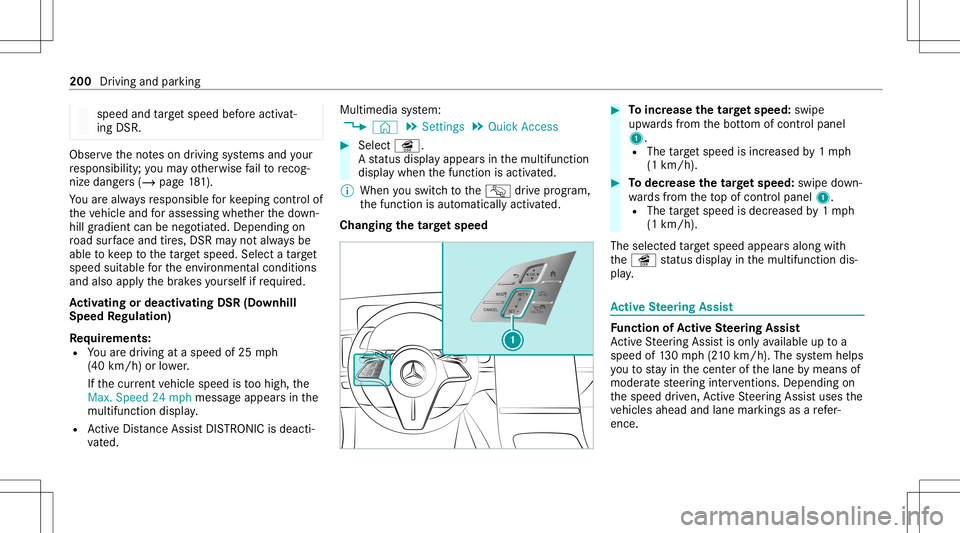
Changing thetar getspe ed #
Toincr ease thetar getspe ed: swipe
up wa rdsfrom thebo ttom ofcon trol panel
1.
R The target speed isincr eased by1mp h
(1 km/ h). #
Todec rease thetar getspe ed: swipe do wn‐
wa rdsfrom theto pof con trol panel 1.
R The target speed isdecr eased by1mp h
(1 km/ h).
The select edtarget speed appearsalon gwit h
th eî status displa yin themultifunc tiondis‐
pla y. Ac
tiv eSte ering Assis t Fu
nction ofActiv eSte ering Assis t
Ac tiveSt eer ing Assis tis onl yav ailable uptoa
speed of130mp h(210 km/h) .The system helps
yo uto stay inthecent erofthelane bymeans of
moder atesteer ing interve ntio ns.Dep endingon
th espeed driven, ActiveSt eer ing Assis tuses the
ve hicles ahead andlane markings asare fer‐
ence. 200
Driving andparking
Page 203 of 466
%
Dep endingonthecount ry,in thelowe r
speed rang eAc tiveSt eer ing Assis tcan use
th esur round ingtraf fic as are fere nce. Ifnec‐
ess ary, Ac tiveSt eer ing Assis tcan then also
pr ov ide assis tance when drivi ng outsid eth e
cent erofthelane, forex am ple, toform a
re scue lane.
If th ede tection oflane mar kings andvehicles
ahead isim pair ed,ActiveSt eer ing Assis t
switc hestopassiv emode. Thesystem prov ides
no suppor tin this case.
St atus displa yof Activ eSte ering Assis tin
th emu ltifunct iondisp lay
R Ø (gra y): act ivat ed and pass ive
R Ø (green ):act ivat ed and active
R Ø (red): system limits detected
R Ø (whit e,redhands): "handsonthesteer‐
ing wheel" prom pt
% During thetransition from activ eto passiv e
st atus ,th eØ symbol issho wnas
enlar gedand flashin g.On ce thesy stem is
passiv e,theØ symbol issho wnasgray in
th emultifunc tiondispla y. %
Dep endingontheselect edvehicle settin gs,
Ac tiveSt eer ing Assis tma ybe una vailable.
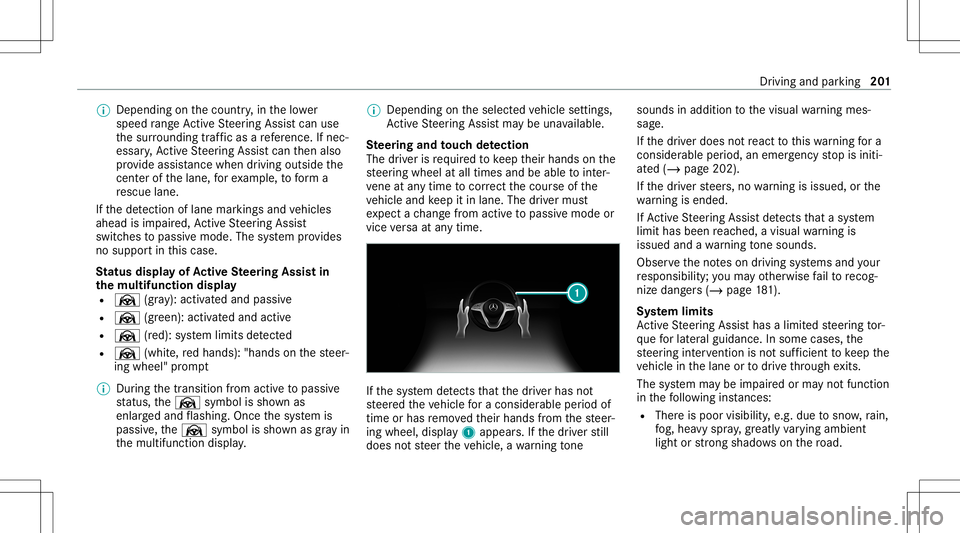
Ste ering and touc hde tection
The driver isrequ ired tokeep their hands onthe
st eer ing wheel atall times andbeable tointer‐
ve ne atanytime tocor rect thecour seofthe
ve hicle andkeep itin lane. Thedriver mus t
ex pect ach ang efrom active to passiv emode or
vice versaat anytim e. If
th esy stem detects that thedr iver has not
st eer edtheve hicle fora consider ableper iod of
time orhas remo vedth eir hands from thesteer‐
ing wheel, display1 appear s.Ifth edr iver still
does notst eer theve hicle, awa rning tone sou
nds inad ditio nto thevisual warning mes‐
sag e.
If th edr iver does notre act tothis wa rning fora
consider ableper iod, anemerg encystop isiniti‐
at ed (/ page202).
If th edr iver steer s,no warning isissued, orthe
wa rning isended .
If Ac tiveSt eer ing Assis tde tects that asy stem
limit hasbeen reac hed, avisual warning is
issued andawa rning tone sou nds.
Obs erve theno teson driving systems andyour
re sponsibili ty;yo uma yot her wise failto recog‐
nize dangers(/ page 181).
Sy stem limit s
Ac tiveSt eer ing Assis thas alimit edsteer ing tor‐
qu efo rlat eral gui dance. Insome cases, the
st eer ing interve ntio nis no tsu fficien tto keep the
ve hicle inthelane ortodrive th ro ugh exits.
The system maybe impair edorma yno tfunc tion
in thefo llo wing instances:
R The reispoor visibilit y,e.g. due tosno w,rain,
fo g, hea vyspr ay,gr ea tly varying ambien t
light orstro ng sha dows onthero ad. Dr
ivin gand parking 20
1
Page 245 of 466
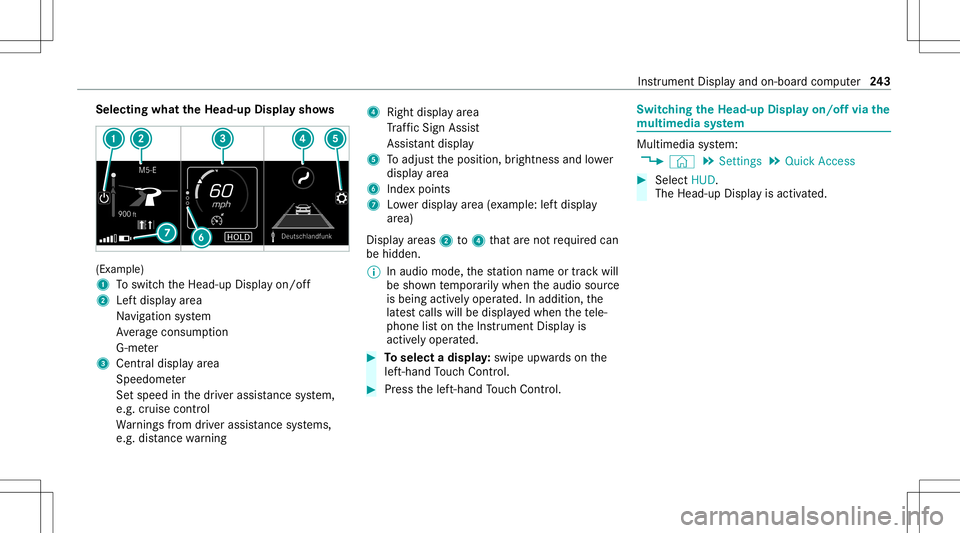
Selec
tingwhat theHead -upDispla ysho ws (Ex
am ple)
1 Toswitc hth eHead-up Displayon/ off
2 Leftdispla yar ea
Na vig ation system
Av erag econ sum ption
G-me ter
3 Centraldispl ayarea
Spe edom eter
Se tspeed inthedr iver assis tance system,
e.g. cruise control
Wa rnings from driver assis tance systems,
e.g. distance warning 4
Right displa yar ea
Tr af fic Sign Assist
Assi stant displa y
5 Toadjus tth eposition ,br ightn essand lowe r
displa yar ea
6 Inde xpoint s
7 Lowe rdisp lay ar ea (exa mp le:leftdispla y
ar ea)
Disp lay ar eas 2to4 that areno tre qu ired can
be hidden .
% Inaudio mode, thest atio nnam eor trac kwill
be sho wntemp orarily when theaudio source
is being activelyoper ated. Inaddition, the
lat estcalls willbedispla yedwhen thete le‐
phon elis ton theIns trument Displayis
activ elyoper ated. #
Toselect adispla y:swipe upwards on the
lef t-hand Touc hCon trol. #
Press thelef t-hand Touc hCon trol. Swit
ching theHead -upDispla yon/of fvia the
mu ltim edia system Multi
media system:
4 © 5
Set ting s5
Quick Access #
Select HUD.
The Head-up Displayis activ ated. Ins
trument Displayand on-boar dcom puter 24
3
Page 266 of 466
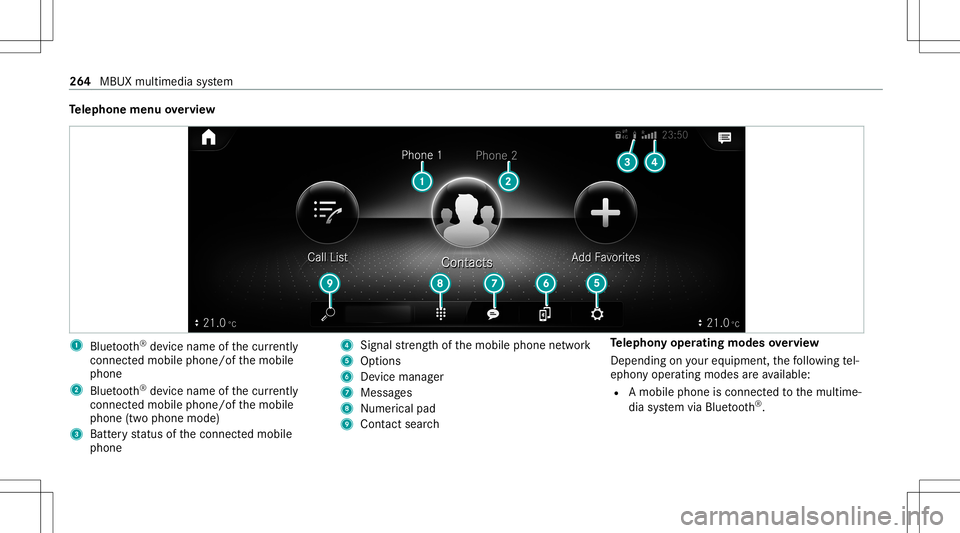
Te
lephone menuoverview 1
Blue tooth®
de vice name ofthecur rently
conne cted mob ile pho ne/o fth emobile
phone
2 Blue tooth®
de vice name ofthecur rently
conne cted mob ile pho ne/o fth emobile
phone (twophone mode)
3 Batt eryst atus ofthecon nect edmobile
phone 4
Signal stre ngt hof themobile phonenetwork
5 Option s
6 Device manag er
7 Messag es
8 Nume rical pad
9 Contact search Te
lephon yoper ating mod esove rview
Depen dingonyour equipme nt,th efo llo wing tel‐
ephon yoper atingmodes areav ailable:
R Amobi lephon eis con nectedto themultime‐
dia system viaBlue tooth®
. 26
4
MBUX multimedia system
Page 267 of 466
R
Twomobile phones areconn ectedwithth e
multime diasystem viaBlue tooth®
(tw o
phone mode).
- Youcan useallthefunc tionsof themulti‐
media system withth emobile phonein
th efo re ground.
- Youcan recei veinc omin gcalls andmes‐
sag eswit hth emobile phoneinthebac k‐
gr ound.
Yo ucan interch ang eth emobile phonein
th efo re ground andbackground .
Connect ingamob ilephone
Re quirement s:
R Blue tooth®
is act ivat ed on themobile phone
(see themanuf acturer'soper ating instruc‐
tion s).
R Blue tooth®
is act ivat ed on themultimedia
sy stem. Multimedia
system:
4 © 5
Phone
Sear ching fora mob ile pho ne #
Select í. #
Select Connect NewDevice.
Co nnectin gamob ile pho ne
Au thor ization follo ws usin gsec uresim ple pair‐
ing . #
Select amob ilephon e.
A co de isdispl ayed inthemultimedia system
and onthemobile phone. #
Ifbo th code smatc h,conf irm thecode onthe
mobil ephone.
Fu nctions inthete lephon ymenu
In thete lephon ymen uyo uha ve thefo llo wing
func tions,forex am ple:
R Mak ingcalls ,e.g .:
- R Accep ta cal l
- k EndCall
- i Create Confer. Call -
Accep ting orrejecti ngawa itin gcall
R Managin gcon tacts, e.g.:
- Downl oading mob ile pho necont acts
- Managi ngthefo rm atofacon tact's name
- Saving acont actasafa vo rite
R Recei ving andsend ingmess ages, e.g.:
- Usingthere ad-al oudfunction
- Dictating ane wmes sage Mer
cede sme and apps Mer
cede sme connect Inf
ormation onMer cede sme connect
Mer cedes meconnect consistsof multi pleserv‐
ices.
Yo ucan usethefo llo wing service svia themulti‐
media system and theov erhead control panel,
fo rex am ple:
R Accid ent and Brea kdo wnManag eme nt(me
bu tton orsitu ation-de pendentdispl ayinthe
multime diasystem) MBUX
multimedia system 265
Page 274 of 466
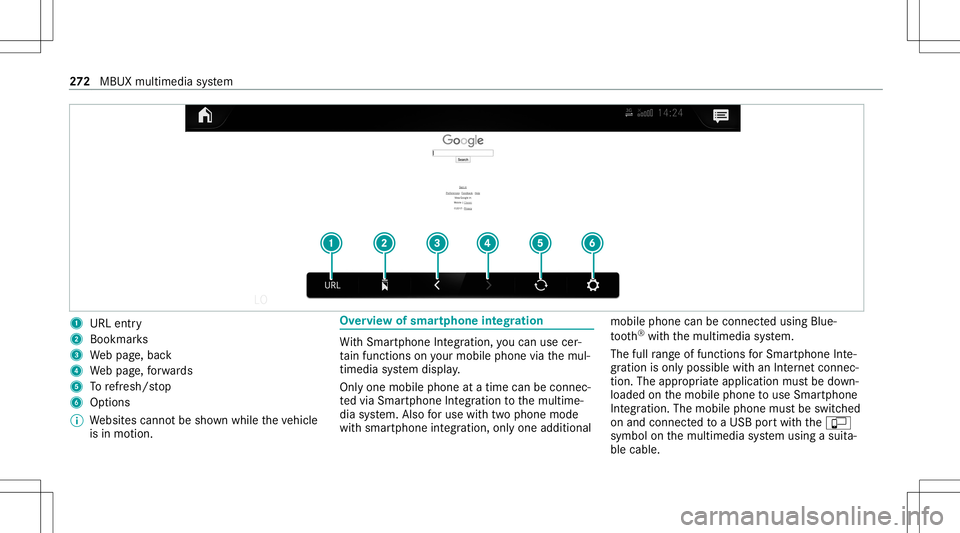
1
URL entry
2 Bookmar ks
3 Webpag e,bac k
4 Webpag e,forw ards
5 Torefresh/s top
6 Options
% Websit escann otbe sho wnwhile theve hicle
is in mo tion. Ov
ervie wof smar tphone integratio n Wi
th Smar tphoneIntegr ation, youcan usecer‐
ta in func tionson your mob ilephon evia themul‐
timedia system displa y.
Onl yone mobile phoneatatime canbeconnec ‐
te dvia Smar tphon eInt egratio nto themultime‐
dia system. Also foruse withtw ophone mode
wit hsmar tphone integr ation, onlyoneadditional mobil
ephone canbeconnect edusing Blue ‐
to oth®
wit hth emultimedia system.
The fullrang eof func tions forSmar tphone Inte‐
gr ation isonly possi blewithan Interne tconnec‐
tion. Theappropr iat eapplication mustbe down‐
loaded onthemobile phonetouse Smartphon e
In te gr ation. Themobile phonemustbe switc hed
on and conn ectedtoaUS Bpor twit hth eç
symbol onthemultimedia system using asuit a‐
ble cable. 27
2
MBUX multimedia system
Page 280 of 466
Symbol
Designation Function
Z Settings Selecttomak ese ttings.
© HomeSelecttoretur nto thehome screen.
j MessagingSelecttocal lup mess aging.
2 Fullscr een Selectto switc hto full screen mode. The
follo wing functionsand settings areav aila‐
ble inthemedia menu:
R Connec tingextern al dat ast or ag emedia with
th emultimedia system (e.g. using USBor
Blue tooth®
)
R Playing backaudio orvideo files Au
thorizing aBlu etoo th®
audio devic efo r
medi apla yba ck Re
quirement s:
R Blue tooth®
is act ivat ed on themultimedia
sy stem and audio equipment. R
The audio equipment supportstheBlue‐
to oth®
audio profiles A2DP and AVRC P.
R The audio equipment is"visible" forot her
de vices.
Multimedia system:
4 © 5
Media 5
Bluetoot h5
00A5
Wi th Blu etoo th®
audio, youcan playbac kmusi c
fi les from anextern al dat ast or ag emedium, e.g.
yo ur smar tphon e,usin gth eMBUX multimedia
sy stem. #
Topla ybac kaudio files using themultimedia
sy stem, author ize theex tern al dat ast or ag e
medium ontheMBUX multimedia system. Au
thorizing ane wBlu etoo th®
audio devic e #
Select Connect NewDevice . #
Select anaudio device.
Au thor ization star ts.A cod eis displa yedon
th emultimedia system and onthemobile
phone. #
Ifth ecodes areidentic al,con firm onthe
audio equipme nt. #
Select Onlyas Bluet oothAudi oDe vic e.
The Blue tooth®
audio equipme ntiscon nec‐
te dwit hth emultimedia system. 27
8
MBUX multimedia system
Page 304 of 466

In
theeve ntofaflat tire, thefo llo wing option s
ar eav ailable dependingon your vehicle's equip‐
ment :
R Vehicl eswith MOExt endedtir es: itis pos‐
sibl eto continu eth ejour neyfo ra shor t
per iod oftime. Makesur eyo uobse rveth e
no teson MOExt ended tires (run-f lattires)
(/ page302).
R Vehicl eswith aTIREF ITkit :yo ucan repair
th etir eso that itis poss ibletocontinu eth e
jou rney fora shor tper iod oftime. Todo this,
use theTIREFI Tkit (/ page303).
R Vehicl eswith Mercedes meconne ct:you
can makeacal lfo rbr eakdo wnassi stanc evia
th eov erhead control panel inthecase ofa
br eakdo wn(/ page26 7).
R Allvehicl es:chang eth ewheel
(/ page345).
% The emer gency sparewheel isonl yav ailable
in cer tain coun tries. No
teson MOExt ended tires (run-fl attires) &
WARNIN GRisk ofacci dent whendr ivi ng
in limp -hom emod e
Whe ndr ivi ng ineme rgency modeth ehan‐
dling charact eristic sar eim pair ed. #
Donotexc eed thespecif iedmaximum
speed oftheMOEx tende dtir es. #
Avoid anyabr uptst eer ing and driving
maneuv ersas wellas drivin gove r
obs tacle s(cu rbs, pothol es, off-r oa d).
Thi sap plies, in pa rticular ,to aloaded
ve hicle. #
Stop driving intheemer gency mod eif
yo uno tic e:
R Ban gingno ise
R Vehicle vibration
R Smok ewhic hsmells likeru bber
R Contin uousESP®
int erve ntio n
R Crac ks inthetir eside walls #
Afterdr iving inemerg encymode, have
th erims checkedby aqu alif ied spec ial‐ is
two rkshop withre ga rd totheir further
use. #
The defective tir emus tbe replaced in
eve rycase . Wi
th MOExt ended tires (run-f lattires), youcan
co ntinue todrive yo ur vehicle evenif th er eis a
tot alloss ofpressur ein on eor mor etir es. How‐
eve r,th etir eaf fect ed mus tno tsho wan ycle arly
vis ible da mag e.
Yo ucan recogni zeMOExt endedtir es by the
MOExt ended marking whichappea rson theside
wa llof thetir e.
Ve hicl eswith tirepr ess urelos swa rning sys‐
te m: MOExt endedtires ma yonly beused incon‐
junc tionwi th an act ivat ed tirepr essur eloss
wa rning system.
Ve hicl eswith tirepr ess uremonit oring sys‐
te m: MOExt endedtires ma yonly beused incon‐
junc tionwi th an act ivat ed tirepr essur emon itor‐
ing system. 302
Breakdo wnassis tance