2021 MERCEDES-BENZ E CLASS ECU
[x] Cancel search: ECUPage 212 of 450
The
vehicle islowe redag ain inthefo llo wing sit‐
uation s:
R When drivin gfa ster than 50 mph(80 km/h).
R When driving between 37mph(60 km/h)
and 50mph(80 km/h) forapp roxima tely
th re eminut es.
R Afterch ang ingadr ive pr ogram usingth e
DY NA MIC SELE CTswitc h.
The vehicle isadjus tedto theheight ofthelas t
activ edr ive pr ogr am.
Lo we ring theve hicl e #
Press butt on1.
Indicat orlam p2 goes out.Thevehicle is
adjus tedto theheight oftheactiv edr ive pr o‐
gr am.
Oper ation withatrailer orbicy clerack
If th eelectr icalconnect ionhas been correctly
es tablished tothetra iler orbicy clerack :
R Uptoappr oximat ely18 .7 mp h(3 0km/h):
th ehigh leve lcan beselec tedre ga rdless of
th edr ive pr og ram. R
From appr ox.18 .7 mp h(3 0km/h) :th eve hi‐
cle isadjus tedto nor malle ve l,re ga rdless of
dr ive pr ogr am. Re
ar vie wcamer a Fu
nction ofthere ar vie wcamer a
When youen gage reve rsege ar,th eimag efrom
th ere ar vie wcam erais sho wninthemedia dis‐
pla y.Dyna micguide lines showthepat hth e
ve hicle willtake wit hth ecur rent steer ing ang le.
This helps youto orient yourself and toavoid
obs tacle swhe nba cking up.
The rear vie wcam erais on lyan aid. Itis no ta
subs titutefo ryo ur att entio nto thesur round ings.
The responsibili tyforsaf emaneu vering and
pa rking remains withyo u. Mak esur eth at ther e
ar eno per sons, animals orobjec tsetc., inthe
maneu vering area while ma neu vering and park‐
ing.
The guide linesinthemedia displaysho wthe
dis tances toyour vehicle. Thedistances dis‐
pl ay ed onlyapply toroad leve l. Depe
ndingon theve hicle equipment, youcan
sele ctfrom thefo llo wing views:
R Normalvie w
R Wide-ang levie w
The area behind theve hicle isdispla yedas a
mir rorimag e,as intheinside rear vie wmir ror.
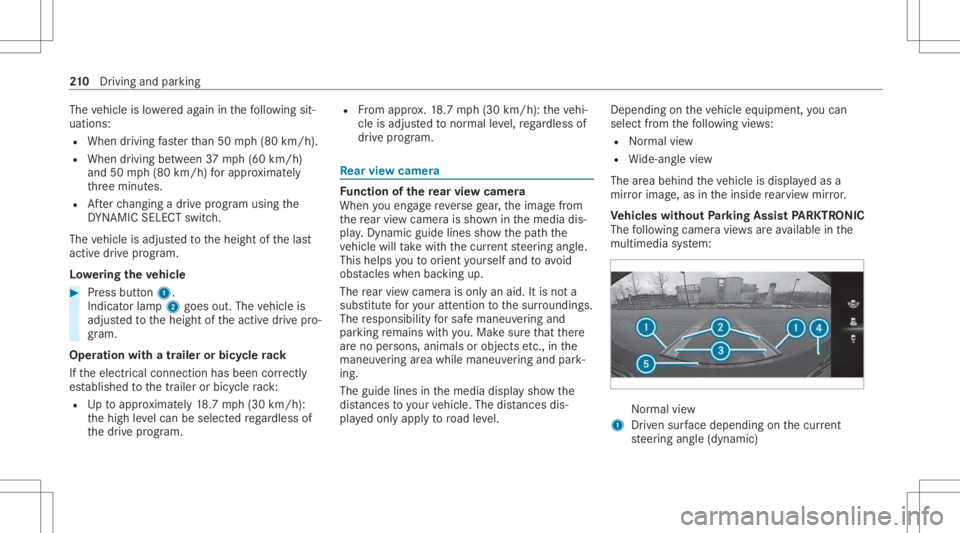
Ve hicl eswithout Parking Assis tPA RK TRONI C
The follo wing camer avie ws areav ailable inthe
multime diasystem: Nor
mal view
1 Driven sur face dep endi ngon thecur rent
st eer ing ang le(dynamic) 21
0
Driving and parking
Page 213 of 450

2
Guide linesat adis tance ofapprox imat ely
1. 6 ft (0.5 m),3.3 ft(1.0 m), 5ft (1.5 m) and
9.9 ft(3.0 m)from there ar area
3 Lanemar kingth ecour sethetir es will take
wit hth ecur rent steer ing ang le(dynamic)
4 Bum per
5 Guide lineatadis tance ofapprox imat ely
1. 0 ft (0.3 m)from there ar area Wi
de-ang levie w
Ve hicl eswith Parking Assis tPA RK TRONI C
The follo wing camera views areav ailable inthe
multime diasystem: Nor
mal view
1 Yello wwa rning displa y:obs tacle sat adi s‐
ta nce betwee nap prox imat ely2. 3ft (0.7 m)
and 3.3ft(1.0 m)
2 Orang ewa rning displa y:obs tacle sat adi s‐
ta nce betwee nap prox imat ely1. 3 ft (0.4 m)
and 2.3ft(0.7 m)
3 Guide linesatadis tance ofapprox imat ely
1. 6 ft (0.5 m),3.3 ft(1.0 m), 5ft (1.5 m) and
9.9 ft(3.0 m)from there ar area
4 Yello wlanes markingth ecour sethetir es
will take wit hth ecur rent steer ing ang le
(dynamic) 5
Driven sur face dep endi ngon thecur rent
st eer ing ang le(dynamic)
6 Guide lineatadis tance ofapprox imat ely
1. 0 ft (0.3 m)from there ar area
The colorofwa rning displa y1/2 chang es
dynam icallyand isbased onthedis tance tothe
de tected obs tacle :
R Blue :no obs tacle sde tected atadi st anc e
less than 3.3ft (1.0 m)
R Yello w: obs tacle sat adi st anc ebe tween
appr oximat ely2. 3ft (0.7 m)and 3.3ft
(1 .0 m)
R Orang e:obs tacle sat adi st anc ebe tween
appr oximat ely1. 3 ft (0.4 m)and 2.3ft
(0.7 m)
R Red:obs tacle sat ave ry shor tdis tance of
ap prox imat ely1. 3 ft (0.4 m)orless
% Vehicl eswith Activ ePa rking Assis t:when
Ac tivePa rking Assistis act ive, lane markings
4 aredispla yedin green. Dr
iving andparking 21
1
Page 215 of 450

Vi
ew sof thesur round viewcamer a 1
Wide-ang levie w, front
2 Topvie wwit himag efrom thefront camer a
3 Topvie wwit himag esfrom theside camer as
in theoutside mirrors
4 Wide-ang levie w, rear
5 Topvie wwit himag efrom there ar vie wcam ‐
er a
6 Topvie wwit htrailer view(vehicles witha
tra iler hitch)
Fu nction oftheguid elines
Guide linesarealso displa yedin thecamer a
imag esoftheto pvie ws,whic haid youby sho w‐ ing
youth ecalculat edvehicle pathas wellas the
dis tance toobject sand other vehicles, basedon
th ecur rent steer ing ang le. 1
Guide linesatadis tance ofapprox imat ely
1. 6 ft (0.5 m),3.3 ft(1.0 m), 5ft (1.5 m) and
9.9 ft(3.0 m)from there ar area
2 Yello wlanes markingth ecour sethetir es
will take wit hth ecur rent steer ing ang le
(dynamic)
3 Driven sur face dep endi ngon thecur rent
st eer ing ang le(dynamic)
4 Guide lineatadis tance ofapprox imat ely
1. 0 ft (0.3 m)from there ar area %
When ActivePa rking Assistis act ive, pat hs
2 aredispla yedin green.
The guide linesshowthedis tances toyour
ve hicle. Thedistances apply toroad leve l.
In all views,th ePa rking AssistPA RK TRONI C
wa rning displa yis sho wnaswell(/ page21 5).
The color ofwa rning displa ych ang esdynam i‐
call yand isbased onthedis tance tothede tec‐
te dobs tacle :
R Blue :no obs tacle sde tected atadi st anc e
less than 3.3ft (1.0 m)
R Yello w: obs tacle sat adi st anc ebe tween
appr oximat ely2. 3ft (0.7 m)and 3.3ft
(1 .0 m)
R Orang e:obs tacles atadis tance betwee n
ap prox imat ely1. 3 ft (0.4 m)and 2.3ft
(0.7 m)
R Red:obs tacle sat ave ry shor tdis tance of
ap prox imat ely1. 3 ft (0.4 m)orless
% When Parking AssistPA RK TRONI Cis oper a‐
ti on aland noobj ectis de tected, thewa rning
displa yis sho wnherein blue. Dr
ivin gand parking 21
3
Page 216 of 450

Wi
de-an glevie w,front 1
Warning displa yof Parking Assist
PA RK TRONI C To
pvie wwi th imag efrom the fron tcame ra 1
Warning displa yof Parking Assist
PA RK TRONI C(/ page21 5)
2 Your vehicle from above
3 Lane indicating thero uteth eve hicle will
ta ke atthecur rent steer ing ang le
To pvie wwi th imag esfrom the side came ras
in theout side mirrors
The sides oftheve hicle canbeseen inthis vie w. 1
Guide lineofextern al vehicle dimensions
wit houtside mirrors folded out
2 Markerof thewheel contact poi nts
Sy stem limit s
If th esy stem isno tre ady foroper ation, theSys-
tem Inoper ativemessag eappear sin themedia
displa y.
The surround viewcam erawill notfun ction or
will onlypa rtiall yfunc tion inthefo llo wing situa‐
tion s:
R Youar edr ivin gfo rw ards ataspee dgr ea ter
th an appr oximat ely10 mph(1 6 km/h).
R The door sar eopen. 21
4
Driving and parking
Page 224 of 450

The
turnsignal indicat orisswitc hedonaut omat‐
ically when thepar king procedur ebegins. You
ar ere sponsible forsele cting thetur nsignal indi‐
cat orinaccor dance withth etraf fic condi tions.If
neces sary,select thetur nsignal indicat or
accor dingly. &
WARNIN GRisk ofacci dent dueto vehi‐
cle swinging outwhile parking orpulli ng
out ofapar king space
While parking orexitin gapar kingspace, the
ve hicle swings outand candrive ont oar eas
of theonc oming lane.
This could cause youto coll ide wi th object s
or other road user s. #
Payatt ention toobject sand other road
user s. #
Wher enec essar y,stop theve hicle or
cancel thepar king procedur ewit h
Ac tivePa rking Assist. #
If,forex am ple, thePlease Engage Reverse
Gear messag eappear sin themedia display: select
thecor responding transmission posi‐
tion.
The vehicle drives intoth eselect edpar king
space.
% During thepar king procedur ewit hAc tive
Pa rking Assist, th elane markings aredis‐
pla yedin green inthecamer aimag e.
On com pletion ofthepar king procedur e,the
Ø Parking AssistFinished, TakeContr olof
Vehicle messageappear s.Fu rther maneuv ering
ma yst ill be nec essar y. #
Secu retheve hicle agains tro lling away.
When requ ired bylegalrequ iremen tsor local
con dition s:tur nth ewheels towa rdsth ecurb.
% Youcan stop theve hicle andchang eth e
tr ans missi on positio ndu ring thepar king pro‐
cedur e.The system then calculat esane w
ve hicle path.Ifno newvehicle pathis availa‐
ble, thetransmission positioncanbe
ch ang edagain, orthepr ocess canbecan‐
celed. Youcan also interru pt thepar king pro‐
cedur eby braking, forex am ple toletpeople
in or out oftheve hicle. Theparking proce‐ dur
ecan then be con tinued bybrief lypress‐
ing theacceler ator pedal.
Exiting apar king space withAc tiv ePa rking
Assis t
Re quirement s:
R The vehicle iseq uipped withasur round view
cam era.
R The vehicle hasbeen parkedpar allel tothe
ro ad withAc tivePa rking Assist.
Please note that youar ere sponsible forth eve hi‐
cle and surround ingsdur ing theent ire par king
pr ocedur e. #
Startth eve hicle. #
Press butt on1.
The media displaysho wsthevie wof Active
Pa rking Assist. 222
Drivin gand parking
Page 228 of 450

No
teson theIns trum ent Displa yand on-
boar dcom puter &
WARNIN GRisk ofacci dent dueto an
In stru ment Displa ymalfu nction
If th eIns trument Displayhas failed ormal‐
func tioned,thefunc tion restrictions applying
to saf etyre leva nt systems areno tvisible.
The oper ating safetyof your vehicle maybe
im pair ed. #
Drive on car efull y. #
Have theve hicle checkedimmediat ely
at aqu alif ied spec ialistwo rkshop. &
WARNIN GRisk ofdist ra ction from infor‐
mati onsystems andcomm unication s
eq uipment
If yo uoper ateinf ormat ionand comm unic a‐
tio neq uipme ntintegratedin theve hicle
when driving, youwill bedistract ed from the
tr af fic situ ation. Thiscou ldalso cau seyouto
lose control of theve hicle. #
Onlyoper ateth is eq uipmen twhen the
tr af fic situ ation per mits. #
Ifyo ucan notbe sur eof this, stop the
ve hicle whilstpa ying attention toroad
and traffic condi tions andoperate the
eq uipment withth eve hicle statio nary. *
NO
TEMercede s-AMG vehicles #
Obser vetheno tesin theSupplement .
Yo uco uld other wise failto recogni ze
da ngers. *
NO
TEPlug -in hybrid #
Obser vetheno tesin theSupplement .
Yo uco uld other wise failto recogni ze
da ngers. Yo
umus tobse rveth eleg alrequ iremen tsforth e
cou ntryin whi chyouar ecur rentl ydr ivi ng when
op erati ng theon- boar dcom puter.
The on-boar dcom putersho wsonlydispla ymes‐
sag esand warnings from spec ific systems on th
emultifunc tiondispla y.Yo umus tth er efor e
ensur eth at your vehicle isalw aysre liable.
If th eoper ating safetyof your vehicle is
im pair ed,parkth eve hicle immediat elyand
saf ely. Con tact aqu alif ied spec ialistwo rkshop. 226
Instrument Displayand on-boar dcom puter
Page 229 of 450

Ins
trum ent Disp layove rview 1
Speedo meter
The segment son thespeedome terindica te
th est atus esofthefo llo wing systems: cruise
con trol/limit er/Active Dis tance Assist
DIS TRONI C
2 Inde xpo ints
3 Outside temp eratur e 4
Time
5 Area foradd itional values (exa mp le:tach om‐
et er): tach ome ter/na vigation/EC Odisp lay/
consum ption/ G-me ter/dat e
The fuel supp lywil lbe interru pted toprotect
th eengine whenthere dmar kon theta ch ‐
ome ter(o ve rrev ving rang e) isreac hed.
6 Coolan tte mp eratur edispla y Dur
ing normal oper ation, thecoolant tem‐
per atur edisp lay is per mitt edtorise to
24 8°F (120°C).
Ve hicles with48 Von-boar delectr icalsys‐
te m: POWER andCHARGE displ ay(elect rical
dr ive su ppo rtand recup erati on powe rof the
electr icmo tor)
7 Select eddrive pr ogr am Ins
trument Displayand on-boar dcom puter 22
7
Page 230 of 450

8
Selectedtransm ission pos ition
9 Multifuncti ondispl ay(exa mp le:standar ddis‐
pla yfo ra trip) :assi stanc e/teleph one/n avi‐
ga tio n/tr ip/me dia/r adio/s tylesand dis‐
pl ay s/ser vice/possible settin gsforHead-u p
Displa y
A Fuelleve land fuel filler flap locatio nind ica‐
to r Ov
ervie wof thebut tons on thest eer ing
wheel
Dep endingontheeq uipment, thelayo ut and the
design ofthecon trol element son thesteer ing
wheel maydif fer. 1
Con trol pan elforcr uis econtr olor Active
Dis tance AssistDIS TRONI C(/ page 181)
2 G Backbutt on,on-boa rdcom puter
3 Touc hCon trol, on-bo ardco mp uter
Swip e(na vigate)
Pr ess 0076 (confirm)
4 00E2 Mainmenu,on -bo ardco mp uter
5 00E2 Mainmenu,MB UX mult imed iasystem 6
Touc hCon trol, MB UX mult imed iasystem
Swipe (navigate)
Pr ess (conf irm)
7 G Backbutt on,MBUX multimedia system
8 Contr olpanel forth eMBUX multimedia sys‐
te m
£ Voice Cont rolSy stem
9 Toadjus tth ebr ightn essoftheins trument
lighting Oper
ating theon-boa rdcom puter
Obser vetheleg alrequ iremen tsforth ecount ry
in whic hyo uar ecur rently drivi ng when operat‐
ing theon- boar dcom puter. 228
Instrument Displayand on-boar dcom puter