2021 MERCEDES-BENZ CLA display
[x] Cancel search: displayPage 191 of 430
The
dam ping issetindividually foreac hwhee l
and isaffect ed bythefo llo wing fact or s:
R thero ad sur face condi tions
R vehicle load
R thedr ive pr og ram sele cted
R thedr iving style
The drive pr ogr am can beadjus tedusing the
DY NA MIC SELE CTswitc h. Re
ar vie wcamer a Fu
nction ofthere ar vie wcamer a
When youen gage reve rsege ar,th eimag efrom
th ere ar vie wcam erais sho wninthemedia dis‐
pla y.Dyna micguide lines showthepat hth e
ve hicle willtake wit hth ecur rent steer ing ang le.
This helps youto orient yourself and toavoid
obs tacle swhe nba cking up.
The rear vie wcam erais on lyan aid. Itis no ta
subs titutefo ryo ur att entio nto thesur round ings.
The responsibili tyforsaf emaneu vering and
pa rking remains withyo u. Mak esur eth at ther e
ar eno per sons, animals orobjec tsetc., inthe maneu
vering area while ma neu vering and park‐
ing.
% Youcan open theco verof there ar vie wcam ‐
er aman ually(/ page19 4).
Th egui de lines inthemedia displaysho wthe
dis tances toyour vehicle. Thedistances dis‐
pl aye donl yapply toroad leve l.
Depe ndingon theve hicle equipment, youcan
sele ctfrom thefo llo wing views:
R Normalvie w
R Wide-ang levie w
The area behind theve hicle isdispla yedas a
mir rorimag e,as intheinside rear vie wmir ror.
Ve hicl eswithout Parking Assis tPA RK TRONI C
The follo wing camer avie ws areav ailable inthe
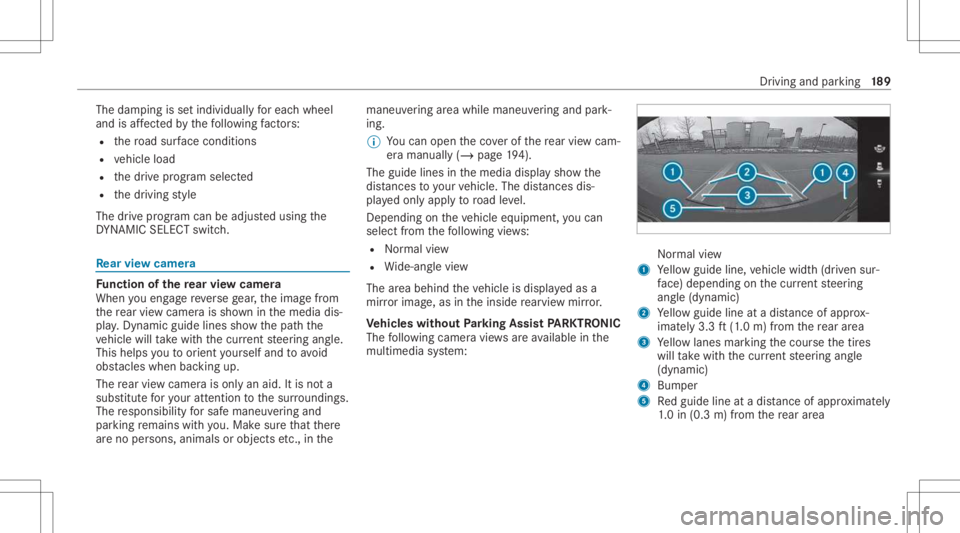
multime diasystem: Nor
mal view
1 Yello wguide line,vehicle width(dr iven sur‐
fa ce) dep endi ngon thecur rent steer ing
ang le(dynamic)
2 Yello wguide lineatadis tance ofapprox ‐
imat ely3. 3ft (1.0 m) from there ar area
3 Yello wlanes markingth ecour sethetir es
will take wit hth ecur rent steer ing ang le
(dynamic)
4 Bum per
5 Redguide lineatadis tance ofapprox imat ely
1. 0 in (0.3 m)from there ar area Dr
ivin gand parking18
9
Page 195 of 430
The
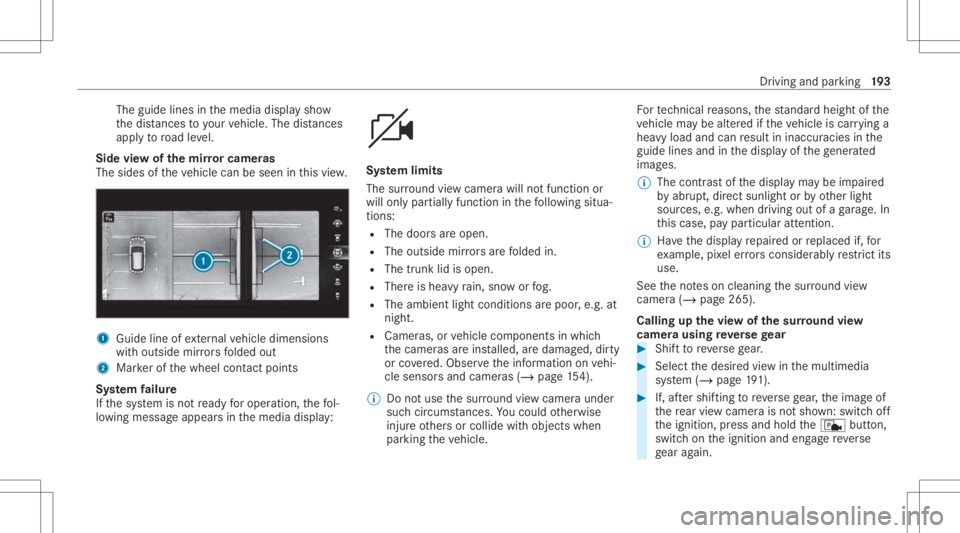
guide linesinthemedia displaysho w
th edis tances toyour vehicle. Thedistances
ap ply toroad leve l.
Side viewof themir rorca mer as
The side sof theve hicle canbeseen inthis vie w. 1
Guide lineofextern al vehicle dimensions
wit houtside mirrors folded out
2 Markerof thewheel contact poi nts
Sy stem failur e
If th esy stem isno tre ady foroper ation, thefo l‐
lo wing mess ageappear sin themedia display: Sy
stem limit s
The surround viewcam erawill notfun ction or
will onlypa rtiall yfunc tion inthefo llo wing situa‐
tion s:
R The door sar eopen .
R The outs idemirrors arefo lded in.
R The trunk lidisopen .
R Ther eis hea vyrain, sno wor fog.
R The ambient lightcondit ionsarepoor ,e.g. at
night.
R Camer as,orvehicle component sin whic h
th ecamer asareins talled, aredamag ed,dirty
or covered. Obser vetheinf ormation onvehi‐
cle sensor sand camer as(/ page15 4).
% Donotus eth esur round viewcam eraund er
suc hcir cum stanc es.Youco uld other wise
injur eot her sor collide withobject swhen
par king theve hicle. Fo
rte ch nica lre ason s,thest andar dheigh tof the
ve hicle maybe altered ifth eve hicle iscar rying a
hea vyload andcanresult ininaccur aciesinthe
guide linesandinthedispla yof thege ner ated
ima ges.
% The cont rast of thedispla yma ybe impair ed
by abr upt,dir ect sunlight orby other light
sour ces, e.g.when driving outofaga rage .In
th is case, paypar ticular attent ion.
% Have thedispla yre pair edorreplaced if,for
ex am ple, pixelerro rs consi derablyrestrict its
us e.
See theno teson cleaning thesur round view
cam era(/ page26 5).
Calli ngup thevie wof thesur round view
camer ausing reve rsege ar #
Shif tto reve rsege ar. #
Select thedesir edviewin themultimedia
sy stem (/ page19 1). #
If,afte rshif ting toreve rsege ar,th eimag eof
th ere ar vie wcam erais no tsho wn: switchoff
th eignition ,pr ess and hold thec button,
switc hon theignition andengagere ve rse
ge ar again. Dr
ivin gand parking19
3
Page 200 of 430
Re
quirement s:
R The camera menuis open.
R Or:Ac tivePa rking Assistis act ive.
R Or:th ePA RK TRONI Cpop- upwin dow
appear s. #
Tap= inthemedia display.
If th eindicat orlam pis lit, Parking Assist
PA RK TRONI Cis act ive. Ifth eindicat orlam pis
no tlit or theé symbol appearsin theins tru‐
ment cluster,Pa rking AssistPA RK TRONI Cis no t
act ive.
% Parking AssistPA RK TRONI Cis aut omat ically
act ivat ed when theve hicle isstar ted.
Alt ernativ ely,Pa rking AssistPA RK TRONI Ccan be
act ivat ed ordeac tiva tedin thequ ick acc ess
men u. Se
tting thewa rning tones ofParking Assis t
PA RK TRONI C
Mu ltimed iasystem:
4 © 5
Set ting s5
Assist ance
5 Camera &Parkin g
Ad jus tingthe volum eof thewa rning tones #
Select Warning ToneVolume. #
Seta va lue.
Ad jus tingthe pitchof the warning tones #
Select Warning TonePitch. #
Seta va lue.
Specif yingthest ar ting pointfo rthe warning
to nes
Yo ucan spec ifywhe ther thePa rking Assist
PA RK TRONI Cwa rning tones should comm ence
wh en theve hicle isfur ther aw ay from anobs ta‐
cle . #
Sele ctWa rnEarl yAll Arou nd. #
Activateor deacti vate thefunc tion. Ac
tiv atin g/deac tivatin gaudi ofa deo ut
Yo ucan spec ifywhe ther thevo lume ofamedia
sour ceinthemultimedia system isto be
re duced whenParking AssistPA RK TRONI C
soun dsawa rning tone. #
Select Aud ioFad eou tDuri ngWa rning Tones. #
Activateor deacti vate thefunc tion. Ac
tiv ePa rking Assis t Fu
nction ofActiv ePa rking Assis t
Ac tivePa rking Assistis an elect ronic parking
assis tance system, whic huses ultrasound with
th eassis tance ofthere ar vie wcam eraand sur‐
ro und viewcam era. When youar edr ivin gfo r‐
wa rdsup toappr oximat ely22 mph(35 km/h),
th esy stem automaticall ymeasur espar king
spaces onboth sides oftheve hicle.
Ac tivePa rking Assistof fers thefo llo wing func‐
tion s:
R Parking inpar kingspaces parallel tothero ad
R Parking inpar kingspaces perpendic ularto
th ero ad (op tionall yeit her forw ards or
re ve rse) 19
8
Driving and parking
Page 201 of 430
R
Exiti ngparking spaces ifyo uha ve par ked
usin gAc tivePa rking Assist
As soon asall requ iremen tsareme tfo rsearc h‐
ing forpar king space s,theÇ displa yappear s
in themultifunc tiondispla y.
When ActivePa rking Assisthas detected parking
spaces ,th eÈ displa yappear sin themulti‐
func tion displa y.The arrow ssho won whic hside
of thero ad detected parking spaces arelocat ed.
The yar eth en sho wninthemedia display.
The parking space canbeselect edasdesir ed.
Dependin gon thelocation ofthepar king space,
th epar king direct ion (rear wardsor forw ards)
can also beselec tedas desir ed.
When ActivePa rking Assistis act ivat ed, thetur n
signal indicat orsar eactiv ated based onthecal‐
culat edpat hof your vehicle.
When youar een tering orexitin gapar king
space, thepr ocedur eis assis tedby acc eleration ,
br akin g,steer ing and gear chang es.
Ac tivePa rking Assistis onl yan aid. Itis no ta
subs titutefo ryo ur att entio nto thesur round ings.
The responsibili tyforsaf emaneu vering and
pa rking remains withyo u. Mak esur eth at no per
son s,anim alsorobj ect set c. arein the
maneu vering rang e.
Ac tivePa rking Assistwill becan celed inthefo l‐
lo wing situat ions:
R Parking AssistPA RK TRONI Cis deac tiva ted.
R Youbegin steer ing.
R Youappl yth epar king brak e.
R Vehicl eswith automatic transmiss ion:
yo uen gage trans missi on positio n005D.
R ESP ®
int erve nes.
R Youopen thedoor sor thetrunk lidwhile
dr iving.
Sy stem limit s
If th eex terior lighting ismalfunct ioning,Active
Pa rking Assistis no tav ailable.
Obj ectsloc ated abo veorbelo wthede tection
ra ng eof thesensor s,e.g. overhanging loads,
ove rhang sor loadin gra mp sof truc ks,or thebor‐
der sof par king spaces, areno tde tected during
mea surement ofthepar king space. Theseare
also then notta ke nint oacco untwhen calcul at‐
ing thepar king procedur e.In some circums tan‐ ces,
ActivePa rking Assistma yth er efor eguide
yo uint oth epar king space incorrectly . &
WARNIN GRisk ofacci dent dueto
object slocat edabo veorbelo wthe
de tection rang eof ActivePa rking Assist
If th er ear eobjec tsabo veorbelo wthe
de tection rang e, thefo llo wing situat ionsmay
ar ise:
R ActivePa rking Assistma yst eer tooear ly.
R The vehicle mayno tst op infront ofthese
objec ts.
This could cause acollision. #
Inthese situation s,do notuse Active
Pa rking Assist. Ex
treme weather condition s,suc has snow or
hea vyrain, ma ylead toapar kingspac ebein g
meas ured inac curately. Pa rking spaces that are
par tiallyoc cupied bytrai le rdr aw bar smight not
be ident ified assuc hor be measur edinco rrect ly.
Onl yuse ActivePa rking Assiston leve l,high- grip
gr ound. Dr
ivin gand parking19
9
Page 202 of 430
Do
notus eAc tivePa rking Assistin thefo llo wing
situat ions:
R Inextreme weather condition ssuc has ice ,
pac kedsno wor inhea vyrain.
R When transpor tingaload that protru des
be yond theve hicle.
R Onsteep uphill ordownhill gradients ofmor e
th an appr oximat ely15 %.
R When snowch ains areins talled.
R Direct lyafte ra tir ech ang eor when spare
tir es areins talled.
R Ifth etir epr essur eis toolow or toohigh.
R Ifth esuspension isout ofalignment ,e.g.
af te rbo ttoming outonacurb.
Ac tivePa rking Assistma yalso displa ypar king
spaces that areno tsuit able forpar king, suchas:
R Parking spaces wherepar kingis prohibit ed.
R Parking spaces onunsuit ablesurfaces. Pa
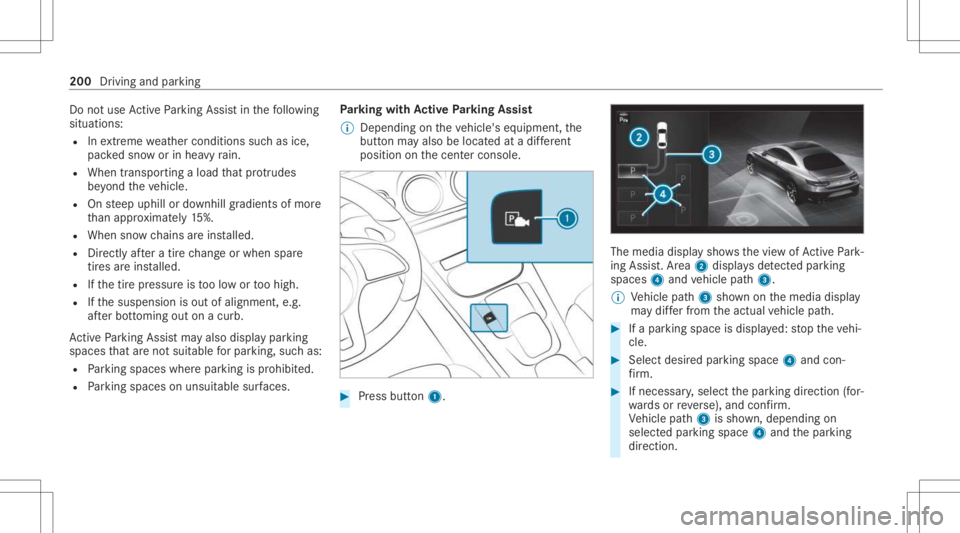
rking withAc tiv ePa rking Assis t
% Depen dingontheve hicle's equipment, the
butt onmayalso belocat edatadif fere nt
po sitio non thecent ercon sole. #
Press butt on1. The
media displaysho wsthevie wof ActivePa rk‐
ing Assist. Ar ea 2 displa ysdetected parking
spaces 4and vehicle path3.
% Vehicle path3 shownonthemedia display
ma ydif ferfr om theactual vehicle path. #
Ifapar king space isdispla yed: stop theve hi‐
cle. #
Select desiredpar king space 4and con‐
fi rm . #
Ifnecessar y,select thepar king direct ion (for‐
wa rdsor reve rse), and confirm .
Ve hicle path3 issho wn, depending on
select edpar king space 4and thepar king
dir ect ion. 200
Driving andparking
Page 203 of 430
%
The turnsignal indicat orisswitc hedonaut o‐
matically whenthepar king procedur e
begins.
Yo uar ere sponsible forsele cting thetur nsignal
indicat orinaccor dance withth etraf fic condi ‐
tions .If neces sary,select thetur nsignal indica‐
to raccor dingly. &
WARNIN GRisk ofacci dent dueto vehi‐
cle swinging outwhile parking orpulli ng
out ofapar king space
While parking orexitin gapar kingspace, the
ve hicle swings outand candrive ont oar eas
of theonc oming lane.
This could cause youto coll ide wi th object s
or other road user s. #
Payatt ention toobject sand other road
user s. #
Wher enec essar y,stop theve hicle or
cancel thepar king procedur ewit h
Ac tivePa rking Assist. #
If,forex am ple, thePlease Engage Reverse
Gear messag eappear sin themedia display: select
thecor responding transmission posi‐
tion.
Ve hicl eswith automatic transmiss ion:
The vehicle drives intoth eselect edpar king
space.
% During thepar king procedur ewit hAc tive
Pa rking Assist, th elane marking sar edis‐
pla yedin green inthecamer aimag e.
On com pletion ofthepar king procedur e,the
Ø Parking AssistFinished, TakeContr olof
Vehicle displaymessag eappear s.Fu rther
maneuv ering mayst ill be nec essar y. #
Aftercom pletion ofthepar king procedur e,
saf eguar dth eve hicle agains tro lling away.
When requ ired bylegalrequ iremen tsor local
con dition s:tur nth ewheels towa rdsth ecurb.
% Youcan stop theve hicle andchang eth e
tr ans missi on positio ndu ring thepar king pro‐
cedur e.The system then calculat esane w
ve hicle path.Ifno newvehicle pathis availa‐
ble, thesy stem can chang eth etransmission
position again orcanc elthepar king proce‐
dur e. Exiting
apar king space withAc tiv ePa rking
Assis t
Re quirement s:
R The vehicle hasbeen parkedwit hAc tive
Pa rking Assist.
% Depe ndingon theve hicle's equipment, the
butt onmayalso belocat edatadif fere nt
po sitio non thecent ercon sole.
Please note that youar ere sponsible forth eve hi‐
cle and surround ingsdur ing theent ire par king
pr ocedur e. #
Startth eve hicle. Dr
iving andparking 20
1
Page 204 of 430
#
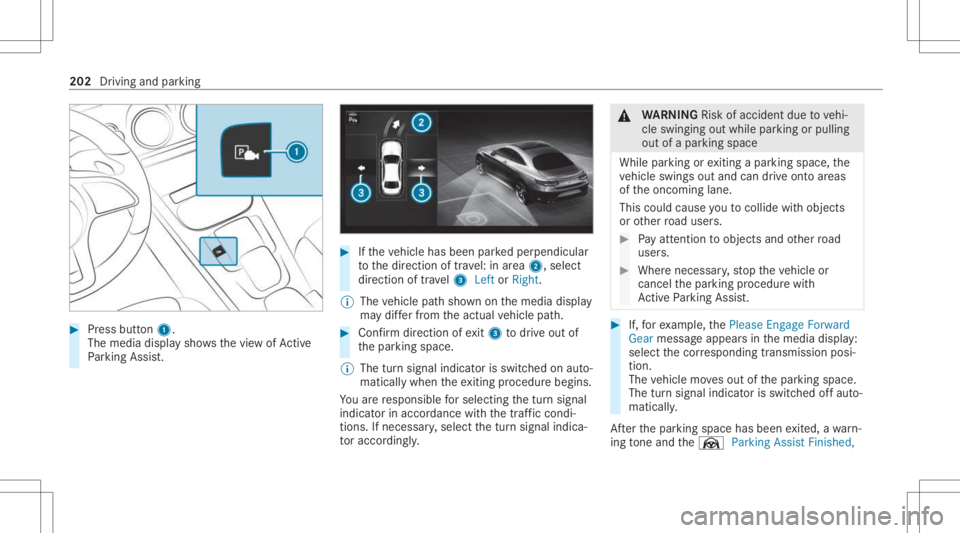
Press butt on1.
The media displaysho wsthevie wof Active
Pa rking Assist. #
Ifth eve hicle hasbeen parkedper pendicular
to thedir ect ion oftra vel:in area 2, selec t
dir ect ion oftra vel3 Left orRight .
% The vehicle pathsho wnonthemedia display
ma ydif ferfr om theactual vehicle path. #
Conf irm dir ection ofexit3 todrive out of
th epar king space.
% The turnsignal indicat orisswitc hedonaut o‐
maticall ywhen theex itin gpr ocedur ebegin s.
Yo uar ere sponsible forsele cting thetur nsignal
indicat orinaccor dance withth etraf fic condi ‐
tions .If neces sary,select thetur nsignal indica‐
to raccor dingly. &
WARNIN GRisk ofacci dent dueto vehi‐
cle swinging outwhile parking orpulli ng
out ofapar king space
While parking orexitin gapar kingspace, the
ve hicle swings outand candrive ont oar eas
of theonc oming lane.
This could cause youto coll ide wi th object s
or other road user s. #
Payatt ention toobject sand other road
user s. #
Wher enec essar y,stop theve hicle or
cancel thepar king procedur ewit h
Ac tivePa rking Assist. #
If,forex am ple, thePlease Engage Forward
Gear messag eappear sin themedia display:
select thecor responding transmission posi‐
tion.
The vehicle movesout ofthepar king space.
The turnsignal indicat orisswitc hedoffaut o‐
maticall y.
Af terth epar king space hasbeen exited, awa rn‐
ing tone and theØ ParkingAssist Finished, 202
Driving andparking
Page 205 of 430
Take
Control ofVehicle messagepr om ptyouto
ta ke contr olof theve hicle.
The vehicle isno taut omatically brak ed and can
ro llaw ay.Yo uha ve toacc eler ate, brak e, steer
and chang ege ar yourself again. Ma
neuv ering assistance Fu
nction ofDrive Awa yAssis t
Dr ive Aw ayAssi stcan reduce these verity of an
impact when pulling away.If an obs tacle is
de tected inthedir ect ion oftrav el, theve hicle's
speed isbrief lyreduced toappr ox.1 mp h
(2 km/ h).Ifacr itic alsituat ionisde tected, the
É symbol appearsinthemedia display.
% Youcan cancelaninterve ntio nby Drive
Aw ayAssi stat anytim eby deactiv ating
Pa rking AssistPA RK TRONI C(/ page19 7). &
WARNIN GRisk ofacci dent caused by
limit eddetection perform anc eof Drive
Aw ayAssi st
Dr ive Aw ayAssi stcanno tal wa ys cle arly iden‐
tify obje ctsand traf fic situ ations. #
Alw ayspa ycar eful attention tothetra f‐
fi c situ ation; donotre ly on Drive Aw ay
Assi stalon e. #
Beprepar edtobrak eor sw erve as nec ‐
essar y,prov ided thetra ffic situat ion
per mitsand that itis saf eto take eva‐
siv eact ion. Dr
ive Aw ayAssi stisonl yan aid. Itis no ta sub‐
st itut efo ryo ur att entio nto thesur round ings.
The responsibili tyforsaf emaneu vering and
pa rking remains withyo u. Mak esur eth at no
per son s,anim alsorobj ect set c. arein the
maneu vering rang e.
A risk ofacollision mayar ise inthefo llo wing sit‐
uation s,forex am ple:
R Ifth eaccelera torand brak epeda lsaremix ed
up.
R Ifan incor rect transm ission position is
eng aged.
Dr ive Aw ayAssi stisact ive under thefo llo wing
con dition s:
R IfPa rking AssistPA RK TRONI Cis act ivat ed. R
Ifyo ushif tth etra nsmiss ionposition to005E or
005B when theve hicle isstatio nary.
R Ifth ede tected obs tacle isless than appr ox.
3.3 ft(1.0 m) away.
R Ifth emaneuv ering assis tance func tionis
acti vatedin themultimedia system.
Sy stem limit s
The perform anc eof Drive Aw ayAssi stislimit ed
on inclines .
% Also obser vethesy stem limits ofParking
Ass istPA RK TRONI C(/ page19 4).
Fu nction ofCross Traf fic Aler t
% Cross Traf fic Aler tis only available forve hi‐
cles withBlind SpotAssis tor ActiveBli nd
Spo tAssi st.
Cr oss Traf fic Aler tcan warndriver sof anycr oss‐
ing traffic when backingup and mane uvering out
of apar kingspace. Theradar sensor sin the
bum peralso monit orthear ea adjacen tto the
ve hicle. Ifacr itical situation isde tected, the
L symbol appearsinthemedia displayand
th eve hicle canbebrak ed aut omatically . Dr
iving andparking 203