Page 195 of 594

Manual type
When adjusting the illumination angle
of the headlights, refer to the Settings
section in the Mazda Connect
Owner's Manual.
Select the proper headlight angle from
the following chart.
Front seatRearseat LoadIllumi-
nation angle
(num- ber)
Driver Passenger
× ――― 0
×× ――0
××× ―1
× × ××2
× ―― ×3.5
×: Yes
―: No
▼ Daytime Running Lights
Some countries require moving
vehicles to have their lights on
(daytime running lights) during the
daytime.
The daytime running lights turn on
automatically.
NOTE
(Except Canada)
The daytime running lights can be
deactivated.
Refer to the Settings section in the
Mazda Connect Owner's Manual.
Turn and Lane-Change
Signals
▼Turn and Lane-Change Signals
The ignition must be switched ON to
use the turn and lane-change signals.
▼Tu r n S i g n a l s
Move the signal lever down (for a left
turn) or up (for a right turn) to the stop
position. The signal will self-cancel
after the turn is completed.
If the indicator light continues to flash
after a turn, manually return the lever
to its original position.
1. Right turn
2. Right lane change
3. OFF
4. Left lane change
5. Left turn
The turn signal indicators in the
instrument cluster flash according to
the operation of the turn signal lever to
show which signal is working.
When Driving
Switches and Controls
4-49
CX-30_8JP5-EA-20K_Edition1_new
2020-7-22 15:50:09
Page 200 of 594
Rear Window Wiper andWasher
▼Rear Window Wiper and Washer
The ignition must be switched ON to
use the wiper.
▼Rear Window Wiper
Turn the wiper on by turning the rear
wiper/washer switch.
Switch Posi-
tion Wiper operation
Spray washer fluid and operate
the rear wiper
ON Normal INT Intermittent
OFF Stop
Spray washer fluid and operate
the rear wiper
▼ Rear Window Washer
To spray washer fluid, turn the rear
wiper/washer switch to either of the
position. After the switch is
released, the washer will stop.
NOTE
While the windshield washers are
operating (from the time the wiper
lever is pulled until the washer fluid
stops spraying), the rear window
washer does not spray washer fluid
even if you operate the switch.
If the washer does not work, inspect
the fluid level (page 6-21). If the fluid
level is normal and the washer still
does not work, consult an Authorized
Mazda Dealer.
When Driving
Switches and Controls
4-54
CX-30_8JP5-EA-20K_Edition1_new 2020-7-22 15:50:09
Page 201 of 594

Rear Window Defogger
▼Rear Window Defogger
The rear window defogger clears fog
from the rear window.
The ignition must be switched ON to
use the defogger.
Press the switch to turn on the rear
window defogger. The rear window
defogger operates for about 15
minutes and then turns
off
automatically.
The indicator light illuminates when
the defogger is operating.
To t u r n off the rear window defogger
before the 15 minutes has elapsed,
press the switch again.
1. Indicator light
CAUTION
Do not use sharp instruments or
window cleaners with abrasives to
clean the inside of the rear window
surface. They may damage the
defogger grid inside the window.
NOTE
This defogger is not designed for
melting snow. If there is an
accumulation of snow on the rear
window, remove it before using the
defogger.
The rear window defogger operation
time can be changed from 15
minutes to continuous operation.
When the operation time has been
switched to continuous operation,
by pressing the switch, the rear
window defogger will continue to
operate until the ignition is switched
OFF.
Refer to the Settings section in the
Mazda Connect Owner's Manual.
▼ Windshield Wiper De-icer*
The thermal filaments at the following
positions heat up and facilitate the
removal of snow accumulated on the
windshield.
When Driving
Switches and Controls
*Some models.4-55
CX-30_8JP5-EA-20K_Edition1_new
2020-7-22 15:50:09
Page 202 of 594
The windshield wiper de-icer operates
in conjunction with the rear window
defogger.
To turn on the windshield wiper
de-icer, switch the ignition ON and
press the rear window defogger switch
(page 4-55).
1. Indicator light
▼Mirror Defogger*
The mirror defoggers defrost the
outside mirrors.
The mirror defoggers operate in
conjunction with the rear window
defogger.
To turn on the mirror defoggers, switch
the ignition ON and press the rear
window defogger switch (page 4-55).
1. Indicator light
Horn
▼ Horn
To sound the horn, press the
mark on the steering wheel.
When Driving
Switches and Controls
4-56*Some models.
CX-30_8JP5-EA-20K_Edition1_new
2020-7-22 15:50:09
Page 207 of 594
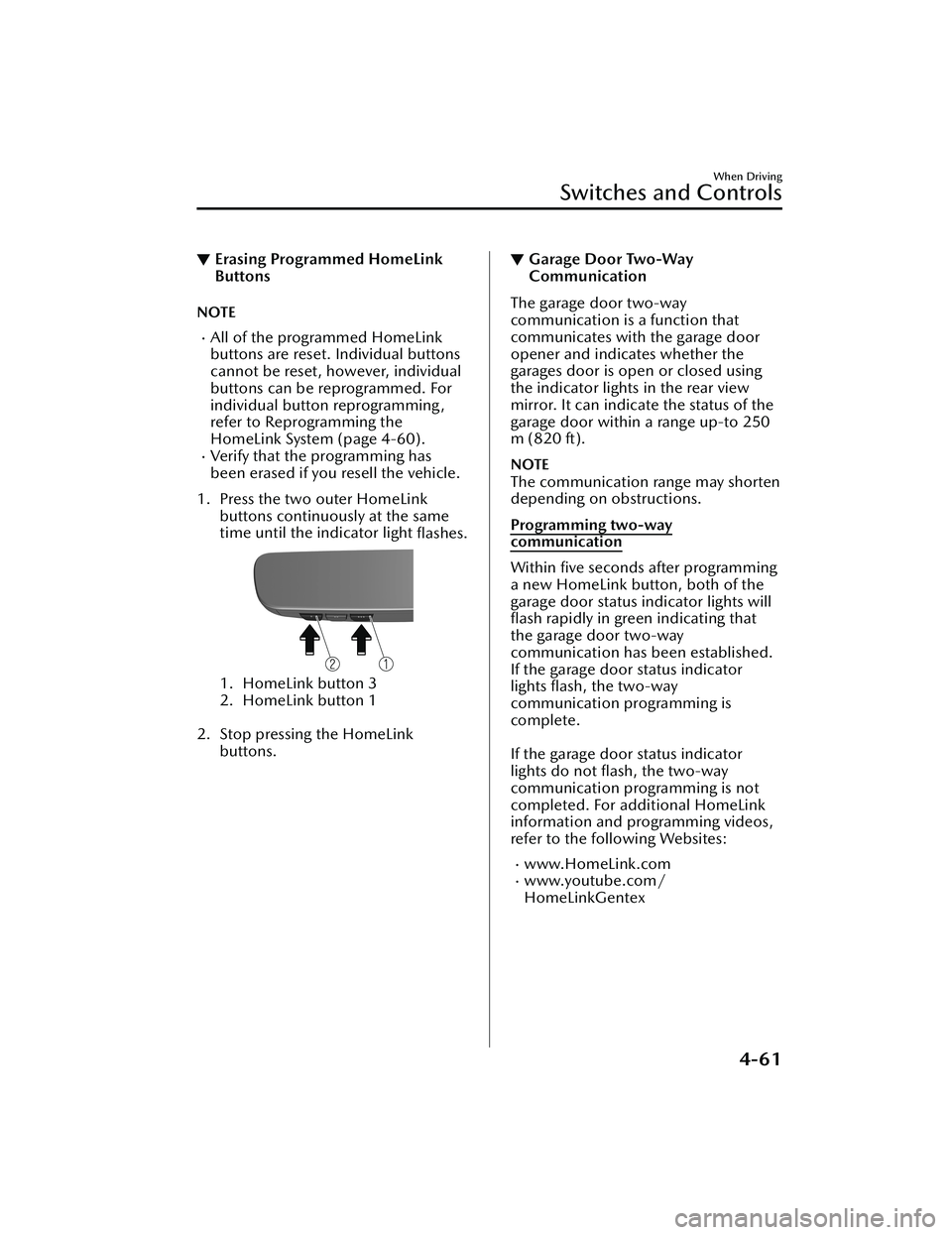
▼Erasing Programmed HomeLink
Buttons
NOTE
All of the programmed HomeLink
buttons are reset. Individual buttons
cannot be reset, however, individual
buttons can be reprogrammed. For
individual button reprogramming,
refer to Reprogramming the
HomeLink System (page 4-60).
Verify that the programming has
been erased if you resell the vehicle.
1. Press the two outer HomeLink buttons continuously at the same
time until the indicator light flashes.
1. HomeLink button 3
2. HomeLink button 1
2. Stop pressing the HomeLink buttons.
▼Garage Door Two-Way
Communication
The garage door two-way
communication is a function that
communicates with the garage door
opener and indicates whether the
garages door is open or closed using
the indicator lights in the rear view
mirror. It can indicate the status of the
garage door within a range up-to 250
m (820 ft).
NOTE
The communication range may shorten
depending on obstructions.
Programming two-way
communication
Within five seconds after programming
a new HomeLink button, both of the
garage door status indicator lights will
flash rapidly in green indicating that
the garage door two-way
communication has been established.
If the garage door status indicator
lights flash, the two-way
communication programming is
complete.
If the garage door status indicator
lights do not flash, the two-way
communication programming is not
completed. For additional HomeLink
information and programming videos,
refer to the following Websites:
www.HomeLink.comwww.youtube.com/
HomeLinkGentex
When Driving
Switches and Controls
4-61
CX-30_8JP5-EA-20K_Edition1_new
2020-7-22 15:50:09
Page 219 of 594

There is a problem with the
AUTOHOLD function.Hill Launch Assist (HLA)
▼Hill Launch Assist (HLA)
The HLA functions to assist in
accelerating the vehicle from a stop on
slopes. When releasing the brake pedal
and depressing the accelerator pedal
to accelerate the vehicle from a stop
while on a slope, the function prevents
the vehicle from rolling. The HLA also
operates when reversing on a slope.
The braking force is maintained
automatically after releasing the brake
pedal on a steep slope.
For manual transmission vehicles, the
HLA operates when the vehicle is tilted
rearward with the shift lever in a
forward gear, and operates when the
vehicle is tilted forward with the shift
lever in the R position.
For automatic transmission vehicles,
the HLA operates when the vehicle is
tilted rearward with the selector lever
in a forward gear, and operates when
the vehicle is tilted forward with the
selector lever in the R position.
When Driving
Brake
4-73
CX-30_8JP5-EA-20K_Edition1_new
2020-7-22 15:50:09
Page 229 of 594

i-ACTIV AWD Operation*
▼i-ACTIV AWD Operation
AWD provides excellent drivability on
snow-covered and ice-packed roads,
sand and mud, as well as on steep
slopes and other slippery surfaces.
A system malfunction or operation
conditions are indicated by a warning.
Refer to AWD Wa
rning Indication/
Warning Light on page 7-27.
WARNING
Never spin a wheel that is off the
ground:
Spinning a wheel that is off the ground
as a result of the vehicle being stuck or
in a ditch is dangerous. The drive
assembly could be seriously damaged
which could lead to an accident or
could even lead to overheating, oil
leakage, and a fire.
▼AWD Driving
WARNING
Avoid sharp turns, excessive speed
and abrupt maneuvers when driving
this vehicle:
Sharp turns, excessive speed and
abrupt maneuvering of this vehicle is
dangerous as it could result in the
increased risk of loss of vehicle control,
vehicle roll-over, personal injury or
death.
This vehicle has a higher center of
gravity. Vehicles with a higher center of
gravity such as utility and AWD vehicles
handle differently than vehicles with a
lower center of gravity.
Utility and AWD vehicles are not
designed for cornering at high speeds
any more than low profile sports cars
are designed to perform satisfactorily
under off-road conditions. In addition,
utility vehicles have a significantly
higher rollover rate than other types of
vehicles.
Drive carefully when the vehicle is
loaded by lowering vehicle speed and
applying the brakes earlier:
Abrupt maneuvering and sudden
braking when driving a loaded vehicle
is dangerous as the driving behavior of
a vehicle with a high center of gravity is
different when it is loaded compared
to when it is not, and could result in
the loss of vehicle control and an
accident.
▼Tires and Tire Chains
The condition of the tires plays a large
role in the performance of the vehicle.
Moreover, to prevent adverse
effects to
the drive assembly, please note the
following:
Tires
When replacing tires, always replace
all front and rear tires at the same
time.
All tires must be of the same size,
manufacture, brand and tread
pattern. Pay particular attention
when equipping snow or other types
of winter tires.
Do not mix tread-worn tires with
normal tires.
Inspect tire inflation pressures at the specified periods adjust to the
specified pressures.
When Driving
i-ACTIV AWD
*Some models.4-83
CX-30_8JP5-EA-20K_Edition1_new 2020-7-22 15:50:09
Page 230 of 594
NOTE
Check the tire inflation pressure label
attached to driver's door frame for the
correct tire inflation pressure.
Make sure to equip the vehicle with
genuine tires of the specified size, on
all wheels. With AWD, the system is
calibrated for all 4 wheels being of
the same dimensions.
Tire chains
Install tire chains to the front tires.Do not use tire chains on the rear
wheels.
Do not drive the vehicle faster than
30 km/h (19 mph) with the tire
chains installed.
Do not drive the vehicle with tire
chains on road conditions other than
snow or ice.
▼ To w i n g
If the vehicle requires towing, have it
towed with all 4 wheels completely off
the ground.
Refer to Towing Description on page
7-19.
When Driving
i-ACTIV AWD
4-84
CX-30_8JP5-EA-20K_Edition1_new
2020-7-22 15:50:09


