2021 MAZDA MODEL CX-30 ACC
[x] Cancel search: ACCPage 255 of 594

WARNING
Do not rely completely on DAA and
always drive carefully:
The DAA detects driver fatigue and
decreased attentiveness and
encourages the driver to take a rest,
however, it is not designed to prevent
the vehicle from straying. If you rely too
much on the DAA it could lead to an
accident. Drive carefully and operate
the steering wheel appropriately.
In addition, the system may not be
able to detect driver fatigue and
decreased attentiveness correctly
depending on the traffic and driving
conditions. The driver must take
sufficient rest in order to drive safely.
NOTE
The DAA operates when all of the
following conditions are met.
The vehicle speed is about 65 to
140 km/h (41 to 86 mph).
The system detects white (yellow)
lane lines.
The system has completed learning
of the driver’s driving data after 60
minutes have passed since the
driver began driving vehicle.
The DAA does not operate under the
following conditions.
The vehicle speed is less than
about 65 km/h (41 mph).
The vehicle speed exceeds about
140 km/h (86 mph).
The vehicle is making a sharp turn.The vehicle is changing lanes.The system cannot detect white
(yellow) lane lines.
The DAA may not operate normally
under the following conditions.
White (yellow) lane lines are less
visible because of dirt or fading/
patchiness.
The vehicle is jolted or swayed
continuously by strong winds or
rough roads.
The vehicle is driven aggressively.When making frequent lane
changes.
The vehicle is making a curve.The DAA detects driver fatigue and
decreased attentiveness based on
the driving data when the vehicle is
driven at about 65 to 140 km/h (41
to 86 mph) for about 20 minutes.
The driving data will be reset under
the following conditions.
The vehicle is stopped for 15
minutes or longer.
The vehicle is driven at less than
about 65 km/h (41 mph) for
about 30 minutes.
The ignition is switched off.After the DAA has displayed the first
message encouraging rest, it does
not display the next one until 60
minutes have passed.
When Driving
i-ACTIVSENSE
4-109
CX-30_8JP5-EA-20K_Edition1_new 2020-7-22 15:50:09
Page 256 of 594

▼Driver Attention Alert (DAA)
Display
When the system detects driver fatigue
or decreased attentiveness, it activates
the warning sound and displays an
alert in the multi-information display.
1. “Time for a Break” message is
displayed
▼Canceling Driver Attention Alert
(DAA)
The DAA can be set to not activate.
Refer to the Settings section in the
Mazda Connect Owner's Manual.
Driver Monitoring (DM)*
▼ Driver Monitoring (DM)
The DM is a system which detects
driver fatigue and sleepiness, and
encourages the driver to take a rest.
While driving the vehicle at about 5
km/h (3 mph) or faster, the DM
detects changes in the driver's facial
features using the driver monitoring
camera. The system then estimates the
amount of accumulated fatigue and
sleepiness of the driver and encourages
the driver to take a rest using a warning
indication in the instrument cluster and
a warning sound.
Two types of warning indication
patterns are set for notifying the driver
based on the estimated amount of
accumulated fatigue and sleepiness of
the driver.
Fatigue and sleepiness are detected:
Warning pattern (caut ion)
Much more fatigue and sleepiness
are detected: Warning pattern
(warning)
When Driving
i-ACTIVSENSE
4-110*Some models.
CX-30_8JP5-EA-20K_Edition1_new
2020-7-22 15:50:09
Page 257 of 594

WARNING
Do not rely completely on the DM
and always drive carefully:
The DM is a system which detects
driver fatigue and sleepiness, and
encourages the driver to take a rest.
This is not designed to prevent driver
fatigue and sleepiness, and
over-reliance on the system could lead
to an accident. Drive carefully and turn
the steering wheel appropriately.
In addition, the system may not be
able to detect driver fatigue and
sleepiness correctly depending on the
traffic and driving conditions. The
driver must take sufficient rest in order
to drive safely.
Operation conditions
The DM begins monitoring after 20
minutes have passed since the driver
began driving the vehicle and when
the vehicle speed is about 5 km/h (3
mph) or faster.
NOTE
If the vehicle speed decreases to less
than about 5 km/h (3 mph) while
the DM is monitoring , the DM stops
monitoring for 6 mi nutes even if the
vehicle speed returns to about 5
km/h (3 mph) or faster.
If the driver monitoring camera does
not recognize the driver correctly, the
DM may not monitor correctly.
Refer to Driver Monitoring Camera
on page 4-208.
After the DM has displayed the first
message encouraging the driver to
take a rest, it does not display it
again during the following periods.
After displaying the warning
pattern (caution), the next warning
pattern (caution) is not displayed
until 45 minutes have passed.
After displaying the warning
pattern (warning), the next
warning pattern (warning) is not
displayed until 15 minutes have
passed.
After displaying the warning
pattern (warning), the next
warning pattern (caution) is not
displayed until 45 minutes have
passed.
▼ Driver Monitoring (DM) Display
When the Driver Monitoring (DM)
detects driver fatigue or sleepiness, it
activates the warning sound and
displays an alert in the instrument
cluster.
Warning pattern (caution) (white)
1. “Time for a Break” message is
displayed
When Driving
i-ACTIVSENSE
4-111
CX-30_8JP5-EA-20K_Edition1_new 2020-7-22 15:50:09
Page 260 of 594

NOTE
The system may operate under the
following conditions even if a vehicle
is not approaching.
An object that reflects the radio
waves of the radar such as a
parked vehicle, guardrail, or wall is
directly next to your vehicle.
Vehicles are stopped in the area
around your vehicle such as during
heavy traffic.
A vehicle approaching from the
front or side of your vehicle slows
down.
A vehicle approaching from the
front or left side of your vehicle
makes a right or left turn directly in
front of your vehicle.
A vehicle or pedestrian moves in
the parking lot or on the sidewalk
in the area surrounding your
vehicle.
After making a left or right turn, an
on-coming vehicle is present.
When passing an on-coming
vehicle.
A vehicle overtakes your vehicle
while it is stopped.
Your vehicle is in an area where
strong radio waves or electrical
noise may occur such as near a
television tower or power plant.
Under the following conditions, the
front side radar sensor cannot detect
approaching vehicles or it might be difficult to detect them, and the
system may not operate normally.
The front side radar sensor
detection area is obstructed by a
nearby wall or vehicle.
Directly after the system becomes
operable.
Radio wave interference from a
radar sensor equipped on a nearby
vehicle.
The approaching vehicle has any of
the following shapes.
a) The size of the vehicle body is
extremely small.
b) The vehicle height is extremely low or high.
c) A special type of vehicle with a complex shape
A vehicle suddenly enters the
detection area from the front or
side of your vehicle.
A vehicle that has stopped
suddenly starts to move.
Multiple objects move at the same
time.
The vehicle is driven in bad
weather conditions such as heavy
rain, fog , snow, or sand storms.
The vehicle is driven on a sharp
curve or on bumpy roads.
An object that reflects the radio
waves of the radar such as a
parked vehicle, guardrail, or wall is
directly next to your vehicle.
A vehicle approaches while turning
(Such as roundabout)
The vehicle is driven at an
extremely slow speed.
In the following cases, the system
turns on the i-ACTIVSENSE warning
indication/warning light and
operation of the system is stopped. If
the i-ACTIVSENSE warning
indication/warning light remains on,
have the vehicle inspected by an
Authorized Mazda Dealer as soon as
possible.
Some problem with the system has
occurred.
The front side radar sensor
installation position is greatly
deviated.
There is a large accumulation of
snow or ice on the front bumper
near a front side radar sensor.
When Driving
i-ACTIVSENSE
4-114
CX-30_8JP5-EA-20K_Edition1_new 2020-7-22 15:50:09
Page 263 of 594
A vehicle approaching from the
rear left and right side of your
vehicle makes a right or left turn
directly in front of your vehicle.
A vehicle overtakes your vehicle
while it is stopped.
Your vehicle is in an area where
strong radio waves or electrical
noise may occur such as near a
television tower or power plant.
In the following cases, the
i-ACTIVSENSE warning indication/
warning light turns on and operation
of the system is stopped. If the
i-ACTIVSENSE warning indication/
warning light remains illuminated,
have the vehicle inspected at an
Authorized Mazda Dealer as soon as
possible.
Some problem with the system
including the Blind Spot
Monitoring (BSM) warning
indicator lights has occurred.
A large deviation in the installation
position of a rear side radar sensor
on the vehicle has occurred.
There is a large accumulation of
snow or ice on the rear bumper
near a rear side radar sensor.
Driving on snow-covered roads for
long periods.
The temperature near the radar
sensors becomes extremely hot
due to driving for long periods on
slopes during the summer.
The battery voltage has decreased.Under the following conditions, the
rear side radar sensor cannot detect
approaching vehicles or it might be
difficult to detect them, and the
system may not operate normally.
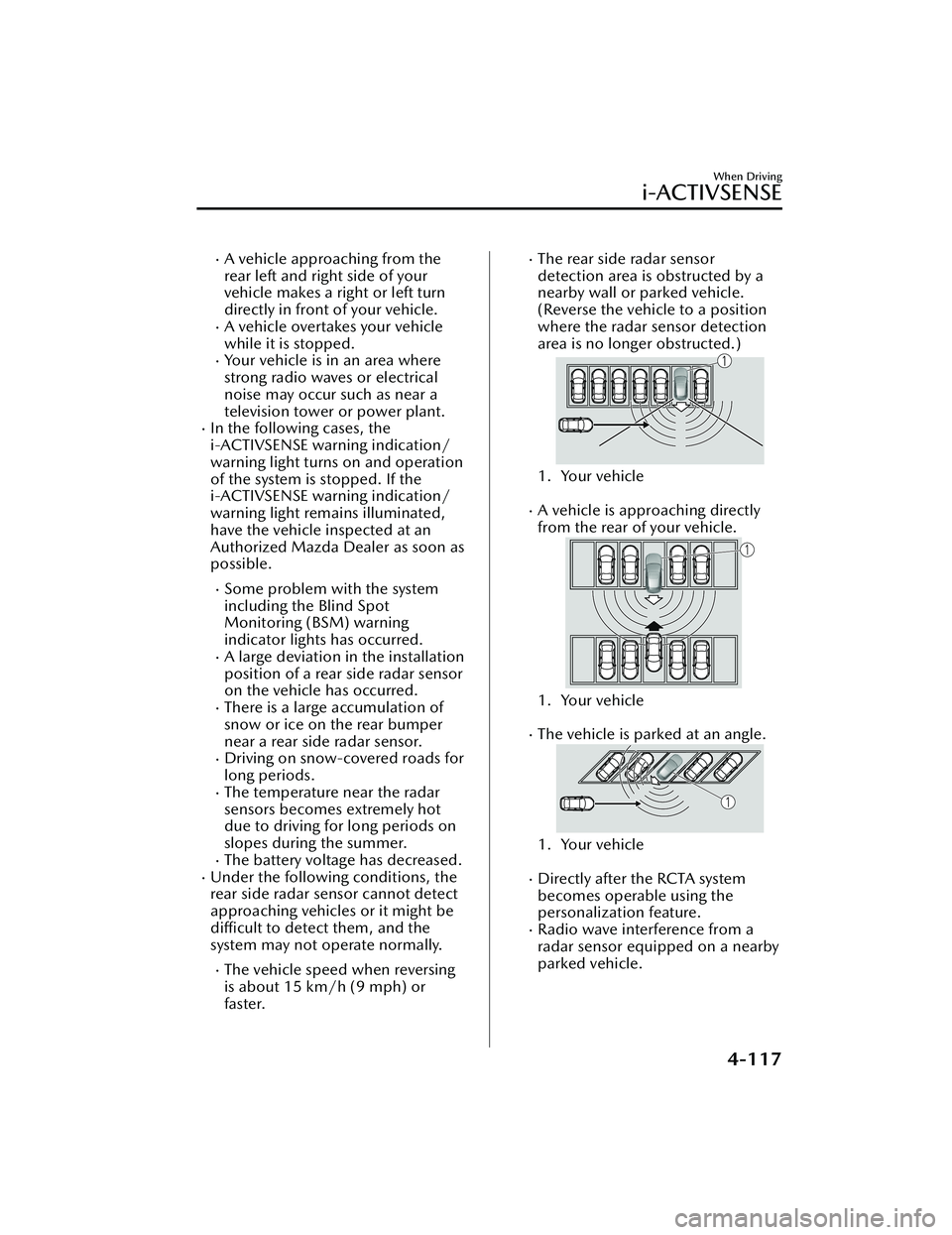
The vehicle speed when reversing
is about 15 km/h (9 mph) or
faster.
The rear side radar sensor
detection area is obstructed by a
nearby wall or parked vehicle.
(Reverse the vehicle to a position
where the radar sensor detection
area is no longer obstructed.)
1. Your vehicle
A vehicle is approaching directly
from the rear of your vehicle.
1. Your vehicle
The vehicle is parked at an angle.
1. Your vehicle
Directly after the RCTA system
becomes operable using the
personalization feature.
Radio wave interference from a
radar sensor equipped on a nearby
parked vehicle.
When Driving
i-ACTIVSENSE
4-117
CX-30_8JP5-EA-20K_Edition1_new 2020-7-22 15:50:09
Page 264 of 594

In the following cases, it may bedifficult to view the illumination/
flashing of the Blind Spot Monitoring
(BSM) warning indicator lights
equipped on the door mirrors.
Snow or ice adheres to the door
mirrors.
The front door glass is fogged or
covered in snow, frost or dirt.
Turn off the RCTA system while
pulling a trailer or while an accessory
such as a bicycle carrier is installed to
the rear of the vehicle. Otherwise,
the radio waves emitted by the radar
will be blocked causing the system to
not operate normally.
The rear side radar sensor of the
RCTA may be regulated under the
radio wave related laws of the
country where the vehicle is driven. If
this system is used abroad, it may be
necessary to turn off the system.
Refer to Rear Side Radar Sensor on
page 4-205.
▼ Canceling Operation of Rear Cross
Tra ffi c
Alert (RCTA)
The RCTA can be set to inoperable.
(If only the RCTA is turned off)
Refer to the Settings section in the
Mazda Connect Owner's Manual.
(If the RCTA is turned off by
operating the i-ACTIVSENSE OFF
switch)
Refer to i-ACTIVSENSE OFF Switch
on page 4-89.
NOTE
If the ignition is switched OFF while
you have canceled the system using the
i-ACTIVSENSE OFF switch, the system
is automatically enabled the next time
the ignition is switched ON. However,
if the system is canceled using the
personalization features, the system is
not automatically enabled.
When Driving
i-ACTIVSENSE
4-118
CX-30_8JP5-EA-20K_Edition1_new
2020-7-22 15:50:09
Page 265 of 594

Mazda Radar Cruise
Control (MRCC) (Manual
Transmission)
*
▼Mazda Radar Cruise Control
(MRCC)
The MRCC system is designed to
maintain headway control*1 with a
vehicle ahead according to your
vehicle's speed using a front radar
sensor to detect the distance to the
vehicle ahead and a preset vehicle
speed without you having to use the
accelerator or brake pedals.
*1 Headway Control: Control of the distance between your vehicle and
the vehicle ahead detected by the
MRCC system.
Additionally, if your vehicle starts
closing in on the vehicle ahead such as
if the vehicle ahead brakes suddenly, a
warning sound and a warning
indication in the display are activated
simultaneously to alert you to maintain
a sufficient distance between the
vehicles.
Also refer to the following before using
the MRCC.
Front radar sensor (page 4-202)
WARNING
Do not rely completely on the MRCC:
The MRCC system has detection
limitations depending on the type of
vehicle ahead and its conditions, the
weather conditions, and the road
conditions. Additionally, the system
may be unable to decelerate
sufficiently to avoid hitting the vehicle
ahead if the vehicle ahead applies the
brakes suddenly or another vehicle
cuts into the driving lane, which could
result in an accident.
Always drive carefully and verify the
surrounding conditions and depress
the brake pedal or accelerator pedal
while keeping a safe distance from
vehicles ahead or on-coming vehicles.
Do not use the MRCC system in the
following locations. Using the MRCC
system at the following locations may
result in an unexpected accident:
General roads other than highways
(Driving under these conditions
using the MRCC system is not
possible.)
Roads with sharp curves and where
vehicle traffic is heavy with
insufficient space between vehicles,
or roads where frequent and
repetitive acceleration and
deceleration occur (Driving under
these conditions using the MRCC is
not possible.)
When entering and exiting
interchanges, service areas, and
parking areas of highways (If you exit
a highway while headway control is
in use, the vehicle ahead will no
longer be tracked and your vehicle
may accelerate to the set speed.)
When Driving
i-ACTIVSENSE
*Some models.4-119
CX-30_8JP5-EA-20K_Edition1_new 2020-7-22 15:50:09
Page 266 of 594

Slippery roads such as ice or
snow-bound roads (Tires could spin
causing you to lose vehicle control,
or the stop hold control may not
operate.)
Long , descending slopes (to
maintain distance between vehicles,
the system automatically and
continuously applies the brakes
which could result in the loss of
brake power.)
Slopes with a st eep gradient (The
vehicle ahead may not be detected
correctly.)
Two-wheeled vehicles such as
motorcycles or bicycles are ahead.
For safety purposes, switch the MRCC
system off when it is not being used.
Leaving the MRCC system turned on
when it is not in use is dangerous as it
could operate unexpectedly, resulting
in an accident.
CAUTION
Turn the system
off when the vehicle
is running on a chassis roller.
If your vehicle is towed or you are
towing something, switch the MRCC
system off to prevent an unexpected
operation.
NOTE
The MRCC system does not detect
the following as physical objects.
Vehicles approaching in the
opposite direction
Pe de st r i a nsStationary objects (stopped
vehicles, obstructions)
If a vehicle ahead is traveling at an
extremely low speed, the system
may not detect it correctly.
If there is a structure on the road or
an object (such as a monorail) at a
low height off the ground in front of
the vehicle, the system may operate.
Therefore, do not use the MRCC.
Do not use the MRCC system under
conditions in which close proximity
warnings are frequently activated.
During headway control travel, the
system accelerates and decelerates
your vehicle in conjunction with the
speed of the vehicle ahead.
However, if it is necessary to
accelerate for a lane change or if the
vehicle ahead brakes suddenly
causing you to close in on the vehicle
rapidly, accelerate using the
accelerator pedal or decelerate using
the brake pedal depending on the
conditions.
While the MRCC system is in use, it
does not cancel even if the shift lever
is operated and any intended engine
braking will not occur. If deceleration
is required, lower the vehicle speed
setting or depress the brake pedal.
While braking by the MRCC control
is operating , you might hear an
operation sound, however, this does
not indicate a problem.
The brake lights turn on while
braking by the MRCC control is
operating, however, they may not
turn on while the vehicle is on a
down slope at the set vehicle speed
or traveling at a constant speed and
following a vehicle ahead.
Stop the headway control function to
switch the system to the cruise
control function.
Refer to the Settings section in the
Mazda Connect Owner's Manual.
When Driving
i-ACTIVSENSE
4-120
CX-30_8JP5-EA-20K_Edition1_new 2020-7-22 15:50:09