Page 343 of 634

Do not turn the steering wheel any more until the vehicle has passed the obstruction, even
if the obstruction is not visible on the side vi ew image. If the steering wheel is turned even
more, the vehicle may contact the obstruction if it is turned sharply.
NOTE
Because there might be a difference between the image displayed on the screen and the
actual conditions, always check the safety of the surrounding area using the mirrors and
directly with your eyes when driving.
Even though the object displayed on the screen, such as a road curb or a division line of a
parking space, and the vehicle parallel guide lines appear parallel, they may not actually
be parallel.
▼ Top View/Rear View
Use the top view/rear view to assist in checking the safety of
the surrounding area when
accelerating from a stop, parking, or stopping the vehicle.
Range of display ed screen image
(Actual condition) (Screen display)
Target object
NOTE
In the top view screen, the areas in black at the front and rear of the vehicle image and the
seams where each of the camera images merge are blind spots.
Because images displayed in the top view screen are processed from each camera, the top
view screen may display in the following ways.
When Driving
i-ACTIVSENSE
4-205
Mazda6_8JN3-EA-20H_Edition1_old 2020-6-18 17:31:27
Page 353 of 634

Forward Sensing Camera (FSC)*
Your vehicle is equipped with a Forward Sensing Camera (FSC). The Forward Sensing
Camera (FSC) is positioned near t he rearview mirror and used by the following systems.
High Beam Control System (HBC)
Driver Attention Alert (DAA)
Lane-keep Assist System (LAS) & Lane Departure Warning System ( LDWS)
Traffic Sign Recognition System (TSR)
Advanced Smart City Brake Support (Advanced SCBS)
Smart City Brake Suppo rt [Forward] (SCBS F)
Mazda Radar Cruise Control with Stop & Go function (MRCC with S top & Go function)
Smart Brake Support (SBS)
Forward Sensing Camera (FSC)
The Forward Sensing Camera (FSC) determines the conditions ahead of the vehicle while
traveling at night and detects traffic lanes. The distance in w hich the Forward Sensing
Camera (FSC) can detect objects varies depending on the surroun ding conditions.
WARNING
Do not modify the suspension:
If the vehicle height or inclination is changed, the system will not be able to correctly detect
vehicles ahead. This will result in the system not operating normally or mistakenly operating,
which could cause a serious accident.
CAUTION
Do not apply accessories, stickers or film to the windshield near the Forward Sensing
Camera (FSC).
If the area in front of the Forward Sensing Came ra (FSC) lens is obstructed, it will cause the
system to not operate correctly. Consequently, each system may not operate normally
which could lead to an unexpected accident.
When Driving
i-ACTIVSENSE
*Some models.4-215
Mazda6_8JN3-EA-20H_Edition1_old 2020-6-18 17:31:27
Page 354 of 634

Do not disassemble or modify the Forward Sensing Camera (FSC).
Disassembly or modification of the Forward Sensing Camera (FSC) will cause a malfunction
or mistaken operation. Consequently, each sy stem may not operate normally which could
lead to an unexpected accident.
Heed the following cautions to assure the correct operation of the Forward Sensing Camera
(FSC).
Be careful not to scratch the Forward Sensing Camera (FSC) lens or allow it to get dirty.
Do not remove the Forward Sensing Camera (FSC) cover.
Do not place objects on the dashboard which reflect light.
Always keep the windshield glass around the camera clean by removing dirt or fogging.
Use the windshield defroster to remove fogging on the windshield.
Consult an Authorized Mazda Dealer regardi ng cleaning the interior side of the
windshield around the Forw ard Sensing Camera (FSC).
Consult an Authorized Mazda Dealer before performing repairs around the Forward
Sensing Camera (FSC).
The Forward Sensing Camera (FSC) is installe d to the windshield. Consult an Authorized
Mazda Dealer for windshield repair and replacement.
When cleaning the wind shield, do not allow glass cleaners or similar cleaning fluids to
get on the Forward Sensing Camera (FSC) le ns. In addition, do not touch the Forward
Sensing Camera (FSC) lens.
When performing repairs around the rearv iew mirror, consult an Authorized Mazda
Dealer.
Consult an Authorized Mazda Dealer regarding cleaning of the camera lens.
Do not hit or apply strong force to the Forward Sensing Camera (FSC) or the area around
it. If the Forward Sensing Camera (FSC) is severely hit or if there are cracks or damage
caused by flying gravel or debris in the area around it, stop using the following systems
and consult an Authorized Mazda Dealer.
High Beam Control System (HBC)
Driver Attention Alert (DAA)
Lane-keep Assist System (LAS) & Lane Departure Warning System (LDWS)
Traffic Sign Recognition System (TSR)
Advanced Smart City Brak e Support (Advanced SCBS)
Smart City Brake Support [Forward] (SCBS F)
Mazda Radar Cruise Control with Stop & Go function (MRCC with Stop & Go function)
Smart Brake Support (SBS)
The direction in which the Forward Sensing Camera (FSC) is pointed has been finely
adjusted. Do not change the installation posi tion of the Forward Sensing Camera (FSC) or
remove it. Otherwise, it could result in damage or malfunction.
When Driving
i-ACTIVSENSE
4-216
Mazda6_8JN3-EA-20H_Edition1_old 2020-6-18 17:31:27
Page 381 of 634

▼Viewing the Display
Guide lines which indicate the wid
th of the vehicle (yellow) are displayed on the screen as a
reference to the approximate width of the vehicle in comparison to the width of the parking
space you are about to back into.
Use this display view for parking your vehicle in a parking spa ce or garage.
b
a
a) Vehicle width guide lines (yellow)
These guide lines serve as a reference to the approximate width of the vehicle.
b) Distance guide lines. These guide lines indicate the approximate distance to a point measured from the
vehicle's rear (from the end of the bumper).
The red and yellow lines indicate the points about 0.5 m (19 in ) for the red line and 1.0
m (39 in) for the yellow lines f rom the rear bumper (at the cen ter point of each of the
lines).
CAUTION
The guide lines on the screen are fixed lines. They are not synced to the driver's turning of the
steering wheel. Always be careful and check the area to the vehicle's rear and the surrounding
area directly with your eyes while backing up.
▼ Rear View Monitor Operation
The operation of the rear view monitor when reversing the vehic
le varies depending on the
traffic, road, and vehicle conditions. The amount of steering a nd the timing also varies
depending on conditions, so conf irm the surrounding conditions directly with your eyes and
steer the vehicle in accordance with the conditions.
Be well aware of the above cautions prior to using the rear vie w monitor.
NOTE
Images displayed on the monitor from the rear view parking camera are reversed images
(mirror images).
When Driving
Rear View Monitor
4-243
Mazda6_8JN3-EA-20H_Edition1_old 2020-6-18 17:31:27
Page 421 of 634
Sunvisors
When you need a sunvisor, lower it for use
in front or swing it to the side.
Sunvisor
▼Side Extension Sunvisors*
The visor extender extends the sunvisor's
range of sun shading.
To use, pull it out.
CAUTION
When moving the sunvisor, retract the visor
extender to its original position. Otherwise,
the visor extender could hit the rearview
mirror.
▼Va n i t y M i r r o r s
To use the vanity mirror, lower the
sunvisor.
If your vehicle is equipped with a vanity
mirror light, it will illuminate when you
open the cover.
To prevent the battery from being
discharged, the vanity mirror will only
illuminate in the tilt range shown in the
figure.
offoff
on
Interior Features
Interior Equipment
*Some models.5-27
Mazda6_8JN3-EA-20H_Edition1_old
2020-6-18 17:31:27
Page 482 of 634
Light Bulbs
Front turn signal lights
Headlights (High/Low beam)/
Daytime running lights Parking lights
Overhead lights/
Front map lights Side turn signal lights Courtesy lights
Vanity mirror lights
Ambient lights
Rear map lights
Trunk light
High-mount brake light
License plate lights
Front side-marker lights
Daytime running lights/
Parking lights
Brake lights/Taillights Rear side-marker lights
Rear turn signal lights
Taillights (Trunk lid side) Taillights
Reverse lights
Some models.
Courtesy lights
Ambient lights
Maintenance and Care
Owner Maintenance
6-48
Mazda6_8JN3-EA-20H_Edition1_old 2020-6-18 17:31:27
Page 484 of 634
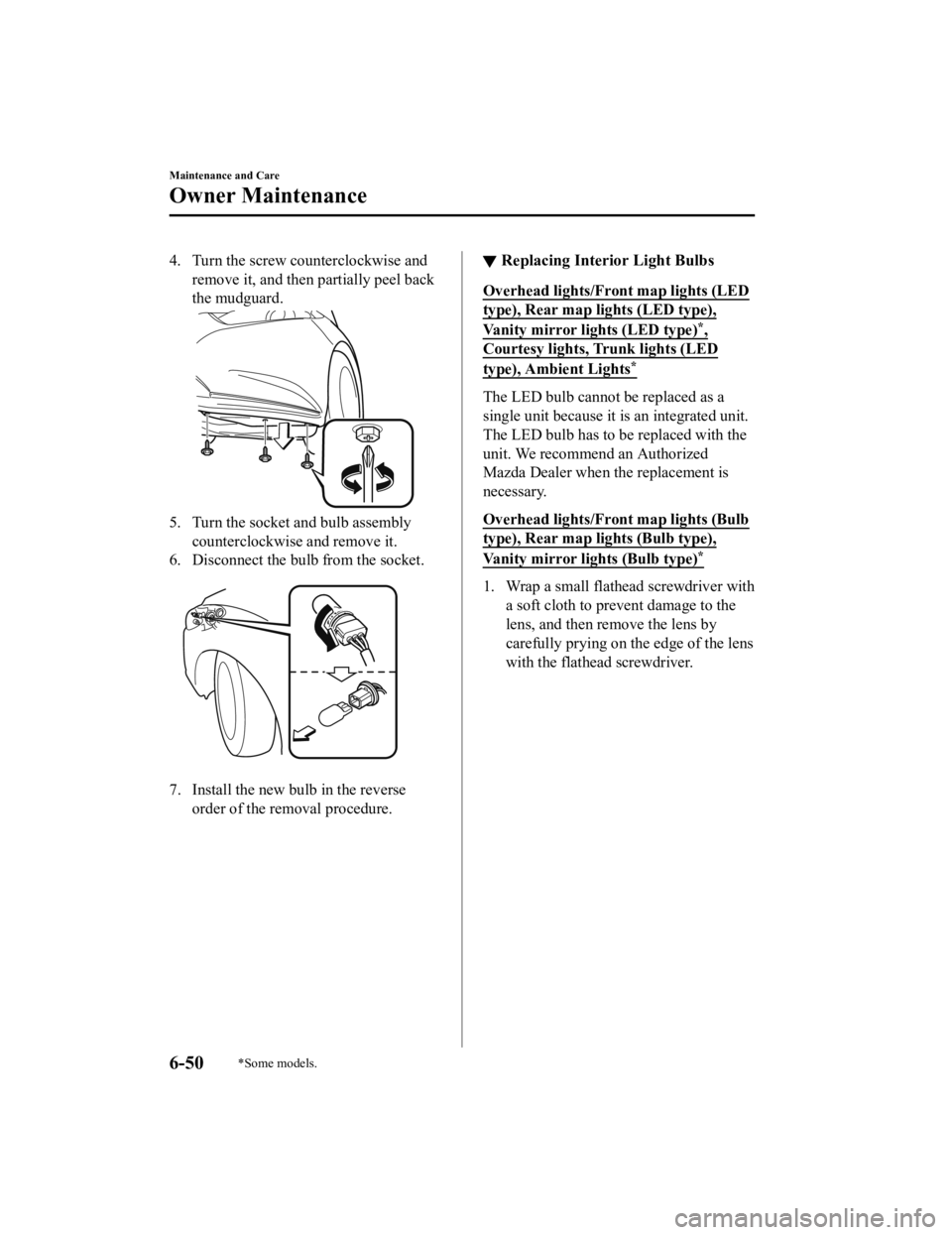
4. Turn the screw counterclockwise andremove it, and then partially peel back
the mudguard.
5. Turn the socket and bulb assemblycounterclockwise and remove it.
6. Disconnect the bulb from the socket.
7. Install the new bulb in the reverse order of the removal procedure.
▼Replacing Interior Light Bulbs
Overhead lights/Front map lights (LED
type), Rear map lig
hts (LED type),
Vanity mirror lights (LED type)*,
Courtesy lights, Trunk lights (LED
type), Ambient Lights*
The LED bulb cannot be replaced as a
single unit because it is an integrated unit.
The LED bulb has to be replaced with the
unit. We recommend an Authorized
Mazda Dealer when the replacement is
necessary.
Overhead lights/Fron t map lights (Bulb
type), Rear map lights (Bulb type),
Vanity mirror lights (Bulb type)*
1. Wrap a small flathead screwdriver with
a soft cloth to prev ent damage to the
lens, and then remove the lens by
carefully prying on the edge of the lens
with the flathead screwdriver.
Maintenance and Care
Owner Maintenance
6-50*Some models.
Mazda6_8JN3-EA-20H_Edition1_old 2020-6-18 17:31:27
Page 486 of 634
Vanity mirror lights*
3. Install the new bulb in the reverseorder of the removal procedure.
Trunk light (Bulb type)
1. Press both sides o f the lens cap to
remove it.
2. Disconnect the bulb by pulling it out.
3. Install the new bulb in the reverseorder of the removal procedure.
Fuses
Your vehicle's electrical system is
protected by fuses.
If any lights, accessories, or controls do
not work, inspect th e appropriate circuit
protector. If a fuse h as blown, the inside
element will be melted.
If the same fuse blows again, avoid using
that system and consult an Authorized
Mazda Dealer as soon as possible.
▼ Fuse Replacement
Replacing the fuses on
the vehicle's left
side
If the electrical system does not work, first
inspect the fuses on the vehicle's left side.
1. Make sure the ignition is switched off,
and other switches are off.
2. Open the fuse panel cover.
Maintenance and Care
Owner Maintenance
6-52*Some models.
Mazda6_8JN3-EA-20H_Edition1_old 2020-6-18 17:31:27


