2021 LINCOLN NAVIGATOR mirror
[x] Cancel search: mirrorPage 319 of 639

RV & Trailer Towing Guide Online
http://www.fleet.ford.com/towing-guides/
Website
TRAILER REVERSING AIDS (IF
EQUIPPED)
Pro Trailer Backup Assist™ WARNING:
Driving while distracted
can result in loss of vehicle control, crash
and injury. We strongly recommend that
you use extreme caution when using any
device that may take your focus off the
road. Your primary responsibility is the safe
operation of your vehicle. We recommend
against the use of any hand-held device
while driving and encourage the use of
voice-operated systems when possible.
Make sure you are aware of all applicable
local laws that may affect the use of
electronic devices while driving. WARNING:
This system is an extra
driving aid. It does not replace your
attention and judgment, or the need to
apply the brakes. This system does NOT
automatically brake your vehicle. If you fail
to press the brake pedal when necessary,
you may collide with another vehicle.
Note: The system is not a substitute for safe
driving practices.
Note: You must always be aware of the
vehicle and trailer combination and the
surrounding environment.
Note: The system does not detect or prevent
the vehicle or trailer from making contact
with obstacles in the surrounding
environment.
Note: Keep in mind that the front end of the
vehicle swings out when changing the
direction of the trailer. Note:
The system relies on user
measurements to determine sticker
placement and system limits. It is critical to
take the key measurements correctly.
Incorrect measurements can result in the
improper function of the system up to and
including contact between the vehicle and
trailer.
Note: The system limits vehicle speed when
backing up. The system is not a replacement
for proper use of the throttle and brake
pedals.
Principle of Operation
This feature helps you to steer your vehicle
when reversing with a trailer attached. Turn
and hold the control knob in the direction
you want the trailer to go and the system
takes over the steering. This allows you to
focus on checking the mirrors and operating
the brake and accelerator.
316
Navigator (TB9) Canada/United States of America, enUSA, First-Printing Towing
Page 365 of 639
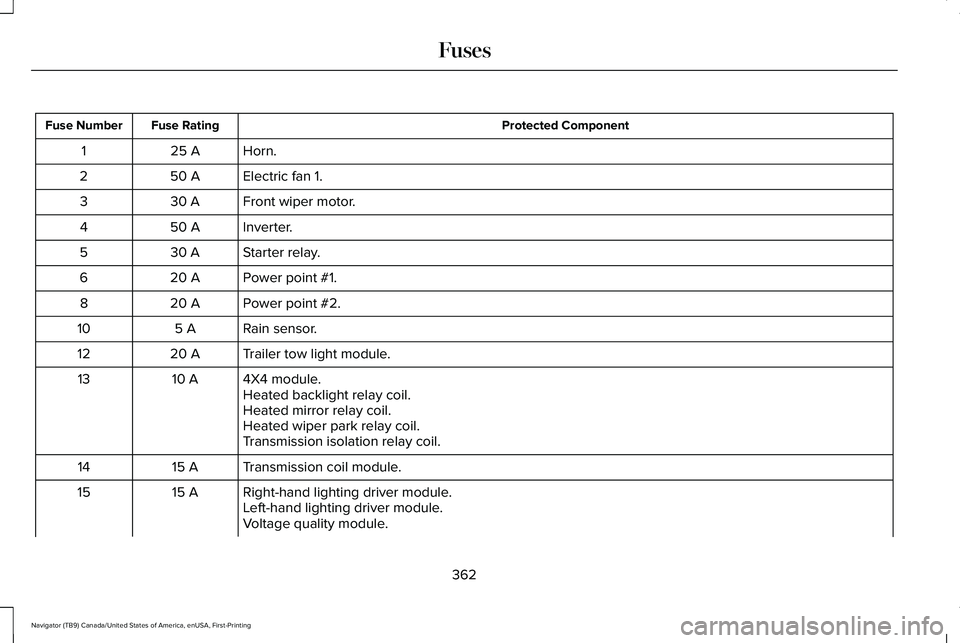
Protected Component
Fuse Rating
Fuse Number
Horn.
25 A
1
Electric fan 1.
50 A
2
Front wiper motor.
30 A
3
Inverter.
50 A
4
Starter relay.
30 A
5
Power point #1.
20 A
6
Power point #2.
20 A
8
Rain sensor.
5 A
10
Trailer tow light module.
20 A
12
4X4 module.
10 A
13
Heated backlight relay coil.
Heated mirror relay coil.
Heated wiper park relay coil.
Transmission isolation relay coil.
Transmission coil module.
15 A
14
Right-hand lighting driver module.
15 A
15
Left-hand lighting driver module.
Voltage quality module.
362
Navigator (TB9) Canada/United States of America, enUSA, First-Printing Fuses
Page 370 of 639

Protected Component
Fuse Rating
Fuse Number
Not used.
—
79
Heated wiper park.
10 A
80
Not used.
—
81
Not used.
—
82
Transmission control module power.
15 A
83
Not used.
—
84
Not used.
—
85
USB smart charger #5.
5 A
86
USB smart charger #3.
5 A
87
Multi-contour seats relay.
10 A
88
Power running boards.
40 A
89
Not used.
—
91
Heated mirrors.
15 A
93
USB smart charger #1.
5 A
94
USB smart charger #2.
10 A
95
Rear wiper motor relay.
30 A
96
367
Navigator (TB9) Canada/United States of America, enUSA, First-Printing Fuses
Page 375 of 639

Protected Component
Fuse Rating
Fuse Number
Headlamp control module.
7.5 A
17
Not used (spare).
7.5 A
18
Telematics control unit module.
5 A
19
Bluetooth low energy module.
Not used (spare).
5 A
20
In-vehicle temperature and humidity sensor.
5 A
21
Electrochromic mirror.
5 A
22
Second row heated seat module.
Left-hand front door zone module.
30 A
23
Power window switch.
Power mirror switch.
DVD player.
Moonroof logic.
30 A
24
Speaker amplifier 2.
20 A
25
Right-hand front door zone module.
30 A
26
Left-hand rear door zone module.
30 A
27
Right-hand rear door zone module.
30 A
28
Adjustable column and pedal memory module.
15 A
29
372
Navigator (TB9) Canada/United States of America, enUSA, First-Printing Fuses
Page 394 of 639

WARNING: This vehicle may have
more than one battery. Removing the
battery cables from only one battery does
not disconnect your vehicle electrical
system. Make sure you disconnect the
battery cables from all batteries when
disconnecting power. Failure to do so may
cause serious personal injury or property
damage.
Your vehicle is fitted with a Motorcraft
maintenance-free battery which normally
does not require additional water.
When a battery replacement is required, you
must use a recommended replacement
battery that matches the electrical
requirements of the vehicle.
Note: After cleaning or replacing the battery,
make sure you reinstall the battery vent tube,
battery cover or shield.
For longer, trouble-free operation, keep the
top of the battery clean and dry. If you see any corrosion on the battery or
terminals, remove the cables from the
terminals and clean with a wire brush. You
can neutralize the acid with a solution of
baking soda and water.
Because your vehicle
’s engine is
electronically controlled by a computer, some
control conditions are maintained by power
from the battery. When the battery is
disconnected or a new battery is installed,
the engine must relearn its idle and fuel trim
strategy for optimum driveability and
performance. Flexible fuel vehicles (FFV)
must also relearn the ethanol content of the
fuel for optimum driveability and
performance.
To restore the settings, do the following:
1. Apply the parking brake.
2. Shift into park (P) or neutral (N).
3. Switch off all accessories.
4. Press the brake pedal and start your vehicle. 5. Run the engine until it reaches normal
operating temperature. While the engine
is warming up, complete the following:
Reset the clock. Reset the power
windows bounce-back feature.
See
Windows and Mirrors (page 119). Reset
the radio station presets. See Audio
System (page 461).
6. Allow the engine to idle for at least one minute.
7. Drive the vehicle at least 10 mi (16 km) to
completely relearn the idle trim and fuel
trim strategy.
Note: If you do not allow the engine to
relearn the idle and fuel trim strategy, the
idle quality of your vehicle may be adversely
affected until the engine computer
eventually relearns the idle trim and fuel trim
strategy.
Note: For flexible fuel vehicles, if you are
operating on E85, you may experience poor
starts or an inability to start the engine and
driveability problems until the fuel trim and
ethanol content have been relearned.
391
Navigator (TB9) Canada/United States of America, enUSA, First-Printing Maintenance
Page 402 of 639

•
Do not allow wax to come in contact with
any non-body (low-gloss black) colored
trim. The wax will discolor or stain the
parts over time.
•Roof racks.
• Bumpers.
• Grained door handles.
• Side moldings.
• Mirror housings.
• Windshield cowl area.
• Do not apply wax to glass areas.
• After waxing, your car's paint should feel
smooth, and be free of streaks and
smudges.
CLEANING THE ENGINE
Engines are more efficient when they are
clean because grease and dirt buildup keep
the engine warmer than normal. When washing:
•
Take care when using a power washer
to clean the engine. The high-pressure
fluid could penetrate the sealed parts
and cause damage.
• Do not spray a hot engine with cold water
to avoid cracking the engine block or
other engine components.
• Spray Motorcraft Engine Shampoo and
Degreaser on all parts that require
cleaning and pressure rinse clean. In
Canada, use Motorcraft Engine Shampoo.
Note: If your vehicle has an engine cover
remove the cover before application of
Motorcraft Engine Shampoo and Degreaser.
Immediately rinse away any over spray.
• Never wash or rinse the engine while it
is hot or running; water in the running
engine may cause internal damage.
• Never wash or rinse any ignition coil,
spark plug wire or spark plug well, or the
area in and around these locations.
• Cover the battery, power distribution box,
and air filter assembly to prevent water
damage when cleaning the engine. CLEANING THE WINDOWS AND
WIPER BLADES
Car wash chemicals and environmental
fallout can result in windshield and wiper
blade contamination. Dirty windshield and
wipers will result in poor windshield wiper
operation. Keep the windshield and wiper
blades clean to maintain windshield wiper
performance.
To clean the windshield and wiper blades:
•
Clean the windshield with a non-abrasive
glass cleaner. When cleaning the interior
of the windshield, avoid getting any glass
cleaner on the instrument panel or door
panels. Wipe any glass cleaner off these
surfaces immediately.
• For windshields contaminated with tree
sap, chemicals, wax or bugs, clean the
entire windshield using steel wool (no
greater than 0000 grade) in a circular
motion and rinse with water.
• Clean the wiper blades with isopropyl
rubbing alcohol or windshield washer
concentrate.
399
Navigator (TB9) Canada/United States of America, enUSA, First-Printing Vehicle Care
Page 456 of 639

Interior Lamps
Power (Watt)
Specification
Lamp
LED
LED
Glove compartment lamp if equipped.
LED
LED
Vanity mirror lamp.
LED
LED
Map lamp.
LED
LED
Second row lamp.
LED
LED
Rear dome lamp.
LED lamps are not serviceable. Contact an authorized dealer if they fail.
453
Navigator (TB9) Canada/United States of America, enUSA, First-Printing Capacities and Specifications
Page 504 of 639

Switching the Heated Exterior Mirrors
On and Off
Touch the button.
Switching the Heated Windshield On
and Off Touch the button to clear the
windshield of thin ice and fog. The
heated windshield turns off after a
short period of time.
Switching the Heated Rear Window On
and Off Touch the button to clear the rear
window of thin ice and fog.
Switching the Heated Seats On and Off Touch the button to cycle through
the various heat settings. Switching the Heated Steering Wheel
On and Off Touch the button.
Switching Maximum Air Conditioning
On and Off Touch the button for maximum
cooling.
Recirculated air flows through the instrument
panel air vents, air conditioning turns on and
the blower motor adjusts to the highest
speed.
Switching Maximum Defrost On and
Off Touch the button for maximum
defrosting.
Air flows through the windshield air vents,
and the blower motor adjusts to the highest
speed.
You can also use this setting to defog and
clear the windshield of a thin covering of ice. Note:
To prevent window fogging, you
cannot select recirculated air when
maximum defrost is on.
Note: The heated rear window also turns on
when you select maximum defrost.
Switching Recirculated Air On and Off Touch the button to switch
between outside air and
recirculated air.
The air currently in the passenger
compartment recirculates. This may reduce
the time needed to cool the interior, when
used with A/C, and reduce unwanted odors
from entering your vehicle.
Note: Recirculated air may turn off, or
prevent you from switching on, in all air flow
modes except MAX A/C to reduce the risk
of fogging. Recirculation may also turn on
and off in various air distribution control
combinations during hot weather to improve
cooling efficiency.
501
Navigator (TB9) Canada/United States of America, enUSA, First-Printing SYNC™ 3E266189 E184884