2021 LINCOLN NAVIGATOR service
[x] Cancel search: servicePage 68 of 639

The design and development of the Safety
Canopy included recommended testing
procedures that were developed by a group
of automotive safety experts known as the
Side Airbag Technical Working Group. These
recommended testing procedures help
reduce the risk of injuries related to the
deployment of side airbags (including the
Safety Canopy).
CRASH SENSORS AND AIRBAG
INDICATOR
WARNING: Modifying or adding
equipment to the front end of your vehicle
(including hood, bumper system, frame,
front end body structure, tow hooks and
hood pins) may affect the performance of
the airbag system, increasing the risk of
injury. Do not modify or add equipment to
the front end of your vehicle. Your vehicle has a collection of crash and
occupant sensors which provide information
to the restraints control module which
deploys (activates) the front seatbelt
pretensioners, the adaptive steering column,
driver airbag, passenger airbag, rear
inflatable belts, seat mounted side airbags,
and the Safety Canopy. Based on the type
of crash, the restraints control module will
deploy the appropriate safety devices.
The restraints control module also monitors
the readiness of the above safety devices
plus the crash and occupant sensors. The
readiness of the safety system is indicated
by a warning indicator light in the instrument
cluster or by a backup tone if the warning
light is not working. See Instrument Cluster
(page
127). Routine maintenance of the
airbag is not required.
A difficulty with the system is indicated by
one or more of the following: The readiness light will not
illuminate immediately after you
switch the ignition on.•
The readiness light either flashes or stays
lit.
• A series of five beeps will be heard. The
tone pattern will repeat periodically until
the problem, the light or both are
repaired.
If any of these things happen, even
intermittently, have the supplemental
restraint system serviced at an authorized
dealer immediately. Unless serviced, the
system may not function properly in the
event of a crash.
65
Navigator (TB9) Canada/United States of America, enUSA, First-Printing Supplementary Restraints SystemE67017
Page 70 of 639

WHAT IS 911 ASSIST
911 Assist is a SYNC system feature that can
call for help if you are in an accident. If a
crash deploys an airbag, excluding knee
airbags and rear inflatable seatbelts [if
equipped], or activates the fuel pump
shut-off, your SYNC-equipped vehicle may
be able to contact emergency services by
dialing 911 through a paired and connected
Bluetooth enabled phone. You can learn
more about the 911 Assist feature, by visiting:
Website
www.owner.lincoln.com
www.syncmyride.ca
www.syncmaroute.ca
Not all crashes will deploy an airbag or
activate the fuel pump shut-off, the triggers
for 911 Assist. If a connected cell phone
sustains damage or loses its connection to
SYNC during a crash, SYNC will search for
and try to connect to a previously paired cell
phone. SYNC will then attempt to call the
emergency services. Before making the call:
•
SYNC provides a short window of time,
about 10 seconds, to cancel the call. If
you fail to cancel the call, SYNC attempts
to dial 911.
• SYNC says the following, or a similar
message: SYNC will attempt to call 911,
to cancel the call, press Cancel on your
screen or press and hold the phone
button on your steering wheel.
If you do not cancel the call, and SYNC
makes a successful call, a pre-recorded
message plays for the 911 operator, and then
the occupant(s) in your vehicle is able to talk
with the operator. Be prepared to
immediately provide your name, phone
number and location, because not all 911
systems are capable of receiving this
information electronically.
During an emergency call, the system
transmits vehicle data to the emergency
service. See Data Recording (page 12). EMERGENCY CALL
REQUIREMENTS WARNING: Do not wait for 911 Assist
to make an emergency call if you can do
it yourself. Dial emergency services
immediately to avoid delayed response
time which could increase the risk of
serious injury or death after a crash. If you
do not hear 911 Assist within five seconds
of the crash, the system or phone may be
damaged or non-functional. WARNING: Always place your phone
in a secure location in your vehicle so it
does not become a projectile or get
damaged in a crash. Failure to do so may
cause serious injury to someone or
damage the phone which could prevent
911 Assist from working properly. WARNING: Unless the 911 Assist
setting is set on before a crash, the system
will not dial for help which could delay
response time, potentially increasing the
risk of serious injury or death after a crash.
67
Navigator (TB9) Canada/United States of America, enUSA, First-Printing 911 Assist
Page 135 of 639

Low Tire Pressure Warning Lamp
It illuminates when your tire
pressure is low. If the lamp remains
on with the engine running or
when driving, check your tire pressure as
soon as possible.
It also illuminates momentarily when you
switch the ignition on to confirm the lamp is
functional. If it does not illuminate when you
switch the ignition on, or begins to flash at
any time, have the system checked by your
authorized dealer.
Low Beam Malfunction Warning Lamp It illuminates when there is a
malfunction with the low beam
headlamp bulb.
Low Washer Fluid Level Warning Lamp It illuminates when the washer fluid
is low. Parking Lamps Illuminates when you switch the
parking lamps on.
Powertrain Fault Illuminates when a powertrain or
an 4WD fault has been detected.
Contact an authorized dealer.
Service Engine Soon If it illuminates when the engine is
running this indicates a
malfunction. The On Board
Diagnostics system has detected a
malfunction of the vehicle emission control
system.
If it flashes, engine misfire may be occurring.
Increased exhaust gas temperatures could
damage the catalytic converter or other
vehicle components. Drive in a moderate
fashion (avoid heavy acceleration and
deceleration) and have your vehicle
immediately serviced. It illuminates when you switch the ignition
on prior to engine start to check the bulb and
to indicate whether your vehicle is ready for
Inspection and Maintenance (I/M) testing.
Normally, it illuminates until the engine is
cranked and automatically turns off if no
malfunctions are present. However, if after
15 seconds it flashes eight times, this
indicates that your vehicle is not ready for
Inspection and Maintenance (I/M) testing.
See Catalytic Converter (page 224).
Stability Control and Traction Control
Indicator Flashes during operation.
If it does not illuminate when you
switch the ignition on, or remains
on when the engine is running, this indicates
a malfunction. Have your vehicle checked
as soon as possible.
See
Using Stability Control (page 249).
132
Navigator (TB9) Canada/United States of America, enUSA, First-Printing Instrument Cluster E181350 E132353 E138639
Page 143 of 639
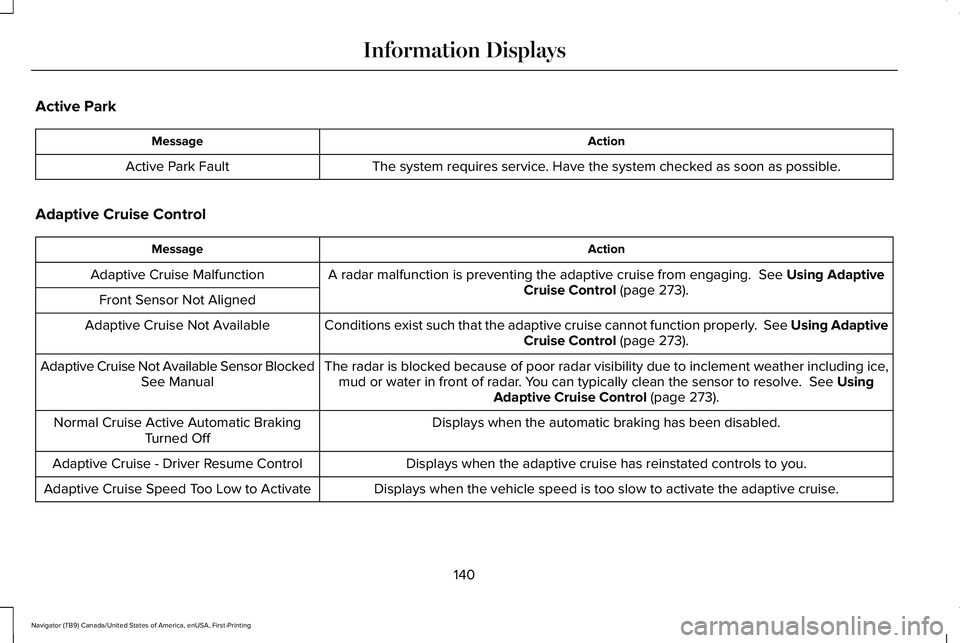
Active Park
Action
Message
The system requires service. Have the system checked as soon as possible.
Active Park Fault
Adaptive Cruise Control Action
Message
A radar malfunction is preventing the adaptive cruise from engaging. See Using Adaptive
Cruise Control (page 273).
Adaptive Cruise Malfunction
Front Sensor Not Aligned Conditions exist such that the adaptive cruise cannot function properly. See Using AdaptiveCruise Control
(page 273).
Adaptive Cruise Not Available
The radar is blocked because of poor radar visibility due to inclement weather including i\
ce,mud or water in front of radar. You can typically clean the sensor to resolve.
See Using
Adaptive Cruise Control (page 273).
Adaptive Cruise Not Available Sensor Blocked
See Manual
Displays when the automatic braking has been disabled.
Normal Cruise Active Automatic Braking
Turned Off
Displays when the adaptive cruise has reinstated controls to you.
Adaptive Cruise - Driver Resume Control
Displays when the vehicle speed is too slow to activate the adaptive cru\
ise.
Adaptive Cruise Speed Too Low to Activate
140
Navigator (TB9) Canada/United States of America, enUSA, First-Printing Information Displays
Page 144 of 639

Adaptive Headlamps
Action
Message
Displays when the system requires service. Have the system checked as soon as possible.
Check Headlamp System See Manual
Alarm Action
Message
The alarm has been triggered due to unauthorized entry.
Vehicle Alarm To Stop Alarm, Start Vehicle.
Automatic Engine Shutdown Action
Message
The engine is getting ready to shut off.
Vehicle Shuts Off In {seconds:#0} Seconds
The engine has shut off to help increase fuel economy.
Vehicle Shut Off to Save Energy
The engine is getting ready to shut off. You can press OK on the left steering wheel buttonto override the shut down.
Vehicle Shuts Off in {seconds:#0} Seconds
Press Ok to Override
141
Navigator (TB9) Canada/United States of America, enUSA, First-Printing Information Displays
Page 145 of 639

Battery and Charging System
Action
Message
The charging system needs servicing. If the warning stays on or continue\
s to come on, contactan authorized dealer as soon as possible.
Check Charging System
The charging system needs servicing. If the warning stays on or continue\
s to come on, contactan authorized dealer as soon as possible.
Charging System Service Soon
The charging system needs servicing. Contact an authorized dealer as soo\
n as possible.
Charging System Service Now
The battery management system determines that the battery is at a low st\
ate of charge. Turnyour ignition off as soon as possible to protect the battery. This message clears once you restart your vehicle and the battery state of charge has recovered.
Battery State of Charge Low
The battery management system determines that the battery is at a low st\
ate of charge. Turnthe ignition off as soon as possible to protect the battery. This message will clear once the
vehicle has been started and the battery state of charge has recovered. \
Turning off unneces- sary electrical loads will allow faster battery state-of-charge recovery\
.
Turn Power Off To Save Battery
Displayed when the battery management system detects an extended low-vol\
tage condition.
Various vehicle features will be disabled to help preserve the battery. Turn off as many of theelectrical loads as soon as possible to improve system voltage. If the system voltage has recovered, the disabled features will operate again as normal.
Low Battery Features Temporarily Turned Off
142
Navigator (TB9) Canada/United States of America, enUSA, First-Printing Information Displays
Page 146 of 639

Blind Spot Information and Cross Traffic Alert System
Action
Message
Displays when the system requires service. Have the system checked as soon as possible.
Blindspot System Fault
The system sensors are blocked. Have the system checked as soon as possible. See Blind
Spot Information System (page 288).
Blindspot Not Available Sensor Blocked See
Manual
The system detects a vehicle.
See Blind Spot Information System (page 288).
Vehicle Coming From X
The blind spot information system and cross traffic alert system sensors\
are blocked.
See
Blind Spot Information System (page 288).
Cross Traffic Not Available Sensor Blocked
See Manual
Displays when the system requires service. Have the system checked as soon as possible.
Cross Traffic System Fault
The system automatically turns off and displays this message when you co\
nnect a trailer to
the vehicle that does not have a trailer blind spot system or when you s\
witch the trailer blind spot system off through the information display.
See Blind Spot Information System (page
288).
Cross Traffic Alert Deactivated Trailer
Attached
The system automatically turns off and displays this message when you co\
nnect a trailer to
the vehicle that does not have a trailer blind spot system or when you s\
witch the trailer blind spot system off through the information display.
See Blind Spot Information System (page
288).
Blind Spot Alert Deactivated Trailer Attached
Displays when the trailer connected is a fifth wheel or gooseneck, or wh\
en the trailer widthis wider than
10 ft (2.7 m) or longer than 33 ft (10 m).
Trailer Blind Spot Not available Due to Invalid
Trailer
143
Navigator (TB9) Canada/United States of America, enUSA, First-Printing Information Displays
Page 147 of 639

Doors and Locks
Action
Message
The door listed is not completely closed.
X Door Ajar
The luggage compartment is not completely closed.
Trunk Ajar
The driver door is opened, your vehicle is in park and the engine is on.\
Engine ON
Displays when the hood is not completely closed.
Hood Ajar
Displays when the door switches have been disabled.
Switches Inhibited Security Mode
Displays when the system requires service. Have the system checked as soon as possible.
Child Lock Malfunction Service Required
Displays the factory keypad code after the keypad has been reset. See Keyless Entry (page88).
Factory Keypad Code {X X X X X}
Driver Alert Action
Message
Stop and rest as soon as it is safe to do so.
Driver Alert Warning Rest Now
Take a rest soon.
Driver Alert Warning Rest Suggested
144
Navigator (TB9) Canada/United States of America, enUSA, First-Printing Information Displays