2021 LINCOLN CORSAIR Windshield washer
[x] Cancel search: Windshield washerPage 5 of 638

Programming Your Phone
..........................68
Using the Valet Mode ...................................
69
Using the Backup Start Passcode .............
69
Phone as a Key – Troubleshooting ...........
70
MyKey™
What Is MyKey ................................................
72
MyKey Settings ...............................................
72
Creating a MyKey ...........................................
73
Programming a MyKey .................................
73
Clearing All MyKeys ......................................
73
Checking MyKey System Status ................
74
Using MyKey With Remote Start Systems ........................................................................\
.
74
MyKey – Troubleshooting ............................
74
Doors and Locks
Locking and Unlocking .................................
76
Keyless Entry
Locating the Keyless Entry Keypad ...........
81
Keyless Entry Limitations ..............................
81
Master Access Code ......................................
81Keyless Entry Settings
...................................
81
Locking and Unlocking the Doors Using Keyless Entry ..............................................
83
Keyless Entry – Troubleshooting ...............
84
Liftgate
Liftgate Precautions ......................................
85
Opening the Liftgate .....................................
85
Setting the Liftgate Opening Height .........
87
Closing the Liftgate .......................................
88
Stopping the Liftgate Movement ...............
90
Liftgate Obstacle Detection ........................
90
Liftgate – Troubleshooting ...........................
91
Security
Passive Anti-Theft System ...........................
93
Anti-Theft Alarm System ..............................
93
Anti-Theft Alarm System Settings .............
94
Security – Troubleshooting .........................
95
Steering Wheel
Adjusting the Steering Wheel - Vehicles With: Power Adjustable Steering Column
........................................................................\
.
97 Adjusting the Steering Wheel - Vehicles
With: Manual Adjustable Steering
Column .........................................................
97
Resetting the Stopping Position - Vehicles With: Power Adjustable Steering Column
........................................................................\
98
Horn ..................................................................
98
Switching the Heated Steering Wheel On ........................................................................\
98
Wipers and Washers
Windshield Wipers ........................................
99
Autowipers ....................................................
100
Windshield Washers .....................................
101
Rear Window Wiper and Washers ............
101
Lighting
General Information ....................................
102
Lighting Control ............................................
102
Autolamps ......................................................
103
Instrument Lighting Dimmer ......................
103
Headlamp Exit Delay ...................................
104
Daytime Running Lamps - Vehicles With: Configurable Daytime Running Lamps
.......................................................................
104
2
Corsair (CTF) Canada/United States of America, enUSA, Edition date: 202007, First-Printing Table of Contents
Page 102 of 638
WINDSHIELD WIPERS
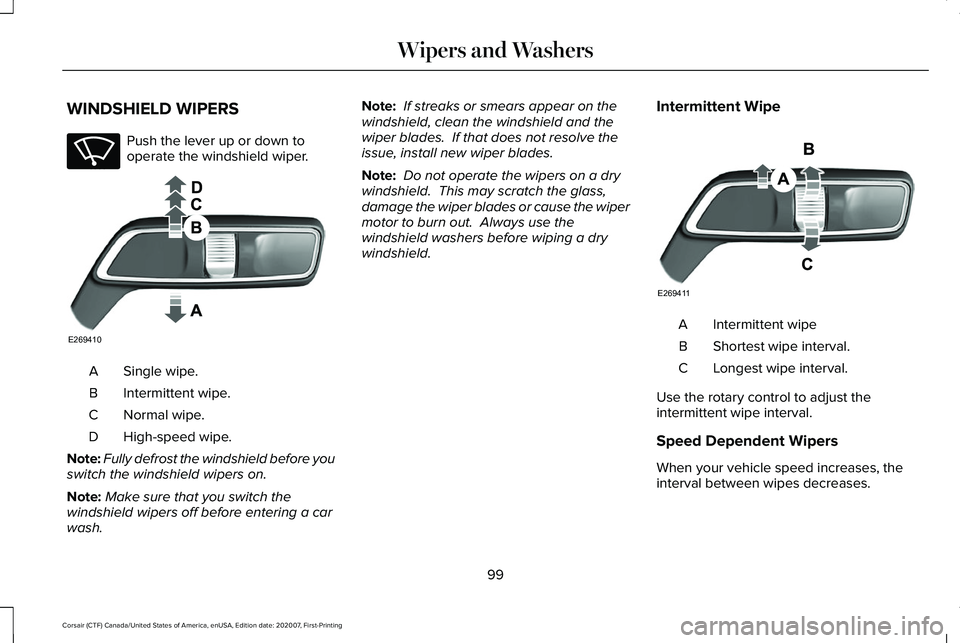
Push the lever up or down to
operate the windshield wiper.
Single wipe.
A
Intermittent wipe.
B
Normal wipe.
C
High-speed wipe.
D
Note: Fully defrost the windshield before you
switch the windshield wipers on.
Note: Make sure that you switch the
windshield wipers off before entering a car
wash. Note:
If streaks or smears appear on the
windshield, clean the windshield and the
wiper blades. If that does not resolve the
issue, install new wiper blades.
Note: Do not operate the wipers on a dry
windshield. This may scratch the glass,
damage the wiper blades or cause the wiper
motor to burn out. Always use the
windshield washers before wiping a dry
windshield. Intermittent Wipe Intermittent wipe
A
Shortest wipe interval.
B
Longest wipe interval.
C
Use the rotary control to adjust the
intermittent wipe interval.
Speed Dependent Wipers
When your vehicle speed increases, the
interval between wipes decreases.
99
Corsair (CTF) Canada/United States of America, enUSA, Edition date: 202007, First-Printing Wipers and WashersE270969 E269410 E269411
Page 103 of 638

AUTOWIPERS (IF EQUIPPED)
Wet or winter driving conditions with ice,
snow or salty road mist can cause
inconsistent and unexpected wiping or
smearing. Autowipers On.
A
High sensitivity.
B
Low sensitivity.
C Use the rotary control to adjust the
sensitivity of the autowipers. When you select low sensitivity, the wipers
operate when the sensor detects a large
amount of water on the windshield. When
you select high sensitivity, the wipers
operate when the sensor detects a small
amount of water on the windshield.
Keep the outside of the windshield clean.
The rain sensor is very sensitive and the
wipers may operate if dirt, mist or insects hit
the windshield.
In these conditions, you can do the following:
•
Lower the sensitivity of the autowipers
to reduce the amount of smearing on the
windshield.
• Switch to normal or high-speed wipe.
• Switch autowipers off.
Note: Fully defrost the windshield before you
switch the windshield wipers on.
Note: Make sure that you switch the
windshield wipers off before entering a car
wash.
Note: If streaks or smears appear on the
windshield, clean the windshield and the
wiper blades. If that does not resolve the
issue, install new wiper blades. Note:
If you switch autolamps and
autowipers on, the headlamps turn on when
the windshield wipers continuously operate.
Autowipers Settings
This setting defaults to on and remains on
until you switch it off in the touchscreen.
When you switch the feature off, the wipers
do not operate based on the rain sensor.
When you switch on the windshield wipers
to the intermittent wipe position with the
feature off, the wipers use the wipe speed
set by the rotary control.
Low Temperature Wipe Inhibit
The rain sensing feature will not operate
immediately after starting your vehicle when
it is in park (P) and the outside temperature
is below
32°F (0°C). You can switch on the
wipers by adjusting the rain sensor sensitivity
or adjusting the wiper speed.
This prevents damage to the wiper blades
from ice and snow on the windshield.
100
Corsair (CTF) Canada/United States of America, enUSA, Edition date: 202007, First-Printing Wipers and WashersE269411 E270969
Page 104 of 638
WINDSHIELD WASHERS
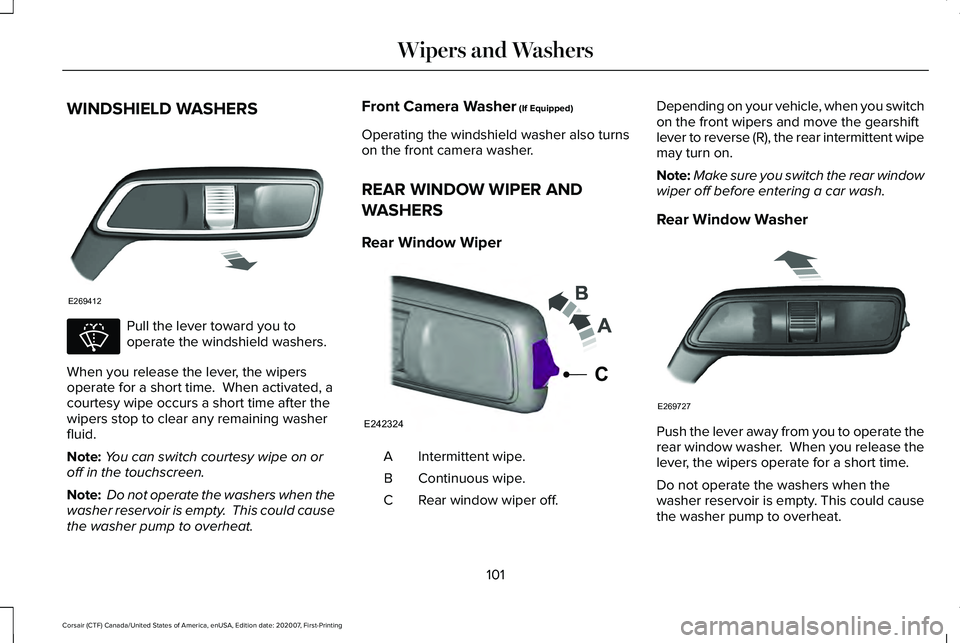
Pull the lever toward you to
operate the windshield washers.
When you release the lever, the wipers
operate for a short time. When activated, a
courtesy wipe occurs a short time after the
wipers stop to clear any remaining washer
fluid.
Note: You can switch courtesy wipe on or
off in the touchscreen.
Note: Do not operate the washers when the
washer reservoir is empty. This could cause
the washer pump to overheat. Front Camera Washer (If Equipped)
Operating the windshield washer also turns
on the front camera washer.
REAR WINDOW WIPER AND
WASHERS
Rear Window Wiper Intermittent wipe.
A
Continuous wipe.
B
Rear window wiper off.
C Depending on your vehicle, when you switch
on the front wipers and move the gearshift
lever to reverse (R), the rear intermittent wipe
may turn on.
Note:
Make sure you switch the rear window
wiper off before entering a car wash.
Rear Window Washer Push the lever away from you to operate the
rear window washer. When you release the
lever, the wipers operate for a short time.
Do not operate the washers when the
washer reservoir is empty. This could cause
the washer pump to overheat.
101
Corsair (CTF) Canada/United States of America, enUSA, Edition date: 202007, First-Printing Wipers and WashersE269412 E270967 E242324
C E269727
Page 106 of 638
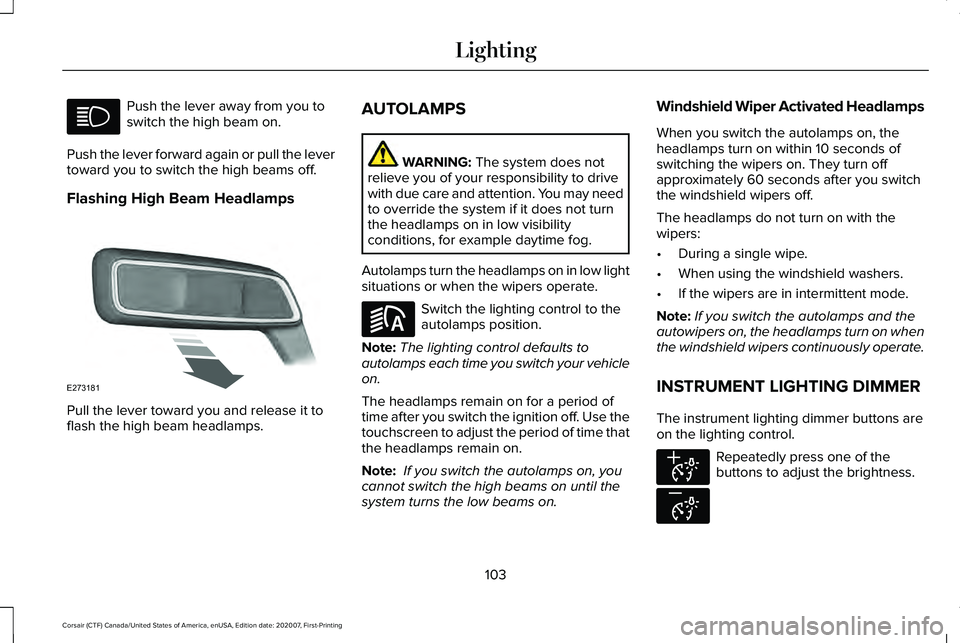
Push the lever away from you to
switch the high beam on.
Push the lever forward again or pull the lever
toward you to switch the high beams off.
Flashing High Beam Headlamps Pull the lever toward you and release it to
flash the high beam headlamps. AUTOLAMPS WARNING: The system does not
relieve you of your responsibility to drive
with due care and attention. You may need
to override the system if it does not turn
the headlamps on in low visibility
conditions, for example daytime fog.
Autolamps turn the headlamps on in low light
situations or when the wipers operate. Switch the lighting control to the
autolamps position.
Note: The lighting control defaults to
autolamps each time you switch your vehicle
on.
The headlamps remain on for a period of
time after you switch the ignition off. Use the
touchscreen to adjust the period of time that
the headlamps remain on.
Note: If you switch the autolamps on, you
cannot switch the high beams on until the
system turns the low beams on. Windshield Wiper Activated Headlamps
When you switch the autolamps on, the
headlamps turn on within 10 seconds of
switching the wipers on. They turn off
approximately 60 seconds after you switch
the windshield wipers off.
The headlamps do not turn on with the
wipers:
•
During a single wipe.
• When using the windshield washers.
• If the wipers are in intermittent mode.
Note: If you switch the autolamps and the
autowipers on, the headlamps turn on when
the windshield wipers continuously operate.
INSTRUMENT LIGHTING DIMMER
The instrument lighting dimmer buttons are
on the lighting control. Repeatedly press one of the
buttons to adjust the brightness.
103
Corsair (CTF) Canada/United States of America, enUSA, Edition date: 202007, First-Printing Lighting E273181 E281240 E291299 E296433
Page 132 of 638

Low Beam Warning
Illuminates when the low beam
headlamp bulb is not functioning
properly.
Low Fuel Level Illuminates when the fuel level is
low or the fuel tank is nearly
empty. Refuel as soon as possible.
Low Tire Pressure Warning Illuminates when your tire pressure
is low. If the lamp remains on with
the engine running or when
driving, check your tire pressure as soon as
possible.
It also illuminates momentarily when you
switch the ignition on to confirm the lamp is
functional. If it does not illuminate when you
switch the ignition on, or begins to flash at
any time, have the system checked as soon
as possible. Low Washer Fluid Illuminates when the windshield
washer fluid is low.
Powertrain Fault Illuminates when the system
detects a powertrain or a
4WD/AWD fault. Have your vehicle
checked as soon as possible.
Ready to Drive Illuminates when you switch on
your vehicle and it is ready to
drive. A corresponding message
may appear in the information display.
Service Engine Soon Illuminates when you switch the
ignition on prior to engine start to
check the bulb and to indicate
whether your vehicle is ready for Inspection
and Maintenance (I/M) testing. Normally, it illuminates until the engine is
cranked and automatically turns off if no
system errors are present. However, if after
15 seconds it flashes eight times, this
indicates that your vehicle is not ready for
Inspection and Maintenance (I/M) testing.
See Catalytic Converter (page 222).
If it illuminates when the engine is running
this indicates a system error. The On Board
Diagnostics system has detected an error in
the vehicle emission control system.
If it flashes, engine misfire may be occurring.
Continuing to drive your vehicle may cause
reduced power or the engine to stop. Failure
to respond to the warning lamp may cause
component damage not covered by the
vehicle Warranty. Have your vehicle
checked as soon as possible.
129
Corsair (CTF) Canada/United States of America, enUSA, Edition date: 202007, First-Printing Instrument ClusterE181350 E132353 E224090
Page 370 of 638

UNDER HOOD OVERVIEW - 2.0L/2.3L
Windshield washer fluid reservoir. See Washer Fluid Check (page 384).
A
Engine coolant reservoir.
See Engine Coolant Check (page 374).
B
Engine oil dipstick.
See Engine Oil Dipstick (page 370).
C
367
Corsair (CTF) Canada/United States of America, enUSA, Edition date: 202007, First-Printing MaintenanceE307705
Page 372 of 638
UNDER HOOD OVERVIEW - 2.5L, PLUG-IN HYBRID ELECTRIC VEHICLE (PHEV)
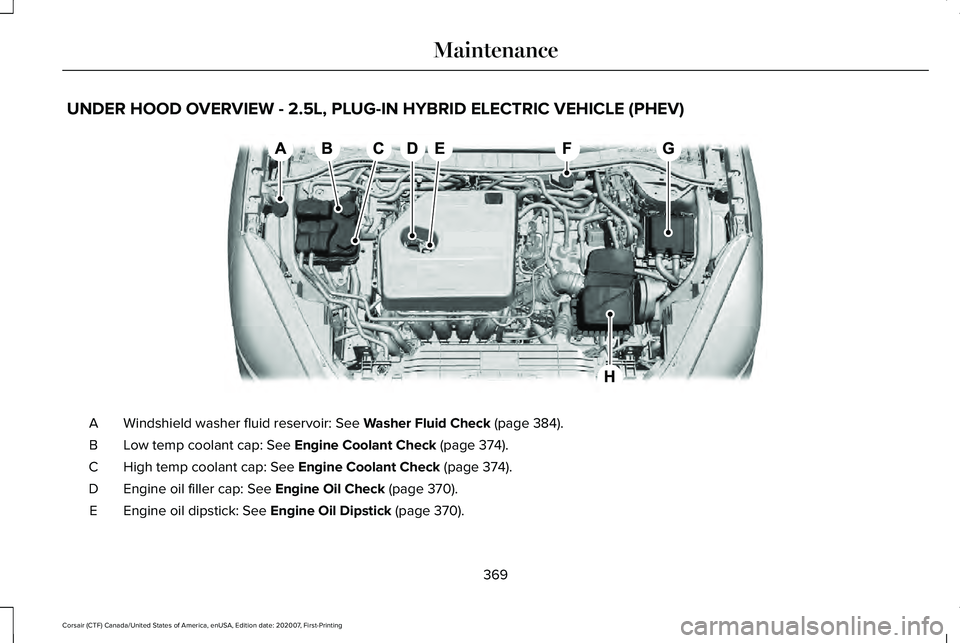
Windshield washer fluid reservoir: See Washer Fluid Check (page 384).
A
Low temp coolant cap:
See Engine Coolant Check (page 374).
B
High temp coolant cap:
See Engine Coolant Check (page 374).
C
Engine oil filler cap:
See Engine Oil Check (page 370).
D
Engine oil dipstick:
See Engine Oil Dipstick (page 370).
E
369
Corsair (CTF) Canada/United States of America, enUSA, Edition date: 202007, First-Printing MaintenanceE291097