2021 LINCOLN CORSAIR ignition
[x] Cancel search: ignitionPage 84 of 638

LOCATING THE KEYLESS ENTRY
KEYPAD
The keypad is near the driver window and
illuminates when you touch it.
KEYLESS ENTRY LIMITATIONS
Make sure a valid passive key is within one
of the three external detection ranges. These
are approximately 5 ft (1.5 m) from the front
door handles and the liftgate. The system may not function if:
•
The passive key remains stationary for
about a minute.
• The vehicle battery has no charge.
• The passive key battery has no charge.
• The passive key frequencies are jammed.
• The passive key is too close to metal
objects or electronic devices, for
example, keys or a cell phone.
MASTER ACCESS CODE
What Is the Master Access Code
The master access code is a factory-set
five-digit entry code. You can operate the
keypad with the master access code at any
time. The master access code is on the
owner’ s wallet card in the glove box and is
available from an authorized dealer. KEYLESS ENTRY SETTINGS
Switching Keyless Entry On and Off
1. Switch the ignition on using an admin
key.
2. Using the information display controls on
the steering wheel, select
Settings. 3. Select
Vehicle.
4. Select
Locks.
5. Press and hold the
OK button until a
confirmation message appears in the
information display.
6. Switch the ignition off.
81
Corsair (CTF) Canada/United States of America, enUSA, Edition date: 202007, First-Printing Keyless EntryE190936 E191336
Page 86 of 638

LOCKING AND UNLOCKING THE
DOORS USING KEYLESS ENTRY
Unlocking the Doors
Enter the factory-set five-digit code or your
personal code. You must press each number
within five seconds of each other. The
interior lamps illuminate.
Note:
All doors unlock if you disable the
two-stage unlocking feature. To disable the
two-stage unlocking feature:
1. Switch the ignition on using an admin key.
2. Using the information display controls on
the steering wheel, select Settings.
3. Select
Vehicle Settings.
4. Select
Locks.
5. Press and hold the
OK button until a
confirmation message appears in the
information display.
6. Switch the ignition off. To Unlock All Doors
Enter the factory-set code or your personal
code, then press the
3·4 control within five
seconds.
To Release the Liftgate (If Equipped)
Enter the factory-set code or your personal
code, then press the
5·6 control within five
seconds.
Unlocking Using Passive Key With your intelligent access key within
5 ft
(1.5 m) of your vehicle, touch the unlock
sensor on the back of the door handle for a
brief period and then pull on the door handle
to unlock, being careful not to touch the lock
sensor at the same time or pull on the door
handle too quickly. The intelligent access
system requires a brief delay to authenticate
your intelligent access key. Using the Power Liftgate with Passive Key
(If Equipped)
With your intelligent access key within
5 ft
(1.5 m) of your vehicle, press the exterior
liftgate release button inside of the liftgate
handle. The liftgate unlocks and opens. See
Opening the Liftgate From Outside Your
Vehicle
(page 85).
83
Corsair (CTF) Canada/United States of America, enUSA, Edition date: 202007, First-Printing Keyless EntryE248553 E291352
Page 87 of 638

Locking the Doors
Press and hold 7·8 and 9·0 at the same time
with the driver door closed. You do not need
to enter the keypad code first.
Locking Using Passive Key
With your intelligent access key within 3 ft
(1 m) of your vehicle, touch the outer door
handle lock sensor for approximately one
second to lock, being careful to not touch
the unlock sensor on the back of the door
handle at the same time. After locking, you
can immediately pull on the door handle to
confirm locking occurred without
inadvertently unlocking.
Note: Do not use the outside door handle
as a roof cargo strap. KEYLESS ENTRY –
TROUBLESHOOTING
Keyless Entry – Frequently Asked
Questions
Why does the keypad not accept the access
code?
If you enter the access code too fast on
the keypad, the unlock function may not
work. Slowly re-enter the access code.
Why does the passive key not work? The system deactivates passive keys
left inside your vehicle when you lock
it. You cannot switch the ignition on
using a deactivated passive key. Press
the unlock button on the remote control
to reactivate a passive key.
Why does the keypad not function? The keypad goes into an anti-scan
mode if you enter a wrong code seven
times. The anti-scan mode disables the
keypad for one minute and the red light
flashes.
84
Corsair (CTF) Canada/United States of America, enUSA, Edition date: 202007, First-Printing Keyless EntryE248554
Page 96 of 638

PASSIVE ANTI-THEFT SYSTEM
What Is the Passive Anti-Theft System
The passive anti-theft system prevents
someone from starting the vehicle with an
incorrectly coded key.
Arming the Passive Anti-Theft System
The Passive Anti-Theft System arms
automatically after a short period of time
when you switch the ignition off.
Disarming the Passive Anti-Theft
System
The engine immobilizer disarms when you
switch the ignition on with a correctly coded
key.
Note:
You could have difficulty starting the
vehicle if you have metallic objects,
electronic devices or a second coded key
on the same key chain. ANTI-THEFT ALARM SYSTEM
What Is the Anti-Theft Alarm System
The Anti-Theft Alarm System warns you of
an unauthorized entry to your vehicle.
How Does the Anti-Theft Alarm System
Work
When armed, the anti-theft alarm is triggered
in any of the following ways:
•
If someone opens a door, the liftgate or
the hood without a correctly coded key
or remote control.
• If you turn the power on without a
correctly coded key.
• If the interior sensors detect movement
inside your vehicle.
• If the inclination sensors detect an
attempt to raise your vehicle.
• If someone disconnects the vehicle
battery or the battery backup alarm. If the anti-theft alarm is triggered, the alarm
horn sounds for 30 seconds and the
direction indicators flash for 5 minutes.
Any further attempts to carry out one of the
above sounds the alarm again.
What Is the Perimeter Alarm
The perimeter alarm is designed to detect
unauthorized access to your vehicle.
What Are the Interior Sensors
The interior sensors are designed to detect
any movement inside your vehicle.
The interior sensors are in the overhead
console.
Note:
Do not cover the interior sensors.
What Are the Inclination Sensors
The inclination sensor is designed to detect
an attempt to raise your vehicle, for example
to remove a wheel or to tow it away.
93
Corsair (CTF) Canada/United States of America, enUSA, Edition date: 202007, First-Printing Security
Page 97 of 638

What Is the Battery Backup Alarm
The battery backup alarm is an additional
alarm system that has its own battery and
horn. It is designed to detect if the vehicle
battery or the battery backup alarm is
disconnected.
Arming the Anti-Theft Alarm System
The alarm is ready to arm when there is not
a key in your vehicle.
Lock your vehicle with your remote control
to arm the alarm.
Disarming the Anti-Theft Alarm System
Disarm the alarm by performing any of the
following actions:
•
Unlock the doors or luggage
compartment with the remote control.
• Switch your vehicle on or start your
vehicle. ANTI-THEFT ALARM SYSTEM
SETTINGS
What are the Alarm Security Levels
You can select two levels of alarm security,
all sensors and perimeter sensing.
All Sensors
All sensors is the standard setting.
In all sensors, all equipped sensors are on
when you arm the alarm.
Note:
Do not arm the alarm with all sensors
if passengers, animals or other moving
objects are inside your vehicle.
Perimeter Sensing
In perimeter sensing, the interior sensors are
off when you arm the alarm.
All the other equipped sensors activate when
you arm the alarm in this mode. Setting the Alarm Security Level
1. Press Settings on the touchscreen.
2. Press
Vehicle Settings.
3. Press
Alarm System.
4. Press
Sensor Set.
5. Press a setting.
What Is Ask on Exit
You can choose which level of security you
require after you switch the ignition off.
Note: If you do not choose a setting, the
system defaults to all sensors.
Switching Ask on Exit On and Off
1. Press
Settings on the touchscreen.
2. Press
Vehicle Settings.
3. Press
Alarm System.
4. Switch
Ask on Exit on or off.
94
Corsair (CTF) Canada/United States of America, enUSA, Edition date: 202007, First-Printing Security
Page 106 of 638
Push the lever away from you to
switch the high beam on.
Push the lever forward again or pull the lever
toward you to switch the high beams off.
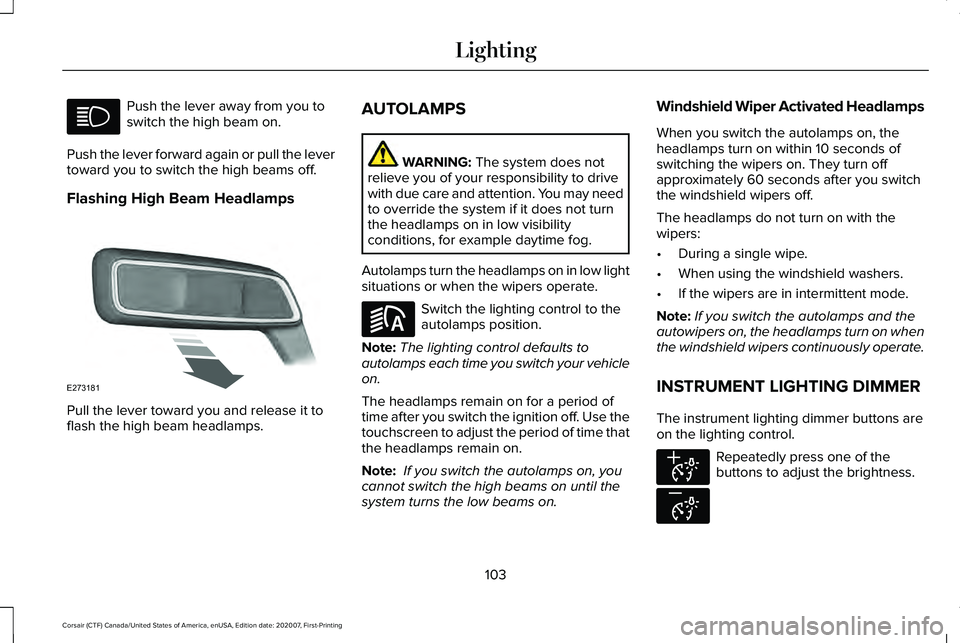
Flashing High Beam Headlamps Pull the lever toward you and release it to
flash the high beam headlamps. AUTOLAMPS WARNING: The system does not
relieve you of your responsibility to drive
with due care and attention. You may need
to override the system if it does not turn
the headlamps on in low visibility
conditions, for example daytime fog.
Autolamps turn the headlamps on in low light
situations or when the wipers operate. Switch the lighting control to the
autolamps position.
Note: The lighting control defaults to
autolamps each time you switch your vehicle
on.
The headlamps remain on for a period of
time after you switch the ignition off. Use the
touchscreen to adjust the period of time that
the headlamps remain on.
Note: If you switch the autolamps on, you
cannot switch the high beams on until the
system turns the low beams on. Windshield Wiper Activated Headlamps
When you switch the autolamps on, the
headlamps turn on within 10 seconds of
switching the wipers on. They turn off
approximately 60 seconds after you switch
the windshield wipers off.
The headlamps do not turn on with the
wipers:
•
During a single wipe.
• When using the windshield washers.
• If the wipers are in intermittent mode.
Note: If you switch the autolamps and the
autowipers on, the headlamps turn on when
the windshield wipers continuously operate.
INSTRUMENT LIGHTING DIMMER
The instrument lighting dimmer buttons are
on the lighting control. Repeatedly press one of the
buttons to adjust the brightness.
103
Corsair (CTF) Canada/United States of America, enUSA, Edition date: 202007, First-Printing Lighting E273181 E281240 E291299 E296433
Page 107 of 638
HEADLAMP EXIT DELAY
After you switch the ignition off, you can
switch the headlamps on by pulling the
direction indicator lever toward you. You will
hear a short tone. The headlamps will switch
off automatically after three minutes with any
door open or 30 seconds after the last door
has been closed. You can cancel this feature
by pulling the direction indicator lever toward
you again or switching the ignition on.
DAYTIME RUNNING LAMPS -
VEHICLES WITH: CONFIGURABLE
DAYTIME RUNNING LAMPS
WARNING: The daytime running
lamps system does not activate the rear
lamps and may not provide adequate
lighting during low visibility driving
conditions. Make sure you switch the
headlamps on, as appropriate, during all
low visibility conditions. Failure to do so
may result in a crash. Switch the daytime running lamps on or off
using the touchscreen:
1.
Select Settings. See Settings
(page 526).
2. Select
Vehicle.
3. Select
Lighting.
The daytime running lamps turn on when:
1. The lamps are on in the information display.
2. You switch the ignition on.
3. The transmission is not in park (P) for vehicles with automatic transmissions or
you release the parking brake for
vehicles with manual transmissions.
4. The lighting control is in the autolamps position.
5. The headlamps are off.
The other lighting control switch positions
do not turn on the daytime running lamps.
If the daytime running lamps are off in the
information display, the lamps stay off in all
switch positions. DAYTIME RUNNING LAMPS -
VEHICLES WITH: DAYTIME
RUNNING LAMPS (DRL) WARNING:
The daytime running
lamps system does not activate the rear
lamps and may not provide adequate
lighting during low visibility driving
conditions. Make sure you switch the
headlamps on, as appropriate, during all
low visibility conditions. Failure to do so
may result in a crash.
The system turns the lamps on in daylight
conditions.
To switch the system on, switch the lighting
control to any position except headlamps.
FRONT FOG LAMPS
(IF EQUIPPED)
Switching the Front Fog Lamps On or
Off
Only switch the front fog lamps on during
reduced visibility.
104
Corsair (CTF) Canada/United States of America, enUSA, Edition date: 202007, First-Printing Lighting
Page 116 of 638
Accessory Delay
You can use the window controls for several
minutes after switching off the ignition or
until opening either front door.
GLOBAL OPENING AND CLOSING
You can use the remote control to operate
the windows with the ignition off.
Note:
You can switch this feature on and off
in the information display or contact an
authorized dealer. See General Information
(page 131).
Note: To operate this feature, make sure the
accessory delay is not switched on.
Opening the Windows
You can open the windows only for a short
time after you unlock your vehicle with the
remote control. After you unlock your vehicle,
press and hold the remote control unlock
button to open the windows. Release the
button once movement starts. Press the lock
or unlock button to stop movement. Closing the Windows WARNING:
When closing the
windows, you should verify they are free
of obstructions and make sure that children
and pets are not in the proximity of the
window openings.
To close the windows, press and hold the
remote control lock button. Release the
button once movement starts. Press the lock
or unlock button to stop movement.
EXTERIOR MIRRORS
Power Exterior Mirrors WARNING: Do not adjust the mirrors
when your vehicle is moving. This could
result in the loss of control of your vehicle,
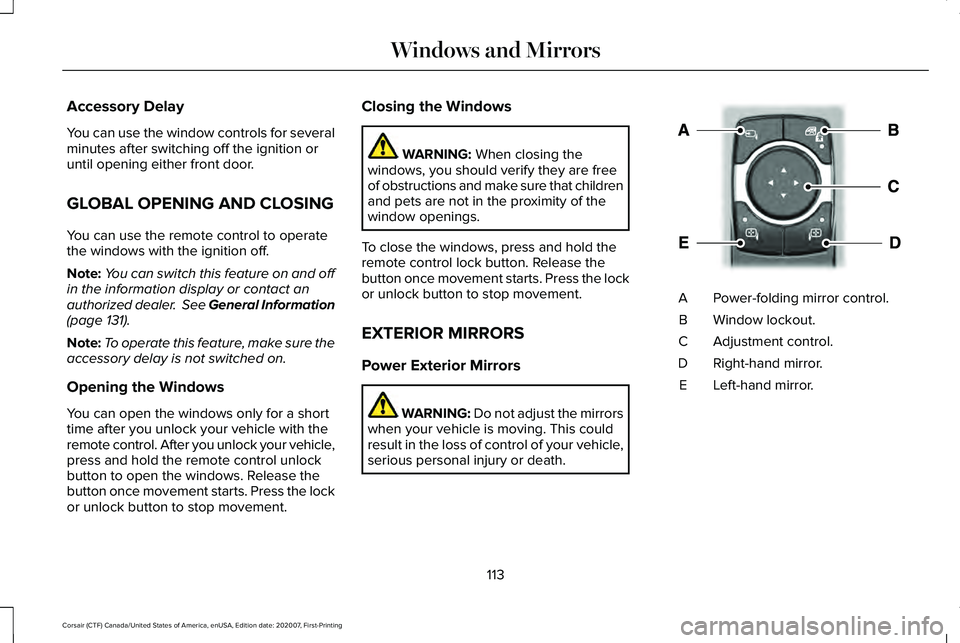
serious personal injury or death. Power-folding mirror control.
A
Window lockout.
B
Adjustment control.
C
Right-hand mirror.
D
Left-hand mirror.
E
113
Corsair (CTF) Canada/United States of America, enUSA, Edition date: 202007, First-Printing Windows and MirrorsE295322