2021 LINCOLN AVIATOR instrument cluster
[x] Cancel search: instrument clusterPage 132 of 667

WARNING LAMPS AND
INDICATORS
The following warning lamps and indicators
alert you to a vehicle condition that may
become serious. Some lamps illuminate
when you start your vehicle to make sure
they work. If any lamps remain on after
starting your vehicle, refer to the respective
system warning lamp for further information.
Note:
Some warning indicators appear in
the information display and function the
same as a warning lamp, but do not display
when you start your vehicle.
Adaptive Cruise Control (If Equipped) The speed control system indicator
light changes color to indicate
what mode the system is in.
See
How Does Adaptive Cruise Control With
Stop and Go Work
(page 291).
On (white light): Illuminates when you switch
on the adaptive cruise control system. Turns
off when the speed control system is turned
off. Engaged (green light): Illuminates when you
engage the adaptive cruise control system.
Turns off when you disengage the speed
control system.
Anti-Lock Braking System
If it illuminates when you are
driving, this indicates a system
error. You continue to have the
normal braking (without ABS) unless the
brake system warning lamp also illuminates.
Have the system checked by an authorized
dealer.
Automatic High Beam Control Illuminates when this feature is on.
See
Automatic High Beam
Control (page 117).
Auto Hold Active Illuminates when the system holds
your vehicle stationary.Auto Hold Unavailable Illuminates when the system is on,
but unavailable to hold your
vehicle stationary.
Auto Start-stop
(If Equipped) Illuminates when the engine shuts
down or in conjunction with a
message.
Battery If it illuminates while driving, it
indicates a system error. Switch off
all unnecessary electrical
equipment and have the system checked by
an authorized dealer immediately.
Blind Spot Monitor Illuminates when you switch this
feature off or in conjunction with a
message.
See Blind Spot
Information System (page 312).
129
Aviator (CTV) Canada/United States of America, enUSA, Edition date: 202007, Second-Printing Instrument ClusterE144524 E197933 E197934 E151262
Page 133 of 667
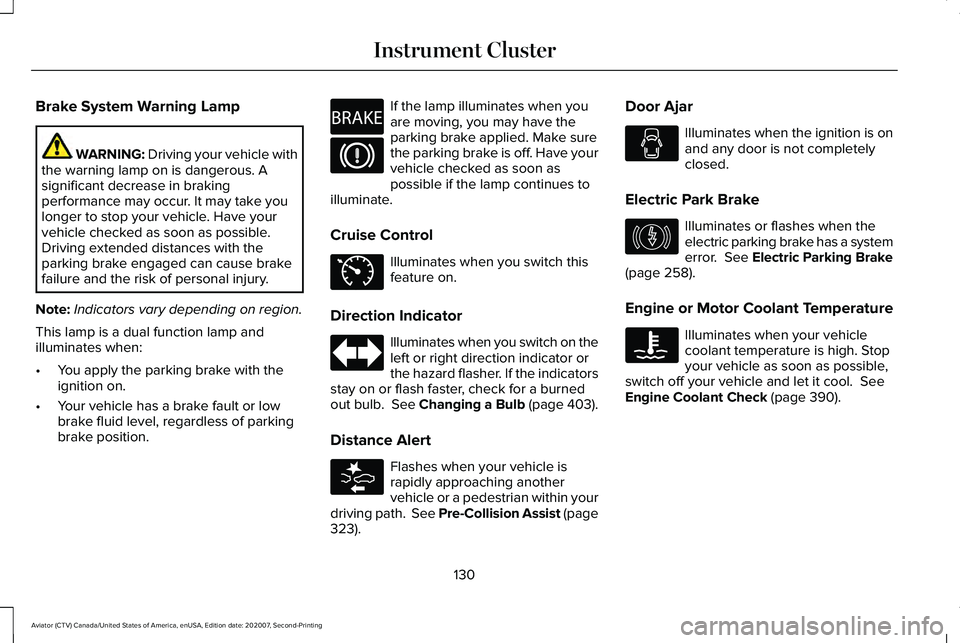
Brake System Warning Lamp
WARNING: Driving your vehicle with
the warning lamp on is dangerous. A
significant decrease in braking
performance may occur. It may take you
longer to stop your vehicle. Have your
vehicle checked as soon as possible.
Driving extended distances with the
parking brake engaged can cause brake
failure and the risk of personal injury.
Note: Indicators vary depending on region.
This lamp is a dual function lamp and
illuminates when:
• You apply the parking brake with the
ignition on.
• Your vehicle has a brake fault or low
brake fluid level, regardless of parking
brake position. If the lamp illuminates when you
are moving, you may have the
parking brake applied. Make sure
the parking brake is off. Have your
vehicle checked as soon as
possible if the lamp continues to
illuminate.
Cruise Control Illuminates when you switch this
feature on.
Direction Indicator Illuminates when you switch on the
left or right direction indicator or
the hazard flasher. If the indicators
stay on or flash faster, check for a burned
out bulb.
See Changing a Bulb (page 403).
Distance Alert Flashes when your vehicle is
rapidly approaching another
vehicle or a pedestrian within your
driving path. See Pre-Collision Assist (page
323
). Door Ajar Illuminates when the ignition is on
and any door is not completely
closed.
Electric Park Brake Illuminates or flashes when the
electric parking brake has a system
error.
See Electric Parking Brake
(page 258).
Engine or Motor Coolant Temperature Illuminates when your vehicle
coolant temperature is high. Stop
your vehicle as soon as possible,
switch off your vehicle and let it cool.
See
Engine Coolant Check (page 390).
130
Aviator (CTV) Canada/United States of America, enUSA, Edition date: 202007, Second-Printing Instrument ClusterE270480 E71340 E281485 E146190
Page 134 of 667

Engine Oil
If it illuminates with the engine
running or when you are driving,
this indicates a system error. Stop
your vehicle as soon as it is safe to do so
and switch the engine off. Check the engine
oil level. See Engine Oil Check (page 387).
Note: Do not resume your journey if it
illuminates despite the level being correct.
Have the system checked by an authorized
dealer immediately.
Fasten Seatbelt Illuminates and a tone sounds to
remind you to fasten your seatbelt.
See Seatbelt Reminder (page 48).
Fasten Rear Seatbelt Illuminates and a tone sounds to
signal the rear seatbelts are not
fastened. Front Airbag If it fails to illuminate when you
start your vehicle, continues to
flash or remains on, it indicates
there is a system error. Have the system
checked by an authorized dealer.
Front Fog Lamps
(If Equipped) Illuminates when you switch the
front fog lamps on.
High Beam Illuminates when you switch the
high beam headlamps on. It flashes
when you use the headlamp
flasher.
Hill Descent
(If Equipped) Illuminates when you switch hill
descent on.Hood Ajar Illuminates when the ignition is on
and the hood is not completely
closed.
Lamps On Illuminates when you switch the
low beam headlamps or the
parking lamps on.
Liftgate Ajar Illuminates when the liftgate is not
completely closed.
Low Beam Warning Illuminates when the low beam
headlamp bulb is not functioning
properly.
Low Fuel Level Illuminates when the fuel level is
low or the fuel tank is nearly
empty. Refuel as soon as possible.
131
Aviator (CTV) Canada/United States of America, enUSA, Edition date: 202007, Second-Printing Instrument Cluster E71880 E206718 E67017 E246598 E162453 E181350
Page 135 of 667

Low Tire Pressure Warning
Illuminates when your tire pressure
is low. If the lamp remains on with
the engine running or when
driving, check your tire pressure as soon as
possible.
It also illuminates momentarily when you
switch the ignition on to confirm the lamp is
functional. If it does not illuminate when you
switch the ignition on, or begins to flash at
any time, have the system checked by an
authorized dealer.
Low Washer Fluid Illuminates when the windshield
washer fluid is low.
Powertrain Fault Illuminates when the system
detects a powertrain or an 4WD
fault. Contact an authorized dealer
as soon as possible. Ready to Drive (If Equipped) Illuminates when you have
switched on your vehicle and it is
ready to drive. A corresponding
message may appear stating ready to drive.
Service Engine Soon It illuminates when you switch the
ignition on prior to engine start to
check the bulb and to indicate
whether your vehicle is ready for Inspection
and Maintenance (I/M) testing.
Normally, it illuminates until the engine is
cranked and automatically turns off if no
system errors are present. However, if after
15 seconds it flashes eight times, this
indicates that your vehicle is not ready for
Inspection and Maintenance (I/M) testing.
See
Catalytic Converter (page 235).
If it illuminates when the engine is running
this indicates a system error. The On Board
Diagnostics system has detected an error in
the vehicle emission control system. If it flashes, engine misfire may be occurring.
Continuing to drive your vehicle may cause
reduced power or the engine to stop. Failure
to respond to the warning lamp may cause
component damage not covered by the
vehicle Warranty. Have your vehicle
checked as soon as possible.
Stability Control
It flashes when the system is
active. If it remains illuminated or
does not illuminate when you
switch the ignition on, this indicates a system
error. During a system error the system
switches off. Have the system checked by
an authorized dealer immediately.
See
Using Stability Control (page 269).
Stability Control Off Illuminates when you switch the
system off. It goes out when you
switch the system back on or when
you switch the ignition off.
See Using
Stability Control (page 269).
132
Aviator (CTV) Canada/United States of America, enUSA, Edition date: 202007, Second-Printing Instrument Cluster E132353 E224090 E138639 E130458
Page 136 of 667

Stop Safely Now
Illuminates if your vehicle has an
electrical component fault or failure
that will cause your vehicle to
shutdown or enter into a limited operating
mode. You may also see a message.
Tow Haul Indicator (If Equipped) Illuminates when the system
switches on.
Vehicle Plugged in
(If Equipped) Illuminates when your vehicle is
plugged in. A corresponding
message may display after
attempting to start your vehicle. AUDIBLE WARNINGS AND
INDICATORS
Keyless Warning Alert
The horn will sound twice when you exit your
vehicle with the intelligent access key and
your vehicle is in RUN, indicating your vehicle
is still on.
Headlamps On Warning Chime
Sounds when you have left the headlamps
or parking lamps on and open the driver door
with the vehicle off.
Parking Brake On Warning Chime
Sounds when you have left the parking brake
on and drive your vehicle. If the warning
chime remains on after you have released
the parking brake, have the system checked
by your authorized dealer immediately.
133
Aviator (CTV) Canada/United States of America, enUSA, Edition date: 202007, Second-Printing Instrument ClusterE144693 E246592 E228962
Page 141 of 667

Note: On Demand information appears on the right-hand side of your instrument \
cluster in single gauge view and in the center of your
instrum")
PERSONALIZED SETTINGS
Information On Demand (If Equipped)
Note: On Demand information appears on the right-hand side of your instrument \
cluster in single gauge view and in the center of your
instrument cluster in dual gauge view when certain drive modes are switc\
hed on.
Note: Pure EV information is only available when you switch on the Pure EV dri\
ve mode. Calm Screen
PURE EVTrip 1
Trip 2
This Trip
Fuel Economy Seatbelts
Tire Pressure
Power Distribution
Trailer Light Check Off Road
EV Coach
138
Aviator (CTV) Canada/United States of America, enUSA, Edition date: 202007, Second-Printing Information Displays
Page 167 of 667

HEAD UP DISPLAY (IF EQUIPPED)
This is a visual system that shows information
in your field of view as you drive. The
information comes from various vehicle
systems and includes vehicle speed, speed
limit, navigation, and advanced driver
assistance systems (ADAS), such as adaptive
cruise control (ACC) and the lane keeping
system. This system projects the information
off the windshield, and focuses the image
near the end of the hood approximately
7 ft
(2 m) in front of the driver. Viewing this
information does not require you to
significantly move your head, allowing you
to keep your eyes on the road while having
quick and easy access to information. Configuring The Head Up Display
You can control the system's options through
the information display by using the 4-way
toggle on the right-hand side of your steering
wheel.
See General Information (page 134).
You can adjust the display according to your
height to make viewing the content easier.
You can also adjust what content displays
and the brightness of the content. The
system's options appear in the instrument
cluster while the updates happen in the HUD.
Note: If HUD On is unchecked, other options
of the system are hidden.
Note: The HUD menu automatically closes
after a certain period of inactivity. Note:
The HUD image brightness
automatically adjusts to the brightness of
the ambient environment. You have the
ability to adjust the brightness further
according to your preference.
Note: In some instances, sunlight can cause
some reflections in and around the HUD
image. Head-Up Display (HUD)
Turns the HUD on and off.
HUD On
Follow onscreen directions to confirm or modify your settings.
Brightness
Follow onscreen directions to confirm or
modify your settings.
Vertical Position
HUD Position
Image Rotation
164
Aviator (CTV) Canada/United States of America, enUSA, Edition date: 202007, Second-Printing Information Displays
Page 222 of 667

•
The trailer is not connected.
• If you select Normal, Conserve, or
Slippery.
• You are not in 4H or 4L.
• You have not selected Manual shift
mode.
• Hill descent control is not active.
• You have not selected Tow haul, Excite,
Deep, or Slow Climb.
Note: When in Excite mode, Start/Stop can
be enabled by pressing the Auto-Start-Stop
button. The green Auto-Start-Stop
indicator light on the instrument
cluster will illuminate to indicate
when the automatic engine stop occurs. If the instrument cluster is
equipped with a grey
Auto-Start-Stop indicator light, it
illuminates when automatic engine stop is
not available due to one of the above noted
conditions not being met. Automatic Engine Restart
Any of the following conditions will result in
an automatic restart of the engine:
•
You have removed your foot from the
brake pedal.
• You press the accelerator pedal.
• You press the accelerator and the brake
pedal at the same time.
• The driver safety belt becomes
unfastened or the driver door is ajar.
• Your vehicle is moving.
• The interior compartment does not meet
customer comfort when air conditioning
or heat is on.
• Fogging of the windows could occur and
the air conditioning is on.
• The battery is not within optimal
operating conditions.
• You have exceeded the maximum engine
off time.
• When you press the Auto-Start-Stop
button with the engine automatically
stopped. •
The front defroster is turned to the Max
setting.
• When you shift into park (P), the engine
will restart.
Any of the following conditions may result in
an automatic restart of the engine:
• You have increased the blower fan speed
or changed the climate control
temperature.
• You have an electrical accessory turned
on or plugged in.
Note: You may notice that the climate seat
fan fluctuates during an automatic restart.
Disabling Auto-Start-Stop Press the button on the instrument
panel to access the
Auto-Start-Stop feature on the
touchscreen. Use the touchscreen to
deactivate the feature.
Deactivating the feature lasts only 1 key
cycle. Use the touchscreen to restore
Auto-Start-Stop function.
219
Aviator (CTV) Canada/United States of America, enUSA, Edition date: 202007, Second-Printing Unique Driving Characteristics E146361 E287975