2021 LEXUS RX450h light
[x] Cancel search: lightPage 206 of 528

2064-3. Operating the lights and wipers
*:If equipped
1 (U.S.A.) or (Canada)
Turns the fog lights off
2 Turns the fog lights on
■Fog lights can be used when
The headlights are on in low beam.
Operate the lever operates the
wipers or washer as follows.
When “AUTO” is selected, the wipers
will operate automatically when the
sensor detects falling rain. The system
automatically adjusts wiper timing in
accordance with rain volume and vehi-
cle speed.
The sensor sensitivity can be adjusted
when “AUTO” is selected.
Fog light switch*
The fog lights secu re excellent visi-
bility in difficult driving conditions,
such as in rain and fog.
Operating instructions
Windshield wipers and
washer
Operating the lever can switch
between automatic operation and
manual operation, or can use the
washer.
NOTICE
■When the windshield is dry
Do not use the wipers, as they may dam-
age the windshield.
Operating the wiper lever
Page 207 of 528

2074-3. Operating the lights and wipers
4
Driving1 (U.S.A.) or (Canada)
Off
2 Rain-sensing wiper operation
3 (U.S.A.) or (Canada)
Low speed operation
4 (U.S.A.) or (Canada)
High speed operation
5 (U.S.A.) or (Canada)
Temporary operation
6 Increases the sensitivity
7 Decreases the sensitivity 8
Washer/wiper dual opera-
tion
Pulling the lever operates the wipers and
washer.
The wipers will automatically operate a
couple of times after the washer squirts.
Vehicles with headlight cleaners:
When the power switch is in ON mode
and the headlights are on, if the lever is
pulled, the headlight cleaners will operate
once. After this, the he adlight cleaners will
operate every 5th time the lever is pulled.
■The windshield wipers and washer can
be operated when
The power switch is in ON mode.
■Dripping prevention wiper sweep
After washing and wipi ng operation several
times, the wipers operate one more time
after a short delay to prevent dripping.
However, this function will not operate while
driving.
■Effects of vehicle speed on wiper opera-
tion
Vehicle speed affects the intermittent wiper
interval.
■Raindrop sensor
●The raindrop sensor judges the amount
of raindrops.
An optical sensor is adopted. It may not
operate properly when sunlight from the
rising or setting of the sun intermittently
strikes the windshield, or if bugs, etc. are
present on the windshield
Page 208 of 528

2084-3. Operating the lights and wipers
●If the wiper switch is turned to the
“AUTO” position while the power switch
is in ON mode, the wipers will operate
once to show that AUTO mode is acti-
vated.
●When the sensor sensitivity ring is turned
toward high while in “AUTO” position, the
wipers will operate once to indicate that
the sensor sensitiv ity is enhanced.
●If the temperature of the raindrop sensor
is 194°F (90°C) or higher, or 5°F (-15°C)
or lower, automatic operation may not
occur. In this case, operate the wipers in
any mode other than AUTO mode.
■If no windshield washer fluid sprays
Check that the washer nozzles are not
blocked, if there is washer fluid in the
washer fluid tank.
■Front door opening linked windshield
wiper stop function
When “AUTO” is selected and the wind-
shield wipers are operatin g, if a front door is
opened, the operation of the windshield
wipers will be stopped to prevent anyone
near the vehicle from being sprayed by
water from the wipers, provided the vehicle
is stopped with the parking brake applied or
the shift lever in P. When the front door is
closed, wiper operation will resume.
■Customization
Some functions can be customized.
( P.480)
When the windshield wipers are not
being used, they retract to below the
hood. To enable the windshield wipers
to be lifted when parking in cold condi-
tions or when replacing a windshield
wiper insert, change the rest position of
the windshield wipers to the service
position using the wiper lever.
WARNING
■Caution regarding the use of wind-
shield wipers in AUTO mode
The windshield wipers may operate
unexpectedly if the sensor is touched or
the windshield is subj ect to vibration in
A U T O m o d e . T a k e c a r e t h a t y o u r f i n g e r s ,
etc. do not become caught in the wind-
shield wipers.
■Caution regarding the use of washer
fluid
When it is cold, do not use the washer
fluid until the windshield becomes warm.
The fluid may freeze on the windshield
and cause low visibility. This may lead to
an accident, resulting in death or serious
injury.
NOTICE
■When the washer fluid tank is empty
Do not operate the switch continually as
the washer fluid pump may overheat.
■When a nozzle becomes blocked
In this case, contact your Lexus dealer.
Do not try to clear it with a pin or other
object. The nozzle will be damaged.
Changing the windshield wiper
rest position/Lifting the wind-
shield wipers
Page 209 of 528

2094-3. Operating the lights and wipers
4
Driving
■Raising the wipers to the service
position
Within approximately 40 seconds of
turning the power switch off, move the
wiper lever to the (U.S.A.) or
(Canada) position and hold it for
approximately 2 se conds or more.
The wipers will move to the service posi-
tion.
■Lifting the windshield wipers
While holding the hook portion of the
wiper arm, lift the windshield wiper
from the windshield. Hook portion
■Lowering the windshield wipers to the
retracted position
With the windshield wipers placed on the
windshield, turn the power switch to ON
mode and then move the wiper lever to an
operating position. Wh en the wiper switch
is turned off, the windshield wipers will stop
at the retracted position.
NOTICE
■When lifting the windshield wipers
●Do not lift the wind shield wipers when
they are in the retracted position
below the hood. Otherwise, they may
contact the hood, possibly resulting in
damage to a windshield wiper and/or
the hood.
●Do not lift a windshield wiper by the
wiper blade. Otherwise, the wiper
blade may be deformed.
●Do not operate the wiper lever when
the windshield wipe rs are lifted. Oth-
erwise, the windshield wipers may
contact the hood, possibly resulting in
damage to the windshield wipers
and/or hood.
A
Page 210 of 528
2104-3. Operating the lights and wipers
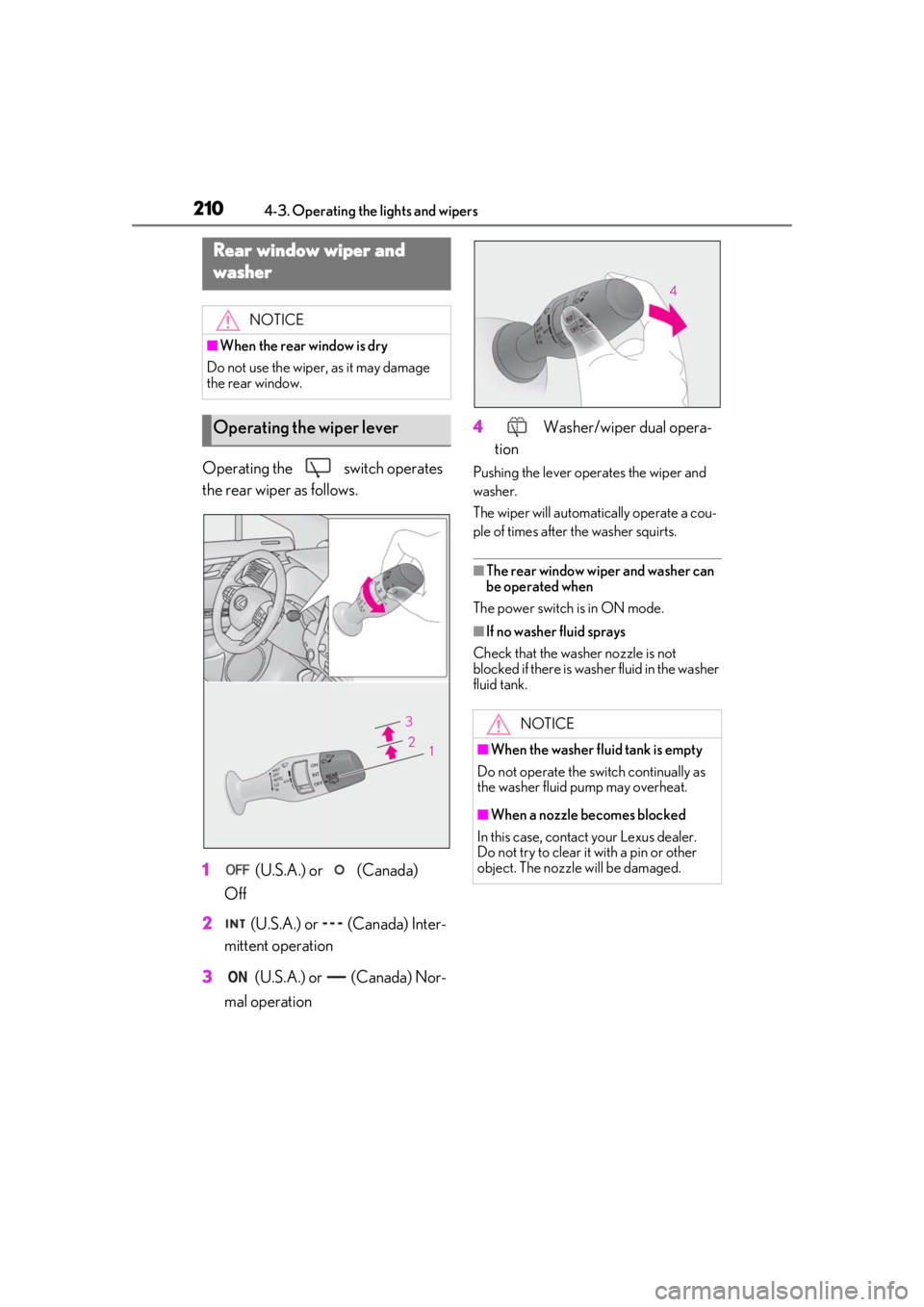
Operating the switch operates
the rear wiper as follows.
1 (U.S.A.) or (Canada)
Off
2 (U.S.A.) or (Canada) Inter-
mittent operation
3 (U.S.A.) or (Canada) Nor-
mal operation 4
Washer/wiper dual opera-
tionPushing the lever oper ates the wiper and
washer.
The wiper will automatically operate a cou-
ple of times after the washer squirts.
■The rear window wiper and washer can
be operated when
The power switch is in ON mode.
■If no washer fluid sprays
Check that the wash er nozzle is not
blocked if there is wash er fluid in the washer
fluid tank.
Rear window wiper and
washer
NOTICE
■When the rear window is dry
Do not use the wiper, as it may damage
the rear window.
Operating the wiper lever
NOTICE
■When the washer fluid tank is empty
Do not operate the switch continually as
the washer fluid pump may overheat.
■When a nozzle becomes blocked
In this case, contact your Lexus dealer.
Do not try to clear it with a pin or other
object. The nozzle will be damaged.
Page 212 of 528

2124-4. Refueling
1Press the switch to open the fuel
filler door.
The fuel filler door will open within about
10 seconds of the sw itch being pressed.
Before refueling is possible, a message will
be shown on the multi-information display
in the instrument clus ter to indicate the
progress of the fuel filler door opener.
2 Open the fuel filler door until it is
securely locked.
3 Turn the fuel tank cap slowly and
remove it, then put it into the holder
on the fuel filler door.
■If the fuel filler door cannot be opened
P.446
1 After refueling, turn the fuel tank
cap until you hear a click. Once the
cap is released, it will turn slightly in
the opposite direction.
2 Close the fuel filler door.
NOTICE
●Do not spill fuel during refueling.
Doing so may damage the vehicle,
such as causing the emission control
system to operate abnormally or dam-
aging fuel system components or the
vehicle’s painted surface.
Opening the fuel tank cap
NOTICE
■When refueling
When refueling your vehicle, make sure
that the fuel filler door lock is not pushed
by the fuel nozzle boot, etc., as this may
cause a valve to close, possibly resulting
in a fuel spill.
If the fuel filler door lock has been
pushed, operate the fuel filler door
opener switch in the vehicle before con-
tinuing to refuel.
Closing the fuel tank cap
Page 216 of 528

2164-5. Using the driving support systems
WARNING
●If the part of the windshield in front of
the front camera is fogged up or cov-
ered with condensation, or ice, use the
windshield defogger to remove the
fog, condensation, or ice. (P.304)
●If water droplets cannot be properly
removed from the area of the wind-
shield in front of the front camera by
the windshield wipers, replace the
wiper insert or wiper blade.
●Do not attach window tint to the wind-
shield.
●Replace the windshield if it is damaged
or cracked.
After replacing the windshield, the
front camera must be recalibrated.
Contact your Lexus dealer.
●Do not allow liquids to contact the
front camera.
●Do not allow bright lights to shine into
the front camera.
●Do not dirty or damage the front cam-
era.
When cleaning the inside of the wind-
shield, do not allow glass cleaner to
contact the lens of the front camera.
Also, do not touch the lens.
If the lens is dirty or damaged, contact
your Lexus dealer.
●Do not subject the front camera to a
strong impact.
●Do not change the installation position
or direction of the front camera or
remove it.
●Do not disassemble the front camera.
●Do not modify any components of the
vehicle around the front camera
(inside rear view mirror, etc.) or ceiling.
●Do not attach any accessories to the
hood, front grille or front bumper that
may obstruct the front camera. Con-
tact your Lexus dealer for details.
●If a surfboard or other long object is to
be mounted on the roof, make sure
that it will not obstruct the front cam-
era.
●Do not modify the headlights or other
lights.
Page 219 of 528

2194-5. Using the driving support systems
4
Driving
●In the following situations, if the situation has changed (or the vehicle has been driven for
some time) and the normal operating conditions are detected, the message will disappear
and the system will become operational.
If the message does not disappear, contact your Lexus dealer.
• When the temperature around the radar sensor is outside of the operational range, such
as when the vehicle is in the sun or in an extremely cold environment
• When the front camera cannot detect objects in front of the vehicle, such as when driving
in the dark, snow, or fog, or when brig ht lights are shining into the front camera
When the temperature around the front
camera is outside of the operational range,
such as when the vehicle is in the sun or in an
extremely cold environment
If the front camera is hot, such as after the
vehicle had been parked in the sun, use the
air conditioning system to decrease the tem-
perature around the front camera.
If a sunshade was used when the vehicle
was parked, depending on its type, the sun-
light reflected from the surface of the sun-
shade may cause the temperature of the
front camera to become excessively high.
If the front camera is cold, such after the
vehicle is parked in an extremely cold envi-
ronment, use the air conditioning system to
increase the temperature around the front
camera.
The area in front of the front camera is
obstructed, such as when the hood is open
or a sticker is attached to the part of the
windshield in front of the front camera.
Close the hood, remove the sticker, etc. to
clear the obstruction.
SituationActions