Page 312 of 508
3125-5. Using the storage features
5-5.Using the storage features
Vehicles with bench-type second-row seatsGlove box ( P.314)
Auxiliary boxes (if equipped) ( P.317)
Door pockets ( P.316)
Bottle holders ( P.316)
Console box ( P.314)
Cup holders ( P.315)
Coin box ( P.316)
Smartphone holder ( P.314)
List of storage features
Location of the storage features
A
B
C
D
E
F
G
H
Page 313 of 508
3135-5. Using the storage features
5
Interior features
Vehicles with separate-type second-row seatsGlove box ( P.314)
Auxiliary boxes ( P.317)
Door pockets ( P.316)
Bottle holders ( P.316)
Console box ( P.314)
Cup holders ( P.315)
Coin box ( P.316)
Smartphone holder ( P.314)
A
B
C
D
E
F
G
H
WARNING
■Items that should not be left in the
storage spaces
Do not leave glasses, lighters or spray
cans in the storage spaces, as this may
cause the following when cabin tempera-
ture becomes high:
●Glasses may be deformed by heat or
cracked if they come into contact with
other stored items.
●Lighters or spray ca ns may explode. If
they come into contact with other
stored items, the lighter may catch fire
or the spray can may release gas,
causing a fire hazard.
Page 315 of 508
3155-5. Using the storage features
5
Interior features
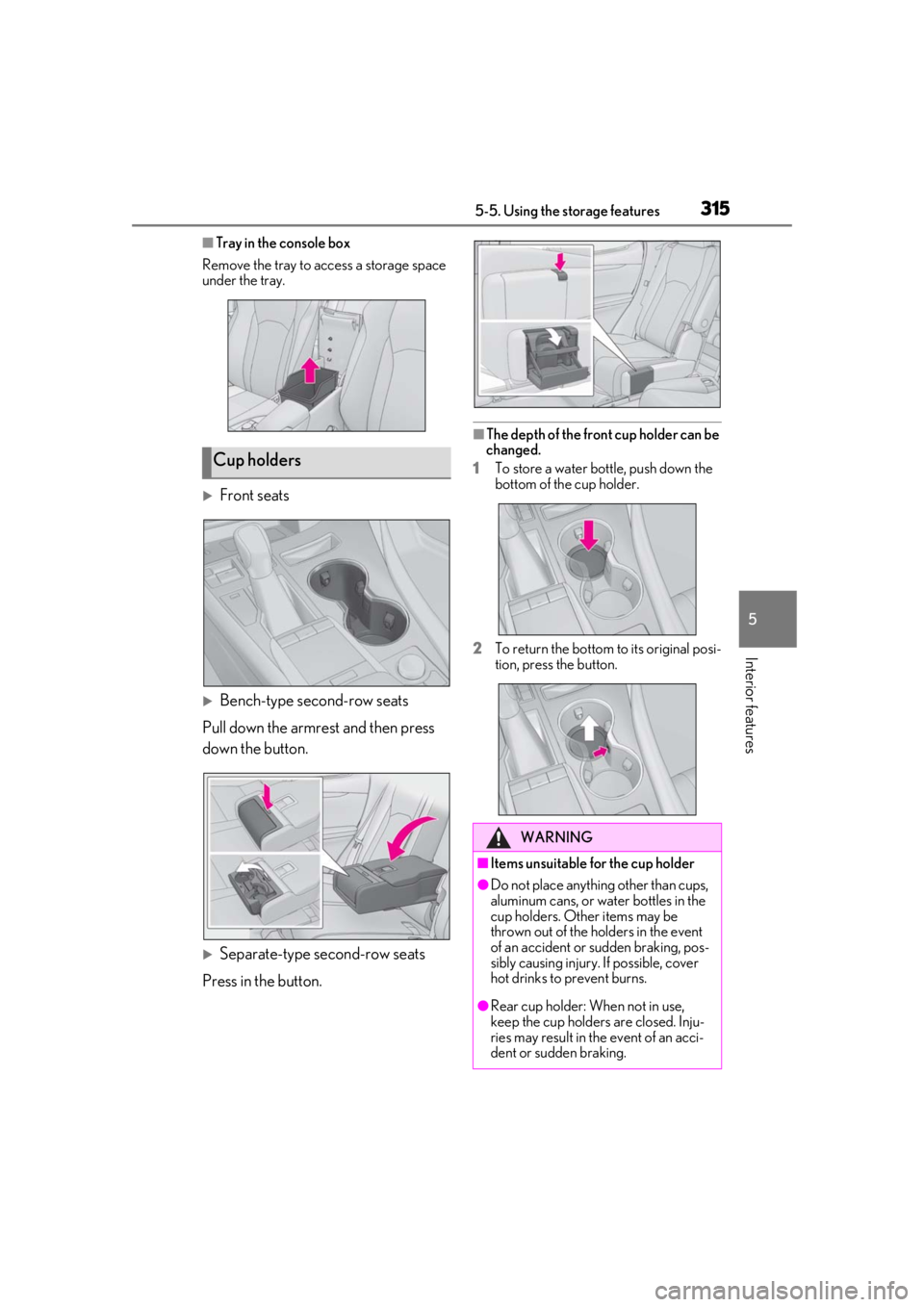
■Tray in the console box
Remove the tray to access a storage space
under the tray.
Front seats
Bench-type second-row seats
Pull down the armrest and then press
down the button.
Separate-type second-row seats
Press in the button.
■The depth of the front cup holder can be
changed.
1 To store a water bottle, push down the
bottom of the cup holder.
2 To return the bottom to its original posi-
tion, press the button.
Cup holders
WARNING
■Items unsuitable for the cup holder
●Do not place anything other than cups,
aluminum cans, or water bottles in the
cup holders. Other items may be
thrown out of the holders in the event
of an accident or sudden braking, pos-
sibly causing injury. If possible, cover
hot drinks to prevent burns.
●Rear cup holder: When not in use,
keep the cup holders are closed. Inju-
ries may result in the event of an acci-
dent or sudden braking.
Page 318 of 508
3185-5. Using the storage features
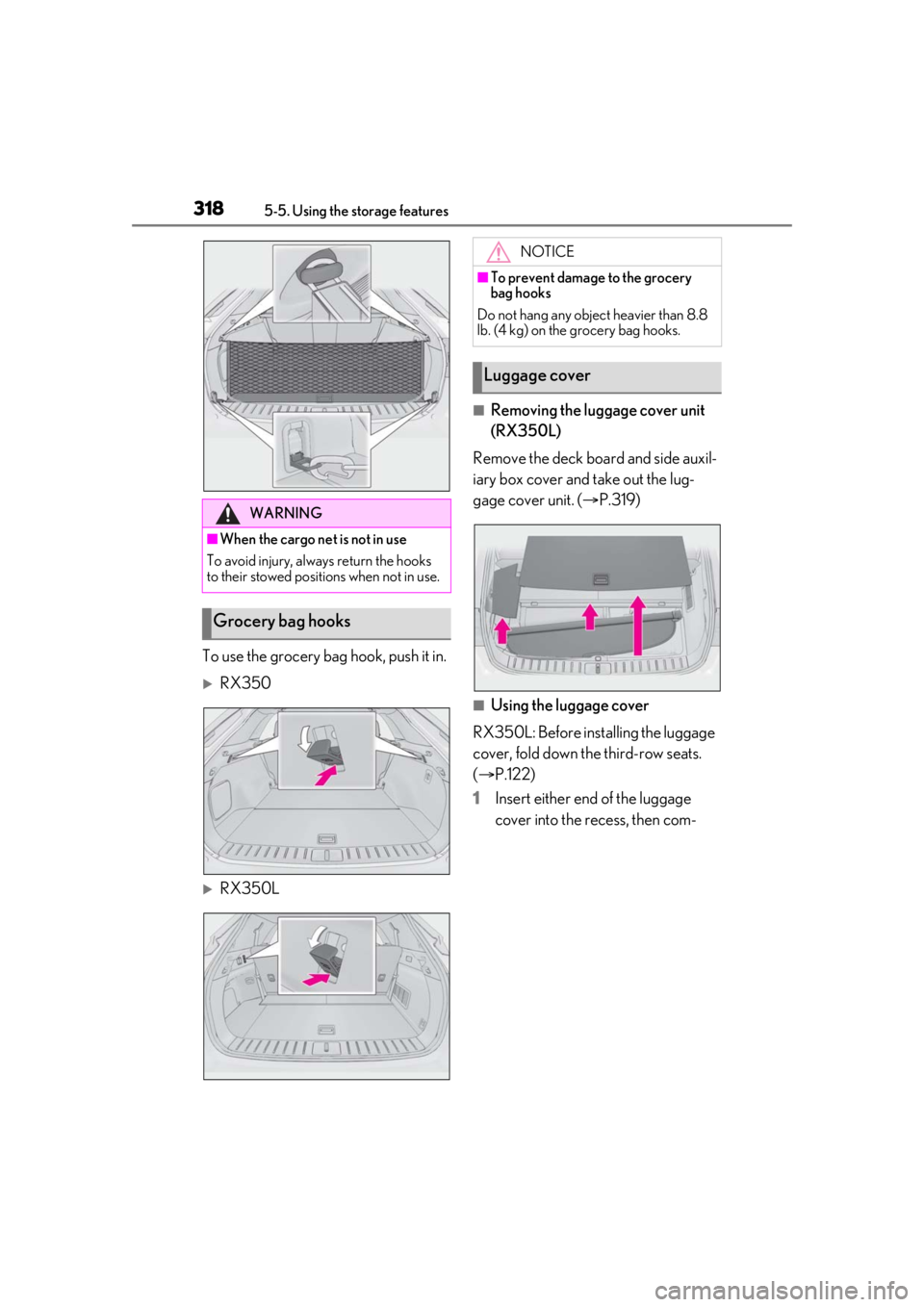
To use the grocery bag hook, push it in.
RX350
RX350L
■Removing the luggage cover unit
(RX350L)
Remove the deck board and side auxil-
iary box cover and take out the lug-
gage cover unit. ( P.319)
■Using the luggage cover
RX350L: Before installing the luggage
cover, fold down the third-row seats.
( P.122)
1 Insert either end of the luggage
cover into the recess, then com-
WARNING
■When the cargo net is not in use
To avoid injury, always return the hooks
to their stowed positions when not in use.
Grocery bag hooks
NOTICE
■To prevent damage to the grocery
bag hooks
Do not hang any object heavier than 8.8
lb. (4 kg) on the grocery bag hooks.
Luggage cover
Page 322 of 508
3225-6. Using the other interior features
5-6.Using the other interior features
The USB charging ports are used to
supply 2.1 A of electricity at 5 V to
external devices.
The USB charging ports are for
charging only. They are not designed
for data transfer or other purposes.
Depending on the external device, it
may not charge properly. Refer to the
manual included with the device
before using a USB charging port.
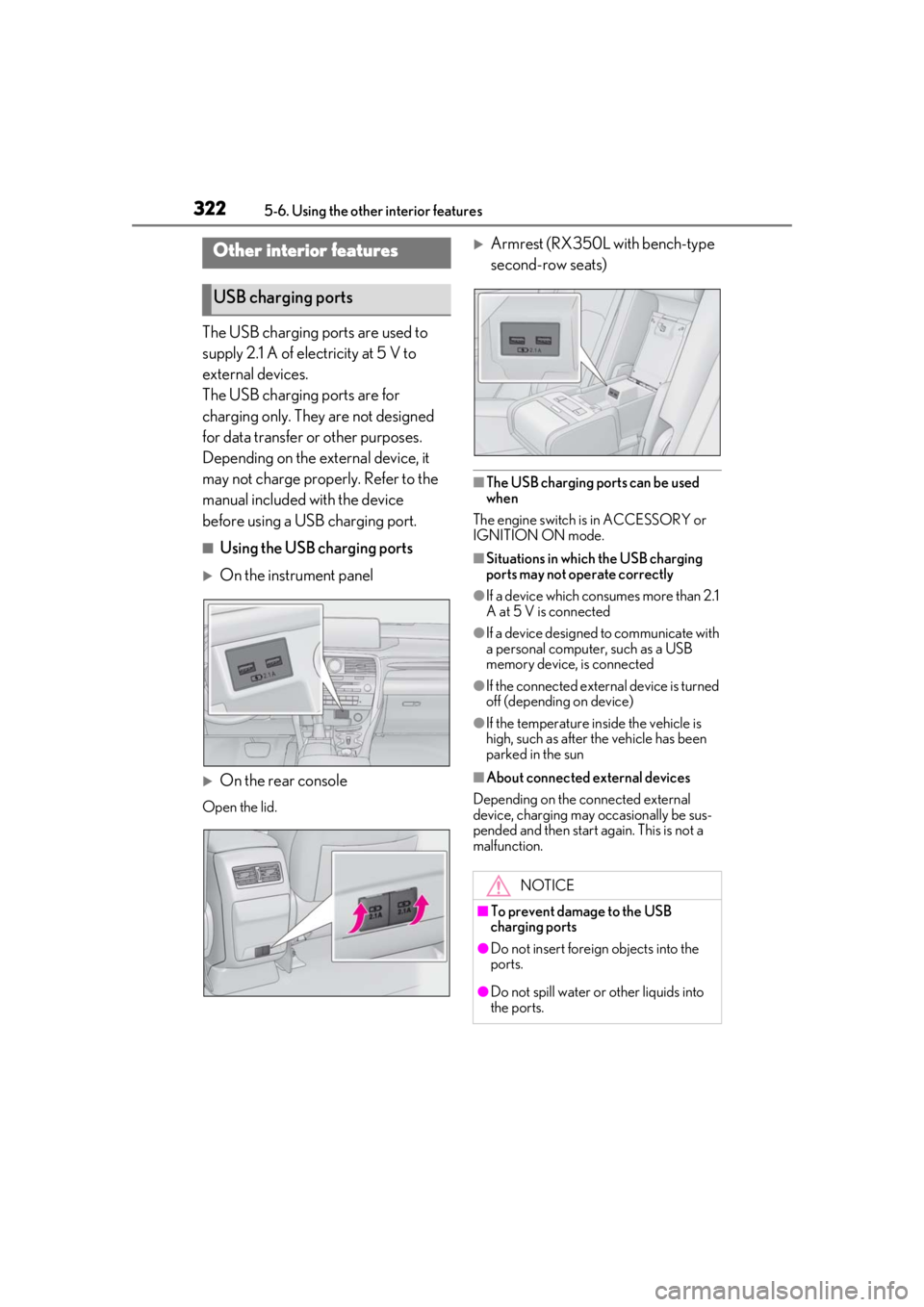
■Using the USB charging ports
On the instrument panel
On the rear console
Open the lid.
Armrest (RX350L with bench-type
second-row seats)
■The USB charging ports can be used
when
The engine switch is in ACCESSORY or
IGNITION ON mode.
■Situations in whic h the USB charging
ports may not operate correctly
●If a device which consumes more than 2.1
A at 5 V is connected
●If a device designed to communicate with
a personal computer, such as a USB
memory device, is connected
●If the connected external device is turned
off (depending on device)
●If the temperature inside the vehicle is
high, such as after the vehicle has been
parked in the sun
■About connected external devices
Depending on the connected external
device, charging may occasionally be sus-
pended and then start again. This is not a
malfunction.
Other interior features
USB charging ports
NOTICE
■To prevent damage to the USB
charging ports
●Do not insert foreign objects into the
ports.
●Do not spill water or other liquids into
the ports.
Page 330 of 508
3305-6. Using the other interior features
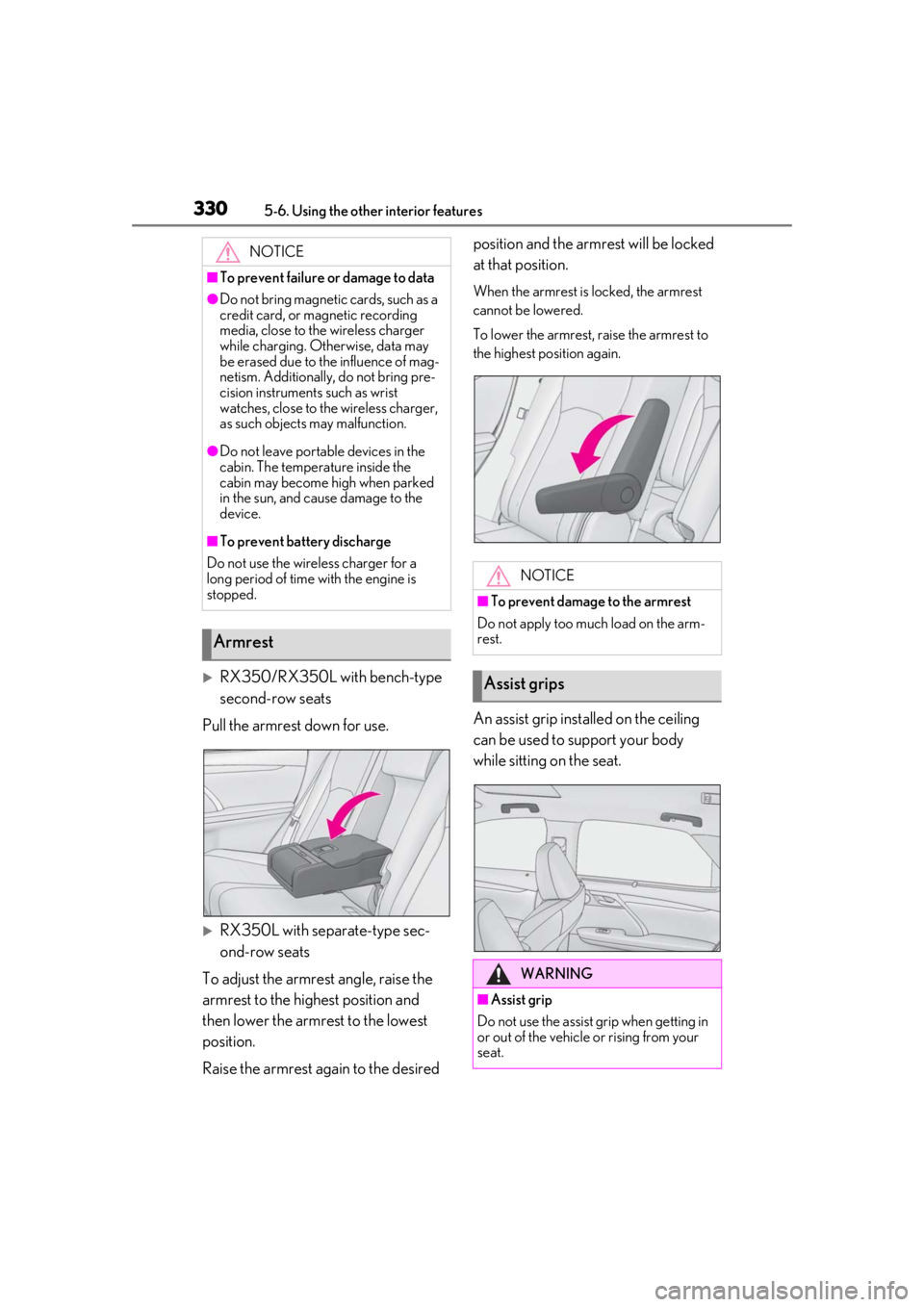
RX350/RX350L with bench-type
second-row seats
Pull the armrest down for use.
RX350L with separate-type sec-
ond-row seats
To adjust the armrest angle, raise the
armrest to the highest position and
then lower the armrest to the lowest
position.
Raise the armrest again to the desired position and the armrest will be locked
at that position.
When the armrest is locked, the armrest
cannot be lowered.
To lower the armrest, raise the armrest to
the highest position again.
An assist grip installed on the ceiling
can be used to support your body
while sitting on the seat.
NOTICE
■To prevent failure or damage to data
●Do not bring magnetic cards, such as a
credit card, or magnetic recording
media, close to the wireless charger
while charging. Otherwise, data may
be erased due to the influence of mag-
netism. Additionally, do not bring pre-
cision instruments such as wrist
watches, close to the wireless charger,
as such objects may malfunction.
●Do not leave portab
le devices in the
cabin. The temperature inside the
cabin may become high when parked
in the sun, and cause damage to the
device.
■To prevent battery discharge
Do not use the wireless charger for a
long period of time with the engine is
stopped.
Armrest
NOTICE
■To prevent damage to the armrest
Do not apply too much load on the arm-
rest.
Assist grips
WARNING
■Assist grip
Do not use the assist grip when getting in
or out of the vehicle or rising from your
seat.
Page 348 of 508

3486-1. Maintenance and care
Remove dirt and dust using a vac-
WARNING
●Do not get any of the SRS components
or wiring in the vehicle interior wet.
( P.30)
An electrical malfunction may cause
the airbags to deploy or not function
properly, resulting in death or serious
injury.
●Vehicles with wireless charger: Do not
let the wireless charger (
P.323) get
wet. Failure to do so may cause the
charger to become hot and cause
burns or could cause electric shock
resulting in death or serious injury.
■Cleaning the interior (especially
instrument panel)
Do not use polish wax or polish cleaner.
The instrument panel may reflect off the
windshield, obstructing the driver’s view
and leading to an accident, resulting in
death or serious injury.
NOTICE
■Cleaning detergents
●Do not use the following liquids, as
they may discolor the vehicle interior
or cause streaks or damage to painted
surfaces:
• Center Display: Organic substances such as benzine or gasoline, alkaline
solutions, and alcohol
• Seats: Alkaline solutions, organic sub- stances such as thinner or benzine,
and alcohol
• Other parts: Organic substances such as benzine or gasoline, alkaline or
acidic solutions, dye, and bleach
●Do not use polish wax or polish
cleaner. The instrument panel’s or
other interior part’s painted surface
may be damaged.
■Preventing damage to leather sur-
faces
Observe the following precautions to
avoid damage to and deterioration of
leather surfaces:
●Remove any dust or dirt from leather
surfaces immediately.
●Do not expose the vehicle to direct
sunlight for extended periods of time.
Park the vehicle in the shade, espe-
cially during summer.
●Do not place items made of vinyl, plas-
tic, or containing wax on the uphol-
stery, as they may stick to the leather
surface if the vehicle interior heats up
significantly.
■Water on the floor
Do not wash the vehicle floor with water.
Vehicle systems such as the audio system
may be damaged if water comes into
contact with electrical components such
as the audio system above or under the
floor of the vehicle. Water may also
cause the body to rust.
■When cleaning the inside of the wind-
shield
Do not allow glass cleaner to contact the
lens. Also, do not touch the lens.
( P.203)
■Cleaning the inside of the rear win-
dow
●Do not use glass cleaner to clean the
rear window, as this may cause dam-
age to the rear window defogger
heater wires or antenna. Use a cloth
dampened with lukewarm water to
gently wipe the window clean. Wipe
the window in strokes running parallel
to the heater wires or antenna.
●Be careful not to scratch or damage
the heater wires or antenna.
Cleaning the leather areas
Page 353 of 508

3536-2. Maintenance
6
Maintenance and care
Seats• Do the seat controls operate properly?
Steering wheel
• Does the steering wheel rotate
smoothly?
• Does the steering wheel have the cor-
rect amount of free
play?
•There should not be any strange sounds
coming from the
steering wheel.
Vehicle exterior
ItemsCheck points
Doors• Do the doors oper-ate smoothly?
Engine hood
•Does the engine hood lock system
work properly?
Fluid leaks
•There should not be any signs of fluid
leakage after the
vehicle has been
parked.
ItemsCheck points
Tires
• Is the tire inflation pressure correct?
• The tires should not be damaged or
excessively worn.
• Have the tires been rotated according to
the maintenance
schedule?
•The wheel nuts should not be loose.
Windshield wip-
ers/rear window
wiper
• The wiper blades should not show any
signs of cracking,
splitting, wear, con-
tamination or defor-
mation.
• The wiper blades should clear the
windshield/rear win-
dow without streak-
ing or skipping.
ItemsCheck points