2021 LEXUS RX350 air condition
[x] Cancel search: air conditionPage 276 of 508

2764-5. Using the driving support systems
function has occurred.
• Vibrations may be felt through the vehicle body and steering.
• A motor sound may be heard also after the vehicle comes to a stop.
• The brake pedal may pulsate slightly after
the ABS is activated.
• The brake pedal may move down slightly after the ABS is activated.
■Active Cornering Assist operation
sounds and vibrations
When the Active Cornering Assist is oper-
ated, operation sounds and vibrations may
be generated from the brake system, but
this is not a malfunction.
■EPS operation sound
When the steering wheel is operated, a
motor sound (whirring sound) may be
heard. This does not indicate a malfunction.
■Reduced effectiveness of the EPS sys-
tem
The effectiveness of the EPS system is
reduced to prevent the system from over-
heating when there is frequent steering
input over an extended period of time. The
steering wheel may feel heavy as a result.
Should this occur, re frain from excessive
steering input or stop the vehicle and turn
the engine off. The EPS system should
return to normal within 10 minutes.
■Automatic reactivation of TRAC, Trailer
Sway Control and VSC systems
After turning the TRAC, Trailer Sway Con-
trol and VSC systems off, the systems will
be automatically re-enabled in the following
situations:
●When the engine switch is turned off
●If only the TRAC system is turned off, the
TRAC will turn on when vehicle speed
increases
If both the TRAC and VSC systems are
turned off, automatic re-enabling will not
occur when vehicle speed increases.
■Operating conditions of Active Corner-
ing Assist
The system operates when the following
occurs.
●TRAC/VSC can operate
●The driver is attempting to accelerate
while turning
●The system detects that the vehicle is
drifting to the outer side
●The brake pedal is released
■Secondary Collision Brake operating
conditions
The system operates when the SRS airbag
sensor detects a collision while the vehicle
is in motion.
However, the system does not operate in
any of the following situations.
●The vehicle speed is below 6 mph (10
km/h)
●Components are damaged
■Secondary Collision Brake automatic
cancellation
The system is automatically canceled in any
of the following situations.
●The vehicle speed drops below approxi-
mately 6 mph (10 km/h)
●A certain amount of time elapses during
operation
●The accelerator pedal is depressed a
large amount
WARNING
■The ABS does not operate effectively
when
●The limits of tire gripping performance
have been exceeded (such as exces-
sively worn tires on a snow covered
road).
●The vehicle hydroplanes while driving
at high speed on wet or slick roads.
■Stopping distance when the ABS is
operating may exceed that of normal
conditions
The ABS is not designed to shorten the
vehicle’s stopping di stance. Always main-
tain a safe distance from the vehicle in
front of you, especially in the following
situations:
●When driving on dirt, gravel or
snow-covered roads
Page 279 of 508

2794-6. Driving tips
4
Driving
4-6.Driving tips
Use fluids that are appropriate to
the prevailing outside temperatures.
•Engine oil
• Engine coolant
•Washer fluid
Have a service technician inspect
the condition of the battery.
Have the vehicle fitted with four
snow tires or purchase a set of tire
chains for the front tires.
Ensure that all tires ar e of the specified size
and the same brand, and that chains match
the size of the tires.
Perform the following according to the
driving conditions:
Do not try to forcibly open a window
or move a wiper that is frozen. Pour
warm water over the frozen area to
melt the ice. Wipe away the water
Winter driving tips
Carry out the necessary prepara-
tions and inspections before driving
the vehicle in winter. Always drive
the vehicle in a manner appropriate
to the prevailing weather condi-
tions.
Pre-winter preparations
WARNING
■Driving with snow tires
Observe the following precautions to
reduce the risk of accidents.
Failure to do so may result in a loss of
vehicle control and cause death or seri-
ous injury.
●Use tires of the specified size.
●Maintain the recommended level of air
pressure.
●Do not drive in excess of 75 mph (120
km/h), regardless of the type of snow
tires being used.
●Use snow tires on all, not just some
wheels.
■Driving with tire chains
Observe the following precautions to
reduce the risk of accidents.
Failure to do so may result in the vehicle
being unable to be driven safely, and may
cause death or serious injury.
●Do not drive in excess of the speed
limit specified for the tire chains being
used, or 30 mph (50 km/h), which-
ever is lower.
●Avoid driving on bumpy road surfaces
or over potholes.
●Avoid sudden acceleration, abrupt
steering, sudden br aking and shifting
operations that cause sudden engine
braking.
●Slow down sufficiently before entering
a curve to ensure that vehicle control is
maintained.
●Do not use the LTA (Lane Tracing
Assist) system.
NOTICE
■Repairing or replacing snow tires
Request repairs or replacement of snow
tires from your Lexus dealer or legitimate
tire retailers.
This is because the removal and attach-
ment of snow tires affects the operation
of the tire pressure warning valves and
transmitters.
Before driving the vehicle
Page 280 of 508

2804-6. Driving tips
immediately to prevent it from
freezing.
To ensure proper operation of the
climate control system fan, remove
any snow that has accumulated on
the air inlet vents in front of the
windshield.
Check for and remove any excess
ice or snow that may have accumu-
lated on the exterior lights, vehicle’s
roof, chassis, around the tires or on
the brakes.
Remove any snow or mud from the
bottom of your shoes before getting
in the vehicle.
Accelerate the vehicle slowly, keep a
safe distance between you and the
vehicle ahead, and drive at a reduced
speed suitable to road conditions.
Park the vehicle and move the shift
lever to P without setting the park-
ing brake. The parking brake may
freeze up, preventing it from being
released. If the vehicle is parked
without setting the parking brake,
make sure to block the wheels. Fail-
ure to do so may be dangerous
because it may cause the vehicle to
move unexpectedly, possibly lead-
ing to an accident.
When the parking brake is in automatic
mode, release the parking brake after shift-
ing the shift lever to P. ( P.184)
If the vehicle is parked without set-
ting the parking brake, confirm that
the shift lever cannot be moved out
of P
*.
*: The shift lever will be locked if it is
attempted to be shifted from P to any
other position with out depressing the
brake pedal. If the shift lever can be
shifted from P, there may be a problem
with the shift lock system. Have the vehi-
cle inspected by your Lexus dealer
immediately.
Use the correct tire chain size when
mounting the tire chains.
Chain size is regulated for each tire
size.
Side chain (0.12 in. [3 mm] in diam-
eter)
Side chain (0.43 in. [10.8 mm] in
width)
Side chain (0.98 in. [25 mm] in
length)
Cross chain (0.15 in. [3.9 mm] in
diameter)
Cross chain (0.54 in. [13.8 mm] in
width)
Cross chain (1.00 in. [25.3 mm] in
When driving the vehicle
When parking the vehicle
Selecting tire chains
A
B
C
D
E
F
Page 285 of 508

285
5
5
Interior features
Interior features
.5-1. Remote Touch/DisplayRemote Touch ............................ 286
Center Display ........................... 288
5-2. Lexus Climate Concierge Lexus Climate Concierge ...... 291
5-3. Using the air conditioning system and defogger
Front automatic air conditioning system ......................................... 292
Rear automatic air conditioning system ......................................... 303
Heated steering wheel/seat heat- ers/seat ventilators ................ 306
5-4. Using the interior lights Interior lights list......................... 309
5-5. Using the storage features List of storage features............. 312
Luggage compartment features ......................................................... 317
5-6. Using the other interior features Other interior features ........... 322
Garage door opener............... 334
Compass....................................... 340
Page 288 of 508

2885-1. Remote Touch/Display
■Menu screen
Press the “MENU” button on the
Remote Touch to display the menu
screen.
This system can also be operated by
the touch screen.
For details, refer to “NAVIGATION
AND MULTIMEDIA SYSTEM
OWNER’S MANUAL”.
The displays shown in the illustrations
are used for example only and may dif-
fer from the actual vehicle.
Vehicles with a 12.3-inch display
Vehicles with a 8-inch display
Center Display
Center Display overview
SwitchFunction
Select to display the
“Destination”
screen.
*1
Select to display the
audio control
screen.
*1
Select to display the
hands-free control
screen.
*1
Select to display the
“Apps” screen.
*1, 2
/
/
When an Apple
CarPlay/Android
Auto connection is
established and this
button displays
“Apple Car-
Play”/“Android
Auto”, select to dis-
play the home
screen of Apple
CarPlay/Android
Auto.
*1, 2
Select to display the
information screen.
*1
( P.92)
Select to display the
setup screen.
*1
Select to display the
air conditioning con-
trol screen.
( P.292)
Select to adjust the
contrast and bright-
ness of the screens,
turn the screen off,
etc.
*1, 2
Page 289 of 508

2895-1. Remote Touch/Display
5
Interior features
*1: Refer to “NAVIGATION AND MULTI-MEDIA SYSTEM OWNER’S MAN-
UAL”.*2: This function is not made available in some models or areas.
■Split-screen display (vehicles with a 12.3-inch display)
Different information can be displayed on the left and right sides of the screen. For
example, air conditioning system screen can be displayed and operated while the
fuel consumption information screen is be ing displayed. The large screen on the
left of the display is called the main display, and the small screen to the right is
called the side display.
■Main display (vehicles with a
12.3-inch display)
For details about the functions and
operation of the main display, refer to
the respective section and “NAVIGA-
TION AND MULTIMEDIA SYSTEM
OWNER’S MANUAL”.
■Side display (vehicles with a
12.3-inch display)
The following functions can be dis-
played and operated on the side dis-
play.
Select or to display the desired
screen. Navigation system
*
Audio*
Vehicle information (
P.94)
Air conditioning system ( P.292)
Show/hide the side display
*
*: Refer to “NAVIGATION AND MULTI- MEDIA SYSTEM OWNER’S MAN-
UAL”.
A
B
C
D
E
Page 291 of 508
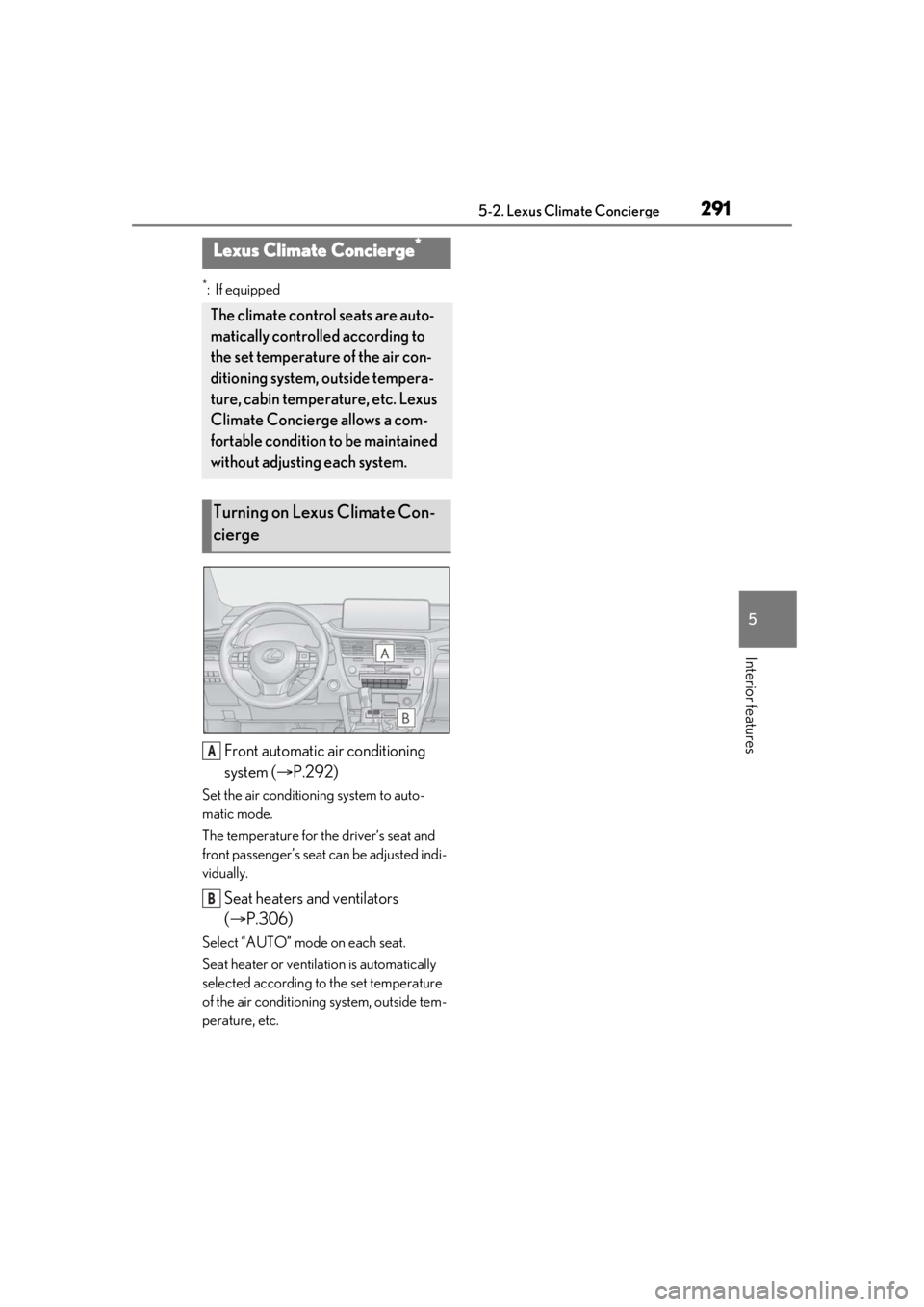
2915-2. Lexus Climate Concierge
5
Interior features
5-2.Lexus Climate Concierge
*:If equipped
Front automatic air conditioning
system (P.292)
Set the air conditioning system to auto-
matic mode.
The temperature for the driver’s seat and
front passenger’s seat can be adjusted indi-
vidually.
Seat heaters and ventilators
( P.306)
Select “AUTO” mode on each seat.
Seat heater or ventilation is automatically
selected according to the set temperature
of the air conditioning system, outside tem-
perature, etc.
Lexus Climate Concierge*
The climate control seats are auto-
matically controlled according to
the set temperature of the air con-
ditioning system, outside tempera-
ture, cabin temperature, etc. Lexus
Climate Concierge allows a com-
fortable condition to be maintained
without adjusting each system.
Turning on Lexus Climate Con-
cierge
A
B
Page 292 of 508

2925-3. Using the air conditioning system and defogger
5-3.Using the air conditioning system and defogger
RX350Left-hand side temperature control switch
Automatic mode switch
Off switch
Fan speed decreases switch
Fan speed increases switch
DUAL switch
Right-hand side temp erature control switch
Outside/recirculated air mode switch
Air flow mode switch
Rear window defogger and outside rear view mirror defoggers switch
Windshield defogger switch
Front automatic air conditioning system
Air outlets and fan speed are automati cally adjusted according to the tem-
perature setting.
Press the “MENU” button on the Remote Touch, then select to display the
air conditioning control screen.
Vehicles with a 12.3-inch display: The air conditioning system can be displayed
and operated on the side display.
Air conditioning controls
A
B
C
D
E
F
G
H
I
J
K