2021 LEXUS RCF seats
[x] Cancel search: seatsPage 104 of 408

1043-3. Adjusting the seats
■Entering/exiting the rear seat
1 Pull the lever.
The front seat will lower automatically.
2Fold the seatback completely for-
ward.
The front seat will move forward automati-
cally.
■Returning the front seat to its origi-
nal position
Move the seatback backward until it
locks. The front seat will return to its
original position automatically.
■Lever-operated “Front, Fold & Return”
seat
●After the front seat is moved forward by
operating the “Front, Fold & Return” seat
lever, if a power seat adjusting switch or a
driving position memory switch is
pressed, the front seat will not return to its
original position even if the front seatback
is moved backward until it locks.
●The lever-operated “Front, Fold &
Return” seat will not operate in the follow- ing situations:
• The front seat belt of the seat to be oper- ated is fastened.
• The engine switch is in IGNITION ON mode and the shift lever is in a position
other than P (driver’s seat only).
●Operation of the lever-operated “Front,
Fold & Return” seat will stop in the follow-
ing situations:
• A power seat adjusting switch or a driv- ing position memory switch is pressed.
• The front seat belt of the seat which is operating is fastened.
• The engine switch is in IGNITION ON
mode and the shift lever is moved to a
position other than P (driver’s seat only).
■Jam protection function
While the lever-operat ed “Front, Fold &
Return” seat is operatin g, if an object is
stuck either in front of or behind the front
seat, the front seat will stop and then move
in the opposite direction slightly.
WARNING
■Lever-operated “Front, Fold &
Return” seat
●Before operating th e lever-operated
“Front, Fold & Return” seat, ensure that
any surrounding passengers or objects
will not contact the seat.
●Make sure the seat back is locked
securely before driving.
●Never operate the lever-operated
“Front, Fold & Return” seat while the
vehicle is moving.
■Jam protection function
Do not use a hand, foot, or any other part
of your body to intentionally activate the
jam protection function.
Page 105 of 408
1053-3. Adjusting the seats
3
Before driving
*:If equipped
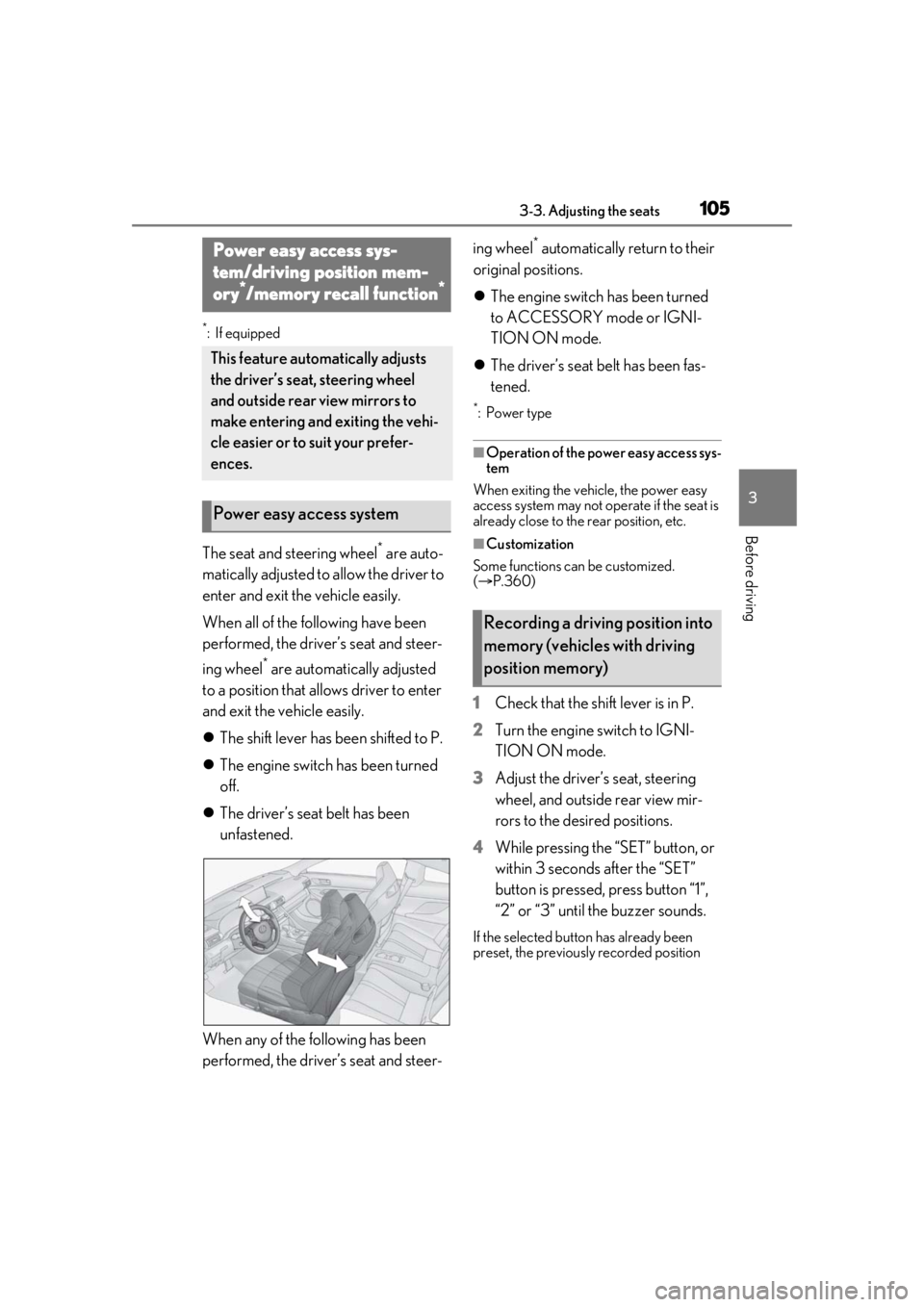
The seat and steering wheel* are auto-
matically adjusted to allow the driver to
enter and exit the vehicle easily.
When all of the following have been
performed, the driver’s seat and steer-
ing wheel
* are automatically adjusted
to a position that allows driver to enter
and exit the vehicle easily.
The shift lever has been shifted to P.
The engine switch has been turned
off.
The driver’s seat belt has been
unfastened.
When any of the following has been
performed, the driver’s seat and steer- ing wheel
* automatically return to their
original positions.
The engine switch has been turned
to ACCESSORY mode or IGNI-
TION ON mode.
The driver’s seat belt has been fas-
tened.
*:Power type
■Operation of the power easy access sys-
tem
When exiting the vehicle, the power easy
access system may not op erate if the seat is
already close to the rear position, etc.
■Customization
Some functions can be customized.
( P.360)
1 Check that the shift lever is in P.
2 Turn the engine switch to IGNI-
TION ON mode.
3 Adjust the driver’s seat, steering
wheel, and outside rear view mir-
rors to the desired positions.
4 While pressing the “SET” button, or
within 3 seconds after the “SET”
button is pressed, press button “1”,
“2” or “3” until the buzzer sounds.
If the selected button has already been
preset, the previously recorded position
Power easy access sys-
tem/driving position mem-
ory
*/memory recall function*
This feature auto matically adjusts
the driver’s seat, steering wheel
and outside rear view mirrors to
make entering and exiting the vehi-
cle easier or to suit your prefer-
ences.
Power easy access system
Recording a driving position into
memory (vehicles with driving
position memory)
Page 106 of 408

1063-3. Adjusting the seats
will be overwritten.
1Check that the shift lever is in P.
2 Turn the engine switch to IGNI-
TION ON mode.
3 Press one of the buttons for the
driving position you want to recall
until the buzzer sounds.
■To stop the position recall operation
part-way through
Perform any of the following:
●Press the “SET” button.
●Press button “1”, “2” or “3”.
●Operate any of the seat adjustment
switches (only cancels seat position
recall).
●Operate the tilt and telescopic steering
control switch (onl y cancels steering
wheel position recall).
■Seat positions that can be memorized
( P.103)
The adjusted positions other than the posi-
tion adjusted by lumb ar support switch can
be recorded.
■Operating the driving position memory
after turning the engine switch off
Recorded seat positions can be activated
up to 180 seconds after the driver’s door is
opened and another 60 seconds after it is
closed again.
■In order to correctly use the driving
position memory function
If a seat position is already in the furthest
possible position and the seat is operated in
the same direction, the recorded position
may be slightly differen t when it is recalled.
■Registering procedure
Record your driving position to button
“1”, “2” or “3” before performing the
following:
Carry only the key yo u want to register,
and then close the driver’s door.
If 2 or more keys are in the vehicle, the
driving position cannot be recorded
properly.
1 Check that the shift lever is in P.
WARNING
■Seat adjustment caution
Take care during seat adjustment so that
the seat does not strike the rear passen-
ger or squeeze your body against the
steering wheel.
Recalling a driving position
(vehicles with driving position
memory)
Registering/canceling/recall a
driving position to an electronic
key (including a card key) (mem-
ory recall function) (vehicles
with memory recall function)
Page 107 of 408

1073-3. Adjusting the seats
3
Before driving
2Turn the engine switch to IGNI-
TION ON mode.
3 Recall the driving position that you
want to record.
4 While pressing the recalled button,
press and hold the door lock switch
(either lock or unlock) until the
buzzer sounds.
If the button could not be registered, the
buzzer sounds continuously for approxi-
mately 3 seconds.
■Cancelation procedure
Carry only the key you want to cancel
and then close the driver’s door.
If 2 or more keys are in the vehicle, the
driving position cannot be canceled
properly.
1 Turn the engine switch to IGNI-
TION ON mode.
2 While pressing the “SET” button,
press and hold the door lock switch
(either lock or unlock) until the
buzzer sounds twice.
If the button could not be canceled, the
buzzer sounds continuously for approxi-
mately 3 seconds.
■Recall procedure
1 Make sure that the doors are
locked before recalling the driving
position. Carry the electronic key that has been registered to the driv-
ing position, and then unlock and
open the driver’s door using the
smart access system with push-but-
ton start or wireless remote control.
The driving position will move to the
recorded position (not including the steer-
ing wheel). However, th
e seat will move to
a position slightly behind the recorded
position in order to make entering the vehi-
cle easier.
If the driving position is in a position that
has already been recorded, the seat and
outside rear view mirrors will not move.
2 Turn the engine switch to ACCES-
SORY mode or IGNITION ON
mode, or fasten a seat belt.
The seat and steering wheel will move to
the recorded position.
■Recalling the driving position using the
memory recall function
●Different driving positions can be regis-
tered for each electronic key. Therefore,
the driving position that is recalled may
be different depending on the key being
carried.
●If a door other than the driver’s door is
unlocked with the smart access system
with push-button start, the driving posi-
tion cannot be recalled. In this case, press
the driving position button which has
been set.
■Customization
Some functions can be customized.
( P.360)
Page 126 of 408

1264-1. Before driving
■Total load capacity and seating capacity
These details are also described on the tire
and loading information label. ( P.279)
WARNING
●Do not place cargo or luggage in or on
the following locations.
• At the feet of the driver
• On the front passenger or rear seats (when stacking items)
• On the package tray
• On the instrument panel
•On the dashboard
• In front of the Center Display
●Secure all items in the occupant com-
partment.
■Capacity and distribution
●Do not exceed the maximum axle
weight rating or the total vehicle
weight rating.
●Even if the total load of occupant’s
weight and the cargo load is less than
the total load capacity, do not apply the
load unevenly. Improper loading may
cause deterioration of steering or
braking control which may cause
death or serious injury.
Vehicle load limits
Vehicle load limits include total
load capacity, seating capacity,
towing capacity and cargo capac-
ity.
Total load capacity (vehicle
capacity weight): P.342
Total load capacity means the com-
bined weight of occupants, cargo
and luggage.
Seating capacity: P.342
Seating capacity means the maxi-
mum number of occupants whose
estimated average weight is 150 lb.
(68 kg) per person.
Towing capacity
Lexus does not recommend towing
a trailer with your vehicle.
Cargo capacity
Cargo capacity may increase or
decrease depending on the weight
and the number of occupants.
WARNING
■Overloading the vehicle
Do not overload the vehicle.
It may not only cause damage to the tires,
but also degrade steering and braking
ability, resulting in an accident.
Page 215 of 408

2155-2. Using the air conditioning system
5
Interior features
Display the option control screen
(P.215)
Adjust the left-hand side tempera-
ture setting
Adjust the fan speed setting
Select the air flow mode
Adjust the right-hand side tem-
perature setting
Function on/off indicators
When the function is on, the indicator illu-
minates on the control screen.
Display the sub function menu
( P.215)
Using the Remote Touch, select the button
on the screen and activate it by pressing on
or double tapping the Remote Touch Pad.
■Option control screen
Select on the air conditioning con-
trol screen to display the option control
screen. The functions can be switched
on and off.
Adjusting the temperature for
driver and passenger seats sepa-
rately (“DUAL” mode) ( P.216)
Select to set eco mode on/off
( P.218)
Set cooling and dehumidification
function on/off
If the “A/C” indicator is turned off, the sys-
tem will blow ambient temperature air or
heated air.
Removing pollen from the air
(Micro dust and pollen filter)
( P.217)
■Sub function menu
When the sub function button on the
Remote Touch is pressed, the following
functions can be switched on and off.
Set automatic mode on/off
(P.216)
Turn the fan off
Set cooling and dehumidification
function on/off
If the “A/C” indicator is turned off, the sys-
tem will blow ambient temperature air or
heated air.
Adjust the temperature for driver
and passenger seats separately
(“DUAL” mode) ( P.216)
Select to set eco mode on/off
( P.218)
B
C
D
E
F
G
H
A
B
C
D
A
B
C
D
E
Page 216 of 408

2165-2. Using the air conditioning system
■Side display (vehicles with a
10.3-inch display)Adjust the left-hand side tempera-
ture setting
Adjust the fan speed setting
Adjust the right-hand side tem-
perature setting
Set cooling and dehumidification
function on/off
If the “A/C” indicator is turned off, the sys-
tem will blow ambient temperature air or
heated air.
Adjust the temperature for the
driver’s and front passenger’s seats
separately (“DUAL” mode)
( P.216)
Select the air flow mode
1 Press , or select “AUTO”
on the air conditioning control
screen.
2 Press to switch to
automatic air intake mode.
The air conditioning system automatically
switches between outside air and recircu-
lated air modes.
3Adjust the temperature setting. 4
To stop the operation, press
or select “Off” on the sub
function menu.
■Automatic mode indicator
If the fan speed setting or air flow
modes are operated, the automatic
mode indicator goes off. However,
automatic mode for functions other
than that operated is maintained.
■Adjusting the temperature for
driver and passenger seats sepa-
rately (“DUAL” mode)
To turn on the “DUAL” mode, perform
any of the following procedures:
Press .
Select “DUAL” on the air condition-
ing control screen.
Adjust the passenger’s side tem-
perature setting.
The indicator comes on when the “DUAL”
mode is on.
While in “DUAL” mode, the temperature of
the rear air outlets is set at the right-hand
side temperature setting.
■Switching between outside air and
recirculated air modes
Press .
The mode switches among (recircu-
lated air mode), automatic and (out-
side air mode) modes each time the button
is pressed.
When the system is switched to automatic
mode, the air conditioning system operates
Using automatic mode
A
B
C
D
E
F
Other functions
Page 221 of 408

2215-2. Using the air conditioning system
5
Interior features
*:If equipped
Turn the heated steering wheel on/off
The indicator light comes on when the heated steering wheel is operating.
■Operation condition
The engine switch is in IGNITION ON
mode.
■Timer function
The heated steering wheel will automati-
cally turn off after about 30 minutes.
Vehicles without seat ventilators
Each time the switch is pressed, the
intensity of the seat heater changes
and the level indicator lights (amber) light as follows:
Hi (3 segments lit) Mid (2 segments
lit) Lo (1 segment lit) Off
Vehicles with seat ventilators
Each time the switch is pressed, the
intensity of the seat heater changes
and the level indicator lights (amber)
Heated steering wheel*/seat
heaters*/seat ventilators*
Heated steering wheel and seat
heaters heat the side grips of the
steering wheel and seats, respec-
tively. Seat ventilators maintain
good ventilation using a fan built
into the seat.
WARNING
■To prevent minor burn injuries
Care should be taken if anyone in the fol-
lowing categories comes in contact with
the steering wheel or seats when the
heater is on:
●Babies, small children, the elderly, the
sick and the phys ically challenged
●Persons with sensitive skin
●Persons who are fatigued
●Persons who have taken alcohol or
drugs that induce sleep (sleeping
drugs, cold remedies, etc.)
NOTICE
■To prevent damage to the seat heat-
ers and seat ventilators
Do not put heavy objects that have an
uneven surface on the seat and do not
stick sharp objects (needles, nails, etc.)
into the seat.
■To prevent battery discharge
Do not use the functions when the
engine is off.
Heated steering wheel
A
Seat heaters
A