2021 LEXUS LS500 ESP
[x] Cancel search: ESPPage 88 of 520

882-1. Instrument cluster
■Suspension of the settings display
●Some settings cannot be changed while
driving. When changing settings, park
the vehicle in a safe place.
●If a warning message is displayed, opera-
tion of the settings display will be sus-
pended.
Displays suggestions to the driver in
the following situations. To select a
response to a displayed suggestion,
use the meter control switches.
■Suggestion to turn off the head-
lights
If the headlights are left on for a certain
amount of time with the headlight
switch in after the engine switch
has been turned off, a suggestion mes-
sage will be displayed asking if you
wish to turn the headlights off.
To turn the headlights off, select “Yes”.
If a front door is opened after the engine
switch is turned off, this suggestion mes-
sage will not be displayed.
■Customization
Some functions can be customized.
( P.476)
WARNING
■Cautions during setting up the dis-
play
As the engine needs to be running
during setting up the display, ensure that
the vehicle is parked in a place with ade-
quate ventilation. In a closed area such as
a garage, exhaust gases including harm-
ful carbon monoxide (CO) may collect
and enter the vehicle. This may lead to
death or a serious health hazard.
NOTICE
■During setting up the display
To prevent battery discharge, ensure that
the engine is running while setting up the
display features.
Suggestion function
Page 90 of 520

902-1. Instrument cluster
Displays the following items:
• Speedometer
• Shift position/shift range/gear position (P.178)
Tachometer/Eco Driving Indicator display area ( P.93)
HUD (Head-up display) switch
■Head-up display will operate when
The engine switch is in IGNITION ON
mode.
■When using the head-up display
The head-up display may seem dark or hard
to see when viewed through sunglasses,
especially polarized su nglasses. Adjust the
brightness of the head-up display or
remove your sunglasses.
■Street name display
Only street names whic h are included in the
map data will be displayed.
■Outside temperature display
●When the ambient temperature is
approximately 37°F (3°C) or lower, the
low outside temperature indicator will
flash for approximately 10 seconds and
the outside temperature display will turn
off. In this case, the display will be dis-
played again when the outside tempera-
ture becomes approximately 41°F (5°C)
or higher.
●In the following situations, the correct
outside temperature may not be dis-
played, or the display may take longer
than normal to change:
• When stopped, or driving at low speeds (less than 12 mph [20 km/h])
• When the outside temperature has
changed suddenly (at the entrance/exit of
a garage, tunnel, etc.)
●When “--” or “E” is displayed, the system
may be malfunctioning. Take your vehicle
to your Lexus dealer.
F
G
WARNING
■When using the head-up display
●Check that the position and brightness
of the head-up display image does not
interfere with safe driving. Incorrect
adjustment of the image’s position or
brightness may obstruct the driver’s
view and lead to an accident, resulting
in death or serious injury.
●Do not continuously look at the
head-up display while driving as you
may fail to see pedestrians, objects on
the road, etc. ahead of the vehicle.
NOTICE
■Head-up display projector
●Do not place any drinks near the
head-up display projector. If the pro-
jector gets wet, electrical malfunctions
may result.
●Do not place anything on or put stick-
ers onto the head-up display projector.
Doing so could interrupt head-up dis-
play indications.
●Do not touch the inside of the head-up
display projector or thrust sharp edges
or the like into the projector.
Doing so could cause mechanical mal-
functions.
Page 104 of 520

1043-2. Opening, closing and locking the doors and trunk
■Customization
Some functions can be customized.
( P.476)
■Door lock switches (to
lock/unlock)
1 Locks all the doors
2 Unlocks all the doors
■Inside lock buttons (to lock)
Push down the inside lock button to
lock the door.
■Inside door handles (to unlock)
For the front doors
Pull the handle to unlock and open the
door.
When the door is unlo cked, the inside lock
button will pop up.
For the rear doors
Pull the handle to unlock the door. Pull
the handle a second time to open the
door.
WARNING
■To prevent an accident
Observe the following precautions while
driving the vehicle.
Failure to do so may result in a door
opening and an occupant throwing out of
the vehicle, resulting in death or serious
injury.
●Ensure that all doors are properly
closed and locked.
●Do not pull the inside handle of the
doors while driving.
Be especially careful for the front doors,
as the doors may be opened even if the
inside lock buttons are in locked position.
●Set the rear door ch ild-protector locks
when children are seated in the rear
seats.
■When opening or closing a door
Check the surroundings of the vehicle
such as whether the vehicle is on an
incline, whether ther e is enough space
for a door to open and whether a strong
wind is blowing. When opening or clos-
ing the door, hold the door handle tightly
to prepare for any unpredictable move-
ment.
■Vehicle height co ntrol precautions
(vehicles with electronically modu-
lated air suspension)
In the following situations, make sure to
check the safety of the area around the
vehicle, as the vehicle height may change
and part of someone’s body may be
caught in the vehicle, possibly causing
injury or the vehicle may be damaged.
●When opening or closing a door
●When locking the doors
Unlocking and locking the doors
from the inside
Page 138 of 520

1383-3. Adjusting the seats
■Front seats
Center Display
1 Press the seat switch.
2 Using the Remote Touch pad,
select “Driver Seat Adjustment” or
“Passenger Seat Adjustment”.
3 Select then the desired adjust-
ment button , , , or to
adjust the head restraint.
Up
Backward
Down
Forward
The head restraint mo ves while the adjust-
ment button is selected.
Head restraints
Head restraints are provided for all
seats.
Vehicles with power rear seat: The
head restraint for the rear center
seat is integrated into the seatback
and cannot be adjusted.
WARNING
■Head restraint precautions
Observe the following precautions
regarding the head re straints. Failure to
do so may result in death or serious
injury.
●Use the head restraints designed for
each respective seat.
●Adjust the head restraints to the cor-
rect position at all times.
●Manual type: After adjusting the head
restraints, push down on them and
make sure they are locked in position.
●Do not drive with the head restraints
removed.
Adjusting a head restraint verti-
cally and horizontally (power
head restraints)
A
BCDE
B
C
D
E
Page 142 of 520

1423-4. Adjusting the steering wheel and mirrors
*:If equipped
The height of the rear view mirror can
be adjusted to suit your driving pos-
ture.
Adjust the height of the rear view mir-
ror by moving it up and down.
Responding to the level of brightness
of the headlights of vehicles behind, the
reflected light is automatically
reduced.
Turn the automatic anti-glare function
mode on/off
When the automatic anti-glare function is
in ON mode, the indicator illuminates.
The function will set to ON mode each
time the engine switch is turned to IGNI-
TION ON mode.
Pressing the button turns the function to
OFF mode. (The indicator also turns
off.)
■To prevent sensor error
To ensure that the sensors operate properly,
do not touch or cover them.
Inside rear view mirror*
The rear view mirror’s position can
be adjusted to enable sufficient
confirmation of the rear view.
Adjusting the height of rear view
mirror
WARNING
■Caution while driving
Do not adjust the position of the mirror
while driving.
Doing so may lead to mishandling of the
vehicle and cause an accident, resulting
in death or serious injury.
Anti-glare function
A
A
Page 143 of 520
1433-4. Adjusting the steering wheel and mirrors
3
Before driving
*:If equipped
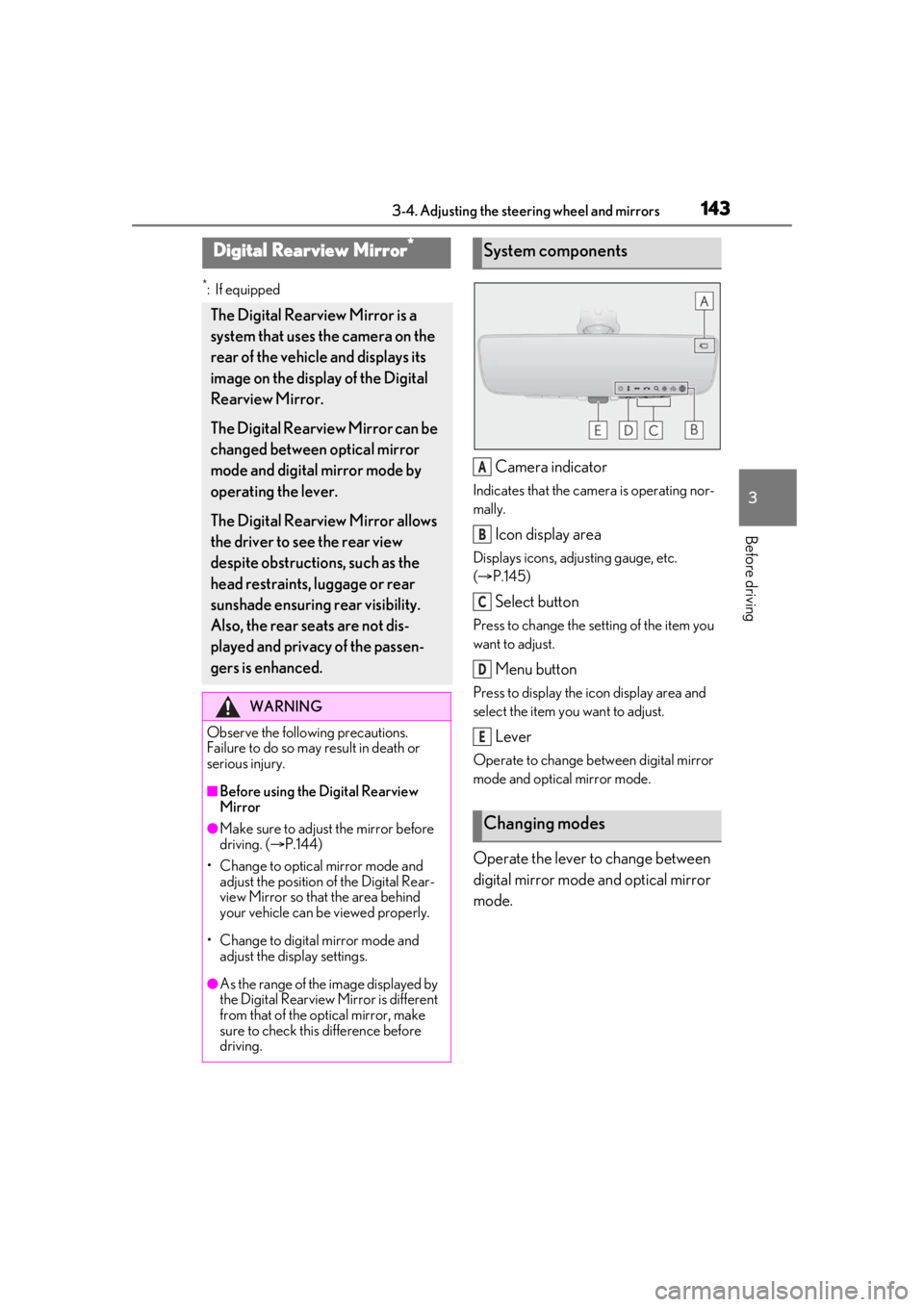
Camera indicator
Indicates that the camera is operating nor-
mally.
Icon display area
Displays icons, adjusting gauge, etc.
( P.145)
Select button
Press to change the setting of the item you
want to adjust.
Menu button
Press to display the ic on display area and
select the item you want to adjust.
Lever
Operate to change between digital mirror
mode and optical mirror mode.
Operate the lever to change between
digital mirror mode and optical mirror
mode.
Digital Rearview Mirror*
The Digital Rearview Mirror is a
system that uses the camera on the
rear of the vehicle and displays its
image on the display of the Digital
Rearview Mirror.
The Digital Rearview Mirror can be
changed between optical mirror
mode and digital mirror mode by
operating the lever.
The Digital Rearview Mirror allows
the driver to see the rear view
despite obstructions, such as the
head restraints, luggage or rear
sunshade ensuring rear visibility.
Also, the rear seats are not dis-
played and privacy of the passen-
gers is enhanced.
WARNING
Observe the following precautions.
Failure to do so may result in death or
serious injury.
■Before using the Digital Rearview
Mirror
●Make sure to adjust the mirror before
driving. ( P.144)
• Change to optical mirror mode and adjust the position of the Digital Rear-
view Mirror so that the area behind
your vehicle can be viewed properly.
• Change to digital mirror mode and adjust the display settings.
●As the range of the image displayed by
the Digital Rearview Mirror is different
from that of the optical mirror, make
sure to check this difference before
driving.
System components
Changing modes
A
B
C
D
E
Page 145 of 520

1453-4. Adjusting the steering wheel and mirrors
3
Before driving
ing the height of the rear view mirror by
moving it up and down.
■Display settings (digital mirror
mode)
Settings of the display in the digital mir-
ror mode, on/off operation of the auto-
matic anti-glare function, etc. can be
changed.
1 Press the menu button.
The icons will be displayed.
2Press the menu button repeatedly
and select the item you want to
adjust.
3 Press or to change the set-
ting.
The icons will disappear if a button is not
operated for approximately 5 seconds or
more.
*: This is a function for the optical mirror
mode, however, the setting can also be
changed while using the digital mirror
mode.
■Enabling/disabling the automatic
anti-glare function (optical mirror
mode)
The automatic anti-glare function in the
optical mirror mode can be
enabled/disabled. The setting can be
changed in both the digital mirror
mode and the optical mirror mode.
When using the digital mirror mode
P.145
When using the op tical mirror mode
1 Press the menu button.
IconsSettings
Select to adjust the brightness of
the display.
Select to adjust the area dis-
played up/down.
Select to adjust the area dis-
played to the left/right.
Select to adjust the angle of the
displayed image.
Select to zoom in/out the dis-
played image.
Select to enable/disable the
automatic anti-glare function.
*
Responding to the brightness of
the headlights of vehicles
behind, the reflected light is
automatically adjusted.
The automatic anti-glare func-
tion is enabled each time the
engine switch is changed to
IGNITION ON mode.
Page 146 of 520

1463-4. Adjusting the steering wheel and mirrors
The icons will be displayed.
2Press the menu button repeatedly
and select .
The setting display will be displayed.
3Press or to enable
(“ON”)/disable (“OFF”) the auto-
matic anti-glare function.
The icons will disappear if a button is not
operated for approximately 5 seconds or
more.
■Adjusting the display (digital mirror
mode)
●If the displayed image is adjusted, it may
appear distorted. This is not a malfunc-
tion.
●If the brightness of the Digital Rearview
Mirror is set too high, it may cause eye
strain. Adjust the Di gital Rearview Mirror
to an appropriate brig htness. If your eyes
become tired, change to optical mirror
mode.
●The brightness of the Digital Rearview
Mirror will change automatically accord-
ing to the brightness of the area in front of
your vehicle.
■To prevent the light sensors from mal-
functioning
To prevent the light sensors from malfunc-
tioning, do not touch or cover them.
■Cleaning the mirror surface
If the mirror surface is dirty, the image
on the display may be difficult to see.
WARNING
Observe the following precautions.
Failure to do so may result in death or
serious injury.
■While driving
●Do not adjust the position of the Digital
Rearview Mirror or adjust the display
settings while driving.
Stop the vehicle and operate the Digi-
tal Rearview Mirror control switches.
Failure to do so may cause a steering
wheel operation error, resulting in an
unexpected accident.
●Always pay attention to the vehicle’s
surroundings.
The size of the vehicles and other objects
may look different when in digital mirror
mode and optical mirror mode.
When backing up, make sure to directly
check the safety of the area around your
vehicle, especially behind the vehicle.
Additionally, if a vehicle approaches from
the rear in the dark, such as at night, the
surrounding area may appear dim.
■To prevent causes of fire
If the driver contin ues using the Digital
Rearview Mirror while smoke or odor
comes from the mirror, it may result in
fire. Stop using the system immediately
and contact your Lexus dealer.
Cleaning the Digital Rearview
Mirror