Page 318 of 520
3185-1. Remote Touch/Display
*:If equipped
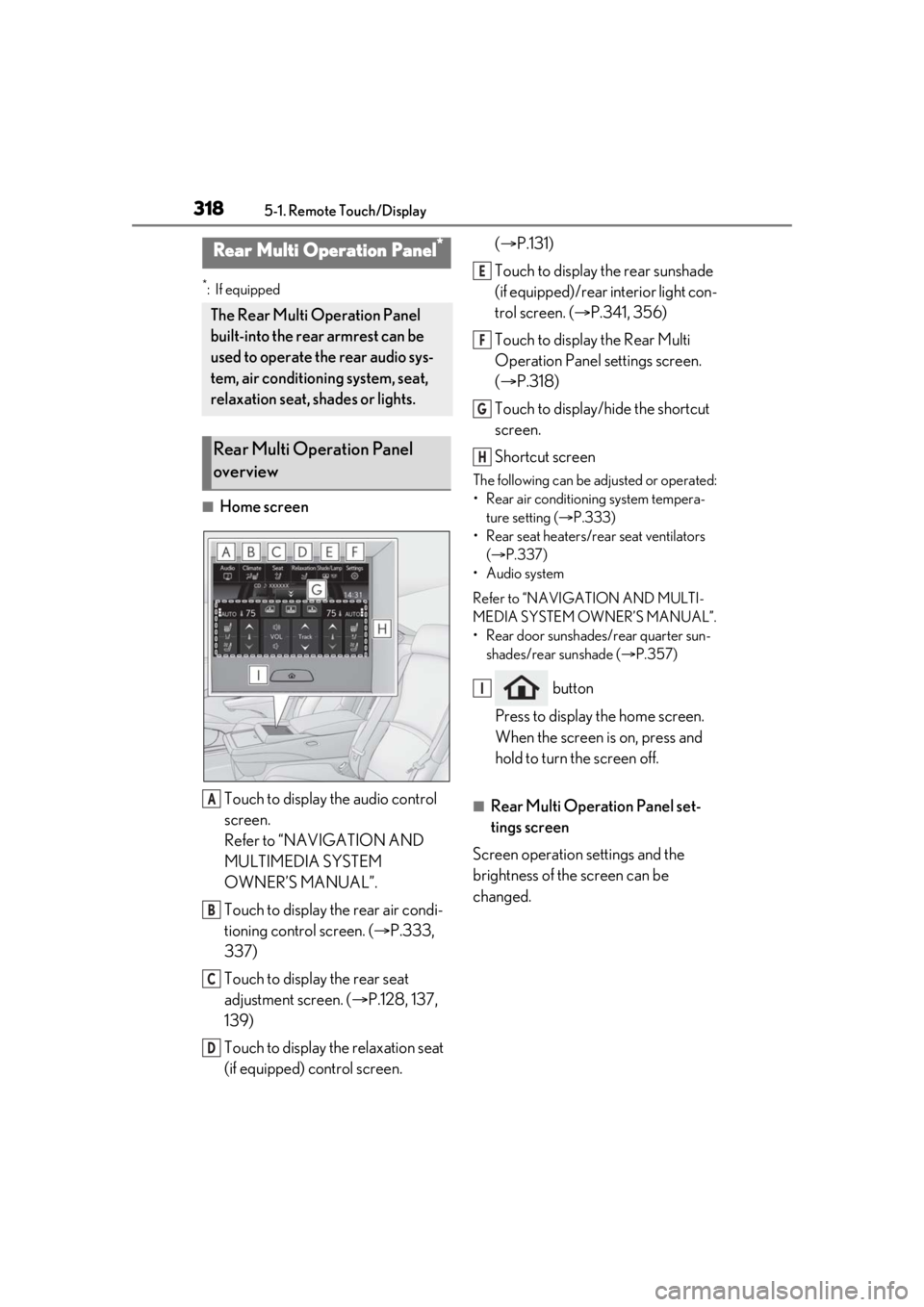
■Home screenTouch to display the audio control
screen.
Refer to “NAVIGATION AND
MULTIMEDIA SYSTEM
OWNER’S MANUAL”.
Touch to display the rear air condi-
tioning control screen. ( P.333,
337)
Touch to display the rear seat
adjustment screen. ( P.128, 137,
139)
Touch to display the relaxation seat
(if equipped) control screen. (
P.131)
Touch to display the rear sunshade
(if equipped)/rear interior light con-
trol screen. ( P.341, 356)
Touch to display the Rear Multi
Operation Panel settings screen.
( P.318)
Touch to display/hide the shortcut
screen.
Shortcut screen
The following can be adjusted or operated:
• Rear air conditioning system tempera- ture setting ( P.333)
• Rear seat heaters/rear seat ventilators ( P.337)
• Audio system
Refer to “NAVIGATION AND MULTI-
MEDIA SYSTEM OWNER’S MANUAL”.
• Rear door sunshades/rear quarter sun- shades/rear sunshade ( P.357)
button
Press to display the home screen.
When the screen is on, press and
hold to turn the screen off.
■Rear Multi Operation Panel set-
tings screen
Screen operation settings and the
brightness of the screen can be
changed.
Rear Multi Operation Panel*
The Rear Multi Operation Panel
built-into the rear armrest can be
used to operate the rear audio sys-
tem, air conditioning system, seat,
relaxation seat, shades or lights.
Rear Multi Operation Panel
overview
A
B
C
D
E
F
G
H
I
Page 325 of 520

3255-3. Using the air conditioning system and defogger
5
Interior features
■Registering air conditioning settings to
electronic keys
●Unlocking the vehicle using an electronic
key and turning the engine switch to
IGNITION ON mode will recall that
key’s registered air conditioning settings.
●When the engine switch is turned off, the
current air conditioning settings will auto-
matically be registered to the electronic
key that was used to unlock the vehicle.
●The system may not operate correctly if
more than one electr onic key is in the
vicinity or if the smart access system with
push-button start is used to unlock a pas-
senger door.
●The doors that can recall the air condi-
tioning setting* when unlocked using the
smart access system with push-button
start can be changed. For details, contact
your Lexus dealer.
*: The doors that can recall the driving
position memory are changed at the
same time.
■Operation of the air conditioning sys-
tem in Eco drive mode
In Eco drive mode, the air conditioning sys-
tem is controlled as follows to prioritize fuel
efficiency:
●Engine speed and compressor operation
controlled to restri ct heating/cooling
capacity
●Fan speed restricted when automatic
mode is selected
To improve air condit ioning performance,
perform the following operations:
●Turn off eco air conditioning mode
( P.326)
●Adjust the fan speed
●Turn off Eco drive mode ( P.299)
■When the outside temperature falls to
nearly 32°F (0°C)
The dehumidification function may not
operate even when “A/C” is selected.
■Ventilation and air conditioning odors
●To let fresh air in, set the air conditioning
system to the outside air mode.
●During use, various odors from inside and
outside the vehicle may enter into and
accumulate in the air conditioning sys-
tem. This may then cause odor to be
emitted from the vents.
●To reduce potential odors from occur-
ring:
• It is recommended that the air condition-
ing system be set to outside air mode
prior to turning the vehicle off.
• The start timing of the blower may be
delayed for a short pe riod of time imme-
diately after the air conditioning system is
started in automatic mode or with the
micro dust and pollen filter on.
●When parking, the system automatically
switches to outside air mode to encour-
age better air circulation throughout the
vehicle, helping to reduce odors that
occur when starting the vehicle.
■Using the voice command system
Air conditioning system can be operated
using voice commands. For details, refer to
the “NAVIGATION AND MULTIMEDIA
SYSTEM OWNER’S MANUAL”.
■Air conditioning filter
P.409
■Air conditioning system refrigerant
●A label regarding the refrigerant of the
air conditioning system is attached to the
hood at the location shown in the follow-
ing illustration.
●The meaning of each symbol on the label
are as follows:
Caution
Air conditioning system
Page 354 of 520
3545-6. Using the other interior features
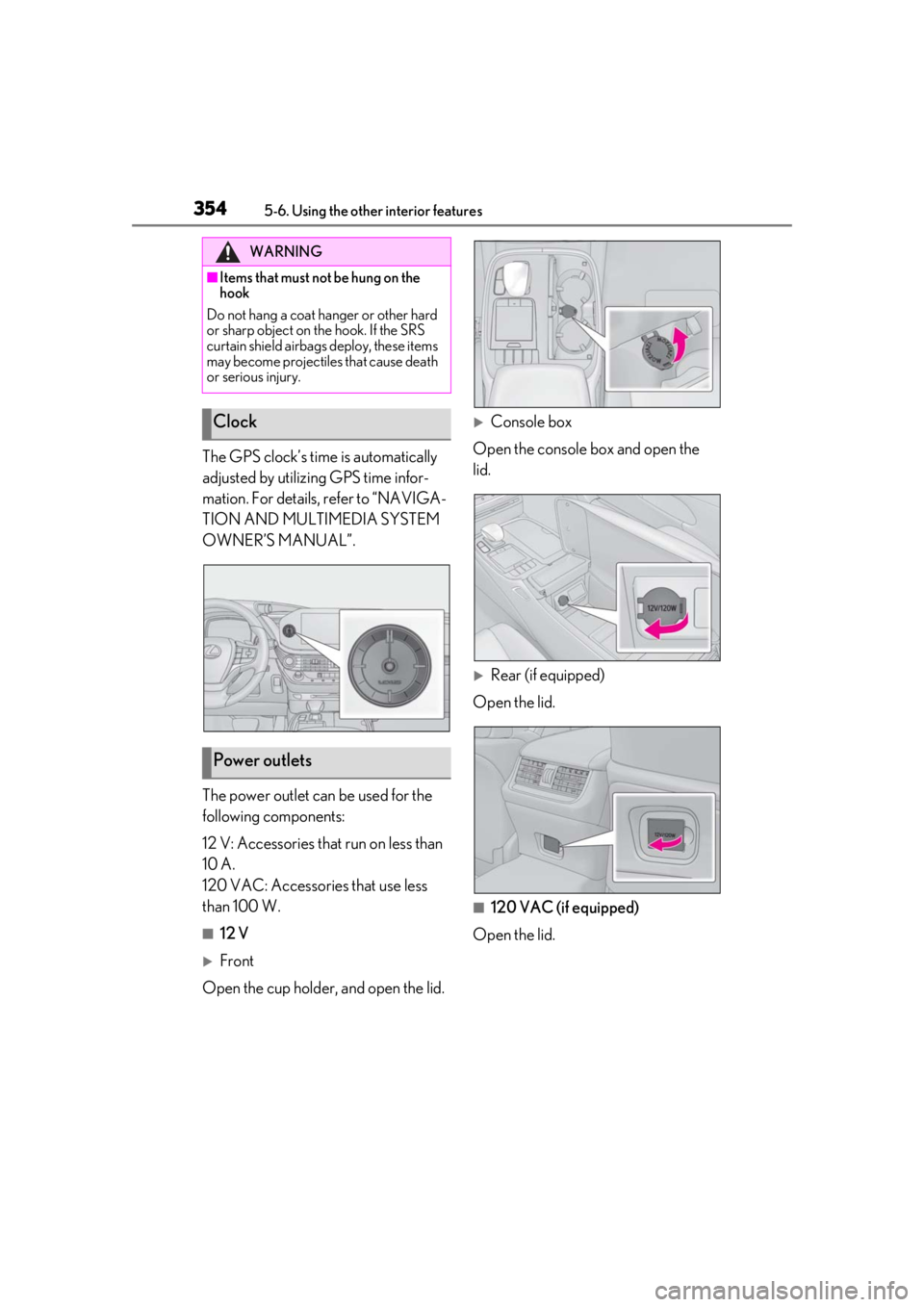
The GPS clock’s time is automatically
adjusted by utilizing GPS time infor-
mation. For details, refer to “NAVIGA-
TION AND MULTIMEDIA SYSTEM
OWNER’S MANUAL”.
The power outlet can be used for the
following components:
12 V: Accessories that run on less than
10 A.
120 VAC: Accessories that use less
than 100 W.
■12 V
Front
Open the cup holder , and open the lid.
Console box
Open the console box and open the
lid.
Rear (if equipped)
Open the lid.
■120 VAC (if equipped)
Open the lid.
WARNING
■Items that must not be hung on the
hook
Do not hang a coat ha nger or other hard
or sharp object on the hook. If the SRS
curtain shield airbags deploy, these items
may become projectiles that cause death
or serious injury.
Clock
Power outlets