2021 LEXUS LS500 Set home
[x] Cancel search: Set homePage 316 of 520

3165-1. Remote Touch/Display
■Menu screen
Press the “MENU” button on the
Remote Touch to display the menu
screen.
This system can also be operated by the
touch screen. For deta ils, refer to “NAVI-
GATION AND MULTIMEDIA SYSTEM
OWNER’S MANUAL”.
The displays shown in the illustrations
are used for example only and may dif-
fer from the actual vehicle.
*1: Refer to the “NAVIGATION AND MULTIMEDIA SYSTEM OWNER’S
MANUAL”.
*2: This function is not made available in some models or areas.
■Split-screen display
Different information can be displayed on the left and right sides of the screen. For
example, audio control screen can be displayed and operated while the fuel con-
Center Display
Center Display overview
SwitchFunction
Select to display the
“Destination” screen.
*1,
2
Select to display the
audio control screen.
*1
Select to display the
hands-free control
screen.
*1
Select to display the
“Apps” screen.
*1, 2
/
/
When an Apple Car-
Play/Android Auto con-
nection is established
and this button displays
“Apple Car-
Play”/“Android Auto”,
select to display the
home screen of Apple
CarPlay/Android
Auto.
*1, 2
Select to display the
information screen.
*1
( P.93)
Select to display the
setup screen.
*1
Select to display the air
conditioning control
screen. ( P.326)
SwitchFunction
Page 318 of 520
3185-1. Remote Touch/Display
*:If equipped
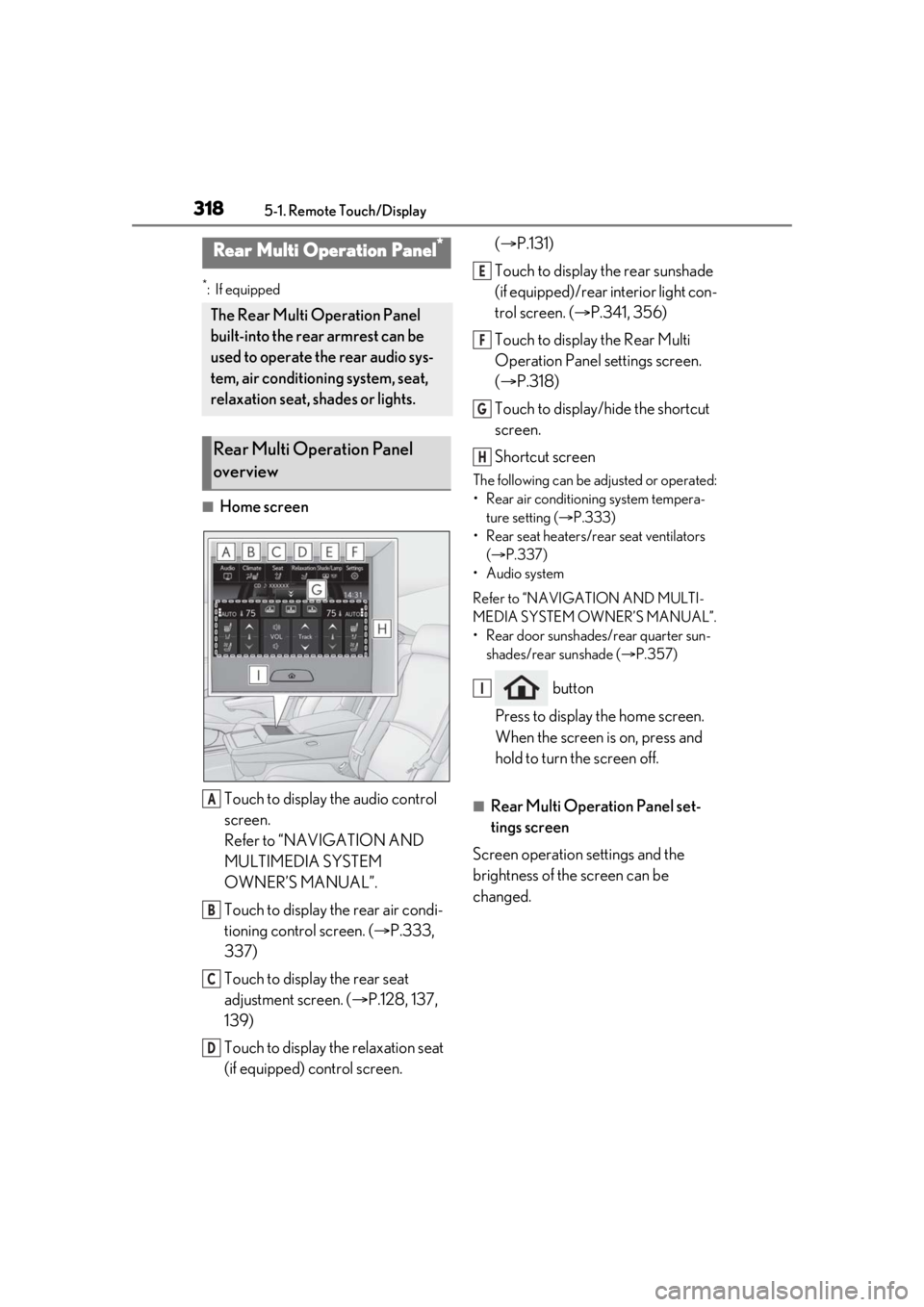
■Home screenTouch to display the audio control
screen.
Refer to “NAVIGATION AND
MULTIMEDIA SYSTEM
OWNER’S MANUAL”.
Touch to display the rear air condi-
tioning control screen. ( P.333,
337)
Touch to display the rear seat
adjustment screen. ( P.128, 137,
139)
Touch to display the relaxation seat
(if equipped) control screen. (
P.131)
Touch to display the rear sunshade
(if equipped)/rear interior light con-
trol screen. ( P.341, 356)
Touch to display the Rear Multi
Operation Panel settings screen.
( P.318)
Touch to display/hide the shortcut
screen.
Shortcut screen
The following can be adjusted or operated:
• Rear air conditioning system tempera- ture setting ( P.333)
• Rear seat heaters/rear seat ventilators ( P.337)
• Audio system
Refer to “NAVIGATION AND MULTI-
MEDIA SYSTEM OWNER’S MANUAL”.
• Rear door sunshades/rear quarter sun- shades/rear sunshade ( P.357)
button
Press to display the home screen.
When the screen is on, press and
hold to turn the screen off.
■Rear Multi Operation Panel set-
tings screen
Screen operation settings and the
brightness of the screen can be
changed.
Rear Multi Operation Panel*
The Rear Multi Operation Panel
built-into the rear armrest can be
used to operate the rear audio sys-
tem, air conditioning system, seat,
relaxation seat, shades or lights.
Rear Multi Operation Panel
overview
A
B
C
D
E
F
G
H
I
Page 319 of 520
3195-1. Remote Touch/Display
5
Interior features
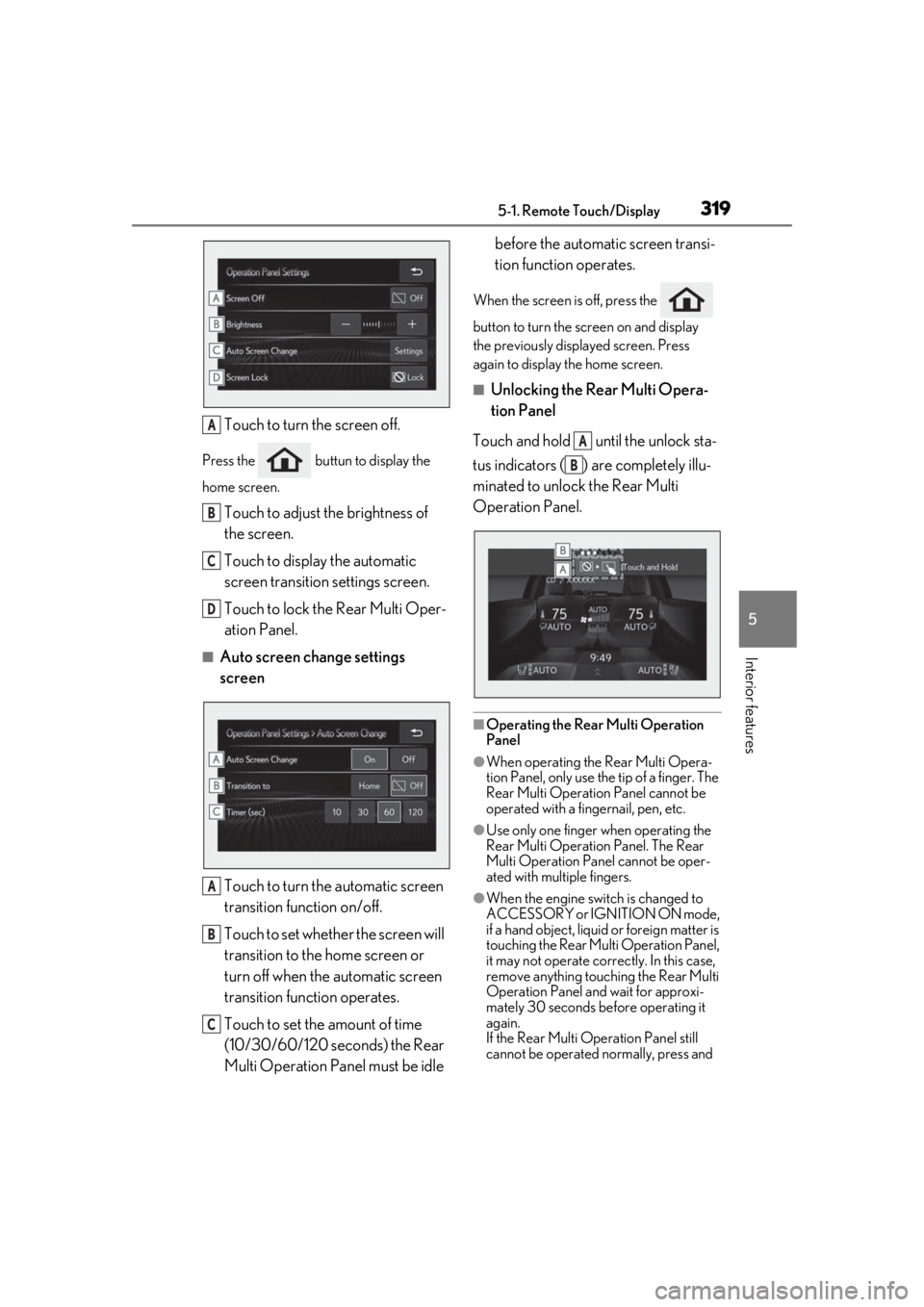
Touch to turn the screen off.
Press the buttun to display the
home screen.
Touch to adjust the brightness of
the screen.
Touch to display the automatic
screen transition settings screen.
Touch to lock the Rear Multi Oper-
ation Panel.
■Auto screen change settings
screenTouch to turn the automatic screen
transition function on/off.
Touch to set whether the screen will
transition to the home screen or
turn off when the automatic screen
transition function operates.
Touch to set the amount of time
(10/30/60/120 seconds) the Rear
Multi Operation Panel must be idle before the automatic screen transi-
tion function operates.
When the screen is off, press the
button to turn the screen on and display
the previously disp
layed screen. Press
again to display the home screen.
■Unlocking the Rear Multi Opera-
tion Panel
Touch and hold until the unlock sta-
tus indicators ( ) are completely illu-
minated to unlock the Rear Multi
Operation Panel.
■Operating the Rear Multi Operation
Panel
●When operating the Rear Multi Opera-
tion Panel, only use the tip of a finger. The
Rear Multi Operation Panel cannot be
operated with a fingernail, pen, etc.
●Use only one finger when operating the
Rear Multi Operation Panel. The Rear
Multi Operation Panel cannot be oper-
ated with multiple fingers.
●When the engine swit ch is changed to
ACCESSORY or IGNITION ON mode,
if a hand object, liquid or foreign matter is
touching the Rear Multi Operation Panel,
it may not operate correctly. In this case,
remove anything touching the Rear Multi
Operation Panel and wait for approxi-
mately 30 seconds be fore operating it
again.
If the Rear Multi Operation Panel still
cannot be operated normally, press and
A
B
C
D
A
B
C
A
B
Page 333 of 520
3335-3. Using the air conditioning system and defogger
5
Interior features
*:If equipped
■Center Display
Press the “MENU” button on the
Remote Touch to display the main
menu and move the cursor to to
display the climate control shortcut
buttons. Then, select to display the
rear air conditioning control screen.
This system can also be operated by the
touch screen.
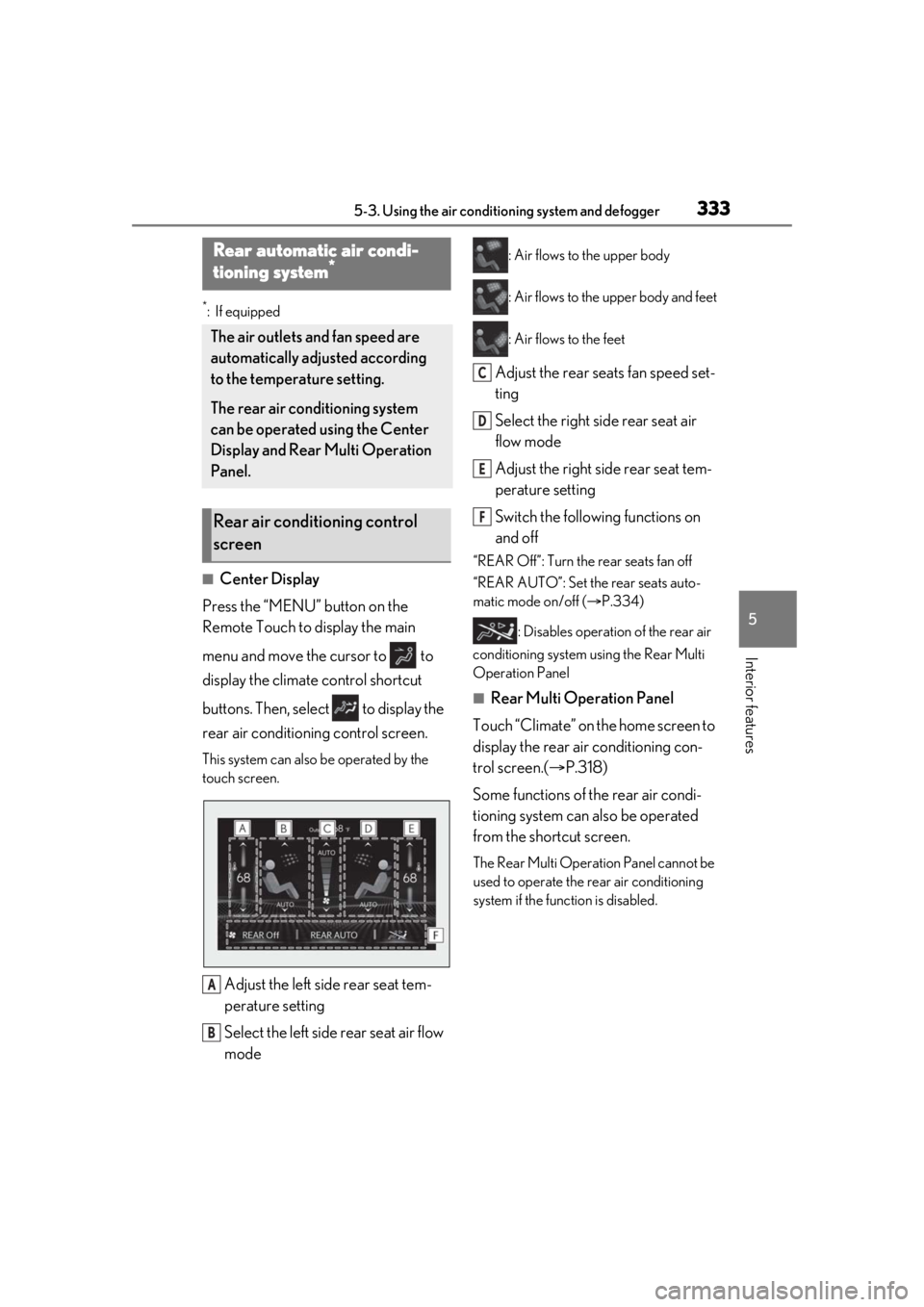
Adjust the left side rear seat tem-
perature setting
Select the left side rear seat air flow
mode
: Air flows to the upper body
: Air flows to the upper body and feet
: Air flows to the feet
Adjust the rear seats fan speed set-
ting
Select the right side rear seat air
flow mode
Adjust the right side rear seat tem-
perature setting
Switch the following functions on
and off
“REAR Off”: Turn the rear seats fan off
“REAR AUTO”: Set the rear seats auto-
matic mode on/off ( P.334)
: Disables operation of the rear air
conditioning system using the Rear Multi
Operation Panel
■Rear Multi Operation Panel
Touch “Climate” on the home screen to
display the rear air conditioning con-
trol screen.( P.318)
Some functions of the rear air condi-
tioning system can also be operated
from the shortcut screen.
The Rear Multi Operat ion Panel cannot be
used to operate the rear air conditioning
system if the func tion is disabled.
Rear automatic air condi-
tioning system*
The air outlets and fan speed are
automatically adjusted according
to the temperature setting.
The rear air conditioning system
can be operated using the Center
Display and Rear Multi Operation
Panel.
Rear air conditioning control
screen
A
B
C
D
E
F
Page 476 of 520

4768-2. Customization
8-2.Customization
■Changing by using the meter con-
trol switches
1 Press or to select .
2 Operate the meter control
switches to select the desired item
to be customized.
3 According to the display, select the
desired setting and then press .
To go back to the previous screen or exit
the customize mode, press .
■Changing by using the Remote
Touch
1 Press the “MENU” button on the
Remote Touch.
2 Select “Setup” on the menu screen
and select “Vehicle”.
3 Select “Vehicle Customization” or
“Drive Mode Customization”.
Various setting can be changed. Refer to
the list of settings that can be changed for
details.
For details on the Remote Touch, refer
to the “NAVIGATION AND MULTI-
MEDIA SYSTEM OWNER’S MAN- UAL”.
■Changing by using the Rear Multi
Operation Panel (if equipped)
1 Display the home screen on the
Rear Multi Operation Panel and
then touch “Seat”.
2 Touch “Left” or “Right”.
3 Touch .
4 Touch a button to change the set-
ting.
■When customizing using the Remote
Touch
Stop the vehicle in a safe place, apply the
parking brake, and shift the shift position to
P. Also, to prevent battery discharge, leave
the engine running while customizing the
features.
Customizable features
Your vehicle includes a variety of
electronic features that can be per-
sonalized to your preferences. The
settings of these features can be
changed by using the meter control
switches, the Remote Touch, Rear
Multi Operation Panel or at your
Lexus dealer.
Customizing vehicle features
WARNING
■During customization
As the engine needs to be running
during customization, ensure that the
vehicle is parked in a place with ade-
quate ventilation. In a closed area such as
a garage, exhaust gases including harm-
ful carbon monoxide (CO) may collect
and enter the vehicle. This may lead to
death or a serious health hazard.
NOTICE
■During customization
To prevent battery discharge, ensure that
the engine is running while customizing
features.
Page 478 of 520

4788-2. Customization
*1: For details about each function: P.87
*2: The default setting varies according to country.
*3:F SPORT models
■Head-up Display* ( P.89)
Drive information 1
Current fuel con-
sumption
Customizable
items: P.84—O——
Average fuel
economy (after reset)
Drive information 2
Distance (driving range)
Average vehicle speed (after reset)
Clock12-hour display24-hour display—O——
Pop-up displayOnOff—O——
Accent colorColor 1Color 2OO——
Rev indicator*35000 r/min.
2000 - 6400 r/min.
—O——
Off
Rev peak*3OnOff—O——
Eco Driving Indicator LightOnOff—O——
Suggestion functionOn
On (when the vehicle is stopped)
O——O
Off
FunctionDefault settingCustomized set- ting
Gauge informationTachometer
Eco Driving Indi-cator
—O——
No content
Function*1Default settingCustomized set- tingABCD
ABCD
Page 517 of 520

517Alphabetical Index
SunshadeRoof ................................................................... 156
Switches Activating the Automatic High Beam193
Automatic High Beam system..............193
Brake Hold switch ..................................... 188
Digital Rearview Mi rror control switches
...........................................................................143
Door lock switches .................................... 104
Driving mode select switch .................. 299
Driving position memory switches .....133
Dynamic radar cruise control with full-speed range switch ....................... 254
Electronic roof sunshade switches .... 158
Emergency flashers switch .................... 418
Engine switch................................................. 174
Garage door opener switches ..........360
Heated steering wheel switch............. 336
HUD (Head-up display) switch.............. 91
Ignition switch................................................ 174
Instrument panel light control switches ..................................................................... 77, 81
Light switches ............................................... 190
LTA (Lane Tracing As sist) switch..... 244
Meter control switches .............................. 83
Moon roof switches .................................. 156
“ODO TRIP” switch ............................. 76, 81
Outside rear view mirror switches ...... 151
Paddle shift switches ....................... 182, 183
Panoramic moon roof switches .......... 158
Parking brake switch ................................ 186
PCS OFF switch ........................................ 230
PKSB (Parking Support Brake) switch .........................................................................285
Power door lock switch .......................... 104
Power window switches ..........................153
RCD (Rear Camera Detection) switch ...........................................................................281
Rear door sunshade switch..................356
Rear seat heater ......................................... 333
Rear seat position memory switches. 137
Rear seat ventilator ................................... 333 Rear sunshades switch........................... 358
Rear window and outside rear view mir-
ror defoggers switch ............................ 323
Seat heater switches.................................336
Seat ventilator switches ..........................336
Snow mode switch..................................... 182
“SOS” button...................................................58
Tilt and telescopic steering control switch ............................................................................. 141
Tire pressure warning reset switch.. 399
Trunk closer switch ...................................... 110
Trunk opener main switch........................ 112
Trunk opener switch ................................. 108
Vehicle-to-vehicle distance switch...254
VSC OFF switch ...................................... 305
Window lock switch.................................. 155
Windshield wiper and washer switch196
Windshield wiper de-icer switch.......328
T
Tachometer............................................... 75, 78 Rev indicator .................................................. 80
Rev peak........................................................... 80
Tail lights Light switch .................................................... 190
Replacing light bulbs ................................. 416
Theft deterrent system Alarm...................................................................66
Engine immobilizer system...................... 64
Tire inflation pressure Maintenance data ...................................... 462
Tire inflation pressure display function......................................................................... 395
Warning light .................................................431
Tire information .............................................467 Glossary .........................................................470
Size ................................................................... 468
Tire identification number..................... 468
Uniform Tire Quality Grading ............469
Tire pressure display ... ............................... 395
Tire pressure warning system Function ......................................................... 395