2021 Lexus LC500C parking brake
[x] Cancel search: parking brakePage 156 of 410

1544-2. Driving procedures
■Driving mode
P.203
■Snow mode
Snow mode can be se lected to suit the
conditions when driving on slippery
road surfaces, such as on snow.
Turn the switch backward.
The snow mode indicator comes on.
Turn the switch backward again to
return to normal mode.
■Snow mode automatic deactivation
Snow mode is automatically deactivated if
the engine switch is turned off after driving
in snow mode.
To drive using temporary shift range
selection, operate the “-” or “+” paddle
shift switch.
When the “-” paddle shift switch is
operated, the shift range switches to a
range that enables engine braking
force that is suitable to driving condi-
tions. When the “+” paddle shift switch
WARNING
■P position switch
●Do not press the P position switch
while the vehicle is moving.
If the P position switch is pressed when
driving at very low speeds (for exam-
ple, directly before stopping the vehi-
cle), the vehicle may stop suddenly
when the shift position switches to P,
which could lead to an accident.
●In order to prevent the shift position
from accidentally being changed, do
not touch the P position switch or shift
lever when not using them.
NOTICE
■Notes regarding shift lever and P
position switch operation
Avoid repeatedly operating the shift
lever and P position switch in quick suc-
cession.
The system protection function may acti-
vate and it will not be temporarily possi-
ble to shift the shift position other than P.
If this happens, plea se wait for a while
before attempting to change the shift
position again.
■When exiting the vehicle (driver’s
seat only)
Check that the shift position indicator
shows P and that the parking brake indi-
cator is illuminated before opening the
door and exiting the vehicle.
■When changing the engine switch to
ACC with the shift position held in N
Even if the engine is not running, by
operating the shift le ver and the engine
switch, the engine switch may be
changed to ACC with the shift position
held in N. Make sure that the engine is
running before performing the opera-
tion.
Selecting the driving mode
Selecting shift ranges in the D
position
Page 159 of 410
1574-2. Driving procedures
4
Driving
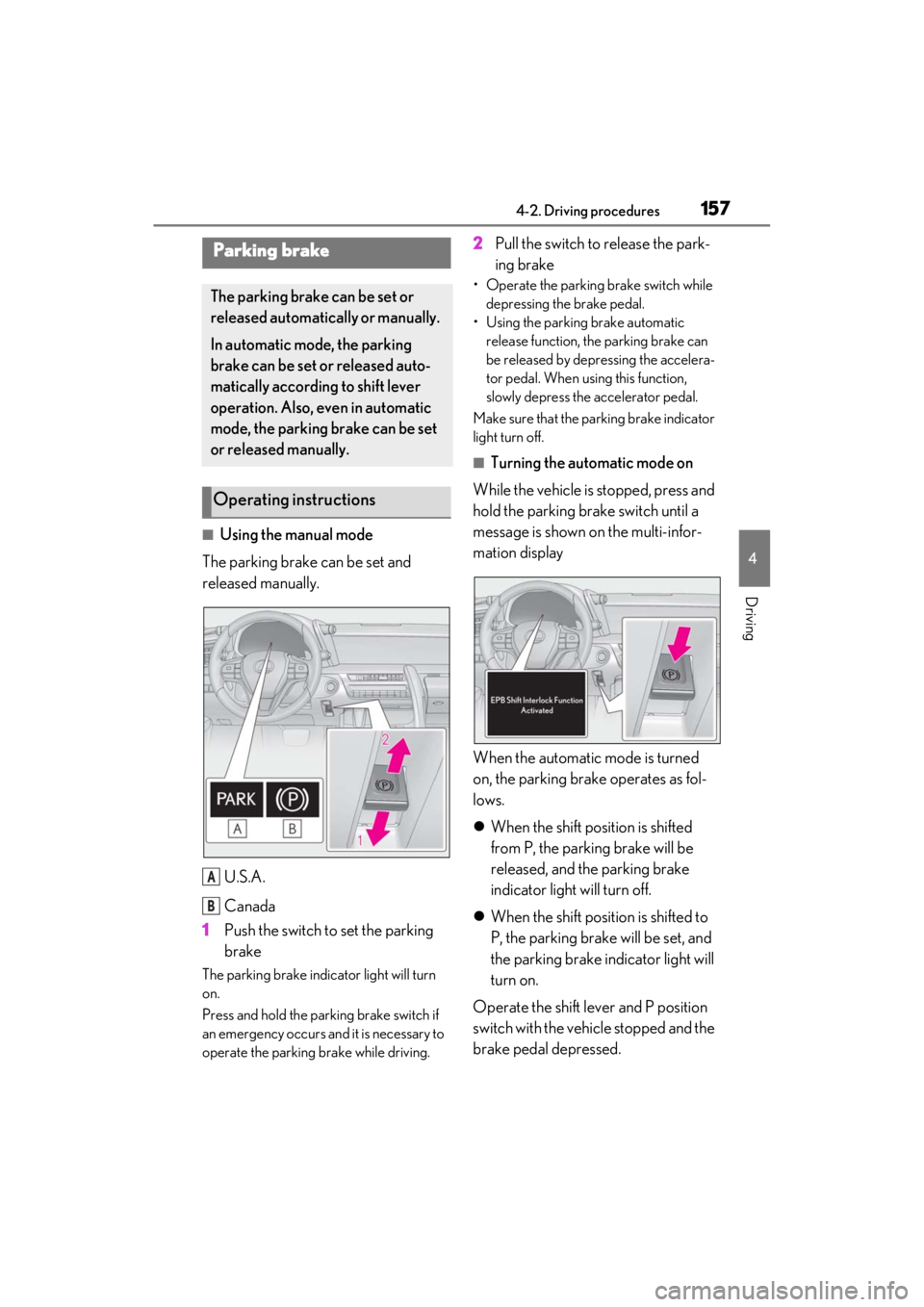
■Using the manual mode
The parking brake can be set and
released manually.
U.S.A.
Canada
1 Push the switch to set the parking
brake
The parking brake indicator light will turn
on.
Press and hold the parking brake switch if
an emergency occurs and it is necessary to
operate the parking brake while driving.
2Pull the switch to release the park-
ing brake
• Operate the parking brake switch while
depressing the brake pedal.
• Using the parking brake automatic release function, the parking brake can
be released by depressing the accelera-
tor pedal. When using this function,
slowly depress the accelerator pedal.
Make sure that the pa rking brake indicator
light turn off.
■Turning the automatic mode on
While the vehicle is stopped, press and
hold the parking brake switch until a
message is shown on the multi-infor-
mation display
When the automatic mode is turned
on, the parking brake operates as fol-
lows.
When the shift position is shifted
from P, the parking brake will be
released, and the parking brake
indicator light will turn off.
When the shift position is shifted to
P, the parking brake will be set, and
the parking brake indicator light will
turn on.
Operate the shift lever and P position
switch with the vehicle stopped and the
brake pedal depressed.
Parking brake
The parking brake can be set or
released automatically or manually.
In automatic mode, the parking
brake can be set or released auto-
matically according to shift lever
operation. Also, even in automatic
mode, the parking brake can be set
or released manually.
Operating instructions
A
B
Page 160 of 410

1584-2. Driving procedures
■Turning the automatic mode off
While the vehicle is stopped, pull and
hold the parking brake switch until a
message is shown on the multi-infor-
mation display
■Parking brake operation
●When the engine switch is not in ON, the
parking brake cannot be released using
the parking brake switch.
●When the engine switch is not in ON,
automatic mode (automatic brake setting
and releasing) is not available.
■Parking brake automatic release func-
tion
●When the shift position is shifted from P,
the parking brake will be released in
automatic mode.
●When all of the foll owing conditions are
met in manual mode, the parking brake
can be released by depressing the accel-
erator pedal.
• The driver’s door is closed
• The driver is wearing the seat belt
• The shift position is in D, M or R
■If “EPB frequently operated Wait a min-
ute” is displayed on the multi-informa-
tion display
If the parking brake is operated repeatedly
over a short period of time, the system may
restrict operation to prevent overheating. If
this happens, refrain from operating the
parking brake. Normal operation will return
after about 1 minute.
■If “EPB Activation Stopped Incom-
pletely” or “EPB unavailable” is dis-
played on the multi-information display
Operate the parking brake switch. If the
message does not disappear after operat-
ing the switch several times, the system may
be malfunctioning. Have the vehicle
inspected by your Lexus dealer.
■Parking brake operation sound
When the parking brake operates, a motor
sound (whirring sound) may be heard. This
does not indicate a malfunction.
■Parking brake indicator light
●Depending on the engine switch mode,
the parking brake indicator light will turn
on and stay on as described below:
ON: Comes on until the parking brake is
released.
Not in ON: Stays on for approximately 15
seconds.
●When the engine switch is turned off with
the parking brake set, the parking brake
indicator light will stay on for about 15
seconds. This does not indicate a mal-
function.
■When the parking brake switch mal-
functions
Automatic mode (automatic brake setting
and releasing) will be turned on automati-
cally.
■Parking the vehicle
P.136
■Parking brake engaged warning buzzer
A buzzer will sound if the vehicle is driven
with the parking brake engaged. “EPB
applied” is displayed on the multi-informa-
tion display (with the vehicle reached a
speed of 3 mph [5 km/h]).
■If the brake system warning light comes
on
P.314
■Usage in winter time
P.223
Page 161 of 410

1594-2. Driving procedures
4
Driving
Turns the brake hold system on
The brake hold standby indicator
(green) comes on. While the system is
holding the brake, the brake hold operated
indicator (yellow) comes on.
■Brake hold system operating conditions
The brake hold system cannot be turned on
in the following conditions:
●The driver’s door is not closed.
●The driver is not wearing the seat belt.
●“EPB Activation Stopped Incompletely”
or “EPB Malfunction Visit your dealer” is
displayed on the multi-information dis-
play.
If any of the conditions above are detected
when the brake hold system is enabled, the
system will turn off and the brake hold
WARNING
■When parking the vehicle
Do not leave a child in the vehicle alone.
The parking brake may be released unin-
tentionally and there is the danger of the
vehicle moving that may lead to an acci-
dent resulting in death or serious injury.
NOTICE
■When parking the vehicle
Before you leave the vehicle, shift the
shift position to P, set the parking brake
and make sure that the vehicle does not
move.
■When the system malfunctions
Stop the vehicle in a safe place and
check the warning messages.
■When the parking brake cannot be
released due to a malfunction
Driving the vehicle with the parking
brake set will lead to brake components
overheating, which may affect braking
performance and increase brake wear.
Have the vehicle inspected by your
Lexus dealer immediately if this occurs.
Brake Hold
The brake hold system keeps the
brake applied when the shift posi-
tion is in D, M or N with the system
on and the brake pedal has been
depressed to stop the vehicle. The
system releases the brake when the
accelerator pedal is depressed with
the shift position in D or M to allow
smooth start off.
Enabling the system
A
B
Page 162 of 410

1604-2. Driving procedures
standby indicator light will go off. In addi-
tion, if any of the conditions are detected
while the system is holding the brake, a
warning buzzer will sound and a message
will be shown on the multi-information dis-
play. The parking brake will then be set
automatically.
■Brake hold function
●If the brake pedal is left released for a
period of about 3 minutes after the sys-
tem has started holding the brake, the
parking brake will be set automatically. In
this case, a warning buzzer sounds and a
message is shown on the multi-informa-
tion display.
●To turn the system off while the system is
holding the brake, firmly depress the
brake pedal and press the button again.
●The brake hold function may not hold the
vehicle when the vehicle is on a steep
incline. In this situation, it may be neces-
sary for the driver to apply the brakes. A
warning buzzer will sound and the multi-
information display will inform the driver
of this situation. If a warning message is
shown on the multi-information display,
read the message and follow the instruc-
tions.
■When the parking brake is set automati-
cally while the system is holding the
brakes
Perform any of the following operations to
release the parking brake.
●Depress the accelerator pedal. (The
parking brake will not be released auto-
matically if the seat belt is not fastened.)
●Operate the parking brake switch with
the brake pedal depressed.
Make sure that the pa rking brake indicator
light goes off. ( P.157)
■When an inspection at your Lexus
dealer is necessary
When the brake hold standby indicator
(green) does not illuminate even when the
brake hold switch is pressed with the brake
hold system operating conditions met, the
system may be malfun ctioning. Have the
vehicle inspected at your Lexus dealer.
■If “Brake Hold Fault Depress Brake to
Deactivate Visit Your Dealer” or
“Brake Hold Malfunction Visit Your
Dealer” is shown on the multi-informa-
tion display
The system may be malfunctioning. Have
the vehicle inspected by your Lexus dealer.
■Warning messages and buzzers
Warning messages and buzzers are used to
indicate a system malfunction or to inform
the driver of the need for caution. If a warn-
ing message is shown on the multi-informa-
tion display, read the message and follow
the instructions.
■If the brake hold operated indicator
flashes
P.317
WARNING
■When the vehicle is on a steep incline
When using the brake hold system on a
steep incline, exercise caution. The brake
hold function may not hold the vehicle in
such a situation.
■When stopped on a slippery road
The system cannot stop the vehicle when
the gripping ability of the tires has been
exceeded. Do not use the system when
stopped on a slippery road.
NOTICE
■When parking the vehicle
The brake hold system is not designed
for use when parking the vehicle for a
long period of time. Turning the engine
switch off while the system is holding the
brake may release the brake, which
would cause the vehicle to move. When
operating the engine switch, depress the
brake pedal, shift the shift position to P
and set the parking brake.
Page 163 of 410

1614-3. Operating the lights and wipers
4
Driving
4-3.Operating the lights and wipers
Operating the switch turns on
the lights as follows:U.S.A.
Canada
1 The side marker, parking, tail,
license plate, instrument panel
lights, and daytime running lights
turn on.
2 The headlights and all the
lights listed above (except daytime
running lights) turn on.
3 The headlights, daytime run-
ning lights ( P.161) and all the lights listed above turn on and off
automatically.
4 Off
*
*: U.S.A. only
■AUTO mode can be used when
The engine switch is in ON.
■Daytime running light system
●The daytime running lights illuminate
using the same lights as the parking lights
and illuminate brighter than the parking
lights.
●To make your vehicle more visible to
other drivers during daytime driving, the
daytime running lights turn on automati-
cally when all of the following conditions
are met. (The daytime running lights are
not designed for use at night.)
• The engine is running
• The parking brake is released
• The headlight switch is in the or
* position
*: When the surroundings are bright
The daytime running lights remain on after
they illuminate, even if the parking brake is
set again.
●For the U.S.A.: Daytime running lights
can be turned off by operating the head-
light switch to position.
●Compared to turning on the headlights,
the daytime running light system offers
greater durability and consumes less
electricity, so it can help improve fuel
economy.
■Headlight control sensor
The sensor may not function properly if an
object is placed on the sensor, or anything
that blocks the sensor is affixed to the wind-
shield.
Doing so interferes with the sensor detect-
ing the level of ambien t light and may cause
the automatic headlight system to malfunc-
tion.
Headlight switch
The headlights can be operated
manually or automatically.
Turning on the headlights
A
B
Page 203 of 410

2014-5. Using the driving support systems
4
Driving
mately 30 mph (50 km/h).
However, when a preceding vehicle is
detected, the dynamic radar cruise con-
trol with full-speed range can be set even
if the vehicle speed is below approxi-
mately 30 mph (50 km/h).
■Accelerating after setting the vehicle
speed
The vehicle can accelerate by operating the
accelerator pedal. After accelerating, the
set speed resumes. However, during vehi-
cle-to-vehicle distance control mode, the
vehicle speed may decrease below the set
speed in order to maintain the distance to
the preceding vehicle.
■When the vehicle stops while follow-up
cruising
●Pressing the “+RES” switch while the
vehicle ahead stops will resume follow-
up cruising if the vehicle ahead starts off
within approximately 3 seconds after the
switch is pressed.
●If the vehicle ahead starts off within 3 sec-
onds after your vehicle stops, follow-up
cruising will be resumed.
■Automatic cancelation of vehicle-to-
vehicle distance control mode
Vehicle-to-vehicle dist ance control mode is
automatically canceled in the following situ-
ations:
●Actual vehicle speed falls at or below
approximately 25 mph (40 km/h) when
there are no vehicles ahead.
●The preceding vehicle leaves the lane
when your vehicle is following at a vehicle
speed at or below approximately 25 mph
(40 km/h). Otherwise, the sensor can
not properly detect the vehicle.
(“CRUISE NOT AVAILABLE No Pre-
ceding Vehicles” is displayed on the
multi-information display)
●VSC is activated.
●TRAC is activated for a period of time.
●When the VSC or TRAC system is
turned off.
●When snow mode is set.
●The sensor cannot detect correctly
because it is covered in some way.
●Pre-collision braking is activated.
●The parking brake is operated.
●The vehicle is stopped by system control
on a steep incline.
●The following are detected when the
vehicle has been stopped by system con-
trol:
• The driver is not wearing a seat belt.
• The driver’s door is opened.
• The vehicle has been stopped for about 3 minutes
If vehicle-to-vehicle distance control mode
is automatically canceled for any other rea-
son, there may be a malfunction in the sys-
tem. Contact your Lexus dealer.
■Automatic cancelation of constant
speed control mode
Constant speed control mode is automati-
cally canceled in the following situations:
●Actual vehicle speed is more than
approximately 10 mph (16 km/h) below
the set vehicle speed.
●Actual vehicle speed falls below approxi-
mately 25 mph (40 km/h).
●VSC is activated.
●TRAC is activated for a period of time.
●When the VSC or TRAC system is
turned off.
●Pre-collision braking is activated.
If constant speed control mode is automati-
cally canceled for any other reason, there
may be a malfunction in the system. Con-
tact your Lexus dealer.
■Brake system operation sound
If the brakes are app lied automatically while
the vehicle is in vehicle-to-vehicle distance
control mode, a brake system operation
sound may be heard. This does not indicate
a malfunction.
■If “Radar Cruise Control Unavailable” is
shown on the multi-information display
The radar cruise control system cannot be
used temporarily. Use the system when it
becomes available again.
Page 208 of 410

2064-5. Using the driving support systems
■If “Clean Parking Assist Sensor” is dis-
played on the multi-information display
A sensor may be dirty or covered with snow
or ice. In such cases, if it is removed from
the sensor, the system should return to nor-
mal.
Also, due to the sensor being frozen at low
temperatures, a malfunction display may
appear or an obstacle may not be detected.
If the sensor thaws out, the system should
return to normal.
■If “Parking Assist Malfunction” or
“Parking Assist Malfunction Visit Your
Dealer” is displayed on the multi-infor-
mation display
There is a malfunction and the device may
not be working properly.
Have the vehicle inspected by your Lexus
dealer.
■Sensor detectio n information
●The sensor’s detection areas are limited
to the areas around the vehicle’s front
and rear bumpers.
●Certain vehicle conditions and the sur-
rounding environment may affect the
ability of the sensor to correctly detect
obstacles. Particular instances where this
may occur are listed below.
• There is dirt, snow or ice on the sensor.
(Wiping the sensors will resolve this
problem.)
• The sensor is frozen. (Thawing the area
will resolve this problem.)
In especially cold weather, if a sensor is
frozen the screen may show an abnormal
display, or obstacles may not be
detected.
• The sensor is covered in any way.
• The vehicle is leaning considerably to
one side.
• On an extremely bumpy road, on an
incline, on gravel, or on grass.
• The vicinity of the vehicle is noisy due to vehicle horns, motorcycle engines, air
brakes of large vehicles, or other loud
noises producing ultrasonic waves.
• There is another vehicle equipped with parking assist sensor in the vicinity.
• The sensor is coated with a sheet of spray or heavy rain.
• The vehicle is equipped with a fender pole or wireless antenna.
• Towing eyelets are installed.
• The bumper or sensor receives a strong impact.
• The vehicle is approaching a tall or curved curb.
• In harsh sunlight or intense cold weather.
• The area directly under the bumpers is not detected.
• If obstacles draw too close to the sensor.
• A non-genuine Lexus suspension (low- ered suspension etc.) is installed.
• People may not be detected if they are wearing certain types of clothing.
In addition to the examples above, there are
instances in which, be cause of their shape,
signs and other objects may be judged by
the sensor to be closer than they are.
●The shape of the obstacle may prevent
the sensor from detecting it. Pay particu-
lar attention to the following obstacles:
• Wires, fences, ropes, etc.
• Cotton, snow and other materials that absorb sound waves
• Sharply-angled objects
• Low obstacles
• Tall obstacles with upper sections pro- jecting outwards in the direction of your
vehicle
●The following situations may occur
during use.
• Depending on the shape of the obstacle and other factors, the detection distance
may shorten, or detection may be impos-
sible.
• Obstacles may not be detected if they are too close to the sensor.
• There will be a short delay between obstacle detection and display. Even at
slow speeds, there is a possibility that the
obstacle will come within the sensor’s
detection areas befo re the display is
shown and the warning beep sounds.
• Thin posts or object s lower than the sen-
sor may not be detected when
approached, even if they have been
detected once.
• It might be difficult to hear beeps due to the volume of the audio system or air flow
noise of the air conditioning system.
• It might be difficult to hear beeps due to the sounds of other systems.