Page 171 of 628

GX460_OM_OM60T19U_(U)
1714-1. Before driving
4
Driving
WARNING
Observe the following precautions.
Failure to do so may result in death or serious injury.
■When starting the vehicle
Always keep your foot on the brake pedal while stopped with the engine running. This
prevents the vehicle from creeping.
■When driving the vehicle
●Do not drive if you are unfamiliar with the location of the brake and accelerator ped-
als to avoid depressing the wrong pedal.
• Accidentally depressing the accelerator pedal instead of the brake pedal will
result in sudden acceleration that may lead to an accident.
• When backing up, you may twist your body around, leading to a difficulty in oper-
ating the pedals. Make sure to operate the pedals properly.
• Make sure to keep a correct driving po sture even when moving the vehicle only
slightly. This allows you to depress th e brake and accelerator pedals properly.
• Depress the brake pedal using your right foot. Depressing the brake pedal using your left foot may delay re sponse in an emergency, resulting in an accident.
●Do not drive the vehicle over or stop the vehicle near flammable materials.
The exhaust system and exhaust gases can be extremely hot. These hot parts may
cause a fire if there is any flammable material nearby.
●During normal driving, do not turn off the engine. Turning the engine off while driving
will not cause loss of steering or braking control, but the power assist to these systems
will be lost. This will make it more difficult to steer and brake, so you should pull over
and stop the vehicle as soon as it is safe to do so.
However, in the event of an emergency, such as if it becomes impossible to stop the
vehicle in the normal way: P. 509
●Use engine braking (downshift) to maintain a safe speed when driving down a steep
hill.
Using the brakes continuously may cause th e brakes to overheat and lose effective-
ness. ( P. 206)
●Do not adjust the positions of the steering wheel, the seat, or the inside or outside rear
view mirrors while driving.
Doing so may result in a loss of vehicle control.
●Always check that all passengers’ arms, heads or other parts of their body are not
outside the vehicle.
●Do not drive in excess of the speed limit. Even if the legal speed limit permits it, do not
drive over 85 mph (140 km/h) unless your vehicle has high-speed capability tires.
Driving over 85 mph (140 km/h ) may result in tire failure, loss of control and possible
injury. Be sure to consult a tire dealer to determine whether the tires on your vehicle
are high-speed capability tires or no t before driving at such speeds.
Page 194 of 628

194
GX460_OM_OM60T19U_(U)4-1. Before driving
■Matching trailer ball height to trailer coupler height
■Before towing
Check that the followin
g conditions are met:
●Ensure that your vehicle’s tires are properly inflated. ( P. 568)
●Trailer tires are inflated according to the trailer manufacturer’s recommendation.
●All trailer lights work as required by law.
●All lights work each time you connect them.
●The trailer ball is set at the proper height for the coupler on the trailer.
●The trailer is level when it is hitched.
Do not drive if the trailer is not level, and check for improper to ngue weight, overload-
ing, worn suspension, or other possible causes.
●The trailer cargo is securely loaded.
●The rear view mirrors conform to all applicable federal, state/provincial or local regula-
tions. If they do not, install rear view mirrors appropriate for towing purposes.
No matter which class of tow hitch applies, for a
more safe trailer hookup, the trailer ball setup
must be the proper height for the coupler on the
trailer.
Trailer ball
Coupler
1
2
Page 286 of 628

286
GX460_OM_OM60T19U_(U)4-5. Using the driving support systems
WARNING
■When using the rear view monitor system
The rear view monitor system
is a supplemental device intended to assist the driver
when backing up. When backin g up, be sure to check visually behind and all around
the vehicle before proceeding.
Observe the following precautions to avoid an accident that could result in death or
serious injuries.
●Never depend on the rear view monitor system entirely when backing up. The image
and the position of the guide lines displaye d on the screen may differ from the actual
state.
Use caution, just as you woul d when backing up any vehicle.
●Be sure to back up slowly, depressing the brake pedal to control vehicle speed.
●The instructions given are only guide lines.
When and how much to turn the steering wheel will vary according to traffic condi-
tions, road surface conditions, vehicle condit ion, etc. when parking. It is necessary to
be fully aware of this before us ing the rear view monitor system.
●When parking, be sure to check that the parking space will accommodate your vehi-
cle before maneuvering into it.
●Do not use the rear view monitor system in the following cases:
• On icy or slick road surfaces, or in snow
• When using tire chains
• When the back door is not closed completely
• On roads that are not flat or stra ight, such as curves or slopes.
●In low temperatures, the screen may darken or the image may become faint. The
image could distort when the vehicle is movi ng, or you may become unable to see the
image on the screen. Be sure to check dire ct visually and with the mirrors all around
the vehicle before proceeding.
●If the tire sizes are changed, the position of the fixed guide lines displayed on the
screen may change.
●The camera uses a special lens. The distances between objects and pedestrians that
appear in the image displayed on the screen will differ from the actual distances.
( P. 281)
Page 292 of 628

292
GX460_OM_OM60T19U_(U)4-5. Using the driving support systems
Multi-terrain Monitor
The following screens can be select
ed according to driving conditions.
• Screens that can be selected vary depend ing on conditions such as shift posi-
tion and vehicle speed. ( P. 298)
• Depending on the displayed screen, the display can be switched from normal to wide view display.
: If equipped
The Multi-terrain Monitor helps the driver to check the vehicle surroundings.
It assists in determining the conditions around the driver in a variety of situa-
tions, such as when judging conditions during off-road driving or checking for
obstacles when parking.
WARNING
■When using the Multi-terrain Monitor system
Observe the following precautions to avoid an accident that could result in death or
serious injuries.
●Never rely solely on the Multi-terrain Monitor. As with unequipped vehicles, drive
carefully while directly confirming the safety of your surroundings and the area to the
rear of the vehicle. Take particular care to avoid parked cars and other obstacles.
●Due to the characteristics of the camera lens, the actual position and distance of peo-
ple and other obstacles will differ from those shown on the Multi-terrain Monitor
screen. Directly confirm the safety of your surroundings before driving.
●Do not drive while only looking at the scre en. When driving, make sure to directly
confirm the safety of your surroundings, su ch as by visually checking the area and
using the vehicle’s mirrors.
●In low temperatures, the screen may darken or the images may become faint.
Images of moving objects in particular may distort or disappear from the screen.
Therefore, make sure to drive carefully while directly visually confirming the safety of
your surroundings.
Multi-terrain Monitor screens
Page 295 of 628
GX460_OM_OM60T19U_(U)
2954-5. Using the driving support systems
4
Driving
●When checking the area to the rear of the vehicle
●When checking the area to the sides, front and rear of the vehicle (with out-
side rear view mirrors retracted)
Panoramic view & rear viewWide rear view
P. 314 P. 314
Wide front view & side viewRear view & side view
P. 320 P. 320
Side views
P. 320
Page 300 of 628
300
GX460_OM_OM60T19U_(U)4-5. Using the driving support systems
■Screens when the four-wheel drive control switch is in H4
: Press
: Select
: Operate the shift lever
*1: The displayed screen differs when the outside rear view mirrors are retracted.
*2: The screen display can be switched by touching the image from the camera on thescreen.
*1
*2*1
Navigation screen, information set-
tings screen, etc.
Side views: P. 311
Panoramic view & wide front view:
P. 309 Panoramic view & rear view:
P. 314
Wide rear view: P. 3141
2
3
4
5
Page 307 of 628
GX460_OM_OM60T19U_(U)
3074-5. Using the driving support systems
4
Driving
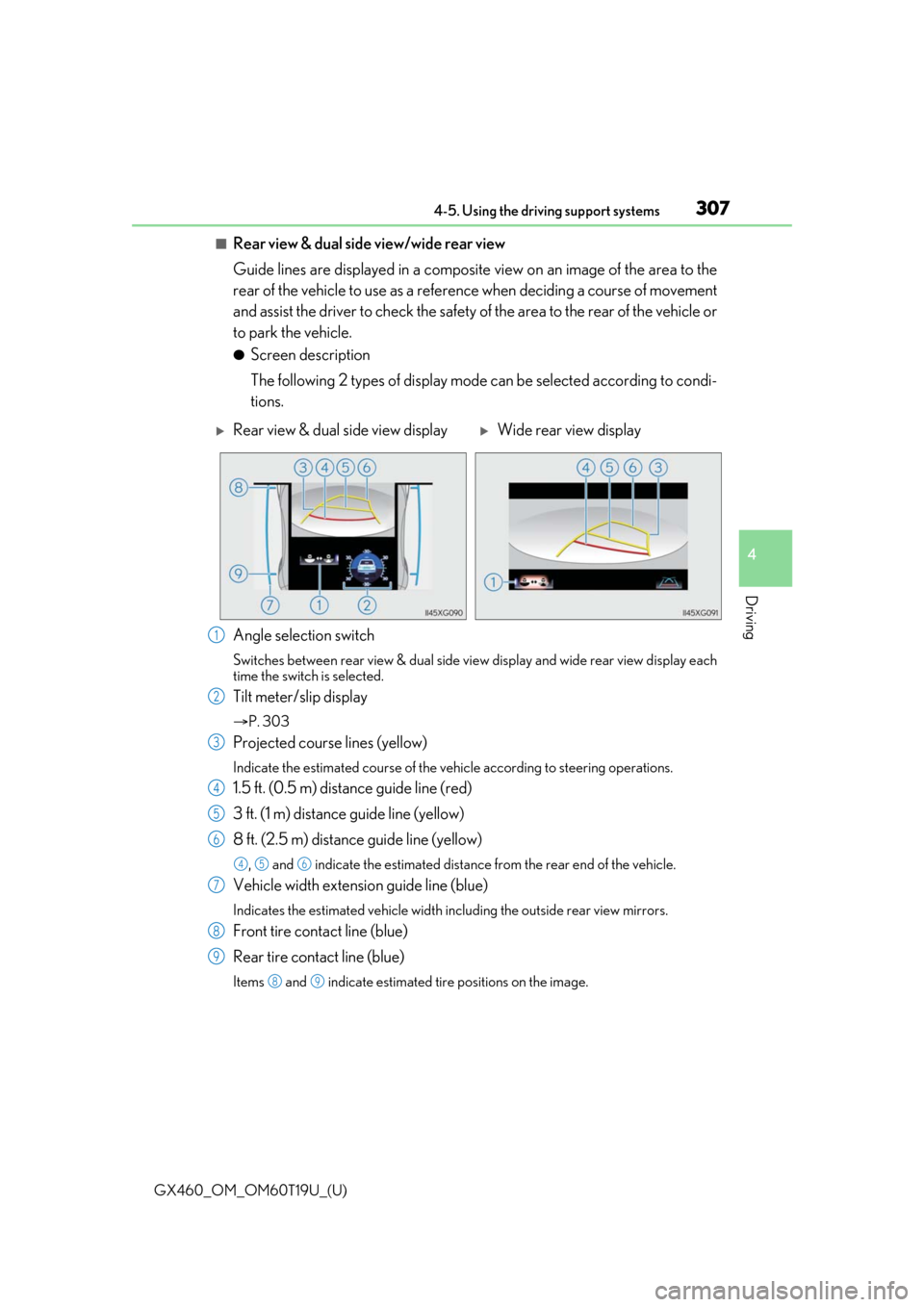
■Rear view & dual side view/wide rear view
Guide lines are displayed in a composite view on an image of the area to the
rear of the vehicle to use as a refere nce when deciding a course of movement
and assist the driver to check the safety of the area to the rear of the vehicle or
to park the vehicle.
●Screen description
The following 2 types of display mode can be selected according to condi-
tions.
Angle selection switch
Switches between rear view & dual side vi ew display and wide rear view display each
time the switch is selected.
Tilt meter/slip display
P. 303
Projected course lines (yellow)
Indicate the estimated course of the vehicle according to steering operations.
1.5 ft. (0.5 m) distance guide line (red)
3 ft. (1 m) distance guide line (yellow)
8 ft. (2.5 m) distan ce guide line (yellow)
, and indicate the estimated distance from the rear end of the vehicle.
Vehicle width extension guide line (blue)
Indicates the estimated vehicle width including the outside rear view mirrors.
Front tire contact line (blue)
Rear tire contact line (blue)
Items and indicate estimated tire positions on the image.
Rear view & dual side view displayWide rear view display
1
2
3
4
5
6
456
7
8
9
89
Page 311 of 628
GX460_OM_OM60T19U_(U)
3114-5. Using the driving support systems
4
Driving
■Side views
The image from the both side cameras is displayed and assists the driver to
check conditions on the sides of the vehicle or to confirm the safety of narrow
roads.
●Screen description
Side view (left front side)
Side view (right front side)
Display area
Vehicle width lines (blue)
Indicate the estimated vehicle
width including the outside rear
view mirrors.
Front distance guide line (red)
Indicates a distance approximately 1.6 ft. (0.5 m) from the front end of the vehi-
cle.
Front tire contact line (blue)
Indicates the estimated front tire position on the image.
Automatic display mode selection switch
P. 297
Intuitive parking assist*
When the intuitive parking assist is on, an icon will be displayed when an obsta-
cle is detected. (Refer to P. 270 for information about the intuitive parking
assist.)
*: If equipped
1
2
3
4
5
6
7
8


