2021 LEXUS ES350 lights
[x] Cancel search: lightsPage 77 of 464

772-1. Instrument cluster
2
Vehicle status information and indicators
1Darker
2 Brighter
■Brightness of the mete r lights (day mode
and night mode)
The brightness of the meter lights can be
adjusted individually.
In the following situations, the meters
changes between day mode and night
mode.
●Day mode: When the tail lights are off or
when the tail lights are on but the sur-
rounding area is bright
●Night mode: When the tail lights are on
and the surrounding area is dark
The display can be switched between
the center and side positions.
■Display (except F SPORT models)
By selecting menu icons on the multi-
information display, a variety of driv-
ing-related information can be dis-
played. The multi-information display
can also be used to change display set-
tings and other vehicle settings.
Warning or suggestion/advice pop-up
displays are also displayed in certain
situations.
■Display (F SPORT models)
Main meter in center position
The multi-informatio n display presents
the driver with a variety of driving-
related information.
Warning or suggestion/advice pop-up
displays are also displayed in certain
situations.
Changing the main meter loca-
tion
Multi-information display
Display and menu icons
Page 83 of 464

832-1. Instrument cluster
2
Vehicle status information and indicators
Displays suggestions to the driver in
the following situations. To select a
response to a displayed suggestion,
use the meter control switches.
■Suggestion to turn off the head-
lights
If the headlights are left on for a certain
amount of time with the headlight
switch in after the engine switch
has been turned off, a suggestion mes-
sage will be displayed asking if you
wish to turn the headlights off.
To turn the headlights off, select “Yes”.
If a front door is op ened after the engine
switch is turned off, this suggestion mes-
sage will not be displayed.
■Customization
Some functions can be customized.
( P.419)
WARNING
■Cautions during setting up the dis-
play
As the engine needs to be running
during setting up the display, ensure that
the vehicle is parked in a place with ade-
quate ventilation. In a closed area such as
a garage, exhaust gases including harm-
ful carbon monoxide (CO) may collect
and enter the vehicle. This may lead to
death or a serious health hazard.
NOTICE
■During setting up the display
To prevent battery discharge, ensure
that the engine is running while setting up
the display features.
Suggestion function
Page 93 of 464

933-1. Key information
3
Before driving
possession) has been registered.
The electronic keys are equipped with
the following wireless remote control:Locks the doors ( P.95)
Unlocks the doors ( P.95)
Opens the windows and moon roof
(if equipped) or panoramic moon
roof (if equipped)
* ( P.95)
Opens the trunk ( P.101)
Sounds the alarm ( P.93)
*: This setting must be customized at your
Lexus dealer.
■Theft deterrent panic mode
When is pressed for longer than
about one second, an alarm will sound
intermittently and the vehicle lights will flash
to deter any person from trying to break
into or damage your vehicle.
To stop the alarm, press any button on the
electronic key.
NOTICE
■To prevent key damage
●Do not drop the keys, subject them to
strong shocks or bend them.
●Do not expose the keys to high tem-
peratures for long periods of time.
●Do not get the keys wet or wash them
in an ultrasonic washer etc.
●Do not attach metallic or magnetic
materials to the keys or place the keys
close to such materials.
●Do not disassemb le the keys.
●Do not attach a sticker or anything else
to the surface of the electronic key.
●Do not place the keys near objects that
produce magnetic fields, such as TVs,
audio systems and induction cookers.
●Do not place the keys near medical
electrical equipment such as low-fre-
quency therapy equipment or micro-
wave therapy equipment, and do not
receive medical attent ion with the keys
on your person.
■Carrying the electronic key on your
person
Carry the electronic key 3.9 in. (10 cm)
or more away from electric appliances
that are turned on. Radio waves emitted
from electric applianc es within 3.9 in. (10
cm) of the electronic key may interfere
with the key, causing the key to not func-
tion properly.
■In case of a smart access system with
push-button start malfunction or
other key-related problems
P.387
■When an electronic key is lost
P.386
Wireless remote control
A
B
C
D
E
Page 120 of 464
1203-4. Adjusting the steering wheel and mirrors
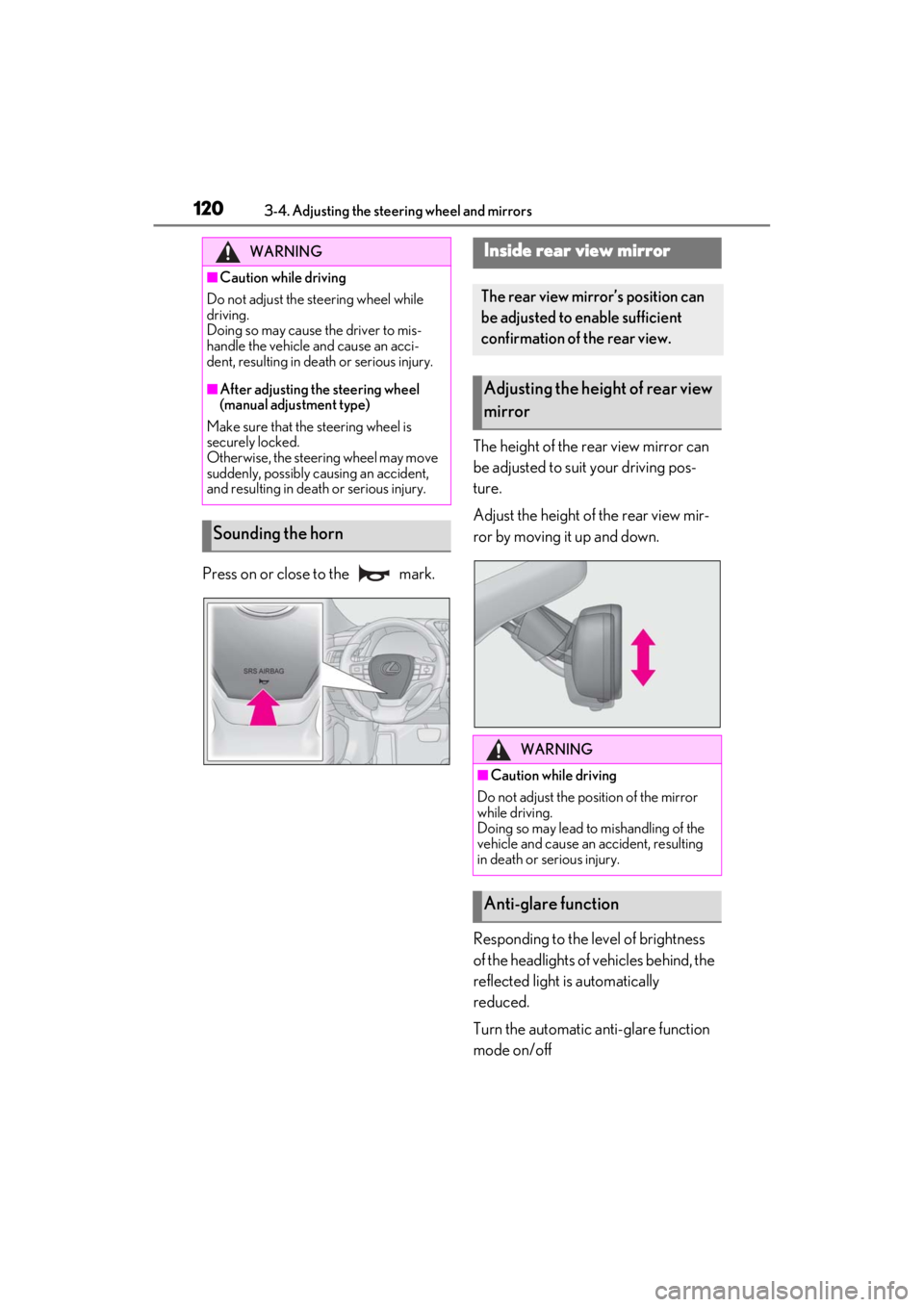
Press on or close to the mark.The height of the rear view mirror can
be adjusted to suit your driving pos-
ture.
Adjust the height of the rear view mir-
ror by moving it up and down.
Responding to the level of brightness
of the headlights of vehicles behind, the
reflected light is automatically
reduced.
Turn the automatic anti-glare function
mode on/off
WARNING
■Caution while driving
Do not adjust the steering wheel while
driving.
Doing so may cause the driver to mis-
handle the vehicle and cause an acci-
dent, resulting in death or serious injury.
■After adjusting the steering wheel
(manual adjustment type)
Make sure that the steering wheel is
securely locked.
Otherwise, the steering wheel may move
suddenly, possibly causing an accident,
and resulting in deat h or serious injury.
Sounding the horn
Inside rear view mirror
The rear view mirror’s position can
be adjusted to enable sufficient
confirmation of the rear view.
Adjusting the height of rear view
mirror
WARNING
■Caution while driving
Do not adjust the position of the mirror
while driving.
Doing so may lead to mishandling of the
vehicle and cause an accident, resulting
in death or serious injury.
Anti-glare function
Page 133 of 464
133
4
4
Driving
Driving
4-1. Before drivingDriving the vehicle ..................... 134
Cargo and luggage ................... 139
Vehicle load limits ....................... 141
Trailer towing ............................... 142
Dinghy towing ............................. 142
4-2. Driving procedures Engine (ignition) switch ........... 144
Automatic transmission........... 149
Turn signal lever.......................... 153
Parking brake .............................. 154
Brake Hold.................................... 156
4-3. Operating the lights and wipers Headlight switch ......................... 158
Automatic High Beam .............. 161
Windshield wipers and washer ......................................................... 164
4-4. Refueling Opening the fuel tank cap...... 169
4-5. Using the driving support sys- tems
Lexus Safety System + 2.0 ...... 171
PCS (Pre-Collision System).. 177
LTA (Lane Tracing Assist)...... 184
RSA (Road Sign Assist) ........... 193
Dynamic radar cruise control with full-speed range....................... 195
BSM (Blind Spot Monitor) .... 205
Driving Mode Select switch .. 210PKSA (Parking Support Alert)
......................................................... 212
Intuitive parking assist .............. 213
RCTA (Rear cross traffic alert) function....................................... 220
RCD (Rear Camera Detection) function........................................ 224
PKSB (Parking Support Brake) ........................................................ 227
Parking Support Brake function (static objects) ......................... 233
Parking Support Brake function (rear-crossing vehicles) ...... 239
Parking Support Brake function (rear pedestrians) .................. 243
Driving assist systems.............. 246
4-6. Driving tips Winter driving tips ..................... 251
Page 153 of 464

1534-2. Driving procedures
4
Driving
■If the S indicator does not come on or
the D indicator is displayed even after
shifting the shift lever to S
This may indicate a malfunction in the auto-
matic transmission system. Have the vehicle
inspected by your Lexus dealer immedi-
ately. (In this situation, the transmission will
operate in the same manner as when the
shift lever is in D.)
1 Right turn
2 Lane change to the right (move the
lever partway and release it)
The right hand signals will flash 3 times.
3Lane change to the left (move the
lever partway and release it)
The left hand signals will flash 3 times.
4Left turn
■Turn signals can be operated when
The engine switch is in IGNITION ON
mode.
■If the indicator flashes faster than usual
Check that a light bulb in the front or rear
turn signal lights has not burned out.
■If the turn signals stop flashing before a
lane change has been performed
Operate the lever again.
Turn signal lever
Operating instructions
Page 158 of 464
1584-3. Operating the lights and wipers
4-3.Operating the lights and wipers
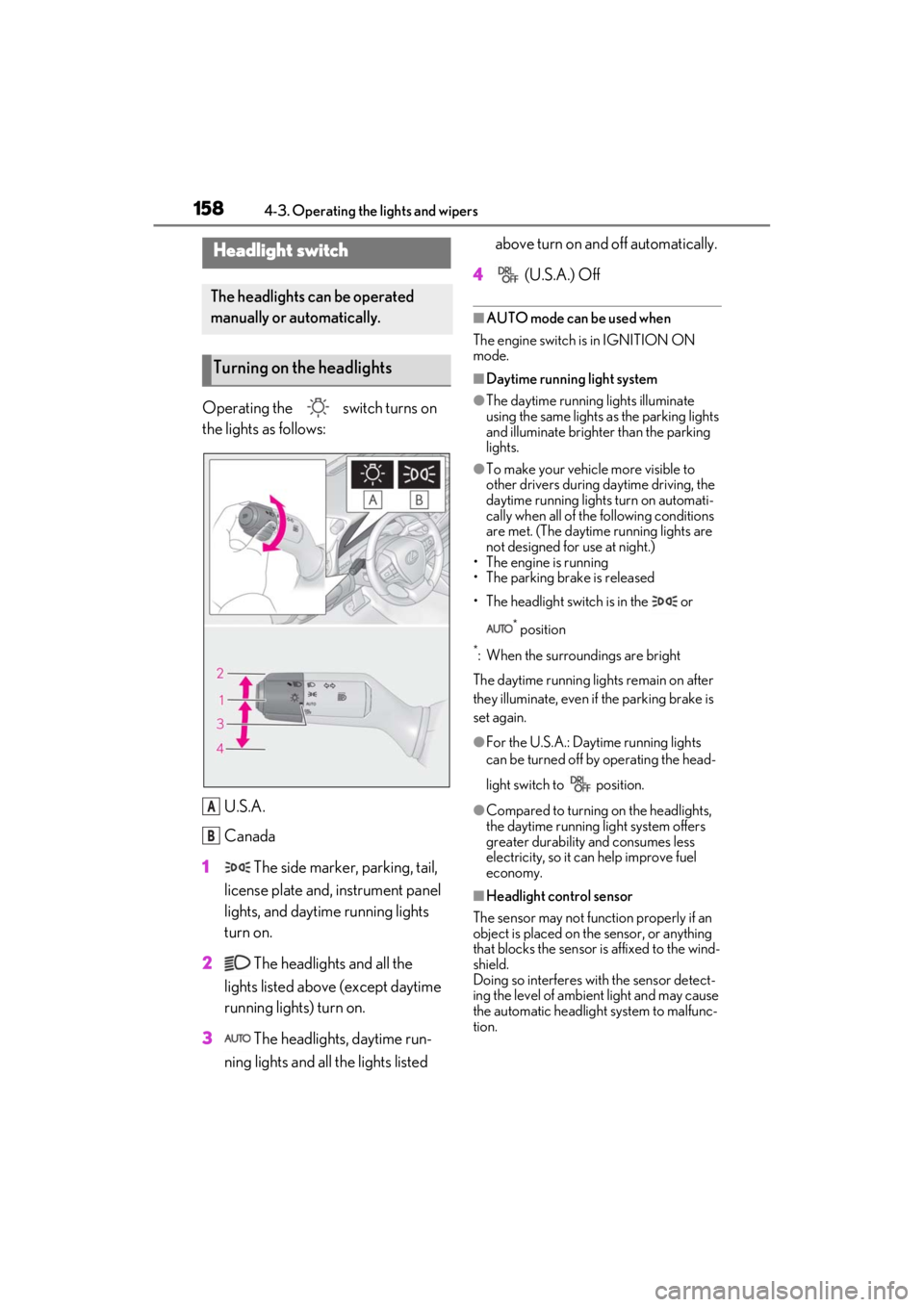
Operating the switch turns on
the lights as follows:U.S.A.
Canada
1 The side marker, parking, tail,
license plate and, instrument panel
lights, and daytime running lights
turn on.
2 The headlights and all the
lights listed above (except daytime
running lights) turn on.
3 The headlights, daytime run-
ning lights and all the lights listed above turn on and off automatically.
4 (U.S.A.) Off
■AUTO mode can be used when
The engine switch is in IGNITION ON
mode.
■Daytime running light system
●The daytime running lights illuminate
using the same lights as the parking lights
and illuminate brighter than the parking
lights.
●To make your vehicle more visible to
other drivers during daytime driving, the
daytime running lights turn on automati-
cally when all of the following conditions
are met. (The daytime running lights are
not designed for use at night.)
• The engine is running
• The parking brake is released
• The headlight switch is in the or
* position
*: When the surroundings are bright
The daytime running lights remain on after
they illuminate, even if the parking brake is
set again.
●For the U.S.A.: Daytime running lights
can be turned off by operating the head-
light switch to position.
●Compared to turning on the headlights,
the daytime running light system offers
greater durability and consumes less
electricity, so it can help improve fuel
economy.
■Headlight control sensor
The sensor may not function properly if an
object is placed on the sensor, or anything
that blocks the sensor is affixed to the wind-
shield.
Doing so interferes with the sensor detect-
ing the level of ambien t light and may cause
the automatic headlight system to malfunc-
tion.
Headlight switch
The headlights can be operated
manually or automatically.
Turning on the headlights
A
B
Page 159 of 464

1594-3. Operating the lights and wipers
4
Driving
■Automatic light off system
●When the headlights come on: The head-
lights and tail lights turn off 30 seconds
after the driver’s door is opened and
closed if the engine switch is turned to
ACCESSORY mode or turned off. (The
lights turn off immediately if on
the key is pressed after all the doors are
locked.)
●When only the tail lights come on: The tail
lights turn off automatically if the engine
switch is turned to ACCESSORY mode
or turned off and the driver’s door is
opened.
For the U.S.A.: To turn the lights on again,
turn the engine swit ch to IGNITION ON
mode, or turn the light switch off once and
then back to or .
For Canada: To turn the lights on again, turn
the engine switch to IGNITION ON mode,
or turn the light switch to position once
and then back to or .
■Light reminder buzzer
A buzzer sounds when the engine switch is
turned off or turned to ACCESSORY
mode and the driver’s door is opened while
the lights are turned on.
■Automatic headlight leveling system (if
equipped)
The level of the headlights is automatically
adjusted according to the number of pas-
sengers and the loading condition of the
vehicle to ensure that the headlights do not
interfere with other road users.
■Windshield wiper linked headlight illu-
mination
When driving during daytime with the
headlight switch turned to , if the wind-
shield wipers are used, the headlights will
turn on automatically after several seconds
to help enhance the visibility of your vehicle.
■Battery-saving function
In order to prevent the battery of the vehi-
cle from discharging, if the headlights
and/or tail lights are on when the engine
switch is turned off the battery saving func-
tion will operate and automatically turn off
all the lights after approximately 20 min-
utes.
When the engine switch is turned to IGNI-
TION ON mode, the battery-saving func-
tion will be disabled.
When any of the following are performed,
the battery-saving function is canceled
once and then reactivated. All the lights will
turn off automatically 20 minutes after the
battery-saving function has been reacti-
vated:
●When the headlight switch is operated
●When a door is opened or closed
■Welcome light illumination control
The parking lights, tail lights and license
plate lights automatically turn on at night
when the doors are unlocked using the
entry function or wireless remote control if
the light switch is in the position.
■Customization
Settings (e.g. light sensor sensitivity) can be
changed.
(Customizable features: P.419)
NOTICE
■To prevent battery discharge
Do not leave the lights on longer than
necessary when the engine is not run-
ning.