2021 LEXUS ES350 headlights
[x] Cancel search: headlightsPage 162 of 464
1624-3. Operating the lights and wipers
●House lights, street lights, traffic signals,
and illuminated billboards or signs may
cause the high beam to switch to the low
beams, or the low beams to remain on.
●The following factors may affect the
amount of time taken to turn the high
beam on or off:
• The brightness of headlights, fog lights,
and tail lights of vehicles ahead
• The movement and direction of vehicles ahead
• When a vehicle ahead only has opera- tional lights on one side
• When a vehicle ahead is a two-wheeled
vehicle
• The condition of the road (gradient, curve, condition of the road surface etc.)
• The number of passengers and amount of luggage
●The high beam may be turned on or off
when the driver does not expect it.
●Bicycles or similar objects may not be
detected.
●In the situations show n below, the system
may not be able to accurately detect sur-
rounding brightness levels. This may
cause the low beams to remain on or the
high beams to cause problems for pedes-
trians, vehicles ahead or other parties. In
these cases, manually switch between the
high and low beams.
• In bad weather (rain, snow, fog, sand-
storms etc.)
• The windshield is obscured by fog, mist, ice, dirt etc.
• The windshield is cracked or damaged.
• The camera sensor is deformed or dirty.
• When the temperature of the camera sensor is extremely high
• Surrounding brightness levels are equal to those of headlights, tail lights or fog
lights.
• When headlights or tail lights of vehicles ahead are turned off, dirty, changing
color, or not aimed properly
• When the vehicle is hit by water, snow, dust, etc. from a preceding vehicle
• When driving through an area of inter-
mittently changing brightness and dark-
ness.
• When frequently and repeatedly driving
ascending/descending roads, or roads with rough, bumpy or uneven surfaces
(such as stone-paved roads, gravel tracks
etc.).
• When frequently and repeatedly taking curves or driving on a winding road.
• There is a highly re flective object ahead
of the vehicle, such as a sign or a mirror.
• The back of a vehicle ahead is highly reflective, such as a container on a truck.
• The vehicle’s headlights are damaged or dirty.
• The vehicle is listing or tilting, due to a flat
tire, a trailer being towed etc.
• The high beam and low beam are repeat- edly being switched between in an
abnormal manner.
• The driver believes that the high beam may be causing problems or distress to
other drivers or pedestrians nearby.
■Temporarily lowering sensor sensitivity
The sensitivity of the sensor can be tempo-
rarily lowered.
1 Turn the engine switch off while the fol-
lowing conditions are met.
• The headlight swit ch is in or .
• The headlight switch lever is in low beam
position.
• Automatic High Be am switch is on.
2 Turn the engine switch to IGNITION
ON mode.
3 Within 60 seconds after 2, repeat pull-
ing the headlight switch lever to the
original position then pushing it to the
high beam position quickly 10 times,
then leave the lever in high beam posi-
tion.
4 If the sensitivity is changed, the Auto-
matic High Beam indicator turns on and
off 3 times.
Automatic High Beam (headlights) may
turn on even the vehicle is stopped.
■Switching to high beam
Push the lever away from you.
Turning the high beam on/off
manually
Page 173 of 464
1734-5. Using the driving support systems
4
Driving
WARNING
●If the part of the windshield in front of
the front camera is fogged up or cov-
ered with condensation, or ice, use the
windshield defogger to remove the
fog, condensation, or ice. (P.264)
●If water droplets cannot be properly
removed from the area of the wind-
shield in front of the front camera by
the windshield wipers, replace the
wiper insert or wiper blade.
●Do not attach window tint to the wind-
shield.
●Replace the windshield if it is damaged
or cracked. After replacing the wind-
shield, the front camera must be recal-
ibrated. Contact your Lexus dealer for
details.
●Do not allow liquids to contact the
front camera.
●Do not allow bright lights to shine into
the front camera.
●Do not dirty or damage the front cam-
era.
When cleaning the inside of the wind-
shield, do not allow glass cleaner to
contact the lens of the front camera.
Also, do not touch the lens.
If the lens is dirty or damaged, contact
your Lexus dealer.
●Do not subject the front camera to a
strong impact.
●Do not change the installation position
or direction of the front camera or
remove it.
●Do not disassemble the front camera.
●Do not modify any components of the
vehicle around the front camera
(inside rear view mirror, etc.) or ceil-
ing.
●Do not attach any accessories to the
hood, front grille or front bumper that
may obstruct the front camera. Con-
tact your Lexus dealer for details.
●If a surfboard or other long object is to
be mounted on the roof, make sure
that it will not obstruct the front cam-
era.
●Do not modify the headlights or other
lights.
Page 185 of 464

1854-5. Using the driving support systems
4
Driving
WARNING
●When tires of a size other than speci-
fied are installed.
●Vehicle is driven in traffic lanes other
than that highways and freeways.
●During emergency towing
■Preventing LTA system malfunctions
and operations performed by mistake
●Do not modify the headlights or place
stickers, etc. on the surface of the
lights.
●Do not modify the suspension etc. If
the suspension etc. needs to be
replaced, contact your Lexus dealer.
●Do not install or place anything on the
hood or grille. Also, do not install a
grille guard (bull bars, kangaroo bar,
etc.).
●If your windshield needs repairs, con-
tact your Lexus dealer.
■Conditions in which functions may
not operate properly
In the following situations, the functions
may not operate properly and the vehi-
cle may depart from its lane. Drive safely
by always paying careful attention to
your surroundings and operate the
steering wheel to correct the path of the
vehicle without relying solely on the func-
tions.
●When the follow-up cruising display is
displayed ( P.189) and the preced-
ing vehicle changes lanes. (Your vehi-
cle may follow the preceding vehicle
and also change lanes.)
●When the follow-up cruising display is
displayed ( P.189) and the preced-
ing vehicle is swaying. (Your vehicle
may sway accordingly and depart from
the lane.)
●When the follow-up cruising display is
displayed ( P.189) and the preced-
ing vehicle departs from its lane. (Your
vehicle may follow the preceding vehi-
cle and depart from the lane.)
●When the follow-up cruising display is
displayed ( P.189) and the preced-
ing vehicle is being driven extremely
close to the left/right lane line. (Your
vehicle may follow the preceding vehi-
cle and depart from the lane.)
●Vehicle is being driven around a sharp
curve.
●Objects or patterns that could be mis-
taken for white (yellow) lines are pres-
ent on the side of the road (guardrails,
reflective poles, etc.).
Page 186 of 464
1864-5. Using the driving support systems
WARNING
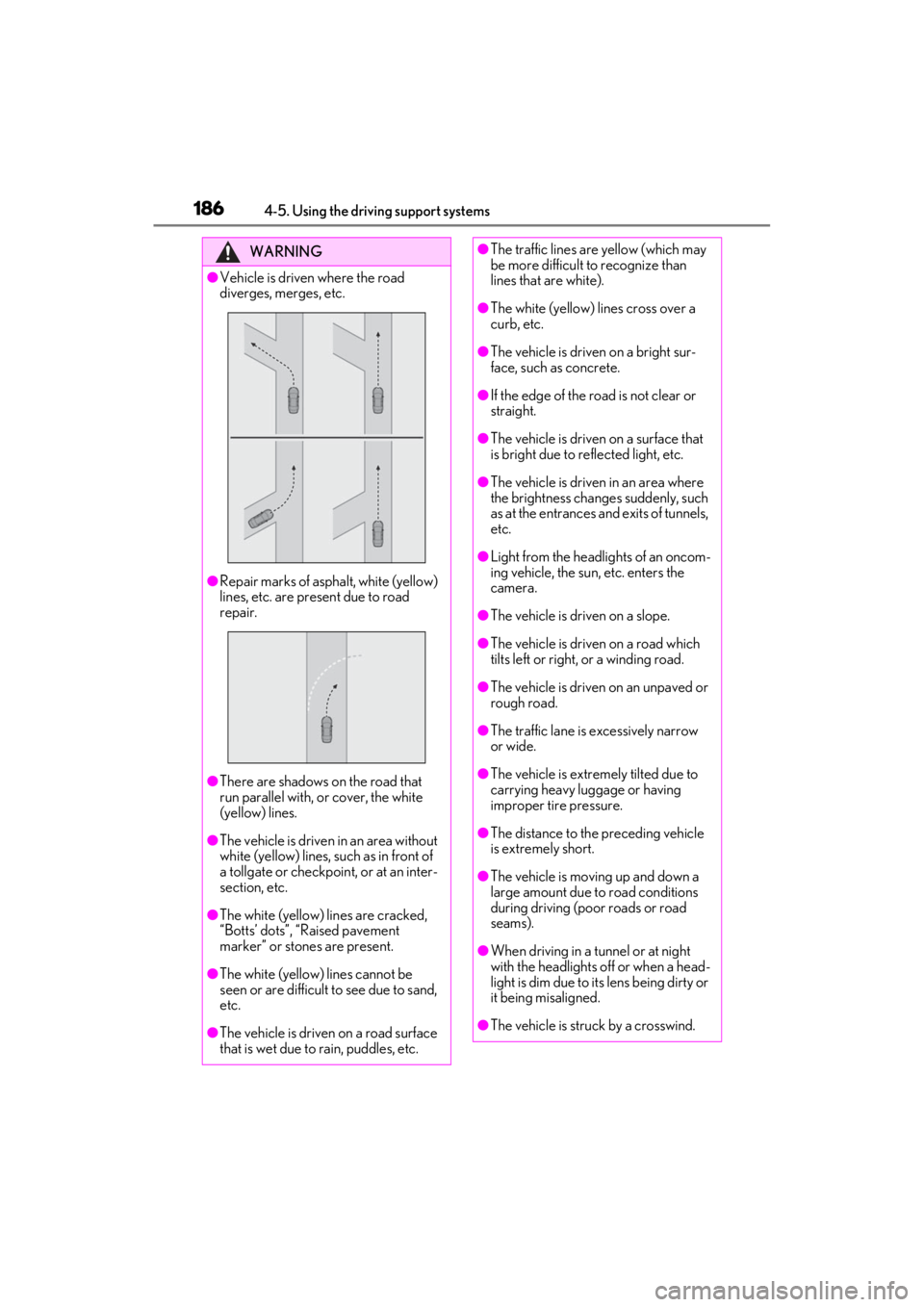
●Vehicle is driven where the road
diverges, merges, etc.
●Repair marks of asphalt, white (yellow)
lines, etc. are present due to road
repair.
●There are shadows on the road that
run parallel with, or cover, the white
(yellow) lines.
●The vehicle is driven in an area without
white (yellow) lines, such as in front of
a tollgate or checkpoint, or at an inter-
section, etc.
●The white (yellow) lines are cracked,
“Botts’ dots”, “Raised pavement
marker” or stones are present.
●The white (yellow) lines cannot be
seen or are difficult to see due to sand,
etc.
●The vehicle is driven on a road surface
that is wet due to rain, puddles, etc.
●The traffic lines are yellow (which may
be more difficult to recognize than
lines that are white).
●The white (yellow) lines cross over a
curb, etc.
●The vehicle is driven on a bright sur-
face, such as concrete.
●If the edge of the road is not clear or
straight.
●The vehicle is driven on a surface that
is bright due to reflected light, etc.
●The vehicle is driven in an area where
the brightness change s suddenly, such
as at the entrances and exits of tunnels,
etc.
●Light from the headlights of an oncom-
ing vehicle, the sun, etc. enters the
camera.
●The vehicle is driven on a slope.
●The vehicle is driven on a road which
tilts left or right, or a winding road.
●The vehicle is driven on an unpaved or
rough road.
●The traffic lane is excessively narrow
or wide.
●The vehicle is extremely tilted due to
carrying heavy luggage or having
improper tire pressure.
●The distance to the preceding vehicle
is extremely short.
●The vehicle is moving up and down a
large amount due to road conditions
during driving (poor roads or road
seams).
●When driving in a tunnel or at night
with the headlights off or when a head-
light is dim due to its lens being dirty or
it being misaligned.
●The vehicle is struck by a crosswind.
Page 226 of 464

2264-5. Using the driving support systems
may not be detected by the rear camera
detection function, preventing the func-
tion from operating properly:
• Pedestrians who are bending forward or squatting
• Pedestrians who are lying down
• Pedestrians who are running
• Pedestrians who suddenly enter the detection area
• People riding a bicycle, skateboard, or other light vehicle
• Pedestrians wearing oversized clothing
such as a rain coat, long skirt, etc., making
their silhouette obscure
• Pedestrians whose body is partially hid-
den by an object, such as a cart or
umbrella
• Pedestrians which are obscured by dark-
ness, such as at night
●In some situations, such as the following,
pedestrians may not be detected by the
rear camera detection function, prevent-
ing the function from operating properly:
• When backing up in inclement weather (rain, snow, fog, etc.)
• When the rear camera is obscured (dirt,
snow, ice, etc. are attached) or scratched
• When a very bright light, such as the sun, or the headlights of another vehicle,
shines directly into the rear camera
• When backing up in a place where the surrounding brightness changes sud-
denly, such as at the entrance or exit of a
garage or underground parking lot
• When backing up in a dim environment
such as during dusk or in an underground
parking lot
●Even though there are no pedestrians in
the detection area, some objects, such as
the following, may be detected, possibly
causing the rear camera detection func-
tion to operate.
• Three dimensional objects, such as a
pole, traffic cone, fence, or parked vehi-
cle
• Moving objects, such as a car or motor- cycle
• Objects moving toward your vehicle when backing up, such as flags or pud-
dles (or airborne matter, such as smoke,
steam, rain, or snow)
• Cobblestone or gravel roads, tram rails, road repairs, white lines, pedestrian crossings or fallen leaves on the road
• Metal covers (gratings), such as those used for drainage ditches
• Objects reflected in a puddle or on a wet road surface
• The roadside or bumps on the road
•Shadows on the road
●In some situations, such as the following,
the rear camera detection function may
operate even though there are no pedes-
trians in the detection area.
• When backing up toward the roadside or a bump on the road
• If the vehicle is signif icantly tilted, such as
when carrying a heavy load
• When backing up toward an incline/decline
• If the suspension has been modified or tires of a size othe r than specified are
installed
• If the rear of the vehicle is raised or low- ered due to the carried load
• If an electronic component, such as a
backlit license plate is installed near the
rear camera
• If a bumper protector, such as an addi-
tional trim strip, is installed to the rear
bumper
• If the orientation of the rear camera has
been changed due to a collision or other
impact, or removal and installation
• If a towing eyelet is in stalled to the rear of
the vehicle
• When water is flowing over the rear cam- era lens
• When the rear camera is obscured (dirt,
snow, ice, etc. are at tached) or scratched
• If there is a flashing light in the detection
area, such as the emergency flashers of
another vehicle
●Situations in which the rear camera
detection function may be difficult to
notice
• The buzzer may be difficult to hear if the surrounding area is noisy, the volume of
the audio system volume is high, the air
conditioning system is being used, etc.
• If the temperature in the cabin is extremely high or low, the Center Dis-
play may not operate correctly.
Page 245 of 464

2454-5. Using the driving support systems
4
Driving
• Pedestrians who suddenly enter the detection area
• People riding a bicycle, skateboard, or
other light vehicle
• Pedestrians wearing oversized clothing such as a rain coat, long skirt, etc., making
their silhouette obscure
• Pedestrians whose body is partially hid- den by an object, such as a cart or
umbrella
• Pedestrians which are obscured by dark- ness, such as at night
●In some situations, such as the following,
pedestrians may not be detected by the
Parking Support Brake function (rear
pedestrians), preventing the function
from operating properly:
• When backing up in inclement weather (rain, snow, fog, etc.)
• When the rear camera is obscured (dirt,
snow, ice, etc. are attached) or scratched
• When a very bright light, such as the sun, or the headlights of another vehicle,
shines directly into the rear camera
• When backing up in a place where the surrounding brightness changes sud-
denly, such as at the entrance or exit of a
garage or underground parking lot
• When backing up in a dim environment
such as during dusk or in an underground
parking lot
●Even though there are no pedestrians in
the detection area, some objects, such as
the following, may be detected, possibly
causing the Parking Support Brake func-
tion (rear pedestri ans) to operate.
• Three dimensional objects, such as a
pole, traffic cone, fence, or parked vehi-
cle
• Moving objects, such as a car or motor-
cycle
• Objects moving toward your vehicle when backing up, such as flags or pud-
dles (or airborne matter, such as smoke,
steam, rain, or snow)
• Cobblestone or gravel roads, tram rails, road repairs, white lines, pedestrian
crossings, puddles or fallen leaves on the
road
• Metal covers (gratings), such as those
used for drainage ditches
• Objects reflected in a puddle or on a wet road surface • The roadside or bumps on the road
•Shadows on the road
●In some situations, such as the following,
the Parking Support Brake function (rear
pedestrians) may operate even though
there are no pedestrians in the detection
area.
• When backing up toward the roadside or
a bump on the road
• If the vehicle is signif icantly tilted, such as
when carrying a heavy load
• When backing up toward an incline/decline
• If the suspension has been modified or
tires of a size othe r than specified are
installed
• If the rear of the vehicle is raised or low-
ered due to the carried load
• If an electronic component, such as a backlit license plate or rear fog light, is
installed near the rear camera
• If a bumper protector, such as an addi- tional trim strip, is installed to the rear
bumper
• If the orientation of the rear camera has been changed due to a collision or other
impact, or removal and installation
• If a towing eyelet is in stalled to the rear of
the vehicle
• When water is flowing over the rear cam- era lens
• When the rear camera is obscured (dirt,
snow, ice, etc. are at tached) or scratched
• If there is a flashing light in the detection area, such as the emergency flashers of
another vehicle
Page 311 of 464
3116-2. Maintenance
6
Maintenance and care
Radiator/con-
denser
The radiator and con-
denser should be free
from foreign objects.
( P.322)
Washer fluid
Is there sufficient
washer fluid?
( P.325)
Vehicle interior
ItemsCheck points
Accelerator
pedal
• The accelerator
pedal should move
smoothly (without
uneven pedal effort
or catching).
Automatic trans-
mission “Park”
mechanism
•When parked on a slope and the shift
lever is in P, is the
vehicle securely
stopped?
Brake pedal
•Does the brake pedal move
smoothly?
•Does the brake pedal have appro-
priate clearance
from the floor?
•Does the brake pedal have the cor-
rect amount of free
play?
ItemsCheck points
Brakes
•The vehicle should not pull to one side
when the brakes are
applied.
• The brakes should work effectively.
• The brake pedal should not feel
spongy.
• The brake pedal should not get too
close to the floor
when the brakes are
applied.
Head restraints
•Do the head restraints move
smoothly and lock
securely?
Indicators/buzz-
ers•Do the indicators and buzzers function
properly?
Lights
• Do all the lights come on?
• Are the headlights aimed correctly?
Parking brake
• Does the parking brake operate nor-
mally?
• When parked on a slope and the park-
ing brake is on, is the
vehicle securely
stopped?
Seat belts
• Do the seat belts operate smoothly?
• The seat belts should not be damaged.
ItemsCheck points
Page 346 of 464
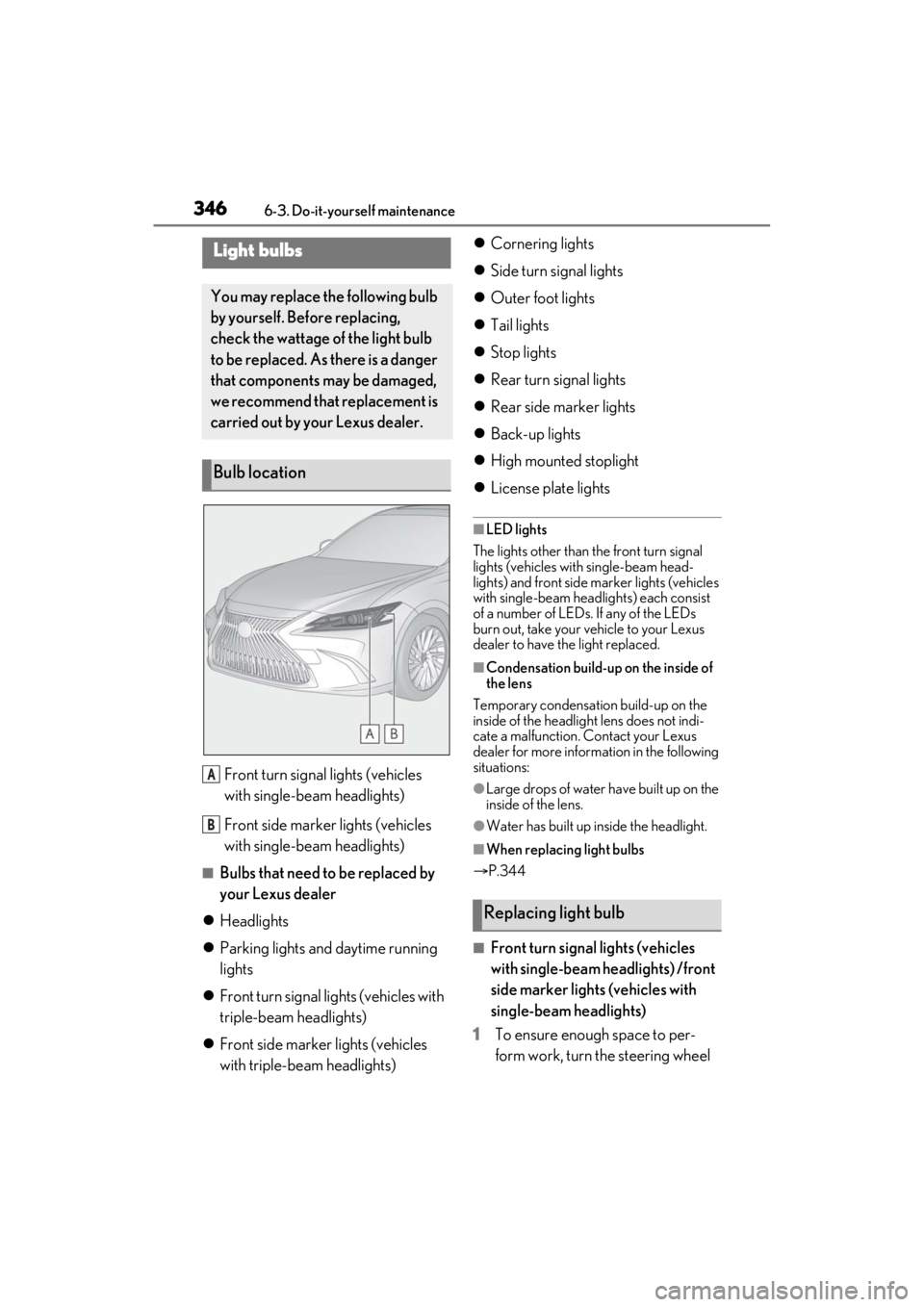
3466-3. Do-it-yourself maintenance
Front turn signal lights (vehicles
with single-beam headlights)
Front side marker lights (vehicles
with single-beam headlights)
■Bulbs that need to be replaced by
your Lexus dealer
Headlights
Parking lights and daytime running
lights
Front turn signal lights (vehicles with
triple-beam headlights)
Front side marker lights (vehicles
with triple-beam headlights)
Cornering lights
Side turn signal lights
Outer foot lights
Tail lights
Stop lights
Rear turn signal lights
Rear side marker lights
Back-up lights
High mounted stoplight
License plate lights
■LED lights
The lights other than the front turn signal
lights (vehicles with single-beam head-
lights) and front side ma rker lights (vehicles
with single-beam head lights) each consist
of a number of LEDs. If any of the LEDs
burn out, take your vehicle to your Lexus
dealer to have the light replaced.
■Condensation build-up on the inside of
the lens
Temporary condensation build-up on the
inside of the headlight lens does not indi-
cate a malfunction. Contact your Lexus
dealer for more information in the following
situations:
●Large drops of water have built up on the
inside of the lens.
●Water has built up inside the headlight.
■When replacing light bulbs
P.344
■Front turn signal lights (vehicles
with single-beam headlights) /front
side marker lights (vehicles with
single-beam headlights)
1 To ensure enough space to per-
form work, turn the steering wheel
Light bulbs
You may replace the following bulb
by yourself. Before replacing,
check the wattage of the light bulb
to be replaced. As there is a danger
that components may be damaged,
we recommend that replacement is
carried out by your Lexus dealer.
Bulb location
A
B
Replacing light bulb