2021 LEXUS ES300h lock
[x] Cancel search: lockPage 153 of 464

1534-2. Driving procedures
4
Driving
While the power switch is in ON mode and the brake pedal depressed*,
shift the shift lever while pushing the shift release button on the shift knob.
Shift the shift lever while pushing the shift release button on the shift knob.
Shift the shift lever normally.
When shifting the shift lever between P and D, make sure that the vehicle is completely
stopped and the brake pedal is depressed.
*: For the vehicle be able to be shifted from P, the brake pedal must be depressed before the shift release button is pushed. If the shift release button is pushed first, the shift lock
will not be released.
■Shift lock system
The shift lock system is a system to prevent
accidental operation of the shift lever in
starting.
The shift lever can be shifted from P only
when the power switch is in ON mode the
brake pedal is depressed and the shift
release button is pushed.■If the shift lever cannot be shifted from P
First, check whether the brake pedal is
being depressed.
If the shift lever cannot be shifted even
though the brake pedal is depressed and
the shift release button is pushed, there may
be a problem with th e shift lock system.
Have the vehicle inspected by your Lexus
dealer immediately.
The following steps may be used as an
Shifting the shift lever
Page 154 of 464

1544-2. Driving procedures
emergency measure to ensure that the shift
lever can be shifted.
Releasing the shift lock:
1If the parking brake is in manual mode,
set the parking brake. ( P.157)
2 Turn the power switch off.
3 Depress the brake pedal.
4 Press down and release the cup holder
lid to open.
5 Pry the cover up with a flathead screw-
driver or equivalent tool.
To prevent damage to the cover, cover the
tip of the screwd river with a rag.
6 Press and hold the shift lock override
button and then push the button on the
shift knob.
The shift lever can be shifted while the but-
ton is pressed
P.213
To drive using temporary shift range
selection, operate the “-” paddle shift
switch. The shift range can then be
selected by operating the “-” and “+”
paddle shift switches.
Changing the shift range allows
restriction of the highest shift range,
preventing unnecessary upshifting and
enabling the level of engine braking
force to be selected.
1 Upshifting
2 Downshifting
WARNING
■To prevent an accident when releas-
ing the shift lock
Before pressing the shift lock override
button, make sure to set the parking
brake and depress the brake pedal.
If the accelerator pe dal is accidentally
depressed instead of the brake pedal
when the shift lock override button is
pressed and the shift lever is shifted out
of P, the vehicle may suddenly start, pos-
sibly leading to an accident resulting in
death or serious injury.
Selecting the driving mode
Selecting shift ranges in the D
position
Page 161 of 464
1614-3. Operating the lights and wipers
4
Driving
4-3.Operating the lights and wipers
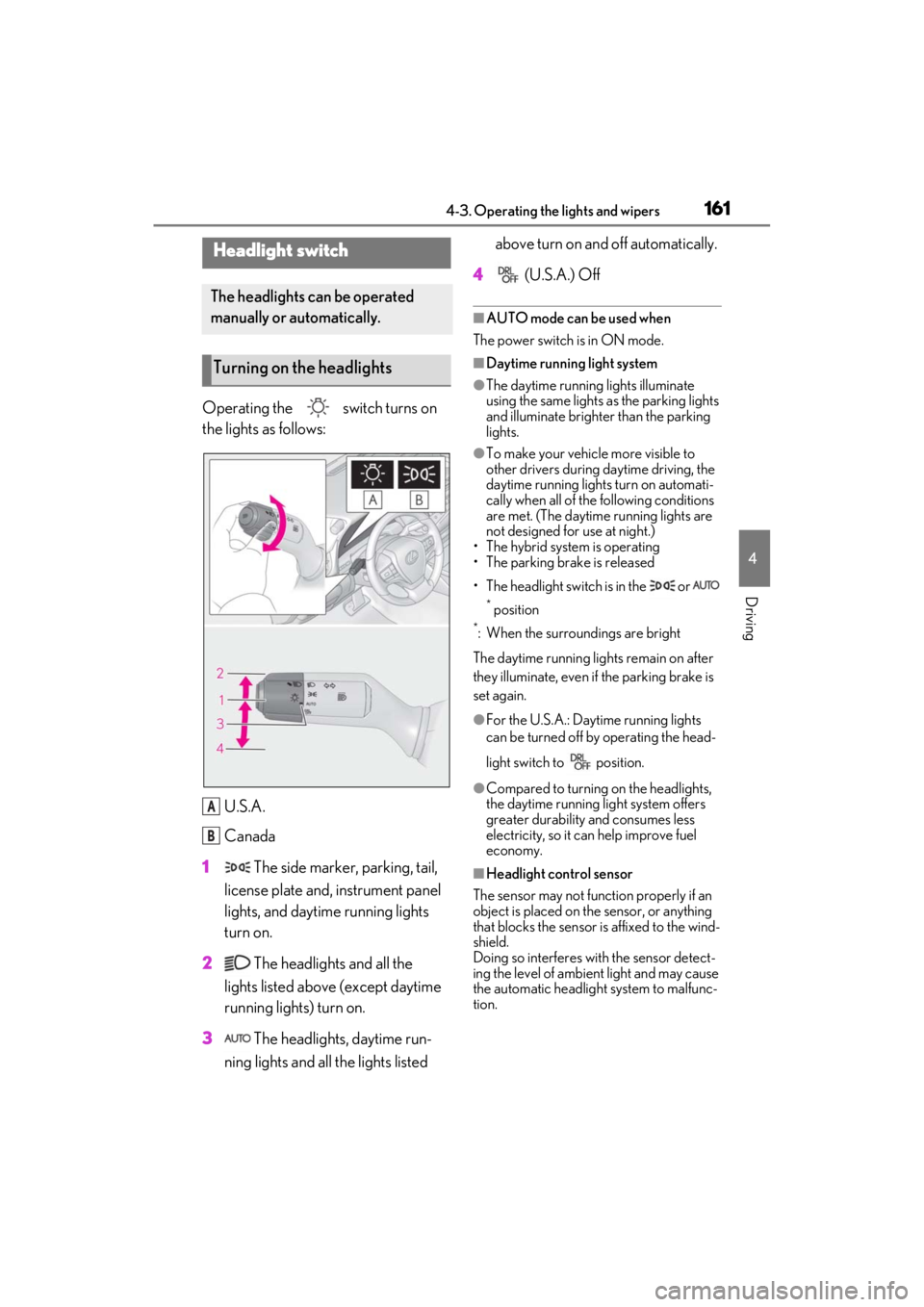
Operating the switch turns on
the lights as follows:U.S.A.
Canada
1 The side marker, parking, tail,
license plate and, instrument panel
lights, and daytime running lights
turn on.
2 The headlights and all the
lights listed above (except daytime
running lights) turn on.
3 The headlights, daytime run-
ning lights and all the lights listed above turn on and off automatically.
4 (U.S.A.) Off
■AUTO mode can be used when
The power switch is in ON mode.
■Daytime running light system
●The daytime running lights illuminate
using the same lights as the parking lights
and illuminate brighter than the parking
lights.
●To make your vehicle more visible to
other drivers during daytime driving, the
daytime running lights turn on automati-
cally when all of the following conditions
are met. (The daytime running lights are
not designed for use at night.)
• The hybrid system is operating
• The parking brake is released
• The headlight switch is in the or
* position
*: When the surroundings are bright
The daytime running lights remain on after
they illuminate, even if the parking brake is
set again.
●For the U.S.A.: Daytime running lights
can be turned off by operating the head-
light switch to position.
●Compared to turning on the headlights,
the daytime running light system offers
greater durability and consumes less
electricity, so it can help improve fuel
economy.
■Headlight control sensor
The sensor may not function properly if an
object is placed on the sensor, or anything
that blocks the sensor is affixed to the wind-
shield.
Doing so interferes with the sensor detect-
ing the level of ambien t light and may cause
the automatic headlight system to malfunc-
tion.
Headlight switch
The headlights can be operated
manually or automatically.
Turning on the headlights
A
B
Page 162 of 464

1624-3. Operating the lights and wipers
■Automatic light off system
●When the headlights come on: The head-
lights and tail lights turn off 30 seconds
after the driver’s door is opened and
closed if the power switch is turned to
ACCESSORY mode or turned off. (The
lights turn off immediately if on
the key is pressed after all the doors are
locked.)
●When only the tail lights come on: The tail
lights turn off automatically if the power
switch is turned to ACCESSORY mode
or turned off and the driver’s door is
opened.
For the U.S.A.: To turn the lights on again,
turn the power switch to ON mode, or turn
the light switch off once and then back to
or .
For Canada: To turn the lights on again, turn
the power switch to ON mode, or turn the
light switch to position once and then
back to or .
■Light reminder buzzer
A buzzer sounds when the power switch is
turned off or turned to ACCESSORY
mode and the driver’s door is opened while
the lights are turned on.
■Automatic headlight leveling system (if
equipped)
The level of the headlights is automatically
adjusted according to the number of pas-
sengers and the loading condition of the
vehicle to ensure that the headlights do not
interfere with other road users.
■Windshield wiper linked headlight illu-
mination
When driving during daytime with the
headlight switch turned to , if the wind-
shield wipers are used, the headlights will
turn on automatically after several seconds
to help enhance the visibility of your vehicle.
■12-volt battery-saving function
In order to prevent the 12-volt battery of the
vehicle from discharging, if the headlights
and/or tail lights are on when the power
switch is turned off the 12-volt battery sav-
ing function will operate and automatically
turn off all the lights after approximately 20
minutes.
When the power switch is turned to ON
mode, the 12-volt battery-saving function
will be disabled.
When any of the following are performed,
the 12-volt battery-saving function is can-
celed once and then reactivated. All the
lights will turn off automatically 20 minutes
after the 12-volt battery-saving function has
been reactivated:
●When the headlight switch is operated
●When a door is opened or closed
■Welcome light illumination control
The parking lights, tail lights and license
plate lights automatically turn on at night
when the doors are unlocked using the
entry function or wireless remote control if
the light switch is in the position.
■Customization
Settings (e.g. light sensor sensitivity) can be
changed.
(Customizable features: P.420)
NOTICE
■To prevent 12-volt battery discharge
Do not leave the lights on longer than
necessary when the hybrid system is not
operating.
Page 170 of 464

1704-3. Operating the lights and wipers
as snow, the operation of the windshield
wipers may be stopped automatically to
protect the windshield wipers. In this case,
turn the windshield wiper switch off and
remove the foreign object, and then use the
windshield wipers.
■When stopping the hybrid system in an
emergency while driving
If the windshield wipers are operating when
the hybrid system is stopped, the windshield
wipers will operate in high speed operation.
After the vehicle is stopped, operation will
return to normal when the power switch is
turned to ON mode, or operation will stop
when the driver’s door is opened.When the windshield wipers are not
being used, they retract to below the
hood. To enable the windshield wipers
to be lifted when parking in cold condi-
tions or when replacing a windshield
wiper insert, change the rest position of
the windshield wipers to the service
position using the wiper lever.
■Raising the wipers to the service
position
Within approximately 45 seconds of
turning the power switch off, move the
wiper lever to the (U.S.A.) or
(Canada) position and hold it for
approximately 2 seconds or more.
The wipers will move to the service posi-
tion.
WARNING
■Caution regarding the use of wind-
shield wipers in AUTO mode (vehi-
cles with rain-sen sing windshield
wipers)
The windshield wipers may operate
unexpectedly if the sensor is touched or
the windshield is subject to vibration in
AUTO mode. Take ca re that your fin-
gers or anything else do not become
caught in the windshield wipers.
■Caution regarding the use of washer
fluid
When it is cold, do not use the washer
fluid until the windshield becomes warm.
The fluid may freeze on the windshield
and cause low visibility. This may lead to
an accident, resulting in death or serious
injury.
NOTICE
■When there is no washer fluid spray
from the nozzle
Damage to the washer fluid pump may
be caused if the lever is pulled toward
you and held continually.
■When a nozzle becomes blocked
In this case, contact your Lexus dealer.
Do not try to clear it with a pin or other
object. The nozzle will be damaged.
Changing the windshield wiper
rest position/Lifting the wind-
shield wipers
Page 186 of 464

1864-5. Using the driving support systems
bicycle ridden by more than one person,
or a uniquely shaped bicycle (bicycle with
a child seat, tandem bicycle, etc.)
• If a pedestrian/or the riding height of a bicyclist ahead is shorter than approxi-
mately 3.2 ft. (1 m) or taller than approxi-
mately 6.5 ft. (2 m)
• If a pedestrian/bicyclist is wearing over- sized clothing (a rain coat, long skirt,
etc.), making their silhouette obscure
• If a pedestrian is bending forward or squatting or bicyclist is bending forward
• If a pedestrian/bicyclist is moving fast
• If a pedestrian is pushing a stroller, wheelchair, bicycle or other vehicle
• When driving in incl ement weather such
as heavy rain, fog, snow or a sandstorm
• When driving through steam or smoke
• When the surrounding area is dim, such
as at dawn or dusk, or while at night or in
a tunnel, making a detectable object
appear to be nearly the same color as its
surroundings
• When driving in a place where the sur-
rounding brightness changes suddenly,
such as at the entrance or exit of a tunnel
• After the hybrid system has started the
vehicle has not been driven for a certain
amount of time
• While making a left/right turn and for a
few seconds after makin g a left/right turn
• While driving on a curve and for a few seconds after driving on a curve
• If your vehicle is skidding
• If the front of the vehicle is raised or low- ered
• If the wheels are misaligned
• If a wiper blade is blocking the front cam- era
• The vehicle is being driven at extremely high speeds
• When driving on a hill
• If the radar sensor or front camera is mis-
aligned●In some situations su ch as the following,
sufficient braking force may not be
obtained, preventing the system from
performing properly:
• If the braking functions cannot operate to their full extent, such as when the brake
parts are extremely cold, extremely hot,
or wet
• If the vehicle is not properly maintained
(brakes or tires are excessively worn,
improper tire inflation pressure, etc.)
• When the vehicle is being driven on a
gravel road or other slippery surface
■If VSC is disabled
●If VSC is disabled ( P.249), the pre-
collision brake assist and pre-collision
braking functions are also disabled.
●The PCS warning light will turn on and
“VSC Turned OFF Pre-Collision Brake
System Unavailable” will be displayed on
the multi-information display.
Page 248 of 464

2484-5. Using the driving support systems
■ECB (Electronically Controlled
Brake System)
The electronically controlled system
generates braking force correspond-
ing to the brake operation
■ABS (Anti-lock Brake System)
Helps to prevent wheel lock when the
brakes are applied suddenly, or if the
brakes are applied while driving on a
slippery road surface
■Brake assist
Generates an increased level of brak-
ing force after the brake pedal is
depressed when the system detects a
panic stop situation
■VSC (Vehicle Stability Control)
Helps the driver to control skidding
when swerving sudden ly or turning on
slippery road surfaces
■Enhanced VSC (Enhanced Vehi-
cle Stability Control)
Provides cooperative control of the
ABS, TRAC, VSC and EPS. Helps to maintain directional stability
when swerving on slippery road sur-
faces by controlling steering perfor-
mance.
■Secondary Collision Brake
When the SRS airbag sensor detects a
collision and the system operates, the
brakes and brake lights are automati-
cally controlled to reduce the vehicle
speed and that help reduce the possi-
bility of further damage due to a sec-
ondary collision
■TRAC (Traction Control)
Helps to maintain drive power and
prevent the drive wheels from spinning
when starting the vehicle or accelerat-
ing on slippery roads
■Active Cornering Assist (ACA)
Helps to prevent the vehicle from drift-
ing to the outer side by performing
inner wheel brake control when
attempting to accele rate while turning
■Hill-start assist control
Helps to reduce the backward move-
ment of the vehicle when starting on an
uphill
■EPS (Electric Power Steering)
Employs an electric motor to reduce
the amount of effort needed to turn the
steering wheel
■When the TRAC/VSC/ABS systems
are operating
The slip indicator light will flash while the
TRAC/VSC/ABS systems are operating.
Driving assist systems
To keep driving safety and perfor-
mance, the following systems oper-
ate automatically in response to
various driving situations. Be
aware, however, that these systems
are supplementary and should not
be relied upon too heavily when
operating the vehicle.
Summary of the driving assist
systems
Page 255 of 464

2554-6. Driving tips
4
Driving
or move a wiper that is frozen. Pour
warm water over the frozen area to
melt the ice. Wipe away the water
immediately to prevent it from
freezing.
To ensure proper operation of the
climate control system fan, remove
any snow that has accumulated on
the air inlet vents in front of the
windshield.
Check for and remove any excess
ice or snow that may have accumu-
lated on the exterior lights, vehicle’s
roof, chassis, around the tires or on
the brakes.
Remove any snow or mud from the
bottom of your shoes before getting
in the vehicle.
■To protect the windshield wipers
P.169
Accelerate the vehicle slowly, keep a
safe distance between you and the
vehicle ahead, and drive at a reduced
speed suitable to road conditions.
Park the vehicle and move the shift
lever to P without setting the park-
ing brake. The parking brake may
freeze up, preventing it from being
released. If the vehicle is parked
without setting the parking brake,
make sure to block the wheels.
Failure to do so may be dangerous
because it may cause the vehicle to move unexpectedly, possibly lead-
ing to an accident.
If the vehicle is parked without set-
ting the parking brake, confirm that
the shift lever cannot be moved out
of P
*.
*: The shift lever will be locked if it is
attempted to be shifted from P to any
other position with out depressing the
brake pedal. If the shift lever can be
shifted from P, there may be a problem
with the shift lock system. Have the vehi-
cle inspected by your Lexus dealer
immediately.
Vehicles with 17-inch tires
Use the correct tire chain size when
mounting the tire chains.
Chain size is regulated for each tire
size.
Side chain:
0.12 in. (3 mm) in diameter
0.39 in. (10 mm) in width
1.18 in. (30 mm) in length
Cross chain:
0.16 in. (4 mm) in diameter
0.55 in. (14 mm) in width
When driving the vehicle
When parking the vehicle
Selecting tire chains
A
B
C
D
E