2021 LEXUS ES300h steering
[x] Cancel search: steeringPage 143 of 464

1434-1. Before driving
4
Driving
In this condition, if 3 more passengers with
the combined weight of D lb. (kg) get on,
the available cargo and luggage load will
be reduced E lb. (kg) as follows:
C lb. (kg) - D*4 lb. (kg) = E*5 lb. (kg)
*4: D = Additional weight of people
*5: E = Available cargo and luggage load
As shown in the example above, if the
number of occupants increases, the
cargo and luggage load will be
reduced by an amount that equals the
increased weight due to the additional
occupants. In other words, if an
increase in the number of occupants
causes an excess of the total load
capacity (combined weight of occu-
pants plus cargo and luggage load),
you must reduce the cargo and lug-
gage on your vehicle.
■Total load capacity and seating capacity
These details are also described on the tire
and loading information label. ( P.339)
Vehicle load limits
Vehicle load limits include total
load capacity, seating capacity,
towing capacity and cargo capac-
ity.
Total load capacity (vehicle
capacity weight): P.402
Total load capacity means the com-
bined weight of occupants, cargo
and luggage.
Seating capacity: P.402
Seating capacity means the maxi-
mum number of occupants whose
estimated average weight is 150 lb.
(68 kg) per person.
Towing capacity
Lexus does not recommend towing
a trailer with your vehicle.
Cargo capacity
Cargo capacity may increase or
decrease depending on the weight
and the number of occupants.
WARNING
■Overloading the vehicle
Do not overload the vehicle.
It may not only cause damage to the tires,
but also degrade steering and braking
ability, resulting in an accident.
Page 146 of 464

1464-2. Driving procedures
system. In this case, try to start the hybrid
system again after the temperature of the
hybrid battery increases due to the out-
side temperature increase etc.
■Sounds and vibrations specific to a
hybrid vehicle
P.62
■If the 12-volt battery is discharged
The hybrid system cannot be started using
the smart access system with push-button
start. Refer to P.391 to restart the hybrid
system.
■Electronic key battery depletion
P.98
■Conditions affe cting operation
P.114
■Notes for the entry function
P.114
■Steering lock function
●After turning the power switch off and
opening and closing the doors, the steer-
ing wheel will be lock ed due to the steer-
ing lock function. Operating the power
switch again automatically cancels the
steering lock.
●When the steering lock cannot be
released, “Push Power Switch while
Turning Steering Whee l in Either Direc-
tion” will be displayed on the multi-infor-
mation display.
Check that the shift leve r is set in P. Press
the power switch shortly and firmly while
turning the steering wheel left and right.
●To prevent the steering lock motor from
overheating, the motor may be sus-
pended if the hybrid system is turned on
and off repeatedly in a short period of
time. In this case, refrain from operating
the power switch. After about 10 sec- onds, the steering lock
motor will resume
functioning.
■If there is a malfunction in the smart
access system with push-button start
If “Access System with Elec. Key Malfunc-
tion See Owner’s Manu al” is displayed on
the multi-information display, the system
may be malfunctioning. Have the vehicle
inspected by your Lexus dealer immedi-
ately.
■If the “READY” indicator does not
come on
In the event that the “READY” indicator
does not come on even after performing
the proper procedures for starting the vehi-
cle, contact your Lexus dealer immediately.
■If the hybrid system is malfunctioning
P.67
■Electronic key battery
P.347
■Operation of the power switch
●If the switch is no t pressed shortly and
firmly, the power switch mode may not
change or the hybrid system may not
start.
●If attempting to restart the hybrid system
immediately after turning the power
switch off, the hybrid system may not start
in some cases. After turning the power
switch off, please wait a few seconds
before restarting the hybrid system.
■Customization
If the smart access system with push-button
start has been deactivated in a customized
setting, refer to P.420.
WARNING
■When starting the hybrid system
Always start the hybrid system while sit-
ting in the driver’s seat. Do not depress
the accelerator pedal while starting the
hybrid system under any circumstances.
Doing so may cause an accident result-
ing in death or serious injury.
Page 147 of 464
1474-2. Driving procedures
4
Driving
1Stop the vehicle completely.
2 Set the parking brake ( P.157),
and shift the shift lever to P
( P.153).
3 Press the power switch.
4 Release the brake pedal and check
that “ACCESSORY” or “IGNI-
TION ON” is not shown on the
meter.
■Automatic hybrid system shut off fea-
ture
●The vehicle is equipped with a feature
that automatically shuts off the hybrid sys-
tem when the shift lever is in P with the
hybrid system operating for an extended
period.
●The hybrid system will automatically shut
off after approximately 1 hour if it has
been left running while the shift lever is in
P.
●The timer for the automatic hybrid system
shut off feature will reset if the brake
pedal is depressed or if the shift lever is in
a position other than P.
●After the vehicle is parked, if the door is
locked with the door lock switch
( P.103) from the inside or the mechan-
ical key from the outside, the automatic
hybrid system shut of f feature will be dis-
abled. The timer for the automatic hybrid
system shut off featur e will be re-enabled
if the driver’s door is opened.
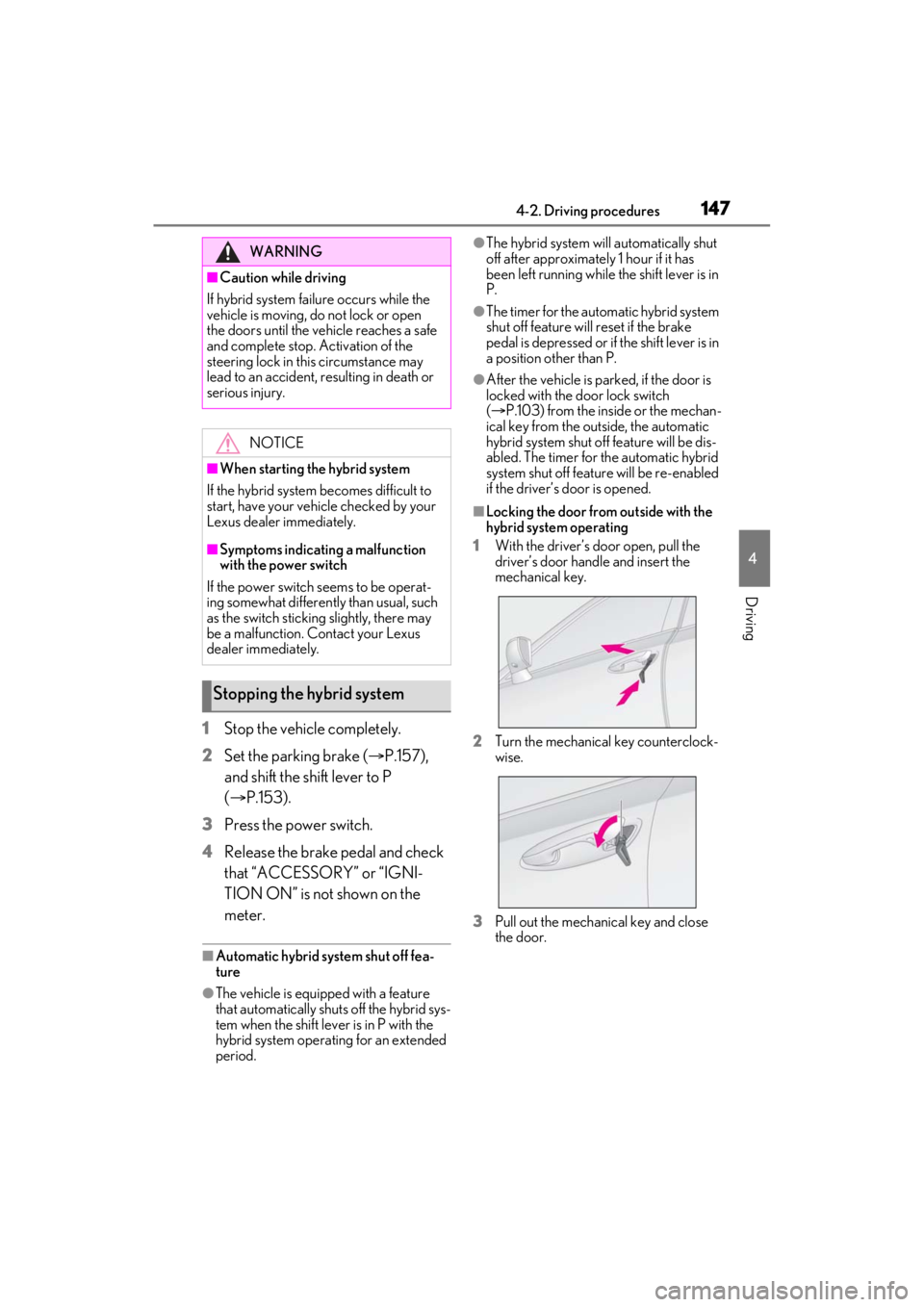
■Locking the door from outside with the
hybrid system operating
1 With the driver’s door open, pull the
driver’s door hand le and insert the
mechanical key.
2 Turn the mechanical key counterclock-
wise.
3 Pull out the mechanical key and close
the door.
WARNING
■Caution while driving
If hybrid system failure occurs while the
vehicle is moving, do not lock or open
the doors until the vehicle reaches a safe
and complete stop. Activation of the
steering lock in this circumstance may
lead to an accident, resulting in death or
serious injury.
NOTICE
■When starting the hybrid system
If the hybrid system becomes difficult to
start, have your vehicle checked by your
Lexus dealer immediately.
■Symptoms indicating a malfunction
with the power switch
If the power switch seems to be operat-
ing somewhat differently than usual, such
as the switch sticking slightly, there may
be a malfunction. Contact your Lexus
dealer immediately.
Stopping the hybrid system
Page 148 of 464

1484-2. Driving procedures
Modes can be changed by pressing
the power switch with the brake pedal
released. (The mode changes each
time the switch is pressed.)
1Off
*
The emergency flashers can be used.
2ACCESSORY mode
Some electrical components such as the
audio system can be used.
“ACCESSORY” will be displayed on the
meter.
3ON mode
All electrical components can be used.
“IGNITION ON” will be displayed on the
meter.
WARNING
■Stopping the hybrid system in an
emergency
●If you want to stop the hybrid system in
an emergency while driving the vehi-
cle, press and hold the power switch
for more than 2 seconds, or press it
briefly 3 times or more in succession.
( P.358)
However, do not touch the power
switch while driving except in an emer-
gency. Turning the hybrid system off
while driving will not cause loss of
steering or braking control, however,
power assist to the steering will be lost.
This will make it more difficult to steer
smoothly, so you should pull over and
stop the vehicle as soon as it is safe to
do so.
●If the power switch is operated while
the vehicle is running, a warning mes-
sage will be shown on the multi-infor-
mation display and a buzzer sounds.
●When restarting the hybrid system
after an emergency shutdown, shift the
shift lever to N and press the power
switch shortly and firmly.
■When parking
Exhaust gases include harmful carbon
monoxide (CO), which is colorless and
odorless. Observe the following precau-
tions.
Failure to do so may cause exhaust gases
to enter the vehicle and may lead to an
accident caused by light-headedness, or
may lead to death or a serious health
hazard.
●If the vehicle is in a poorly ventilated
area or a closed area, such as a
garage, stop the hybrid system.
●Do not leave the vehicle with the
hybrid system operating for a long
time. If such a situation cannot be
avoided, park the vehicle in an open
space and ensure that exhaust fumes
do not enter the vehicle interior.
●Do not leave the hybrid system oper-
ating in an area with snow build-up, or
where it is snowing. If snowbanks build
up around the vehicle while the hybrid
system is operating, exhaust gases
may collect and enter the vehicle.
Changing power switch modes
Page 163 of 464

1634-3. Operating the lights and wipers
4
Driving
1With the headlights on, push the
lever away from you to turn on the
high beams.
Pull the lever toward you to the center
position to turn the high beams off.
2Pull the lever toward you and
release it to flash the high beams
once.
You can flash the high beams with the
headlights on or off.
AFS (Adaptive Front-lighting System)
secures excellent visibility at intersec-
tions and on curves by automatically
adjusting the direction of the light axis
of the headlights according to vehicle
speed and the degree of the tire’s
angle as controlled by steering input.
AFS operates at speed s of approximately
6 mph (10 km/h) or higher.
When any of the following conditions is
met, while the headlights (low beam)
are on, the cornering lights will addi- tionally turn on and light up the direc-
tion of movement for the vehicle. This is
to ensure excellent visibility when
either driving at intersections or park-
ing at night.
The steering wheel is operated
The turn signal lever is operated
The shift position is in R (both left
and right side cornering lights)
■Cornering light control
●The lights illuminate when the vehicle
speed is approximately 19 mph (30
km/h) or less. However, the lights turn off
when the vehicle speed increases to
approximately 22 mph (35 km/h) or
more.
●After the lights remain illuminated for 30
minutes, they automatically turn off.
Turning on the high beam head-
lights
AFS (Adaptive Front-lighting
System) (if equipped)
Cornering lights
Page 181 of 464

1814-5. Using the driving support systems
4
Driving
WARNING
●Although this system is designed to
help avoid a collision or help reduce
the impact of the collision, its effective-
ness may change according to various
conditions, therefore the system may
not always be able to achieve the same
level of performance.
Read the following conditions care-
fully. Do not overly rely on this system
and always drive carefully.
• Conditions under which the system may operate even if there is no possi-
bility of a collision: P.184
• Conditions under which the system may not operate properly: P.185
●Do not attempt to test the operation of
the pre-collision system yourself.
Depending on the objects used for
testing (dummies, cardboard objects
imitating detectable objects, etc.), the
system may not operate properly, pos-
sibly leading to an accident.
■Pre-collision braking
●When the pre-collision braking func-
tion is operating, a large amount of
braking force will be applied.
●If the vehicle is stopped by the opera-
tion of the pre-collision braking func-
tion, the pre-collision braking function
operation will be canceled after
approximately 2 seconds.
Depress the brake pedal as necessary.
●The pre-collision braking function may
not operate if certain operations are
performed by the driver. If the acceler-
ator pedal is being depressed strongly
or the steering wheel is being turned,
the system may determine that the
driver is taking evasive action and pos-
sibly prevent the pre-collision braking
function from operating.
●In some situations, while the pre-colli-
sion braking function is operating,
operation of the function may be can-
celed if the accelerator pedal is
depressed strongly or the steering
wheel is turned and the system deter-
mines that the driver is taking evasive
action.
●If the brake pedal is being depressed,
the system may determine that the
driver is taking evasive action and pos-
sibly delay the operat ion timing of the
pre-collision braking function.
■When to disable the pre-collision sys-
tem
In the following situations, disable the
system, as it may not operate properly,
possibly leading to an accident resulting
in death or serious injury:
●When the vehicle is being towed
●When your vehicle is towing another
vehicle
●When transporting the vehicle via
truck, boat, train or similar means of
transportation
●When the vehicle is raised on a lift with
the hybrid system on and the tires are
allowed to rotate freely
●When inspecting the vehicle using a
drum tester such as a chassis dyna-
mometer or speedometer tester, or
when using an on vehicle wheel bal-
ancer
●When a strong impact is applied to the
front bumper or front grille, due to an
accident or other reasons
●If the vehicle cannot be driven in a sta-
ble manner, such as when the vehicle
has been in an accid ent or is malfunc-
tioning
●When the vehicle is driven in a sporty
manner or off-road
●When the tires are not properly
inflated
Page 184 of 464

1844-5. Using the driving support systems
pre-collision braking function is operating,
it will be canceled:
●The accelerator pedal is depressed
strongly.
●The steering wheel is turned sharply or
abruptly.
■Conditions under which the system may
operate even if there is no possibility of a
collision
●In some situations such as the following,
the system may determine that there is a
possibility of a frontal collision and oper-
ate.
• When passing a detectable object, etc.
• When changing lane s while overtaking a
detectable object, etc.
• When approaching a detectable object in an adjacent lane or on the roadside,
such as when changing the course of
travel or driving on a winding road
• When rapidly closing on a detectable object, etc.
• When approaching objects on the road- side, such as detectable objects, guard-
rails, utility poles, trees, or walls
• When there is a detectable object or other object by the roadside at the
entrance of a curve
• When there are patterns or paint in front of your vehicle that may be mistaken for a
detectable object
• When the front of your vehicle is hit by water, snow, dust, etc. • When overtaking a de
tectable object
that is changing lanes or making a
right/left turn
• When passing a detectable object in an oncoming lane that is stopped to make a
right/left turn
• When a detectable object approaches very close and then stops before entering
the path of your vehicle
• If the front of your vehicle is raised or low-
ered, such as when on an uneven or
undulating road surface
• When driving on a road surrounded by a
structure, such as in a tunnel or on an iron
bridge
• When there is a metal object (manhole
cover, steel plate, etc.), steps, or a protru-
sion in front of your vehicle
• When passing under an object (road
sign, billboard, etc.)
• When approaching an electric toll gate barrier, parking area barrier, or other
barrier that opens and closes
• When using an automatic car wash
• When driving through or under objects
Page 187 of 464

1874-5. Using the driving support systems
4
Driving
LTA (Lane Tracing Assist)
When driving on highways and
freeways with white (yellow) lane
lines, this function alerts the driver
when the vehicle might depart from
its lane or course
* and provides
assistance by operating the steer-
ing wheel to keep the vehicle in its
lane or course
*. Furthermore, the
system provides steering assis-
tance when dynamic radar cruise
control with full-speed range is
operating to keep the vehicle in its
lane.
The LTA system recognizes white
(yellow) lane lines or a course
*
using the front camera. Addition-
ally, it detects preceding vehicles
using the front camera and radar.
*: Boundary between asphalt and the side of the road, such as grass, soil, or
a curb
WARNING
■Before using LTA system
●Do not rely solely upon the LTA sys-
tem. The LTA system does not auto-
matically drive the vehicle or reduce
the amount of attention that must be
paid to the area in front of the vehicle.
The driver must always assume full
responsibility for driving safely by pay-
ing careful attention to the surround-
ing conditions and operating the
steering wheel to correct the path of
the vehicle. Also, the driver must take
adequate breaks when fatigued, such
as from driving for a long period of
time.
●Failure to perform appropriate driving
operations and pay careful attention
may lead to an accident, resulting in
death or serious injury.
●When not using the LTA system, use
the LTA switch to turn the system off.
■Situations unsuitable for LTA system
In the following situations, use the LTA
switch to turn the system off. Failure to do
so may lead to an accident, resulting in
death or serious injury.
●Vehicle is driven on a road surface
which is slippery due to rainy weather,
fallen snow, freezing, etc.
●Vehicle is driven on a snow-covered
road.
●White (yellow) lines are difficult to see
due to rain, snow, fog, dust, etc.
●Vehicle is driven in a temporary lane
or restricted lane due to construction
work.
●Vehicle is driven in a construction
zone.
●A spare tire, tire chains, etc. are
equipped.
●When the tires have been excessively
worn, or when the tire inflation pres-
sure is low.