Page 130 of 585

441
Features of your vehicle
Opening the fuel filler door
The fuel filler door must be opened
from inside the vehicle by pressing
the fuel filler door opener button.
If the fuel filler door does not open
because ice has formed around it,
tap lightly or push on the lid to break
the ice and release the lid. Do not pry
on the lid. If necessary, spray around
the lid with an approved de-icer fluid
(do not use radiator anti-freeze) or
move the vehicle to a warm place
and allow the ice to melt.1. Stop the engine.
2. To open the fuel filler door, push
the fuel filler door opener button.
3. Pull open the fuel filler door (1).
4. To remove the cap, turn the fuel filler cap (2) counterclockwise.
5. Refuel as needed.
FUEL FILLER DOOR
OCK047031L
OCK047032
WARNING
Before refueling, be sure to
check what type of fuel is used
for your vehicle.
If you put diesel fuel into a
gasoline-powered vehicle or
gasoline into a diesel-powered
vehicle, it may affect the fuel
system and cause serious dam-
age to the vehicle.
Page 131 of 585
Features of your vehicle
42
4
Closing the fuel filler door
1. To install the cap, turn it clockwise
until it “clicks” once. This indicates
that the cap is securely tightened.
2. Close the fuel filler door and push it in lightly making sure that it is
securely closed.
✽ ✽NOTICE
There may be an intermittent noise
near the refueling hole while the
engine is idling if the fuel cap is not
closed securely. This occurs normal-
ly with the OBD system.
✽ ✽NOTICE
When refueling on unlevel ground,
the fuel gauge may not point to the F
position.
It is not a malfunction. If you move
your vehicle to a level ground, the fuel
gauge will move to the full position.
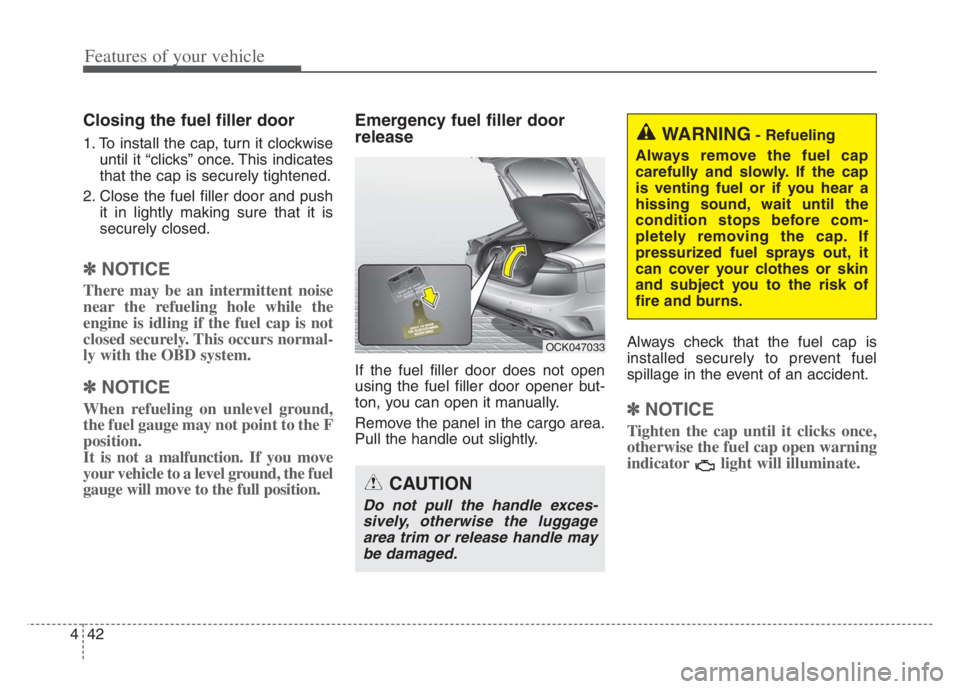
Emergency fuel filler door
release
If the fuel filler door does not open
using the fuel filler door opener but-
ton, you can open it manually.
Remove the panel in the cargo area.
Pull the handle out slightly. Always check that the fuel cap is
installed securely to prevent fuel
spillage in the event of an accident.
✽ ✽
NOTICE
Tighten the cap until it clicks once,
otherwise the fuel cap open warning
indicator light will illuminate.
WARNING- Refueling
Always remove the fuel cap
carefully and slowly. If the cap
is venting fuel or if you hear a
hissing sound, wait until the
condition stops before com-
pletely removing the cap. If
pressurized fuel sprays out, it
can cover your clothes or skin
and subject you to the risk of
fire and burns.
CAUTION
Do not pull the handle exces- sively, otherwise the luggagearea trim or release handle maybe damaged.
OCK047033
Page 148 of 585

459
Features of your vehicle
There are some conditions that can
cause changes to the vehicle mag-
nets, such as installing a ski rack or
a CB antenna. Body repair work on
the vehicle can also cause changes
to the vehicle's magnetic field. In
these situations, the compass will
need to be re-calibrated to quickly
correct for these changes. To re-cali-
brate the compass:
1. Press and hold the button for
more than 6 seconds. When the
compass memory is cleared, a "C"
will appear in the display.
2. To calibrate the compass, drive the
vehicle in 2 complete circles at
less than 5 mph (8 km/h).Integrated HomeLink®Wireless
Control System
The HomeLink
®Wireless Control
System provides a convenient way to
replace up to three hand-held radio-
frequency (RF) transmitters with a
single built-in device. This innovative
feature will learn the radio frequency
codes of most current transmitters to
operate devices such as gate opera-
tors, garage door openers, entry
door locks, security systems, even
home lighting. Both standard and
rolling code-equipped transmitters
can be programmed by following the
outlined procedures. Additional
HomeLink
®information can be found
at: www.homelink.com or by calling
1-800-355-3515.
❈HomeLink
®is a registered trade-
mark of Johnson Controls, Inc.Retain the original transmitter of the
RF device you are programming for
use in other vehicles as well as for
future HomeLink
®programming. It is
also suggested that upon the sale of
the vehicle, the programmed
HomeLink
®buttons be erased for
security purposes.
Page 151 of 585

Features of your vehicle
62 4
Gate operator & Canadian pro-
gramming
During programming, your handheld
transmitter may automatically stop
transmitting. Continue to press the
Integrated HomeLink
®Wireless
Control System button (note steps 2
through 4 in the Standard
Programming portion of this docu-
ment) while you press and re-press
(“cycle”) your handheld transmitter
every two seconds until the frequen-
cy signal has been learned. The indi-
cator light will flash slowly and then
rapidly after several seconds upon
successful training.Operating HomeLink
®
To operate, simply press and release
the programmed HomeLink®button.
Activation will now occur for the
trained device (i.e. garage door
opener, gate operator, security sys-
tem, entry door lock, home/office
lighting, etc.). For convenience, the
hand-held transmitter of the device
may also be used at any time.Reprogramming a single
HomeLink
®button
To program a new device to a previ-
ously trained HomeLink
®button, fol-
low these steps:
1. Press and hold the desired
HomeLink
®button. Do NOT
release until step 4 has been com-
pleted.
2. When the indicator light begins to
flash slowly (after 20 seconds),
position the handheld transmitter 1
to 3 inches away from the
HomeLink
®surface.
3. Press and hold the handheld
transmitter button. The HomeLink
®
indicator light will flash, first slowly
and then rapidly.
4. When the indicator light begins to
flash rapidly, release both buttons.
5. Press and hold the just-trained
HomeLink
®button and observe
the red Status Indicator LED. If the
indicator light stays on constantly,
programming is complete and
your new device should activate.
Page 155 of 585

Features of your vehicle
66 4
Folding the outside rearview mirror
Electric type
The outside rearview mirror can be
folded or unfolded by pressing the
switch as below.
Left (1): The mirror will unfold.
Right (2): The mirror will fold.Center (AUTO, 3):
The mirror will fold or unfold automat-
ically as follows:
The mirror will fold or unfold when
the door is locked or unlocked by
the smart key.
The mirror will fold or unfold when
the door is locked or unlocked by the
button on the outside door handle.
The mirror will unfold when you
approach the vehicle (all doors
closed and locked) with a smart
key in possession.
OCK047044L
CAUTION -Electric type
outside rearview mirror
The electric type outside rearview
mirror operates even though the
engine start/stop button is in the
OFF position. However, to prevent
unnecessary battery discharge,
do not adjust the mirrors longer
than necessary while the engine
is not running.
Do not fold the electric type out-
side rearview mirror by hand. This
could cause motor failure.
Page 173 of 585

Features of your vehicle
84
4
• Blind-Spot Collision Warning
Sound (if equipped)
- If this item is checked, Blind-SpotCollision Warning sound function
will be activated.
❈ For more details, refer to “Blind-Spot
Collision Warning (BCW) system” in
chapter 5. Door
Automatically Lock :
- Enable on Speed : All doors willbe automatically locked when the
vehicle speed exceeds 9.3 mph
(15 km/h).
- Enable on Shift (if equipped with Automatic transmission) : All
doors will be automatically locked
if the shift lever is shifted from the
P (Park) position to the R
(Reverse), N(Neutral), or D
(Drive) position. (With the Engine
ON, it is activated.)
Automatically Unlock : - Disable : The auto door unlockoperation will be canceled.
- Vehicle Off : All doors will be auto- matically unlocked when the
Engine Start/Stop Button is set to
the OFF position.
- On Shift to P (if equipped with Automatic transmission) : All
doors will be automatically
unlocked if the shift lever is in the
parking position by pressing P
(Park) button. (With the Engine
ON, it is activated.) Two Press Unlock (if equipped)
If this item checked, the Two Press
Unlock function will be activated.
(Only the driver’s door will unlock
when unlock button is pressed
once and all doors will unlock when
the same button is pressed again
within 4 seconds.)
Power Liftgate (if equipped) - If this item is checked, the powerliftgate function will be activated.
❈ For more details, refer to “Power
Liftgate” in this chapter.
Smart Liftgate (if equipped) - If this item is checked, the smartliftgate function will be activated.
- If the power liftgate function is not activated, you cannot activate
this function.
❈ For more details, refer to “Smart
Liftgate” in this chapter.
Page 178 of 585
489
Features of your vehicle
Door, Hood, Liftgate Open
It means that a door, hood, or lift-
gate is open.
The hood warning message will
appear on the LCD display when
hood is open.
The warning chime will operate
when the vehicle is being driven at
or above 2 mph (3 km/h) with the
hood open.
Sunroof Open (if equipped)
This warning message illuminates
if you turn off the engine and then
open the driver's door when the
sunroof is open.
Icy Road Warning Light
(if equipped)
This warning pop-up message and
light are to warn the driver the road
may be icy.
When the Outside Temperature is
below approximately 39°F (4°C),
- The warning light (including
Outside Temperature) blinks 5
times and then illuminates.
- The warning pop-up message dis-
plays, and the warning chime
sounds once at the same time only
once for each ignition cycle.
OCK047124LOCK047123L
OCK047152N
Page 219 of 585

Features of your vehicle
130 4
Map lamp
Press the lens (1) to turn ON the
map lamp.
To turn the map lamp OFF press
the lens (1) again. (2) : DOOR mode
- The map lamp and room lamp
come on when a door is opened.
The lamps go out after approxi-
mately 30 seconds.
- The map lamp and room lamp
come on for approximately 30 sec-
onds when doors are unlocked
with a transmitter or smart key as
long as the doors are not opened.
- The map lamp and room lamp will
stay on for approximately 20 min-
utes if a door is opened with the
ignition switch in the ACC or
LOCK/OFF position.
- The map lamp and room lamp will
stay on continuously if the door is
opened with the ignition switch in
the ON position.
- The map lamp and room lamp will
go out immediately if the ignition
switch is changed to the ON posi-
tion or all doors are locked.
- To turn off the DOOR mode, press
the DOOR button (2) once again
(not pressed).
✽ ✽
NOTICE
The DOOR mode and ROOM mode
can not be selected at the same time.
Front Room Lamp:
(3): Press this switch to turn the
front and rear room lamps on
and off.
(3): Press this switch to turn the
front and rear room lamps
on.
(4): Press this switch to turn the
front and rear room lamps
off.
OCK047420
OCK047055
■ Type B
■ Type A
