2021 KIA SPORTAGE start stop button
[x] Cancel search: start stop buttonPage 339 of 631
5 53
Driving your vehicle
Good braking practices
Wet brakes can be dangerous! The
brakes may get wet if the vehicle is
driven through standing water or if it
is washed. Your vehicle will not stop
as quickly if the brakes are wet. Wet
brakes may cause the vehicle to pull
to one side.To dry the brakes, apply the brakes
lightly until the braking action returns
to normal, taking care to keep the
vehicle under control at all times. If
the braking action does not return to
normal, stop as soon as it is safe to
do so and we recommend that you
call an authorized Kia dealer for
assistance.
DO NOT drive with your foot resting
on the brake pedal. Even light, but
constant pedal pressure can result in
the brakes overheating, brake wear,
and possibly even brake failure.
If a tire goes flat while you are driv-
ing, apply the brakes gently and
keep the vehicle pointed straight
ahead while you slow down. When
you are moving slowly enough for it
to be safe to do so, pull off the road
and stop in a safe location.
Keep your foot firmly on the brake
pedal when the vehicle is stopped to
prevent the vehicle from rolling for-
ward.
Vehicle stability management
(VSM)
This system provides further
enhancements to vehicle stability
and steering responses when a vehi-
cle is driving on a slippery road or a
vehicle detects changes in coeffi-
cient of friction between right wheels
and left wheels when braking.
WARNING
Whenever leaving the vehicle or
parking, always come to a com-
plete stop and continue to
depress the brake pedal. Move
the shift lever into the P (Park)
position, then apply the parking
brake, and place the Engine
Start/Stop button in the OFF
position.
Vehicles with the parking brake
not fully engaged are at risk for
moving inadvertently and caus-
ing injury to yourself or others.WARNING- Tire/
Wheel size
When replacing tires and wheels,
make sure they are the same size
as the original tires and wheels
installed. Driving with varying
tire or wheel sizes may diminish
any supplemental safety benefits
of the VSM system.
Page 344 of 631
Driving your vehicle
585
When Active ECO is activated:
• The acceleration may slightly bereduced even though you depress
the accelerator fully.
• The air conditioner performance may be limited
• The shift pattern of the automatic transmission may change.
• The engine noise may get louder.
The above situations are normal
conditions when the Active Eco
System is activated to improve fuel
efficiency. Limitation of Active ECO opera-
tion:
If the following conditions occur while
Active ECO is operating, the system
operation is limited even though
there is no change in the ECO indi-
cator.
• When the coolant temperature is
low:
The system will be limited until
engine performance becomes nor-
mal.
• When driving up a hill: The system will be limited to gain
power when driving uphill because
the engine torque is restricted.
• When using manual mode: The system will be limited accord-
ing to the shift location.
• When the accelerator pedal is deeply depressed for a few sec-
onds:
The system will be limited, judging
that the driver wants to speed up.SPORT mode
SPORT mode focuses on
dynamic driving by auto-
matically adjusting the
steering wheel, engine
and transmission system.
• When the DRIVE MODE button is pressed and the SPORT mode is
selected, the SPORT indicator
(yellow) will illuminate.
• When the SPORT mode is activat- ed, and the engine start/stop but-
ton is turned off and on it will
change to NORMAL mode. To turn
on the SPORT mode press DRIVE
MODE button again.
• If the system is activated:
- It maintains the gear and RPM for some time even though the accel-
erator pedal is not depressed.
- Up-shifting is delayed.
✽ NOTICE
In Sport drive mode, the fuel effi-
ciency may decrease.
SPORT
Page 347 of 631
5 61
Driving your vehicle
Prerequisite for activation
FCA gets ready to be activated,
when FCA is selected on the LCD
display, and when the following pre-
requisites are satisfied.
- The ESC (Electronic StabilityControl) is activated.
- Vehicle speed is over 8 km/h (5 mph). (FCA is only activated within
a certain speed range.)
- The system detects a vehicle or pedestrian in front, which may col-
lide with your vehicle. (FCA may
not be activated or may sound a
warning alarm in accordance with
the driving situation or vehicle con-
dition.)
❈ FCA may not operate properly
according to the frontal situation,
the direction and speed of pedes-
trian.
✽
NOTICE
FCA automatically deactivates upon
canceling the ESC (Electronic
Stability Control). When the ESC is
canceled, FCA cannot be activated
on the LCD display. FCA warning
light will illuminate, but it does not
indicate a malfunction of the system.
FCA warning message and
system control
FCA produces warning messages,
warning alarms, alarms in accor-
dance with the collision risk levels,
such as abrupt stopping of the vehi-
cle in front, insufficient braking dis-
tance detection. Also, it controls the
brakes in accordance with the colli-
sion risk levels.
The driver can select the initial warn-
ing activation time in the User
Settings in the LCD display. The
options for the initial Forward
Collision Warning include Early,
Normal or Late initial warning time.
WARNING
• Completely stop the vehicle
on a safe location before
operating the switch on the
steering wheel to activate/
deactivate FCA.
• FCA automatically activates upon placing the Engine
Start/Stop button to the ON
position. The driver can deac-
tivate FCA by canceling the
system setting on the LCD
display. To avoid driver dis-
tractions, do not attempt to
set or cancel FCA while driv-
ing the vehicle.
Page 470 of 631
What to do in an emergency
106
✽NOTICE
If the TPMS, Low Tire Pressure
indicator does not illuminate for 3
seconds when the ignition switch or
the Engine start/stop button is
turned to the ON position, or if they
remain illuminated after coming on
for approximately 3 seconds, take
your vehicle to your nearest author-
ized Kia dealer and have the system
checked.
Low tire pressure
telltale
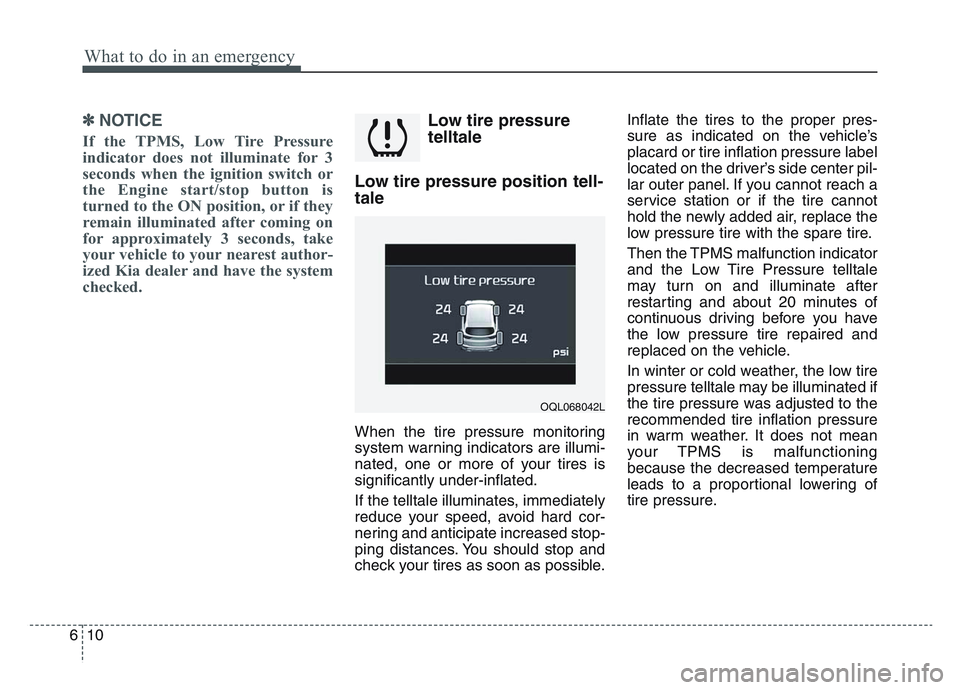
Low tire pressure position tell-
tale
When the tire pressure monitoring
system warning indicators are illumi-
nated, one or more of your tires is
significantly under-inflated.
If the telltale illuminates, immediately
reduce your speed, avoid hard cor-
nering and anticipate increased stop-
ping distances. You should stop and
check your tires as soon as possible. Inflate the tires to the proper pres-
sure as indicated on the vehicle’s
placard or tire inflation pressure label
located on the driver’s side center pil-
lar outer panel. If you cannot reach a
service station or if the tire cannot
hold the newly added air, replace the
low pressure tire with the spare tire.
Then the TPMS malfunction indicator
and the Low Tire Pressure telltale
may turn on and illuminate after
restarting and about 20 minutes of
continuous driving before you have
the low pressure tire repaired and
replaced on the vehicle.
In winter or cold weather, the low tire
pressure telltale may be illuminated if
the tire pressure was adjusted to the
recommended tire inflation pressure
in warm weather. It does not mean
your TPMS is malfunctioning
because the decreased temperature
leads to a proportional lowering of
tire pressure.
OQL068042L
Page 490 of 631
What to do in an emergency
306
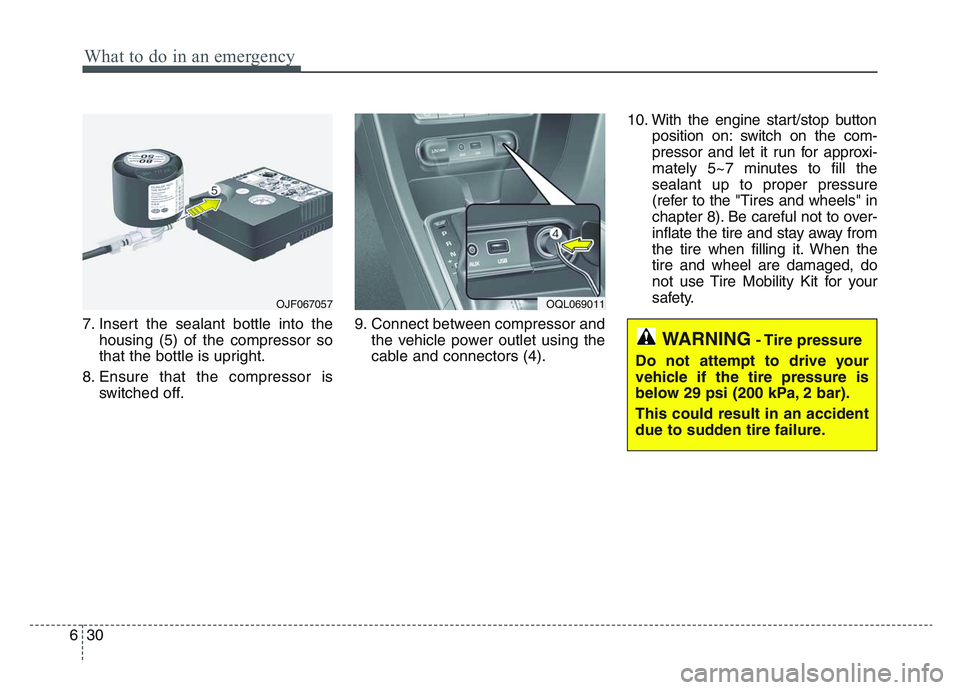
7. Insert the sealant bottle into thehousing (5) of the compressor so
that the bottle is upright.
8. Ensure that the compressor is switched off. 9. Connect between compressor and
the vehicle power outlet using the
cable and connectors (4). 10. With the engine start/stop button
position on: switch on the com-
pressor and let it run for approxi-
mately 5~7 minutes to fill the
sealant up to proper pressure
(refer to the "Tires and wheels" in
chapter 8). Be careful not to over-
inflate the tire and stay away from
the tire when filling it. When the
tire and wheel are damaged, do
not use Tire Mobility Kit for your
safety.
OJF067057OQL069011
WARNING- Tire pressure
Do not attempt to drive your
vehicle if the tire pressure is
below 29 psi (200 kPa, 2 bar).
This could result in an accident
due to sudden tire failure.
Page 491 of 631
6 31
What to do in an emergency
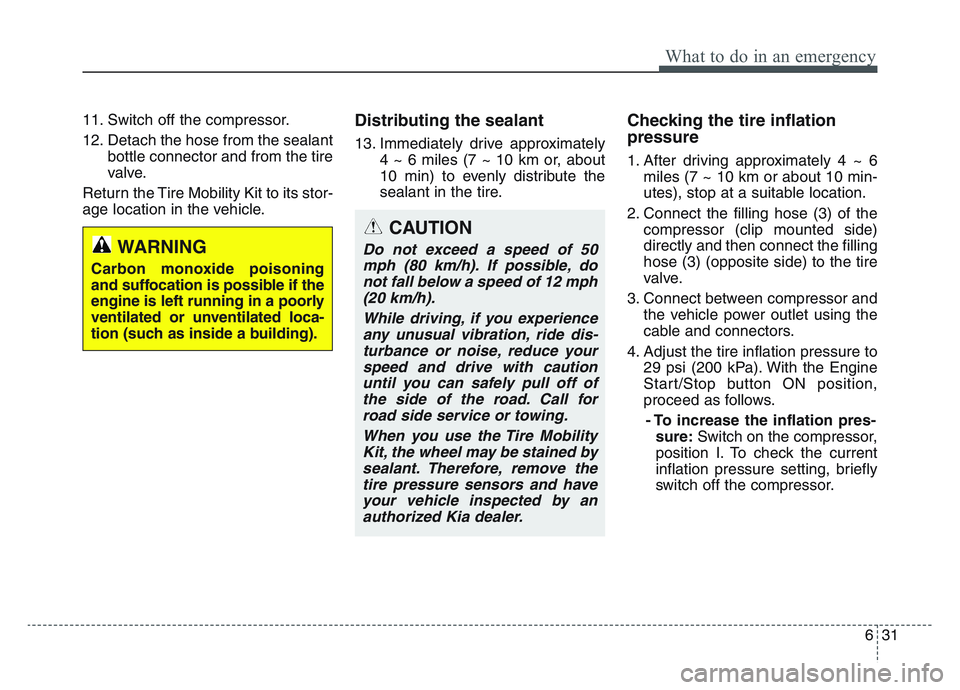
11. Switch off the compressor.
12. Detach the hose from the sealantbottle connector and from the tire
valve.
Return the Tire Mobility Kit to its stor-
age location in the vehicle.Distributing the sealant
13. Immediately drive approximately 4 ~ 6 miles (7 ~ 10 km or, about
10 min) to evenly distribute the
sealant in the tire.
Checking the tire inflation
pressure
1. After driving approximately 4 ~ 6miles (7 ~ 10 km or about 10 min-
utes), stop at a suitable location.
2. Connect the filling hose (3) of the compressor (clip mounted side)
directly and then connect the filling
hose (3) (opposite side) to the tire
valve.
3. Connect between compressor and the vehicle power outlet using the
cable and connectors.
4. Adjust the tire inflation pressure to 29 psi (200 kPa). With the Engine
Start/Stop button ON position,
proceed as follows.
- To increase the inflation pres- sure: Switch on the compressor,
position I. To check the current
inflation pressure setting, briefly
switch off the compressor.
CAUTION
Do not exceed a speed of 50 mph (80 km/h). If possible, donot fall below a speed of 12 mph(20 km/h).
While driving, if you experienceany unusual vibration, ride dis-turbance or noise, reduce yourspeed and drive with cautionuntil you can safely pull off ofthe side of the road. Call forroad side service or towing.
When you use the Tire MobilityKit, the wheel may be stained bysealant. Therefore, remove thetire pressure sensors and haveyour vehicle inspected by anauthorized Kia dealer.WARNING
Carbon monoxide poisoning
and suffocation is possible if the
engine is left running in a poorly
ventilated or unventilated loca-
tion (such as inside a building).
Page 566 of 631
7 69
Maintenance
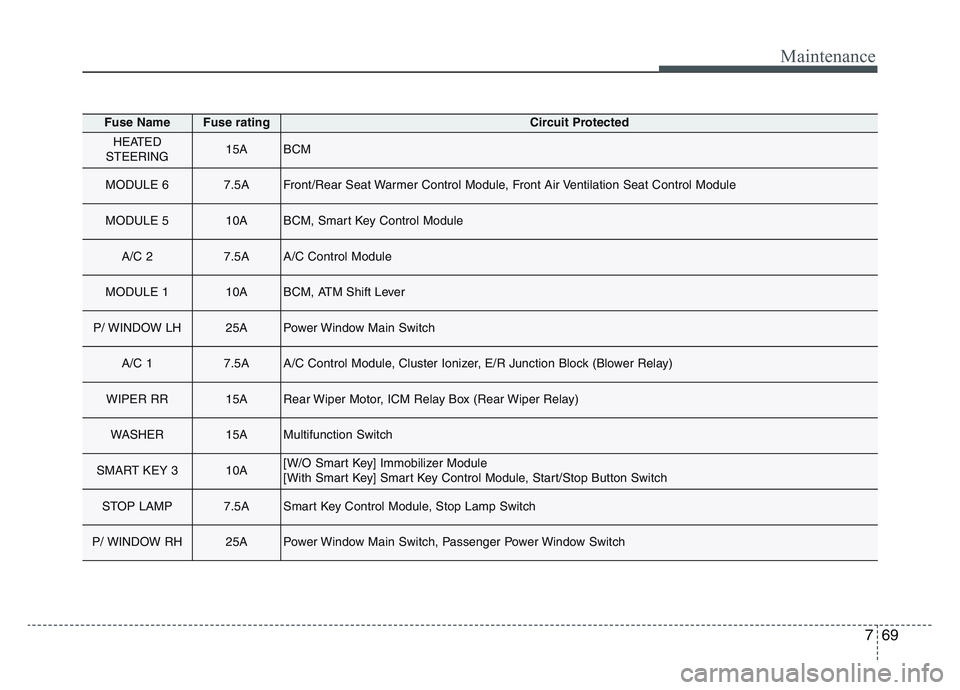
Fuse NameFuse ratingCircuit Protected
HEATED
STEERING15ABCM
MODULE 67.5AFront/Rear Seat Warmer Control Module, Front Air Ventilation Seat Control Module
MODULE 510ABCM, Smart Key Control Module
A/C 27.5AA/C Control Module
MODULE 110ABCM, ATM Shift Lever
P/ WINDOW LH25APower Window Main Switch
A/C 17.5AA/C Control Module, Cluster Ionizer, E/R Junction Block (Blower Relay)
WIPER RR15ARear Wiper Motor, ICM Relay Box (Rear Wiper Relay)
WASHER15AMultifunction Switch
SMART KEY 310A[W/O Smart Key] Immobilizer Module
[With Smart Key] Smart Key Control Module, Start/Stop Button Switch
STOP LAMP7.5ASmart Key Control Module, Stop Lamp Switch
P/ WINDOW RH25APower Window Main Switch, Passenger Power Window Switch
Page 623 of 631
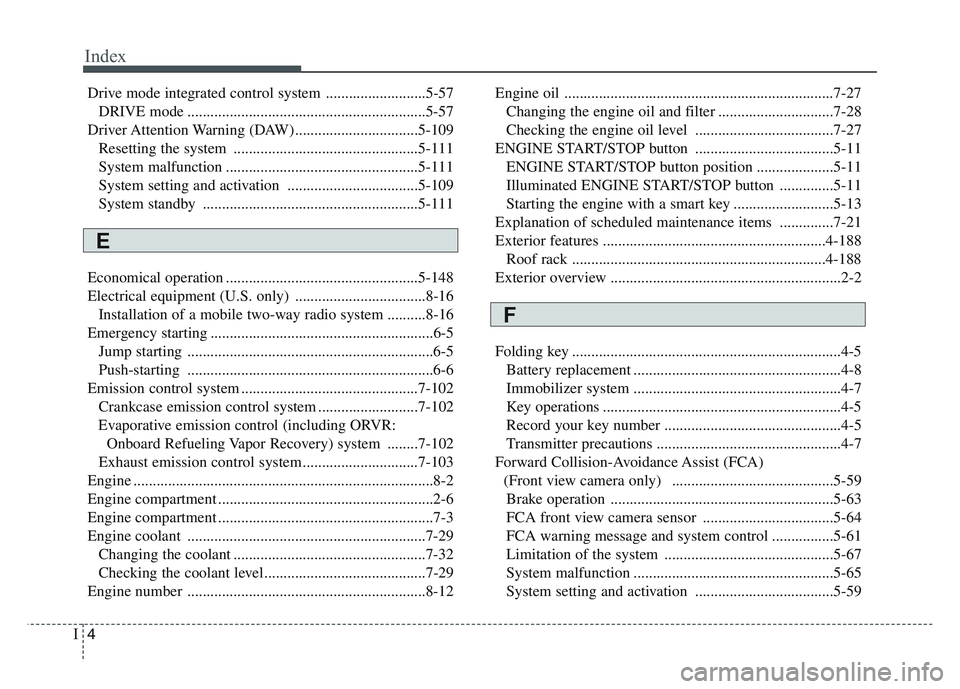
Index
4I
Drive mode integrated control system ..........................5-57DRIVE mode ..............................................................5-57
Driver Attention Warning (DAW)................................5-109 Resetting the system ................................................5-111
System malfunction ..................................................5-111
System setting and activation ..................................5-109
System standby ........................................................5-111
Economical operation ..................................................5-148
Electrical equipment (U.S. only) ..................................8-16 Installation of a mobile two-way radio system ..........8-16
Emergency starting ..........................................................6-5 Jump starting ................................................................6-5
Push-starting ................................................................6-6
Emission control system ..............................................7-102 Crankcase emission control system ..........................7-102
Evaporative emission control (including ORVR: Onboard Refueling Vapor Recovery) system ........7-102
Exhaust emission control system ..............................7-103
Engine ........................................................................\
......8-2
Engine compartment ........................................................2-6
Engine compartment ........................................................7-3
Engine coolant ..............................................................7-29 Changing the coolant ..................................................7-32
Checking the coolant level..........................................7-29
Engine number ..............................................................8-12 Engine oil ......................................................................7-\
27
Changing the engine oil and filter ..............................7-28
Checking the engine oil level ....................................7-27
ENGINE START/STOP button ....................................5-11 ENGINE START/STOP button position ....................5-11
Illuminated ENGINE START/STOP button ..............5-11
Starting the engine with a smart key ..........................5-13
Explanation of scheduled maintenance items ..............7-21
Exterior features ..........................................................4-188 Roof rack ..................................................................4-188
Exterior overview ............................................................2-2
Folding key ......................................................................4-\
5 Battery replacement ......................................................4-8
Immobilizer system ......................................................4-7
Key operations ..............................................................4-5
Record your key number ..............................................4-5
Transmitter precautions ................................................4-7
Forward Collision-Avoidance Assist (FCA) (Front view camera only) ..........................................5-59Brake operation ..........................................................5-63
FCA front view camera sensor ..................................5-64
FCA warning message and system control ................5-61
Limitation of the system ............................................5-67
System malfunction ....................................................5-65
System setting and activation ....................................5-59
E
F