2021 KIA SPORTAGE ESP
[x] Cancel search: ESPPage 159 of 631
4 69
Features of your vehicle
FCC ID: NZLZTVHL3
IC: 4112A-ZTVHL3
This device complies with part 15
of the FCC Rules.
Operation is subject to the following
two conditions:
1. This device may not cause harmfulinterference, and
2. This device must accept any inter- ference received, including inter-
ference that may cause undesired
operation.
✽NOTICE
The transceiver has been tested and
complies with FCC and Industry
Canada rules. Changes or modifica-
tions not expressly approved by the
party responsible for compliance
could void the user's authority to
operate the device.
Electric chromic mirror (ECM)
with HomeLink®system, com-
pass (if equipped)
Your vehicle may be equipped with a
Gentex Automatic-Dimming Mirror
with a Z-Nav™ Electronic Compass
Display and an Integrated
HomeLink
®Wireless Control
System. During nighttime driving,
this feature will automatically detect
and reduce rearview mirror glare
while the compass indicates the
direction the vehicle is pointed. The
HomeLink
®Universal Transceiver
allows you to activate your garage
door(s), electric gate, home lighting,
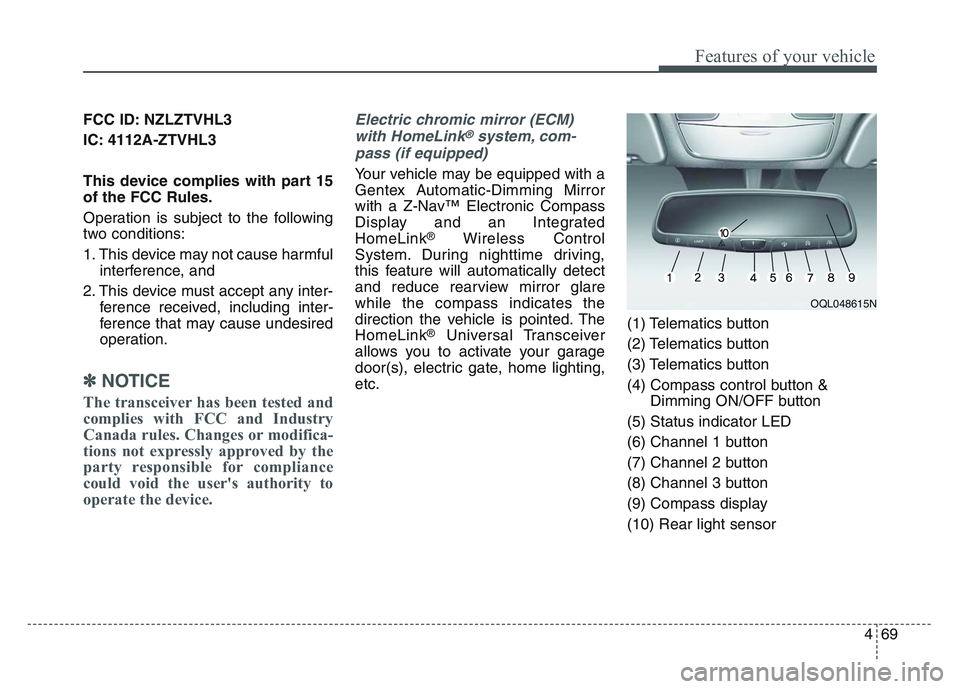
etc. (1) Telematics button
(2) Telematics button
(3) Telematics button
(4) Compass control button &
Dimming ON/OFF button
(5) Status indicator LED
(6) Channel 1 button
(7) Channel 2 button
(8) Channel 3 button
(9) Compass display
(10) Rear light sensor
OQL048615N
Page 166 of 631
Features of your vehicle
764
Erasing HomeLink®buttons
Individual buttons cannot be erased.
However, to erase all three pro-
grammed buttons:
1. Press and hold the two outerHomeLink
®buttons until the indi-
cator light begins to flash after 10
seconds.
2. Release both buttons. Do not hold for longer than 20 seconds.
The Integrated HomeLink
®Wireless
Control System is now in the training
(learn) mode and can be pro-
grammed at any time following the
appropriate steps in the
Programming chapters above.
NVS
®is a registered trademark and
Z-Nav™ is a trademark of the Gentex
Corporation, Zeeland, Michigan.
HomeLink
®is a registered trademark
owned by Johnson Controls,
Incorporated, Milwaukee, Wisconsin. FCC ID: NZLZTVHL3
IC: 4112A-ZTVHL3
This device complies with part 15
of the FCC Rules.
Operation is subject to the following
two conditions:
1. This device may not cause harmful
interference, and
2. This device must accept any inter- ference received, including inter-
ference that may cause undesired
operation.
✽NOTICE
The transceiver has been tested and
complies with FCC and Industry
Canada rules. Changes or modifica-
tions not expressly approved by the
party responsible for compliance
could void the user's authority to
operate the device.
Outside rearview mirror
Be sure to adjust the mirror angles
before driving.
Your vehicle is equipped with both
left-hand and right-hand outside
rearview mirrors. The mirrors can be
adjusted remotely with the remote
switch. The mirror heads can be fold-
ed back to prevent damage during an
automatic vehicle wash or when
passing through a narrow street.
The right outside rearview mirror is
convex. Objects seen in the mirror
are closer than they appear.
Use your interior rearview mirror or
direct observation to determine the
actual distance of following vehicles
when changing lanes.
Page 167 of 631
4 77
Features of your vehicle
If the mirror is jammed with ice, do
not adjust the mirror by force. Use an
approved spray de-icer (not radiator
antifreeze) to release the frozen
mechanism or move the vehicle to a
warm place and allow the ice to melt.
Adjusting outside rearview mirror(if equipped)
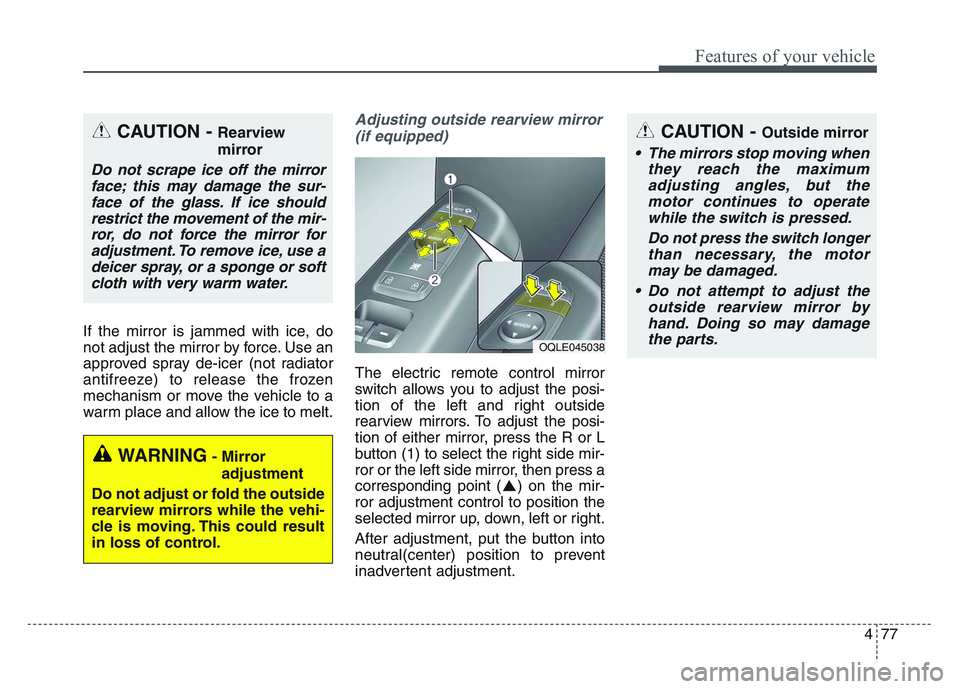
The electric remote control mirror
switch allows you to adjust the posi-
tion of the left and right outside
rearview mirrors. To adjust the posi-
tion of either mirror, press the R or L
button (1) to select the right side mir-
ror or the left side mirror, then press a
corresponding point ( ) on the mir-
ror adjustment control to position the
selected mirror up, down, left or right.
After adjustment, put the button into
neutral(center) position to prevent
inadvertent adjustment.
CAUTION - Outside mirror
• The mirrors stop moving when they reach the maximumadjusting angles, but themotor continues to operatewhile the switch is pressed.
Do not press the switch longerthan necessary, the motormay be damaged.
• Do not attempt to adjust the outside rearview mirror byhand. Doing so may damagethe parts.
OQLE045038
WARNING- Mirror
adjustment
Do not adjust or fold the outside
rearview mirrors while the vehi-
cle is moving. This could result
in loss of control.
CAUTION - Rearview
mirror
Do not scrape ice off the mirror face; this may damage the sur-face of the glass. If ice shouldrestrict the movement of the mir-ror, do not force the mirror foradjustment. To remove ice, use adeicer spray, or a sponge or softcloth with very warm water.
Page 205 of 631
![KIA SPORTAGE 2021 Owners Manual 4 115
Features of your vehicle
AUTO HOLD IndicatorLight (if equipped)
This indicator light illuminates:
• [White] When you activate the auto hold system by pressing the AUTO
HOLD button.
• [Green]](/manual-img/2/55169/w960_55169-204.png "KIA SPORTAGE 2021 Owners Manual 4 115
Features of your vehicle
AUTO HOLD IndicatorLight (if equipped)
This indicator light illuminates:
• [White] When you activate the auto hold system by pressing the AUTO
HOLD button.
• [Green]")
4 115
Features of your vehicle
AUTO HOLD IndicatorLight (if equipped)
This indicator light illuminates:
• [White] When you activate the auto hold system by pressing the AUTO
HOLD button.
• [Green] When you stop the vehicle completely by depressing the
brake pedal with the auto hold sys-
tem activated.
• [Yellow] When there is a malfunc- tion with the auto hold system.
In this case, have your vehicle
inspected by an authorized Kia
dealer.
❈ For more details, refer to “Auto
Hold” in chapter 5.
LKA (Lane Keeping
Assist) System Indicator
This indicator light illuminates :
• When you turn the lane keeping assistant system on by pressing
the LKA button.
If there is a problem with the sys-
tem, the yellow LKA indicator will
illuminate.
❈ For more details, refer to “Lane
Keeping Assist (LKA) System” in
chapter 5.
AUTO
HOLDWARNING - Distracted
driving
Driving while distracted can
result in a loss of vehicle con-
trol that may lead to an acci-
dent, severe personal injury,
and death. The driver’s primary
responsibility is in the safe and
legal operation of a vehicle, and
use of any handheld devices,
other equipment, or vehicle sys-
tems which take the driver’s
eyes, attention and focus away
from the safe operation of a
vehicle or which are not permis-
sible by law should never be
used during operation of the
vehicle.
Page 207 of 631
4 117
Features of your vehicle
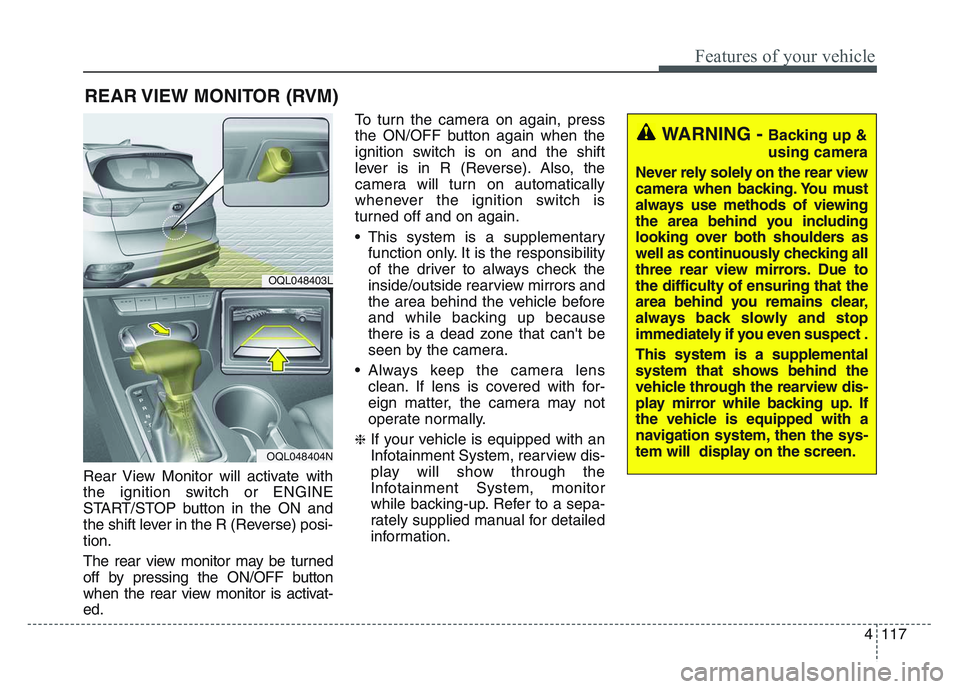
Rear View Monitor will activate with
the ignition switch or ENGINE
START/STOP button in the ON and
the shift lever in the R (Reverse) posi-
tion.
The rear view monitor may be turned
off by pressing the ON/OFF button
when the rear view monitor is activat-
ed.To turn the camera on again, press
the ON/OFF button again when the
ignition switch is on and the shift
lever is in R (Reverse). Also, the
camera will turn on automatically
whenever the ignition switch is
turned off and on again.
• This system is a supplementary
function only. It is the responsibility
of the driver to always check the
inside/outside rearview mirrors and
the area behind the vehicle before
and while backing up because
there is a dead zone that can't be
seen by the camera.
• Always keep the camera lens clean. If lens is covered with for-
eign matter, the camera may not
operate normally.
❈If your vehicle is equipped with an
Infotainment System, rearview dis-
play will show through the
Infotainment System, monitor
while backing-up. Refer to a sepa-
rately supplied manual for detailed
information.
REAR VIEW MONITOR (RVM)
OQL048403L
OQL048404N
WARNING - Backing up &
using camera
Never rely solely on the rear view
camera when backing. You must
always use methods of viewing
the area behind you including
looking over both shoulders as
well as continuously checking all
three rear view mirrors. Due to
the difficulty of ensuring that the
area behind you remains clear,
always back slowly and stop
immediately if you even suspect .
This system is a supplemental
system that shows behind the
vehicle through the rearview dis-
play mirror while backing up. If
the vehicle is equipped with a
navigation system, then the sys-
tem will display on the screen.
Page 212 of 631
Features of your vehicle
1224
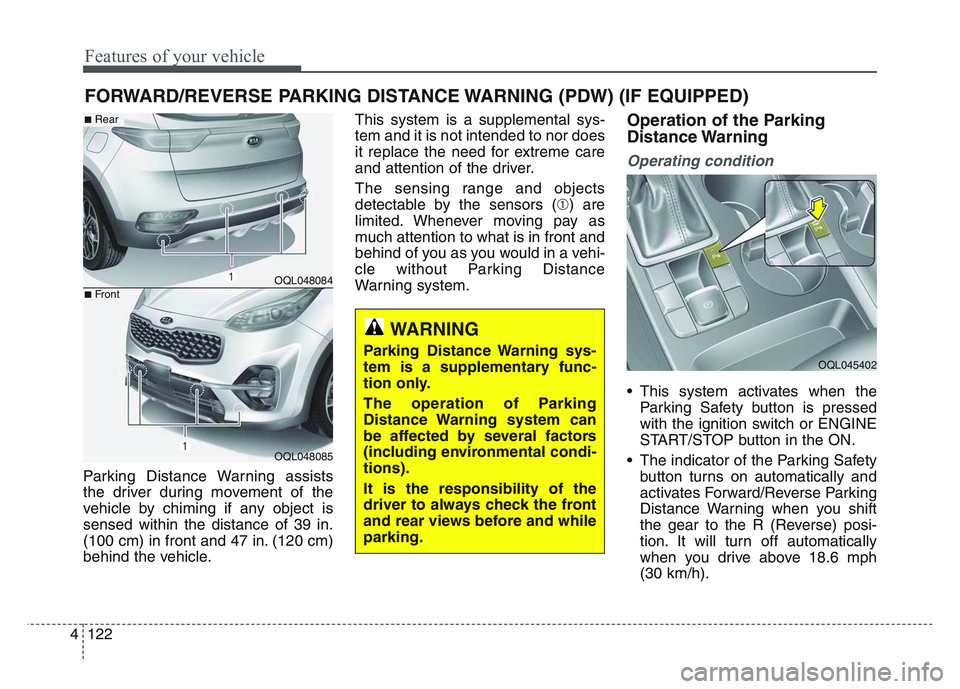
Parking Distance Warning assists
the driver during movement of the
vehicle by chiming if any object is
sensed within the distance of 39 in.
(100 cm) in front and 47 in. (120 cm)
behind the vehicle.This system is a supplemental sys-
tem and it is not intended to nor does
it replace the need for extreme care
and attention of the driver.
The sensing range and objects
detectable by the sensors (➀) are
limited. Whenever moving pay as
much attention to what is in front and
behind of you as you would in a vehi-
cle without Parking Distance
Warning system.
Operation of the Parking
Distance Warning
Operating condition
• This system activates when the
Parking Safety button is pressed
with the ignition switch or ENGINE
START/STOP button in the ON.
• The indicator of the Parking Safety button turns on automatically and
activates Forward/Reverse Parking
Distance Warning when you shift
the gear to the R (Reverse) posi-
tion. It will turn off automatically
when you drive above 18.6 mph
(30 km/h).
FORWARD/REVERSE PARKING DISTANCE WARNING (PDW) (IF EQUIPPED)
WARNING
Parking Distance Warning sys-
tem is a supplementary func-
tion only.
The operation of Parking
Distance Warning system can
be affected by several factors
(including environmental condi-
tions).
It is the responsibility of the
driver to always check the front
and rear views before and while
parking.
OQL048084
OQL048085
■Rear
■Front
OQL045402
Page 216 of 631
Features of your vehicle
1264
Self-diagnosis
When you shift the gear to the R
(Reverse) position and if one or more
of the below occurs you may have a
malfunction in Forward/Reverse
Parking Distance Warning.
• You don't hear an audible warningsound or if the buzzer sounds inter-
mittently.
If this occurs, we recommend that the
system be checked by an authorized
Kia dealer.
✽NOTICE
Your new vehicle warranty does not
cover any accidents or damage to
the vehicle or injuries to its occu-
pants related to Parking Distance
Warning system. Always drive safe-
ly and cautiously.
WARNING
Pay close attention when the
vehicle is driven close to
objects on the road, particularly
pedestrians, and especially
children. Be aware that some
objects may not be detected by
the sensors, due to the objects
distance, size or material, all of
which can limit the effective-
ness of the sensor. Always per-
form a visual inspection to
make sure the vehicle is clear of
all obstructions before moving
the vehicle in any direction.
• is displayed. (if equipped)
(blinks)
Page 217 of 631
4 127
Features of your vehicle
Battery saver function
• The purpose of this feature is toprevent the battery from being dis-
charged if the lights are left in the
ON position. The system automati-
cally shuts off the parking lights 30
seconds after the ignition key is
removed and the driver’s door is
opened and closed.
• With this feature, the parking lights will turn off automatically if the driver
parks on the side of the road at night
and opens the driver’s side door.
If necessary, to keep the parking
lights on when the ignition key is
removed, perform the following:
1) Open the driver-side door.
2) Turn the parking lights OFF and ON again using the light switch
on the steering column.
Daytime running light
(if equipped)
The Daytime Running Lights (DRL)
can make it easier for others to see the
front of your vehicle during the day.
DRL can be helpful in many different
driving conditions, and it is especially
helpful after dawn and before sunset.
The DRL system turns OFF when:
1. The headlight switch is ON.
2. The engine is OFF.
3. Engaging the Parking Brake
4. The front fog light is ON.
Lighting control
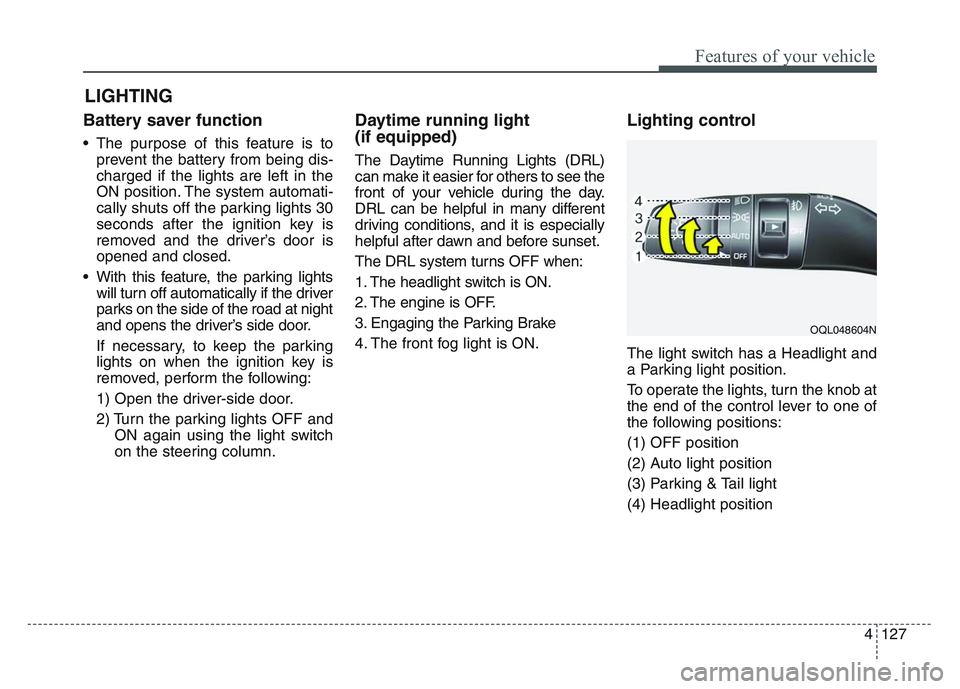
The light switch has a Headlight and
a Parking light position.
To operate the lights, turn the knob at
the end of the control lever to one of
the following positions:
(1) OFF position
(2) Auto light position
(3) Parking & Tail light
(4) Headlight position
LIGHTING
OQL048604N