2021 KIA SOUL ECO
[x] Cancel search: ECOPage 5 of 211

3
\334System handling
Do NOT apply excessive force to the system.
\225When you apply excessive pressure to the screen, the LCD panel or touch
panel may get damaged.
To clean the screen or button panel, first turn off the vehicle
and then use a dry, soft cloth to wipe it.
\225Do not wipe using a rough or hard cloth, chemical fiber, organic solvent (e.g.
alcohol, benzene, thinner), or air freshener. The panel surface may become
scratched or damaged due to a chemical reaction.
When you install an air freshener on the air conditioner vent,
the surface may be deformed due to leakage.
0000
A
If you experience any problems with the system, contact your
place of purchase or dealer.
Safety Precautions
Be sure to keep the following instructions. Otherwise, it may
cause minor injury or system damage.
\334Operation
Use the system with the vehicle started.
\225
When you use the system for a long time with the vehicle stopped, it may\
cause battery discharge.
Do NOT install unapproved products.
\225Using unapproved products may cause an error while using the system.
\225System errors caused by installing unapproved products are not covered
under the warranty.
Page 8 of 211
6
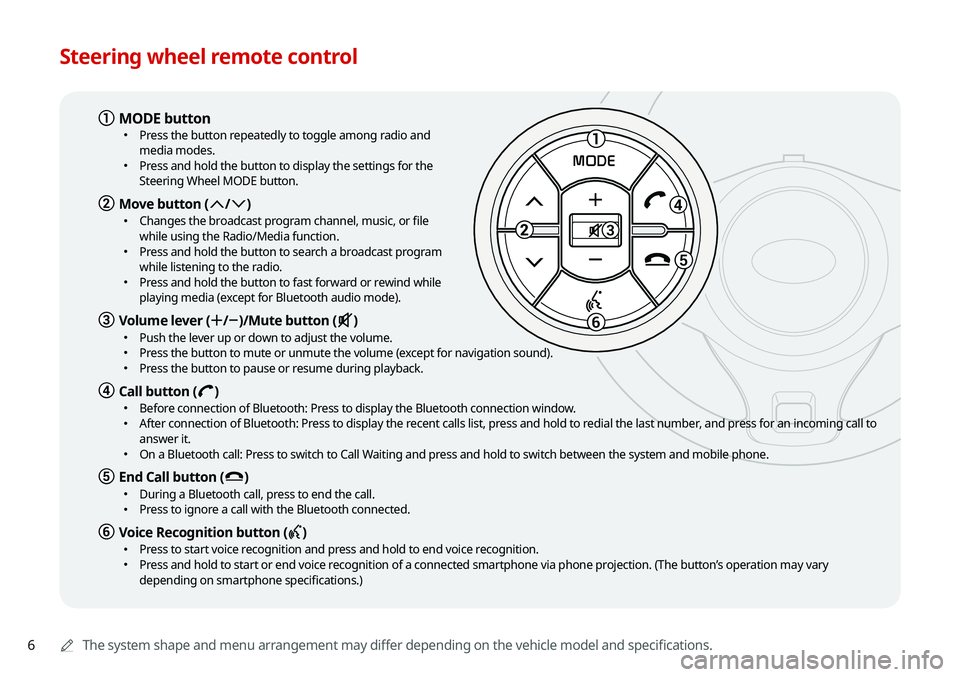
Steering wheel remote control
0000AThe system shape and menu arrangement may differ depending on the vehicle model and specifications.
1
3
5
6
MODE
a MODE button \225
Press the button repeatedly to toggle among radio and
media modes.
\225Press and hold the button to display the settings for the
Steering Wheel MODE button.
b Move button (: /; ) \225
Changes the broadcast program channel, music, or file
while using the Radio/Media function.
\225Press and hold the button to search a broadcast program
while listening to the radio.
\225Press and hold the button to fast forward or rewind while
playing media (except for Bluetooth audio mode).
c Volume lever (+ /- )/Mute button (M ) \225
Push the lever up or down to adjust the volume. \225Press the button to mute or unmute the volume (except for navigation sound). \225Press the button to pause or resume during playback.
d Call button (D ) \225
Before connection of Bluetooth: Press to display the Bluetooth connection window. \225After connection of Bluetooth: Press to display the recent calls list, press and hold to redial the last number, and press for an incoming call to
answer it.
\225On a Bluetooth call: Press to switch to Call Waiting and press and hold to switch between the system and mobile phone.
e End Call button (E ) \225
During a Bluetooth call, press to end the call. \225Press to ignore a call with the Bluetooth connected.
f Voice Recognition button (C ) \225
Press to start voice recognition and press and hold to end voice recognition. \225Press and hold to start or end voice recognition of a connected smartphone via phone projection. (The button’s operation may vary
depending on smartphone specifications.)
Page 15 of 211
5
\334System handling
Do NOT apply excessive force to the system.
\225 When you apply excessive pressure to the screen, the LCD panel or touch
panel may get damaged.
To clean the screen or button panel, first turn off the vehicle
and then use a dry, soft cloth to wipe it.
\225Do not wipe using a rough or hard cloth, chemical fiber, organic solvent (e.g.
alcohol, benzene, thinner), or air freshener. The panel surface may become
scratched or damaged due to a chemical reaction.
When you install an air freshener on the air conditioner vent,
the surface may be deformed due to leakage.
0000
A
If you experience any problems with the system, contact your
place of purchase or dealer.
Be sure to keep the following instructions. Otherwise, it may
cause minor injury or system damage.
\334Operation
Use the system with the vehicle started.
\225 When you use the system for a long time with the vehicle stopped, it may\
cause battery discharge.
Do NOT install unapproved products.
\225Using unapproved products may cause an error while using the system.
\225System errors caused by installing unapproved products are not covered
under the warranty.
Safety Precautions
Page 18 of 211

8
Accepting an incoming call over Bluetooth 6-15
Rejecting a call 6-15
Using functions during a call 6-16
Checking a new message over Bluetooth 6-17
Checking a new message 6-18
Checking a new message from the list 6-19
Sending a text by using the voice recognition 6-20
07 Voice functions
Voice recognition 7-2
Using the voice recognition 7-2
Seeing the voice recognition help 7-4
Available voice commands 7-6
POI names 7-11
Using the Siri Eyes Free 7-19
Voice Memo 7-20
Using the voice memos 7-20
Recording a voice memo 7-21
Playing a voice memo 7-21
Using the address book 5-20
Registering a searched place as a favorite place 5-20
Registering the current position as a favorite place 5-22
Registering a frequently visited place as a favorite place 5-22
Setting a registered favorite place as a destination 5-23
Registering a frequently visited place as a destination 5-23
Editing the registered place 5-24
Deleting a registered favorite place(s) 5-24
Importing/exporting the address book 5-25
Searching for gas stations 5-25
06 Phone
Connecting a Bluetooth device 6-2
Registering a device 6-3
Connecting a registered device 6-4
Disconnecting a registered device 6-6
Deleting a registered device 6-6
Making a call via Bluetooth 6-6
Dialing from the recent call list 6-7
Dialing from the favorites list 6-8
Dialing from the contacts 6-10
Using the dial pad 6-12
Dialing with voice recognition 6-14
Page 19 of 211

9
09 Settings
Configuring the device connection settings 9-2
Bluetooth 9-2
Android Auto 9-3
Apple CarPlay 9-3
Configuring the advanced system settings 9-4
Return to Map: Set Time 9-4
TUNE Knob Function 9-4
Custom Button ☆ 9-5
Steering Wheel MODE Button 9-5
Home Screen 9-5
My Data 9-6
Extend Rear Camera Use 9-6
Configuring the sound settings 9-7
Position 9-7
Volume 9-8
Advanced 9-8
Tone 9-9
Priority 9-9
Navigation Volume 9-10
Reset 9-11
Turning on/off the screen touch sound 9-11
Configuring the voice recognition settings 9-11
Use Network 9-12
Guidance 9-12
08 UVO
UVO service 8-2
Service restrictions 8-2
Subscribing to the service 8-3
Running the UVO 8-4
Viewing driving information 8-5
Contacting for roadside assistance 8-6
Diagnosing the vehicle 8-6
Using the received location information 8-7
Contacting the UVO Center 8-8
Using Voice Local Search 8-9
Configuring the UVO settings 8-9
Page 23 of 211
1-3
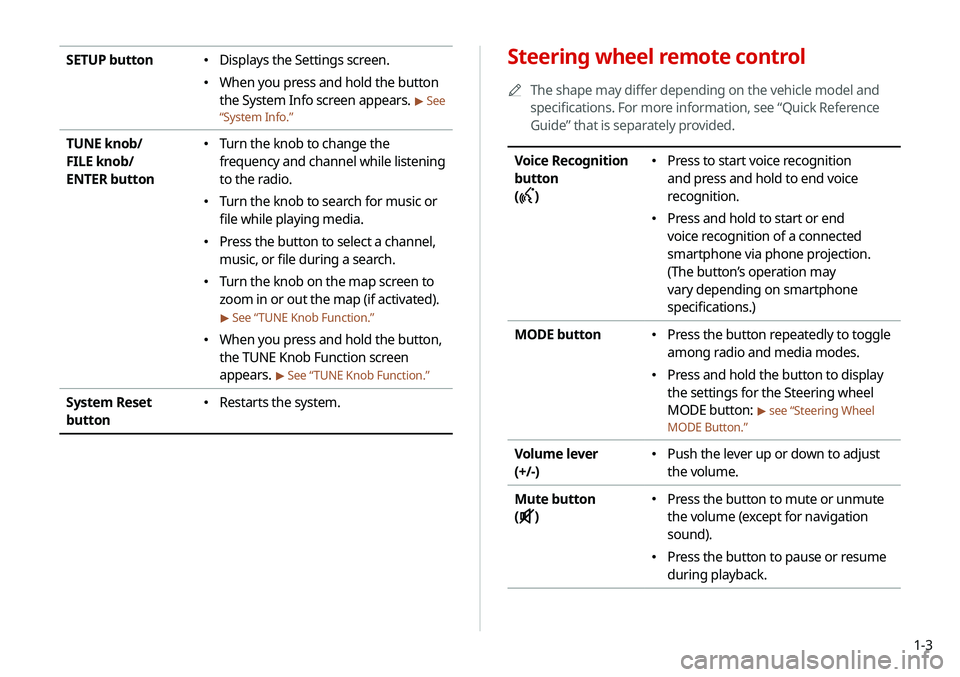
Steering wheel remote control
0000
A
The shape may differ depending on the vehicle model and
specifications. For more information, see “Quick Reference
Guide” that is separately provided.
Voice Recognition
button
(
)
\225 Press to start voice recognition
and press and hold to end voice
recognition.
\225Press and hold to start or end
voice recognition of a connected
smartphone via phone projection.
(The button’s operation may
vary depending on smartphone
specifications.)
MODE button
\225 Press the button repeatedly to toggle
among radio and media modes.
\225Press and hold the button to display
the settings for the Steering wheel
MODE button:
> see “Steering Wheel
MODE Button.”
Volume lever
(+/-) \225 Push the lever up or down to adjust
the volume.
Mute button
(
)
\225 Press the button to mute or unmute
the volume (except for navigation
sound).
\225Press the button to pause or resume
during playback.
SETUP button \225Displays the Settings screen.
\225When you press and hold the button
the System Info screen appears.
> See
“ System Info.”
TUNE knob/
FILE knob/
ENTER button \225
Turn the knob to change the
frequency and channel while listening
to the radio.
\225Turn the knob to search for music or
file while playing media.
\225Press the button to select a channel,
music, or file during a search.
\225Turn the knob on the map screen to
zoom in or out the map (if activated).
> See “ TUNE Knob Function.”
\225
When you press and hold the button,
the TUNE Knob Function screen
appears.
> See “ TUNE Knob Function.”
System Reset
button \225
Restarts the system.
Page 26 of 211
1-6
Using the touch screen
This system is equipped with a touch-type screen. You can use
various practices by using this feature.
\335Warning
Do not use the touch screen while driving as this will divert your
attention away from the safe operation of the vehicle. You may
lose your steering control which could cause an accident and
severe bodily injuries.
\334Caution
\225 Do not press the touch screen with excessive force or a sharp
object. The touch screen may become damaged.
\225 Be careful for the touch screen not to contact any electrically
charged object. Static or other electric shock may cause the
system to malfunction or damage the touch screen.
0000
A
The touch screen will not respond when you are wearing
gloves. Take off the gloves or wear electrostatic touch gloves.
\334Caution
\225 The system can be turned on even when the ignition switch is
in “ACC” or “ON.” However, when you use the system without
turning on the vehicle for a long time, it may cause battery
discharge. To use the system for a long time, be sure to turn
on the vehicle.
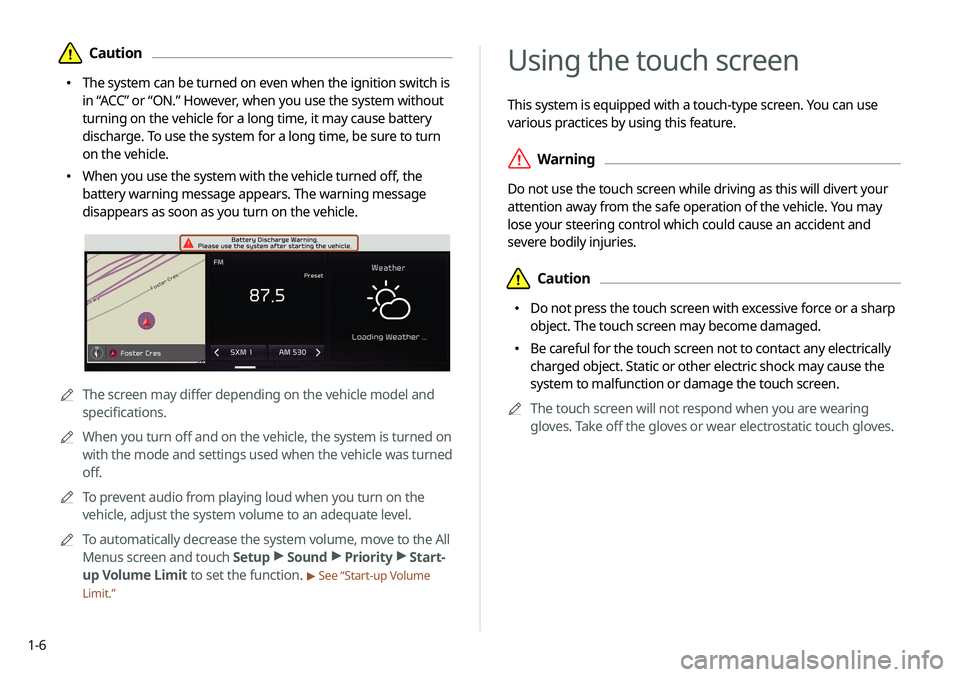
\225 When you use the system with the vehicle turned off, the
battery warning message appears. The warning message
disappears as soon as you turn on the vehicle.
0000AThe screen may differ depending on the vehicle model and
specifications.
0000
A
When you turn off and on the vehicle, the system is turned on
with the mode and settings used when the vehicle was turned
off.
0000
A
To prevent audio from playing loud when you turn on the
vehicle, adjust the system volume to an adequate level.
0000
A
To automatically decrease the system volume, move to the All
Menus screen and touch Setup >
Sound >
Priority >
Start-
up Volume Limit to set the function.
> See “Start-up Volume
Limit.”
Page 36 of 211
2-2
Pairing to an Android smartphone via
Android Auto
When you connect an Android smartphone to the vehicle with
Android Auto, you can run and control applications on the phone
through the widescreen using its user-friendly interface.
1 To use Android Auto, first check the following.
\225Visit the Android Auto website at https://www.android.
com/auto to check the list of countries, device types, and
models that support Android Auto.
\225Download and install the Android Auto application from
Google Play Store. It is not possible to install Android Auto
in countries that do not support the feature.
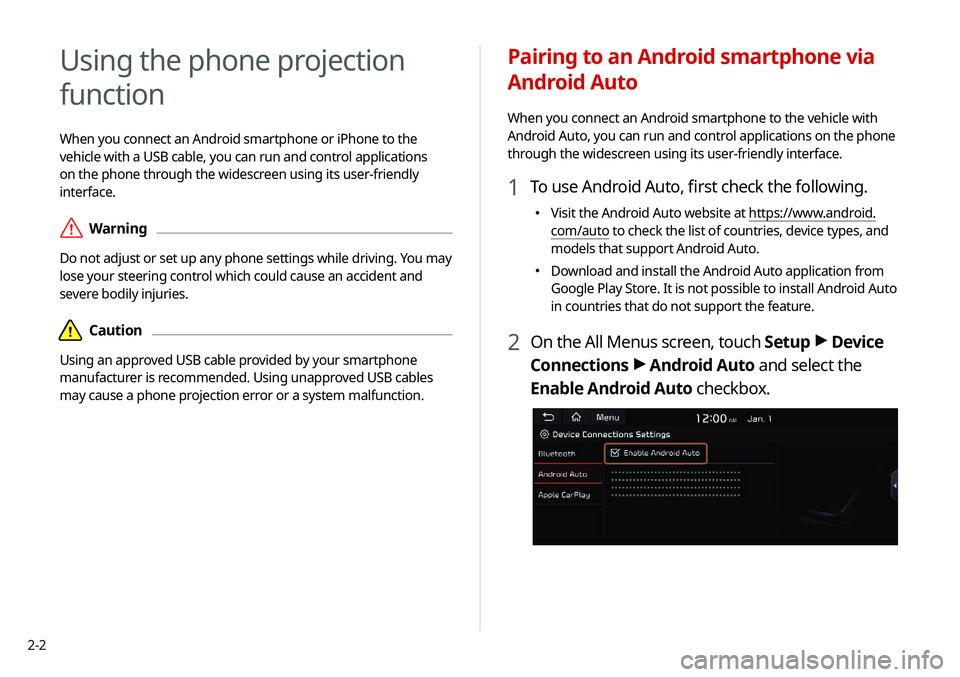
2 On the All Menus screen, touch Setup >
Device
Connections >
Android Auto and select the
Enable Android Auto checkbox.
Using the phone projection
function
When you connect an Android smartphone or iPhone to the
vehicle with a USB cable, you can run and control applications
on the phone through the widescreen using its user-friendly
interface.
\335Warning
Do not adjust or set up any phone settings while driving. You may
lose your steering control which could cause an accident and
severe bodily injuries.
\334Caution
Using an approved USB cable provided by your smartphone
manufacturer is recommended. Using unapproved USB cables
may cause a phone projection error or a system malfunction.