2021 KIA NIRO PHEV alarm
[x] Cancel search: alarmPage 399 of 710

Driving your vehicle
76 5
In bad weather conditions such as
heavy rain, heavy snow, and fog, or
when sensor is covered by foreign
material, dust, tec., the sensors will
be degraded and the function will be
temporarily disabled.
Always keep the sensor clean.✽ ✽
NOTICE
• Do not install any accessories,
such as license plate molding or
sticker, on the sensor area. Nor
arbitrarily replace the bumper.
Those may adversely affect the
sensing performance.
• Always keep the sensor/bumper
area clean.
• Use only soft cloths to wash the
vehicle. Also, do not spray highly-
pressurized water on the sensor
installed on the bumper.
• Be careful not to apply unneces-
sary force on the frontal sensor
area. When the sensor moves out
of the correct position due to
external force, the function may
not normally operate even without
the warning light or message. In
this case, have your vehicle
inspected by an authorized Kia
dealer.
• Use only the genuine Kia sensor
cover. Do not arbitrarily apply
paint on the sensor cover.
(Continued)(Continued)
• Do not tint the window or install
stickers, accessories around the
inside mirror where the camera is
installed.
• Make sure the front view camera
installation point does not get wet.
• Do not impact or arbitrarily
remove any front radar compo-
nents.
• Do not place reflective
objects(white paper or mirror etc.)
on the crash pad.
The function may activate unnec-
essarily due to reflect of the sun-
light.
• Excessive audio volume may dis-
turb the sound of the function
warning alarm.
• For more cautions for the front
view camera sensor, refer to the
“Lane Keeping Assist (LKA)” in
this chapter.
Page 401 of 710

Driving your vehicle
78 5
WARNING
FCA is only a supplemental
function for the driver’s con-
venience. The driver has the
ultimate responsibility to con-
trol and operate the vehicle
safely. Do not solely depend
on FCA. Rather, maintain a
safe braking distance, and, if
necessary, depress the brake
pedal to lower the driving
speed.
In certain instances and
under certain driving condi-
tions, FCA may activate unin-
tentionally. This initial warning
message appears on the LCD
display with a warning chime.
Also, in certain instances the
front view camera or front
radar recognition function
may not detect the vehicle,
pedestrian or cyclist (if
equipped) ahead. FCA may
not activate and the warning
message will not be displayed.
(Continued)
(Continued)
FCA may unnecessarily pro-
duce the warning message
and the warning alarms. Also,
due to the sensing limitation,
FCA may not produce the
warning message and the
warning alarm at all.
When there is a malfunction
with FCA, the braking control
does not operate upon detect-
ing a collision risk even with
other braking systems nor-
mally operating.
FCA operates only for the
vehicle/pedestrian in front,
while driving forward. It does
not operate for any animals or
vehicles in the opposite direc-
tion.
FCA does not recognize the
vehicle, which transversally
drives across the crossroad,
or the vehicle, which is parked
in the transversal direction.
(Continued)(Continued)
If the vehicle in front stops
suddenly, you may have less
control of the brake system.
Therefore, always keep safe
distance between your vehicle
and the vehicle in front of you.
FCA may activate during brak-
ing and the vehicle may stop
suddenly. And the load in the
vehicle may endanger passen-
gers. Therefore, always be
mindful of the load volume in
the vehicle.
FCA may not activate if the
driver applies the brake pedal
to avoid risk of collision.
FCA does not operate when
the vehicle is in reverse. In
these circumstances, you
must maintain a safe braking
distance, and if necessary,
depress the brake pedal to
reduce the driving speed in
order to maintain a safe dis
tance.
(Continued)
Page 404 of 710

581
Driving your vehicle
When the front view camera
(including lens) or front radar is
damaged.
If not using headlamp or using
weak light in the night or in a tun-
nel.
Backlight is shining in the driving
direction of the vehicle. (Including
oncoming vehicle headlights.)
When the rear part of the front
vehicle is small or low.
When a trailer or other vehicle is
towing the front vehicle.
When the ground clearance of the
front vehicle is high.
When a front vehicle makes sud-
den lane changes unexpectedly.- Driving on a curve
The performance of Forward
Collision-Avoidance Assist may be
limited when driving on a curved
road.
The front view camera or front radar
sensor recognition function may not
detect the vehicle, pedestrian or
cyclist traveling in front on a curved
road.
This may result in no alarm and brak-
ing when necessary.
Always pay attention to road and
driving conditions, and if necessary,
depress the brake pedal to reduce
your driving speed in order to main-
tain a safe distance.
OHM059350L
OHM059349L
OHM059351L
Page 405 of 710
Driving your vehicle
82 5
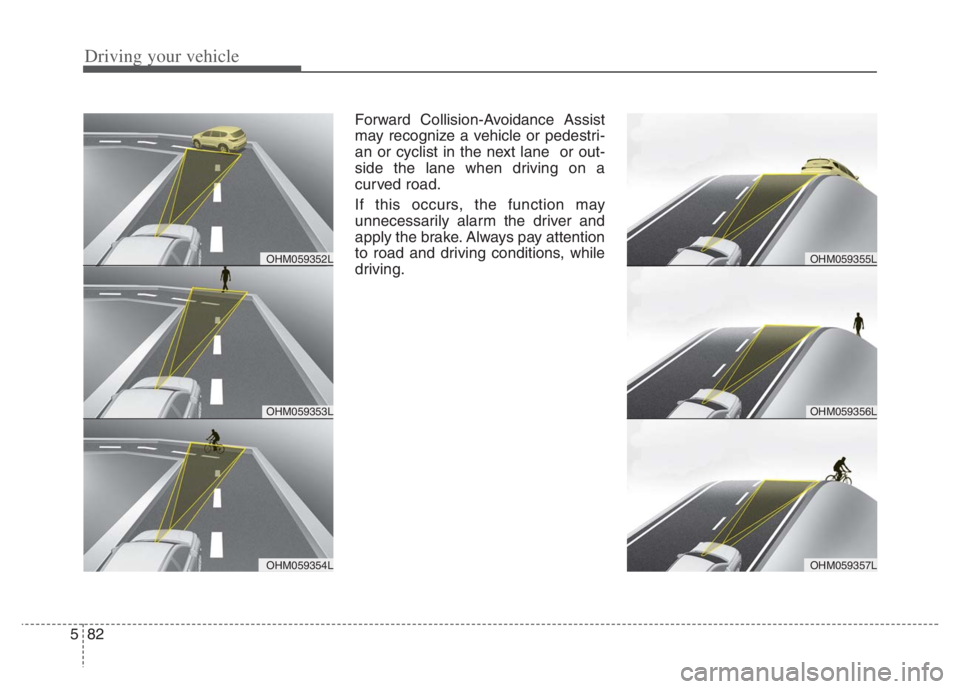
Forward Collision-Avoidance Assist
may recognize a vehicle or pedestri-
an or cyclist in the next lane or out-
side the lane when driving on a
curved road.
If this occurs, the function may
unnecessarily alarm the driver and
apply the brake. Always pay attention
to road and driving conditions, while
driving.
OHM059353L
OHM059352L
OHM059354L
OHM059356L
OHM059355L
OHM059357L
Page 406 of 710

583
Driving your vehicle
- Driving on a slope
The performance of Forward
Collision-Avoidance Assist may be
decreased while driving upward or
downward on a slope. The front view
camera or front radar sensor recog-
nition may not detect the vehicle,
pedestrian or cyclist in front.
This may result in unnecessary
alarm and braking or no alarm and
braking when necessary.
When the function suddenly recog-
nizes the vehicle, pedestrian or
cyclist in front while passing over a
slope, you may experience sharp
deceleration.
Always keep your eyes forward while
driving upward or downward on a
slope, and, if necessary, depress the
brake pedal to reduce your driving
speed in order to maintain distance.- Changing lanes
When a vehicle changes lanes in
front of you, Forward Collision-
Avoidance Assist may not immedi-
ately detect the vehicle, especially if
the vehicle changes lanes abruptly.
In this case, you must maintain a
safe braking distance, and if neces-
sary, depress the brake pedal to
reduce your driving speed in order to
maintain a safe distance.When driving in stop-and-go traffic,
and a stopped vehicle in front of you
merges out of the lane, Forward
Collision-Avoidance Assist may not
immediately detect the new vehicle
that is now in front of you. In this
case, you must maintain a safe brak-
ing distance, and if necessary,
depress the brake pedal to reduce
your driving speed in order to main-
tain a safe distance.
OJF055028OJF055029
Page 411 of 710

Driving your vehicle
88 5
LKA operation
To activate/deactivate LKA :
With the ignition switch or ENGINE
START/STOP button in the ON posi-
tion, press the Lane Safety button
located on the instrument panel on
the lower left hand side of the driver.
The indicator ( )in the cluster dis-
play will initially illuminate white.
When the indicator(white) was acti-
vated in the previous ignition cycle,
the function turns on without any
control. If you press the Lane Safety
button again, the indicator on the
cluster display will go off.
(Continued)
The function detects lane
markers and controls the
steering wheel by a front view
camera, therefore, if the lane
markers are hard to detect,
the function may not work
properly. Always be cautious
when using the function.
When the lane markers are
hard to detect, please refer to
“DRIVER’S ATTENTION”.
Do not remove or damage the
related parts of the front view
camera function.
Do not place objects on the
crash pad that reflect light
such as mirrors, white paper,
etc. it may cause malfunction
of LKA if sunlight is reflected.
You may not hear warning
sound of LKA because of the
excessive audio sound.
(Continued)(Continued)
If other beeps such as the
seat belt warning sound are in
operation and override LKA
alarming function, LKA beeps
may not occur.
At high vehicle speeds, the
steering torque needed for
assistance may not be suffi-
cient to keep your vehicle
within the lane. If so, the vehi-
cle may move out of its lane.
Always obey the speed limit
when using LKA.
If you attach objects to the
steering wheel, the function
may not assist steering.
If you attach objects to the
steering wheel, hands off
alarm may not work properly.
ODEP059113
Page 424 of 710

5101
Driving your vehicle
Detecting Sensor
The rear corner radars are the sen-
sors inside the rear bumper for
detecting the side/rear areas. Always
keep the rear bumper clean for prop-
er operation of the function.
CAUTION
The driver should always use
extreme caution while operat-
ing the vehicle, whether or not
the warning light on the out-
side rearview mirror illumi-
nates or there is a warning
alarm.
Playing the vehicle audio sys-
tem at high volume may offset
Blind-Spot Collision Warning
warning sounds.
The warning of the Blind-Spot
Collision Warning may not
sound while other system's
warning sounds.
ODEP059158
■Rear corner radarsCAUTION
The function may not work
properly when the bumper has
been damaged, or if the rear
bumper has been replaced or
repaired.
The sensing range differs some-
what according to the width of
the road. When the road is nar-
row, the function may detect
other vehicles in the next lane.
The function may turn off due to
strong electromagnetic waves.
Always keep the sensor or near
the sensor clean.
NEVER arbitrarily disassem-
ble the sensor component nor
apply any impact on the sen-
sor component.
Be careful not to apply unnec-
essary force on the radar sen-
sor or sensor cover. If the sen-
sor is forcibly moved out of
proper alignment, the function
may not operate correctly. In
this case, a warning message
may not be displayed.
(Continued)
Page 467 of 710

Driving your vehicle
144 5
Function operating
If temporary deceleration is required
in the standby state and Navigation-
based Smart Cruise Control is oper-
ating, the green ( ) symbol will
illuminate on the cluster.
If the Set Speed Auto Change func-
tion operates, the green ( )sym-
bol and green set speed will illumi-
nate on the cluster, and an audible
alarm will sound.
✽ ✽
NOTICE
Highway Auto Curve Slowdown and
Set Speed Auto Change function
uses the same ( ) symbol.
Highway Auto Curve Slowdown
Depending on the curve ahead on
the highway (or motorway), the
vehicle will decelerate, and after
passing the curve, the vehicle will
accelerate to Smart Cruise Control
set speed.
Vehicle deceleration time may dif-
fer depending on the vehicle speed
and the degree of the curve on the
road. The higher the driving speed,
the faster the vehicle will deceler-
ate.Limitations of the function
Navigation-based Smart Cruise
Control may not operate normally
under the following circumstances:
The navigation is not working prop-
erly.
The navigation is not updated to
include the latest information about
road curvature and changes.
Speed limit and road information in
the navigation is not updated
The map information and the actu-
al road is different because of real-
time GPS data or map information
error
The navigation searches for a
route while driving
GPS signals are blocked in areas
such as a tunnel
A road that divides into two or
more roads and joins again
The driver goes off course the
route set in the navigation
The route to the destination is
changed or canceled by resetting
the navigation (including TPEG
change)
ODEP050010N