2021 KIA NIRO HYBRID EV wireless
[x] Cancel search: wirelessPage 66 of 667
25
Your vehicle at a glance
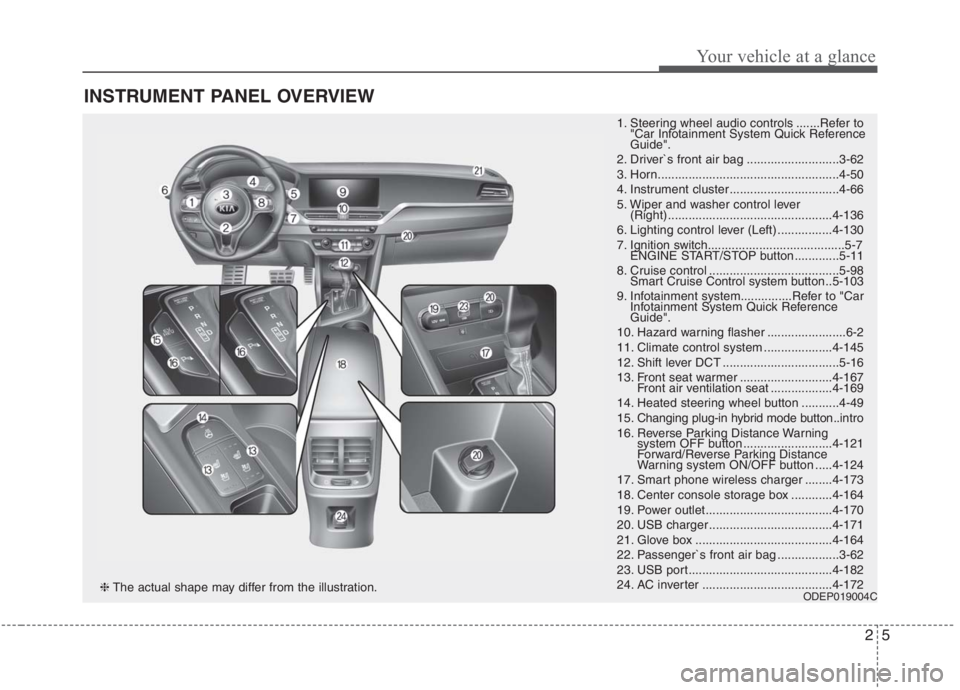
INSTRUMENT PANEL OVERVIEW
1. Steering wheel audio controls .......Refer to
"Car Infotainment System Quick Reference
Guide".
2. Driver`s front air bag ...........................3-62
3. Horn.....................................................4-50
4. Instrument cluster ................................4-66
5. Wiper and washer control lever
(Right) ................................................4-136
6. Lighting control lever (Left) ................4-130
7. Ignition switch........................................5-7
ENGINE START/STOP button .............5-11
8. Cruise control ......................................5-98
Smart Cruise Control system button ..5-103
9. Infotainment system...............Refer to "Car
Infotainment System Quick Reference
Guide".
10. Hazard warning flasher .......................6-2
11. Climate control system ....................4-145
12. Shift lever DCT ..................................5-16
13. Front seat warmer ...........................4-167
Front air ventilation seat ..................4-169
14. Heated steering wheel button ...........4-49
15. Changing plug-in hybrid mode button..intro
16. Reverse Parking Distance Warning
system OFF button ..........................4-121
Forward/Reverse Parking Distance
Warning system ON/OFF button .....4-124
17. Smart phone wireless charger ........4-173
18. Center console storage box ............4-164
19. Power outlet.....................................4-170
20. USB charger ....................................4-171
21. Glove box ........................................4-164
22. Passenger`s front air bag ..................3-62
23. USB port..........................................4-182
24. AC inverter ......................................4-172
ODEP019004C❈The actual shape may differ from the illustration.
Page 194 of 667
Features of your vehicle
54 4
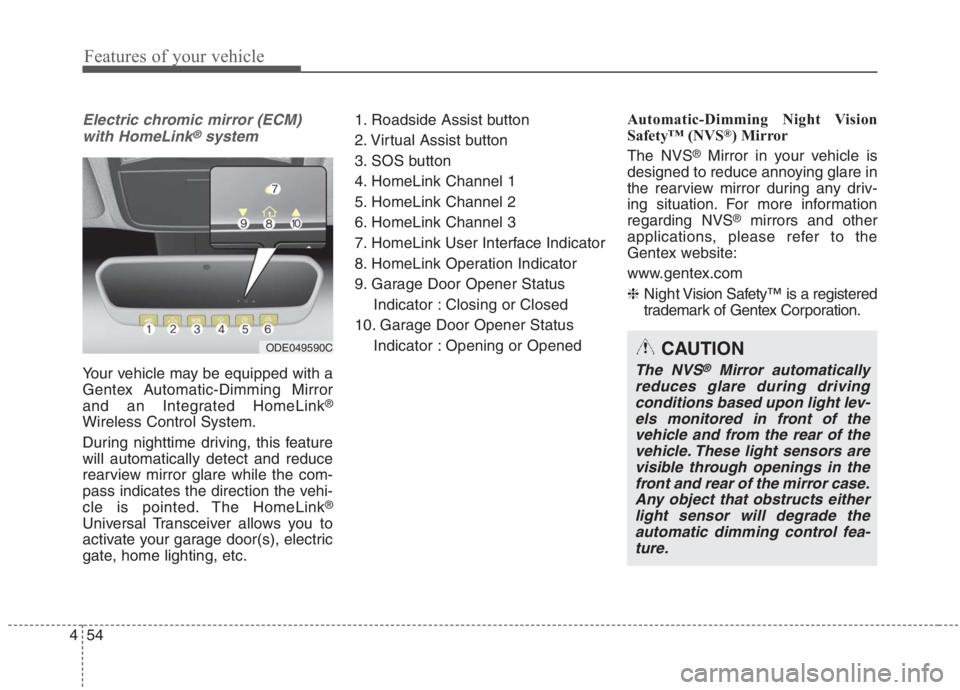
Electric chromic mirror (ECM)
with HomeLink®system
Your vehicle may be equipped with a
Gentex Automatic-Dimming Mirror
and an Integrated HomeLink
®
Wireless Control System.
During nighttime driving, this feature
will automatically detect and reduce
rearview mirror glare while the com-
pass indicates the direction the vehi-
cle is pointed. The HomeLink
®
Universal Transceiver allows you to
activate your garage door(s), electric
gate, home lighting, etc.1. Roadside Assist button
2. Virtual Assist button
3. SOS button
4. HomeLink Channel 1
5. HomeLink Channel 2
6. HomeLink Channel 3
7. HomeLink User Interface Indicator
8. HomeLink Operation Indicator
9. Garage Door Opener Status
Indicator : Closing or Closed
10. Garage Door Opener Status
Indicator : Opening or OpenedAutomatic-Dimming Night Vision
Safety™ (NVS
®) Mirror
The NVS
®Mirror in your vehicle is
designed to reduce annoying glare in
the rearview mirror during any driv-
ing situation. For more information
regarding NVS
®mirrors and other
applications, please refer to the
Gentex website:
www.gentex.com
❈Night Vision Safety™ is a registered
trademark of Gentex Corporation.
ODE049590CCAUTION
The NVS®Mirror automatically
reduces glare during driving
conditions based upon light lev-
els monitored in front of the
vehicle and from the rear of the
vehicle. These light sensors are
visible through openings in the
front and rear of the mirror case.
Any object that obstructs either
light sensor will degrade the
automatic dimming control fea-
ture.
Page 195 of 667
455
Features of your vehicle
Automatic-dimming function
Your mirror will automatically dim
upon detecting glare from the vehi-
cles traveling behind you.
✽ ✽
NOTICE
The mirror defaults to the ON posi-
tion each time the vehicle is started.
Integrated HomeLink®Wireless
Control System
The HomeLink
®Wireless Control
System provides a convenient way to
replace up to three hand-held radio-
frequency (RF) transmitters with a
single built-in device. This innovative
feature will learn the radio frequency
codes of most current transmitters to
operate devices such as gate opera-
tors, garage door openers, entry
door locks, security systems, even
home lighting. Both standard and
rolling code-equipped transmitters
can be programmed by following the
outlined procedures. Additional
HomeLink
®information can be found
at: www.homelink.com or by calling
1-800-355-3515.
❈HomeLink
®is a registered trade-
mark of Gentex Corporation.Retain the original transmitter of the
RF device you are programming for
use in other vehicles as well as for
future HomeLink
®programming. It is
also suggested that upon the sale of
the vehicle, the programmed
HomeLink
®buttons be erased for
security purposes.
Page 197 of 667
457
Features of your vehicle
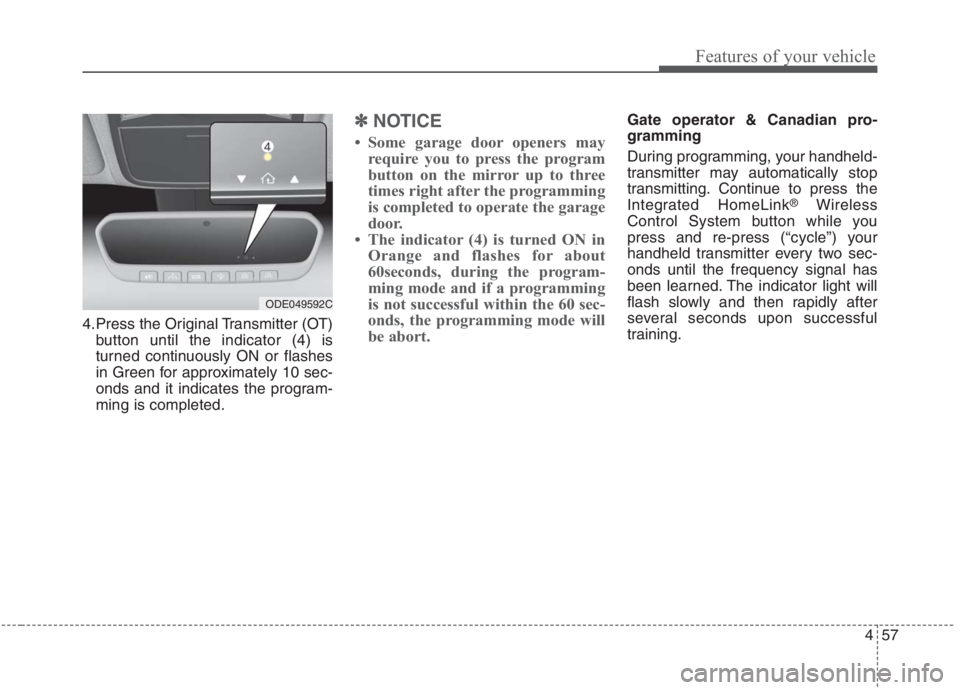
4.Press the Original Transmitter (OT)
button until the indicator (4) is
turned continuously ON or flashes
in Green for approximately 10 sec-
onds and it indicates the program-
ming is completed.
✽ ✽
NOTICE
• Some garage door openers may
require you to press the program
button on the mirror up to three
times right after the programming
is completed to operate the garage
door.
• The indicator (4) is turned ON in
Orange and flashes for about
60seconds, during the program-
ming mode and if a programming
is not successful within the 60 sec-
onds, the programming mode will
be abort.
Gate operator & Canadian pro-
gramming
During programming, your handheld-
transmitter may automatically stop
transmitting. Continue to press the
Integrated HomeLink
®Wireless
Control System button while you
press and re-press (“cycle”) your
handheld transmitter every two sec-
onds until the frequency signal has
been learned. The indicator light will
flash slowly and then rapidly after
several seconds upon successful
training.
ODE049592C
Page 225 of 667
485
Features of your vehicle
ItemsExplanation
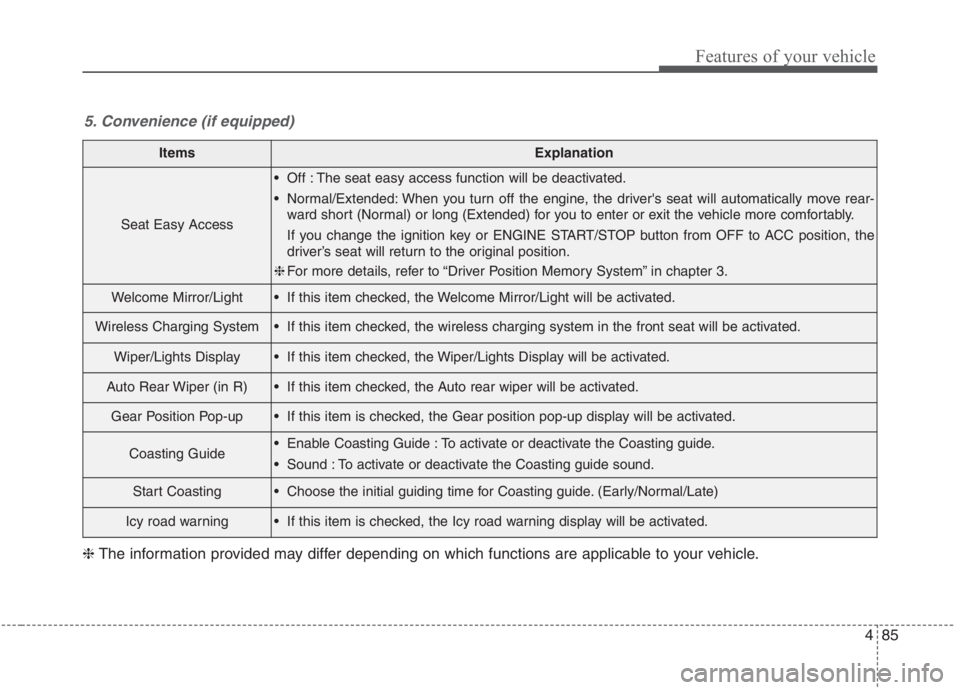
Seat Easy Access
Off : The seat easy access function will be deactivated.
Normal/Extended: When you turn off the engine, the driver's seat will automatically move rear-
ward short (Normal) or long (Extended) for you to enter or exit the vehicle more comfortably.
If you change the ignition key or ENGINE START/STOP button from OFF to ACC position, the
driver’s seat will return to the original position.
❈For more details, refer to “Driver Position Memory System” in chapter 3.
Welcome Mirror/Light If this item checked, the Welcome Mirror/Light will be activated.
Wireless Charging System If this item checked, the wireless charging system in the front seat will be activated.
Wiper/Lights Display If this item checked, the Wiper/Lights Display will be activated.
Auto Rear Wiper (in R) If this item checked, the Auto rear wiper will be activated.
Gear Position Pop-up If this item is checked, the Gear position pop-up display will be activated.
Coasting Guide Enable Coasting Guide : To activate or deactivate the Coasting guide.
Sound : To activate or deactivate the Coasting guide sound.
Start Coasting Choose the initial guiding time for Coasting guide. (Early/Normal/Late)
Icy road warning If this item is checked, the Icy road warning display will be activated.
5. Convenience (if equipped)
❈The information provided may differ depending on which functions are applicable to your vehicle.
Page 239 of 667
499
Features of your vehicle
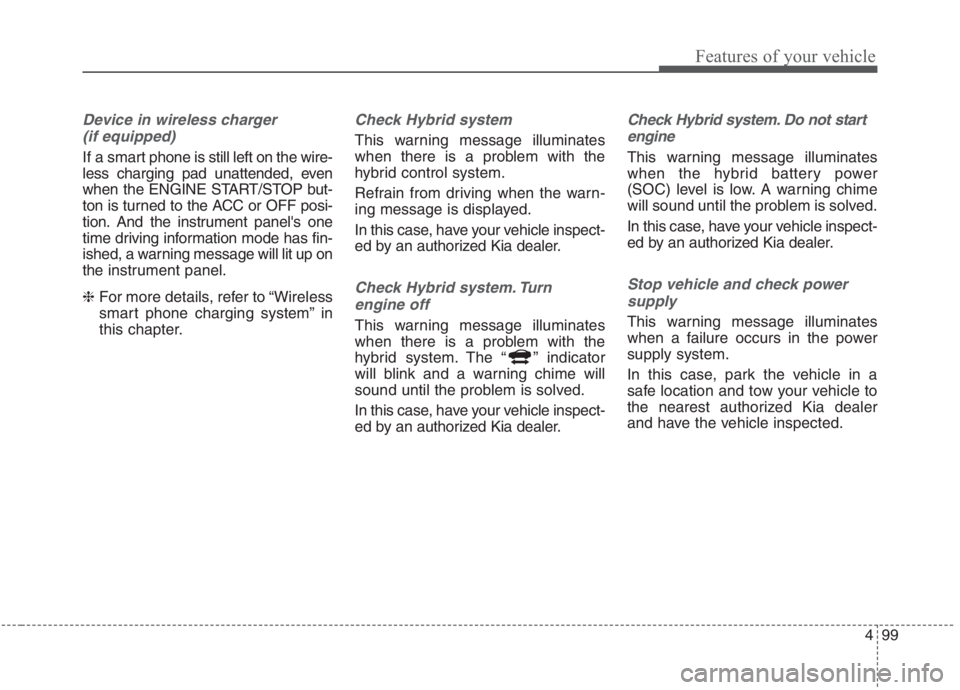
Device in wireless charger
(if equipped)
If a smart phone is still left on the wire-
less charging pad unattended, even
when the ENGINE START/STOP but-
ton is turned to the ACC or OFF posi-
tion. And the instrument panel's one
time driving information mode has fin-
ished, a warning message will lit up on
the instrument panel.
❈For more details, refer to “Wireless
smart phone charging system” in
this chapter.
Check Hybrid system
This warning message illuminates
when there is a problem with the
hybrid control system.
Refrain from driving when the warn-
ing message is displayed.
In this case, have your vehicle inspect-
ed by an authorized Kia dealer.
Check Hybrid system. Turn
engine off
This warning message illuminates
when there is a problem with the
hybrid system. The “ ” indicator
will blink and a warning chime will
sound until the problem is solved.
In this case, have your vehicle inspect-
ed by an authorized Kia dealer.
Check Hybrid system. Do not start
engine
This warning message illuminates
when the hybrid battery power
(SOC) level is low. A warning chime
will sound until the problem is solved.
In this case, have your vehicle inspect-
ed by an authorized Kia dealer.
Stop vehicle and check power
supply
This warning message illuminates
when a failure occurs in the power
supply system.
In this case, park the vehicle in a
safe location and tow your vehicle to
the nearest authorized Kia dealer
and have the vehicle inspected.
Page 262 of 667
Features of your vehicle
122 4
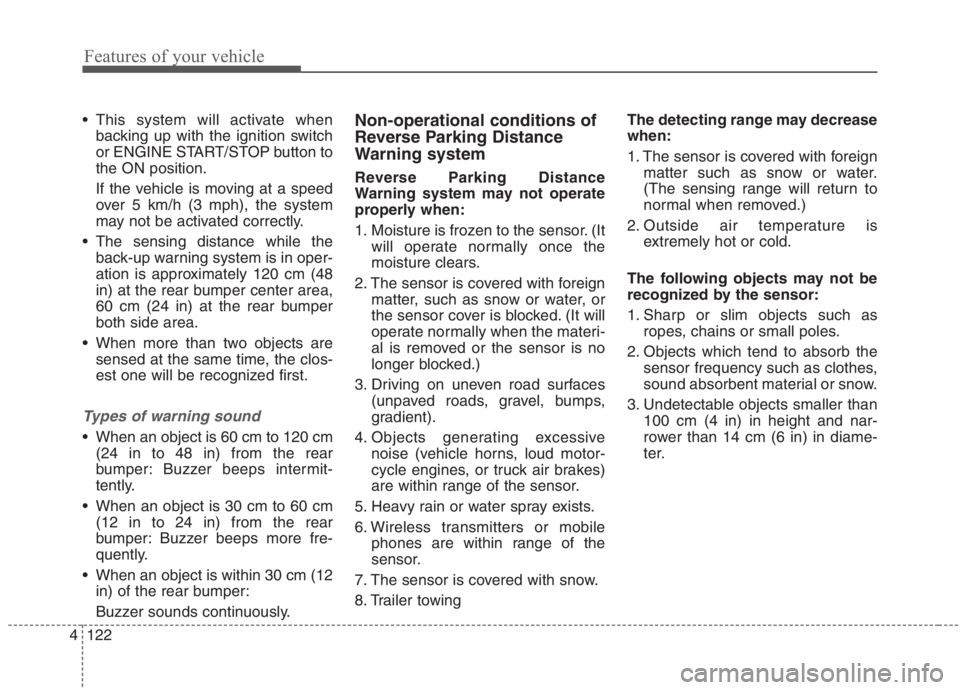
This system will activate when
backing up with the ignition switch
or ENGINE START/STOP button to
the ON position.
If the vehicle is moving at a speed
over 5 km/h (3 mph), the system
may not be activated correctly.
The sensing distance while the
back-up warning system is in oper-
ation is approximately 120 cm (48
in) at the rear bumper center area,
60 cm (24 in) at the rear bumper
both side area.
When more than two objects are
sensed at the same time, the clos-
est one will be recognized first.
Types of warning sound
When an object is 60 cm to 120 cm
(24 in to 48 in) from the rear
bumper: Buzzer beeps intermit-
tently.
When an object is 30 cm to 60 cm
(12 in to 24 in) from the rear
bumper: Buzzer beeps more fre-
quently.
When an object is within 30 cm (12
in) of the rear bumper:
Buzzer sounds continuously.
Non-operational conditions of
Reverse Parking Distance
Warning system
Reverse Parking Distance
Warning system may not operate
properly when:
1. Moisture is frozen to the sensor. (It
will operate normally once the
moisture clears.
2. The sensor is covered with foreign
matter, such as snow or water, or
the sensor cover is blocked. (It will
operate normally when the materi-
al is removed or the sensor is no
longer blocked.)
3. Driving on uneven road surfaces
(unpaved roads, gravel, bumps,
gradient).
4. Objects generating excessive
noise (vehicle horns, loud motor-
cycle engines, or truck air brakes)
are within range of the sensor.
5. Heavy rain or water spray exists.
6. Wireless transmitters or mobile
phones are within range of the
sensor.
7. The sensor is covered with snow.
8. Trailer towingThe detecting range may decrease
when:
1. The sensor is covered with foreign
matter such as snow or water.
(The sensing range will return to
normal when removed.)
2. Outside air temperature is
extremely hot or cold.
The following objects may not be
recognized by the sensor:
1. Sharp or slim objects such as
ropes, chains or small poles.
2. Objects which tend to absorb the
sensor frequency such as clothes,
sound absorbent material or snow.
3. Undetectable objects smaller than
100 cm (4 in) in height and nar-
rower than 14 cm (6 in) in diame-
ter.
Page 267 of 667
4127
Features of your vehicle
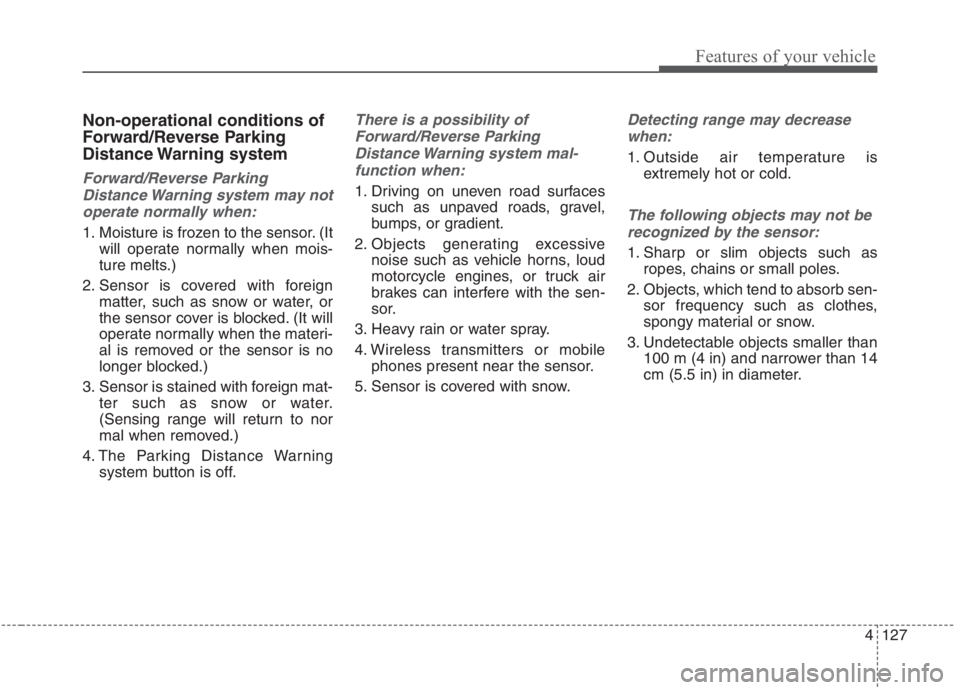
Non-operational conditions of
Forward/Reverse Parking
Distance Warning system
Forward/Reverse Parking
Distance Warning system may not
operate normally when:
1. Moisture is frozen to the sensor. (It
will operate normally when mois-
ture melts.)
2. Sensor is covered with foreign
matter, such as snow or water, or
the sensor cover is blocked. (It will
operate normally when the materi-
al is removed or the sensor is no
longer blocked.)
3. Sensor is stained with foreign mat-
ter such as snow or water.
(Sensing range will return to nor
mal when removed.)
4. The Parking Distance Warning
system button is off.
There is a possibility of
Forward/Reverse Parking
Distance Warning system mal-
function when:
1. Driving on uneven road surfaces
such as unpaved roads, gravel,
bumps, or gradient.
2. Objects generating excessive
noise such as vehicle horns, loud
motorcycle engines, or truck air
brakes can interfere with the sen-
sor.
3. Heavy rain or water spray.
4. Wireless transmitters or mobile
phones present near the sensor.
5. Sensor is covered with snow.
Detecting range may decrease
when:
1. Outside air temperature is
extremely hot or cold.
The following objects may not be
recognized by the sensor:
1. Sharp or slim objects such as
ropes, chains or small poles.
2. Objects, which tend to absorb sen-
sor frequency such as clothes,
spongy material or snow.
3. Undetectable objects smaller than
100 m (4 in) and narrower than 14
cm (5.5 in) in diameter.