Page 185 of 667
445
Features of your vehicle
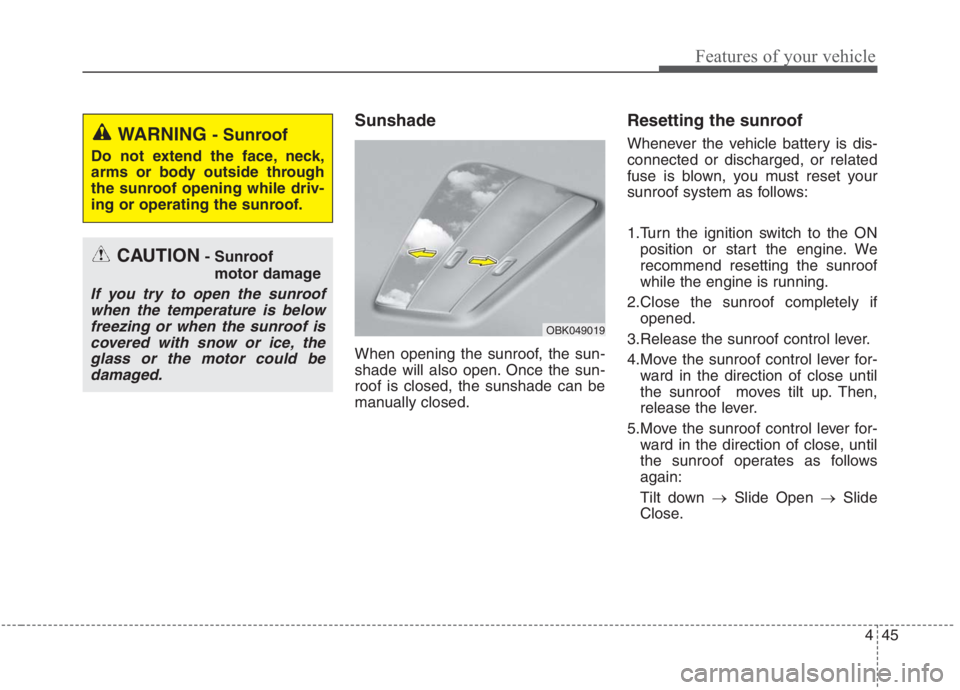
Sunshade
When opening the sunroof, the sun-
shade will also open. Once the sun-
roof is closed, the sunshade can be
manually closed.
Resetting the sunroof
Whenever the vehicle battery is dis-
connected or discharged, or related
fuse is blown, you must reset your
sunroof system as follows:
1.Turn the ignition switch to the ON
position or start the engine. We
recommend resetting the sunroof
while the engine is running.
2.Close the sunroof completely if
opened.
3.Release the sunroof control lever.
4.Move the sunroof control lever for-
ward in the direction of close until
the sunroof moves tilt up. Then,
release the lever.
5.Move the sunroof control lever for-
ward in the direction of close, until
the sunroof operates as follows
again:
Tilt down →Slide Open →Slide
Close.
OBK049019
CAUTION- Sunroof
motor damage
If you try to open the sunroof
when the temperature is below
freezing or when the sunroof is
covered with snow or ice, the
glass or the motor could be
damaged.
WARNING - Sunroof
Do not extend the face, neck,
arms or body outside through
the sunroof opening while driv-
ing or operating the sunroof.
Page 186 of 667
Features of your vehicle
46 4
✽
✽
NOTICE
Do not release the lever until the
operation is completed.
If you release the lever during oper-
ation, try again from step 2.
6. Release the sunroof control lever
after all operation has completed.
(The sunroof system has been
reset.)
❈For more detailed information,
contact an authorized Kia dealer.
✽ ✽
NOTICE
If the sunroof is not reset when the
vehicle battery is disconnected or
discharged, or related fuse is blown,
the sunroof may operate improper-
ly.
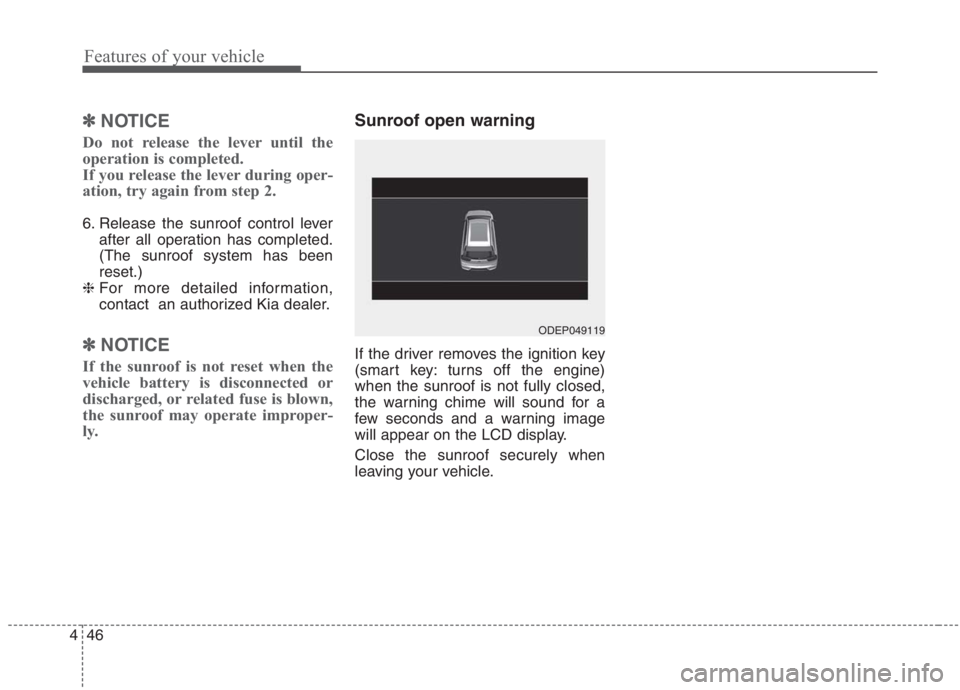
Sunroof open warning
If the driver removes the ignition key
(smart key: turns off the engine)
when the sunroof is not fully closed,
the warning chime will sound for a
few seconds and a warning image
will appear on the LCD display.
Close the sunroof securely when
leaving your vehicle.
ODEP049119
Page 187 of 667
447
Features of your vehicle
Electric Power Steering
(EPS)
The power steering uses a motor to
assist you in steering the vehicle. If
the engine is off or if the power steer-
ing system becomes inoperative, the
vehicle may still be steered, but it will
require increased steering effort.
The EPS is controlled by a power
steering control unit which senses
the steering wheel torque and vehi-
cle speed to command the motor.
The steering becomes heavier as the
vehicle’s speed increases and
becomes lighter as the vehicle’s
speed decreases for optimum steer-
ing control.
Should you notice any change in the
effort required to steer during normal
vehicle operation, have the power
steering checked by an authorized
Kia dealer. If the Electric Power Steering
System does not operate normally,
the warning light will illuminate on
the instrument cluster. The steering
wheel may require increased
steering effort. Take your vehicle to
an authorized Kia dealer and have
the vehicle checked as soon as
possible.
When you operate the steering
wheel in low temperature, noise
may occur. If temperature rises, the
noise will likely disappear. This is a
normal condition.
When the vehicle is stationary, and
the steering wheel is turned all the
way to the left or right continuous-
ly, the steering wheel becomes
harder to turn. The power assist is
limited to protect the motor from
overheating.
As time passes, the steering wheel
will return to its normal condition.
✽ ✽
NOTICE
The following symptoms may occur
during normal vehicle operation:
• The EPS warning light does not
illuminate.
• The steering gets heavy immedi-
ately after turning the ENGINE
START/STOP button is ON posi-
tion. This happens as the system
performs the EPS system diagnos-
tics. When the diagnostics are
completed, the steering wheel will
return to its normal condition.
• A click noise may be heard from
the EPS relay after turning the
ENGINE START/STOP button is
ON or OFF position.
• A motor noise may be heard when
the vehicle is at a stop or at a low
driving speed.
• If the Electric Power Steering
System does not operate normally,
the warning light will illuminate on
the instrument cluster. The steer-
ing wheel may become difficult to
control or operate abnormally.
Take your vehicle to an authorized
Kia dealer and have the vehicle
checked as soon as possible.
(Continued)
STEERING WHEEL
Page 189 of 667
449
Features of your vehicle
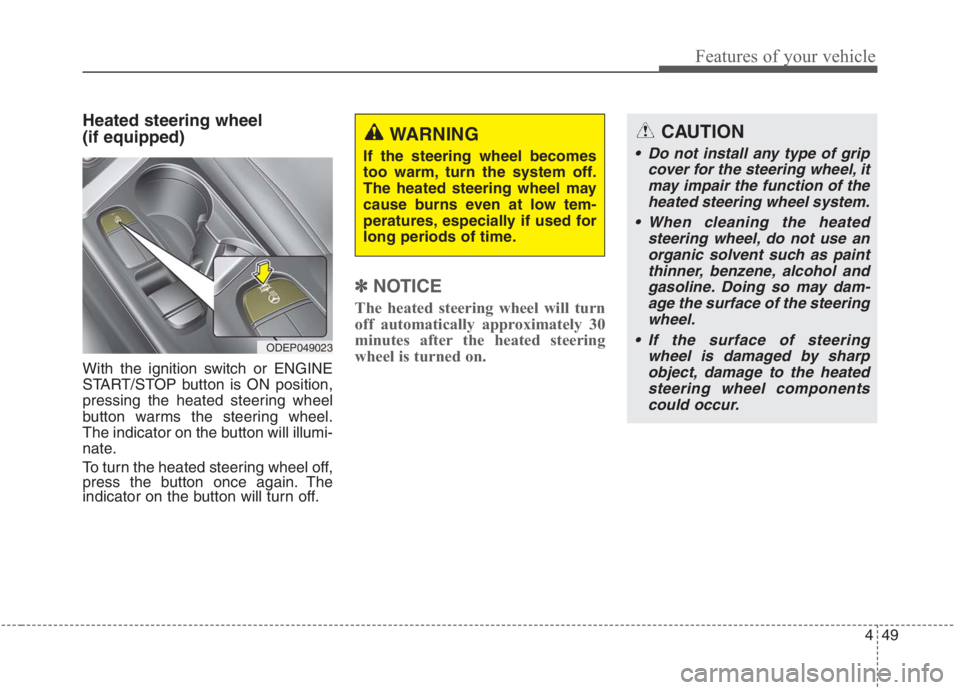
Heated steering wheel
(if equipped)
With the ignition switch or ENGINE
START/STOP button is ON position,
pressing the heated steering wheel
button warms the steering wheel.
The indicator on the button will illumi-
nate.
To turn the heated steering wheel off,
press the button once again. The
indicator on the button will turn off.
✽ ✽
NOTICE
The heated steering wheel will turn
off automatically approximately 30
minutes after the heated steering
wheel is turned on.
CAUTION
Do not install any type of grip
cover for the steering wheel, it
may impair the function of the
heated steering wheel system.
When cleaning the heated
steering wheel, do not use an
organic solvent such as paint
thinner, benzene, alcohol and
gasoline. Doing so may dam-
age the surface of the steering
wheel.
If the surface of steering
wheel is damaged by sharp
object, damage to the heated
steering wheel components
could occur.
ODEP049023
WARNING
If the steering wheel becomes
too warm, turn the system off.
The heated steering wheel may
cause burns even at low tem-
peratures, especially if used for
long periods of time.
Page 192 of 667
Features of your vehicle
52 4
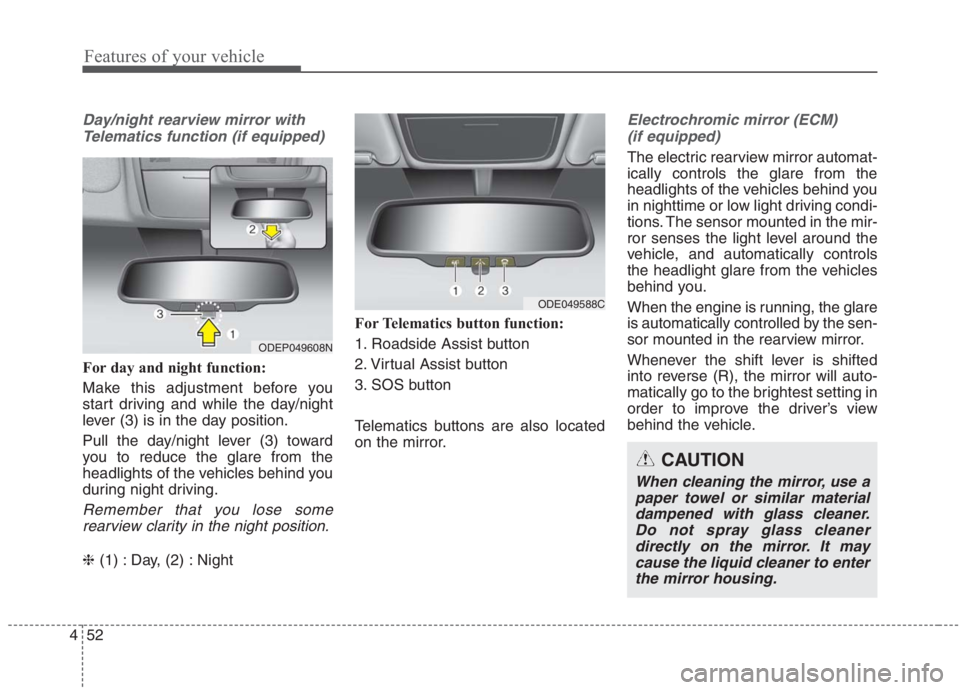
Day/night rearview mirror with
Telematics function (if equipped)
For day and night function:
Make this adjustment before you
start driving and while the day/night
lever (3) is in the day position.
Pull the day/night lever (3) toward
you to reduce the glare from the
headlights of the vehicles behind you
during night driving.
Remember that you lose some
rearview clarity in the night position.
❈(1) : Day, (2) : NightFor Telematics button function:
1. Roadside Assist button
2. Virtual Assist button
3. SOS button
Telematics buttons are also located
on the mirror.
Electrochromic mirror (ECM)
(if equipped)
The electric rearview mirror automat-
ically controls the glare from the
headlights of the vehicles behind you
in nighttime or low light driving condi-
tions. The sensor mounted in the mir-
ror senses the light level around the
vehicle, and automatically controls
the headlight glare from the vehicles
behind you.
When the engine is running, the glare
is automatically controlled by the sen-
sor mounted in the rearview mirror.
Whenever the shift lever is shifted
into reverse (R), the mirror will auto-
matically go to the brightest setting in
order to improve the driver’s view
behind the vehicle.
ODEP049608N
ODE049588C
CAUTION
When cleaning the mirror, use a
paper towel or similar material
dampened with glass cleaner.
Do not spray glass cleaner
directly on the mirror. It may
cause the liquid cleaner to enter
the mirror housing.
Page 193 of 667
453
Features of your vehicle
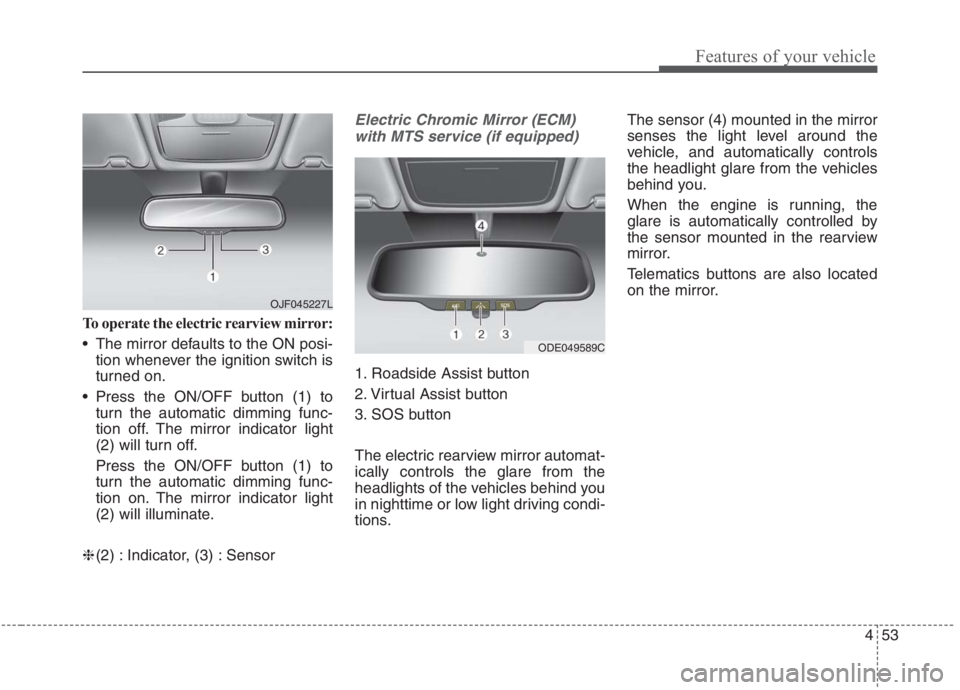
To operate the electric rearview mirror:
The mirror defaults to the ON posi-
tion whenever the ignition switch is
turned on.
Press the ON/OFF button (1) to
turn the automatic dimming func-
tion off. The mirror indicator light
(2) will turn off.
Press the ON/OFF button (1) to
turn the automatic dimming func-
tion on. The mirror indicator light
(2) will illuminate.
❈(2) : Indicator, (3) : Sensor
Electric Chromic Mirror (ECM)
with MTS service (if equipped)
1. Roadside Assist button
2. Virtual Assist button
3. SOS button
The electric rearview mirror automat-
ically controls the glare from the
headlights of the vehicles behind you
in nighttime or low light driving condi-
tions.The sensor (4) mounted in the mirror
senses the light level around the
vehicle, and automatically controls
the headlight glare from the vehicles
behind you.
When the engine is running, the
glare is automatically controlled by
the sensor mounted in the rearview
mirror.
Telematics buttons are also located
on the mirror.
ODE049589C
OJF045227L
Page 196 of 667
Features of your vehicle
56 4
Programming HomeLink®
✽
✽
NOTICE
• When programming a garage
door opener, it is advised to park
the vehicle outside of the garage.
• It is recommended that a new bat-
tery be placed in the hand-held
transmitter of the device being pro-
grammed to HomeLink
®for quick-
er training and accurate transaxle of
the radio-frequency signal.
• Some vehicles may require the igni-
tion switch or ENGINE
START/STOP button to be turned
to ACC position for programming
and/or operation of HomeLink
®.
• In the event that there are still pro-
gramming difficulties or questions
after following the programming
steps listed below, contact
HomeLink
®at: www.homelink.com
or 1-800-355-3515.
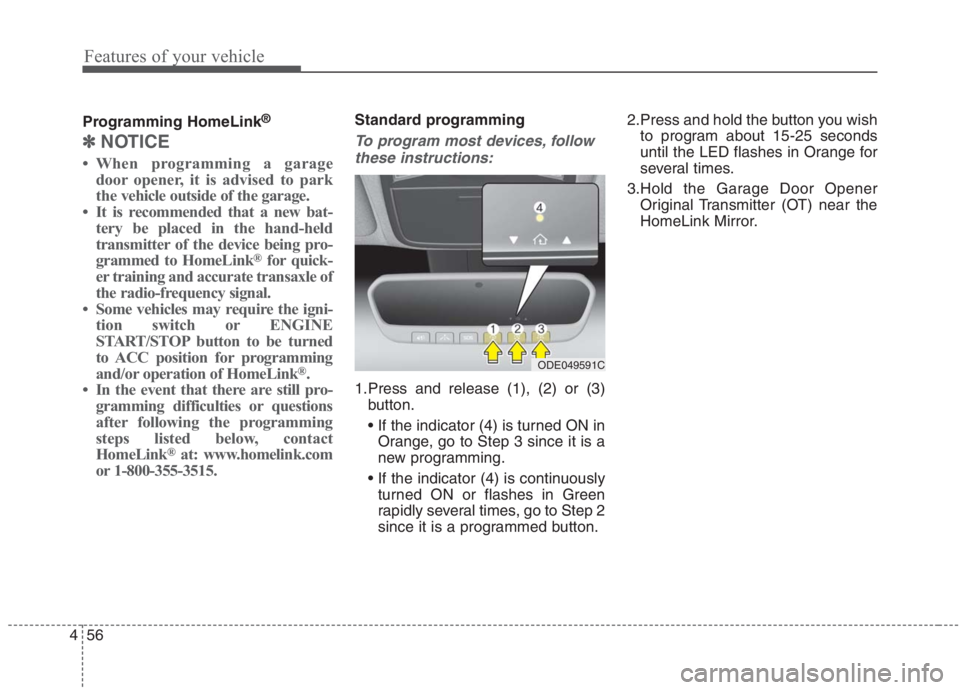
Standard programming
To program most devices, follow
these instructions:
1.Press and release (1), (2) or (3)
button.
Orange, go to Step 3 since it is a
new programming.
turned ON or flashes in Green
rapidly several times, go to Step 2
since it is a programmed button.2.Press and hold the button you wish
to program about 15-25 seconds
until the LED flashes in Orange for
several times.
3.Hold the Garage Door Opener
Original Transmitter (OT) near the
HomeLink Mirror.
ODE049591C
Page 203 of 667
463
Features of your vehicle
Reverse parking aid function
(if equipped)
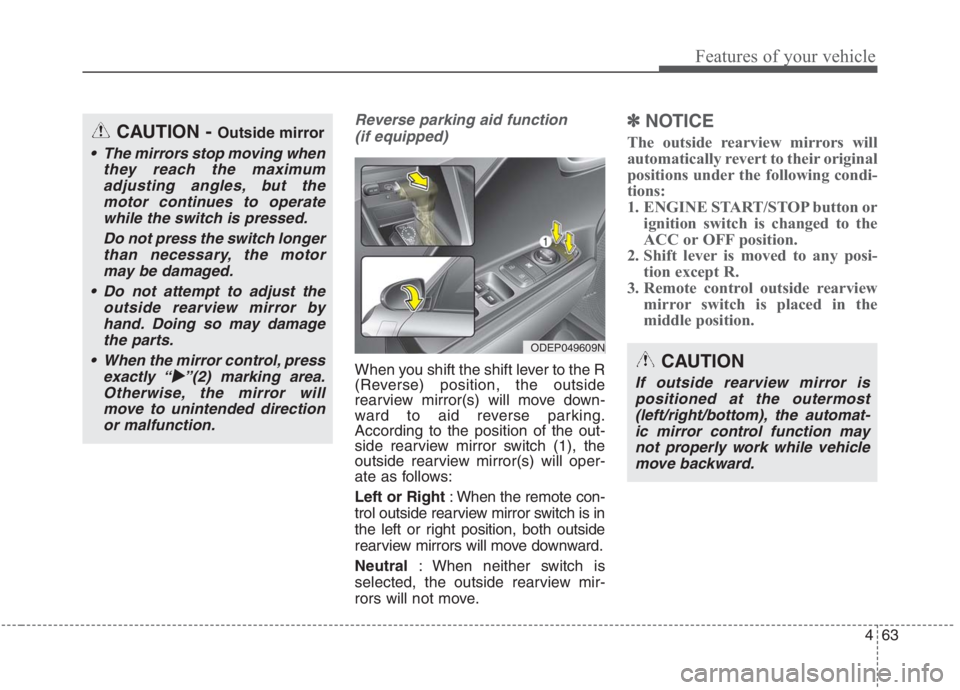
When you shift the shift lever to the R
(Reverse) position, the outside
rearview mirror(s) will move down-
ward to aid reverse parking.
According to the position of the out-
side rearview mirror switch (1), the
outside rearview mirror(s) will oper-
ate as follows:
Left or Right: When the remote con-
trol outside rearview mirror switch is in
the left or right position, both outside
rearview mirrors will move downward.
Neutral: When neither switch is
selected, the outside rearview mir-
rors will not move.
✽ ✽
NOTICE
The outside rearview mirrors will
automatically revert to their original
positions under the following condi-
tions:
1. ENGINE START/STOP button or
ignition switch is changed to the
ACC or OFF position.
2. Shift lever is moved to any posi-
tion except R.
3. Remote control outside rearview
mirror switch is placed in the
middle position.CAUTION - Outside mirror
The mirrors stop moving when
they reach the maximum
adjusting angles, but the
motor continues to operate
while the switch is pressed.
Do not press the switch longer
than necessary, the motor
may be damaged.
Do not attempt to adjust the
outside rearview mirror by
hand. Doing so may damage
the parts.
When the mirror control, press
exactly “� �
”(2) marking area.
Otherwise, the mirror will
move to unintended direction
or malfunction.
ODEP049609N
CAUTION
If outside rearview mirror is
positioned at the outermost
(left/right/bottom), the automat-
ic mirror control function may
not properly work while vehicle
move backward.