2021 INFINITI QX50 lights
[x] Cancel search: lightsPage 133 of 542

•Do not use double adapters or more than
one electrical accessory.
• Use power outlets with the engine run-
ning to avoid discharging the vehicle
battery.
• Avoid using power outlets when the air
conditioner, headlights or rear window
defroster is on.
• Before inserting or disconnecting a plug,
be sure the electrical accessory being
used is turned off. •
Push the plug in as far as it will go. If good
contact is not made, the plug may over-
heat or the internal temperature fuse
may open.
• When not in use, be sure to close the cap.
Do not allow water or any other liquid to
contact the outlet.
The extended storage switch is used when
shipping the vehicle. It is located in the fuse
panel on the driver’s side of the instrument
panel. If any electrical equipment does not
operate, ensure the extended storage switch
is pushed fully in place, as shown.
To inspect the extended storage switch, en-
sure the ignition switch and headlight switch
are off, remove the fuse box cover
OAusing a
suitable tool in combination with a cloth to
avoid damaging the trim.
LIC3833
Cargo Area
LIC3359
EXTENDED STORAGE SWITCH
Instruments and controls2-49
Page 152 of 542

•Do not pull or push the sunshade. This
could cause improper operation or dam-
age it.
CAUTION
• Do not place objects (such as newspa-
pers, handkerchiefs, etc.) on the sun-
shade inlet port. Doing so may entangle
these objects in the sunshade when it is
extending or retracting, causing im-
proper operation or damage to the
sunshade.
• Do not push the sunshade arm with your
hands, etc., as this may deform it. Im-
proper operation or damage to the sun-
shade may result.
• Do not put any object into the sunshade
inlet port as this may result in improper
operation or damage the sunshade.
• Do not hang any object on the arm rail as
this may result in improper operation or
damage the sunshade.
• Do not forcefully pull the sunshade. Do-
ing so may elongate the sunshade. Im-
proper operation or damage to the sun-
shade may result. The interior lights will automatically turn on
and stay on for a period of time when:
• The doors are unlocked by the Intelligent
Key, a key or the request switch while all
doors are closed and the ignition switch is
in the OFF position.
• The doors and/or liftgate is opened.
• The switch is individually pushed.
When the ON switch
O1is pushed, the inte-
rior lights illuminate.
When the DOOR/OFF switch
O2is pushed,
the interior lights do not illuminate unless
individually pushed.
NOTE:
The footwell lights and step lights illuminate
when the driver and passenger doors are
open regardless of the interior light switch
position. These lights will turn off automati-
cally after a period of time while doors are
open to prevent the battery from becoming
discharged.
CAUTION
Do not use for extended periods of time
with the engine stopped. This could result
in a discharged battery.
LIC3841
INTERIOR LIGHTS
2-68Instruments and controls
Page 153 of 542

MAP LIGHTS
To turn the map lights on, push the switches.
To turn them off, push the switches again.
CAUTION
Do not use for extended periods of time
with the engine stopped. This could result
in a discharged battery.
PERSONAL LIGHTS
To turn the rear personal lights on, push the
switch. To turn them off, push the switch
again.
CARGO LIGHT
The light illuminates when the liftgate is
opened. When the liftgate is closed, the light
goes off.
The light will go off after a period of time if
the liftgate is left open, unless the ignition
switch is placed in the ON position. For additional information, see “Exterior and
interior lights” (P. 8-24).
LIC3842LIC3907
Rear personal lights
Instruments and controls2-69
Page 172 of 542
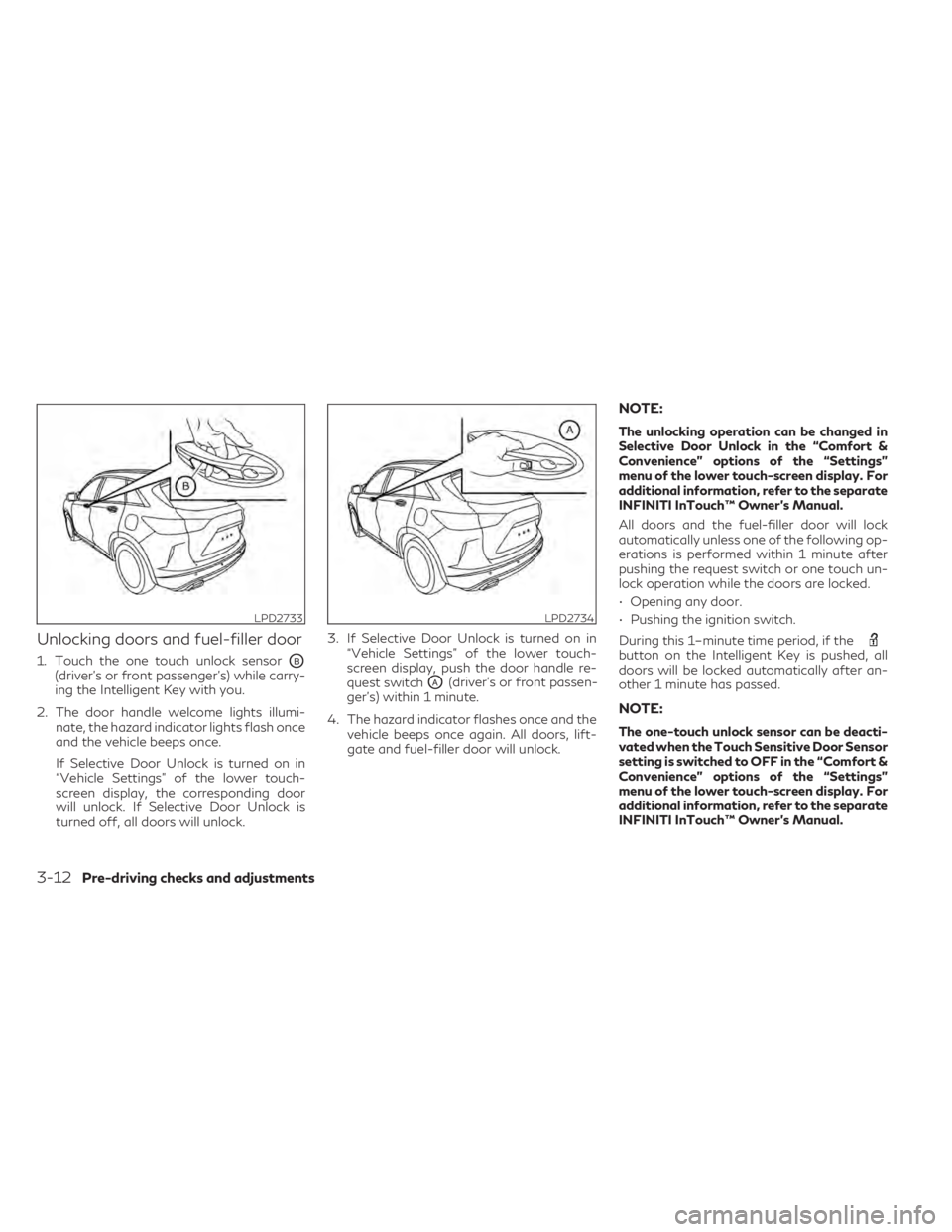
Unlocking doors and fuel-filler door
1. Touch the one touch unlock sensorOB(driver’s or front passenger’s) while carry-
ing the Intelligent Key with you.
2. The door handle welcome lights illumi- nate, the hazard indicator lights flash once
and the vehicle beeps once.
If Selective Door Unlock is turned on in
“Vehicle Settings” of the lower touch-
screen display, the corresponding door
will unlock. If Selective Door Unlock is
turned off, all doors will unlock. 3. If Selective Door Unlock is turned on in
“Vehicle Settings” of the lower touch-
screen display, push the door handle re-
quest switchOA(driver’s or front passen-
ger’s) within 1 minute.
4. The hazard indicator flashes once and the vehicle beeps once again. All doors, lift-
gate and fuel-filler door will unlock.
NOTE:
The unlocking operation can be changed in
Selective Door Unlock in the “Comfort &
Convenience” options of the “Settings”
menu of the lower touch-screen display. For
additional information, refer to the separate
INFINITI InTouch™ Owner’s Manual.
All doors and the fuel-filler door will lock
automatically unless one of the following op-
erations is performed within 1 minute after
pushing the request switch or one touch un-
lock operation while the doors are locked.
• Opening any door.
• Pushing the ignition switch.
During this 1–minute time period, if the
button on the Intelligent Key is pushed, all
doors will be locked automatically after an-
other 1 minute has passed.
NOTE:
The one-touch unlock sensor can be deacti-
vated when the Touch Sensitive Door Sensor
setting is switched to OFF in the “Comfort &
Convenience” options of the “Settings”
menu of the lower touch-screen display. For
additional information, refer to the separate
INFINITI InTouch™ Owner’s Manual.
LPD2733LPD2734
3-12Pre-driving checks and adjustments
Page 173 of 542

If a door handle is pulled too quickly while
unlocking the doors using the one touch un-
lock sensor, you may be unable to open the
door. Returning the door handle to its original
position will allow you to open the door.
Using the interior lights
The interior lights illuminate for a period of
time when a door is unlocked.
The lights can be turned off without waiting
by performing one of the following
operations:
• Placing the ignition switch in the ONposition.
• Locking the doors with the Intelligent Key.
• Switching the interior light switch to the OFF position.
For additional information, see “Interior
lights” (P. 2-68).
Door handle welcome lights
When you unlock the doors using the Intelli-
gent Key, request switch or one touch unlock
sensor, the door handle welcome lights
OAwill illuminate for a period of time. The wel-
come lights will also illuminate when you
open an unlocked door without carrying the
Intelligent Key with you. When you lock the
doors using the Intelligent Key or request
switch, the door handle welcome lights fade
out.
NOTE:
The door handle welcome lights and one
touch unlock sensor can be deactivated in
the ”Comfort & Convenience” options of the
“Settings” menu in the lower touch-screen
display. For additional information, refer to
the separate INFINITI InTouch™ Owner’s
Manual.
HOW TO USE THE REMOTE
KEYLESS ENTRY FUNCTION
The remote keyless entry function can oper-
ate all door locks using the remote keyless
function of the Intelligent Key. The remote
keyless function can operate at a distance of
10 m (33 ft) away from the vehicle. The op-
erating distance depends upon the conditions
around the vehicle.
The remote keyless entry function will not
function under the following conditions:
• When the Intelligent Key is not within the operational range.
• When the Intelligent Key battery is discharged.
LPD2732
Driver’s and passenger’s side
Pre-driving checks and adjustments3-13
Page 175 of 542

3. Press thebutton on the Intelligent
Key.
4. The hazard indicator lights flash twice and the horn beeps once.
5. All doors, liftgate and fuel-filler door will be locked.
WARNING
After locking the doors using the Intelli-
gent Key, be sure that the doors have been
securely locked by operating the door
handles within two seconds of locking.
Failure to follow these instructions may re-
sult in inadvertently unlocking the doors,
which may decrease the safety and secu-
rity of your vehicle.
Unlocking doors
1. Press thebutton on the Intelligent
Key.
2. The hazard indicator lights flash once and the driver’s and fuel-filler doors unlock.
3. Press the
button again within 1 min-
ute to unlock all doors and liftgate. All doors, liftgate and fuel-filler door will be
locked automatically unless one of the fol-
lowing operations is performed within 1 min-
ute after pressing the
button:
• Opening any doors.
• Pushing the ignition switch.
Using the interior lights
The interior lights illuminate for a period of
time when a door is unlocked.
The lights can be turned off without waiting
by performing one of the following
operations:
• Placing the ignition switch in the ON position.
• Locking the doors with the Intelligent Key.
• Switching the interior light switch to the OFF position.
For additional information, see “Interior
lights” (P. 2-68).
Opening windows
The Intelligent Key allows you to simultane-
ously open windows equipped with auto-
matic operation.
To open the windows, press and hold the
button on the Intelligent Key for longer
than 3 seconds after all doors are unlocked. The door windows will open while pressing
the
button on the Intelligent Key.
The door windows cannot be closed by using
the Intelligent Key.
Releasing the rear liftgate
The rear liftgate can be opened and closed by
performing the following:
• Press the
button for longer than 1
second to open the rear liftgate.
• Press the
button again for longer than
1 second to close the rear liftgate.
When the
button is pressed during the
open or close process, the liftgate motors will
stop. When the
button is pressed again
for longer than 1 second the liftgate will re-
verse direction.
Using the panic alarm
If you are near your vehicle and feel threat-
ened, you may activate the panic alarm to call
attention by pressing and holding the
button on the Intelligent Key for longer than
0.5 seconds.
The panic alarm and headlights will stay on
for a period of time.
Pre-driving checks and adjustments3-15
Page 176 of 542

The panic alarm stops when:
• It has run for a period of time, or
• Any button is pressed on the Intelligent Key.
• The request switch on the driver or passen-ger door is pushed and the Intelligent Key is
in range of the door handle.
Answer back horn feature
If desired, the answer back horn feature can
be deactivated using the Intelligent Key.
When it is deactivated and the
button
is pressed, the hazard indicator lights flash
twice. When the
button is pressed, nei-
ther the hazard indicator lights nor the horn
operates.
NOTE:
If you change the answer back horn and light
flash feature with the Intelligent Key, the
lower touch-screen display will show the
current mode after the ignition switch has
been cycled from the OFF to the ON position
of the ”Comfort & Convenience” options of
the “Settings” menu in the lower touch-
screen display can also be used to change the
answer back horn mode between “Conve-
nience” and “Security” settings. To deactivate:
Press and hold the
andbuttonsfor at least 2 seconds.
The hazard indicator lights will flash three
times to confirm that the answer back horn
feature has been deactivated.
To activate: Press and hold the
andbuttonsfor at least 2 seconds once
more.
The hazard indicator lights will flash once and
the horn will sound once to confirm that the
horn beep feature has been reactivated.
Deactivating the horn beep feature does not
silence the horn if the alarm is triggered.
WARNING SIGNALS
To help prevent the vehicle from moving un-
expectedly by erroneous operation of the In-
telligent Key or to help prevent the vehicle
from being stolen, a chime or buzzer sounds
from inside and outside the vehicle and a
warning is displayed in the instrument panel.
When a chime or beep sounds or a warning is
displayed, be sure to check the vehicle and
the Intelligent Key.
For additional information, see “Trouble-
shooting guide” (P. 3-16) and the separate
INFINITI InTouch™ Owner’s Manual.
TROUBLESHOOTING GUIDE
Verify the location of all Intelligent Keys that
are programmed for the vehicle. If another
Intelligent Key is in range or inside the vehicle,
the vehicle system may respond differently
than expected.
3-16Pre-driving checks and adjustments
Page 179 of 542
Other conditions may affect the function of
the Remote Engine Start feature. For addi-
tional information, see “Conditions the Re-
mote Engine Start will not work” (P. 3-20).
Other conditions can affect the performance
of the Intelligent Key transmitter. For addi-
tional information, see “INFINITI Intelligent
Key” (P. 3-6).
REMOTE ENGINE START
OPERATING RANGE
WARNING
To help avoid risk of injury or death
through unintended operation of the ve-
hicle and/or its systems, including entrap-
ment in windows or inadvertent door lock
activation, do not leave children, people
who require the assistance of others or
pets unattended in your vehicle. Addition-
ally, the temperature inside a closed vehicle
on a warm day can quickly become high
enough to cause a significant risk of injury
or death to people and pets.
CAUTION
When the Intelligent Key battery is dis-
charged or other strong radio wave
sources are present near the operating lo-
cation, the Intelligent Key operating range
becomes narrower, and the Intelligent Key
may not function properly.
The Remote Engine Start function can only
be used when the Intelligent Key is within the
specified operating range from the vehicle.
The Remote Engine Start operating range is
approximately 197 ft (60 m) from the vehicle.
REMOTE STARTING THE
VEHICLE
To use the Remote Engine Start feature to
start the engine perform the following:
1. Aim the Intelligent Key at the vehicle.
2. Press the
button to lock all doors.
3. Within 5 seconds press and hold the
button until the turn signal lights flash and
the tail lamps turn on. If the vehicle is not
within view press and hold the
but-
ton for at least 2 seconds. The following events will occur when the en-
gine starts:
• The parking lights will turn on and remain
on as long as the engine is running.
• The doors will be locked and the climate control system may come on.
• The engine will continue to run for 10 min- utes. Repeat the steps to extend the time
for an additional 10 minutes. For additional
information, see “Extending engine run
time” (P. 3-19).
Depress and hold the brake then push the
push-button ignition switch to the ON posi-
tion before driving. For additional informa-
tion, see “Driving the vehicle” (P. 5-18).
EXTENDING ENGINE RUN TIME
The Remote Engine Start feature can be ex-
tended one time by performing the steps
listed in “Remote starting the vehicle” in this
section. Run time will be calculated as
follows:
• The first 10–minute run time will start when the Remote Engine Start function is
performed.
Pre-driving checks and adjustments3-19