2021 INFINITI Q50 trunk
[x] Cancel search: trunkPage 85 of 484

WAA0093X
1. Side ventilator (P.4-35)
2. Headlight, fog light and turn signalswitch (P.2-35)
3. Steering wheel — Horn (P.2-42)
— Driver supplemental air bag (P.1-42) — Heated steering wheel (if so
equipped) (P.2-44)
— Power steering (P.5-123)
4. Windshield wiper and washer switch (P.2-32)
5. Hazard warning flasher switch (P.6-2) 6. Shift lever (P.5-16)
7. INFINITI controller*
8. Vehicle Dynamic Control (VDC) OFF
switch (P.2-42, P.5-128)
9. Trunk lid release switch (P.3-23)
10. Instrument brightness control switch (P.2-41)
11. TRIP/RESET switch for twin trip od- ometer (P.2-7)
12. Electric tilting/telescopic steering wheel switch (P.3-27)
13. Manual tilting/telescopic steering wheel lever (P.3-27)
14. Steering-wheel-mounted controls (left side)
— Audio control steering switch*
— Hands-Free Phone System switch*
— Voice recognition system switch*
15. Steering-wheel-mounted controls (right side)
— Trip computer switch (P.2-27)
— Cruise control switches (if so
equipped) (P.5-69)
— Intelligent Cruise Control (ICC)
switches (if so equipped) (P.5-71)
— Dynamic driver assistance switch (if
so equipped) (P. 5-25, P.5-33, P.5-48,
P.5-91)
Instruments and controls2-3
COCKPIT
Page 87 of 484

JVC0969X
1. Paddle shifter (if so equipped) (P.5-18)
2. Meters and gauges (P.2-6)— Clock (P.2-29)
3. Push-button ignition switch (P.5-11)
4. Center ventilator (P.4-35) 5. Automatic climate control system
(P.4-36)
6. Upper touch screen display* (upper display) and Navigation system* (if so
equipped)
— RearView Monitor (if so equipped)
(P.4-3) — Around View
®Monitor (if so
equipped) (P.4-11)
7. Lower touch screen display* (lower display)
8. Rear window and outside mirror defroster switch (P.2-35)
9. Front passenger supplemental air bag (P.1-42)
10. Hood release handle (P.3-22)
11. Fuse box cover (P.8-17)
12. Parking brake (P.5-20)
13. Storage box (P.2-51) and power outlet (P.2-45)
14. Seat heater switch (if so equipped) (P.2-43)
15. Audio system*
16. Trunk release power cancel switch (P.3-24)
17. Glove box (P.2-50)
*: Refer to the INFINITI InTouch
TMOwn-
er’s Manual.
Instruments and controls2-5
INSTRUMENT PANEL
Page 104 of 484

2-22Instruments and controls
reaches the empty (0) position.
There is a small reserve of fuel remaining in
the tank when the fuel gauge reaches the
empty (0) position.
11. Low washer fluid warning
This warning appears when the washer tank
fluid is at a low level. Add washer fluid as
necessary. (See “Window washer fluid” (P.8-
10).)
12. Door/trunk open warning
This warning appears if any of the doors
and/or the trunk lid are open or not closed
securely. The vehicle icon indicates which
door or the trunk lid is open on the display.
13. Intelligent Key system warning
This warning appears if there is a malfunc-
tion in the Intelligent Key system.
If this warning appears while the engine is
stopped, the engine cannot be started. If this
warning appears while the engine is running,
the vehicle can be driven. However, in these
cases, have the system checked as soon as
possible. It is recommended you visit an
INFINITI retailer for this service.
14. Loose Fuel Cap warning
This warning appears when the fuel-filler
cap is not tightened correctly after thevehicle has been refueled. (See “Fuel-filler
cap” (P.3-25).)
15. Tire Pressure Low - Add Air
warning
This warning appears when the low tire
pressure warning light in the meter illumi-
nates and low tire pressure is detected. The
warning appears each time the ignition
switch is placed in the ON position as long
as the low tire pressure warning light
remains illuminated. If this warning appears,
stop the vehicle and adjust the pressure to
the recommended COLD tire pressure
shown on the Tire and Loading Information
label. (See “Low tire pressure warning light”
(P.2-13) and “Tire Pressure Monitoring
System (TPMS)” (P.5-5).)
16. Flat Tire - Visit dealer warning
(if so equipped)
This warning appears when the low tire
pressure warning light in the meter illumi-
nates and one or more flat tires are detected
while driving. A chime also sounds for
approximately 10 seconds. (See “Low tire
pressure warning light” (P.2-13) and “Tire
Pressure Monitoring System (TPMS)” (P.5-
5).)
17. Low oil pressure warning
This warning appears if low engine oil
pressure is detected. If the warning appears
during normal driving, pull off the road in a
safe area, stop the engine immediately and
call an INFINITI retailer or other authorized
repair shop.
The low oil pressure warning is not designed
to indicate a low oil level. Use the dipstick to
check the oil level. (See “Engine oil” (P.8-7).)
18. All-Wheel Drive (AWD) warning
(if so equipped)
This warning appears when the Intelligent
All-Wheel Drive (AWD) system is not func-
tioning properly while the engine is running.
The displayed message will vary depending
on the condition of the AWD system mal-
function. (See “Intelligent All-Wheel Drive
(AWD)” (P.5-120).)
19. Extended storage fuse warning
(if so equipped)
This warning may appear if the extended
storage fuse switch is not pushed in
(switched on). When this warning appears,
push in (switch on) the extended storage
fuse switch to turn off the warning. For
more information, see “Extended storage
fuse switch” (P.8-19).
Page 112 of 484

2-30Instruments and controls
SIC2132
Your vehicle has two types of security
systems, as follows:
.Vehicle security system
. INFINITI Vehicle Immobilizer System
The security condition will be shown by the
security indicator light.
VEHICLE SECURITY SYSTEM
The vehicle security system provides visual
and audio alarm signals if someone opens
the doors, hood, or trunk lid when the
system is armed. It is not, however, a motion
detection type system that activates when a
vehicle is moved or when a vibration occurs.
The system helps deter vehicle theft but
cannot prevent it, nor can it prevent the
theft of interior or exterior vehicle compo-
nents in all situations. Always secure your
vehicle even if parking for a brief period.
Never leave your Intelligent Key(s) in the
vehicle, and always lock it when unattended.
Be aware of your surroundings, and park in
secure, well-lit areas whenever possible.
Many devices offering additional protection,
such as component locks, identification
markers, and tracking systems, are available
at auto supply stores and specialty shops.
Your INFINITI retailer may also offer such
equipment. Check with your insurance com-
pany to see if you may be eligible for
discounts for various theft protection fea-
tures.
SIC2045
How to arm the vehicle security
system
1. Close all windows.
The system can be armed even if the
windows are open.
2. Push the ignition switch to the OFF position.
3. Remove the Intelligent Key from the vehicle.
4. Close all doors, hood and trunk. Lock all doors. The doors can be locked with the
Intelligent Key, door handle request
switch or power door lock switch.
SECURITY SYSTEMS
Page 113 of 484

5. Confirm that the security indicator lightcomes on. The security indicator light
stays on for about 30 seconds. The
vehicle security system is now pre-
armed. After about 30 seconds the
vehicle security system automatically
shifts into the armed phase. The security
light begins to flash once every approxi-
mately 3 seconds. If, during this 30-
second pre-arm time period, the door is
unlocked, or the ignition switch is pushed
to ACC or ON, the system will not arm.
Even when the driver and/or passengers
are in the vehicle, the system will activate
with all doors, hood, and trunk lid locked
with the ignition switch in the LOCK
position. When pushing the ignition switch
to the ACC or ON position, the system will
be released.
Vehicle security system activation
The vehicle security system will give the
following alarm:
. The headlights blink and the horn sounds
intermittently.
. The alarm automatically turns off after
approximately 1 minute. However, the
alarm reactivates if the vehicle is tam-
pered with again. The alarm is activated by:
.
Unlocking the door or opening the trunk
lid without using the UNLOCK button on
the Intelligent Key, the door handle
request switch or one touch unlock
sensor. (Even if the door is opened by
releasing the door inside lock knob or
using the mechanical key, the alarm will
activate.)
. Opening the hood.
How to stop an activated alarm
The alarm will stop by unlocking a door by
pushing the UNLOCK button on the Intelli-
gent Key, the door handle request switch or
touching the one touch unlock sensor. The
alarm will not stop if the ignition switch is
placed in the ACC or ON position.
If the Intelligent Key battery is discharged:
If the Intelligent Key battery is discharged,
the alarm will not stop by pushing the
UNLOCK button on the Intelligent Key, the
door handle request switch or one touch
unlock sensor. In such a case, unlock the
driver’s door using the mechanical key and
touch the ignition switch with the Intelligent
Key to stop the alarm. See “Intelligent Key
battery discharge” (P.5-14) for details.
If the system does not operate as described
above, it is recommended you have it
checked by an INFINITI retailer.
INFINITI VEHICLE IMMOBILIZER
SYSTEM
The INFINITI Vehicle Immobilizer System
will not allow the engine to start without
the use of the registered Intelligent Key.
Never leave these keys in the vehicle.
FCC Notice:
For USA:
This device complies with Part 15 of the
FCC Rules. Operation is subject to the
following two conditions: (1) This device
may not cause harmful interference, and (2)
this device must accept any interference
received, including interference that may
cause undesired operation.
NOTE:
Changes or modifications not expressly
approved by the party responsible for
compliance could void the user’s authority
to operate the equipment.
For Canada:
This device complies with Industry Canada
licence-exempt RSS standard(s). Operation
is subject to the following two conditions:
(1) this device may not cause interference,
and (2) this device must accept any inter-
ference, including interference that may
cause undesired operation of the device.
Instruments and controls2-31
Page 133 of 484
JVI0664X
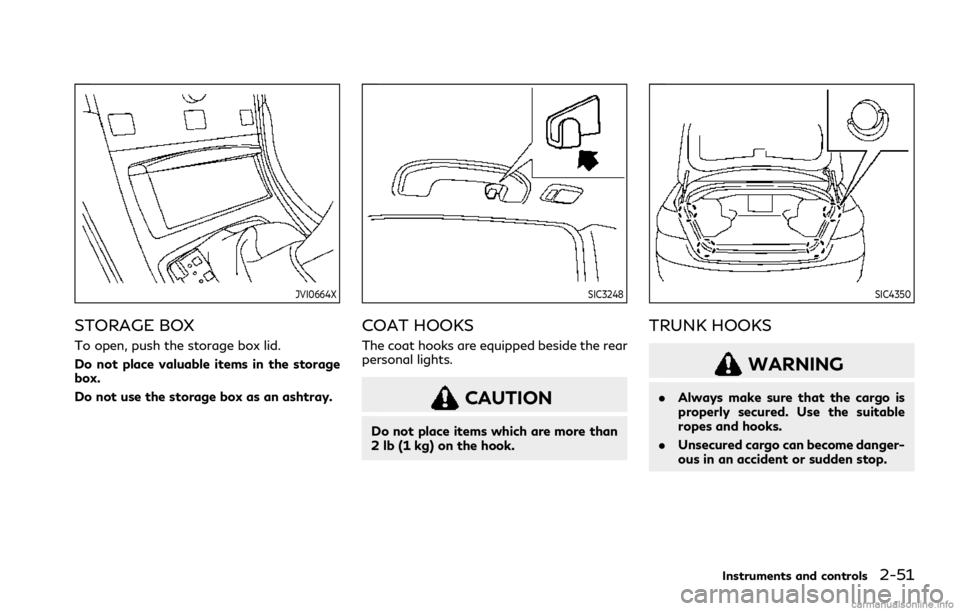
STORAGE BOX
To open, push the storage box lid.
Do not place valuable items in the storage
box.
Do not use the storage box as an ashtray.
SIC3248
COAT HOOKS
The coat hooks are equipped beside the rear
personal lights.
CAUTION
Do not place items which are more than
2 lb (1 kg) on the hook.
SIC4350
TRUNK HOOKS
WARNING
.Always make sure that the cargo is
properly secured. Use the suitable
ropes and hooks.
. Unsecured cargo can become danger-
ous in an accident or sudden stop.
Instruments and controls2-51
Page 141 of 484

The light illuminates when the trunk lid is
opened. When the trunk lid is closed, the
light will turn off.
The light will also turn off after a period of
time when the light remains illuminated
after the ignition switch has been pushed
to the OFF or LOCK position to prevent the
battery from becoming discharged.
SIC4328
When the doors are unlocked by pushing the
UNLOCK button on the Intelligent Key or
touching the one touch unlock sensor with
the ignition switch in the LOCK position, the
courtesy light
will illuminate.
To activate or deactivate the courtesy light,
set [Lamp ON when Door Unlocks] on the
lower display. See the INFINITI InTouch
TM
Owner’s Manual. The HomeLink
®Universal Transceiver pro-
vides a convenient way to consolidate the
functions of up to three individual hand-held
transmitters into one built-in device.
HomeLink
®Universal Transceiver:
. Will operate most Radio Frequency (RF)
devices such as garage doors, gates,
home and office lighting, entry door
locks and security systems.
. Is powered by your vehicle’s battery. No
separate batteries are required. If the
vehicle’s battery is discharged or is
disconnected, HomeLink
®will retain all
programming.
When the HomeLink
®Universal Transceiver
is programmed, retain the original trans-
mitter for future programming procedures
(Example: new vehicle purchases). Upon
sale of the vehicle, the programmed
HomeLink
®Universal Transceiver buttons
should be erased for security purposes. For
additional information, refer to “Program-
ming HomeLink
®” (P.2-60).
WARNING
. Do not use the HomeLink®Universal
Transceiver with any garage door
opener that lacks safety stop and
reverse features as required by fed-
eral safety standards. (These stan-
Instruments and controls2-59
TRUNK LIGHT COURTESY LIGHTHomeLink®UNIVERSAL TRANSCEIVER
Page 147 of 484

3 Pre-driving checks and adjustments
Keys ........................................................................\
.............. 3-2Intelligent Key .............................................................. 3-2
Valet hand-off ............................................................. 3-4
Doors ........................................................................\
............ 3-4 Locking with mechanical key ................................... 3-4
Locking with inside lock knob ................................. 3-5
Locking with power door lock switch ................... 3-5
Automatic door locks ................................................. 3-5
Child safety rear door lock ....................................... 3-6
Intelligent Key system ..................................................... 3-6
Intelligent Key operating range ............................... 3-8
Door locks/unlocks precaution .............................. 3-9
Intelligent Key operation ........................................... 3-9
Battery saver system ............................................... 3-13
Warning signals ......................................................... 3-13
Troubleshooting guide ............................................. 3-14
Log-in function .......................................................... 3-15
Remote keyless entry system ...................................... 3-15 How to use remote keyless entry system .......... 3-16
Remote engine start (if so equipped) ........................ 3-19
Remote engine start operating range ................ 3-20
Remote starting the engine .................................. 3-20
Extending engine run time ..................................... 3-20
Canceling a remote engine start ........................... 3-21 Conditions the remote engine start will
not work .................................................................... 3-21
Hood ........................................................................\
.......... 3-22
Trunk lid ........................................................................\
.... 3-22 Trunk lid release switch ......................................... 3-23
Trunk open request switch ................................... 3-23
TRUNK button ......................................................... 3-23
Trunk release power cancel switch .................... 3-24
Interior trunk lid release ........................................ 3-24
Fuel-filler door ................................................................ 3-25
Opening the fuel-filler door ................................. 3-25
Fuel-filler cap ........................................................... 3-25
Tilt/telescopic steering ................................................. 3-27
Manual operation (if so equipped) ..................... 3-28
Electric operation (if so equipped) ..................... 3-28
Sun visors ........................................................................\
. 3-29
Mirrors ........................................................................\
...... 3-29 Inside mirror .............................................................. 3-29
Outside mirrors ....................................................... 3-30
Vanity mirror ............................................................ 3-32
Memory seat (if so equipped) ..................................... 3-33 Entry/exit function ................................................. 3-33
Memory storage ...................................................... 3-33
System operation .................................................... 3-34