2021 HYUNDAI SONATA temperature display
[x] Cancel search: temperature displayPage 25 of 546
Vehicle Information
2-12
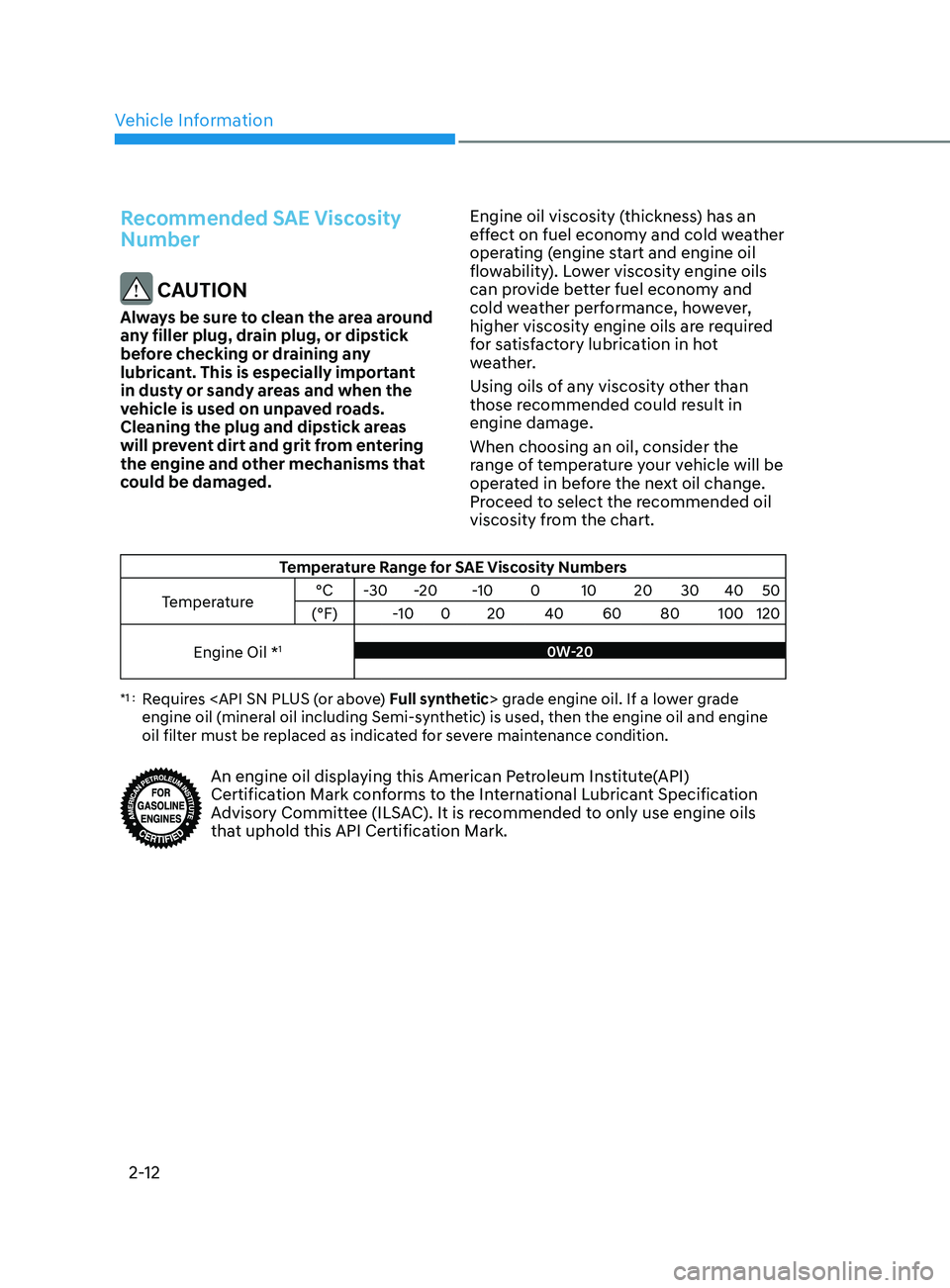
Recommended SAE Viscosity
Number
CAUTION
Always be sure to clean the area around
any filler plug, drain plug, or dipstick
before checking or draining any
lubricant. This is especially important
in dusty or sandy areas and when the
vehicle is used on unpaved roads.
Cleaning the plug and dipstick areas
will prevent dirt and grit from entering
the engine and other mechanisms that
could be damaged.Engine oil viscosity (thickness) has an
effect on fuel economy and cold weather
operating (engine start and engine oil
flowability). Lower viscosity engine oils
can provide better fuel economy and
cold weather performance, however,
higher viscosity engine oils are required
for satisfactory lubrication in hot
weather.
Using oils of any viscosity other than
those recommended could result in
engine damage.
When choosing an oil, consider the
range of temperature your vehicle will be
operated in before the next oil change.
Proceed to select the recommended oil
viscosity from the chart.
Temperature Range for SAE Viscosity Numbers
Temperature °C
-30 -20 -10 0 10 20 30 40 50
(°F) -100 20 40 60 80 100 120
Engine Oil *
10W-20
*1 : Requires
engine oil (mineral oil including Semi-synthetic) is used, then the engine oil and engine
oil filter must be replaced as indicated for severe maintenance condition.
An engine oil displaying this American Petroleum Institute(API)
Certification Mark conforms to the International Lubricant Specification
Advisory Committee (ILSAC). It is recommended to only use engine oils
that uphold this API Certification Mark.
Page 87 of 546
4-2
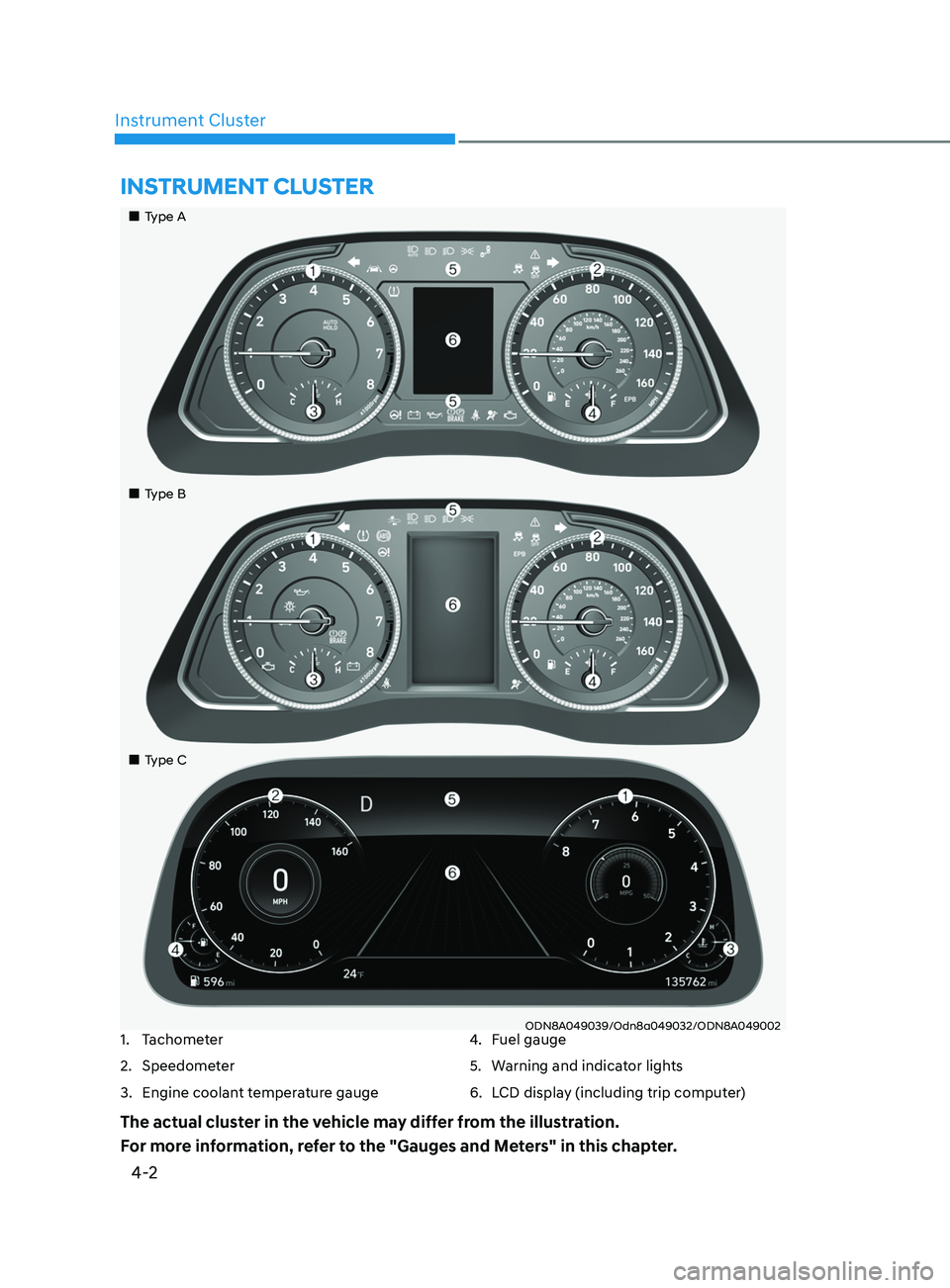
Instrument Cluster
ODN8A049039/Odn8a049032/ODN8A049002
Instrument Cluster
1. Tachometer
2.
Speedome
ter
3.
E
ngine coolant temperature gauge 4. F
uel gauge
5.
W
arning and indicator lights
6.
L
CD display (including trip computer)
The actual cluster in the vehicle may differ from the illustration.
For more information, refer to the "Gauges and Meters" in this chapter.
„„Type A
„
„Type B
„
„Type C
Page 90 of 546
04
4-5
WARNING
Running out of fuel can expose vehicle
occupants to danger.
You must stop and obtain additional
fuel as soon as possible after the
warning light comes on or when the
gauge indicator comes close to the "E
(Empty)" level.
NOTICE
Avoid driving with an extremely low
fuel level. Running out of fuel could
cause the engine to misfire and damage
the catalytic converter.
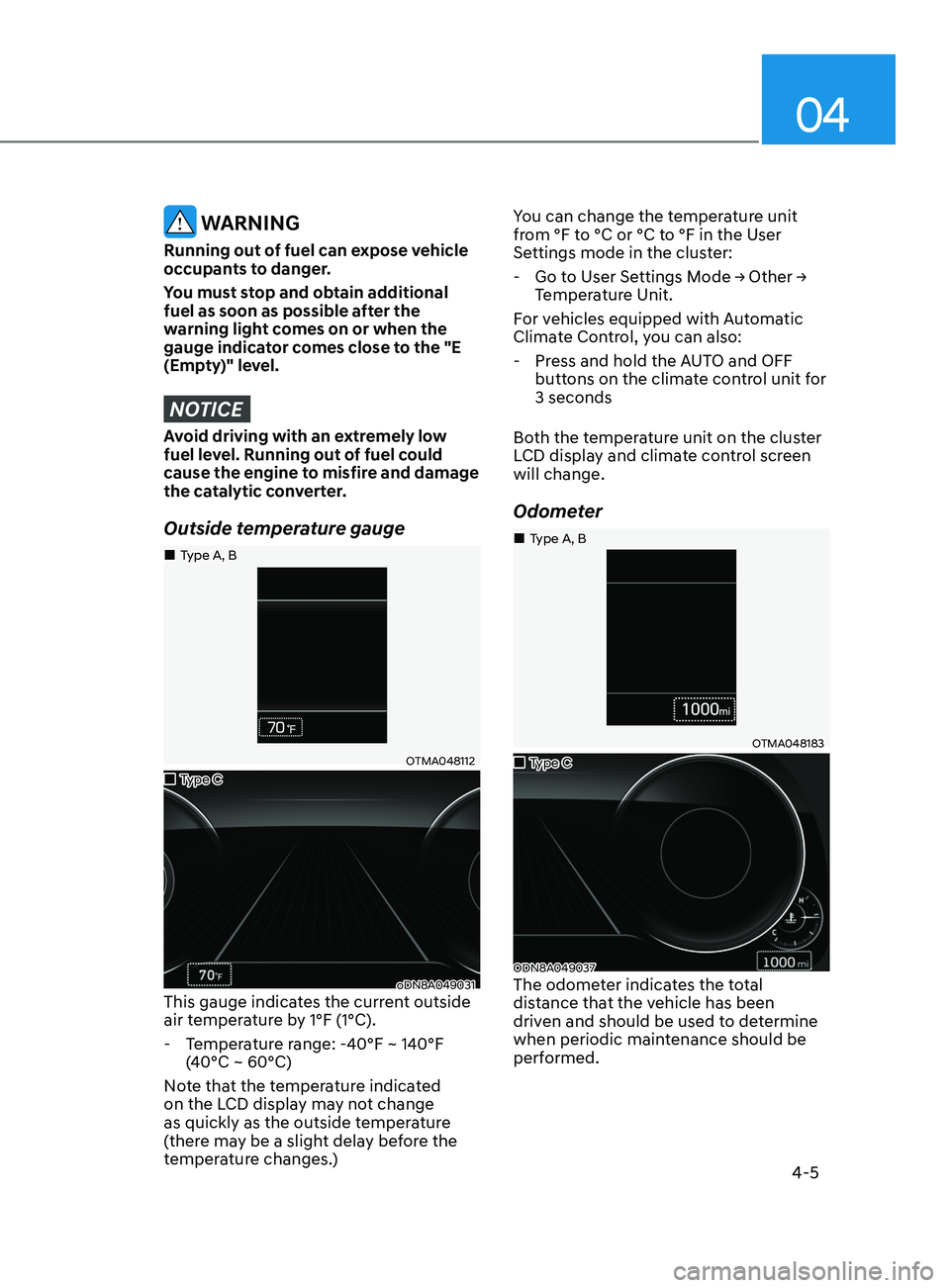
Outside temperature gauge
OTMA048112
oDN8A049031This gauge indicates the current outside
air temperature by 1°F (1°C).
- T
emperature range: -40°F ~ 140°F
(40°C ~ 60°C)
Note that the temperature indicated
on the LCD display may not change
as quickly as the outside temperature
(there may be a slight delay before the
temperature changes.) You can change the temperature unit
from °F to °C or °C to °F in the User
Settings mode in the cluster:
-
Go
to User Settings Mode → Other →
T
emperature Unit.
For vehicles equipped with Automatic
Climate Control, you can also:
- Pr
ess and hold the AUTO and OFF
buttons on the climate control unit for
3 seconds
Both the temperature unit on the cluster
LCD display and climate control screen
will change.
Odometer
OTMA048183
ODN8A049037The odometer indicates the total
distance that the vehicle has been
driven and should be used to determine
when periodic maintenance should be
performed.
„„Type C
„
„Type A, B
„
„Type C
„
„Type A, B
Page 133 of 546
5
Automatic Climate Control System ...........................................................5- 127Automatic Heating and Air Conditioning ............................................................5- 128
Manual Temperature Control Mode ..................................................................... 5-129
System Operation
........................................................................\
.......................... 5-135
System Maintenance
........................................................................\
.................... 5-136
Windshield Defrosting and Defogging ......................................................5- 138Manual Climate Control System........................................................................\
...5-138
Automatic Climate Control System......................................................................5-139
Defogging Logic
........................................................................\
.......................... 5-140
Auto Defogging System (Only for Automatic Climate Control System)
............5-141
Defroster
........................................................................\
........................................ 5-142
Climate Control Additional Features .........................................................5- 143Sunroof Inside Air Recirculation ........................................................................\
..5- 143
Automatic Ventilation ........................................................................\
................... 5-143
Storage Compartment ........................................................................\
........5- 144Center Console Storage ........................................................................\
................5- 144
Glove Box ........................................................................\
....................................... 5-144
Interior Features ........................................................................\
..................5- 145Cup Holder ........................................................................\
.....................................5- 145
Sunvisor ........................................................................\
......................................... 5-146
Power Outlet
........................................................................\
.................................. 5-146
USB Charger
........................................................................\
................................. 5-147
Wireless Cellular Phone Charging System
..........................................................5-148
Clock
........................................................................\
.............................................. 5-150
Clothes Hanger
........................................................................\
.............................. 5-150
Floor Mat Anchor(S)
........................................................................\
....................... 5-151
Infotainment System ........................................................................\
..........5- 152USB And Ipod® Port ........................................................................\
.......................5- 152
Antenna ........................................................................\
.......................................... 5-152
Steering Wheel Audio Control
........................................................................\
...... 5-153
Bluetooth® Wireless Technology Hands-Free
.....................................................5-154
Audio (Display Audio) / Video / Navigation System (AVN)
................................5-154
Head Up Display (HUD) ........................................................................\
...... 5-72
Lighting ........................................................................\
................................. 5 -74
Exterior Lights ........................................................................\
................................. 5 -74
Interior Lights ........................................................................\
................................. 5-80
Welcome System ........................................................................\
........................... 5-83
Wipers and Washers ........................................................................\
............5-84Windshield Wipers ........................................................................\
......................... 5-84
Windshield Washers ........................................................................\
....................... 5-85
Rear View Monitor (RVM) ........................................................................\
... 5-86Rear View Monitor with Parking Guidance ........................................................... 5-86
Rear View Monitor - Top View ........................................................................\
....... 5-86
Surround View Monitor (SVM) ................................................................... 5-88
Reverse Parking Collision-Avoidance Assist .............................................. 5-89
System Setting and Operation ........................................................................\
...... 5-89
Warning and System Control ........................................................................\
......... 5-90
Detecting Sensor ........................................................................\
............................ 5-92
System Malfunction ........................................................................\
....................... 5-93
Limitations of the System ........................................................................\
.............. 5-93
Reverse Parking Distance Warning (PDW) ................................................5-95Operation of Reverse Parking Distance Warning System .................................... 5-95
To Turn Off Reverse Parking Distance Warning System ..................................... 5-97
Non-Operational Conditions of Reverse Parking Distance Warning System ..... 5-97
Reverse Parking Distance Warning System Precautions ..................................... 5-98
Forward/Reverse Parking Distance Warning (PDW) ................................5-99Operation of Forward/Reverse Parking Distance Warning System .................. 5-100
Non-Operational Conditions of Forward/Reverse Parking Distance Warning
System ........................................................................\
............................................ 5-102
Forward/Reverse Parking Distance Warning System Precautions .................... 5-103
Remote Smart Parking Assist (RSPA) .......................................................5-104Operating Condition ........................................................................\
..................... 5-105
How Remote Smart Parking Assist System Works ............................................. 5-108
Additional Instructions ........................................................................\
................... 5-113
Display Operation Status ........................................................................\
.............. 5-114
How the Remote Moving Forward/Backward System Works ............................. 5-115
Manual Climate Control System ............................................................... 5-118Heating and Air Conditioning ........................................................................\
....... 5-119
System Operation ........................................................................\
.......................... 5-124
System Maintenance ........................................................................\
.................... 5-125
5. Convenient Features
Page 160 of 546
Convenient Features
5-30
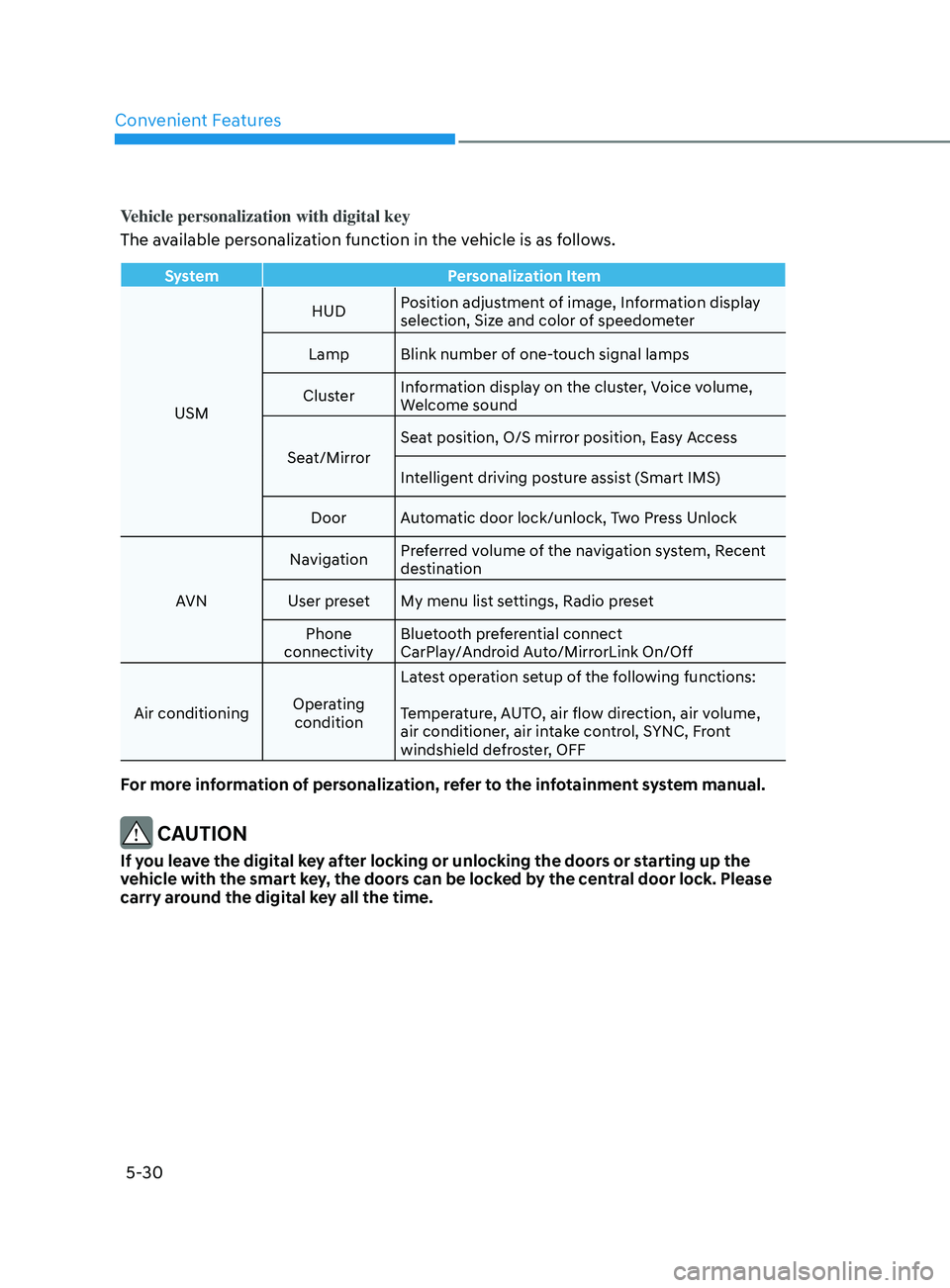
Vehicle personalization with digital key
The available personalization function in the vehicle is as follows.
SystemPersonalization Item
USM HUD
Position adjustment of image, Information display
selection, Size and color of speedometer
Lamp Blink number of one-touch signal lamps
Cluster Information display on the cluster, Voice volume,
Welcome sound
Seat/Mirror Seat position, O/S mirror position, Easy Access
Intelligent driving posture assist (Smart IMS)
Door Automatic door lock/unlock, Two Press Unlock
AVN Navigation
Preferred volume of the navigation system, Recent
destination
User preset My menu list settings, Radio preset Phone
connectivity Bluetooth preferential connect
CarPlay/Android Auto/MirrorLink On/Off
Air conditioning Operating
condition Latest operation setup of the following functions:
Temperature, AUTO, air flow direction, air volume,
air conditioner, air intake control, SYNC, Front
windshield defroster, OFF
For more information of personalization, refer to the infotainment system manual.
CAUTION
If you leave the digital key after locking or unlocking the doors or starting up the
vehicle with the smart key, the doors can be locked by the central door lock. Please
carry around the digital key all the time.
Page 263 of 546
05
5-133
Temperature conversion
If the battery has been discharged or
disconnected, the temperature mode
display will reset to Centigrade.
To change the temperature unit from °C
to °F or °F to °C :
-
A
utomatic climate control system
Pr
ess the AUTO button for 3 seconds
while pressing the OFF button.
-
Ins
trument cluster
Go
to User Settings → Other →
T
emperature Unit.
The temperature unit on both the cluster
LCD display and the climate control
screen will change.
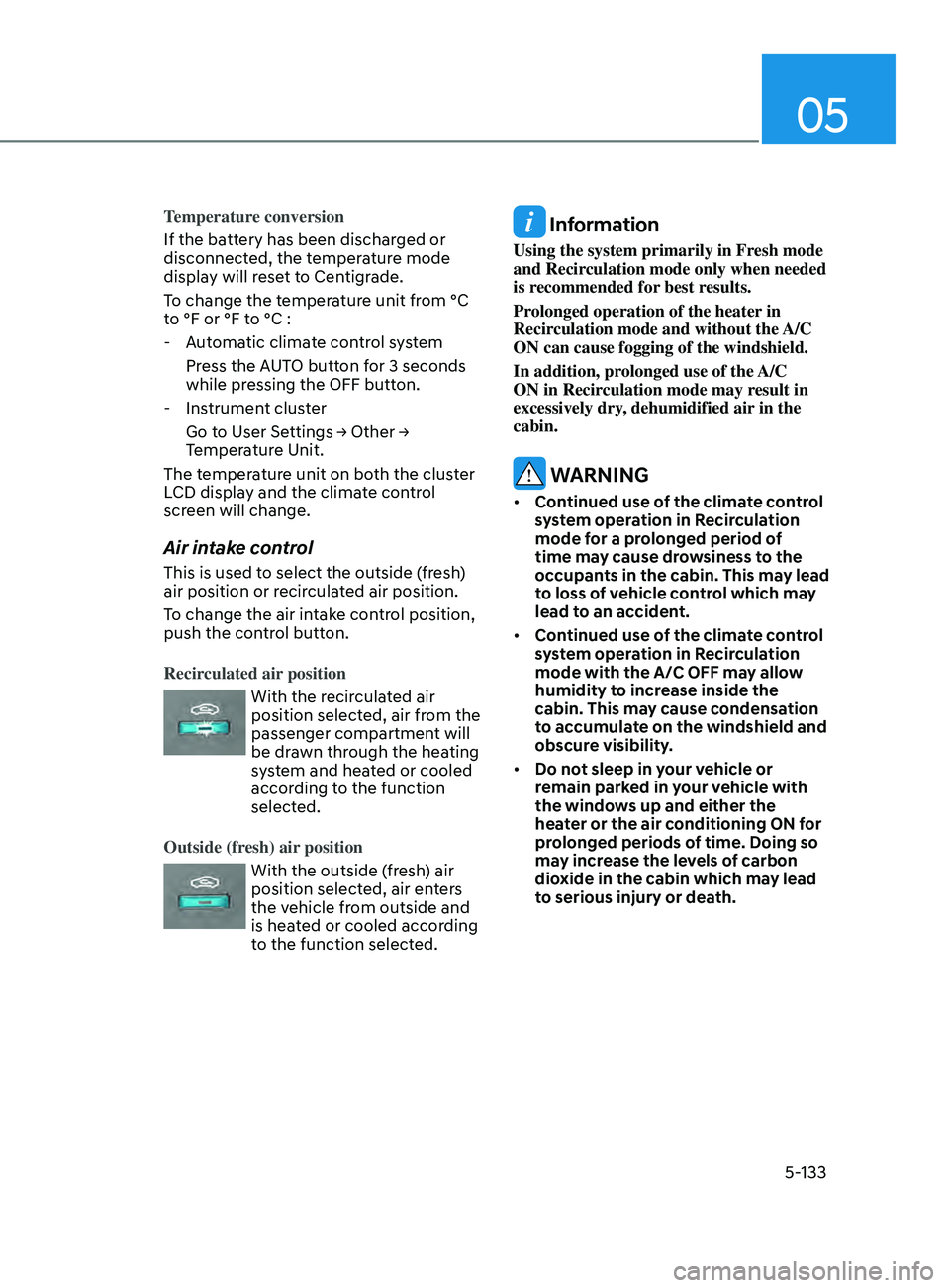
Air intake control
This is used to select the outside (fresh)
air position or recirculated air position.
To change the air intake control position,
push the control button.
Recirculated air position
With the recirculated air
position selected, air from the
passenger compartment will
be drawn through the heating
system and heated or cooled
according to the function
selected.
Outside (fresh) air position
With the outside (fresh) air
position selected, air enters
the vehicle from outside and
is heated or cooled according
to the function selected.
Information
Using the system primarily in Fresh mode
and Recirculation mode only when needed
is recommended for best results.
Prolonged operation of the heater in
Recirculation mode and without the A/C
ON can cause fogging of the windshield.
In addition, prolonged use of the A/C
ON in Recirculation mode may result in
excessively dry, dehumidified air in the
cabin.
WARNING
• Continued use of the climate control
system operation in Recirculation
mode for a prolonged period of
time may cause drowsiness to the
occupants in the cabin. This may lead
to loss of vehicle control which may
lead to an accident.
• Continued use of the climate control
system operation in Recirculation
mode with the A/C OFF may allow
humidity to increase inside the
cabin. This may cause condensation
to accumulate on the windshield and
obscure visibility.
• Do not sleep in your vehicle or
remain parked in your vehicle with
the windows up and either the
heater or the air conditioning ON for
prolonged periods of time. Doing so
may increase the levels of carbon
dioxide in the cabin which may lead
to serious injury or death.
Page 444 of 546
07
7-9
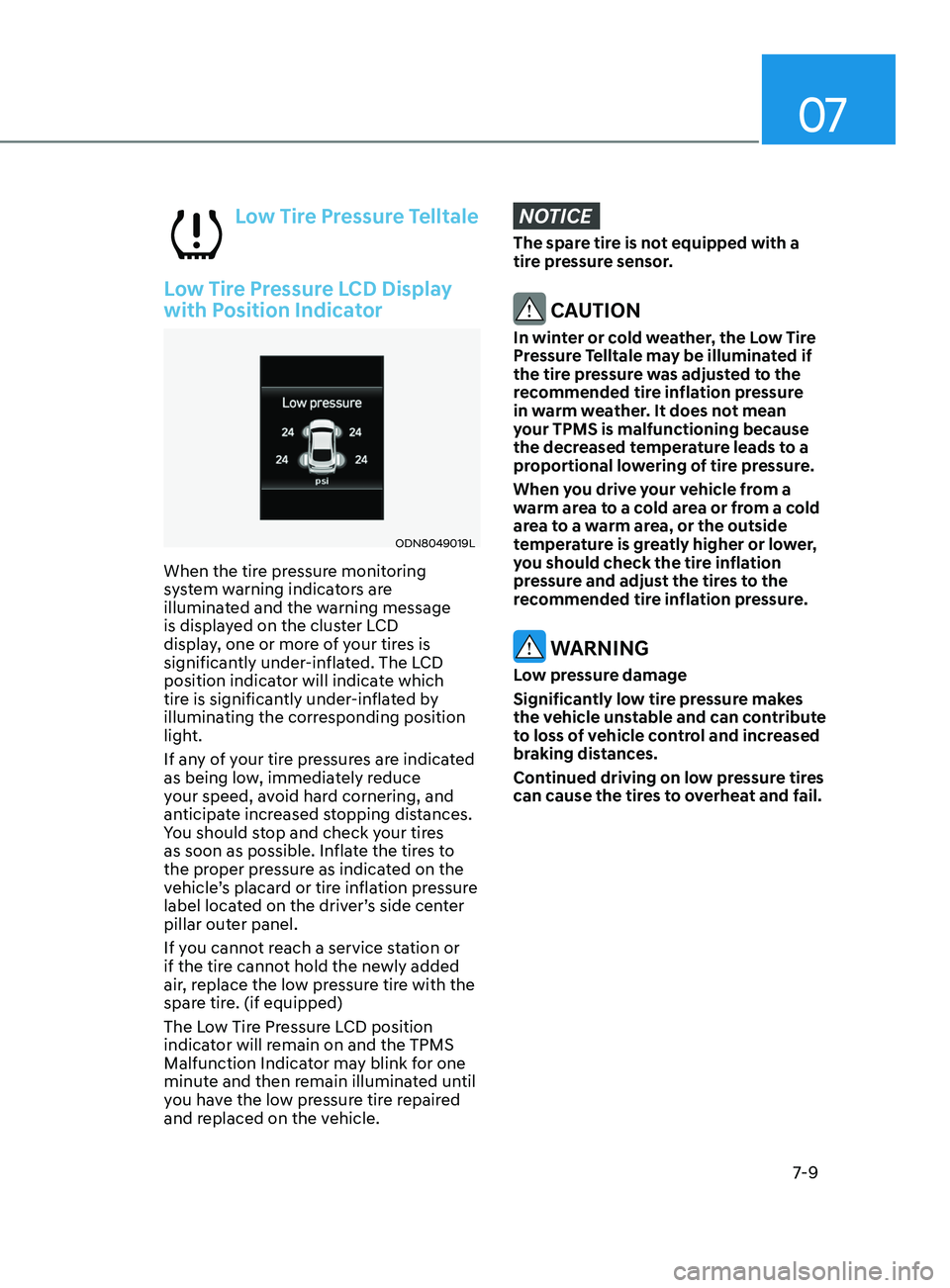
Low Tire Pressure Telltale
Low Tire Pressure LCD Display
with Position Indicator
ODN8049019L
When the tire pressure monitoring
system warning indicators are
illuminated and the warning message
is displayed on the cluster LCD
display, one or more of your tires is
significantly under-inflated. The LCD
position indicator will indicate which
tire is significantly under-inflated by
illuminating the corresponding position
light.
If any of your tire pressures are indicated
as being low, immediately reduce
your speed, avoid hard cornering, and
anticipate increased stopping distances.
You should stop and check your tires
as soon as possible. Inflate the tires to
the proper pressure as indicated on the
vehicle’s placard or tire inflation pressure
label located on the driver’s side center
pillar outer panel.
If you cannot reach a service station or
if the tire cannot hold the newly added
air, replace the low pressure tire with the
spare tire. (if equipped)
The Low Tire Pressure LCD position
indicator will remain on and the TPMS
Malfunction Indicator may blink for one
minute and then remain illuminated until
you have the low pressure tire repaired
and replaced on the vehicle.
NOTICE
The spare tire is not equipped with a
tire pressure sensor.
CAUTION
In winter or cold weather, the Low Tire
Pressure Telltale may be illuminated if
the tire pressure was adjusted to the
recommended tire inflation pressure
in warm weather. It does not mean
your TPMS is malfunctioning because
the decreased temperature leads to a
proportional lowering of tire pressure.
When you drive your vehicle from a
warm area to a cold area or from a cold
area to a warm area, or the outside
temperature is greatly higher or lower,
you should check the tire inflation
pressure and adjust the tires to the
recommended tire inflation pressure.
WARNING
Low pressure damage
Significantly low tire pressure makes
the vehicle unstable and can contribute
to loss of vehicle control and increased
braking distances.
Continued driving on low pressure tires
can cause the tires to overheat and fail.
Page 495 of 546
08
8-41
3. Checking tire life (TIN : Tire
Identification Number)
Any tires that are over six years old,
based on the manufacturing date,
(including the spare tire) should be
replaced by new tires. You can find
the manufacturing date on the tire
sidewall (possibly on the inside of
the wheel), displaying the DOT Code.
The DOT Code is a series of numbers
on a tire consisting of numbers and
English letters. The manufacturing
date is designated by the last four
digits (characters) of the DOT code.
DOT : XXXX XXXX OOOO
The front part of the DOT shows a
plant code number, tire size and
tread pattern and the last four
numbers indicate week and year
manufactured.
For example:
DOT XXXX XXXX 1420 represents that
the tire was produced in the 14th
week of 2020.
4.
Tir
e ply composition and material
The number of layers or plies of
rubber-coated fabric in the tire. Tire
manufacturers also must indicate the
materials in the tire, which include
steel, nylon, polyester, and others.
The letter “R” means radial ply
construction; the letter “D” means
diagonal or bias ply construction;
and the letter “B” means belted-bias
ply construction. 5.
M
aximum permissible inflation
pressure
This number is the greatest amount
of air pressure that should be put in
the tire. Do not exceed the maximum
permissible inflation pressure. Refer
to the Tire and Loading Information
label for recommended inflation
pressure.
6.
M
aximum load rating
This number indicates the maximum
load in kilograms and pounds that
can be carried by the tire. When
replacing the tires on the vehicle,
always use a tire that has the same
load rating as the factory installed
tire.
7.
U
niform tire quality grading
Quality grades can be found where
applicable on the tire sidewall
between tread shoulder and
maximum section width.
For example:
TREAD WEAR 200
TRACTION AA
TEMPERATURE A