2021 HYUNDAI SONATA front view camera
[x] Cancel search: front view cameraPage 208 of 546
Convenient Features5-78
2. When the High Beam Assis t camera
is adversely affected by an external
condition. Such examples may
include:
• When the vehicle’s headlamps
have been damaged or not
repaired properly.
• When the vehicle headlamps are
not aimed properly.
• When the vehicle is driven on a
narrow curved road or rough road
• When the vehicle is driven on an
uphill road or downhill road
• When only part of the vehicle in
front is visible on a crossroad or
curved road.
• When there is a traffic light,
reflecting sign, flashing sign or
mirror.
• When the road conditions are bad
such as being wet or covered with
snow.
• When a vehicle suddenly appears
from a curve.
• When the vehicle is tilted from a
flat tire or being towed.
• When Lane Keeping Assist system
warning light illuminates.
• When the light from the on-coming
or front vehicle is not detected
because of exhaust fume, smoke,
fog, snow, etc.
• When the front window is covered
with foreign matters such as ice,
dust, fog, or is damaged.
3.
When the f
orward visibility is poor.
Such examples may include:
• When the headlamps of an on-
coming vehicle or a vehicle in front
is not detected due to poor outside
visibility (smog, smoke, dust, fog,
heavy rain, snow, etc.).
• When the windshield visibility is
poor. WARNING
• Do not attempt to disassemble
the front view camera without the
assistance of an authorized HYUNDAI
dealer technician. If the front camera
is removed for any reason, the
system may need to be re-calibrated.
Have the system inspected by an
authorized HYUNDAI dealer.
• If the windshield of your vehicle is
replaced, most likely the front view
camera will need to be re-calibrated.
If this occurs, have your vehicle
inspected and have the system re-
calibrated by an authorized HYUNDAI
dealer.
• Be careful that water doesn’t get into
High Beam Assist unit and do not
remove or damage related parts of
High Beam Assist system.
• Do not place objects on the crash
pad that reflect light such as mirrors,
white paper, etc. The system may
malfunction if sunlight is reflected.
• At times, High Beam Assist system
may not work properly. The system
is for your convenience only. It is the
responsibility of the driver for safe
driving practices and always check
the road conditions for your safety.
• When the system does not operate
normally, change the headlamp
position manually between the high
beam and low beam.
Page 218 of 546
Convenient Features5-88
SUrroUnD view moniTor (Svm ) (if eQU ippe D )
ODN8059265
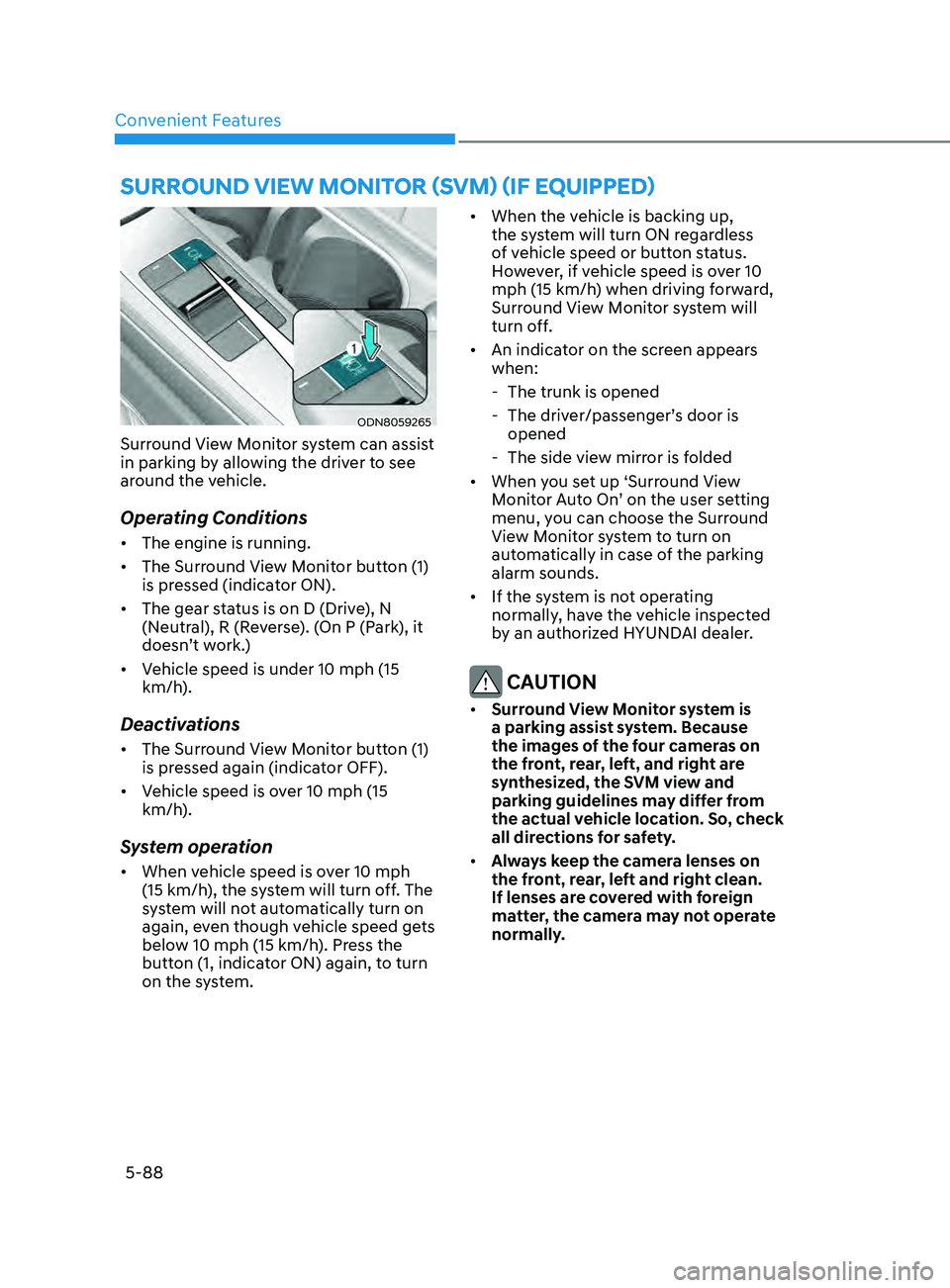
Surround View Monitor system can assist
in parking by allowing the driver to see
around the vehicle.
Operating Conditions
• The engine is running.
• The Surround View Monitor button (1)
is pressed (indicator ON).
• The gear status is on D (Drive), N
(Neutral), R (Reverse). (On P (Park), it
doesn’t work.)
• Vehicle speed is under 10 mph (15
km/h).
Deactivations
• The Surround View Monitor button (1)
is pressed again (indicator OFF).
• Vehicle speed is over 10 mph (15
km/h).
System operation
• When vehicle speed is over 10 mph
(15 km/h), the system will turn off. The
system will not automatically turn on
again, even though vehicle speed gets
below 10 mph (15 km/h). Press the
button (1, indicator ON) again, to turn
on the system. •
When the vehicle is backing up,
the system will turn ON regardless
of vehicle speed or button status.
However, if vehicle speed is over 10
mph (15 km/h) when driving forward,
Surround View Monitor system will
turn off.
• An indicator on the screen appears
when:
- The trunk is opened
- The driv
er/passenger’s door is
opened
- The side vie
w mirror is folded
• When you set up ‘Surround View
Monitor Auto On’ on the user setting
menu, you can choose the Surround
View Monitor system to turn on
automatically in case of the parking
alarm sounds.
• If the system is not operating
normally, have the vehicle inspected
by an authorized HYUNDAI dealer.
CAUTION
• Surround View Monitor system is
a parking assist system. Because
the images of the four cameras on
the front, rear, left, and right are
synthesized, the SVM view and
parking guidelines may differ from
the actual vehicle location. So, check
all directions for safety.
• Always keep the camera lenses on
the front, rear, left and right clean.
If lenses are covered with foreign
matter, the camera may not operate
normally.
Page 286 of 546
 ........................................................................\
..6-59LKA Operation ........................................................................\
.....")
Lane Keeping Assist (LKA) ........................................................................\
..6-59LKA Operation ........................................................................\
................................ 6-61
LKA S ystem Function Change ........................................................................\
....... 6-61
Warning Light and Message
........................................................................\
.......... 6-64
Limitations of the System
........................................................................\
.............. 6-65
Blind-Spot Collision Warning (BCW) /
Blind-Spot Collision-Avoidance Assist (BCA)
............................................6-67
System Description ........................................................................\
........................ 6-67
S ystem Setting and Activation ........................................................................\
...... 6-68
Warning and System Control
........................................................................\
......... 6-70
Detecting Sensors
(Front view camera and Rear corner radar).......................................................... 6-72
Limitations of the System
........................................................................\
.............. 6-75
Declaration of Conformity ........................................................................\
...6- 79The radio frequency components (Rear Corner Radar) complies: .....................6- 79
Safe Exit Assist (SEA) ........................................................................\
.........6-80Function settings ........................................................................\
............................ 6-81
F unction operation ........................................................................\
......................... 6-82
Function malfunction and limitations
................................................................... 6-84
Driver Attention Warning (DAW) ................................................................6-86System Setting and Operation ........................................................................\
...... 6-86
R esetting the System ........................................................................\
..................... 6-88
System Standby
........................................................................\
.............................. 6-89
System Malfunction
........................................................................\
....................... 6-89
Leading Vehicle Departure Alert
........................................................................\
... 6-91
Blind-Spot View Monitor (BVM) .................................................................6-94
Smart cruise con trol (SCC) ........................................................................\
. 6-95
Smart Cruise Control Switch ........................................................................\
......... 6-96
T o Convert to Cruise Control Mode ...................................................................... 6-96
Smart Cruise Con
trol Speed ........................................................................\
.......... 6-97
Smart Cruise Control Vehicle-to-Vehicle Distance
............................................6-103
Limitations of the System
........................................................................\
............ 6-108
Navigation-Based Smart Cruise Control ..................................................6- 112System Setting and Operation ........................................................................\
.....6- 113
Lane Following Assist (LFA) .......................................................................6- 116LFA Operation ........................................................................\
................................6- 118
Warning Message ........................................................................\
.......................... 6-118
Limitations of the System
........................................................................\
............ 6-120
6
Page 287 of 546
Highway Driving Assist (HDA) ...................................................................6- 122System Setting and Operation ........................................................................\
.....6- 123
Warning Message ........................................................................\
.......................... 6-125
Rear Cross-Traffic Collision Warning (RCCW) /
Rear Cross-Traffic Collision-Avoidance Assist (RCCA)
...........................6-128
System Description ........................................................................\
....................... 6- 128
System Setting and Activation ........................................................................\
..... 6-129
Warning and System Control
........................................................................\
........ 6-131
Detecting Sensors
........................................................................\
.........................6-134
Limitations of the System
........................................................................\
............. 6-135
Special Driving Conditions ........................................................................\
6- 140Hazardous Driving Conditions ........................................................................\
....6- 140
Rocking the Vehicle ........................................................................\
..................... 6-140
Smooth Cornering
........................................................................\
......................... 6-141
Driving at Night
........................................................................\
............................. 6-141
Driving in the Rain
........................................................................\
......................... 6-141
Driving in Flooded Areas
........................................................................\
............... 6-142
Highway Driving
........................................................................\
............................ 6-142
Winter Driving ........................................................................\
....................6- 143Snow or Icy Conditions ........................................................................\
.................6-143
Win ter Precautions ........................................................................\
....................... 6-144
Vehicle load limit........................................................................\
................ 6-146
Tire Loading Information Label ........................................................................\
...6- 146
Trailer Towing ........................................................................\
......................6- 151
Lane Keeping Assist (LKA) ........................................................................\
..6-59LKA Operation ........................................................................\
................................ 6-61
LKA System Function Change ........................................................................\
....... 6-61
Warning Light and Message ........................................................................\
.......... 6-64
Limitations of the System ........................................................................\
.............. 6-65
Blind-Spot Collision Warning (BCW) /
Blind-Spot Collision-Avoidance Assist (BCA) ............................................6-67
System Description ........................................................................\
........................ 6-67
System Setting and Activation ........................................................................\
...... 6-68
Warning and System Control ........................................................................\
......... 6-70
Detecting Sensors
(Front view camera and Rear corner radar).......................................................... 6-72
Limitations of the System ........................................................................\
.............. 6-75
Declaration of Conformity ........................................................................\
...6-79The radio frequency components (Rear Corner Radar) complies: ..................... 6-79
Safe Exit Assist (SEA) ........................................................................\
.........6-80Function settings ........................................................................\
............................ 6-81
Function operation ........................................................................\
......................... 6-82
Function malfunction and limitations ................................................................... 6-84
Driver Attention Warning (DAW) ................................................................ 6-86System Setting and Operation ........................................................................\
...... 6-86
Resetting the System ........................................................................\
..................... 6-88
System Standby ........................................................................\
.............................. 6-89
System Malfunction ........................................................................\
....................... 6-89
Leading Vehicle Departure Alert ........................................................................\
... 6-91
Blind-Spot View Monitor (BVM) ................................................................. 6-94
Smart cruise control (SCC) ........................................................................\
. 6-95
Smart Cruise Control Switch ........................................................................\
......... 6-96
To Convert to Cruise Control Mode ...................................................................... 6-96
Smart Cruise Control Speed ........................................................................\
.......... 6-97
Smart Cruise Control Vehicle-to-Vehicle Distance ............................................ 6-103
Limitations of the System ........................................................................\
............ 6-108
Navigation-Based Smart Cruise Control ..................................................6-112System Setting and Operation ........................................................................\
..... 6-113
Lane Following Assist (LFA) ....................................................................... 6-116LFA Operation ........................................................................\
................................ 6-118
Warning Message ........................................................................\
.......................... 6-118
Limitations of the System ........................................................................\
............ 6-120
6
6. While Driving
Page 324 of 546
6-40
Forward Collision-Avoidance Assist
system is designed to detect the
vehicle, a pedestrian or cyclist ahead (if
equipped) in the roadway through front
radar signals and front view camera
recognition to warn the driver that a
collision is imminent, and if necessary,
apply emergency braking.
WARNING
Take the following precautions when
using Forward Collision-Avoidance
Assist system:
• This system is only a supplemental
system and it is not intended to,
nor does it replace the need for
extreme care and attention of
the driver. The sensing range and
objects detectable by the sensors
are limited. Pay attention to the road
conditions at all times.
• Drive at posted speed limits and
accordance to road conditions.
• Always drive cautiously to prevent
unexpected and sudden situations
from occurring. FCA does not always
stop the vehicle completely.
System Setting and Activation
System setting
OTMA058186
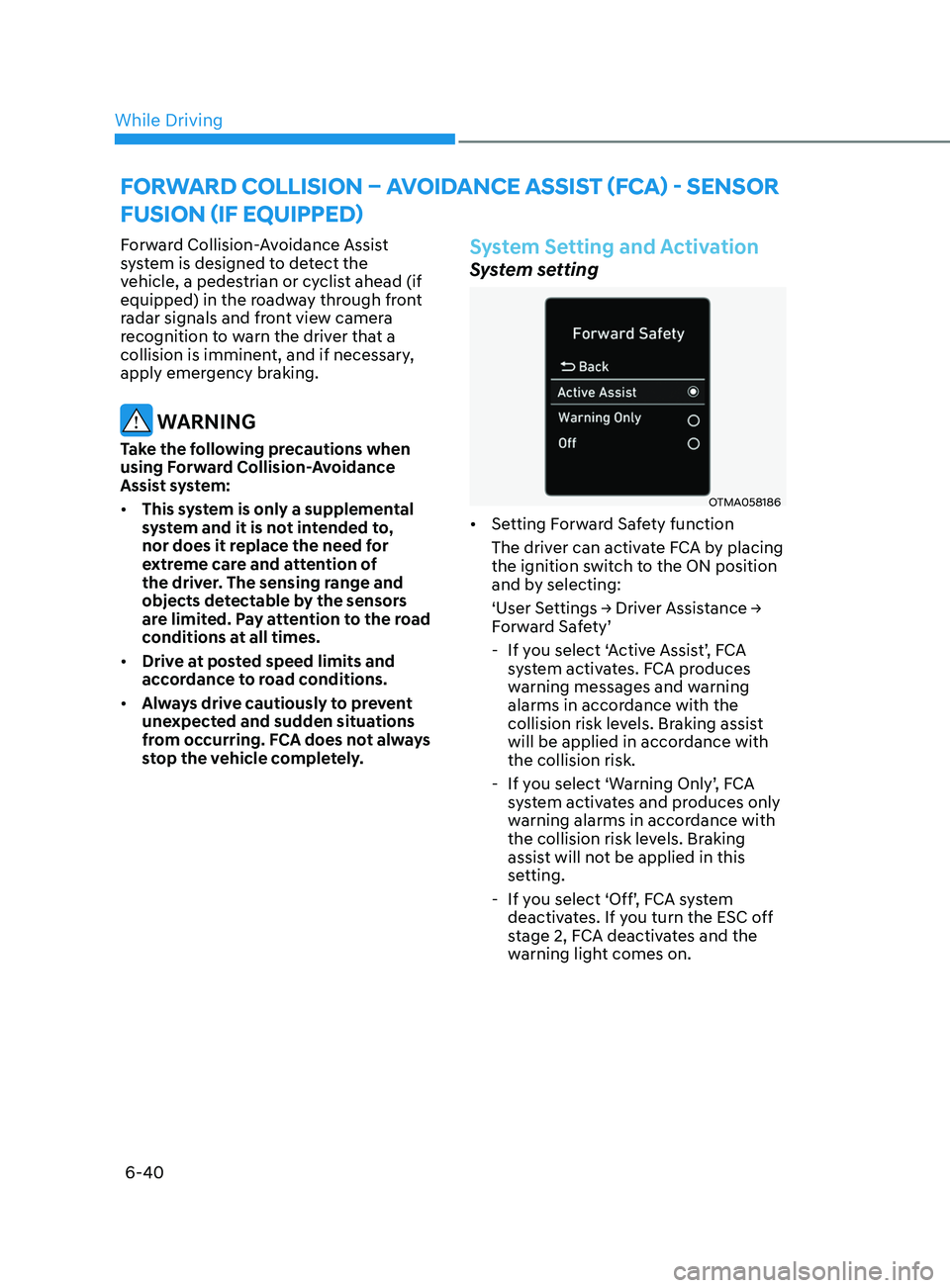
• Setting Forward Safety function
The driver can activate FCA by placing
the ignition switch to the ON position
and by selecting:
‘User
Settings → Driver Assistance →
F
orward Safety’
- If y
ou select ‘Active Assist’, FCA
system activates. FCA produces
warning messages and warning
alarms in accordance with the
collision risk levels. Braking assist
will be applied in accordance with
the collision risk.
- If y
ou select ‘Warning Only’, FCA
system activates and produces only
warning alarms in accordance with
the collision risk levels. Braking
assist will not be applied in this
setting.
- If y
ou select ‘Off’, FCA system
deactivates. If you turn the ESC off
stage 2, FCA deactivates and the
warning light comes on.
forward Coll ISI on – av o I dan C e aSSISt ( fCa ) - Sen S or
f
u SI on ( I f equ I pped)
While Driving
Page 329 of 546
06
6-45
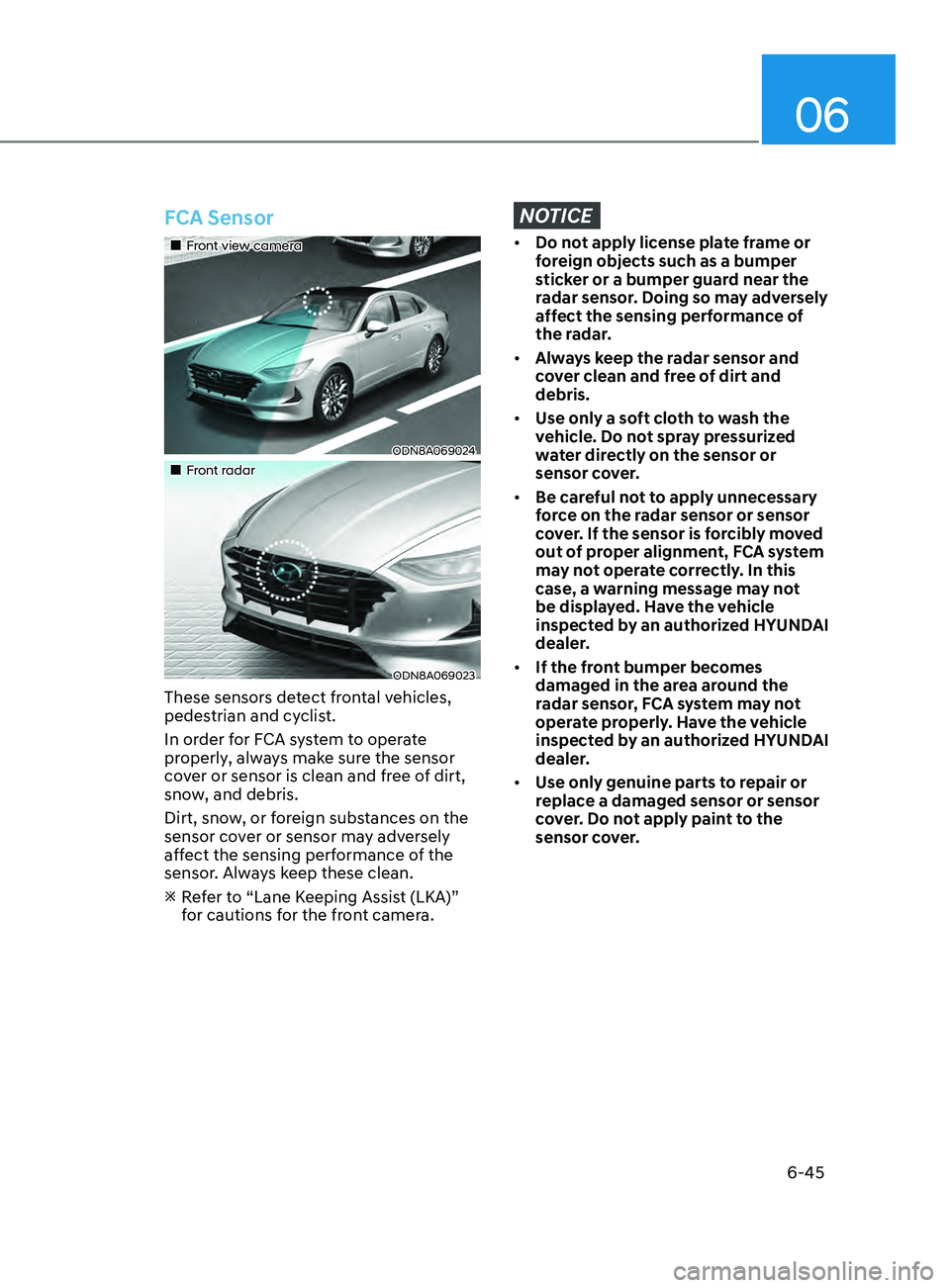
FCA Sensor
•„Front view camera
ODN8A069024
•„Front radar
ODN8A069023
These sensors detect frontal vehicles,
pedestrian and cyclist.
In order for FCA system to operate
properly, always make sure the sensor
cover or sensor is clean and free of dirt,
snow, and debris.
Dirt, snow, or foreign substances on the
sensor cover or sensor may adversely
affect the sensing performance of the
sensor. Always keep these clean.
R
efer to “Lane Keeping Assist (LKA)”
for cautions for the front camera.
NOTICE
• Do not apply license plate frame or
foreign objects such as a bumper
sticker or a bumper guard near the
radar sensor. Doing so may adversely
affect the sensing performance of
the radar.
• Always keep the radar sensor and
cover clean and free of dirt and
debris.
• Use only a soft cloth to wash the
vehicle. Do not spray pressurized
water directly on the sensor or
sensor cover.
• Be careful not to apply unnecessary
force on the radar sensor or sensor
cover. If the sensor is forcibly moved
out of proper alignment, FCA system
may not operate correctly. In this
case, a warning message may not
be displayed. Have the vehicle
inspected by an authorized HYUNDAI
dealer.
• If the front bumper becomes
damaged in the area around the
radar sensor, FCA system may not
operate properly. Have the vehicle
inspected by an authorized HYUNDAI
dealer.
• Use only genuine parts to repair or
replace a damaged sensor or sensor
cover. Do not apply paint to the
sensor cover.
Page 333 of 546
06
6-49
Detecting vehicle, pedestrian and
cyclist
The sensor may be limited when:
• The system may not operate for 15
seconds after the vehicle is started or
the camera is initialized
• The radar sensor or camera is covered
with a foreign object or debris
• The camera lens is contaminated due
to tinted, filmed or coated windshield,
damaged glass, or stuck of foreign
matter (sticker, bug, etc.) on the glass
• Inclement weather such as heavy rain
or snow obscures the field of view of
the radar sensor or camera
• There is interference by
electromagnetic waves
• There is severe irregular reflection
from the radar sensor
• The radar/camera sensor recognition
is limited
• The vehicle in front is too small to be
detected (for example a motorcycle
etc.)
• The vehicle in front is an oversize
vehicle or trailer that is too big to be
detected by the camera recognition
system (for example a tractor trailer,
etc.)
• The camera’s field of view is not well
illuminated (either too dark or too
much reflection or too much backlight
that obscures the field of view)
• The vehicle in front does not have
their rear lights or their rear lights
does not turned ON or their rear lights
are located unusually
• The outside brightness changes
suddenly, for example when entering
or exiting a tunnel
• Light coming from a street light or an
oncoming vehicle is reflected on a wet
road surface such as a puddle in the
road •
The field of view in front is obstructed
by sun glare or head light of oncoming
vehicle
• The windshield glass is fogged up; a
clear view of the road is obstructed
• The vehicle in front is driving
erratically
• The vehicle is on unpaved or uneven
rough surfaces, or road with sudden
gradient changes
• The vehicle is driven near areas
containing metal substances as a
construction zone, railroad, etc.
• The vehicle drives inside a building,
such as a basement parking lot
• The camera does not recognize the
entire vehicle in front
• The camera is damaged
• The brightness outside is too low such
as when the headlamps are not on at
night or the vehicle is going through
a tunnel
• The shadow is on the road by a
median strip, trees, etc.
• The vehicle drives through a tollgate
• The windshield glass is fogged up; a
clear view of the road is obstructed
• The rear part of the vehicle in front is
not normally visible (the vehicle turns
in other direction or the vehicle is
overturned.)
• The adverse road conditions cause
excessive vehicle vibrations while
driving
• The sensor recognition changes
suddenly when passing over a speed
bump
• The vehicle in front is moving
vertically to the driving direction
• The vehicle in front is stopped
vertically
• The vehicle in front is driving towards
your vehicle or reversing
• You are on a roundabout and the
vehicle in front circles
Page 334 of 546
6-50
OADAS014SD
OADAS016SD
OADAS018SD
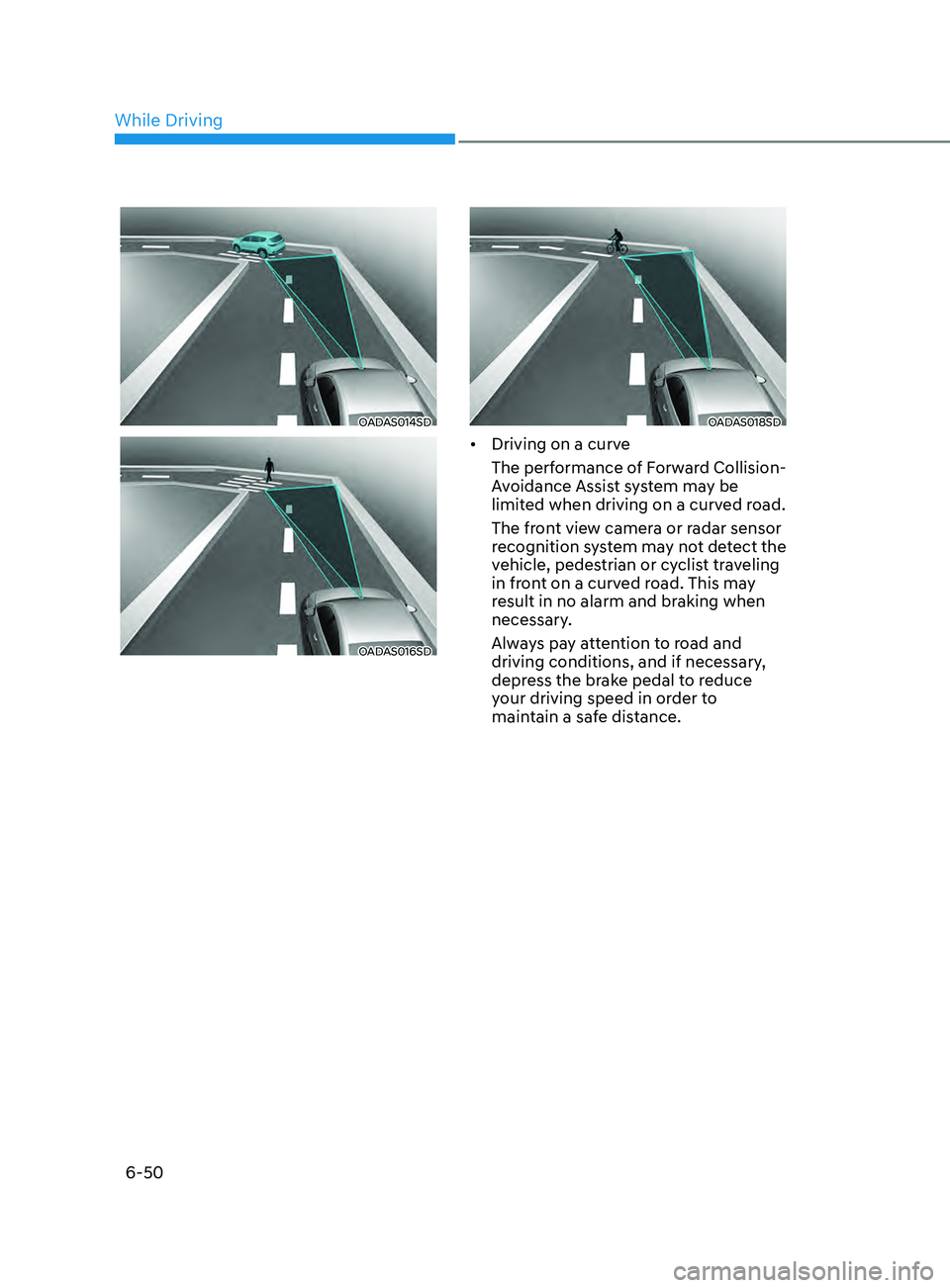
• Driving on a curve
The performance of Forward Collision-
Avoidance Assist system may be
limited when driving on a curved road.
The front view camera or radar sensor
recognition system may not detect the
vehicle, pedestrian or cyclist traveling
in front on a curved road. This may
result in no alarm and braking when
necessary.
Always pay attention to road and
driving conditions, and if necessary,
depress the brake pedal to reduce
your driving speed in order to
maintain a safe distance.
While Driving