2021 HYUNDAI SONATA light system
[x] Cancel search: light systemPage 227 of 546
05
5-97
To Turn off Reverse Parking
Distance Warning System
(if equipped)
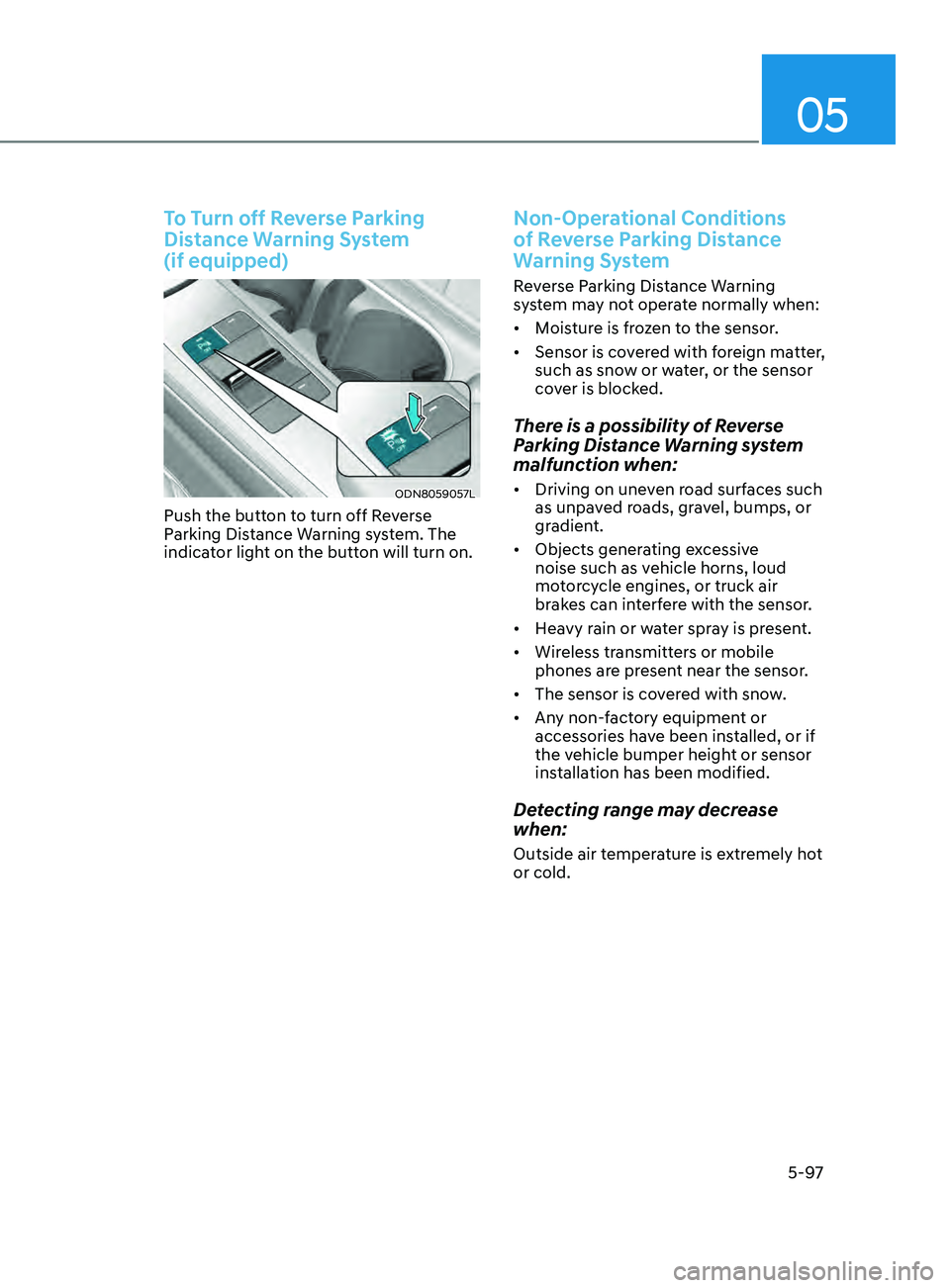
ODN8059057L
Push the button to turn off Reverse
Parking Distance Warning system. The
indicator light on the button will turn on.
Non-Operational Conditions
of Reverse Parking Distance
Warning System
Reverse Parking Distance Warning
system may not operate normally when:
• Moisture is frozen to the sensor.
• Sensor is covered with foreign matter,
such as snow or water, or the sensor
cover is blocked.
There is a possibility of Reverse
Parking Distance Warning system
malfunction when:
• Driving on uneven road surfaces such
as unpaved roads, gravel, bumps, or
gradient.
• Objects generating excessive
noise such as vehicle horns, loud
motorcycle engines, or truck air
brakes can interfere with the sensor.
• Heavy rain or water spray is present.
• Wireless transmitters or mobile
phones are present near the sensor.
• The sensor is covered with snow.
• Any non-factory equipment or
accessories have been installed, or if
the vehicle bumper height or sensor
installation has been modified.
Detecting range may decrease
when:
Outside air temperature is extremely hot
or cold.
Page 238 of 546
Convenient Features
5-108
How Remote Smart Parking
Assist System Works
Remote Moving Forward/Backward
Remote Moving Forward/Backward is
available with the driver outside the
vehicle. Make sure the conditions are
met before activating Remote Moving
Forward/Backward function. With the
function, you can park or exit the vehicle
and the procedure is as follows.
1.
R
emote Moving Forward/Backward
ready:
(1)
With the v
ehicle off: Remotely turn
on the vehicle.
(2)
With the v
ehicle on: with shift
button is in P (Park) position,
then press Remote Smart Parking
Assist system button. Then exit the
vehicle possessing the smart key.
2.
R
emote Moving Forward/Backward
assist: Press and hold the Moving
Forward/Backward button of the
smart key to provide the Remote
Moving Forward/Backward assist
through steering wheel, gear shift and
vehicle speed control.
3.
R
emote Moving Forward/Backward
complete: When the vehicle reaches
the desired position, release the
smart key button. Then complete the
Remote Moving Forward/Backward
by entering the vehicle possessing the
smart key or by pressing the remote
start button of the smart key.
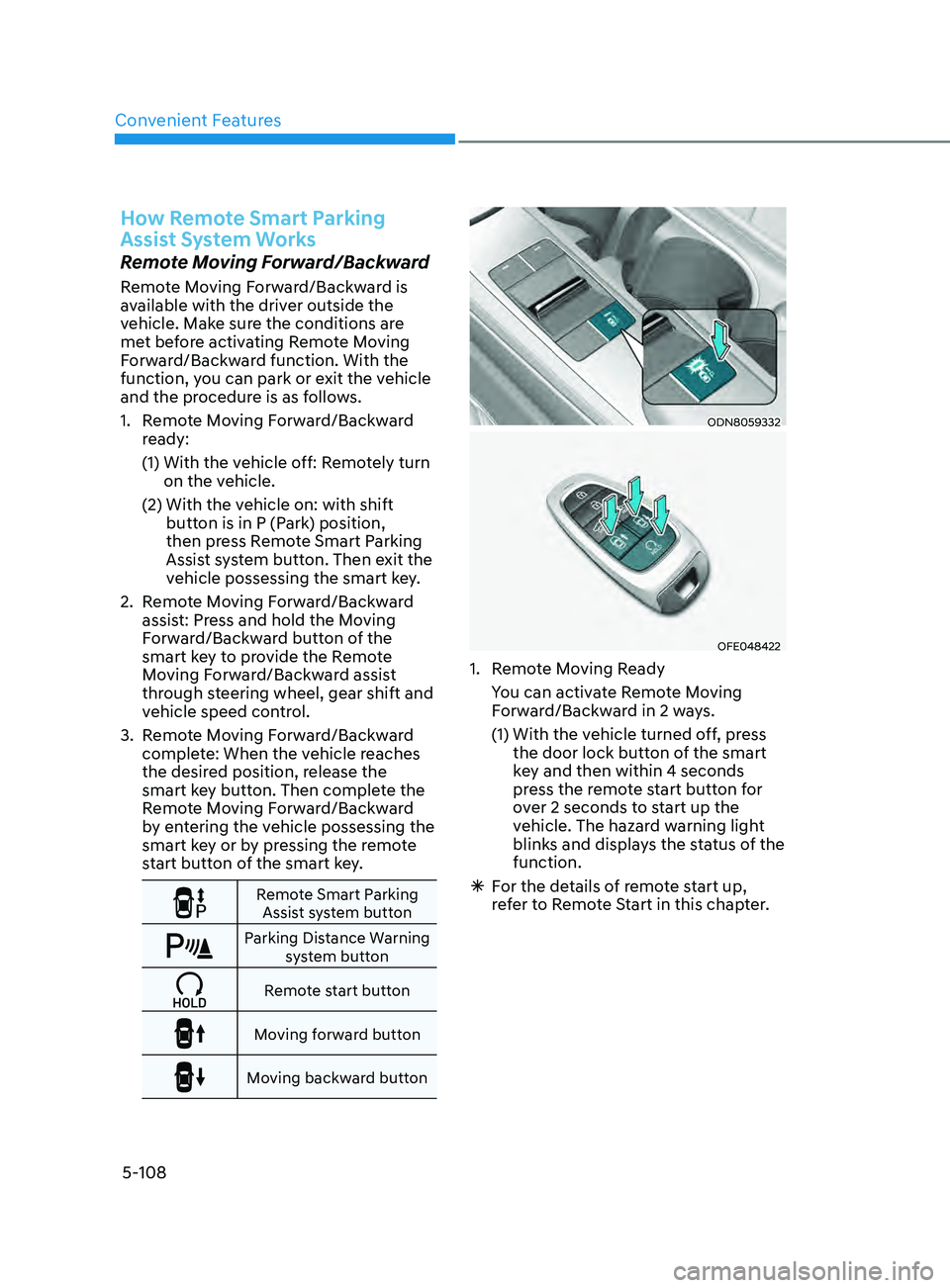
Remote Smart Parking
Assist system button
Parking Distance Warning system button
Remote start button
Moving forward button
Moving backward button
ODN8059332
OFE048422
1. Remote Moving Ready
Y
ou can activate Remote Moving
Forward/Backward in 2 ways.
(1)
With the v
ehicle turned off, press
the door lock button of the smart
key and then within 4 seconds
press the remote start button for
over 2 seconds to start up the
vehicle. The hazard warning light
blinks and displays the status of the
function.
à F
or the details of remote start up,
refer to Remote Start in this chapter.
Page 239 of 546
05
5-109
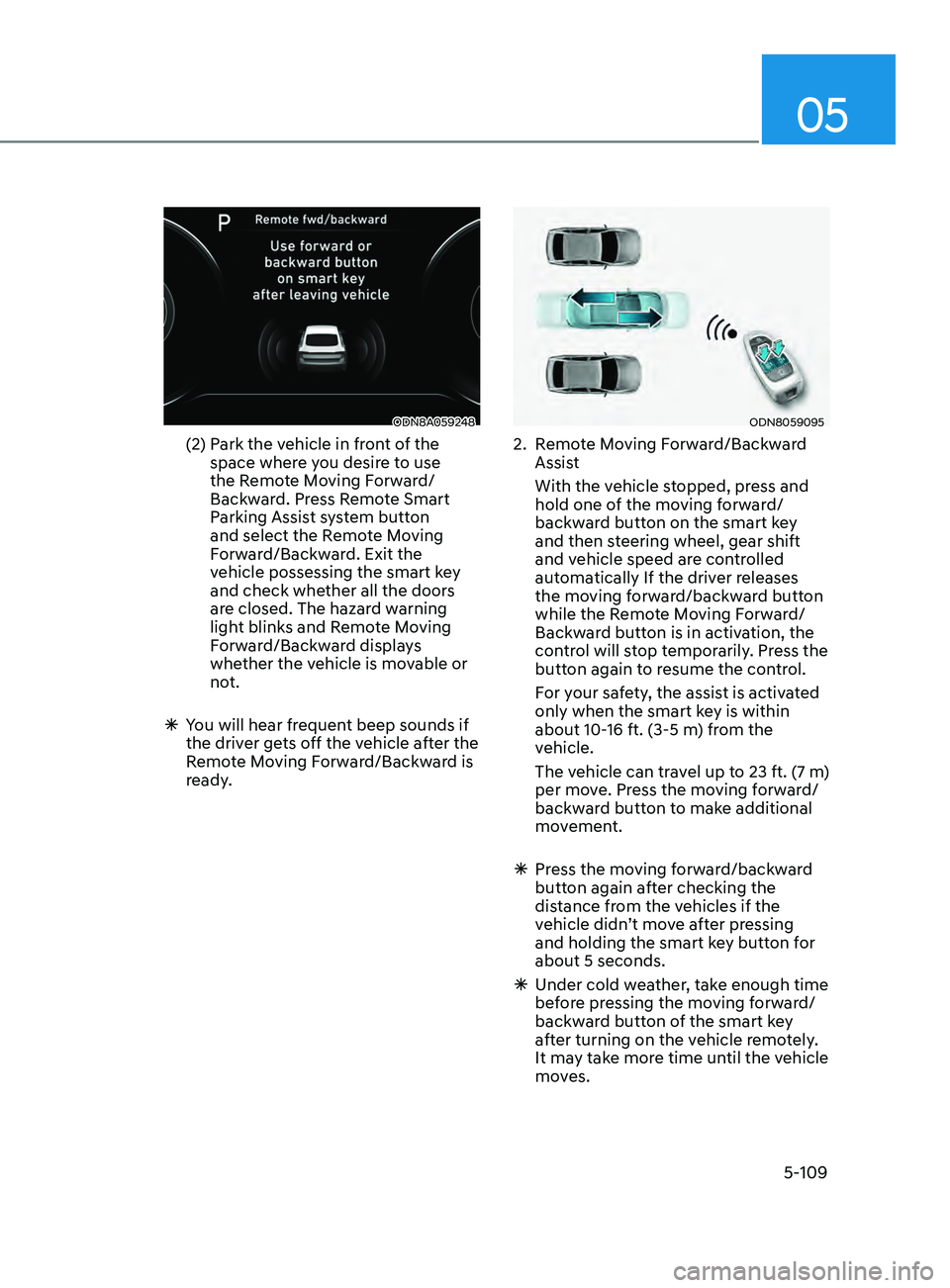
ODN8A059248
(2) Park the vehicle in front of the
space where you desire to use
the Remote Moving Forward/
Backward. Press Remote Smart
Parking Assist system button
and select the Remote Moving
Forward/Backward. Exit the
vehicle possessing the smart key
and check whether all the doors
are closed. The hazard warning
light blinks and Remote Moving
Forward/Backward displays
whether the vehicle is movable or
not.
ÃY
ou will hear frequent beep sounds if
the driver gets off the vehicle after the
Remote Moving Forward/Backward is
ready.
ODN8059095
2. Remote Moving Forward/Backward Assist
With the v
ehicle stopped, press and
hold one of the moving forward/
backward button on the smart key
and then steering wheel, gear shift
and vehicle speed are controlled
automatically If the driver releases
the moving forward/backward button
while the Remote Moving Forward/
Backward button is in activation, the
control will stop temporarily. Press the
button again to resume the control.
F
or your safety, the assist is activated
only when the smart key is within
about 10-16 ft. (3-5 m) from the
vehicle.
The v
ehicle can travel up to 23 ft. (7 m)
per move. Press the moving forward/
backward button to make additional
movement.
à Pr
ess the moving forward/backward
button again after checking the
distance from the vehicles if the
vehicle didn’t move after pressing
and holding the smart key button for
about 5 seconds.
à Under cold w
eather, take enough time
before pressing the moving forward/
backward button of the smart key
after turning on the vehicle remotely.
It may take more time until the vehicle
moves.
Page 244 of 546
Convenient Features
5-114
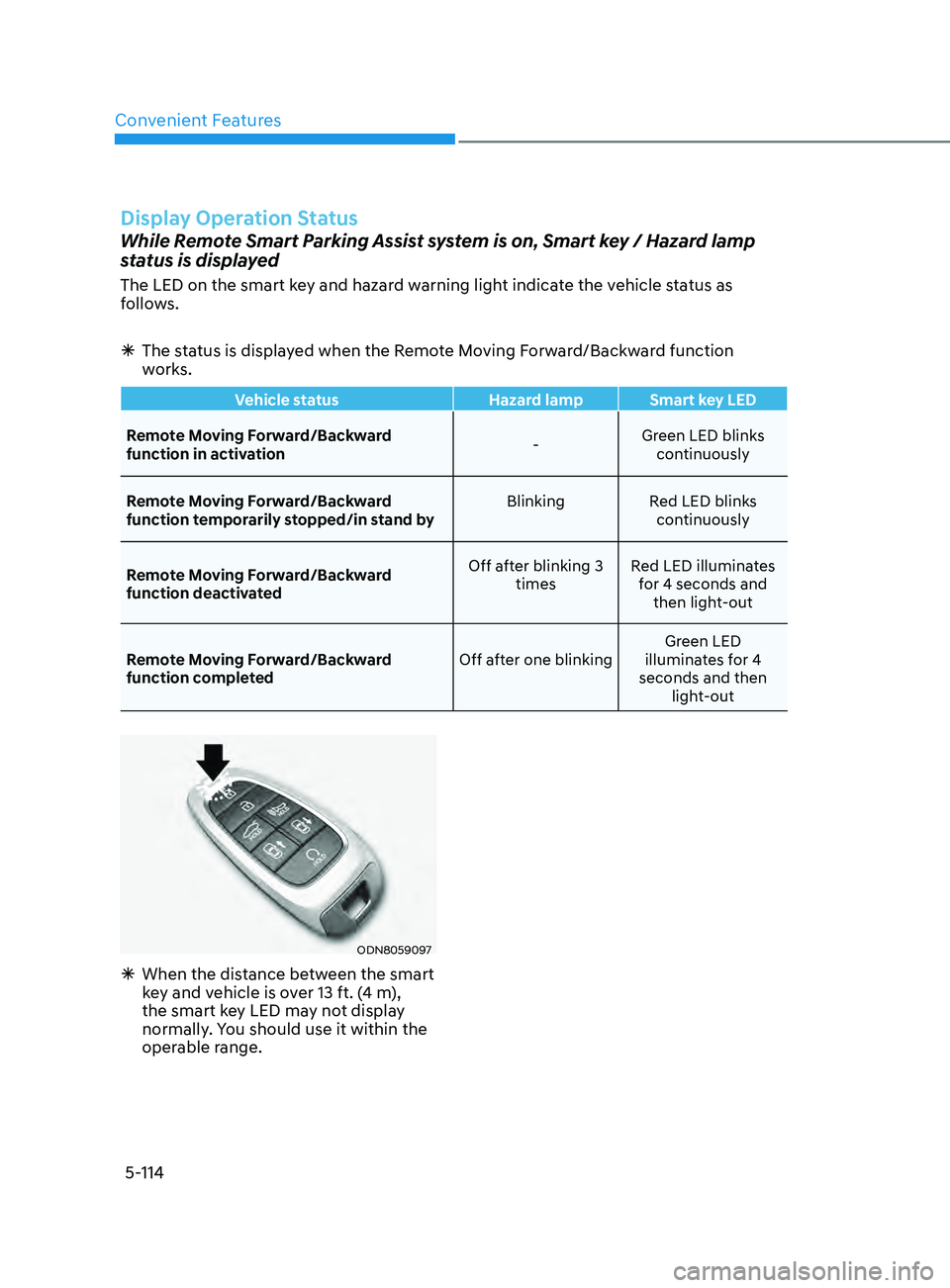
Display Operation Status
While Remote Smart Parking Assist system is on, Smart key / Hazard lamp
status is displayed
The LED on the smart key and hazard warning light indicate the vehicle status as
follows.
ÃThe s
tatus is displayed when the Remote Moving Forward/Backward function
works.
Vehicle status Hazard lamp Smart key LED
Remote Moving Forward/Backward
function in activation -Green LED blinks
continuously
Remote Moving Forward/Backward
function temporarily stopped/in stand by Blinking
Red LED blinks
continuously
Remote Moving Forward/Backward
function deactivated Off after blinking 3
times Red LED illuminates
for 4 seconds and then light-out
Remote Moving Forward/Backward
function completed Off after one blinkingGreen LED
illuminates for 4
seconds and then light-out
ODN8059097
ÃWhen the dis tance between the smart
key and vehicle is over 13 ft. (4 m),
the smart key LED may not display
normally. You should use it within the
operable range.
Page 253 of 546
05
5-123
Information
Using the system primarily in Fresh mode
and Recirculation mode only when needed
is recommended for best results.
Prolonged operation of the heater in
Recirculation mode and without the A/C
ON can cause fogging of the windshield.
In addition, prolonged use of the A/C
ON in Recirculation mode may result in
excessively dry, dehumidified air in the
cabin.
WARNING
• Continued use of the climate control
system operation in Recirculation
mode for a prolonged period of
time may cause drowsiness to the
occupants in the cabin. This may lead
to loss of vehicle control which may
lead to an accident.
• Continued use of the climate control
system operation in Recirculation
mode with the A/C OFF may allow
humidity to increase inside the
cabin. This may cause condensation
to accumulate on the windshield and
obscure visibility.
• Do not sleep in your vehicle or
remain parked in your vehicle with
the windows up and either the
heater or the air conditioning ON for
prolonged periods of time. Doing so
may increase the levels of carbon
dioxide in the cabin which may lead
to serious injury or death.
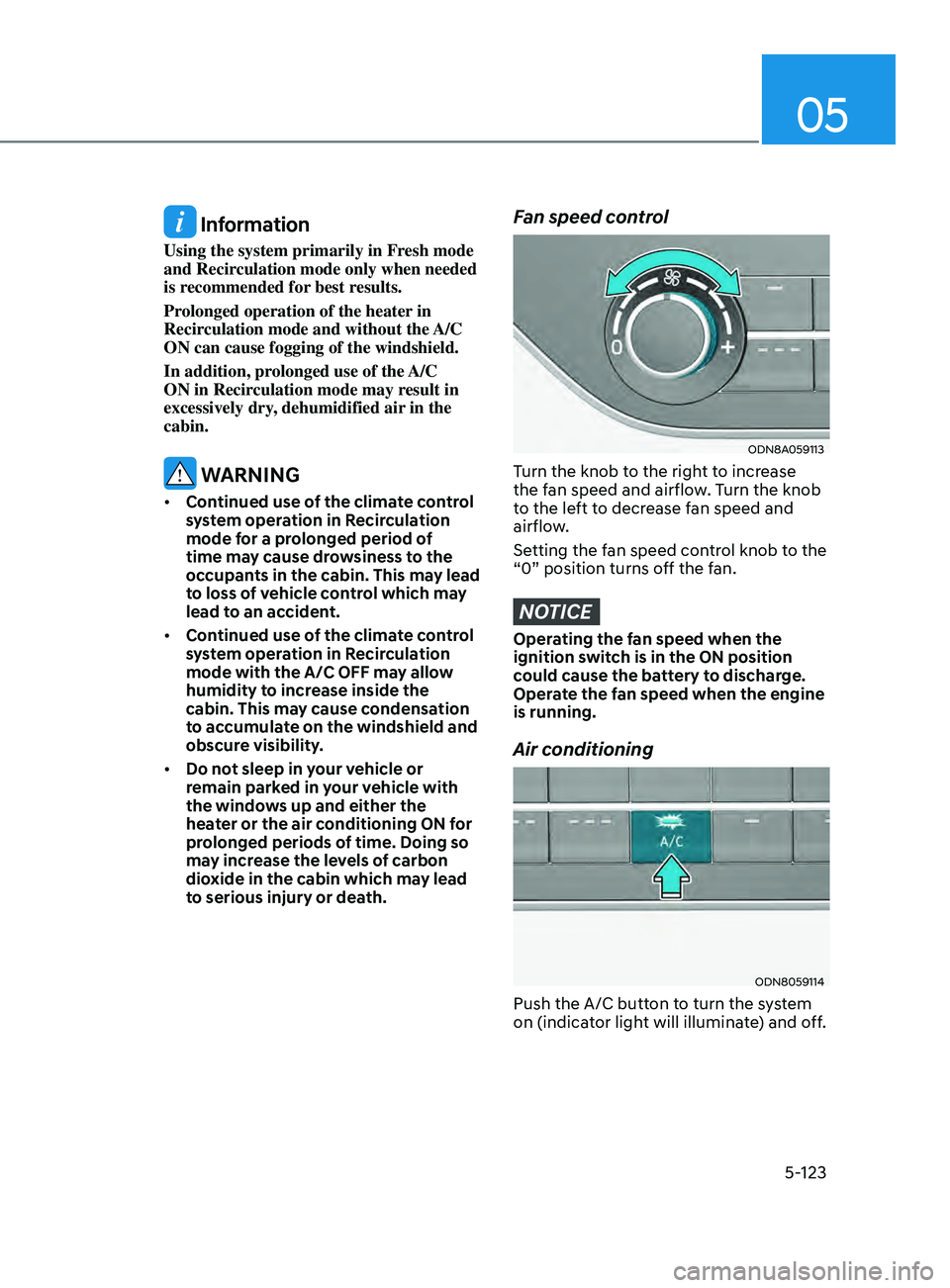
Fan speed control
ODN8A059113
Turn the knob to the right to increase
the fan speed and airflow. Turn the knob
to the left to decrease fan speed and
airflow.
Setting the fan speed control knob to the
“0” position turns off the fan.
NOTICE
Operating the fan speed when the
ignition switch is in the ON position
could cause the battery to discharge.
Operate the fan speed when the engine
is running.
Air conditioning
ODN8059114
Push the A/C button to turn the system
on (indicator light will illuminate) and off.
Page 255 of 546
05
5-125
Air conditioning system operation tips
• If the vehicle has been parked in
direct sunlight during hot weather,
open the windows for a short time
to let the hot air inside the vehicle
escape.
• After sufficient cooling has been
achieved, switch back from the
recirculated air to the fresh outside air
position.
• To help reduce moisture inside of
the windows on rainy or humid
days, decrease the humidity inside
the vehicle by operating the air
conditioning system with the windows
and sunroof closed.
• Use the air conditioning system
every month only for a few minutes
to ensure maximum system
performance.
• If you operate air conditioner
excessively, the difference between
the temperature of the outside air and
that of the windshield could cause
the outer surface of the windshield
to fog up, causing loss of visibility. In
this case, set the mode selection knob
or button to the
position and fan
speed control to the lower speed.
System Maintenance
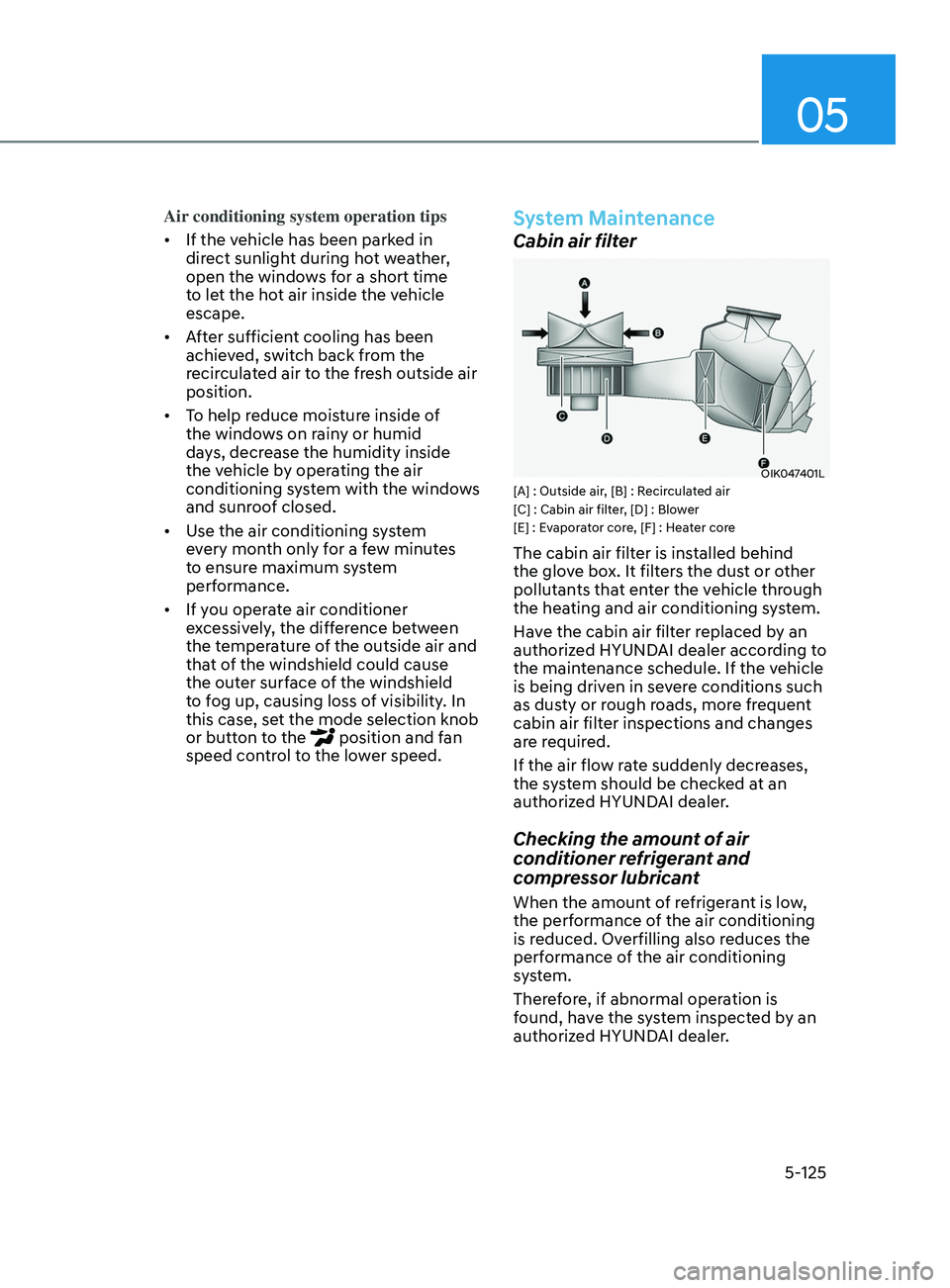
Cabin air filter
OIK047401L[A] : Outside air, [B] : Recirculated air
[C] : Cabin air filter, [D] : Blower
[E] : Evaporator core, [F] : Heater core
The cabin air filter is installed behind
the glove box. It filters the dust or other
pollutants that enter the vehicle through
the heating and air conditioning system.
Have the cabin air filter replaced by an
authorized HYUNDAI dealer according to
the maintenance schedule. If the vehicle
is being driven in severe conditions such
as dusty or rough roads, more frequent
cabin air filter inspections and changes
are required.
If the air flow rate suddenly decreases,
the system should be checked at an
authorized HYUNDAI dealer.
Checking the amount of air
conditioner refrigerant and
compressor lubricant
When the amount of refrigerant is low,
the performance of the air conditioning
is reduced. Overfilling also reduces the
performance of the air conditioning
system.
Therefore, if abnormal operation is
found, have the system inspected by an
authorized HYUNDAI dealer.
Page 259 of 546
05
5-129
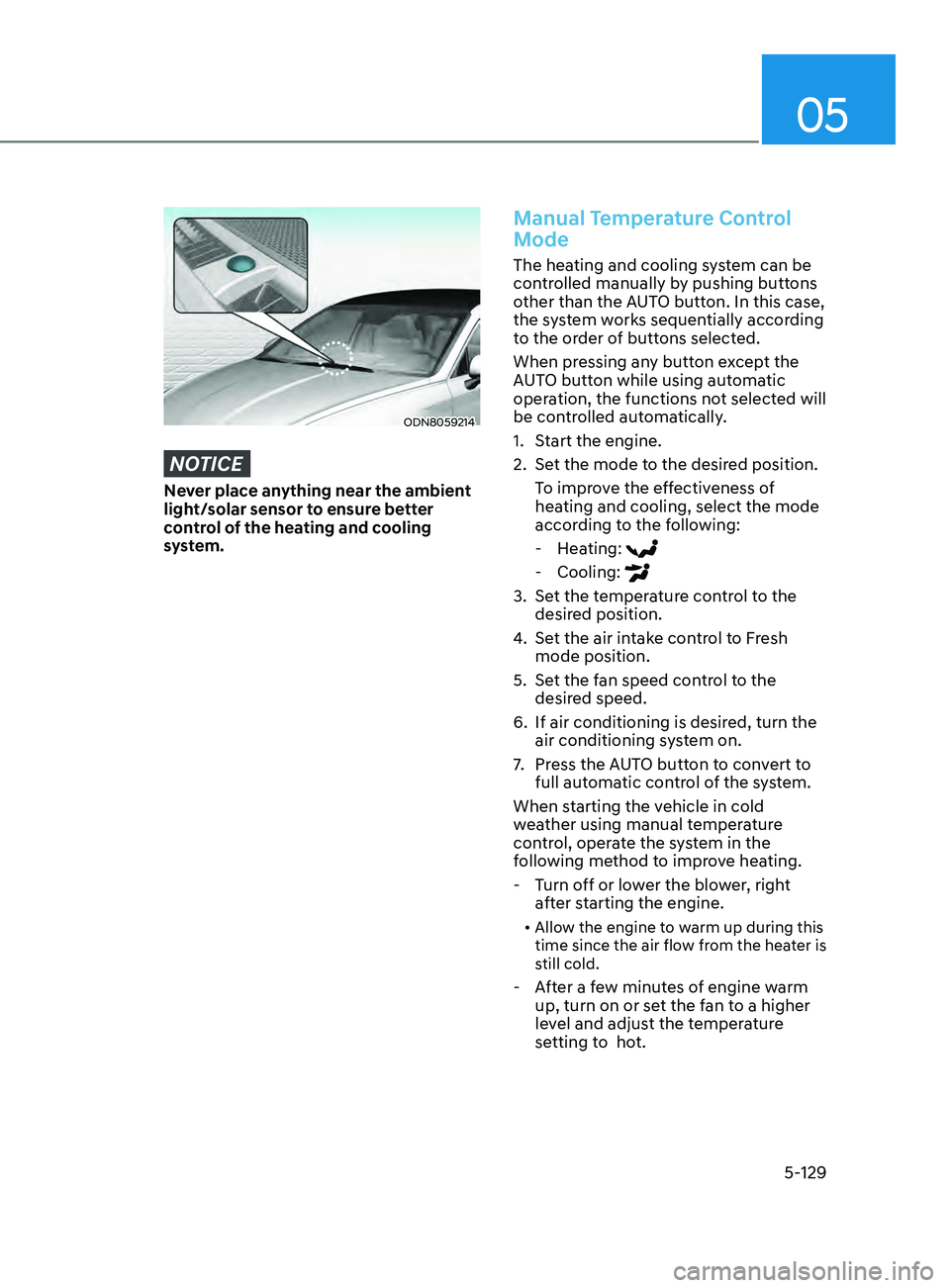
ODN8059214
NOTICE
Never place anything near the ambient
light/solar sensor to ensure better
control of the heating and cooling
system.
Manual Temperature Control
Mode
The heating and cooling system can be
controlled manually by pushing buttons
other than the AUTO button. In this case,
the system works sequentially according
to the order of buttons selected.
When pressing any button except the
AUTO button while using automatic
operation, the functions not selected will
be controlled automatically.
1.
S
tart the engine.
2.
Se
t the mode to the desired position.
To improve the effectiveness of
heating and cooling, select the mode
according to the following:
- H
eating:
- Cooling:
3. Set the temperature control to the desired position.
4.
Se
t the air intake control to Fresh
mode position.
5.
Se
t the fan speed control to the
desired speed.
6.
If air conditioning is desir
ed, turn the
air conditioning system on.
7.
Pr
ess the AUTO button to convert to
full automatic control of the system.
When starting the vehicle in cold
weather using manual temperature
control, operate the system in the
following method to improve heating.
- T
urn off or lower the blower, right
after starting the engine.
• Allow the engine to warm up during this
time since the air flow from the heater is
still cold.
- After a few minutes of engine warm
up, turn on or set the fan to a higher
level and adjust the temperature
setting to hot.
Page 264 of 546
Convenient Features
5-134
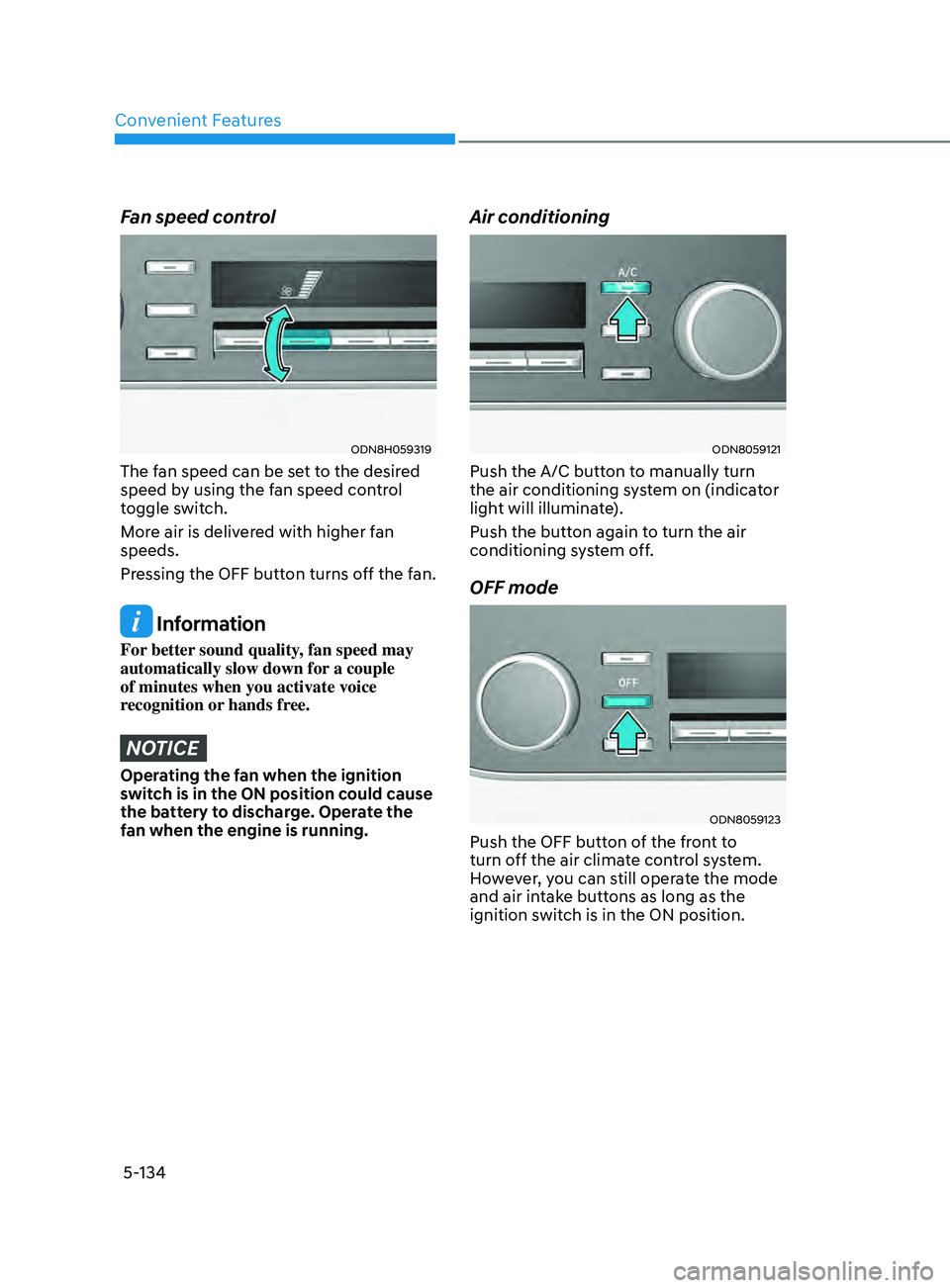
Fan speed control
ODN8H059319
The fan speed can be set to the desired
speed by using the fan speed control
toggle switch.
More air is delivered with higher fan
speeds.
Pressing the OFF button turns off the fan.
Information
For better sound quality, fan speed may
automatically slow down for a couple
of minutes when you activate voice
recognition or hands free.
NOTICE
Operating the fan when the ignition
switch is in the ON position could cause
the battery to discharge. Operate the
fan when the engine is running.
Air conditioning
ODN8059121
Push the A/C button to manually turn
the air conditioning system on (indicator
light will illuminate).
Push the button again to turn the air
conditioning system off.
OFF mode
ODN8059123
Push the OFF button of the front to
turn off the air climate control system.
However, you can still operate the mode
and air intake buttons as long as the
ignition switch is in the ON position.