2021 HYUNDAI SONATA seat position
[x] Cancel search: seat positionPage 131 of 546

5. Convenient Features
Convenient Features
Accessing Your Vehicle ........................................................................\
..........5-4Remote Key ........................................................................\
...................................... 5-4
Smart K ey ........................................................................\
.......................................... 5 -7
Immobilizer System
........................................................................\
........................ 5-14
Hyundai Digital Key
........................................................................\
......................... 5-15
Door Locks ........................................................................\
............................. 5- 31Operating Door Locks from Outside the Vehicle ..................................................5- 31
Operating Door Locks from Inside the Vehicle ....................................................5-32
Automatic Door Lock and Unlock Features
..........................................................5-34
Child-Protector Rear Door Locks
........................................................................\
.. 5-
35
Rear Occupant Alert (ROA) System
....................................................................... 5-36
Vehicle Auto-Shut Off Function
........................................................................\
.... 5-
37
Theft-Alarm System ........................................................................\
.............5- 38
Driver Position Memory System ................................................................. 5-39
Storing Positions into Memory ........................................................................\
..... 5- 39
Recalling Positions from Memory ........................................................................\
. 5-40
R
esetting the Driver’s Seat Memory System ........................................................5-40
Easy Access Function
........................................................................\
...................... 5-41
Steering Wheel ........................................................................\
.....................5-42Electric Power Steering (EPS) ........................................................................\
........5-42
Tilt S teering / Telescope Steering ........................................................................\
. 5-43
H
eated Steering Wheel ........................................................................\
.................. 5-44
Horn........................................................................\
................................................. 5-45
Mirrors ........................................................................\
.................................. 5-46Inside Rearview Mirror ........................................................................\
...................5-46
Side Vie w Mirrors ........................................................................\
........................... 5-53
Reverse Parking Aid Function
........................................................................\
........ 5-55
Windows ........................................................................\
............................... 5-56Power Windows ........................................................................\
..............................5-57
Panoramic Sunroof ........................................................................\
..............5-60Sunshade ........................................................................\
......................................... 5-61
Sliding the Sunr oof ........................................................................\
.......................... 5-61
Tilting the Sunroof
........................................................................\
.......................... 5-61
Closing the Sunroof
........................................................................\
....................... 5-62
Resetting the Sunroof
........................................................................\
.................... 5-63
Sunroof Open Warning
........................................................................\
.................. 5-63
Exterior Features ........................................................................\
..................5-64Hood ........................................................................\
................................................ 5-64
T runk ........................................................................\
................................................ 5-65
Emergency Trunk Safety Release
........................................................................\
.. 5-66
Fuel Filler Door
........................................................................\
............................... 5-70
5
Page 148 of 546
Convenient Features
5-18
Set up main vehicle
You can manage multiple digital keys
from the Digital key app. From the list of
digital keys you own, select the vehicle
you want to make your priority vehicle.
For more information, please refer to
the ‘Tutorial’ on your Digital key app.
ODN8059237
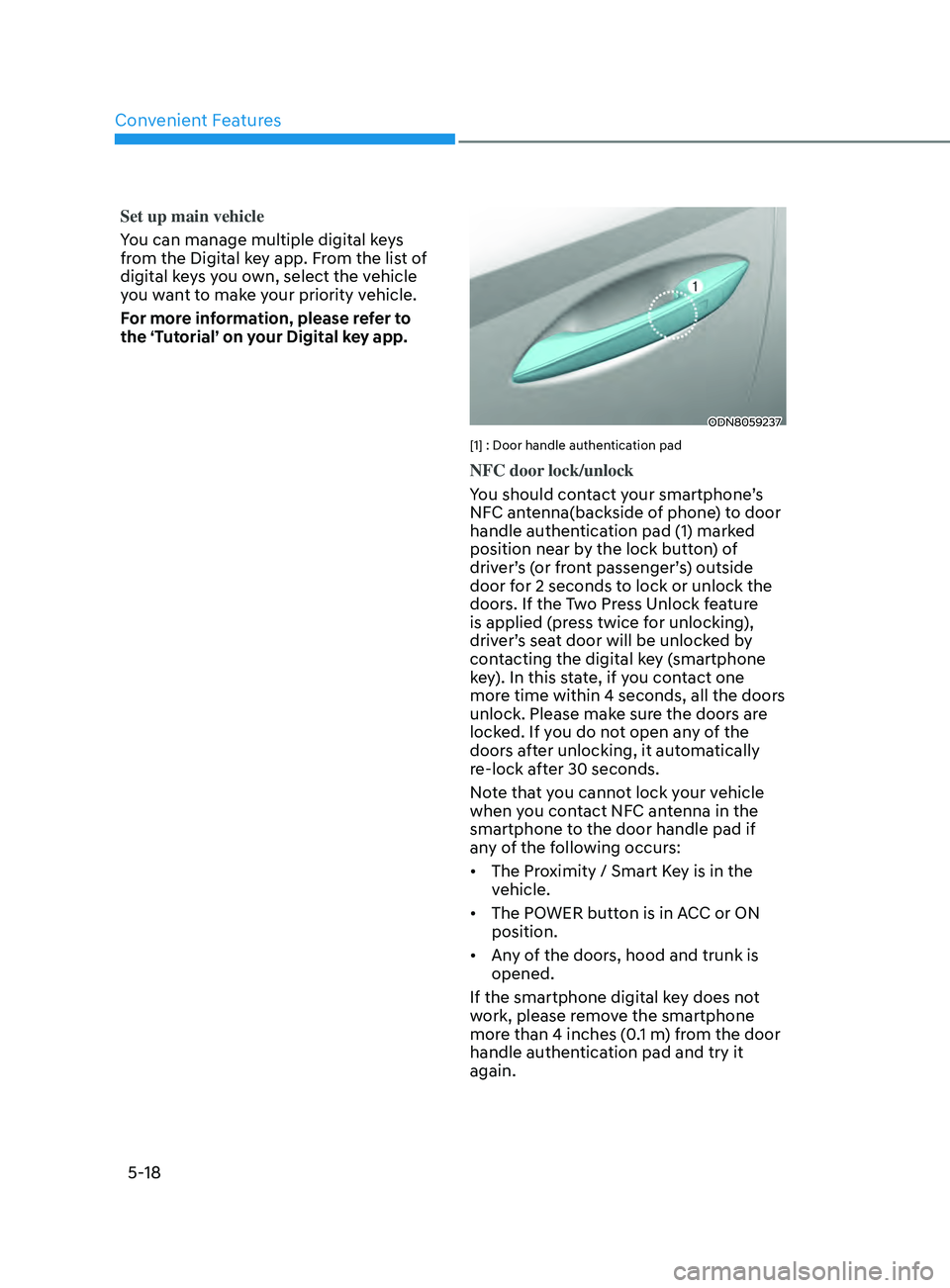
[1] : Door handle authentication pad
NFC door lock/unlock
You should contact your smartphone’s
NFC antenna(backside of phone) to door
handle authentication pad (1) marked
position near by the lock button) of
driver’s (or front passenger’s) outside
door for 2 seconds to lock or unlock the
doors. If the Two Press Unlock feature
is applied (press twice for unlocking),
driver’s seat door will be unlocked by
contacting the digital key (smartphone
key). In this state, if you contact one
more time within 4 seconds, all the doors
unlock. Please make sure the doors are
locked. If you do not open any of the
doors after unlocking, it automatically
re-lock after 30 seconds.
Note that you cannot lock your vehicle
when you contact NFC antenna in the
smartphone to the door handle pad if
any of the following occurs:
• The Proximity / Smart Key is in the
vehicle.
• The POWER button is in ACC or ON
position.
• Any of the doors, hood and trunk is
opened.
If the smartphone digital key does not
work, please remove the smartphone
more than 4 inches (0.1 m) from the door
handle authentication pad and try it
again.
Page 155 of 546
05
5-25
• To delete the saved digital key (card
key), the smart key must be exist
inside the vehicle.
• The deleted digital key (card key) can
be re-registered before registering a
new digital key (card key).
• If you try to register a new digital key
(card key), the previously registered
digital key (card key) cannot be used
again.
ODN8059237
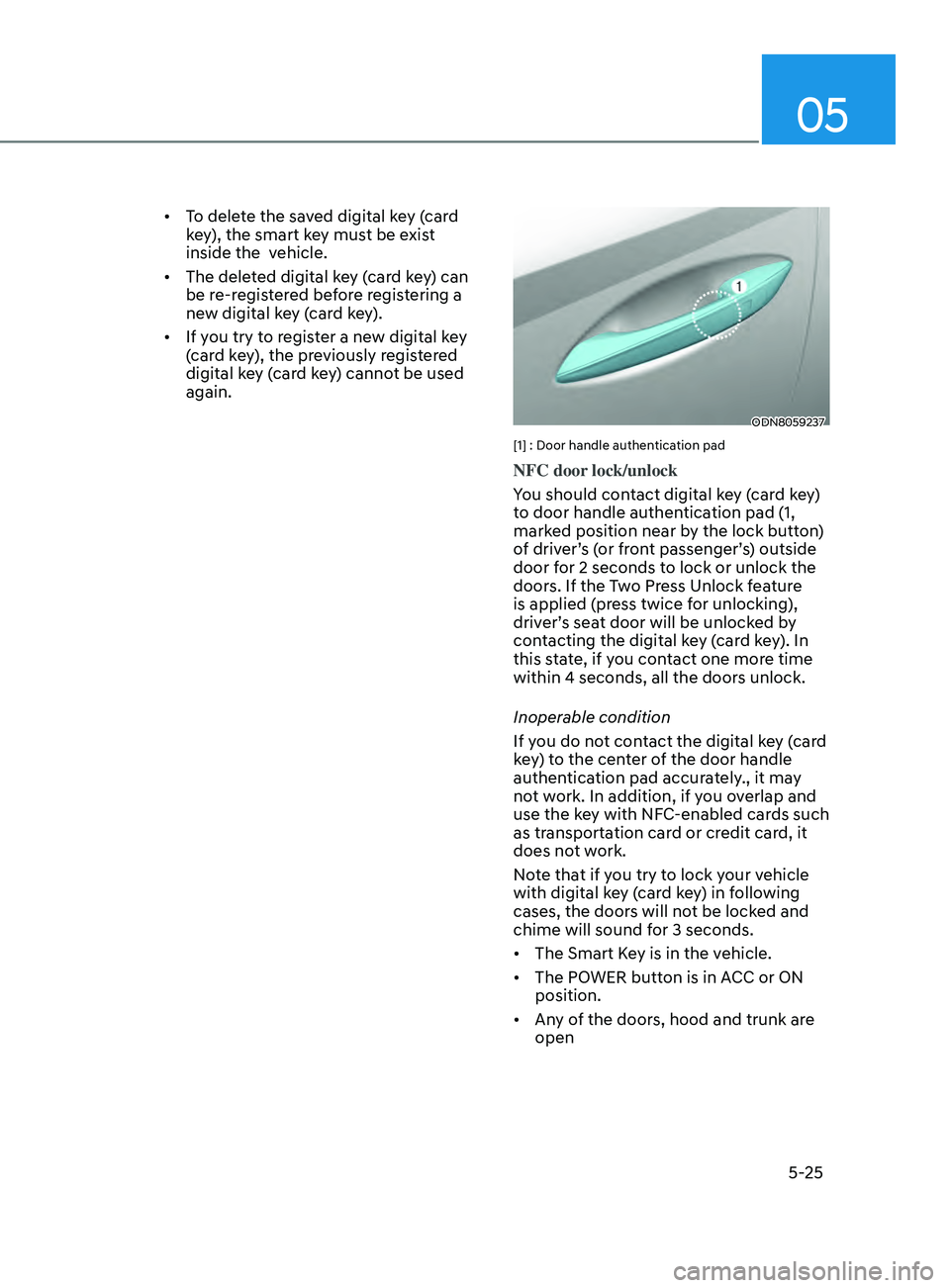
[1] : Door handle authentication pad
NFC door lock/unlock
You should contact digital key (card key)
to door handle authentication pad (1,
marked position near by the lock button)
of driver’s (or front passenger’s) outside
door for 2 seconds to lock or unlock the
doors. If the Two Press Unlock feature
is applied (press twice for unlocking),
driver’s seat door will be unlocked by
contacting the digital key (card key). In
this state, if you contact one more time
within 4 seconds, all the doors unlock.
Inoperable condition
If you do not contact the digital key (card
key) to the center of the door handle
authentication pad accurately., it may
not work. In addition, if you overlap and
use the key with NFC-enabled cards such
as transportation card or credit card, it
does not work.
Note that if you try to lock your vehicle
with digital key (card key) in following
cases, the doors will not be locked and
chime will sound for 3 seconds.
• The Smart Key is in the vehicle.
• The POWER button is in ACC or ON
position.
• Any of the doors, hood and trunk are
open
Page 160 of 546
Convenient Features
5-30
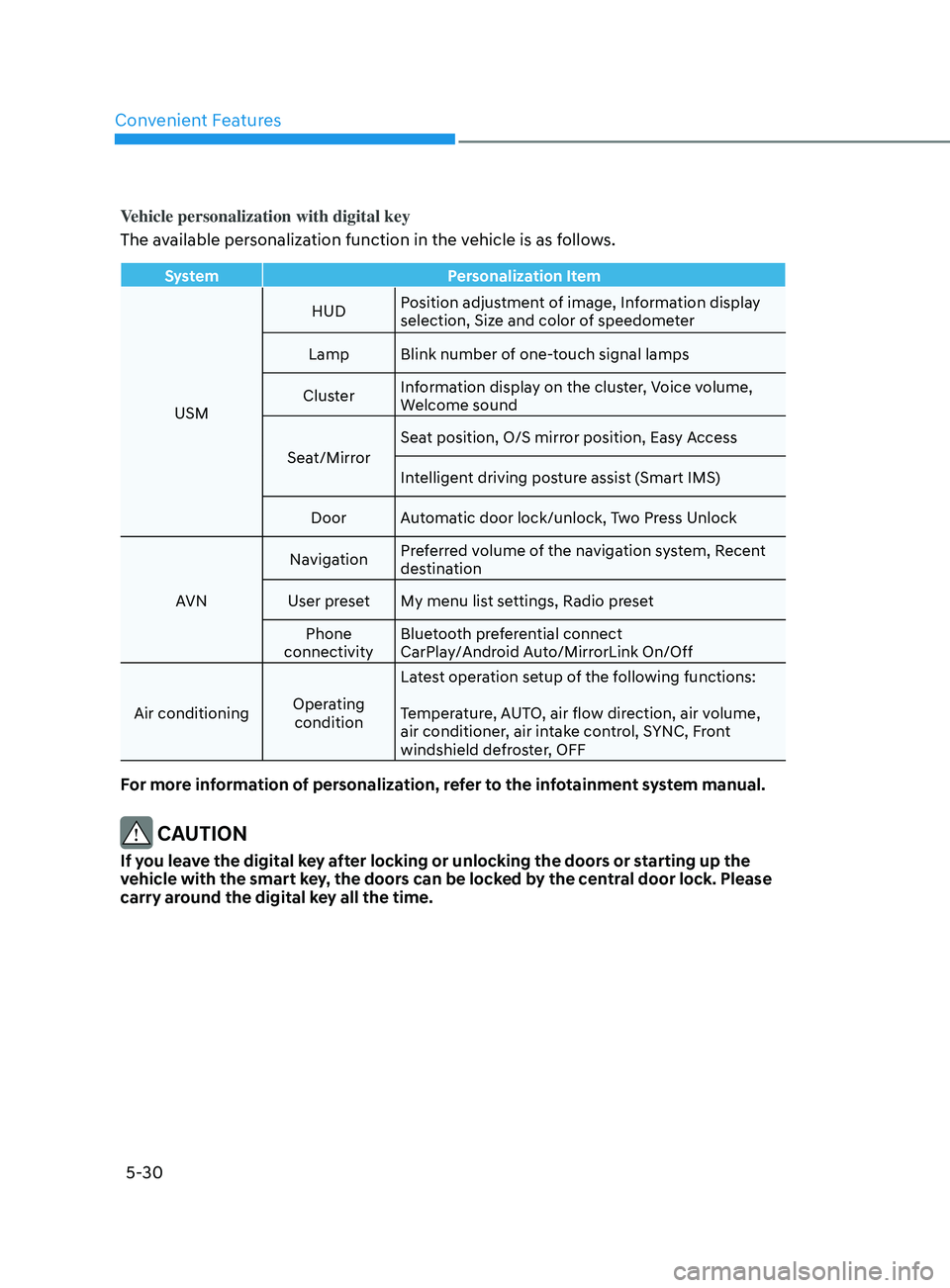
Vehicle personalization with digital key
The available personalization function in the vehicle is as follows.
SystemPersonalization Item
USM HUD
Position adjustment of image, Information display
selection, Size and color of speedometer
Lamp Blink number of one-touch signal lamps
Cluster Information display on the cluster, Voice volume,
Welcome sound
Seat/Mirror Seat position, O/S mirror position, Easy Access
Intelligent driving posture assist (Smart IMS)
Door Automatic door lock/unlock, Two Press Unlock
AVN Navigation
Preferred volume of the navigation system, Recent
destination
User preset My menu list settings, Radio preset Phone
connectivity Bluetooth preferential connect
CarPlay/Android Auto/MirrorLink On/Off
Air conditioning Operating
condition Latest operation setup of the following functions:
Temperature, AUTO, air flow direction, air volume,
air conditioner, air intake control, SYNC, Front
windshield defroster, OFF
For more information of personalization, refer to the infotainment system manual.
CAUTION
If you leave the digital key after locking or unlocking the doors or starting up the
vehicle with the smart key, the doors can be locked by the central door lock. Please
carry around the digital key all the time.
Page 165 of 546
05
5-35
Child-Protector Rear Door Locks
ODN8059015L
The child safety lock is provided to help
prevent children seated in the rear from
accidentally opening the rear doors. The
rear door safety locks should be used
whenever children are in the vehicle.
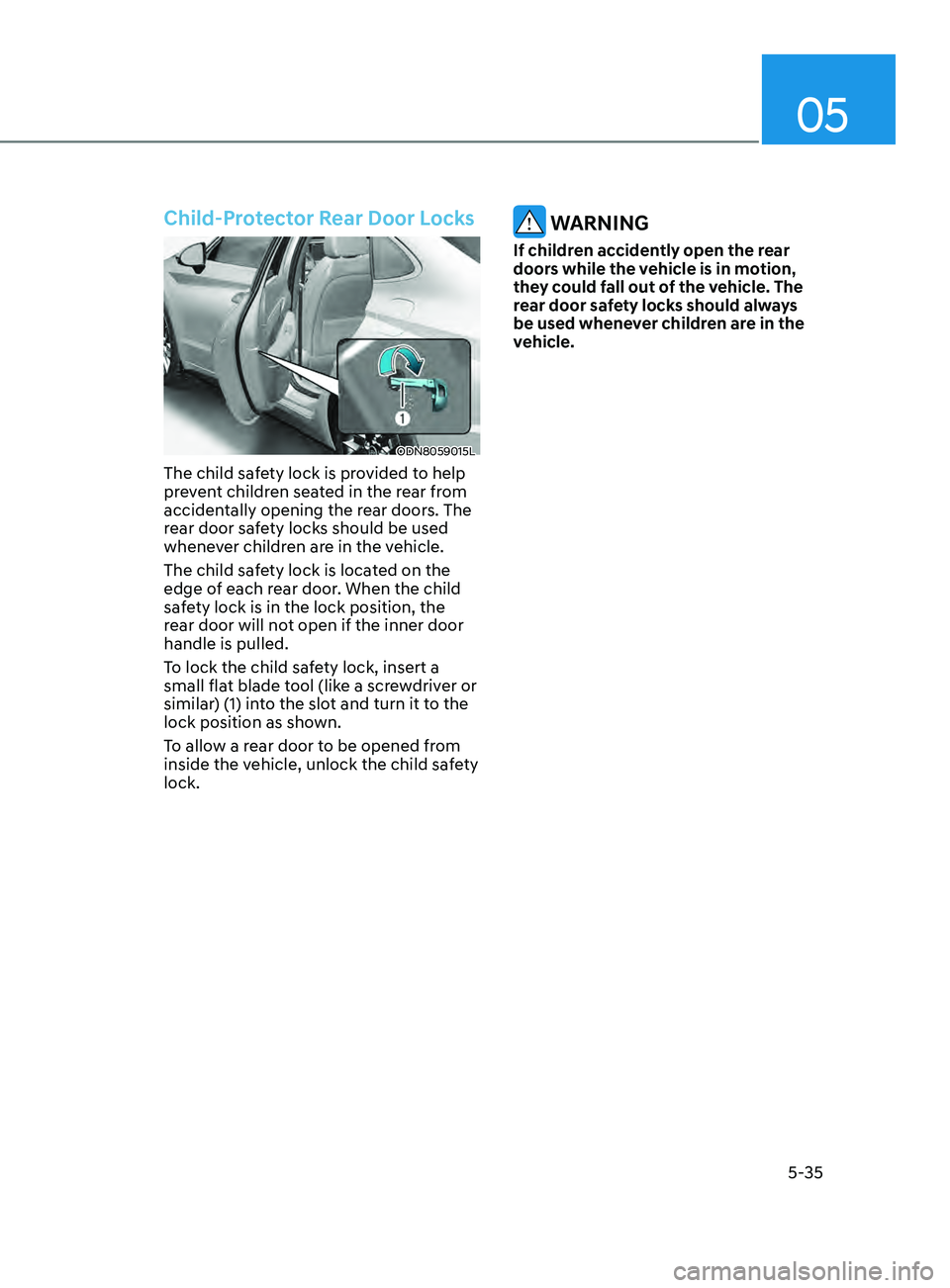
The child safety lock is located on the
edge of each rear door. When the child
safety lock is in the lock position, the
rear door will not open if the inner door
handle is pulled.
To lock the child safety lock, insert a
small flat blade tool (like a screwdriver or
similar) (1) into the slot and turn it to the
lock position as shown.
To allow a rear door to be opened from
inside the vehicle, unlock the child safety
lock.
WARNING
If children accidently open the rear
doors while the vehicle is in motion,
they could fall out of the vehicle. The
rear door safety locks should always
be used whenever children are in the
vehicle.
Page 167 of 546
05
5-37
WARNING
It does not use the actual sensors but it
provides the alarm sounds by checking
the rear door lock/unlock status as a
reminder.
Vehicle Auto-Shut Off Function
If your parked vehicle in a garage is on
for a period of time, the engine turns
off automatically to prevent carbon
monoxide poisoning.
System setting
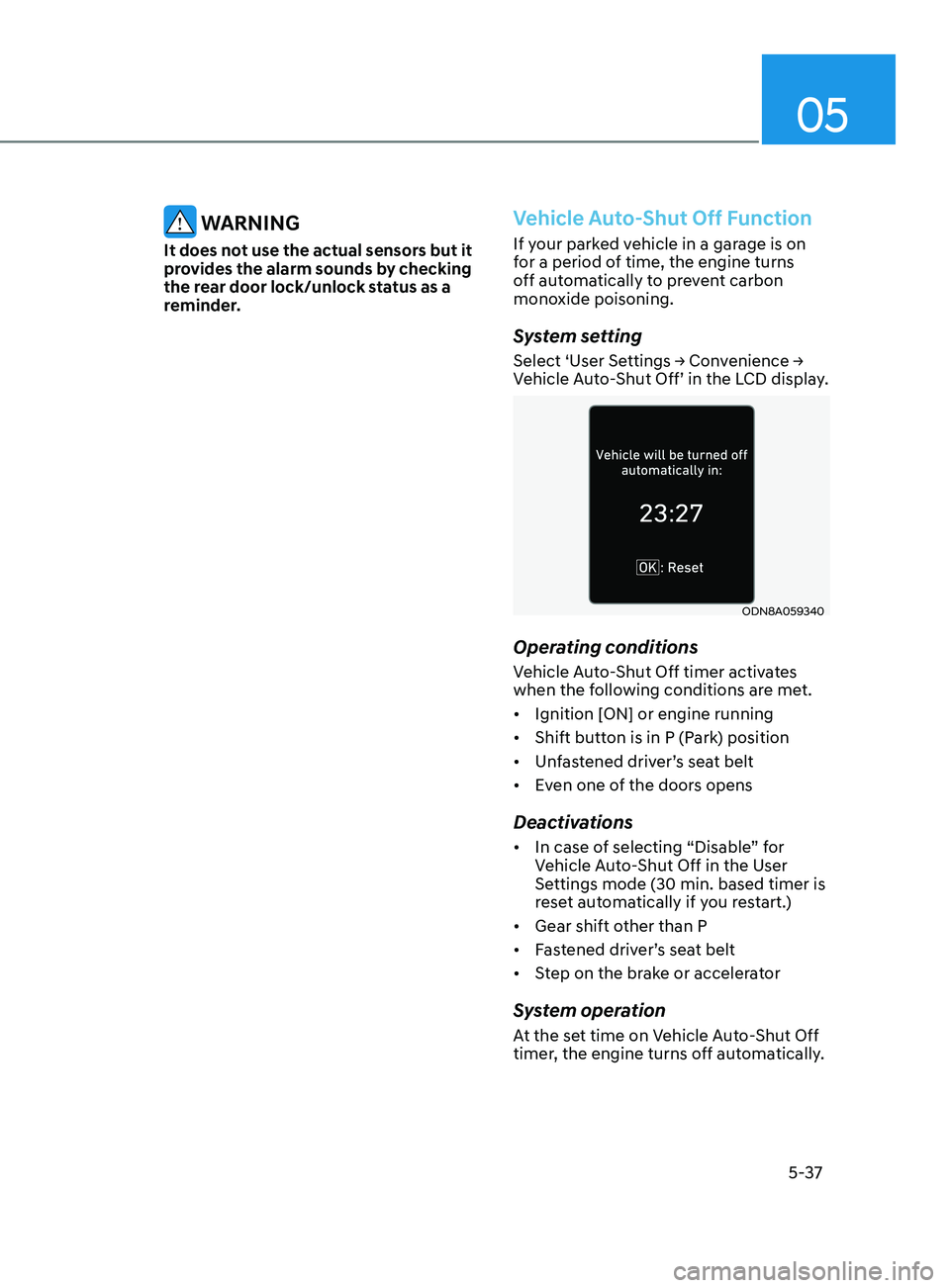
Select ‘User Settings → Convenience → Vehicle Auto-Shut Off’ in the LCD display.
ODN8A059340
Operating conditions
Vehicle Auto-Shut Off timer activates
when the following conditions are met.
• Ignition [ON] or engine running
• Shift button is in P (Park) position
• Unfastened driver’s seat belt
• Even one of the doors opens
Deactivations
• In case of selecting “Disable” for
Vehicle Auto-Shut Off in the User
Settings mode (30 min. based timer is
reset automatically if you restart.)
• Gear shift other than P
• Fastened driver’s seat belt
• Step on the brake or accelerator
System operation
At the set time on Vehicle Auto-Shut Off
timer, the engine turns off automatically.
Page 169 of 546
05
5-39
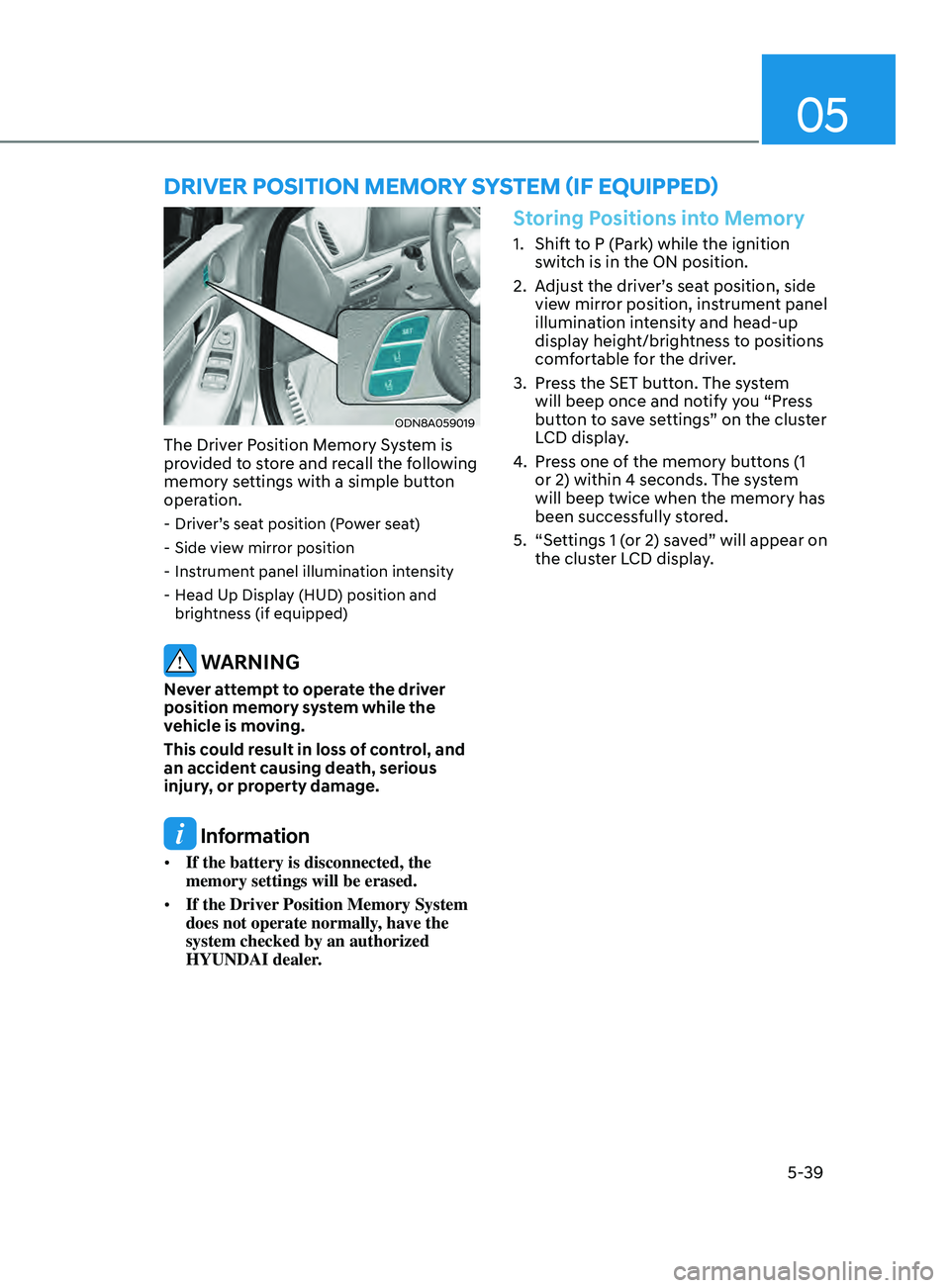
ODN8A059019
The Driver Position Memory System is
provided to store and recall the following
memory settings with a simple button
operation.
- Driver’s seat position (Power seat)
- Side vie
w mirror position
- Ins
trument panel illumination intensity
- H
ead Up Display (HUD) position and
brightness (if equipped)
WARNING
Never attempt to operate the driver
position memory system while the
vehicle is moving.
This could result in loss of control, and
an accident causing death, serious
injury, or property damage.
Information
• If the battery is disconnected, the
memory settings will be erased.
• If the Driver Position Memory System
does not operate normally, have the
system checked by an authorized
HYUNDAI dealer.
Storing Positions into Memory
1. Shift to P (Park) while the ignition
switch is in the ON position.
2.
A
djust the driver’s seat position, side
view mirror position, instrument panel
illumination intensity and head-up
display height/brightness to positions
comfortable for the driver.
3.
Pr
ess the SET button. The system
will beep once and notify you “Press
button to save settings” on the cluster
LCD display.
4.
Pr
ess one of the memory buttons (1
or 2) within 4 seconds. The system
will beep twice when the memory has
been successfully stored.
5.
“Se
ttings 1 (or 2) saved” will appear on
the cluster LCD display.
Driver poS i T ion memory SyS T em ( if eQU ippe D)
Page 170 of 546
Convenient Features
5-40
Recalling Positions from Memory
1. Shift to P (Park) while the ignition switch is in the ON position.
2.
Pr
ess the desired memory button
(1 or 2). The system will beep once,
and then the driver’s seat position,
side view mirror position, instrument
panel illumination intensity and
head-up display height/brightness
will automatically adjust to the stored
positions.
3.
“Se
ttings 1 (or 2) applied” will appear
on the cluster LCD display.
If your vehicle is equipped with
additional navigation, please refer to the
infotainment system manual separately
supplied.
Information
• While recalling the “1” memory
position, pressing the SET or 1 button
temporarily stops the adjustment of
the recalled memory position. Pressing
the 2 button recalls the “2” memory
position.
• While recalling the “2” memory
position, pressing the SET or 2 button
temporarily stops the adjustment of
the recalled memory position. Pressing
the 1 button recalls the “1” memory
position.
• While recalling the stored positions,
pressing one of the control buttons
for the driver’s seat, side view mirror,
instrument panel illumination or head-
up display will cause the movement of
that component to stop and move in
the direction that the control button is
pressed.
Resetting the Driver’s Seat
Memory System
Take the following procedures to reset
the driver’s seat memory system, when it
does not operate properly.
To reset the driver’s seat memory
system
1. Place the ignition s witch to the ON
position, shift to P (Park), and open
the driver’s door.
2.
Oper
ate the control switch to set
the driver’s seat and seatback to the
foremost position.
3.
Simultaneously pr
ess the SET button
and push forward the seat movement
switch over 2 seconds.
While resetting the driver’s seat
memory system
1. It starts with the notification sound.
2.
The driv
er’s seat and seatback is
adjusted to the rearward position with
the notification sound.
3.
The driv
er’s seat and seatback is
re-adjusted to the default position
(central position) with the notification
sound.
However, in the following cases, the
resetting procedure and the notification
sound may stop.
-
The memory butt
on is pressed.
-
The con
trol switch is operated.
-
The gear is shift
ed out of P (Park) .
-
The driving speed e
xceeds 2 mph (3
km/h).
-
The driv
er’s door is closed.