2021 HYUNDAI SANTA FE HYBRID door lock
[x] Cancel search: door lockPage 151 of 598
04
4-39
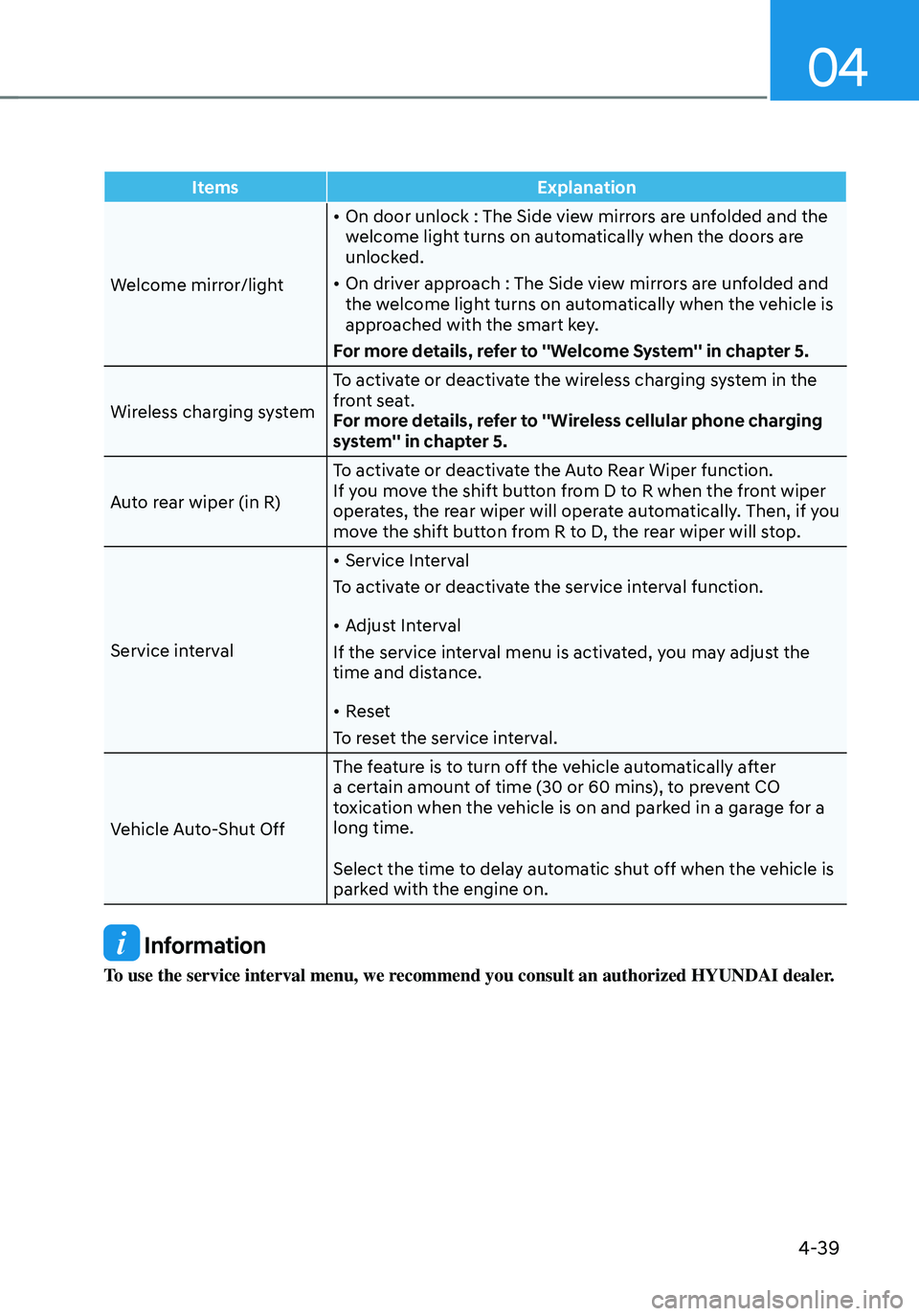
ItemsExplanation
Welcome mirror/light
• On door unlock : The Side view mirrors are unfolded and the
welcome light turns on automatically when the doors are
unlocked.
• On driver approach : The Side view mirrors are unfolded and
the welcome light turns on automatically when the vehicle is
approached with the smart key.
For more details, refer to ''Welcome System'' in chapter 5.
Wireless charging system To activate or deactivate the wireless charging system in the
front seat.
For more details, refer to ''Wireless cellular phone charging
system'' in chapter 5.
Auto rear wiper (in R) To activate or deactivate the Auto Rear Wiper function.
If you move the shift button from D to R when the front wiper
operates, the rear wiper will operate automatically. Then, if you
move the shift button from R to D, the rear wiper will stop.
Service interval
• Service Interval
To activate or deactivate the service interval function.
• Adjust Interval
If the service interval menu is activated, you may adjust the
time and distance.
• Reset
To reset the service interval.
Vehicle Auto-Shut Off The feature is to turn off the vehicle automatically after
a certain amount of time (30 or 60 mins), to prevent CO
toxication when the vehicle is on and parked in a garage for a
long time.
Select the time to delay automatic shut off when the vehicle is
parked with the engine on.
Information
To use the service interval menu, we recommend you consult an authorized HYUNDAI dealer.
Page 159 of 598

Convenient features
Accessing your vehicle ........................................................................\
.............5-4Smart key ........................................................................\
..............................................5-4
Immobilizer system ........................................................................\
............................5-10
Hyundai Digital Key ........................................................................\
.............................5-11
Door locks........................................................................\
................................. 5-27Operating door locks from outside the vehicle........................................................5-27
Operating door locks from inside the vehicle ..........................................................5-28
Auto door lock/unlock features ........................................................................\
......... 5-30
Electronic child safety lock
........................................................................\
...............5-30
Theft-alarm system ........................................................................\
.................5-32
Integrated memory system
........................................................................\
....5-33Storing memory positions ........................................................................\
.................5-33
Recalling memory positions ........................................................................\
..............5-34
Resetting the system ........................................................................\
.........................5-34
Easy access function ........................................................................\
..........................5-35
Steering wheel ........................................................................\
........................5-36Electric Power Steering (EPS) ........................................................................\
............5-36
Tilt / Telescopic steering ........................................................................\
....................5-37
Heated steering wheel ........................................................................\
.......................5-37
Horn ........................................................................\
..................................................... 5-38
Mirrors ........................................................................\
.....................................5-39Inside rearview mirror ........................................................................\
........................5-39
Side view mirrors ........................................................................\
...............................5-50
Reverse parking aid ........................................................................\
............................5-52
Windows ........................................................................\
..................................5-54Power windows ........................................................................\
..................................5-55
Panoramic sunroof ........................................................................\
..................5-58Sunshade ........................................................................\
............................................5-59
Sliding the sunroof ........................................................................\
.............................5-59
Tilting the sunroof ........................................................................\
.............................5-60
Closing the sunroof ........................................................................\
...........................5-60
Resetting the sunroof ........................................................................\
........................5-61
Sunroof open warning ........................................................................\
.......................5-62
5.Convenient features
5
Page 162 of 598
Convenient features
5-4
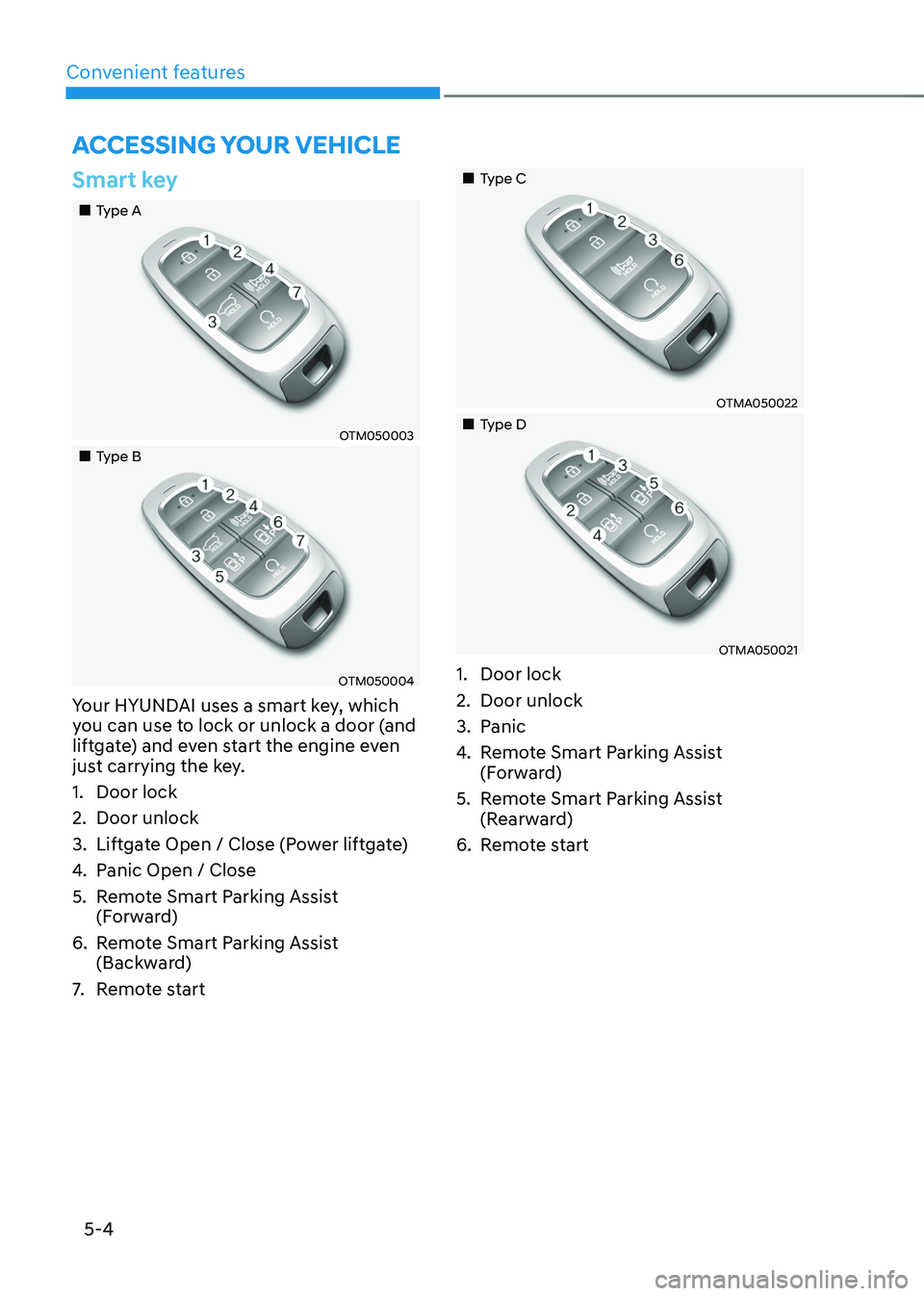
Smart key
„„Type A
OTM050003
„„Type B
OTM050004
Your HYUNDAI uses a smart key, which
you can use to lock or unlock a door (and
liftgate) and even start the engine even
just carrying the key.
1. Door lock
2. Door unlock
3. Liftgate Open / Close (Power liftgate)
4. Panic Open / Close
5. Remote Smart Parking Assist
(Forward)
6. Remote Smart Parking Assist
(Backward)
7. Remote start
„„Type C
OTMA050022
„„Type D
OTMA050021
1. Door lock
2. Door unlock
3. Panic
4. Remote Smart Parking Assist
(Forward)
5. Remote Smart Parking Assist
(Rearward)
6. Remote start
ACCESSING YOUR VEHICLE
Page 163 of 598
05
5-5
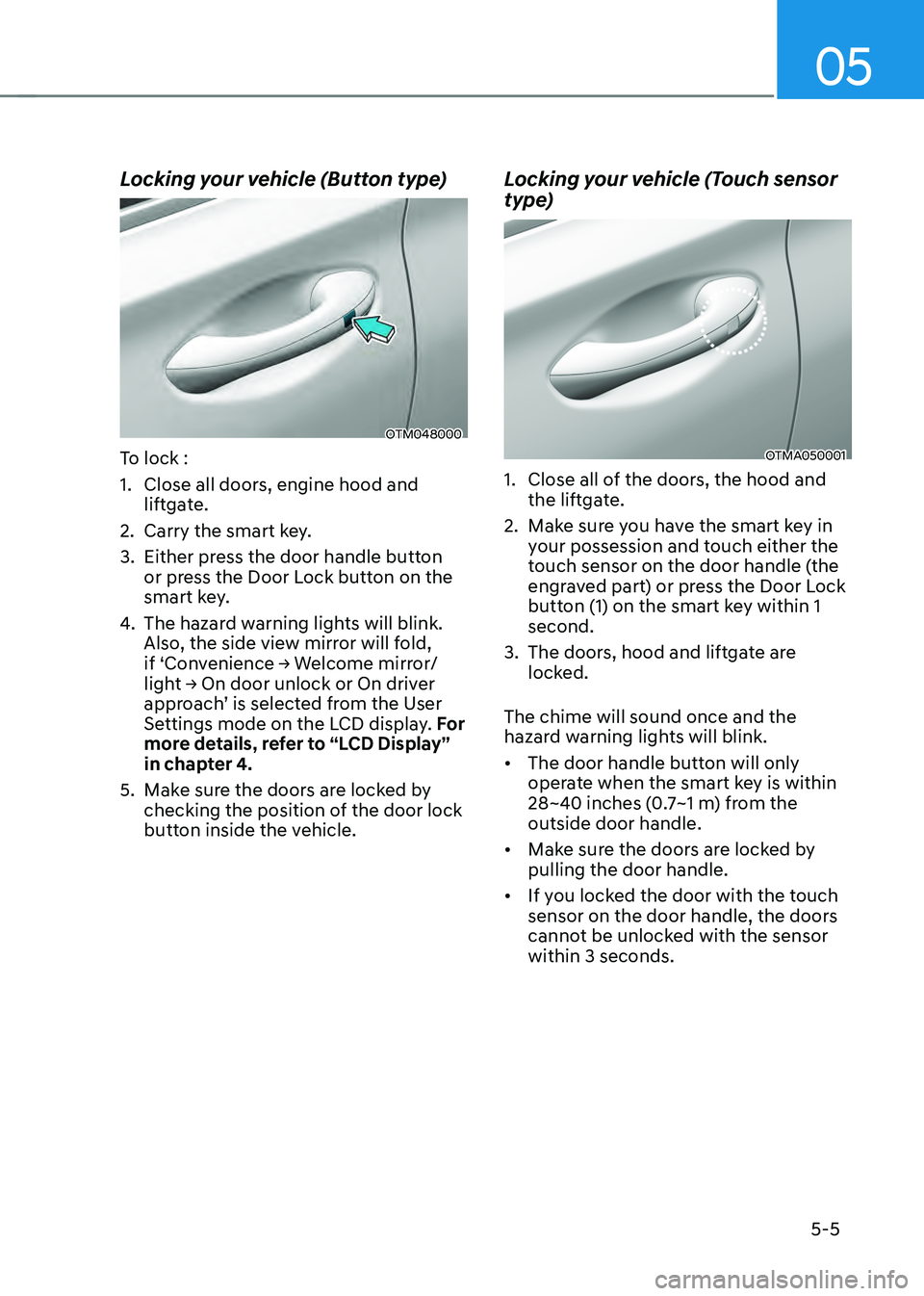
Locking your vehicle (Button type)
OTM048000
To lock :
1. Close all doors, engine hood and
liftgate.
2. Carry the smart key.
3. Either press the door handle button
or press the Door Lock button on the
smart key.
4. The hazard warning lights will blink.
Also, the side view mirror will fold,
if ‘Convenience → Welcome mirror/
light → On door unlock or On driver
approach’ is selected from the User
Settings mode on the LCD display. For
more details, refer to “LCD Display”
in chapter 4.
5. Make sure the doors are locked by
checking the position of the door lock
button inside the vehicle.
Locking your vehicle (Touch sensor
type)
OTMA050001
1. Close all of the doors, the hood and
the liftgate.
2. Make sure you have the smart key in
your possession and touch either the
touch sensor on the door handle (the
engraved part) or press the Door Lock
button (1) on the smart key within 1
second.
3. The doors, hood and liftgate are
locked.
The chime will sound once and the
hazard warning lights will blink.
• The door handle button will only
operate when the smart key is within
28~40 inches (0.7~1 m) from the
outside door handle.
• Make sure the doors are locked by
pulling the door handle.
• If you locked the door with the touch
sensor on the door handle, the doors
cannot be unlocked with the sensor
within 3 seconds.
Page 164 of 598
Convenient features
5-6
Even though you press the outside
door handle button, the doors will not
lock and the chime will sound for three
seconds if any of the following occur:
• The Smart Key is in the vehicle.
• The Engine Start/Stop button is in
ACC or ON position.
• Any door except the liftgate is open.
CAUTION
When you leave your vehicle with
the smart key, make sure to press the
button on the front door handle or
touch the touch sensor on the front
door handle to lock the doors after
close all of the doors, the hood and the
trunk. If you do not press the button
or touch the touch sensor firmly, the
doors might not be locked so please use
caution.
WARNING
Do not leave the Smart Key in your
vehicle with unsupervised children.
Unattended children could press the
Engine Start/ Stop button and may
operate power windows or other
controls, or even make the vehicle
move, which could result in serious
injury or death.
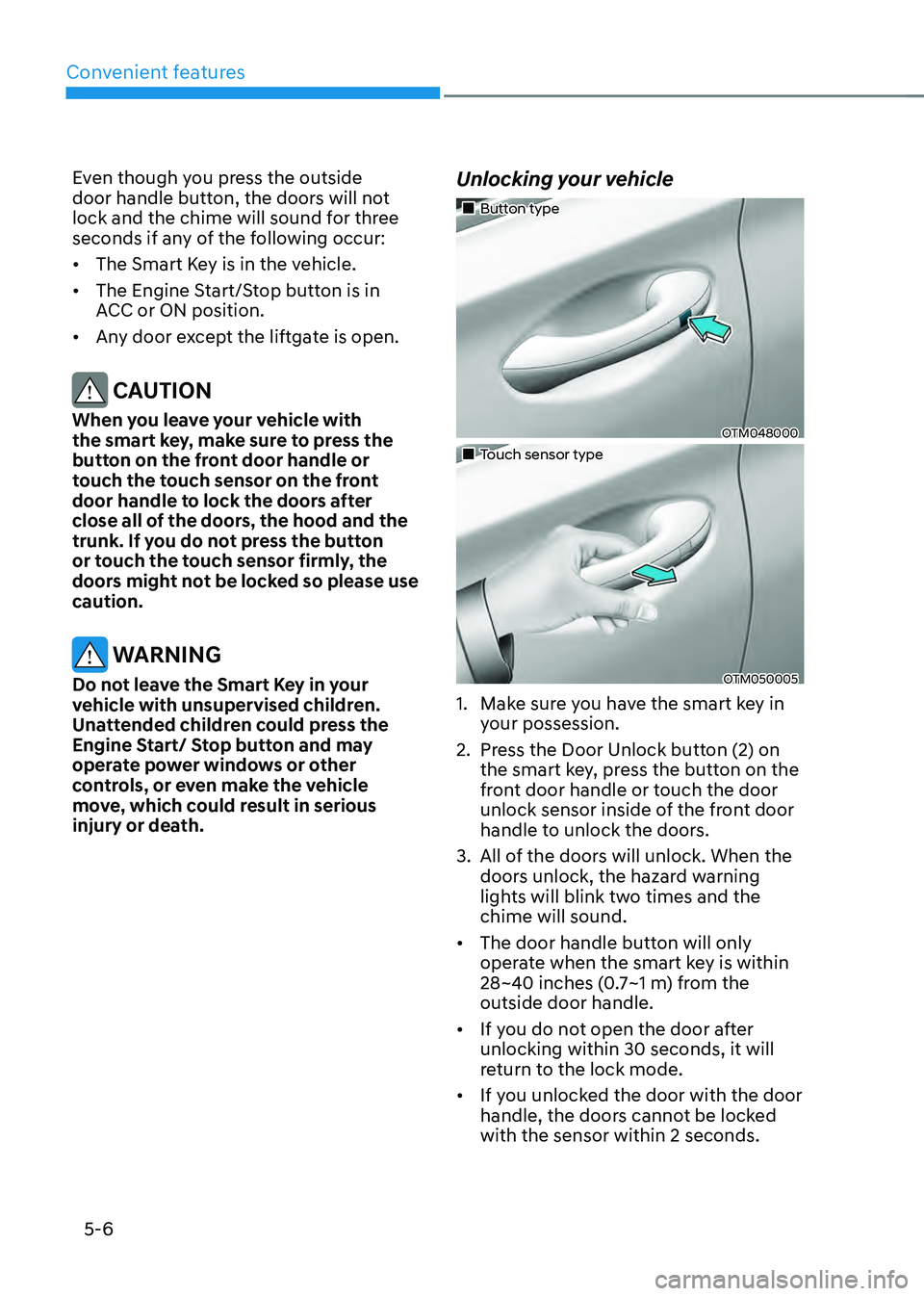
Unlocking your vehicle
„„Button type
OTM048000
„„Touch sensor type
OTM050005
1. Make sure you have the smart key in
your possession.
2. Press the Door Unlock button (2) on
the smart key, press the button on the
front door handle or touch the door
unlock sensor inside of the front door
handle to unlock the doors.
3. All of the doors will unlock. When the
doors unlock, the hazard warning
lights will blink two times and the
chime will sound.
• The door handle button will only
operate when the smart key is within
28~40 inches (0.7~1 m) from the
outside door handle.
• If you do not open the door after
unlocking within 30 seconds, it will
return to the lock mode.
• If you unlocked the door with the door
handle, the doors cannot be locked
with the sensor within 2 seconds.
Page 165 of 598
05
5 -7
Opening the liftgate
To open the liftgate:
1. Make sure you have the smart key in
your possession.
2. Press either the liftgate open/close
button on the vehicle or press and
hold the liftgate open button on the
smart key for more than one second.
The hazard warning lights will blink
two times and the liftgate will open.
Remotely starting vehicle (if
equipped)
You can start the vehicle using the
Remote Start button on the smart key.
To start the vehicle remotely:
1. Press the door lock button on the
smart key within 32 feet (10 m) from
the vehicle.
2. Press the Remote Start button for
more than 2 seconds within 4 seconds
after pressing the door lock button.
3. The hazard warning lights will blink
and the engine will start.
4. To turn off the remote start function,
press the Remote Start button once.
Information
• The vehicle must be in P (Park) for the
remote start function to start.
• The engine turns off if you get on the
vehicle without a registered smart key.
• The engine turns off if you do not get
on the vehicle within 10 minutes after
remotely starting the vehicle.
• The Remote Start button may not
operate if the smart key is not within 32
feet (10 m).
• The vehicle will not remotely start if the
engine hood or liftgate is opened.
• Do not idle the engine for a long period.
Remotely moving vehicle forward or
reverse (if equipped)
With the smart key, the driver can move
the vehicle forward or reverse using the
Forward or Reverse button on the smart
key.
For more details, refer to “Remote
Smart Parking Assist (RSPA)” section in
chapter 7.
Panic alarm
The horn sounds and the hazard warning
lights blink for about 30 seconds if this
button is pressed for more than 0.5
seconds. To stop the horn and lights,
press any button on the transmitter.
Start-up
You can start the vehicle without
inserting the key.
For more details, refer to the “Engine
Start/Stop Button” section in chapter 6.
Information
If the smart key is not moved for some
time, the detection function for smart key
operation will pause. Lift the smart key to
activate the detection again.
NOTICE
To prevent damaging the smart key:
• Keep the smart key in a cool,
dry place to avoid damage or
malfunction. Exposure to moisture
or high temperature may cause
the internal circuit of the smart key
to malfunction which may not be
covered under warranty.
• Avoid dropping or throwing the
smart key.
• Protect the smart key from extreme
temperatures.
Page 166 of 598
Convenient features
5-8
Mechanical key
If the Smart Key does not operate
normally, you can lock or unlock the
driver’s door by using the mechanical
key.
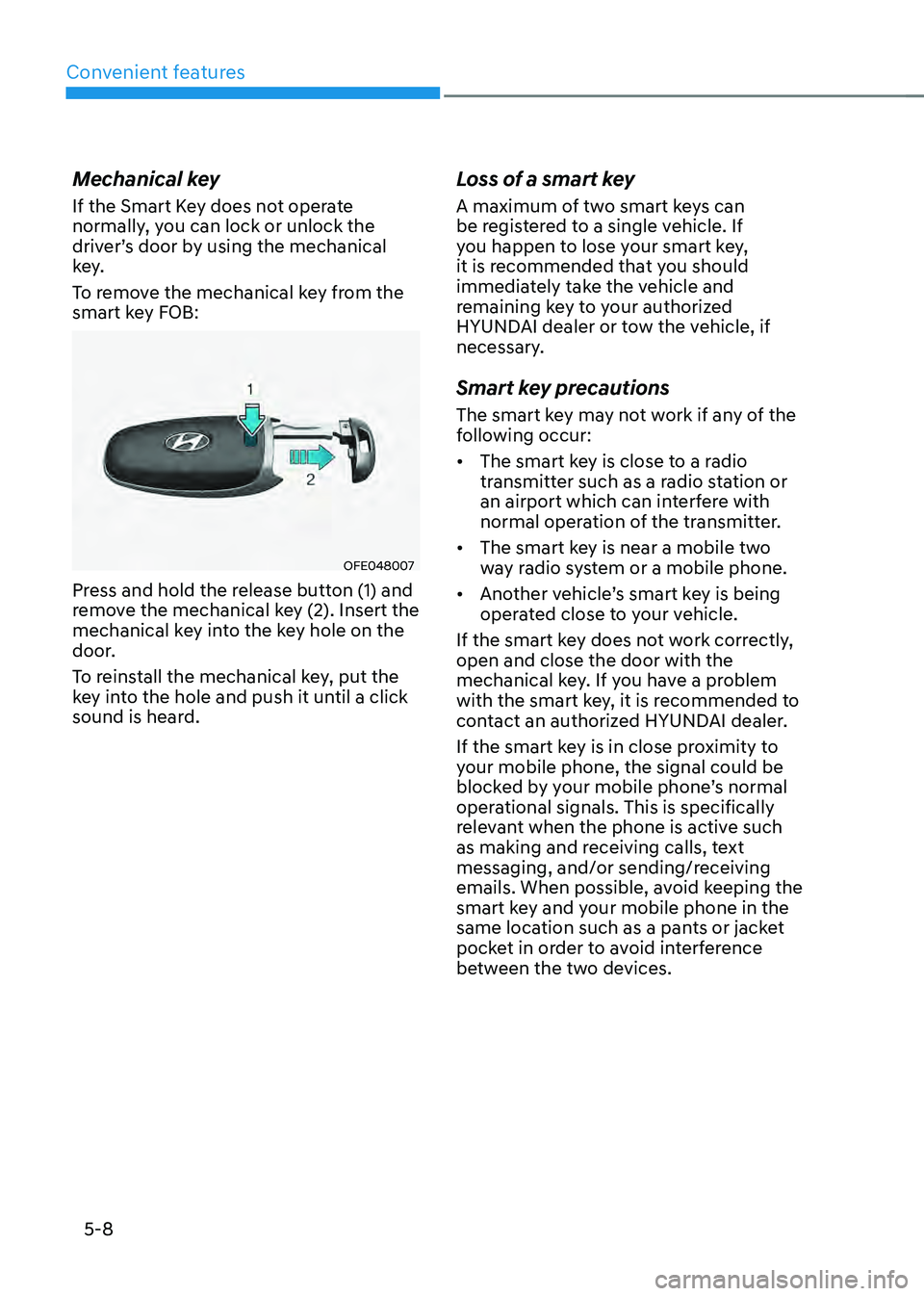
To remove the mechanical key from the
smart key FOB:
OFE048007
Press and hold the release button (1) and
remove the mechanical key (2). Insert the
mechanical key into the key hole on the
door.
To reinstall the mechanical key, put the
key into the hole and push it until a click
sound is heard.
Loss of a smart key
A maximum of two smart keys can
be registered to a single vehicle. If
you happen to lose your smart key,
it is recommended that you should
immediately take the vehicle and
remaining key to your authorized
HYUNDAI dealer or tow the vehicle, if
necessary.
Smart key precautions
The smart key may not work if any of the
following occur:
• The smart key is close to a radio
transmitter such as a radio station or
an airport which can interfere with
normal operation of the transmitter.
• The smart key is near a mobile two
way radio system or a mobile phone.
• Another vehicle’s smart key is being
operated close to your vehicle.
If the smart key does not work correctly,
open and close the door with the
mechanical key. If you have a problem
with the smart key, it is recommended to
contact an authorized HYUNDAI dealer.
If the smart key is in close proximity to
your mobile phone, the signal could be
blocked by your mobile phone’s normal
operational signals. This is specifically
relevant when the phone is active such
as making and receiving calls, text
messaging, and/or sending/receiving
emails. When possible, avoid keeping the
smart key and your mobile phone in the
same location such as a pants or jacket
pocket in order to avoid interference
between the two devices.
Page 169 of 598
05
5-11
Hyundai Digital Key
Digital Key Application
To use Hyundai Digital Key mobile app,
you should install Hyundai digital key
application. Search ‘Hyundai digital key’
in the Google Play Store and download
the app. Please refer to the detailed
manual of the digital key app. The option
can be found under the following app
menu:
Menu → Application Info → Tutorial
Please note the manual before using the
app.
ÃThis service is only available for
Android smartphones. Please confirm
supported/compatible devices on our
website.
WARNING
For used vehicle
If any of the digital key (smartphone key
or card key) is already registered when
you press ON button after unlocking the
doors, the message ‘Digital key(s) active’
appears on the instrument cluster once.
If you buy a used vehicle, you should
confirm the message and delete the
registered smartphone key and card key.
In addition, please notify the Hyundai
Customer Care Center.
If the card key does not work properly,
please delete the card key and register
the smartphone key and re-register the
card key.
For vehicle maintenance
If you need to have your Digital Key
System repaired or replaced please
ensure you Smartphone Key is still active.
You may have to pair your phone again.
In the case, re-initialize your Digital Keys
using the Hyundai Digital Key mobile app.
Digital key (smartphone) NFC
function
You can use the Digital Key NFC (Near
Field Communication) function after turn
your smartphone NFC settings on. And
you should unlock & turn on smartphone
screen to use it.
ÃTo change the NFC mode of the
smartphone, please refer to the
smartphone manual or contact
to the customer service center of
smartphone manufacturers.