2021 HYUNDAI SANTA FE HYBRID automatic transmission
[x] Cancel search: automatic transmissionPage 299 of 598
06
6-15
Shifter system malfunction! Service
immediately
The warning message appears on the
LCD display, when the transmission
or the shift button does not properly
operate in the P (Park) position.
In this case, we recommend you to
immediately have the vehicle inspected
by an authorized HYUNDAI dealer.
Check shift controls
The warning message appears on the
LCD display, when there is a malfunction
with transmission shift button.
In this case, we recommend you to
immediately have the vehicle inspected
by an authorized HYUNDAI dealer.
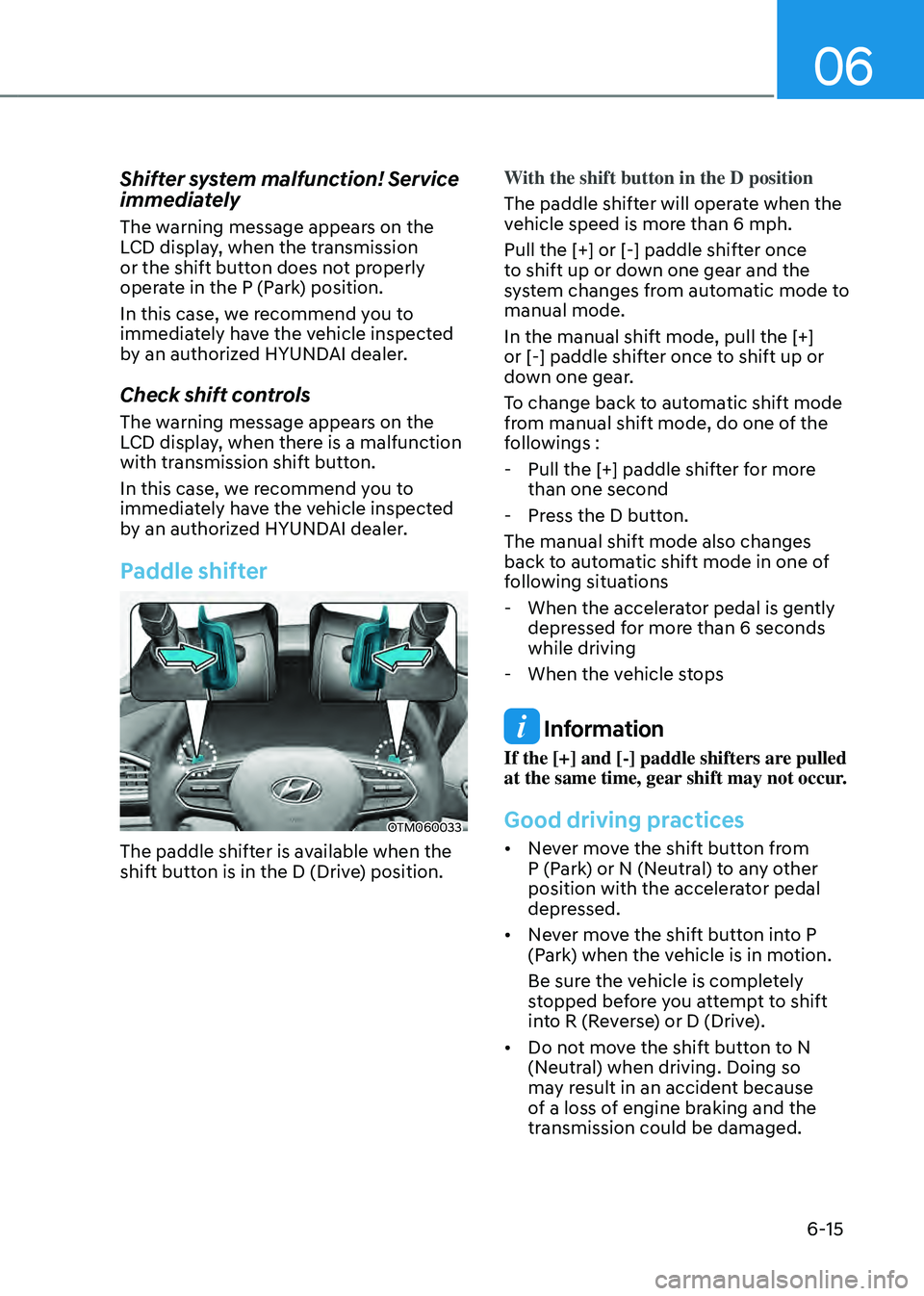
Paddle shifter
OTM060033
The paddle shifter is available when the
shift button is in the D (Drive) position.With the shift button in the D position
The paddle shifter will operate when the
vehicle speed is more than 6 mph.
Pull the [+] or [-] paddle shifter once
to shift up or down one gear and the
system changes from automatic mode to
manual mode.
In the manual shift mode, pull the [+]
or [-] paddle shifter once to shift up or
down one gear.
To change back to automatic shift mode
from manual shift mode, do one of the
followings :
-
Pull the [+] paddle shifter for more
than one second
-Press the D button.
The manual shift mode also changes
back to automatic shift mode in one of
following situations
- When the accelerator pedal is gently
depressed for more than 6 seconds
while driving
-When the vehicle stops
Information
If the [+] and [-] paddle shifters are pulled
at the same time, gear shift may not occur.
Good driving practices
• Never move the shift button from
P (Park) or N (Neutral) to any other
position with the accelerator pedal
depressed.
• Never move the shift button into P
(Park) when the vehicle is in motion.
Be sure the vehicle is completely
stopped before you attempt to shift
into R (Reverse) or D (Drive).
• Do not move the shift button to N
(Neutral) when driving. Doing so
may result in an accident because
of a loss of engine braking and the
transmission could be damaged.
Page 323 of 598
06
6-39
CAUTION
When driving on normal roads,
deactivate the 4WD LOCK mode by
pushing the 4WD LOCK button (4WD
LOCK indicator light goes off). Driving
on normal roads with the 4WD LOCK
mode, especially, when cornering
may cause mechanical noise or
vibration. The noise and vibration will
disappear when the 4WD LOCK mode is
deactivated. Prolonged driving with the
noise and vibration may damage some
parts of the power train.
NOTICE
• When the 4WD LOCK mode is
deactivated, a sensation may be felt
as the driving power is delivered
entirely to the front wheels.
Auto Four Wheel Drive mode
(normal driving)
If the 4WD system determines there is a
need for four wheel drive, the engine's
driving power is distributed to all four
wheels automatically.
Multi terrain mode
In the multi terrain mode, four-wheel
drive, engine and transmission is
controlled to achieve optimal driving
performance depending on the mode
selected (SNOW/MUD/SAND).
Page 329 of 598
06
6-45
DRIVE MODE INTEGRATED CONTROL SYSTEM (4WD)
(IF EQUIPPED)
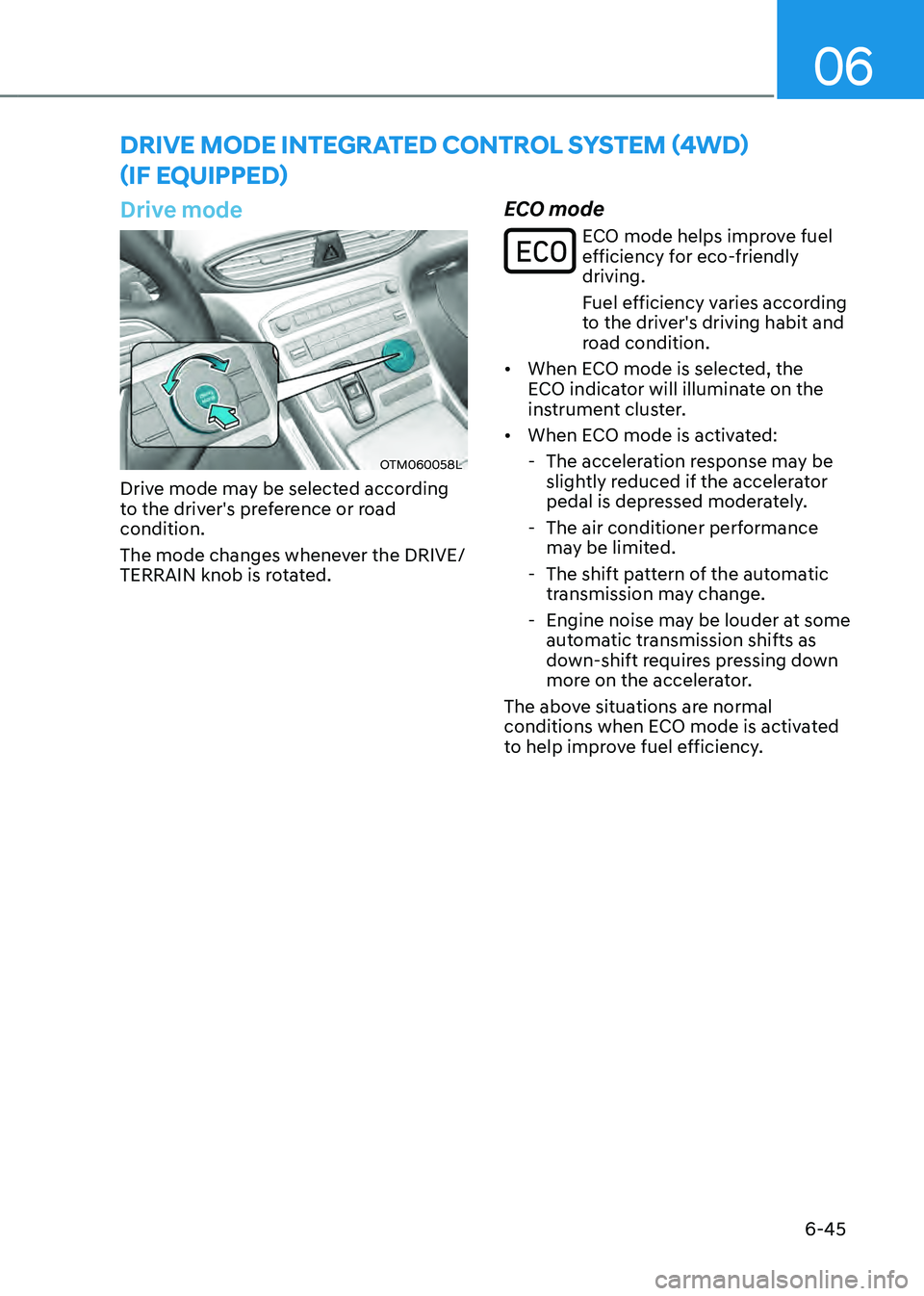
Drive mode
OTM060058L
Drive mode may be selected according
to the driver's preference or road
condition.
The mode changes whenever the DRIVE/
TERRAIN knob is rotated.
ECO mode
ECO mode helps improve fuel efficiency for eco-friendly
driving.
Fuel efficiency varies according
to the driver's driving habit and
road condition.
• When ECO mode is selected, the
ECO indicator will illuminate on the
instrument cluster.
• When ECO mode is activated:
-The acceleration response may be
slightly reduced if the accelerator
pedal is depressed moderately.
-The air conditioner performance
may be limited.
-The shift pattern of the automatic
transmission may change.
-Engine noise may be louder at some
automatic transmission shifts as
down-shift requires pressing down
more on the accelerator.
The above situations are normal
conditions when ECO mode is activated
to help improve fuel efficiency.
Page 333 of 598
06
6-49
Hazardous driving conditions
When hazardous driving elements
are encountered such as water, snow,
ice, mud and sand, take the following
precautions:
• Drive cautiously and maintain a longer
braking distance.
• Avoid abrupt braking or steering.
• When your vehicle is stuck in
snow, mud, or sand, use second
gear. Accelerate slowly to avoid
unnecessary wheel spin.
• Put sand, rock salt, tire chains or other
non-slip materials under the wheels to
provide additional traction while the
vehicle becomes stuck in ice, snow,
or mud.
WARNING
Downshifting with an automatic
transmission while driving on slippery
surfaces can cause an accident. The
sudden change in tire speed could
cause the tires to skid. Be careful when
downshifting on slippery surfaces.
Rocking the vehicle
If it is necessary to rock the vehicle to
free it from snow, sand, or mud, first turn
the steering wheel right and left to clear
the area around your front wheels. Then,
shift back and forth between R (Reverse)
and a forward gear.
Try to avoid spinning the wheels, and do
not race the engine.
To prevent transmission wear, wait until
the wheels stop spinning before shifting
gears. Release the accelerator pedal
while shifting, and press lightly on the
accelerator pedal while the transmission
is in gear. Slowly spinning the wheels in
forward and reverse directions causes a
rocking motion that may free the vehicle.
WARNING
If the vehicle is stuck and excessive
wheel spin occurs, the temperature
in the tires can increase very quickly.
If the tires become damaged, a tire
blow out or tire explosion can occur.
This condition is dangerous - you and
others may be injured. Do not attempt
this procedure if people or objects are
anywhere near the vehicle.
If you attempt to free the vehicle, the
vehicle can overheat quickly, possibly
causing an engine compartment fire
or other damage. Try to avoid spinning
the wheels as much as possible to
prevent overheating of either the tires
or the engine. DO NOT allow the vehicle
to spin the wheels above 35 mph (56
km/h).
Information
The ESC system must be turned OFF
before rocking the vehicle.
NOTICE
If you are still stuck after rocking the
vehicle a few times, have the vehicle
pulled out by a tow vehicle to avoid
engine overheating, possible damage to
the transmission, and tire damage. See
“Towing” section in chapter 8.
Smooth cornering
Avoid braking or gear changing in
corners, especially when roads are wet.
Ideally, corners should always be taken
under gentle acceleration.
SPECIAL DRIVING CONDITIONS
Page 346 of 598
Driving your vehicle
6-62
Backing up
Hold the bottom of the steering wheel
with one hand. Then, to move the trailer
to the left, move your hand to the left. To
move the trailer to the right, move your
hand to the right. Always back up slowly
and, if possible, have someone guide
you.
Making turns
When you’re turning with a trailer, make
wider turns than normal. Do this so your
trailer won’t strike soft shoulders, curbs,
road signs, trees, or other objects. Avoid
jerky or sudden maneuvers. Signal well in
advance.
Turn signals
When you tow a trailer, your vehicle has
to have a different turn signal flasher and
extra wiring. The green arrows on your
instrument panel will flash whenever you
signal a turn or lane change. Properly
connected, the trailer lights will also flash
to alert other drivers you’re about to turn,
change lanes, or stop.
When towing a trailer, the green arrows
on your instrument panel will flash for
turns even if the bulbs on the trailer
are burned out. Thus, you may think
drivers behind you are seeing your
signals when, in fact, they are not. It’s
important to check occasionally to be
sure the trailer bulbs are still working.
You must also check the lights every time
you disconnect and then reconnect the
wires.
WARNING
Do not connect a trailer lighting system
directly to your vehicle’s lighting
system. Use an approved trailer wiring
harness. Failure to do so could result in
damage to the vehicle electrical system
and/or personal injury. We recommend
that you consult an authorized
HYUNDAI dealer for assistance.
Driving on hills
Reduce speed and shift to a lower gear
before you start down a long or steep
downgrade. If you don’t shift down, you
might have to use your brakes so much
that they would get overheated and may
not operate efficiently.
On a long uphill grade, shift down and
reduce your speed to around 45 mph (70
km/h) to reduce the possibility of engine
and transmission overheating.
If your trailer weighs more than the
maximum trailer weight without trailer
brakes and you have a automatic
transmission, you should drive in D
(Drive) when towing a trailer.
Operating your vehicle in D (Drive)
when towing a trailer will minimize heat
build-up and extend the life of your
transmission.
Page 480 of 598
07
7-127
• 'Agree' must be selected on the
infotainment system screen and the
infotainment system has to operate
properly to use Remote Forward/
Backward function.
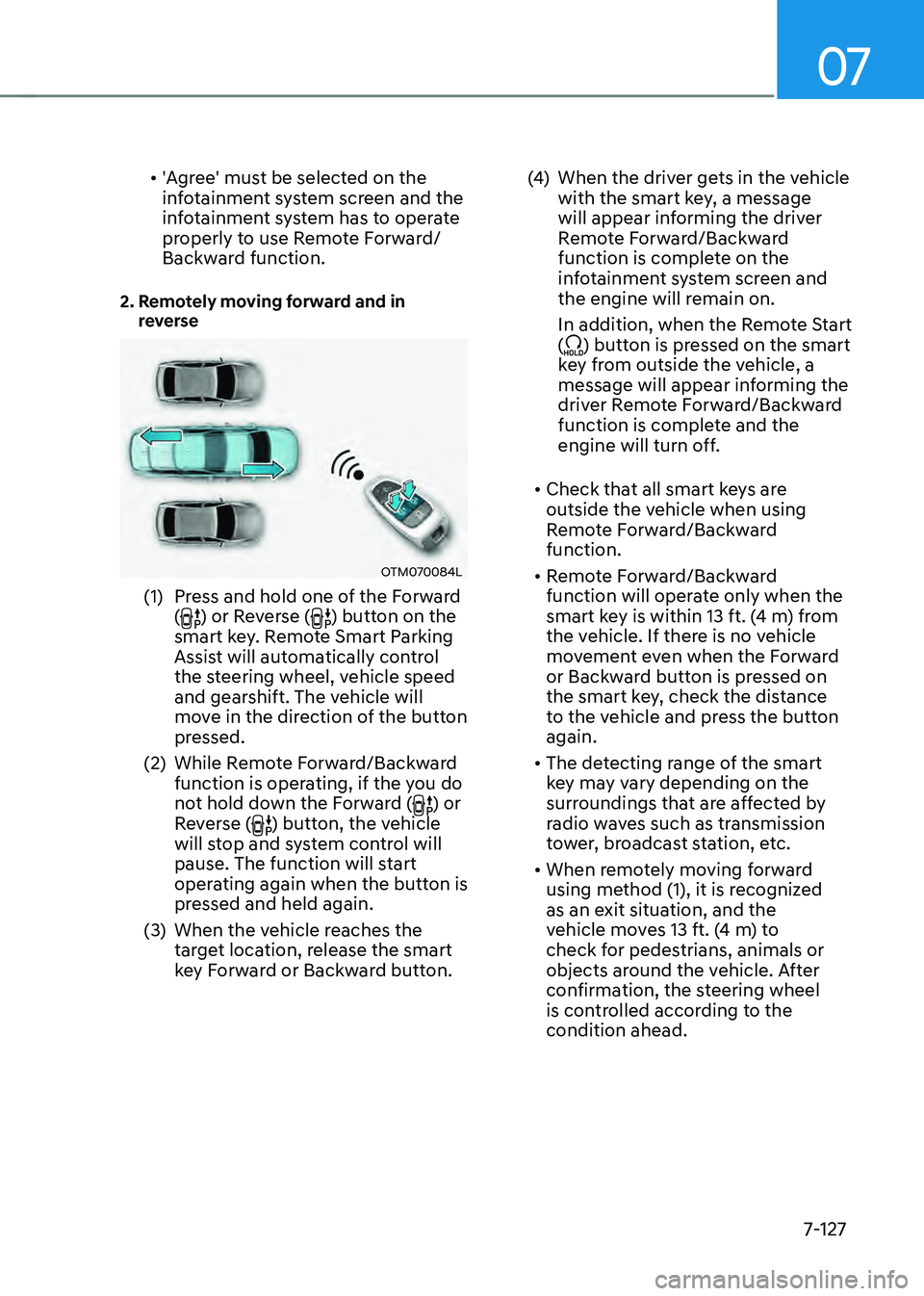
2. Remotely moving forward and in reverse
OTM070084L
(1) Press and hold one of the Forward
() or Reverse () button on the
smart key. Remote Smart Parking
Assist will automatically control
the steering wheel, vehicle speed
and gearshift. The vehicle will
move in the direction of the button
pressed.
(2) While Remote Forward/Backward
function is operating, if the you do
not hold down the Forward (
) or
Reverse () button, the vehicle
will stop and system control will
pause. The function will start
operating again when the button is
pressed and held again.
(3) When the vehicle reaches the
target location, release the smart
key Forward or Backward button.
(4) When the driver gets in the vehicle
with the smart key, a message
will appear informing the driver
Remote Forward/Backward
function is complete on the
infotainment system screen and
the engine will remain on.
In addition, when the Remote Start
(
) button is pressed on the smart
key from outside the vehicle, a
message will appear informing the
driver Remote Forward/Backward
function is complete and the
engine will turn off.
• Check that all smart keys are
outside the vehicle when using
Remote Forward/Backward
function.
• Remote Forward/Backward
function will operate only when the
smart key is within 13 ft. (4 m) from
the vehicle. If there is no vehicle
movement even when the Forward
or Backward button is pressed on
the smart key, check the distance
to the vehicle and press the button
again.
• The detecting range of the smart
key may vary depending on the
surroundings that are affected by
radio waves such as transmission
tower, broadcast station, etc.
• When remotely moving forward
using method (1), it is recognized
as an exit situation, and the
vehicle moves 13 ft. (4 m) to
check for pedestrians, animals or
objects around the vehicle. After
confirmation, the steering wheel
is controlled according to the
condition ahead.
Page 510 of 598
Emergency situations
8-20
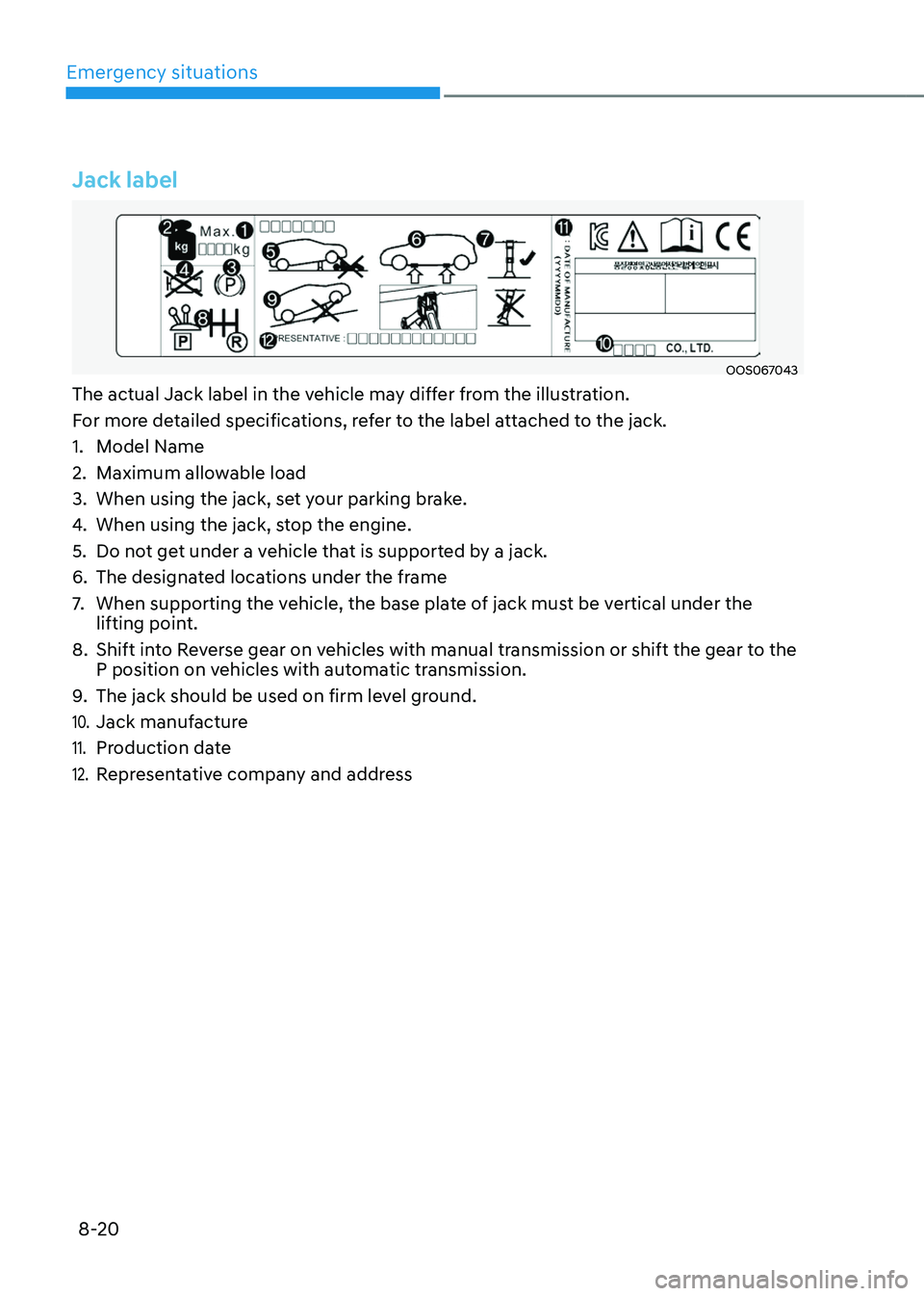
Jack label
OOS067043
The actual Jack label in the vehicle may differ from the illustration.
For more detailed specifications, refer to the label attached to the jack.
1. Model Name
2. Maximum allowable load
3. When using the jack, set your parking brake.
4. When using the jack, stop the engine.
5. Do not get under a vehicle that is supported by a jack.
6. The designated locations under the frame
7. When supporting the vehicle, the base plate of jack must be vertical under the
lifting point.
8. Shift into Reverse gear on vehicles with manual transmission or shift the gear to the
P position on vehicles with automatic transmission.
9. The jack should be used on firm level ground.
10. Jack manufacture
11. Production date
12. Representative company and address
Page 514 of 598
Emergency situations
8-24
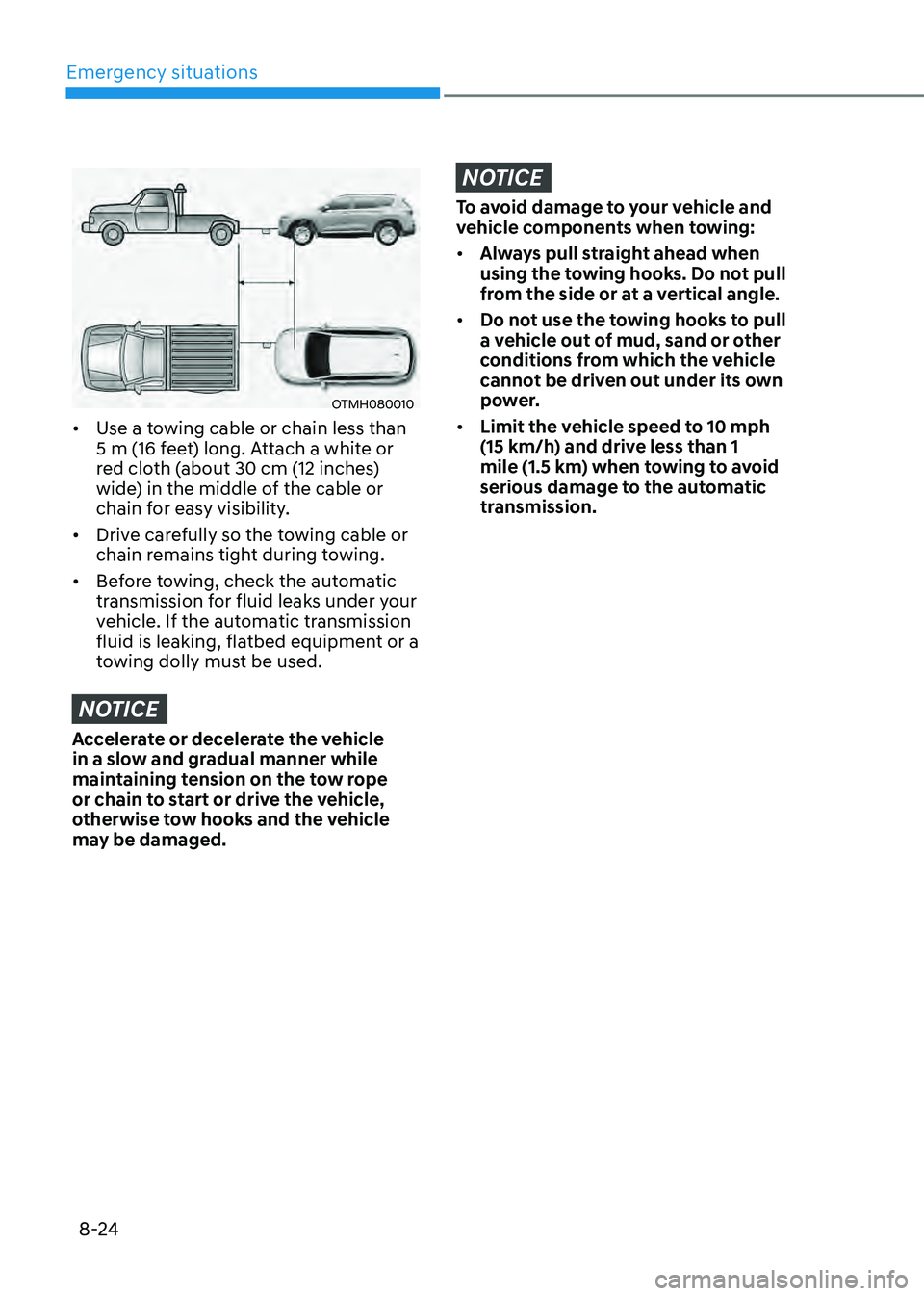
OTMH080010
• Use a towing cable or chain less than
5 m (16 feet) long. Attach a white or
red cloth (about 30 cm (12 inches)
wide) in the middle of the cable or
chain for easy visibility.
• Drive carefully so the towing cable or
chain remains tight during towing.
• Before towing, check the automatic
transmission for fluid leaks under your
vehicle. If the automatic transmission
fluid is leaking, flatbed equipment or a
towing dolly must be used.
NOTICE
Accelerate or decelerate the vehicle
in a slow and gradual manner while
maintaining tension on the tow rope
or chain to start or drive the vehicle,
otherwise tow hooks and the vehicle
may be damaged.
NOTICE
To avoid damage to your vehicle and
vehicle components when towing:
• Always pull straight ahead when
using the towing hooks. Do not pull
from the side or at a vertical angle.
• Do not use the towing hooks to pull
a vehicle out of mud, sand or other
conditions from which the vehicle
cannot be driven out under its own
power.
• Limit the vehicle speed to 10 mph
(15 km/h) and drive less than 1
mile (1.5 km) when towing to avoid
serious damage to the automatic
transmission.