2021 HYUNDAI PALISADE wiper
[x] Cancel search: wiperPage 13 of 612
1-2
E EX
XT
TE
ER
RI
IO
OR
R
O
OV
VE
ER
RV
VI
IE
EW
W
Your vehicle at a glance
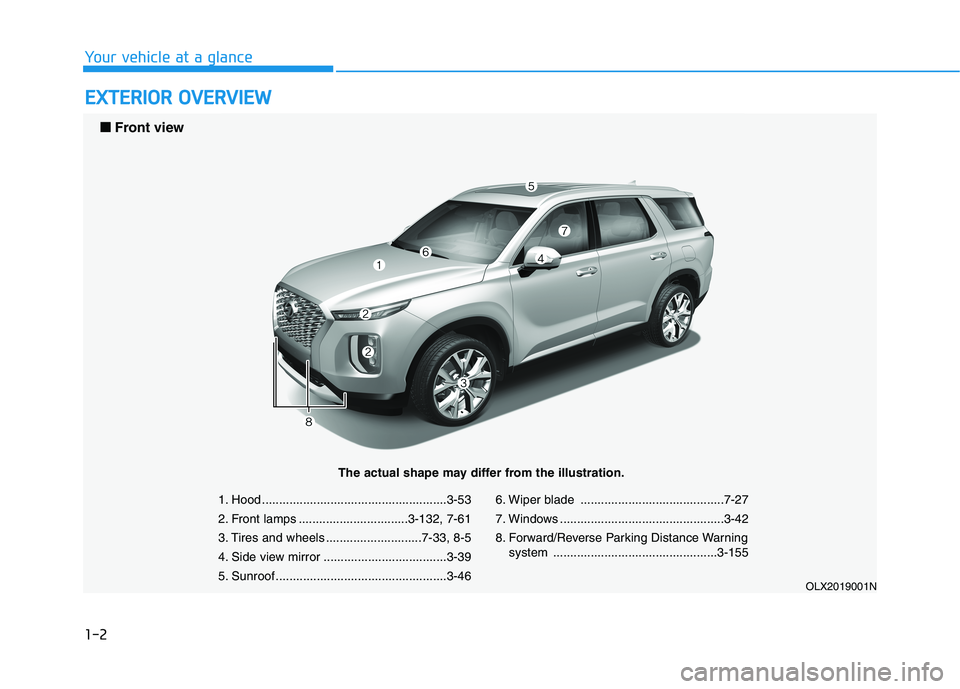
1. Hood ......................................................3-53
2. Front lamps ................................3-132, 7-61
3. Tires and wheels ............................7-33, 8-5
4. Side view mirror ....................................3-39
5. Sunroof ..................................................3-466. Wiper blade ..........................................7-27
7. Windows ................................................3-42
8. Forward/Reverse Parking Distance Warning
system ................................................3-155
OLX2019001N
■ ■
Front view
The actual shape may differ from the illustration.
Page 14 of 612
1-3
Your vehicle at a glance
1
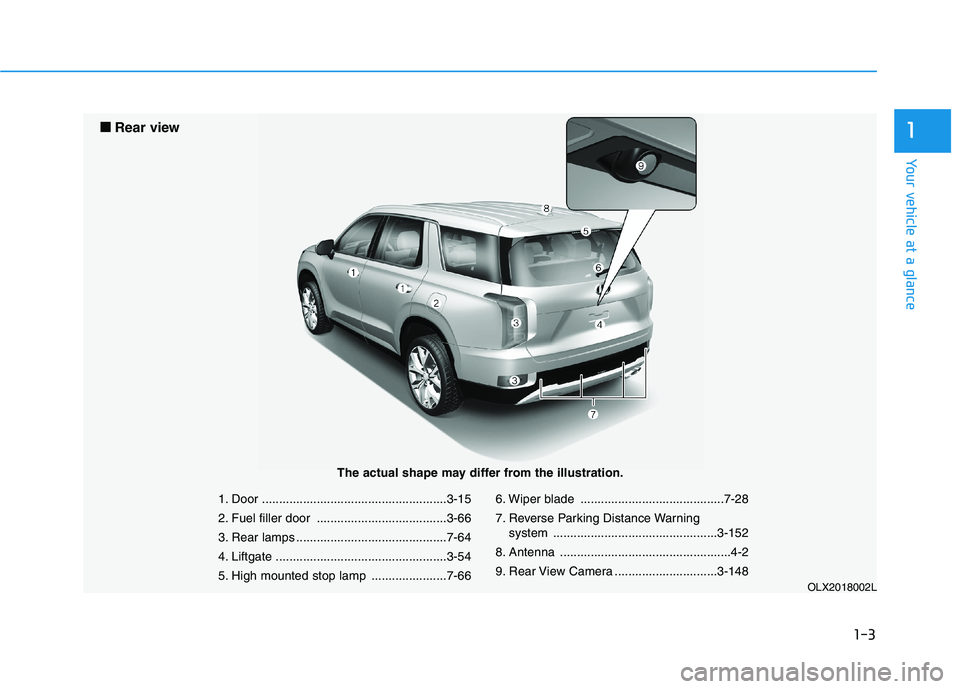
1. Door ......................................................3-15
2. Fuel filler door ......................................3-66
3. Rear lamps ............................................7-64
4. Liftgate ..................................................3-54
5. High mounted stop lamp ......................7-666. Wiper blade ..........................................7-28
7. Reverse Parking Distance Warning
system ................................................3-152
8. Antenna ..................................................4-2
9. Rear View Camera ..............................3-148
OLX2018002L
■ ■
Rear view
The actual shape may differ from the illustration.
Page 16 of 612

I IN
NS
ST
TR
RU
UM
ME
EN
NT
T
P
PA
AN
NE
EL
L
O
OV
VE
ER
RV
VI
IE
EW
W
(
(I
I)
)
The actual shape may differ from the illustration.
1-5
Your vehicle at a glance
1
OLX2019004N
1. Instrument cluster......................................3-69
2. Driver's front air bag ..................................2-59
3. Key ignition switch/ ......................................5-7
Engine Start/Stop button ..........................5-10
4. Hazard warning flasher switch ....................6-2
5. Audio/Video/Navigation System ..................4-4
6. Manual climate control system/ ..............3-159
Automatic climate control system............3-171
7. Automatic transmission shift button ..........5-15
8. Auto Hold ..................................................5-29
9. Drive mode knob ......................................5-55
10. DBC button ..............................................5-39
11. Forward/Reverse Parking Distance
Warning button ......................................3-156
12. Idle stop and go (ISG) OFF button ........5-51
13. Surround view monitor ..........................3-149
14. Air ventilation seat ..................................2-27
15. Seat warmer ............................................2-26
16. Heated steering wheel ............................3-32
17. Air ventilation seat (2
ndrow) ....................2-27
18. Seat warmer (2ndrow) ............................2-26
19. Climate control system (rear) ................3-164
20. Power outlet ..........................................3-197
21. AC inverter ............................................3-198
22. Passenger's front air bag ........................2-59
23. Glove box ..............................................3-192
24. Light control/Turn signals ......................3-132
25. Wiper/Washer ........................................3-144
26. Steering wheel audio controls ..................4-3
27. Smart Cruise Controls ..........................5-129
28. Wireless cellular phone charging
system ..................................................3-201
Page 98 of 612

Instrument cluster................................................3-69
Instrument Cluster Control............................................3-71
Gauges and Meters ........................................................3-71
Transmission Shift Indicator .........................................3-76
Warning and Indicator Lights .......................................3-76
LCD Display Messages ...................................................3-90
LCD Display (Cluster type A and type B) .........3-96
LCD Display Control ........................................................3-96
LCD Display Modes .........................................................3-97
TRIP Computer (Cluster type A and type B) ..3-110
LCD Display (Cluster type C)............................3-114
LCD Display Control......................................................3-114
View Modes ....................................................................3-115
Option Menu (Cluster type C) ..........................3-119
Head up display (HUD)......................................3-130
Lighting................................................................3-132
Exterior Lights ...............................................................3-132
Interior Lights ................................................................3-139
Welcome System ...........................................................3-142
Wipers and washers ..........................................3-144
Front Windshield Wipers .............................................3-144
Front Windshield Washers ..........................................3-146
Rear Window Wiper and Washer..............................3-147
Driver Assist System .........................................3-148
Rear View Monitor .......................................................3-148
Surround View Monitoring .........................................3-149
Blind-spot View Monitor system ..............................3-150
Reverse Parking Distance Warning System ...........3-152
Forward/Reverse Parking Distance Warning
System .............................................................................3-155
Manual climate control system........................3-159
Heating and Air Conditioning .....................................3-160
Rear climate control .....................................................3-164
System Operation .........................................................3-167
System Maintenance....................................................3-169
Automatic climate control system ...................3-171
Automatic Temperature Control Mode ....................3-172
Manual Temperature Control Mode .........................3-173
Rear climate control .....................................................3-179
System Operation .........................................................3-182
System Maintenance....................................................3-184
3
Page 189 of 612
3-93
Convenient features of your vehicle
3
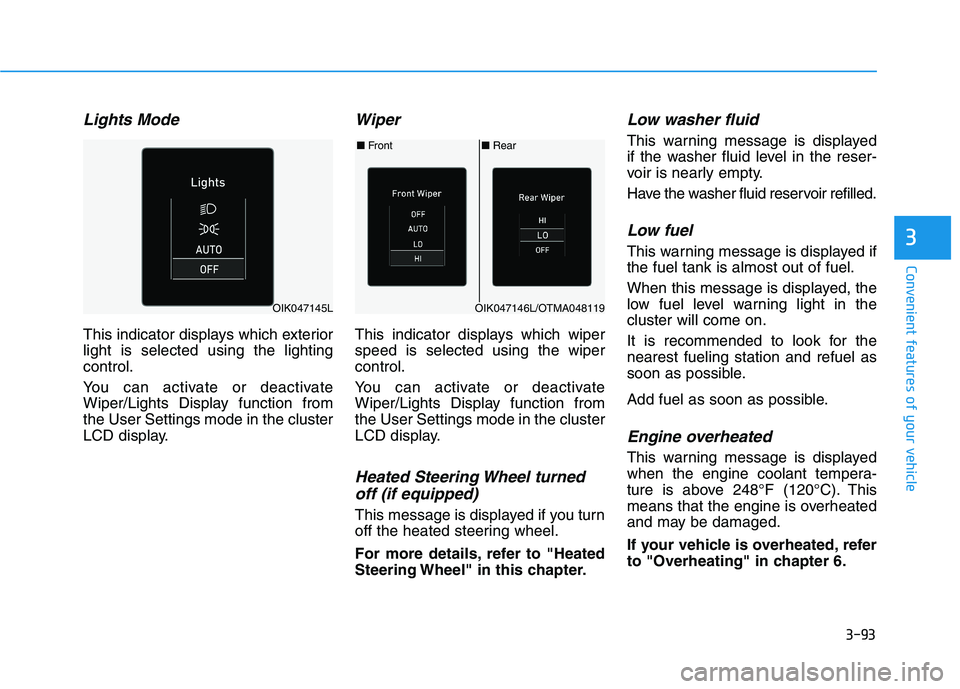
Lights Mode
This indicator displays which exterior
light is selected using the lighting
control.
You can activate or deactivate
Wiper/Lights Display function from
the User Settings mode in the cluster
LCD display.
Wiper
This indicator displays which wiper
speed is selected using the wiper
control.
You can activate or deactivate
Wiper/Lights Display function from
the User Settings mode in the cluster
LCD display.
Heated Steering Wheel turned
off (if equipped)
This message is displayed if you turn
off the heated steering wheel.
For more details, refer to "Heated
Steering Wheel" in this chapter.
Low washer fluid
This warning message is displayed
if the washer fluid level in the reser-
voir is nearly empty.
Have the washer fluid reservoir refilled.
Low fuel
This warning message is displayed if
the fuel tank is almost out of fuel.
When this message is displayed, the
low fuel level warning light in the
cluster will come on.
It is recommended to look for the
nearest fueling station and refuel as
soon as possible.
Add fuel as soon as possible.
Engine overheated
This warning message is displayed
when the engine coolant tempera-
ture is above 248°F (120°C). This
means that the engine is overheated
and may be damaged.
If your vehicle is overheated, refer
to "Overheating" in chapter 6.
■Rear ■Front
OIK047146L/OTMA048119OIK047145L
Page 203 of 612
3-107
Convenient features of your vehicle
3
ItemsExplanation
Seat Height Easy AccessTo activate or deactivate the Seat Height Easy Access.
For more details, refer to "Driver Position Memory System" in this chapter.
Rear Occupant AlertTo activate or deactivate the Rear Occupant Alert
For more details, refer to "Rear Occupant Alert (ROA) system" in this chapter.
Welcome Light
The welcome light turns on automatically when the vehicle is approached
with the smart key.
For more details, refer to ''Welcome System'' in this chapter.
Wireless Charging SystemTo activate or deactivate the wireless charging system in the front seat.
For more details, refer to "Wireless Charging System" in this chapter.
Traffic InformationTo activate or deactivate traffic information display function.
When activated, traffic information, such as speed limits, etc. are displayed in the cluster LCD
display.
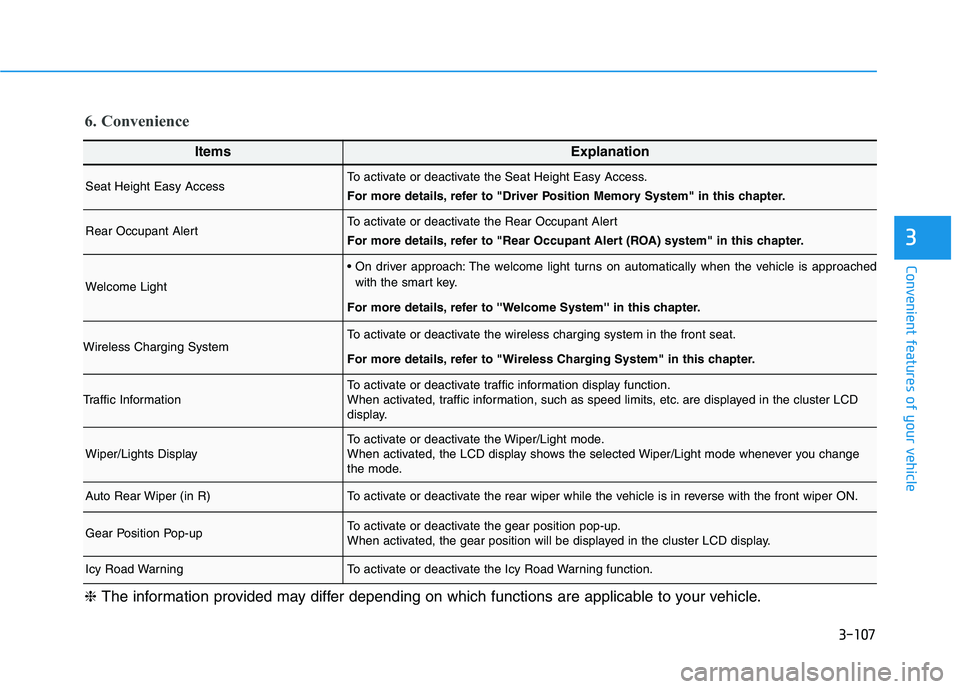
Wiper/Lights DisplayTo activate or deactivate the Wiper/Light mode.
When activated, the LCD display shows the selected Wiper/Light mode whenever you change
the mode.
Auto Rear Wiper (in R)To activate or deactivate the rear wiper while the vehicle is in reverse with the front wiper ON.
Gear Position Pop-upTo activate or deactivate the gear position pop-up.
When activated, the gear position will be displayed in the cluster LCD display.
Icy Road WarningTo activate or deactivate the Icy Road Warning function.
6. Convenience
❈The information provided may differ depending on which functions are applicable to your vehicle.
Page 223 of 612
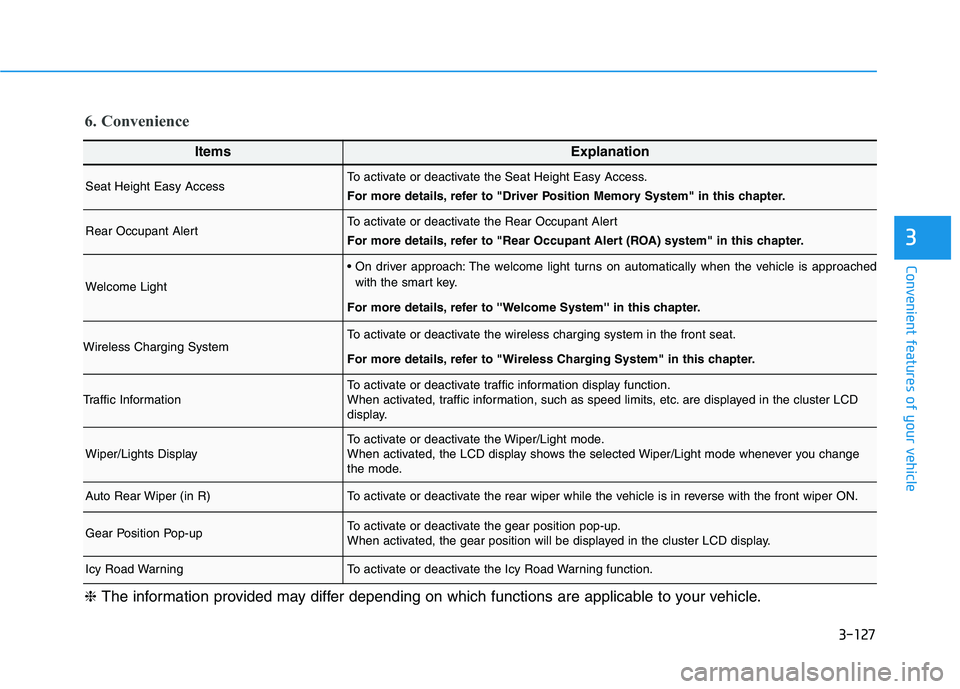
3-127
Convenient features of your vehicle
3
ItemsExplanation
Seat Height Easy AccessTo activate or deactivate the Seat Height Easy Access.
For more details, refer to "Driver Position Memory System" in this chapter.
Rear Occupant AlertTo activate or deactivate the Rear Occupant Alert
For more details, refer to "Rear Occupant Alert (ROA) system" in this chapter.
Welcome Light
The welcome light turns on automatically when the vehicle is approached
with the smart key.
For more details, refer to ''Welcome System'' in this chapter.
Wireless Charging SystemTo activate or deactivate the wireless charging system in the front seat.
For more details, refer to "Wireless Charging System" in this chapter.
Traffic InformationTo activate or deactivate traffic information display function.
When activated, traffic information, such as speed limits, etc. are displayed in the cluster LCD
display.
Wiper/Lights DisplayTo activate or deactivate the Wiper/Light mode.
When activated, the LCD display shows the selected Wiper/Light mode whenever you change
the mode.
Auto Rear Wiper (in R)To activate or deactivate the rear wiper while the vehicle is in reverse with the front wiper ON.
Gear Position Pop-upTo activate or deactivate the gear position pop-up.
When activated, the gear position will be displayed in the cluster LCD display.
Icy Road WarningTo activate or deactivate the Icy Road Warning function.
6. Convenience
❈The information provided may differ depending on which functions are applicable to your vehicle.
Page 240 of 612

3-144
Convenient features of your vehicle
A : Wiper speed control
· MIST – Single wipe
· OFF – Off
· INT – Intermittent wipe
AUTO* – Auto control wipe
· LO – Low wiper speed
· HI – High wiper speedB : Intermittent control wipe time
adjustment
C : Wash with brief wipes
(pull lever towards you)
D : Rear wiper/washer control
· HI – High wiper speed
· LO – Low wiper speed
· OFF – Off
E : Wash with brief wipes (rear)
(push lever away from you)
* : if equipped
Front Windshield Wipers
Operates as follows when the igni-
tion switch is in the ON position.
MIST : For a single wiping cycle,
push the lever upward and
release. The wipers will oper-
ate continuously if the lever is
held in this position.
OFF : Wiper is not in operation.
INT : Wiper operates intermittently at
the same wiping intervals. To
vary the speed setting, move
the speed control lever. The top
most setting will run the wipers
most frequently (for more rain).
The bottom setting will run the
wipers the least frequently (for
less rain).
AUTO : The rain sensor located on
the upper end of the wind-
shield glass senses the
amount of rainfall and con-
trols the wiping cycle for the
proper interval. The more it
rains, the faster the wiper
operates. When the rain
stops, the wiper stops.To
vary the speed setting, turn
the speed control knob (B).
W WI
IP
PE
ER
RS
S
A
AN
ND
D
W
WA
AS
SH
HE
ER
RS
S
OPD047454L
OTLA045318
■Front windshield wiper/washer
■Rear window wiper/washer