2021 HYUNDAI IONIQ ELECTRIC parking brake
[x] Cancel search: parking brakePage 295 of 546
5-5
Driving your vehicle
5
PPOO WW EERR BB UU TTTTOO NN
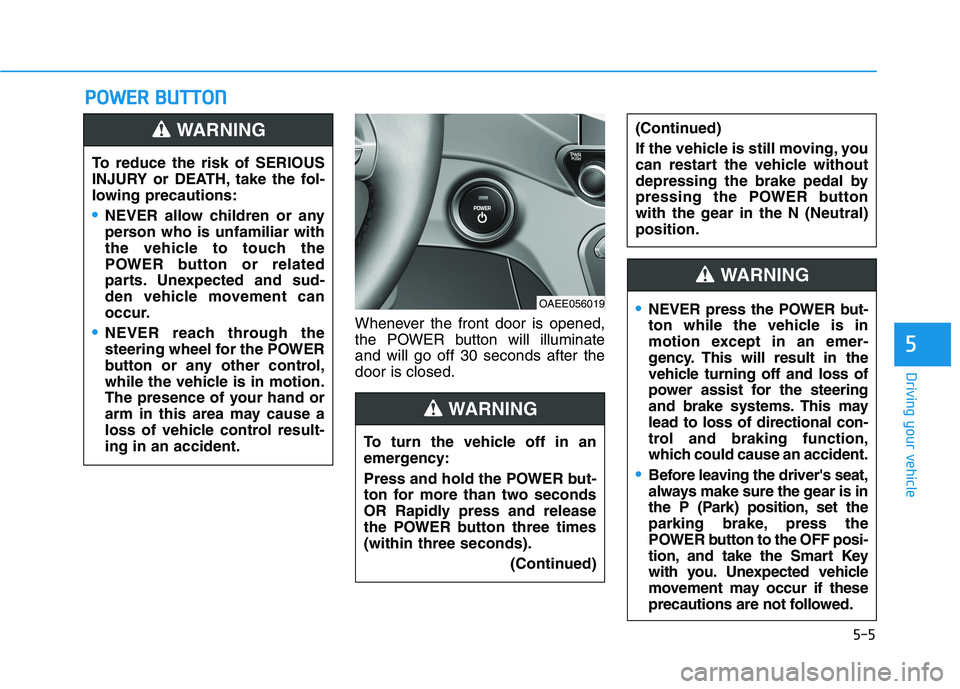
Whenever the front door is opened,
the POWER button will illuminateand will go off 30 seconds after thedoor is closed.
To reduce the risk of SERIOUS
INJURY or DEATH, take the fol-
lowing precautions:
NEVER allow children or any
person who is unfamiliar with
the vehicle to touch the
POWER button or related
parts. Unexpected and sud-
den vehicle movement can
occur.
NEVER reach through the
steering wheel for the POWER
button or any other control,
while the vehicle is in motion.
The presence of your hand or
arm in this area may cause a
loss of vehicle control result-ing in an accident.
WARNING
OAEE056019
To turn the vehicle off in an
emergency:
Press and hold the POWER but-
ton for more than two seconds
OR Rapidly press and release
the POWER button three times(within three seconds). (Continued)
(Continued)
If the vehicle is still moving, you
can restart the vehicle without
depressing the brake pedal by
pressing the POWER button
with the gear in the N (Neutral)position.
WARNING
NEVER press the POWER but-
ton while the vehicle is in
motion except in an emer-
gency. This will result in the
vehicle turning off and loss of
power assist for the steering
and brake systems. This maylead to loss of directional con-
trol and braking function,
which could cause an accident.
Before leaving the driver's seat,
always make sure the gear is in
the P (Park) position, set the
parking brake, press the
POWER button to the OFF posi-
tion, and take the Smart Key
with you. Unexpected vehicle
movement may occur if these
precautions are not followed.
WARNING
Page 299 of 546
5-9
Driving your vehicle
5
To prevent damage to the vehicle:
If the " " indicator turns off
while you are in motion, do not
attempt to shift to the P (Park)position.
To prevent damage to the vehicle:
When the stop lamp fuse is blown,
you cannot normally start the
vehicle. Replace the fuse with a
new one. If you are not able to
replace the fuse, you can start the
vehicle by pressing and holding
the POWER button for 10 seconds
with the POWER button in the ACCposition.
Do not press the POWER button
for more than 10 seconds except
when the stop lamp fuse is blown.
For your safety always depress
the brake pedal before starting the
vehicle.Information
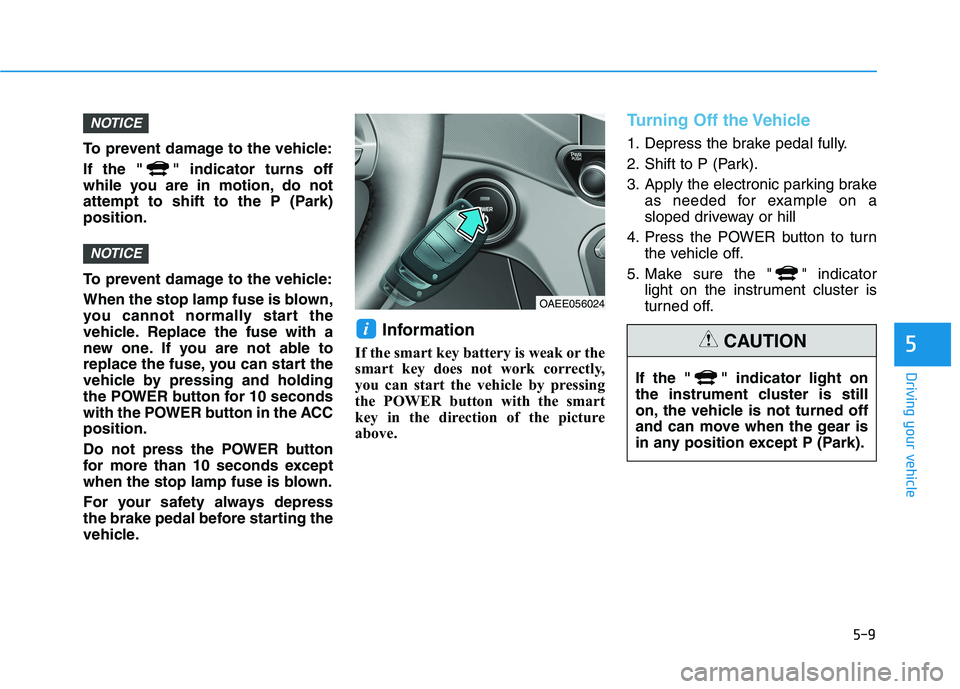
If the smart key battery is weak or the
smart key does not work correctly,
you can start the vehicle by pressing
the POWER button with the smart
key in the direction of the picture
above.
Turning Off the Vehicle
1. Depress the brake pedal fully.
2. Shift to P (Park).
3. Apply the electronic parking brake as needed for example on a
sloped driveway or hill
4. Press the POWER button to turn the vehicle off.
5. Make sure the " " indicator light on the instrument cluster is
turned off.
i
NOTICE
NOTICE
OAEE056024
If the " " indicator light on
the instrument cluster is still
on, the vehicle is not turned off
and can move when the gear is
in any position except P (Park).
CAUTION
Page 300 of 546
5-10
Driving your vehicle
Reduction Gear Operation
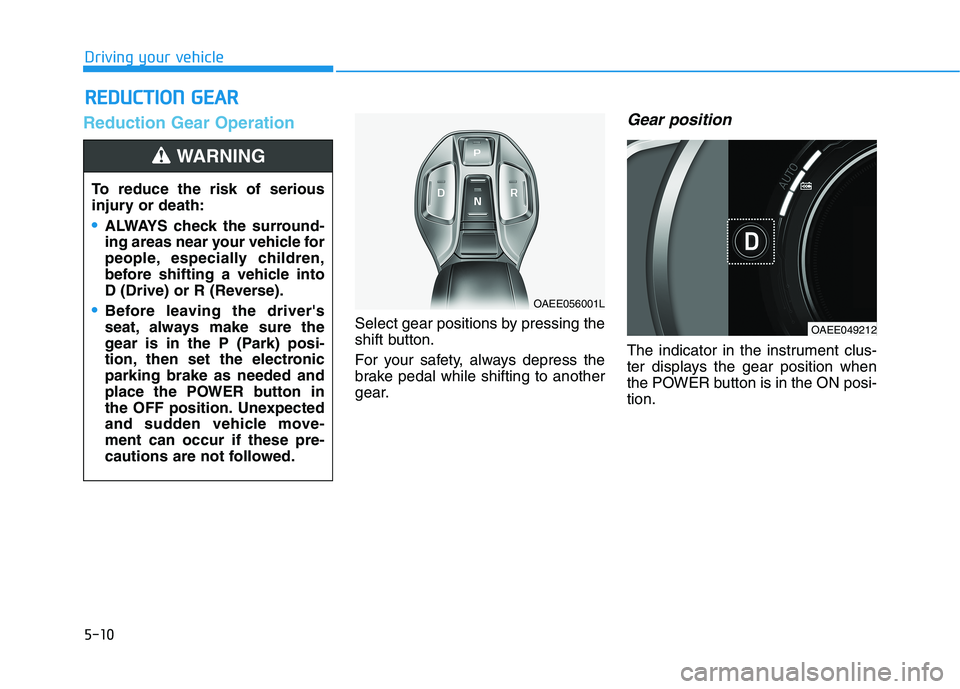
Select gear positions by pressing the
shift button.
For your safety, always depress the
brake pedal while shifting to another
gear.
Gear position
The indicator in the instrument clus-
ter displays the gear position when
the POWER button is in the ON posi-tion.
RREEDD UU CCTT IIOO NN GG EEAA RR
To reduce the risk of serious
injury or death:
ALWAYS check the surround-
ing areas near your vehicle for
people, especially children,
before shifting a vehicle into
D (Drive) or R (Reverse).
Before leaving the driver's
seat, always make sure the
gear is in the P (Park) posi-
tion, then set the electronicparking brake as needed and
place the POWER button in
the OFF position. Unexpected
and sudden vehicle move-ment can occur if these pre-
cautions are not followed.
WARNING
OAEE056001L
OAEE049212
Page 301 of 546
![HYUNDAI IONIQ ELECTRIC 2021 Owners Manual 5-11
Driving your vehicle
5
P (Park)
Always come to a complete stop
before shifting into P (Park).
To shift the gear from R (Reverse), N
(Neutral) or D (Drive) to P (Park),
press the [P] button.](/manual-img/35/56167/w960_56167-300.png "HYUNDAI IONIQ ELECTRIC 2021 Owners Manual 5-11
Driving your vehicle
5
P (Park)
Always come to a complete stop
before shifting into P (Park).
To shift the gear from R (Reverse), N
(Neutral) or D (Drive) to P (Park),
press the [P] button.")
5-11
Driving your vehicle
5
P (Park)
Always come to a complete stop
before shifting into P (Park).
To shift the gear from R (Reverse), N
(Neutral) or D (Drive) to P (Park),
press the [P] button.
If you turn off the vehicle in D (Drive)
or R (Reverse), the gear automatical-
ly shifts to P (Park).
R (Reverse)
Use this position to drive the vehicle
backward.
To shift to R (Reverse), press the [R]
button while depressing the brakepedal.
N (Neutral)
The wheels and gear are not engaged.
To shift to N (Neutral), press the [N]
button while depressing the brakepedal.
Always depress the brake pedal
when you are shifting from N
(Neutral) to another gear.
In N (Neutral), if the driver attempts
to turn off the vehicle, the gear
remains in N (Neutral) and the
POWER button will be in the ACCposition.
To turn off the vehicle from the ACC
position, press the [P] button within 3
minutes. The vehicle will shift to P
(Park) and turn off.When the driver’s door is opened
within 3 minutes with the POWER
button in the ACC position and the
gear in N (Neutral), the vehicle is
automatically turned OFF and shifted
to the P (Park) position.
D (Drive)
This is the normal driving position.
To shift to D (Drive), press the [D]
button while depressing the brakepedal.
Shifting into P (Park) while the
vehicle is in motion may
cause you to lose control of
the vehicle.
After the vehicle has stopped,
always make sure the gear is
in P (Park), apply the electron-ic parking brake as needed
such as on a sloped driveway
or hill and turn the vehicle off.
WARNING
Page 302 of 546
5-12
Driving your vehicle
Shift-lock system
For your safety, your vehicle has a
shift-lock system which prevents
shifting the gear from P (Park) or N
(Neutral) into R (Reverse) or D
(Drive) unless the brake pedal isdepressed.
To shift from P (Park) or N (Neutral)
into R (Reverse) or D (Drive) :
1. Depress and hold the brake pedal.
2. Start the vehicle or place thePOWER button in the ON position.
3. Press the R (Reverse) or D (Drive) button.
When the battery (12 V) is dis-
charged
You cannot shift the gear when the
battery is discharged.
Jump start your vehicle (refer to
“Jump Starting” in chapter 6) or con-
tact an authorized HYUNDAI dealer.
Parking
Always come to a complete stop and
continue to depress the brake pedal.
Shift to the P (Park) position, apply
the electronic parking brake as need-
ed such as on a sloped driveway or
hill and place the POWER button in
the OFF position. Take the Key with
you when exiting the vehicle.
LCD Display Messages
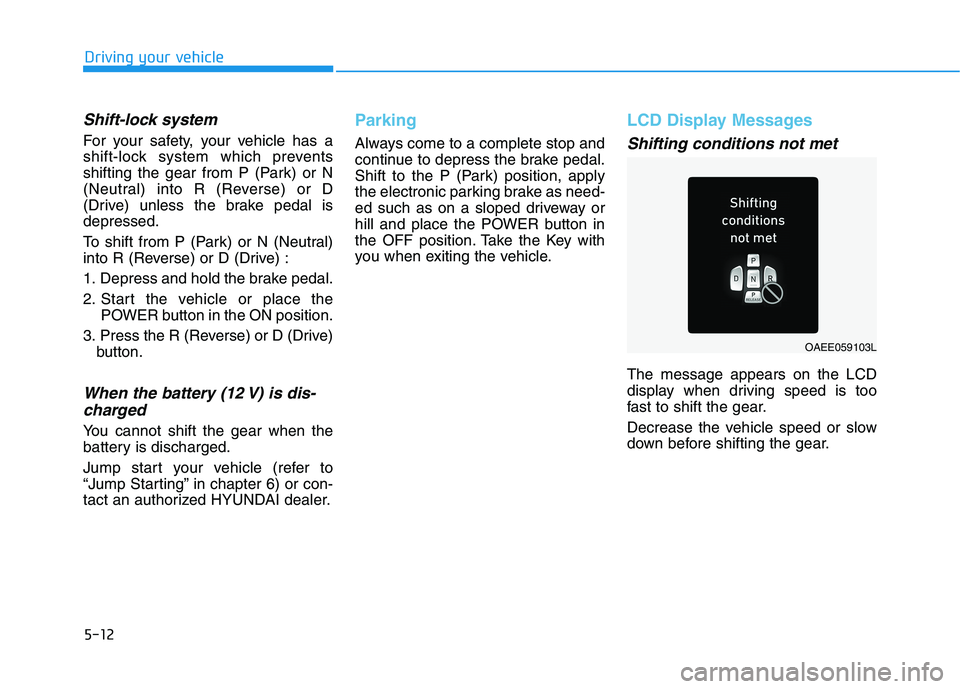
Shifting conditions not met
The message appears on the LCD
display when driving speed is too
fast to shift the gear.
Decrease the vehicle speed or slow
down before shifting the gear.
OAEE059103L
Page 305 of 546
5-15
Driving your vehicle
5
Good Driving Practices
Never shift to P (Park) or N(Neutral) to any other position with
the accelerator pedal depressed.
Never shift to P (Park) when the vehicle is in motion.
Be sure the vehicle is completely
stopped before you attempt to shift
into R (Reverse) or D (Drive).
Do not shift to N (Neutral) when driving. Doing so may result in anaccident.
Do not drive with your foot resting on the brake pedal. Even light, butconsistent pedal pressure can
result in the brakes overheating,
brake wear and possibly even
brake failure.
Alway apply the parking brake when parked on a sloped driveway
or hill when leaving the vehicle. Donot depend on placing the gear in
P (Park) to keep the vehicle from
moving. Exercise extreme caution when
driving on a slippery surface. Be
especially careful when braking,
accelerating or shifting gears. Also,
avoid increasing the regenerative
braking level suddenly. On a slip-
pery surface, an abrupt change in
vehicle speed can cause the drive
wheels to lose traction and may
cause loss of vehicle control result-ing in an accident
Optimum vehicle performance and economy is obtained by smoothlydepressing and releasing the
accelerator.
To reduce the risk of SERIOUS
INJURY or DEATH:
ALWAYS wear your seat belt.
In a collision, an unbelted
occupant is significantly more
likely to be seriously injured
or killed than a properly belt-ed occupant.
Avoid high speeds when cor- nering or turning. (Continued)
WARNING
(Continued)
Do not make quick steering
wheel movements, such as
sharp lane changes or fast,sharp turns.
The risk of rollover is greatly
increased if you lose control
of your vehicle at highwayspeeds.
Loss of control often occurs if
two or more wheels drop off
the roadway and the driver
over steers to reenter the
roadway.
In the event your vehicle
leaves the roadway, do not
steer sharply. Instead, slow
down before pulling back into
the travel lanes.
HYUNDAI recommends you
follow all posted speed limits.
Page 307 of 546
5-17
Driving your vehicle
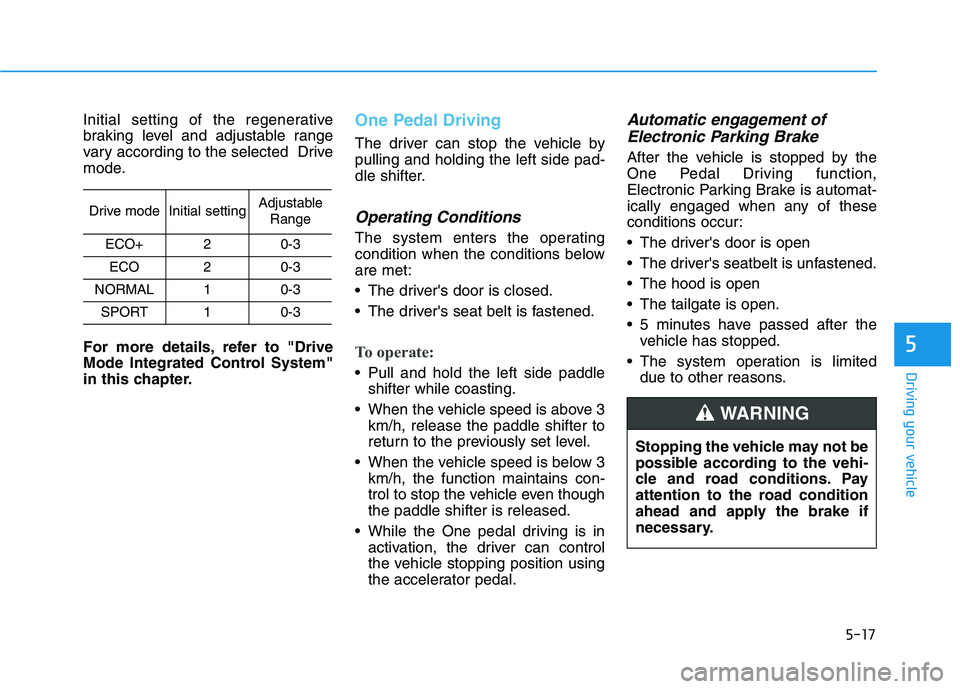
Initial setting of the regenerative
braking level and adjustable range
vary according to the selected Drive
mode.
For more details, refer to "Drive
Mode Integrated Control System"
in this chapter.One Pedal Driving
The driver can stop the vehicle by pulling and holding the left side pad-
dle shifter.
Operating Conditions
The system enters the operating
condition when the conditions beloware met:
The driver's door is closed.
The driver's seat belt is fastened.
To operate:
Pull and hold the left side paddleshifter while coasting.
When the vehicle speed is above 3 km/h, release the paddle shifter to
return to the previously set level.
When the vehicle speed is below 3 km/h, the function maintains con-
trol to stop the vehicle even thoughthe paddle shifter is released.
While the One pedal driving is in activation, the driver can control
the vehicle stopping position using
the accelerator pedal.
Automatic engagement of
Electronic Parking Brake
After the vehicle is stopped by the
One Pedal Driving function,
Electronic Parking Brake is automat-
ically engaged when any of these
conditions occur:
The driver's door is open
The driver's seatbelt is unfastened.
The hood is open
The tailgate is open.
5 minutes have passed after the vehicle has stopped.
The system operation is limited due to other reasons.
5
Drive modeInitial settingAdjustable
Range
ECO+20-3
ECO20-3
NORMAL10-3
SPORT10-3
Stopping the vehicle may not be
possible according to the vehi-
cle and road conditions. Pay
attention to the road condition
ahead and apply the brake if
necessary.
WARNING
Page 316 of 546
5-26
Driving your vehicle
Do not continue depressing thebrake pedal if the " "indica-
tor is OFF. The battery may be
discharged.
Noise and vibration generated during braking is normal.
Under normal operation, electric brake pump noise and motor
vibration may occur temporarily
in below cases.
- When the pedal is depressedsuddenly.
- When the pedal is repeatedly depressed in short intervals.
- When the ABS function is acti- vated while braking.
Disc Brake Wear Indicator
When your brake pads are worn and
new pads are required, you will hear
a high pitched warning sound from
your front or rear brakes. You mayhear this sound come and go or it
may occur whenever you depress
the brake pedal.
Note that some driving conditions or
climates may cause a brake squeal
when you first apply (or lightly apply)
the brakes. This is normal and does
not indicate a problem with your
brakes.
To avoid costly brake repairs, do
not continue to drive with wornbrake pads.
Information
Always replace brake pads as com-
plete front or rear axle sets.
Electronic Parking Brake (EPB)
Applying the parking brake
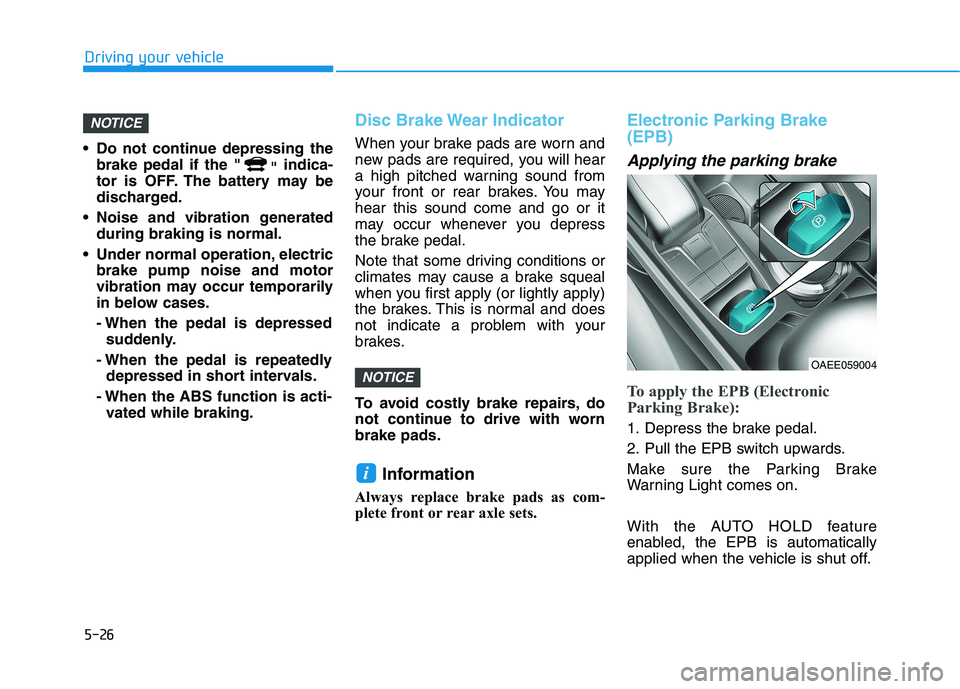
To apply the EPB (Electronic
Parking Brake):
1. Depress the brake pedal.
2. Pull the EPB switch upwards.
Make sure the Parking Brake
Warning Light comes on.
With the AUTO HOLD feature
enabled, the EPB is automatically
applied when the vehicle is shut off.
i
NOTICE
NOTICE
OAEE059004