2021 HYUNDAI GENESIS G70 check
[x] Cancel search: checkPage 151 of 516

3-66
Convenient features of your vehicle
If the brake fluid level in the reser-
voir is low:
1. Drive carefully to the nearest safe
location and stop your vehicle.
2.
With the engine stopped, check
the brake fluid level immediately
and add fluid as required (For
more details, refer to "Brake
Fluid" in chapter 7). After adding
brake fluid, check all brake compo-
nents for fluid leaks. If a brake fluid
leak is found, or if the warning light
remains on, or if the brakes do not
operate properly, do not drive the
vehicle. Have the vehicle inspect-
ed by an authorized retailer of
Genesis Branded products.
Dual-diagonal braking system
Your vehicle is equipped with dual-
diagonal braking systems. This
means you still have braking on two
wheels even if one of the dual sys-
tems should fail.
With only one of the dual systems
working, more than normal pedal
travel and greater pedal pressure is
required to stop the vehicle.Also, the vehicle will not stop in as
short a distance with only a portion
of the brake system working.
If the brakes fail while you are driv-
ing, shift to a lower gear for addition-
al engine braking and stop the vehi-
cle as soon as it is safe to do so.
Anti-lock Brake System
(ABS) Warning Light
This warning light illuminates:
• When you press the Engine
Start/Stop button to the ON posi-
tion.
- It illuminates for approximately 3
seconds and then goes off.
• Whenever there is a malfunction
with the ABS.
Note that the hydraulic braking
system will still be operational even
if there is a malfunction with the
ABS.
In this case, have the vehicle
inspected by an authorized retailer
of Genesis Branded products.
Parking Brake & Brake Fluid
Warning Light
Driving the vehicle with a warn-
ing light ON is dangerous. If the
Parking Brake & Brake Fluid
Warning Light illuminates with
the parking brake released, it
indicates that the brake fluid
level is low.
In this case, have the vehicle
inspected by an authorized
retailer of Genesis Branded
products.
WARNING
Page 154 of 516

3-69
Convenient features of your vehicle
3
Charging System
Warning Light
This warning light illuminates:
When there is a malfunction with
either the alternator or electrical
charging system.
If there is a malfunction with either
the alternator or electrical charging
system:
1. Drive carefully to the nearest safe
location and stop your vehicle.
2. Turn the engine off and check the
alternator drive belt for looseness
or breakage.
If the belt is adjusted properly,
there may be a problem in the
electrical charging system.
If this occurs, we recommend that
you have the vehicle inspected by
an authorized retailer of Genesis
Branded products as soon as pos-
sible.
Engine Oil Pressure
Warning Light
This warning light illuminates:
• When the engine oil pressure is low.
If the engine oil pressure is low:
1. Drive carefully to the nearest safe
location and stop your vehicle.
2. Turn the engine off and check the
engine oil level (For more details,
refer to "Engine Oil" in chapter 7).
If the level is low, add oil as required.
If the warning light remains on
after adding oil or if oil is not avail-
able, have the vehicle inspected
by an authorized retailer of
Genesis Branded products as
soon as possible.• If the engine does not stop
immediately after the Engine Oil
Pressure Warning Light is illumi-
nated, severe damage could
result.
• If the warning light stays on
while the engine is running, it
indicates that there may be seri-
ous engine damage or malfunc-
tion. In this case:
1. Stop the vehicle as soon as it
is safe to do so.
2. Turn off the engine and check
the oil level. If the oil level is
low, fill the engine oil to the
proper level.
3. Start the engine again. If the
warning light stays on after
the engine is started, turn the
engine off immediately. In this
case, have the vehicle inspect-
ed by an authorized retailer of
Genesis Branded products.
NOTICE
Page 163 of 516

3-78
Convenient features of your vehicle
Press START button with key
(for smart key system)
This warning message is displayed if
you press the Engine Start/Stop but-
ton while the warning message "Key
not detected" is displayed.
At this time, the immobilizer indicator
light blinks.
Check BRAKE SWITCH fuse
(for smart key system)
This warning message is displayed if
the brake switch fuse is disconnected.
You need to replace the fuse with a
new one before starting the engine.
If that is not possible, you can start
the engine by pressing the Engine
Start/Stop button for 10 seconds in
the ACC position.
Door, Hood, Trunk open indicator
This warning is displayed if any door
or the hood or the trunk is left open.
The warning will indicate which door
is open in the display.
Window openindicator
This warning is displayed if you turn
off the engine when any window is
open.
OIK047180L
Before driving the vehicle, you
should confirm that the door/
hood/trunk is fully closed. Also,
check there is no door/
hood/trunk open warning light or
message displayed on the instru-
ment cluster.
CAUTION
OIK047117
Page 166 of 516

3-81
Convenient features of your vehicle
3
Check headlight (if equipped)
This warning message is displayed if
the headlights are not operating
properly. A headlight bulb may need
to be replaced.
Information
Make sure to replace the burned out
bulb with a new one of the same wattage
rating.
Check turn signal (if equipped)
This warning message is displayed if
the turn signal lamps are not operat-
ing properly. A lamp may need to be
replaced.
Information
Make sure to replace the burned out
bulb with a new one of the same wattage
rating.
Check headlight LED
(if equipped)
This warning message is displayed if
there is a problem with the LED head-
lamps. Have the vehicle inspected by
an authorized retailer of Genesis
Branded products.
Check High Beam Assist (HBA)
system (if equipped)
This warning message is displayed if
there is a problem with the High Beam
Assist (HBA) system. Have the vehi-
cle inspected by an authorized retail-
er of Genesis Branded products.
For more details, refer to "High
Beam Assist (HBA) system" in
chapter 3.
Check haptic steering wheel
system (if equipped)
This warning message is displayed if
there is a problem with the haptic
steering wheel system. Have the
vehicle inspected by an authorized
retailer of Genesis Branded prod-
ucts.
Check shift lever
This warning message is displayed if
there is a problem with the shift lever.
Have the vehicle inspected by an
authorized retailer of Genesis
Branded products.
For more details, refer to ''Automatic
Transmission" in chapter 5.
Shifter System Malfunction
This warning message is displayed if
there is a problem with the shift lever.
Have the vehicle inspected by an
authorized retailer of Genesis
Branded products.
For more details, refer to ''Automatic
Transmission" in chapter 5.
i
i
Page 167 of 516

3-82
Convenient features of your vehicle
Check Electronic Suspension
This warning message is displayed if
there is a problem with the Electronic
Control Suspension (ECS) system.
Have the vehicle inspected by an
authorized retailer of Genesis
Branded products.
For more details, refer to
"Electronic Control Suspension
(ECS)" in chapter 5.
Check Forward Collision
Avoidance Assist (FCA) system
(if equipped)
This warning message is displayed if
there is a problem with the Forward
Collision-Avoidance Assist (FCA)
system. Have the vehicle inspected
by an authorized retailer of Genesis
Branded products.
For more details, refer to "Forward
Collision-Avoidance Assist (FCA)
system" in chapter 5.
Check Blind-Spot Collision
Warning (BCW) system
(if equipped)
This warning message is displayed if
there is a problem with the Blind-
Spot Collision Warning system. Have
the vehicle inspected by an author-
ized retailer of Genesis Branded
products.
For more details, refer to "Blind-
Spot Collision Warning" (BCW)
System in chapter 5.
Check Driver Attention Warning
(DAW) system (if equipped)
This warning message is displayed if
there is a problem with the Driver
Attention Warning (DAW) system.
Have the vehicle inspected by an
authorized retailer of Genesis
Branded products.
For more details, refer to "Driver
Attention Warning (DAW) system"
in chapter 5.
Check Lane Keeping Assist
(LKA) system (if equipped)
This warning message is displayed if
there is a problem with the Lane
Keeping Assist (LKA) system. Have
the vehicle inspected by an author-
ized retailer of Genesis Branded
products.
For more details, refer to "Lane
Keeping Assist (LKA) system" in
chapter 5.
Check Smart Cruise Control
System (if equipped)
This warning message is displayed if
there is a problem with the Smart
Cruise Control system. Have the
vehicle inspected by an authorized
retailer of Genesis Branded prod-
ucts.
For more details, refer to "Smart
Cruise Control with Stop & Go" in
chapter 5.
Page 191 of 516

3-106
Convenient features of your vehicle
When the High Beam Assist (HBA) is
operating, the high beam switches to
low beam if any of the following con-
ditions occur:
• When the headlamp of an on-com-
ing vehicle is detected.
• When the tail lamp of the front
vehicle is detected.
• When the headlamp or tail lamp of a
motorcycle or a bicycle is detected.
• When the surrounding ambient
light is bright enough that high
beams are not required.
• When streetlights or other lights
are detected.
• When the light switch is not in the
AUTO position.
• When the High Beam Assist (HBA)
is off.
• When vehicle speed is below 15 mph
(24 km/h).
Warning light and message
When the High Beam Assist (HBA) is
not working properly, the warning
message will come on for a few sec-
ond. After the message disappears,
the master warning light ( ) will illu-
minate. Take your vehicle to an author-
ized retailer of Genesis Branded prod-
ucts and have the system checked.
OIK047132N
The system may not operate
normally if any of the following
conditions should occur:
1) When the illumination from
an on-coming vehicle or a
vehicle in front is dim. Such
examples may include:
•When the headlamps of an on-
coming vehicle or the tail
lamps of a vehicle in front is
covered with dust, snow, or
water
•When the headlamps on an
on-coming vehicle are OFF,
but the fog lamps are ON
2) When the High Beam Assist
camera is adversely affected
by an external condition.
Such examples may include:
•When the vehicle's head-
lamps have been damaged or
not repaired properly
•When the vehicle headlamps
are not aimed properly
WARNING
Page 193 of 516

3-108
Convenient features of your vehicle
Turn signals and lane change
signals
To signal a turn, push down on the
lever for a left turn or up for a right
turn in position (A). To signal a lane
change, move the turn signal lever
slightly and hold it in position (B). The
lever will return to the OFF position
when released or when the turn is
completed.
If an indicator stays on and does not
flash or if it flashes abnormally, one of
the turn signal bulbs may be burned
out and will require replacement.
Onetouch turn signal function
To activate an One Touch Turn Signal
function, move the turn signal lever
slightly and then release it. The lane
change signals will blink 3, 5 or 7
times.
You can activate or deactivate the
One Touch Turn Signal function or
choose the number of blinking (3, 5,
or 7) from the User Settings mode in
the cluster LCD display.
For more details, refer to "LCD
Display" in this chapter.•Do not place objects on the
crash pad that reflect light
such as mirrors, white paper,
etc. The system may malfunc-
tion if sunlight is reflected.
•At times, the High Beam
Assist (HBA) may not work
properly. The system is for
your convenience only. It is
the responsibility of the driver
for safe driving practices and
always check the road condi-
tions for your safety.
•When the system does not
operate normally, change the
lamp position manually
between the high beam and
low beam.OIG046417
Page 195 of 516
3-110
Convenient features of your vehicle
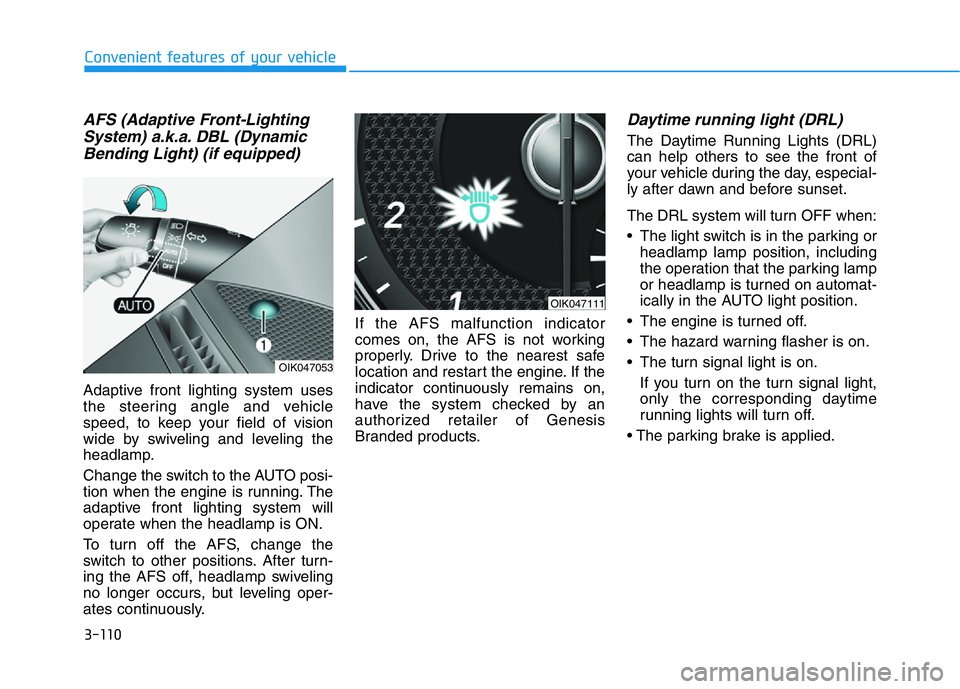
AFS (Adaptive Front-Lighting
System) a.k.a. DBL (Dynamic
Bending Light) (if equipped)
Adaptive front lighting system uses
the steering angle and vehicle
speed, to keep your field of vision
wide by swiveling and leveling the
headlamp.
Change the switch to the AUTO posi-
tion when the engine is running. The
adaptive front lighting system will
operate when the headlamp is ON.
To turn off the AFS, change the
switch to other positions. After turn-
ing the AFS off, headlamp swiveling
no longer occurs, but leveling oper-
ates continuously.If the AFS malfunction indicator
comes on, the AFS is not working
properly. Drive to the nearest safe
location and restart the engine. If the
indicator continuously remains on,
have the system checked by an
authorized retailer of Genesis
Branded products.
Daytime running light (DRL)
The Daytime Running Lights (DRL)
can help others to see the front of
your vehicle during the day, especial-
ly after dawn and before sunset.
The DRL system will turn OFF when:
• The light switch is in the parking or
headlamp lamp position, including
the operation that the parking lamp
or headlamp is turned on automat-
ically in the AUTO light position.
• The engine is turned off.
• The hazard warning flasher is on.
• The turn signal light is on.
If you turn on the turn signal light,
only the corresponding daytime
running lights will turn off.
• The parking brake is applied.
OIK047053
OIK047111