2021 HYUNDAI ELANTRA SEL phone
[x] Cancel search: phonePage 248 of 570
Convenient Features
5-112
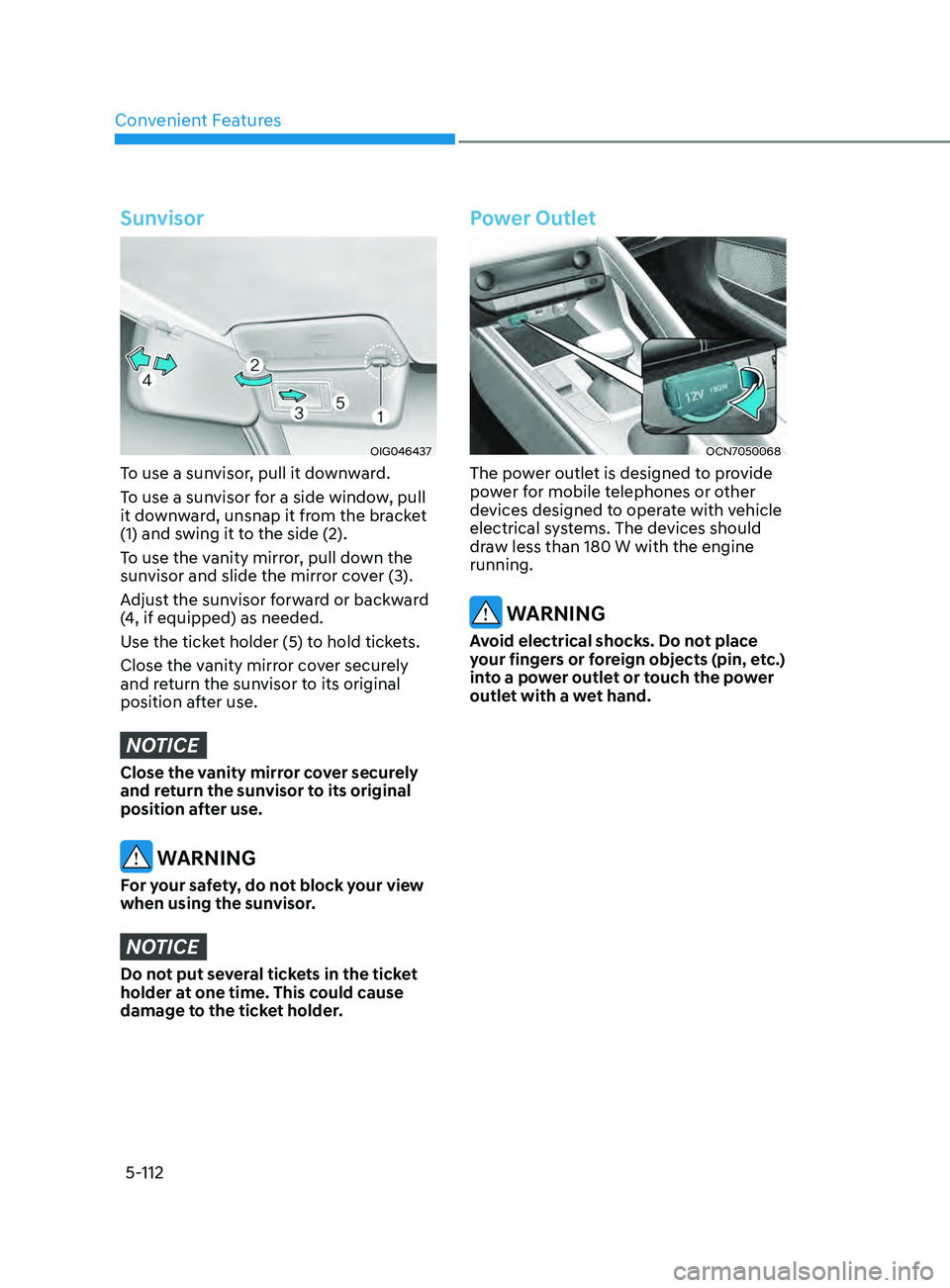
Sunvisor
OIG046437
To use a sunvisor, pull it downward.
To use a sunvisor for a side window, pull
it downward, unsnap it from the bracket
(1) and swing it to the side (2).
To use the vanity mirror, pull down the
sunvisor and slide the mirror cover (3).
Adjust the sunvisor forward or backward
(4, if equipped) as needed.
Use the ticket holder (5) to hold tickets.
Close the vanity mirror cover securely
and return the sunvisor to its original
position after use.
NOTICE
Close the vanity mirror cover securely
and return the sunvisor to its original
position after use.
WARNING
For your safety, do not block your view
when using the sunvisor.
NOTICE
Do not put several tickets in the ticket
holder at one time. This could cause
damage to the ticket holder.
Power Outlet
OCN7050068
The power outlet is designed to provide
power for mobile telephones or other
devices designed to operate with vehicle
electrical systems. The devices should
draw less than 180 W with the engine
running.
WARNING
Avoid electrical shocks. Do not place
your fingers or foreign objects (pin, etc.)
into a power outlet or touch the power
outlet with a wet hand.
Page 249 of 570
05
5-113
NOTICE
To prevent damage to the Power
Outlets:
• Use the power outlet only when the
engine is running and remove the
accessory plug after use. Using the
accessory plug for prolonged periods
of time with the engine off could
cause the battery to discharge.
• Only use 12V electric accessories
which are less than 180 W in electric
capacity.
• Adjust the air-conditioner or heater
to the lowest operating level when
using the power outlet.
• Close the cover when not in use.
• Some electronic devices can
cause electronic interference
when plugged into a vehicle’s
power outlet. These devices may
cause excessive audio static and
malfunctions in other electronic
systems or devices used in your
vehicle.
• Push the plug in as far as it will go. If
good contact is not made, the plug
may overheat and the fuse may open.
• Plug in battery equipped electrical/
electronic devices with reverse
current protection. The current
from the battery may flow into the
vehicle’s electrical/electronic system
and cause system malfunction.
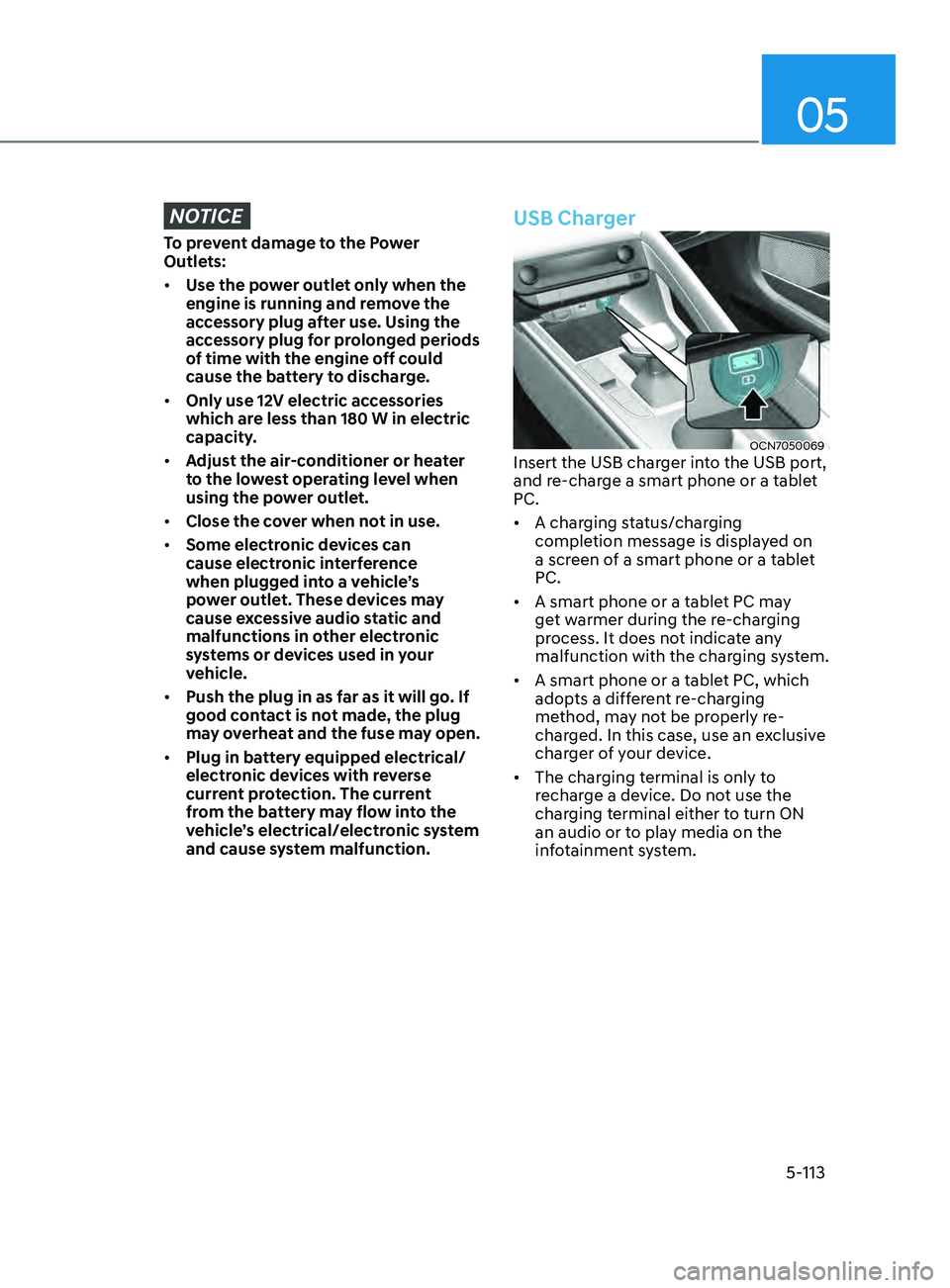
USB Charger
OCN7050069Insert the USB charger into the USB port,
and re-charge a smart phone or a tablet
PC.
• A charging status/charging
completion message is displayed on
a screen of a smart phone or a tablet
PC.
• A smart phone or a tablet PC may
get warmer during the re-charging
process. It does not indicate any
malfunction with the charging system.
• A smart phone or a tablet PC, which
adopts a different re-charging
method, may not be properly re-
charged. In this case, use an exclusive
charger of your device.
• The charging terminal is only to
recharge a device. Do not use the
charging terminal either to turn ON
an audio or to play media on the
infotainment system.
Page 250 of 570
![HYUNDAI ELANTRA SEL 2021 Owners Manual Convenient Features
5-114
Wireless Cellular Phone
Charging System (if equipped)
OCN7050070
[A] : Charging pad
There is a wireless cellular phone charger
inside the front console.
The system is ava](/manual-img/35/56089/w960_56089-249.png "HYUNDAI ELANTRA SEL 2021 Owners Manual Convenient Features
5-114
Wireless Cellular Phone
Charging System (if equipped)
OCN7050070
[A] : Charging pad
There is a wireless cellular phone charger
inside the front console.
The system is ava")
Convenient Features
5-114
Wireless Cellular Phone
Charging System (if equipped)
OCN7050070
[A] : Charging pad
There is a wireless cellular phone charger
inside the front console.
The system is available when all doors
are closed, and when the ignition switch
is in the ACC/ON position.
To charge a cellular phone
The wireless cellular phone charging
system charges only the Qi-enabled
cellular phones. Read the label on the
cellular phone accessory cover or visit
your cellular phone manufacturer’s
website to check whether your cellular
phone supports the Qi technology.
The wireless charging process starts
when you put a Qi-enabled cellular
phone on the wireless charging unit.
1.
Remo
ve other items, including the
smart key, from the wireless charging
unit. If not, the wireless charging
process may be interrupted. Place the
cellular phone on the center of the
charging pad (
).
2.
When charging s
tarts, a charging
icon is displayed on the infotainment
system screen. However, depending
on the infotainment system screen,
the wireless charging icon may not be
displayed. See the infotainment web
manual for details.
3.
You can turn ON or OFF the wir
eless
charging function in the user settings
mode on the instrument cluster. For
further information, refer to the “LCD
Display Modes” in this chapter.
The system warns you with a message
on the LCD display if the cellular phone
is still on the wireless charging unit after
the engine is turned OFF and the front
door is opened.
Page 251 of 570
5-115
05
Information
For some manufacturers’ cellular phones,
the system may not warn you even though
the cellular phone is left on the wireless
charging unit. This is due to the particular
characteristic of the cellular phone and
not a malfunction of the wireless charging.
NOTICE
• The wireless cellular phone charging
system may not support certain
cellular phones, which are not
verified for the Qi specification (
).
•
When placing your c
ellular phone
on the charging mat, position the
phone in the middle of the mat for
optimal charging performance. If
your cellular phone is off to the side,
the charging rate may be less and in
some cases the cellular phone may
experience higher heat conduction.
•
In some cases, the wireless char
ging
may stop temporarily when the
Remote Key or Smart Key is used,
either when starting the vehicle or
locking/unlocking the doors, etc.
•
The wireless char
ging process may
temporarily stop, when temperature
abnormally increases inside the
wireless cellular phone charging
system. Stop the charging cellular
phone and wait until temperature
falls to a certain level.
•
The wireless char
ging process may
temporarily stop when there is
any metallic item, such as a coin,
between the wireless cellular phone
charging system and the cellular
phone. •
When charging some c
ellular phones
with a self-protection feature,
the wireless charging speed may
decrease and the wireless charging
may stop.
•
If the c
ellular phone has a thick
cover, the wireless charging may not
be possible.
•
If the c
ellular phone is not
completely contacting the charging
pad, wireless charging may not
operate properly.
• Some magnetic it ems like credit
cards, phone cards or rail tickets may
be damaged if left with the cellular
phone during the charging process.
•
When any c
ellular phone without
a wireless charging function or a
metallic object is placed on the
charging pad, a small noise may
sound. This small sound is due to the
vehicle discerning compatibility of
the object placed on the charging
pad. It does not affect your vehicle or
the cellular phone in any way.
Information
If the ignition switch is in the LOCK/ OFF
position, the charging also stops.
Information
This device complies with part 15 of the
FCC Rules.
Operation is subject to the following two
conditions:
1.
This device may not cause harmful
interference, and
2.
This device must accept any
interference r
eceived, including
interference that may cause undesired
operation.
Page 256 of 570
Convenient Features
5-120
Infotainment system (if equipped)
If your vehicle is equipped with
additional navigation, please refer to the
infotainment system manual separately
supplied.
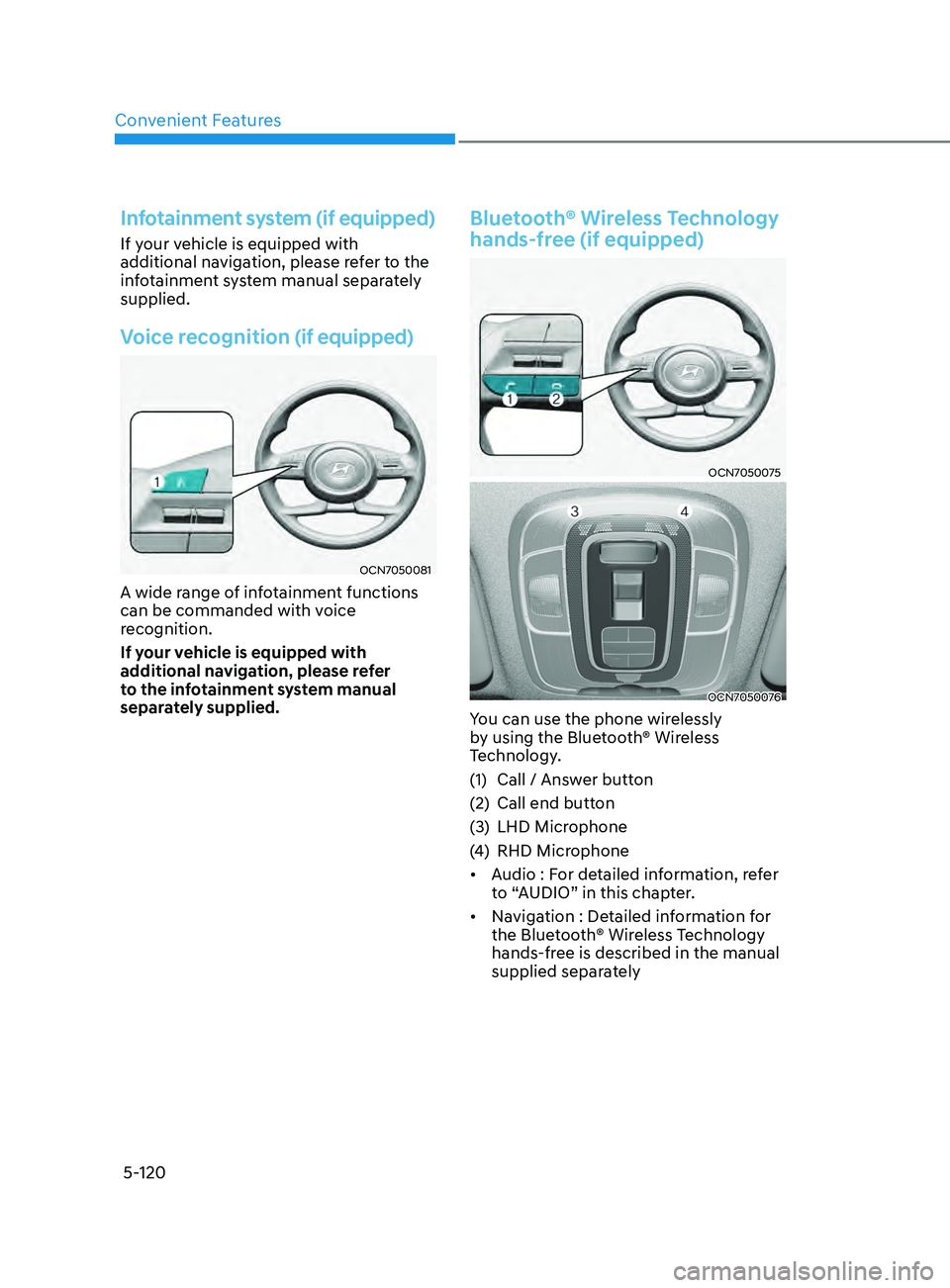
Voice recognition (if equipped)
OCN7050081
A wide range of infotainment functions
can be commanded with voice
recognition.
If your vehicle is equipped with
additional navigation, please refer
to the infotainment system manual
separately supplied.
Bluetooth® Wireless Technology
hands-free (if equipped)
OCN7050075
OCN7050076
You can use the phone wirelessly
by using the Bluetooth® Wireless
Technology.
(1)
Call / Answ
er button
(2)
Call end button
(3
)
LHD Microphone
(4
)
RHD Microphone
• A
udio : For detailed information, refer
to “AUDIO” in this chapter.
• Navigation : Detailed information for
the Bluetooth® Wireless Technology
hands-free is described in the manual
supplied separately
Page 259 of 570
05
5-123
OJF045311L
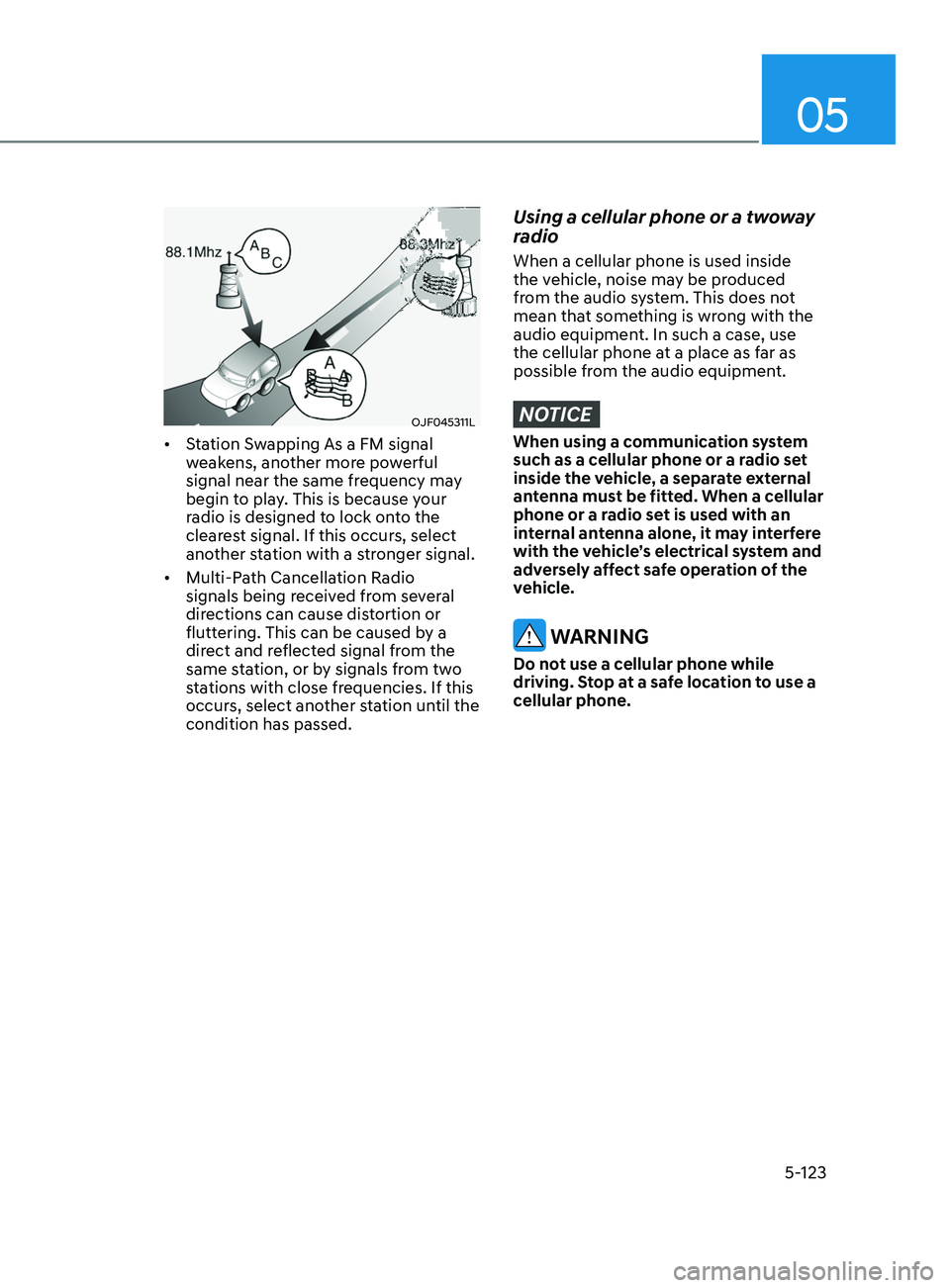
• Station Swapping As a FM signal
weakens, another more powerful
signal near the same frequency may
begin to play. This is because your
radio is designed to lock onto the
clearest signal. If this occurs, select
another station with a stronger signal.
• Multi-Path Cancellation Radio
signals being received from several
directions can cause distortion or
fluttering. This can be caused by a
direct and reflected signal from the
same station, or by signals from two
stations with close frequencies. If this
occurs, select another station until the
condition has passed.
Using a cellular phone or a twoway
radio
When a cellular phone is used inside
the vehicle, noise may be produced
from the audio system. This does not
mean that something is wrong with the
audio equipment. In such a case, use
the cellular phone at a place as far as
possible from the audio equipment.
NOTICE
When using a communication system
such as a cellular phone or a radio set
inside the vehicle, a separate external
antenna must be fitted. When a cellular
phone or a radio set is used with an
internal antenna alone, it may interfere
with the vehicle’s electrical system and
adversely affect safe operation of the
vehicle.
WARNING
Do not use a cellular phone while
driving. Stop at a safe location to use a
cellular phone.
Page 564 of 570

I
I -7
Instrument Cluster ........................................................................\
.........................4-4
Gauges and Meters ........................................................................\
.....................4-5
Instrument Cluster Control ........................................................................\
.........4-5
LCD Display Messages ........................................................................\
............ 4-19
Transmission shift indicator ........................................................................\
.......4-9
Warning and Indicator Lights ........................................................................\
.....4-9
Instrument Panel Overview
........................................................................\
........... 2-5
Intelligent Speed Limit
Assist (ISLA)
................................................................ 7-66
Function malfunction and limitations ..............................................................7-69
Function operation ........................................................................\
.................... 7-67
Function settings ........................................................................\
...................... 7-66
Intelligent
Variable Transmission
........................................................................\
6-12
Good driving practices ........................................................................\
............. 6-18
Intelligent variable transmission operation ......................................................6-12
Parking ........................................................................\
..................................... 6-17
Interior Features
........................................................................\
......................... 5
-111
Clock ........................................................................\
......................................5-1
16
Clothes Hanger ........................................................................\
.......................5-1
16
Cup Holder ........................................................................\
.............................5
-111
Power Outlet ........................................................................\
...........................5-1
12
Sunvisor ........................................................................\
..................................5-1
12
USB Charger ........................................................................\
..........................5-1
13
Wireless Cellular Phone Char
ging System
..................................................... 5-1
14
Interior Lights
........................................................................\
.............................. 5-75
Front lamps ........................................................................\
............................... 5-75
Interior lamp AUT
O cut
........................................................................\
........... 5-75
Luggage compartment lamp ........................................................................\
.....5-77
Rear lamp ........................................................................\
................................. 5-76
Vanity mirror lamp ........................................................................\
...................5-77
Welcome system ........................................................................\
....................... 5-78
Interior Overview
........................................................................\
........................... 2-4
ISG (Idle Stop and Go) system
........................................................................\
.... 6-35
Battery Sensor Deactivation ........................................................................\
..... 6-38
ISG System Malfunction ........................................................................\
.......... 6-37
To
Activate the ISG System
........................................................................\
..... 6-35
To Deactivate the ISG System ........................................................................\
6-37