2021 HYUNDAI ELANTRA HYBRID tire pressure reset
[x] Cancel search: tire pressure resetPage 137 of 555
Instrument Cluster
4-36
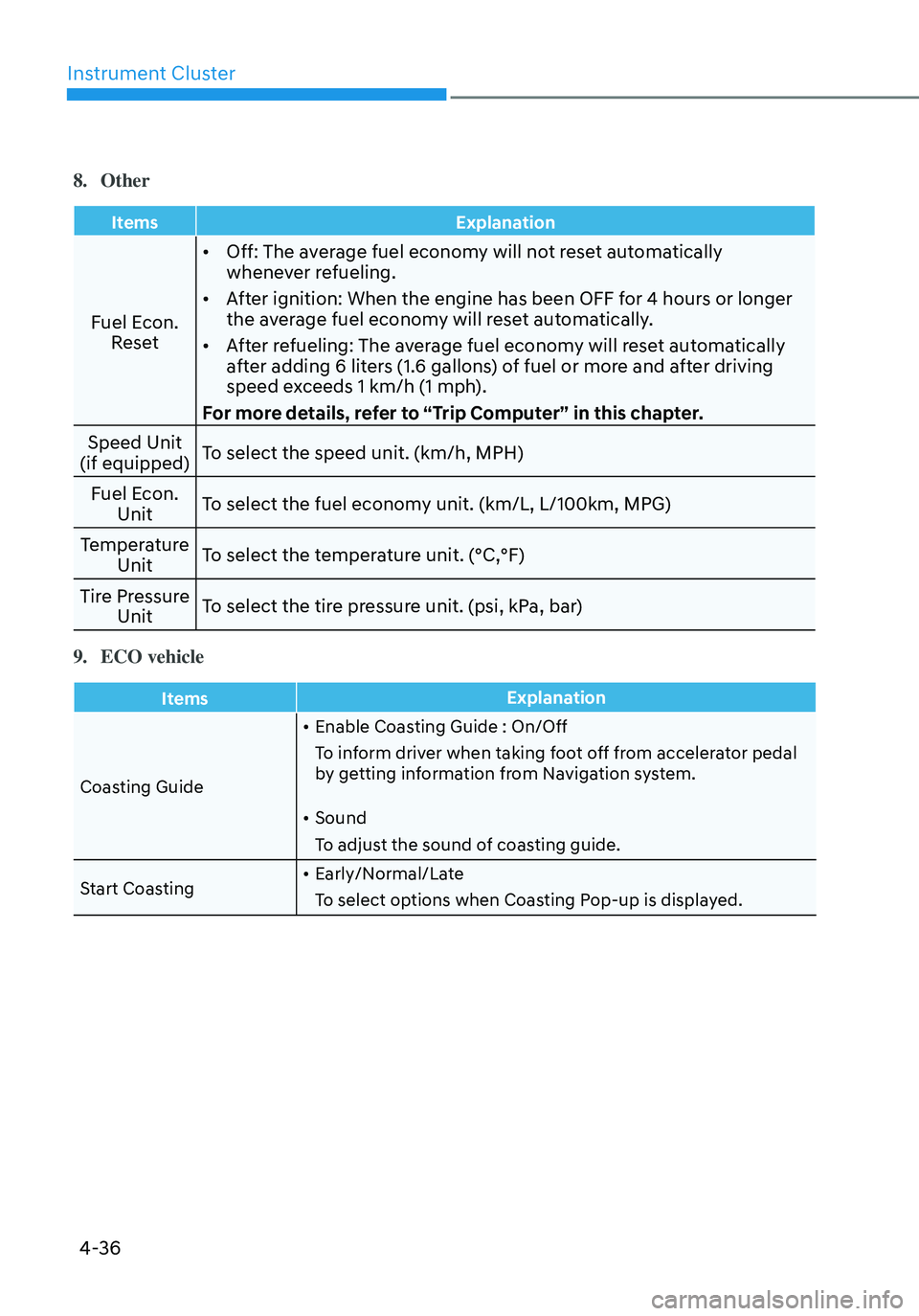
8. Other
ItemsExplanation
Fuel Econ.
Reset •
Off: The average fuel economy will not reset automatically
whenever refueling.
• After ignition: When the engine has been OFF for 4 hours or longer
the average fuel economy will reset automatically.
• After refueling: The average fuel economy will reset automatically
after adding 6 liters (1.6 gallons) of fuel or more and after driving
speed exceeds 1 km/h (1 mph).
For more details, refer to “Trip Computer” in this chapter.
Speed Unit
(if equipped) To select the speed unit. (km/h, MPH)
Fuel Econ. Unit To select the fuel economy unit. (km/L, L/100km, MPG)
Temperature Unit To select the temperature unit. (°C,°F)
Tire Pressure Unit To select the tire pressure unit. (psi, kPa, bar)
9. ECO vehicle
Items
Explanation
Coasting Guide •
Enable Coasting Guide : On/Off
To inform driver when taking foot off from accelerator pedal
by getting information from Navigation system.
• Sound
To adjust the sound of coasting guide.
Start Coasting •
Early/Normal/Late
To select options when Coasting Pop-up is displayed.
Page 145 of 555
Instrument Cluster
4-44
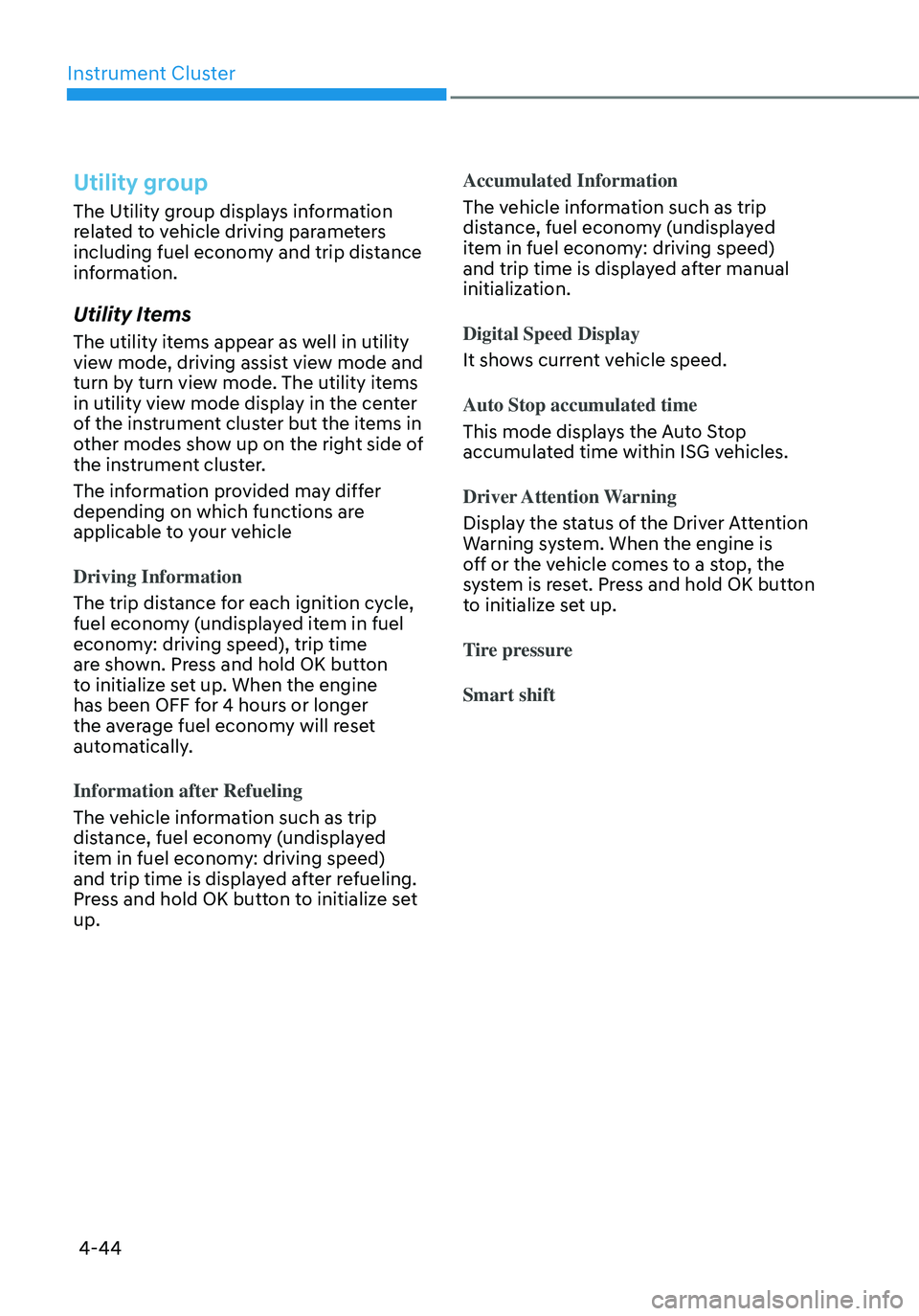
Utility group
The Utility group displays information
related to vehicle driving parameters
including fuel economy and trip distance
information.
Utility Items
The utility items appear as well in utility
view mode, driving assist view mode and
turn by turn view mode. The utility items
in utility view mode display in the center
of the instrument cluster but the items in
other modes show up on the right side of
the instrument cluster.
The information provided may differ
depending on which functions are
applicable to your vehicle
Driving Information
The trip distance for each ignition cycle,
fuel economy (undisplayed item in fuel
economy: driving speed), trip time
are shown. Press and hold OK button
to initialize set up. When the engine
has been OFF for 4 hours or longer
the average fuel economy will reset
automatically.
Information after Refueling
The vehicle information such as trip
distance, fuel economy (undisplayed
item in fuel economy: driving speed)
and trip time is displayed after refueling.
Press and hold OK button to initialize set
up.Accumulated Information
The vehicle information such as trip
distance, fuel economy (undisplayed
item in fuel economy: driving speed)
and trip time is displayed after manual
initialization.
Digital Speed Display
It shows current vehicle speed.
Auto Stop accumulated time
This mode displays the Auto Stop
accumulated time within ISG vehicles.
Driver Attention Warning
Display the status of the Driver Attention
Warning system. When the engine is
off or the vehicle comes to a stop, the
system is reset. Press and hold OK button
to initialize set up.
Tire pressure
Smart shift
Page 152 of 555
04
4-51
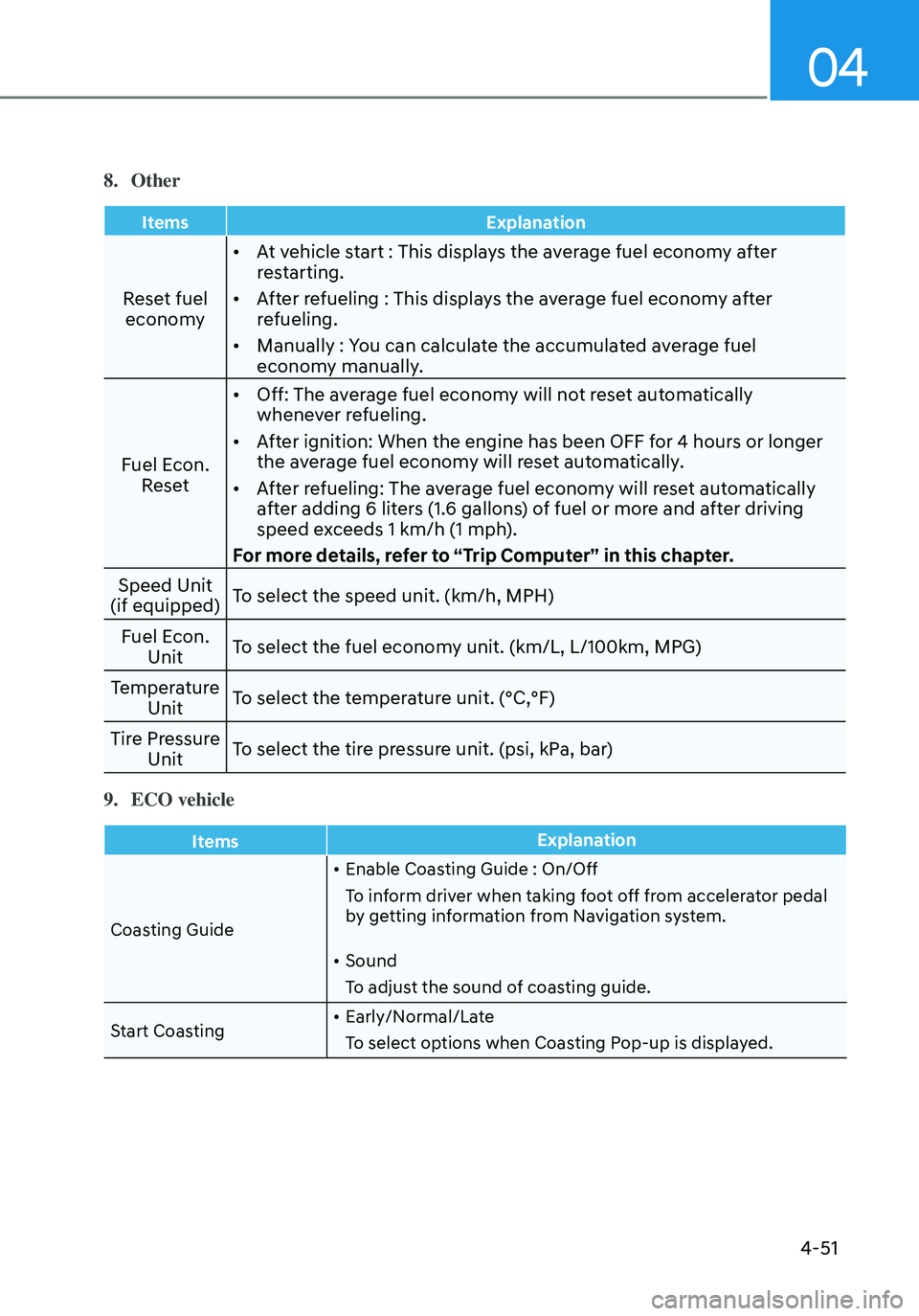
8. Other
ItemsExplanation
Reset fuel
economy •
At vehicle start : This displays the average fuel economy after
restarting.
• After refueling : This displays the average fuel economy after
refueling.
• Manually : You can calculate the accumulated average fuel
economy manually.
Fuel Econ. Reset •
Off: The average fuel economy will not reset automatically
whenever refueling.
• After ignition: When the engine has been OFF for 4 hours or longer
the average fuel economy will reset automatically.
• After refueling: The average fuel economy will reset automatically
after adding 6 liters (1.6 gallons) of fuel or more and after driving
speed exceeds 1 km/h (1 mph).
For more details, refer to “Trip Computer” in this chapter.
Speed Unit
(if equipped) To select the speed unit. (km/h, MPH)
Fuel Econ. Unit To select the fuel economy unit. (km/L, L/100km, MPG)
Temperature Unit To select the temperature unit. (°C,°F)
Tire Pressure Unit To select the tire pressure unit. (psi, kPa, bar)
9. ECO vehicle
Items
Explanation
Coasting Guide •
Enable Coasting Guide : On/Off
To inform driver when taking foot off from accelerator pedal
by getting information from Navigation system.
• Sound
To adjust the sound of coasting guide.
Start Coasting •
Early/Normal/Late
To select options when Coasting Pop-up is displayed.
Page 174 of 555
05
5-21
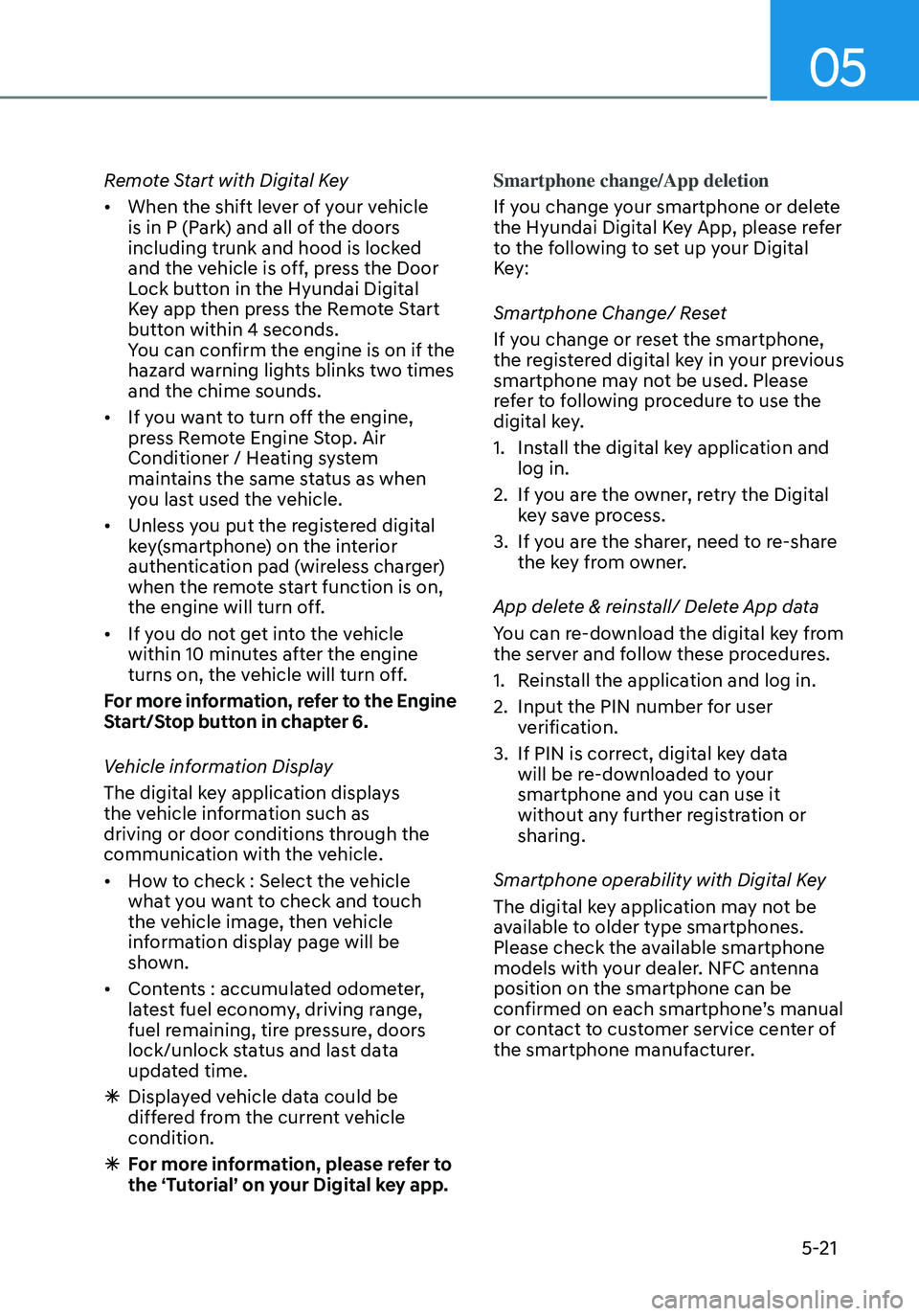
Remote Start with Digital Key
• When the shift lever of your vehicle
is in P (Park) and all of the doors
including trunk and hood is locked
and the vehicle is off, press the Door
Lock button in the Hyundai Digital
Key app then press the Remote Start
button within 4 seconds.
You can confirm the engine is on if the
hazard warning lights blinks two times
and the chime sounds.
• If you want to turn off the engine,
press Remote Engine Stop. Air
Conditioner / Heating system
maintains the same status as when
you last used the vehicle.
• Unless you put the registered digital
key(smartphone) on the interior
authentication pad (wireless charger)
when the remote start function is on,
the engine will turn off.
• If you do not get into the vehicle
within 10 minutes after the engine
turns on, the vehicle will turn off.
For more information, refer to the Engine
Start/Stop button in chapter 6.
Vehicle information Display
The digital key application displays
the vehicle information such as
driving or door conditions through the
communication with the vehicle.
• How to check : Select the vehicle
what you want to check and touch
the vehicle image, then vehicle
information display page will be
shown.
• Contents : accumulated odometer,
latest fuel economy, driving range,
fuel remaining, tire pressure, doors
lock/unlock status and last data
updated time.
ÃDisplayed vehicle data could be
differed from the current vehicle
condition.
ÃFor more information, please refer to
the ‘Tutorial’ on your Digital key app. Smartphone change/App deletion
If you change your smartphone or delete
the Hyundai Digital Key App, please refer
to the following to set up your Digital
Key:
Smartphone Change/ Reset
If you change or reset the smartphone,
the registered digital key in your previous
smartphone may not be used. Please
refer to following procedure to use the
digital key.
1. Install the digital key application and
log in.
2. If you are the owner, retry the Digital
key save process.
3. If you are the sharer, need to re-share
the key from owner.
App delete & reinstall/ Delete App data
You can re-download the digital key from
the server and follow these procedures.
1. Reinstall the application and log in.
2. Input the PIN number for user
verification.
3. If PIN is correct, digital key data
will be re-downloaded to your
smartphone and you can use it
without any further registration or
sharing.
Smartphone operability with Digital Key
The digital key application may not be
available to older type smartphones.
Please check the available smartphone
models with your dealer. NFC antenna
position on the smartphone can be
confirmed on each smartphone’s manual
or contact to customer service center of
the smartphone manufacturer.
Page 553 of 555

I
I-11
Highway Driving ........................................................................\
......................6-44
Rocking the Vehicle........................................................................\
..................6-42
Smooth Cornering ........................................................................\
....................6-43
Steering Wheel
........................................................................\
.............................5-41
Electric Power Steering (EPS) ........................................................................\
.5-41
Horn ........................................................................\
..........................................5-43
Tilt Steering / Telescope Steering .....................................................................5-42
Storage compartment
........................................................................\
.................5-102
Center console storage ........................................................................\
...........5-102
Glove box ........................................................................\
...............................5-102
Sunroof
........................................................................\
........................................5-58
Resetting the sunroof ........................................................................\
................5-61
Sunroof open warning ........................................................................\
..............5-61
Sunroof opening and closing ........................................................................\
....5-59
Sunshade........................................................................\
................................... 5-60
Tilting the sunroof ........................................................................\
....................5-60
T
Theft –Alarm System
........................................................................\
...................5-37
Tire Pressure Monitoring System (TPMS)
...........................................................8-9
Changing a tire with TPMS ........................................................................\
......8-13
Check tire pressure ........................................................................\
.....................8-9
Low tire pressure position and tire pressure telltale .........................................8-11
Low tire pressure telltale ........................................................................\
..........8-11
Tire pressure monitoring system ......................................................................8-10
TPMS (Tire Pressure Monitoring System) malfunction indicator ...................8-13
Tire Specification and Pressure Label
.................................................................2-14
Tires and Wheels
........................................................................\
.................2-9/ 9-29
All Season Tires ........................................................................\
.......................9-40
Check Tire Inflation Pressure ........................................................................\
...9-30
Low Aspect Ratio Tires ........................................................................\
............9-41
Radial-Ply Tires ........................................................................\
........................9-40
Recommended Cold T ire Inflation Pressures ...................................................9-29
Snow Tires ........................................................................\
................................9-40
Summer Tires ........................................................................\
...........................9-40
Tire Care ........................................................................\
...................................9-29
Tire Maintenance ........................................................................\
......................9-34
Tire Replacement ........................................................................\
.....................9-32
Tire Rotation ........................................................................\
.............................9-31