Page 414 of 643
412
uuBluetooth ® HandsFreeLink ®u HFL Menus
Features
■To edit a speed dial
1. Go to the phone menu screen.
2 Phone Menu screen P. 402
2.Select Edit Speed Dial .
3. Select an existing speed dial entry.
u From the pop-up menu, select Edit.
4. Select a setting you want.
■To delete a speed dial
1. Go to the phone menu screen.
2 Phone Menu screen P. 402
2.Select Edit Speed Dial .
3. Select an existing speed dial entry.
u From the pop-up menu, select Delete.
4. A confirmation message appears on the
screen. Select Yes.
AAAAA
BBBBB
CCCCC
DDDDD
EEEEE
FFFFF
21 HR-V HDMC-31T7A6500.book 412 ページ 2020年9月23日 水曜日 午前7時0分
Page 419 of 643
Continued417
uuBluetooth ® HandsFreeLink ®u HFL Menus
Features
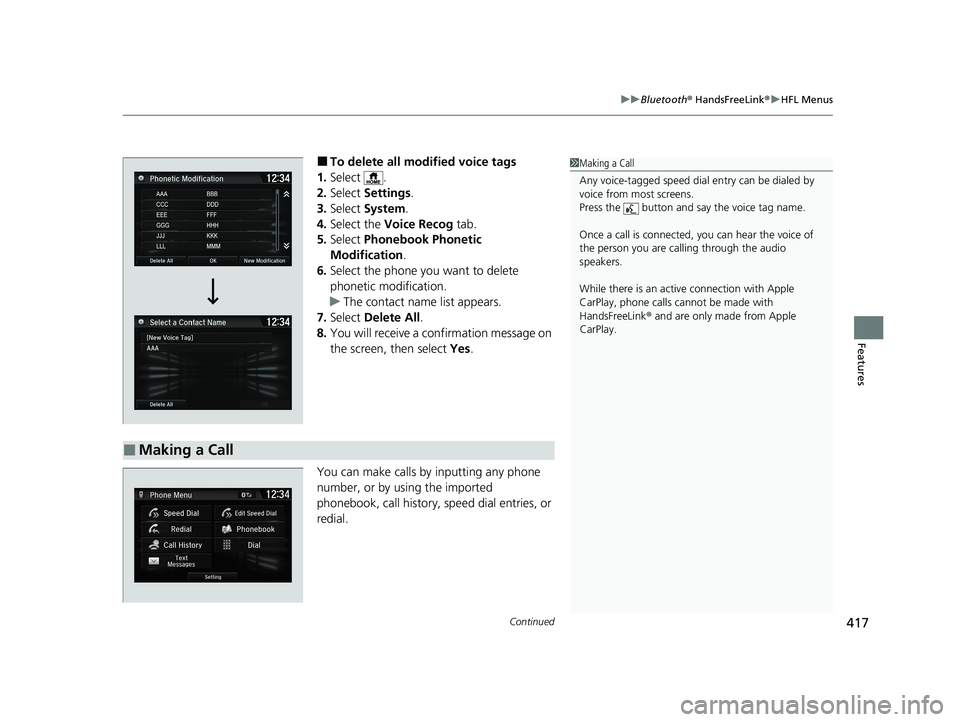
■To delete all modified voice tags
1. Select .
2. Select Settings .
3. Select System.
4. Select the Voice Recog tab.
5. Select Phonebook Phonetic
Modification .
6. Select the phone you want to delete
phonetic modification.
u The contact name list appears.
7. Select Delete All.
8. You will receive a confirmation message on
the screen, then select Yes.
You can make calls by inputting any phone
number, or by using the imported
phonebook, call history, speed dial entries, or
redial.
■Making a Call
1 Making a Call
Any voice-tagged speed dial entry can be dialed by
voice from most screens.
Press the button and say the voice tag name.
Once a call is connected, you can hear the voice of
the person you are call ing through the audio
speakers.
While there is an active connection with Apple
CarPlay, phone calls ca nnot be made with
HandsFreeLink ® and are only made from Apple
CarPlay.
21 HR-V HDMC-31T7A6500.book 417 ページ 2020年9月23日 水曜日 午前7時0分
Page 420 of 643
uuBluetooth ® HandsFreeLink ®u HFL Menus
418
Features
■To make a call using the imported
phonebook
1. Go to the phone menu screen.
2 Phone Menu screen P. 402
2.Select Phonebook .
3. Select a name.
u You can also search by letter. Select
Search .
u Use the keyboard on the touch screen for
entering letters.
4. Select a number.
u Dialing starts automatically.
■To make a call using a phone number
1. Go to the phone menu screen.
2 Phone Menu screen P. 402
2.Select Dial.
3. Select a number.
u Use the keyboard on the touch screen for
entering numbers.
4. Select .
u Dialing starts automatically.
1To make a call using the imported phonebook
You can call a stored voice-tagged speed dial number
using voice commands.
2 Speed Dial P. 410
1To make a call using a phone number
You can call a stored voice-tagged speed dial number
using voice commands.
2 Speed Dial P. 410
21 HR-V HDMC-31T7A6500.book 418 ページ 2020年9月23日 水曜日 午前7時0分
Page 421 of 643

Continued419
uuBluetooth ® HandsFreeLink ®u HFL Menus
Features
■To make a call using redial
1. Go to the phone menu screen.
2 Phone Menu screen P. 402
2.Select Redial .
u Dialing starts automatically.
■To make a call using the Call History
Call history is stored by All, Dialed ,
Received , and Missed .
1. Go to the phone menu screen.
2 Phone Menu screen P. 402
2.Select Call History .
3. Select All, Dialed , Received , or Missed .
4. Select a number.
u Dialing starts automatically.
■To make a call using a Speed Dial entry
1. Go to the phone menu screen.
2 Phone Menu screen P. 402
2.Select Speed Dial .
3. Select a number.
u Dialing starts automatically.
1To make a call using redial
Press and hold the butt on to redial the last
number dialed.
1 To make a call using the Call History
The call history displays the last 20 all, dialed,
received, or missed calls.
(Appears only when a phone is connected to the
system.)
1 To make a call using a Speed Dial entry
When a voice tag is stored, press the button to
call the number using the voice tag.
2 Speed Dial P. 410
Any voice-tagged speed dial entry can be dialed by
voice from any screen.
Press the button and follow the prompts.
21 HR-V HDMC-31T7A6500.book 419 ページ 2020年9月23日 水曜日 午前7時0分
Page 563 of 643

561
uuChecking and Maintaining Tires uTire and Loading Information Label
Continued
Maintenance
Tire and Loading Information Label
The label attached to the dr iver’s doorjamb provides necessary tire and loading
information.
Tire Labeling
The tires that came on your vehicle have a
number of markings. Those you should be
aware of are described as shown.
Whenever tires are replaced, they should be replaced with tires of the same size.
1Tire and Loading Information Label
The tire and loading informat ion label attached to the
driver’s doorjamb contains:
aThe number of people your vehicle can carry.
bThe total weight your vehicle can carry. Do not
exceed this weight.
cThe original tire sizes for front, rear, and spare.
dThe proper cold tire pre ssure for front, rear, and
spare.
Label
Example
Example Tire Size
Tire
Identification
Number (TIN)
Maximum
Tire Load
Maximum
Tire Pressure
Tire Size
■Tire Sizes
1 Tire Sizes
Following is an example of tire size with an
explanation of what each component means.
215/55R17 94V
215: Tire width in millimeters.
55: Aspect ratio (the tire’s section height as a
percentage of its width).
R: Tire construction code (R indicates radial).
17: Rim diameter in inches.
94: Load index (a numerical code associated with the
maximum load the tire can carry).
V: Speed symbol (an alphab etical code indicating the
maximum speed rating).
21 HR-V HDMC-31T7A6500.book 561 ページ 2020年9月23日 水曜日 午前7時0分
Page 568 of 643
566
uuChecking and Maintaining Tires uTire and Wheel Replacement
Maintenance
Tire and Wheel Replacement
Replace your tires with radials of the sa me size, load range, speed rating, and
maximum cold tire pressure ra ting (as shown on the tire’s sidewall). Using tires of a
different size or construction can cause ce rtain vehicle systems such as the ABS and
Vehicle Stability Assist
TM (VSA ®) system to work incorrectly.
It is best to replace all four tires at the same time. If that isn’t possible, replace the
front or rear tires in pairs.
Make sure that the wheel’s specifications match thos e of the original wheels.
1Tire and Wheel Replacement
3WARNING
Installing improper tires on your vehicle can
affect handling and stability. This can cause
a crash in which you can be seriously hurt or
killed.
Always use the size and type of tires
recommended in this owner’s manual.
21 HR-V HDMC-31T7A6500.book 566 ページ 2020年9月23日 水曜日 午前7時0分


