Page 201 of 643

199
uuAdjusting the Seats uRear Seats
Controls
Separately lift up the left and right halves of
the rear seat cushions to make room for cargo
area.
■Lifting up the seat cushion
1. Make sure the seat belt buckles are in their
loops on the seat.
2. Pull up the rear seat cushion.
3. Fold the seat leg do wn while pushing the
seat cushion firmly against the seat-back to
lock it.
■Putting the seat in the original position
1. Hold the seat cushion in place with one
hand, then unlock it by pulling up the seat
leg fully with your other hand.
u Hold the seat cushion firmly, as it may
abruptly fall when you unlock it.
2. Slowly lower the seat cushion, and set the
seat leg in the floor guide until it latches in
place.
■Folding the Rear Seat Up1 Folding the Rear Seat Up
After you fold the seat up, or put it back in the
original position, make sure the seat is firmly secured
by rocking it forward and back.
Check if there are any items on the seat before you
pull the seat cushion up. Check if there are any
obstacles around the floor guide before you put the
seat back in the original position.
Loop
Seat Leg
Floor Guide
Latch
Seat Leg
21 HR-V HDMC-31T7A6500.book 199 ページ 2020年9月23日 水曜日 午前7時0分
Page 205 of 643
203
uuAdjusting the Seats uHead Restraints
Controls
Head restraints can be removed for cleaning or repair.
To remove a head restraint:
Pull the restraint up as far as it will go. Then push the release button, and pull the
restraint up and out.
To reinstall a head restraint:
Insert the legs back in place, then adjust the head restraint to an appropriate height
while pressing the release button. Pull up on the restraint to make sure it is locked
in position.
■Removing and Reinstalling the Head Restraints1 Removing and Reinstalling the Head Restraints
To remove and install the rear outer head restraint,
recline the seat-back slightly forward as the space
between the ceili ng and the seat-back is limited.
3WARNING
Failure to reinstall, or correctly reinstall, the
head restraints can result in severe injury
during a crash.
Always replace the he ad restraints before
driving.
21 HR-V HDMC-31T7A6500.book 203 ページ 2020年9月23日 水曜日 午前7時0分
Page 207 of 643

205Continued
Controls
Interior Lights/Interior Convenience Items
Interior Lights
■ON
The interior lights come on regardless of
whether the doors are open or closed.
■Door activated
The interior lights come on in the following
situations:
• When any doors are opened.
• You unlock the driver’s door.
• You remove the key from the ignition
switch.
• When the power mode is set to VEHICLE
OFF (LOCK).
■OFF
The interior lights remain off regardless of
whether the doors are open or closed.
*1: Models with the smart entry system have an ENGINE START/STOP button instead of an
ignition switch.
■Interior Light Switches1 Interior Light Switches
In the door activated position, the interior lights fade
out and go off about 30 se conds after the doors are
closed.
The lights go off after about 30 seconds in the
following situations:
•When you unlock the driver’s door but do not open
it.
•When you remove the key from the ignition switch
but do not open a door.
•When you set the power mode to VEHICLE OFF
(LOCK) but do not open a door.
You can change the interi or lights dimming time.
2 Customized Features P. 127
The interior lights go off im mediately in the following
situations:
•When you lock the driver’s door.•When you turn the ignition switch to ON ( w*1.
•When you close the driver’s door with the key in
the ignition switch.
•When you close the driver’s door in ACCESSORY
mode.
Models without smart entry system
Models with smart entry system
Models with multi-information display
Models without smart entry system
Models with smart entry system
On
Off
Door Activated Position
Front*
Rear
Door Activated Position
Off
Models without smart entry system
Models with smart entry system
* Not available on all models
21 HR-V HDMC-31T7A6500.book 205 ページ 2020年9月23日 水曜日 午前7時0分
Page 216 of 643
uuInterior Lights/Interior Convenience Items uInterior Convenience Items
214
Controls
The cargo cover can be used to conceal your
items and protect them from direct sunlight.
■To remove:
Pull out the cargo cover rearwards and
remove it.
■To fold:
The cargo cover is collapsible.
1. Take the opposite sides, fold the cover
halfway, then twist into opposite ways.
2. Curl to narrow the cover as shown.
■Cargo Cover
Canadian models1Cargo Cover
Do not let anyone access items in the cargo area
while driving. Loose items can cause injury if you have
to brake hard.
Do not stack objects higher than the top of the seat
in the cargo area. They could block your view and be
thrown about the vehicle during a sudden stop.
To prevent cargo cover damage, do not:
•Place items on the cargo cover.•Put weight on the cargo cover.
When reinstalling the carg o cover, put the tagged
side first.
Tag
21 HR-V HDMC-31T7A6500.book 214 ページ 2020年9月23日 水曜日 午前7時0分
Page 352 of 643
350
uuCustomized Features u
Features
■Customization flow
Press the MENU/CLOCK button.
Adjust Clock
SettingsBluetoothAdd New Device
Connect an Audio Device
Display AdjustmentBrightness
Contrast
Black Level
Rear CameraCamera Guideline
21 HR-V HDMC-31T7A6500.book 350 ページ 2020年9月23日 水曜日 午前7時0分
Page 355 of 643
353
uuCustomized Features u
Continued
Features
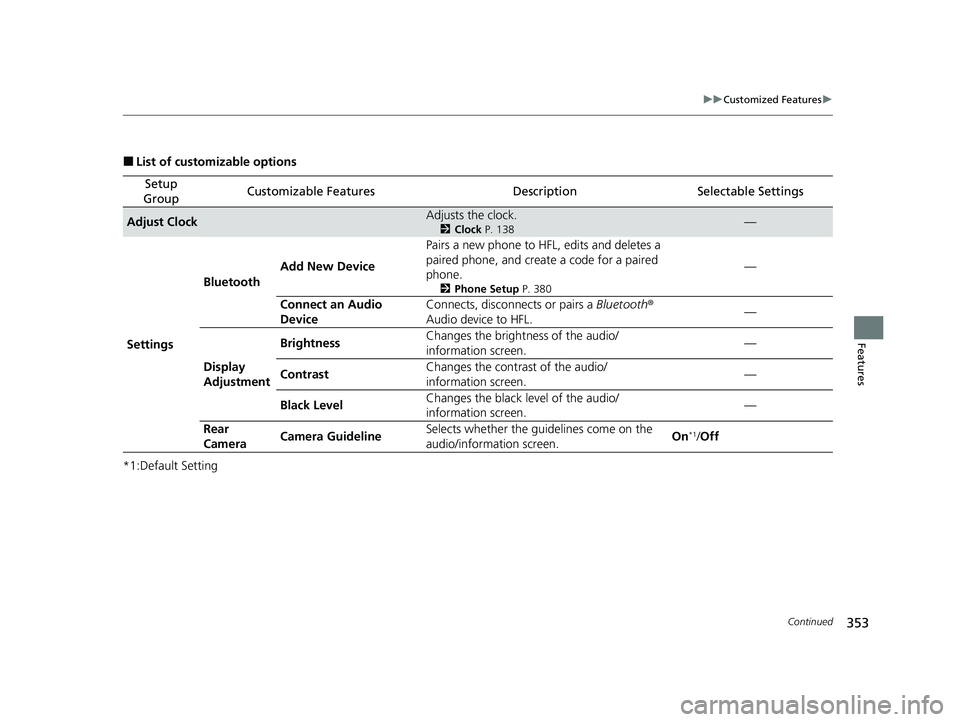
■List of customizable options
*1:Default Setting
Setup
GroupCustomizable FeaturesDescriptionSelectable Settings
Adjust ClockAdjusts the clock.
2 Clock P. 138—
Settings Bluetooth
Add New Device Pairs a new phone to HFL, edits and deletes a
paired phone, and creat
e a code for a paired
phone.
2 Phone Setup P. 380
—
Connect an Audio
Device Connects, disconnects or pairs a
Bluetooth®
Audio device to HFL. —
Display
Adjustment Brightness
Changes the brightness of the audio/
information screen.
—
Contrast Changes the contrast of the audio/
information screen. —
Black Level Changes the black level of the audio/
information screen. —
Rear
Camera Camera Guideline Selects whether the guidelines come on the
audio/information screen.
On
*1/
Off
21 HR-V HDMC-31T7A6500.book 353 ページ 2020年9月23日 水曜日 午前7時0分
Page 429 of 643

427
Driving
This chapter discusses driving and refueling.
Before DrivingDriving Preparation .......................... 428
Maximum Load Limit........................ 431
Towing a Trailer Towing Behind a Motorhome .......... 433
Off-Highway Driving Guidelines ..... 434
When Driving Starting the Engine .................. 436, 439
Precautions While Driving................. 442
Continuously Variable Transmission ..... 443Shifting .................................... 444, 446
ECON Button ................................... 450
Cruise Control
*................................ 451
Vehicle Stability AssistTM (VSA®), aka Electronic
Stability Control (ESC), System .............. 454
LaneWatchTM*.................................. 456
Real Time AWD with Intelligent Control System
TM*...................................... 458Tire Pressure Monitoring System (TPMS) ...... 459Tire Pressure Monitoring System (TPMS) - Required Federal Explanation ......... 462
Honda Sensing ®
*.............................. 464
Collision Mitigati on Braking SystemTM
(CMBSTM) ....................................... 467
Adaptive Cruise Control (ACC)......... 477
Lane Keeping Assist System (LKAS)...... 490
Road Departure Mitigation (RDM) System.... 499Front Sensor Camera ....................... 504
Radar Sensor ................................... 506
Braking Brake System ................................... 507
Anti-lock Brake System (ABS) ........... 512
Brake Assist System ......................... 513
Parking Your Vehicle When Stopped ................................ 514
Multi-View Rear Camera .................. 515
Refueling Fuel Information .............................. 517
How to Refuel ................................. 518
Fuel Economy and CO
2 Emissions .... 520
* Not available on all models
21 HR-V HDMC-31T7A6500.book 427 ページ 2020年9月23日 水曜日 午前7時0分
Page 438 of 643

436
Driving
When Driving
Starting the Engine
1.Make sure the parking brake is applied.
u The electric parking brake indicator
comes on for 15 seconds when you pull
up to electric parking brake switch.
2. Check that the tr ansmission is in
(P, then
depress the brake pedal.
u Although it is possible to start the vehicle
in
(N, it is safer to start it in (P.
Models without smart entry system
1Starting the Engine
Keep your foot firmly on the brake pedal when
starting the engine.
The engine is harder to st art in cold weather and in
thinner air found at altit udes above 8,000 feet (2,400
meters).
When starting the engine in cold weather, turn off all
electrical accessories such as the lights, heating and
cooling system
*/climate control system*, and rear
defogger in order to reduce battery drain.
If you live in a region where winter is extremely cold,
an engine block heater will improve starting and
warming of the engine. Cons ult a dealer for details.
If the exhaust system sounds abnormal or you can
smell exhaust gas inside the vehicle, have your vehicle
checked by a dealer. There may be a problem with
the engine or exhaust system.Electric Parking Brake Switch
Brake Pedal
* Not available on all models
21 HR-V HDMC-31T7A6500.book 436 ページ 2020年9月23日 水曜日 午前7時0分