Page 243 of 659
Continued241
uuClimate Control System uUsing Automatic Climate Control
Controls
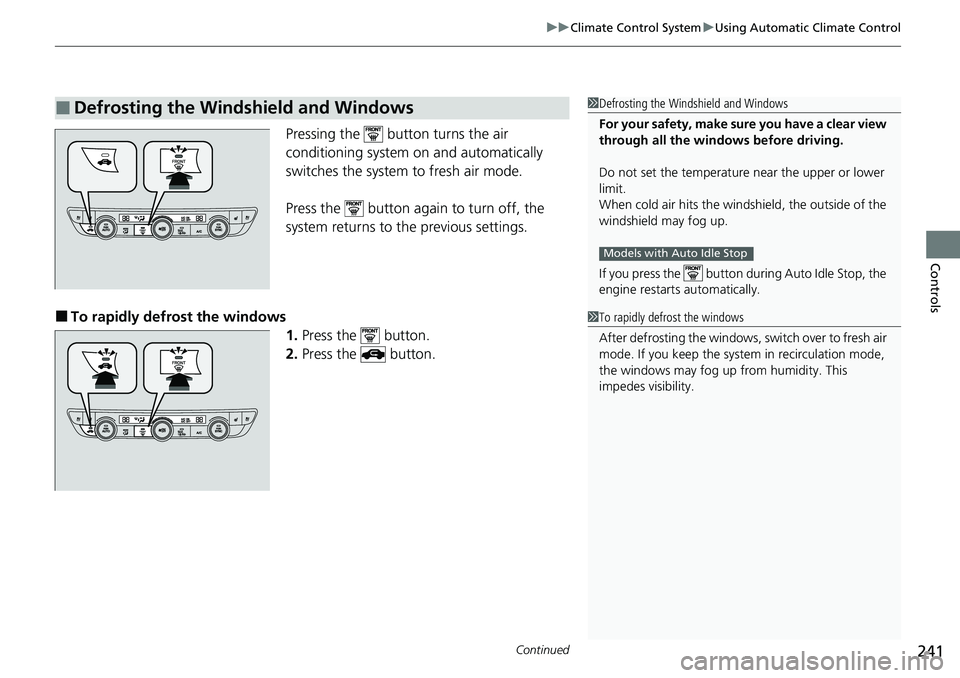
Pressing the button turns the air
conditioning system on and automatically
switches the system to fresh air mode.
Press the button again to turn off, the
system returns to the previous settings.
■To rapidly defrost the windows
1.Press the button.
2. Press the button.
■Defrosting the Windshield and Windows1Defrosting the Windshield and Windows
For your safety, make sure you have a clear view
through all the windows before driving.
Do not set the temperatur e near the upper or lower
limit.
When cold air hits the windshield, the outside of the
windshield may fog up.
If you press the button during Auto Idle Stop, the
engine restarts automatically.
Models with Auto Idle Stop
1 To rapidly defrost the windows
After defrosting the windows, switch over to fresh air
mode. If you keep the syst em in recirculation mode,
the windows may fog up from humidity. This
impedes visibility.
Page 306 of 659
uuAudio System Basic Operation uHondaLink ®
304
Features
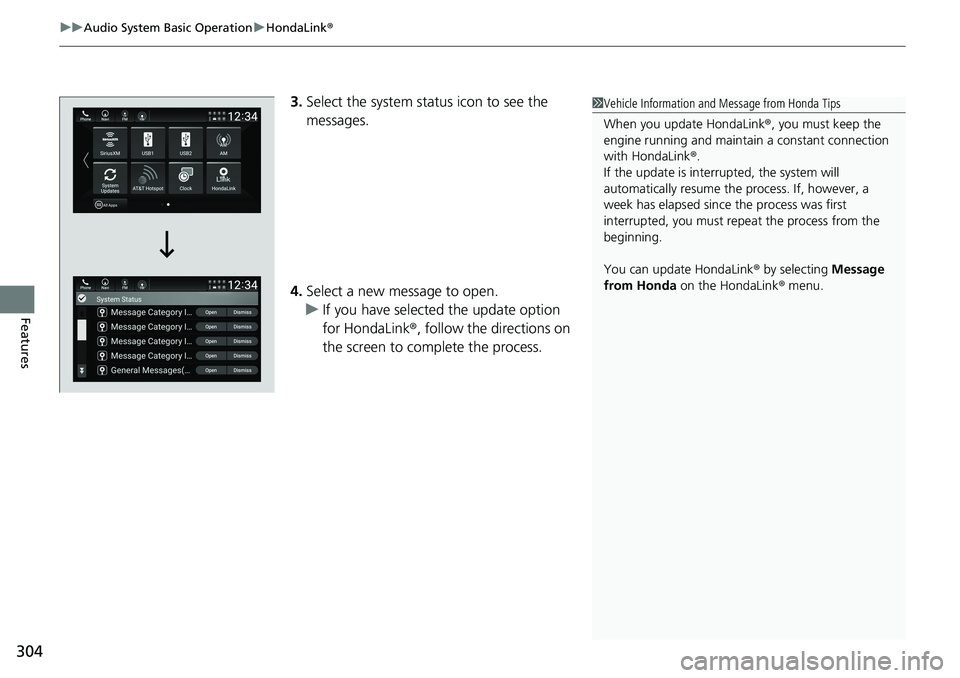
3.Select the system status icon to see the
messages.
4. Select a new message to open.
u If you have selected the update option
for HondaLink ®, follow the directions on
the screen to complete the process.1 Vehicle Information and Message from Honda Tips
When you update HondaLink ®, you must keep the
engine running and maintain a constant connection
with HondaLink ®.
If the update is interrupted, the system will
automatically resume the process. If, however, a
week has elapsed since the process was first
interrupted, you must repeat the process from the
beginning.
You can update HondaLink ® by selecting Message
from Honda on the HondaLink ® menu.
Page 311 of 659

309
uuAudio System Basic Operation uHondaLink® Service*
Features
Your subscribed telematics service prov ider can check your vehicle’s condition.
■Virtual Dashboard
You can remotely check the mileage, fuel range, and oil life in your app.
■Remote Start and stop the engine
You can remotely start and stop engine using your app as same as the smart entry
key.
■Geofence Alert
You can receive a notification anytime your ve hicle enters or leaves a region set by
you.
■Speed Alert
You can receive a notification when your ve hicle has exceeded a speed limit set by
you.
■Personal Data Wipe
You can reset your audio and navigation system settings to factory defaults with the
app.
■Wi-Fi hotspot
Vehicle provides 4G LTE ne twork environment as Wi-Fi router to use tablet or
smartphone in your vehicle.
■Convenient Features1 Convenient Features
The contact information of your provider, your user
ID and PIN will be given when you subscribe to
HondaLink ®. If you forget any of the above, contact a
Honda dealer, or go to hondalink.honda.com.
You cannot use Wi-Fi hotspots when you are
connected wirelessly to Apple CarPlay or Android
Auto.
Page 336 of 659
334
uuGeneral Information on the Audio System uHonda App License Agreement
Features
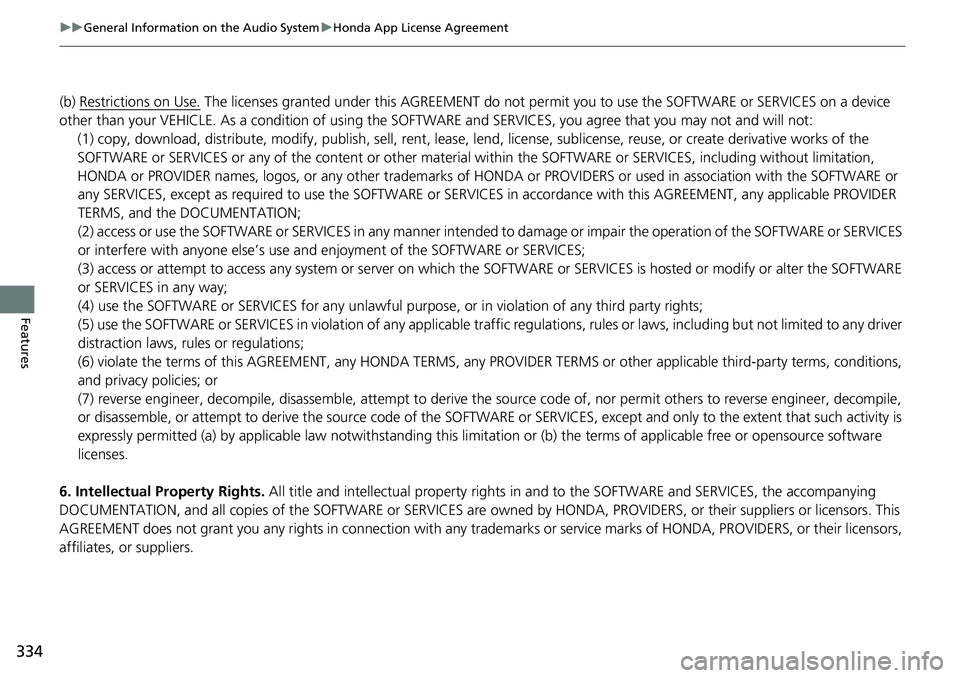
(b) Restrictions on Use. The licenses granted under this AGREEMENT do not pe rmit you to use the SOFTWARE or SERVICES on a device
other than your VEHICLE. As a condition of using the SOFTWARE and SERVICES, you agree that you may not and will not:
6. Intellectual Property Rights. All title and intellectual property rights in and to the SOFTWARE and SERVICES, the accompanying
DOCUMENTATION, and all copies of the SOFTWARE or SERVICES are ow ned by HONDA, PROVIDERS, or their suppliers or licensors. This
AGREEMENT does not grant you any rights in connection with any trademarks or service marks of HONDA, PROVIDERS, or their licens ors,
affiliates, or suppliers. (1) copy, download, distribute, modify, publish, sell, rent, leas
e, lend, license, sublicense, reuse, or create derivative works of the
SOFTWARE or SERVICES or any of the content or other material within the SOFTWARE or SERVICES, including without limitation,
HONDA or PROVIDER names, logos, or any othe r trademarks of HONDA or PROVIDERS or used in association with the SOFTWARE or
any SERVICES, except as required to use the SOFTWARE or SERVICES in accordance with this AGREEMENT, any applicable PROVIDER
TERMS, and the DOCUMENTATION;
(2) access or use the SOFTWARE or SERVICES in any manner intended to damage or impair the operation of the SOFTWARE or SERVICES
or interfere with anyone else’s use a nd enjoyment of the SOFTWARE or SERVICES;
(3) access or attempt to access any system or server on which the SOFTWARE or SERVICES is hosted or modify or alter the SOFTWAR E
or SERVICES in any way;
(4) use the SOFTWARE or SERVICES for any unlawful pu rpose, or in violation of any third party rights;
(5) use the SOFTWARE or SERVICES in violatio n of any applicable traffic regulations, rules or laws, including but not limited t o any driver
distraction laws, rules or regulations;
(6) violate the terms of this AGREEMENT, any HONDA TERMS, any PR OVIDER TERMS or other applicable third-party terms, conditions,
and privacy policies; or
(7) reverse engineer, decompile, disassemble , attempt to derive the source code of, nor permit others to reverse engineer, deco mpile,
or disassemble, or attempt to derive the source code of the SOFT WARE or SERVICES, except and only to the extent that such activity is
expressly permitted (a) by applicable law notwithstanding this limi tation or (b) the terms of applicable free or opensource software
licenses.
Page 340 of 659
338
uuGeneral Information on the Audio System uHonda App License Agreement
Features
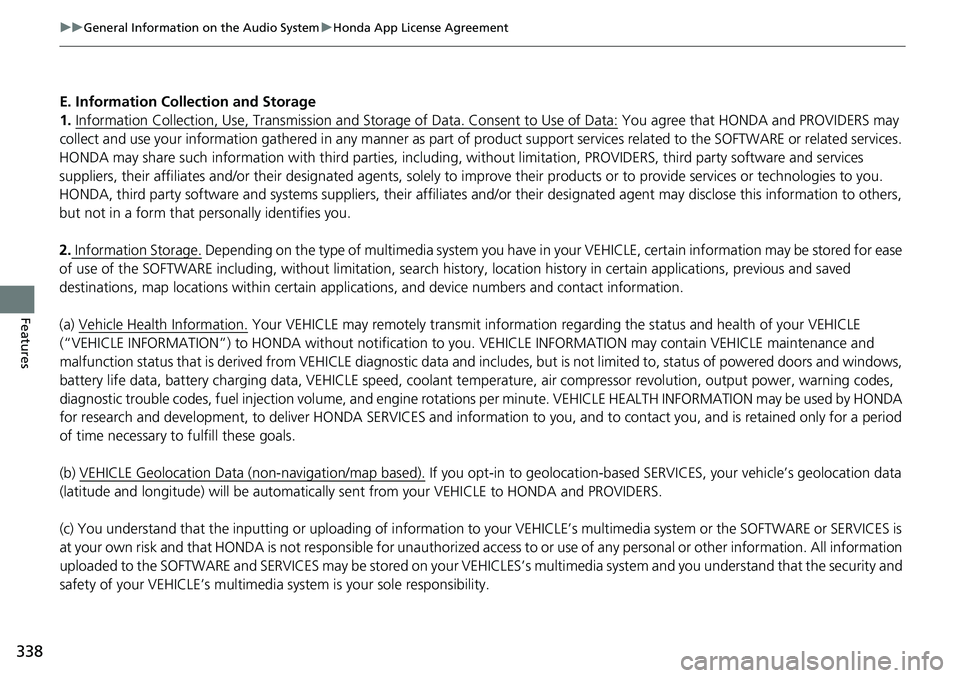
E. Information Coll ection and Storage
1. Information Collection, Use, Transmission and Storage of Data. Consent to Use of Data:
You agree that HONDA and PROVIDERS may
collect and use your information gathered in any manner as part of product support services related to the SOFTWARE or related services.
HONDA may share such information with third parties, including, without limitation, PROVIDERS, th ird party software and services
suppliers, their affiliates and/or their desi gnated agents, solely to improve their products or to provide services or technolo gies to you.
HONDA, third party software and systems s uppliers, their affiliates and/or their designated agent may disclose this information to others,
but not in a form that pe rsonally identifies you.
2. Information Storage.
Depending on the type of multimedia system you have in your VEHICLE, certain information may be stored for ease
of use of the SOFTWARE including, without limitation, search hi story, location history in certain applications, previous and saved
destinations, map locations within certain applications, and device numbers and contact information.
(a) Vehicle Health Information.
Your VEHICLE may remotely trans mit information regarding the status and health of your VEHICLE
(“VEHICLE INFORMATION”) to HONDA without notification to you. VEHICLE INFORMATION may contain VEHICLE maintenance and
malfunction status that is derived from VEHICLE diagnostic data and includes, but is not limited to, status of powered doors and windows,
battery life data, battery charging data, VEHICLE speed, coolant temperat ure, air compressor revolution, output power, warning codes,
diagnostic trouble codes, fuel injection volu me, and engine rotations per minute. VEHICL E HEALTH INFORMATION may be used by HON DA
for research and development, to deliver HONDA SERVICES and information to you, and to contact you, and is retained only for a period
of time necessary to fulfill these goals.
(b) VEHICLE Geolocation Data (non-navigation/map based).
If you opt-in to geolocation-based SERVICES, your vehicle’s geolocation data
(latitude and longitude) will be automatically se nt from your VEHICLE to HONDA and PROVIDERS.
(c) You understand that the inputting or uploading of information to your VEHICLE’s multimedia system or the SOFTWARE or SERVIC ES is
at your own risk and that HONDA is not responsible for unauthorized access to or use of any personal or other information. All information
uploaded to the SOFTWARE and SERVICES may be stored on your VEHICLES’s multimedia system and you understand that the security and
safety of your VEHICLE’s multimedia system is your sole responsibility.
Page 358 of 659
356
uuCustomized Features u
Features
Vehicle
Meter Setup
Adjust Outside Temp. Display
“Trip A” Reset Timing
“Trip B” Reset Timing
Reverse Alert Tone*
Config. of Instrument Panel
Adjust Alarm Volume
Turn By Turn Auto Display
Fuel Efficiency Backlight
TPMS Calibration
Driver Assist
System SetupBlind Spot Info*
Head-up Warning*
Traffic Sign Recognition System
Forward Collision Warning Distance
ACC Forward Vehicle Detect Beep
Lane Keeping Assist Suspend Beep
Road Departure Mitigation Setting
Driver Attention Monitor
Speed/Distance Units
Tachometer
Language Selection
Auto Engine Idle Stop Guidance Screens*
Rear Seat Reminder*
* Not available on all models
Page 363 of 659
361
uuCustomized Features u
Continued
Features
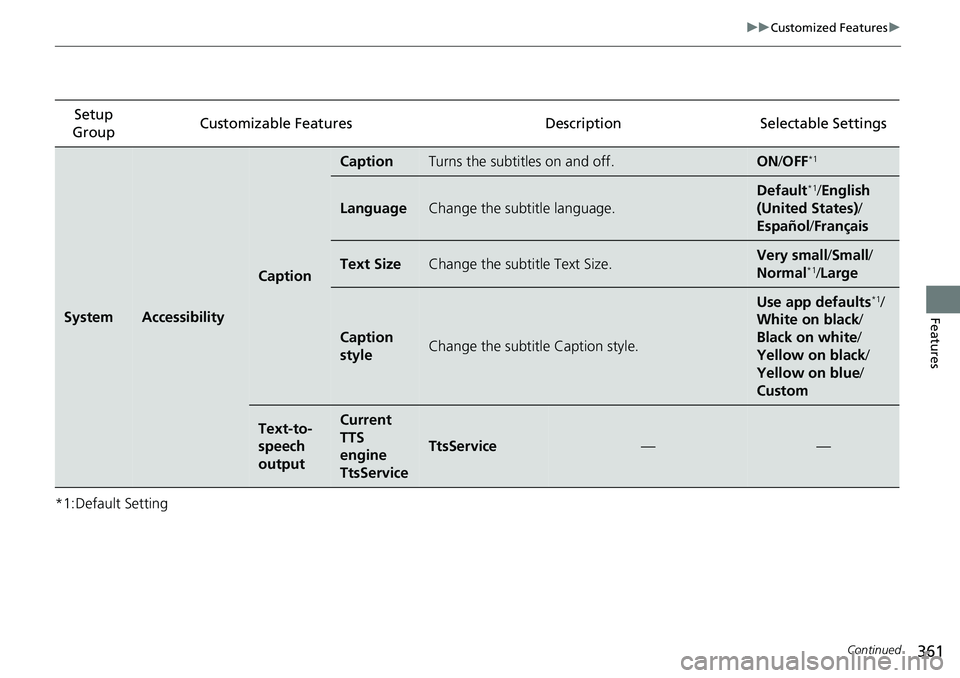
*1:Default SettingSetup
Group Customizable Features Descri
ption Selectable Settings
SystemAccessibility
Caption
CaptionTurns the subtitles on and off.ON/OFF*1
LanguageChange the subtitle language.
Default*1/English
(United States) /
Español /Français
Text SizeChange the subtitle Text Size.Very small/ Small/
Normal*1/ Large
Caption
styleChange the subtitle Caption style.
Use app defaults*1/
White on black /
Black on white /
Yellow on black /
Yellow on blue /
Custom
Text-to-
speech
outputCurrent
TTS
engine
TtsService
TtsService——
Page 368 of 659
366
uuCustomized Features u
Features
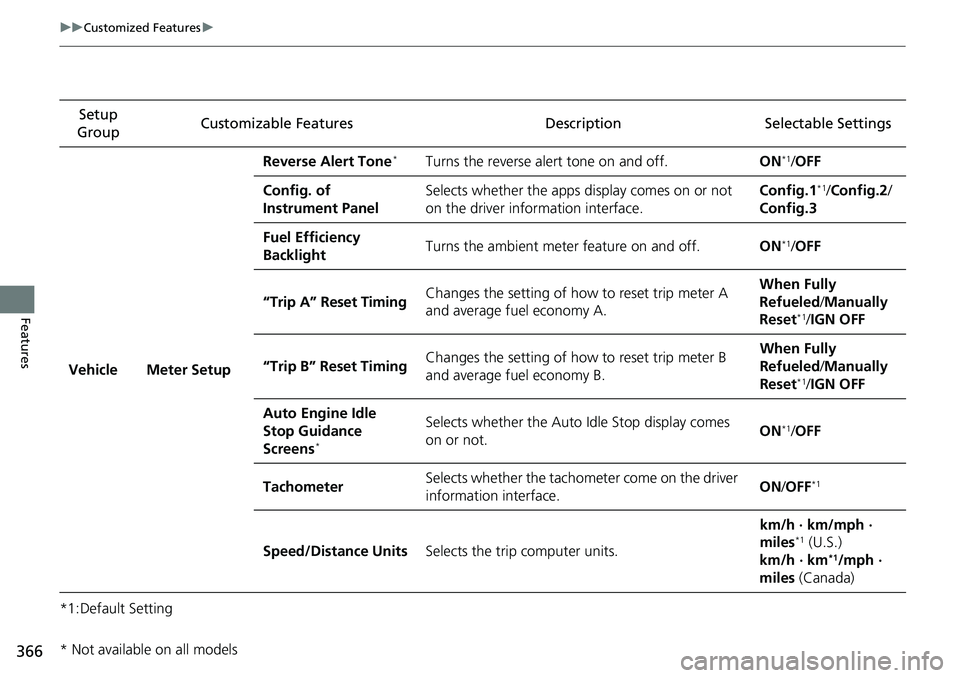
*1:Default SettingSetup
Group Customizable Features Description Selectable Settings
Vehicle Meter Setup Reverse Alert Tone
*Turns the reverse alert tone on and off.
ON*1/OFF
Config. of
Instrument Panel Selects whether the apps display comes on or not
on the driver information interface. Config.1
*1/
Config.2 /
Config.3
Fuel Efficiency
Backlight Turns the ambient meter feature on and off.
ON
*1/OFF
“Trip A” Reset Timing Changes the setting of how to reset trip meter A
and average fuel economy A. When Fully
Refueled
/Manually
Reset
*1/ IGN OFF
“Trip B” Reset Timing Changes the setting of how to reset trip meter B
and average fuel economy B. When Fully
Refueled
/Manually
Reset
*1/ IGN OFF
Auto Engine Idle
Stop Guidance
Screens
*
Selects whether the Auto Idle Stop display comes
on or not. ON*1/
OFF
Tachometer Selects whether the tachometer come on the driver
information interface. ON
/OFF
*1
Speed/Distance Units Selects the trip computer units. km/h · km/mph ·
miles*1 (U.S.)
km/h · km*1/mph ·
miles (Canada)
* Not available on all models