Page 311 of 659

309
uuAudio System Basic Operation uHondaLink® Service*
Features
Your subscribed telematics service prov ider can check your vehicle’s condition.
■Virtual Dashboard
You can remotely check the mileage, fuel range, and oil life in your app.
■Remote Start and stop the engine
You can remotely start and stop engine using your app as same as the smart entry
key.
■Geofence Alert
You can receive a notification anytime your ve hicle enters or leaves a region set by
you.
■Speed Alert
You can receive a notification when your ve hicle has exceeded a speed limit set by
you.
■Personal Data Wipe
You can reset your audio and navigation system settings to factory defaults with the
app.
■Wi-Fi hotspot
Vehicle provides 4G LTE ne twork environment as Wi-Fi router to use tablet or
smartphone in your vehicle.
■Convenient Features1 Convenient Features
The contact information of your provider, your user
ID and PIN will be given when you subscribe to
HondaLink ®. If you forget any of the above, contact a
Honda dealer, or go to hondalink.honda.com.
You cannot use Wi-Fi hotspots when you are
connected wirelessly to Apple CarPlay or Android
Auto.
Page 331 of 659
329
uuAudio Error Messages uAndroid/Apps
Features
Android/Apps
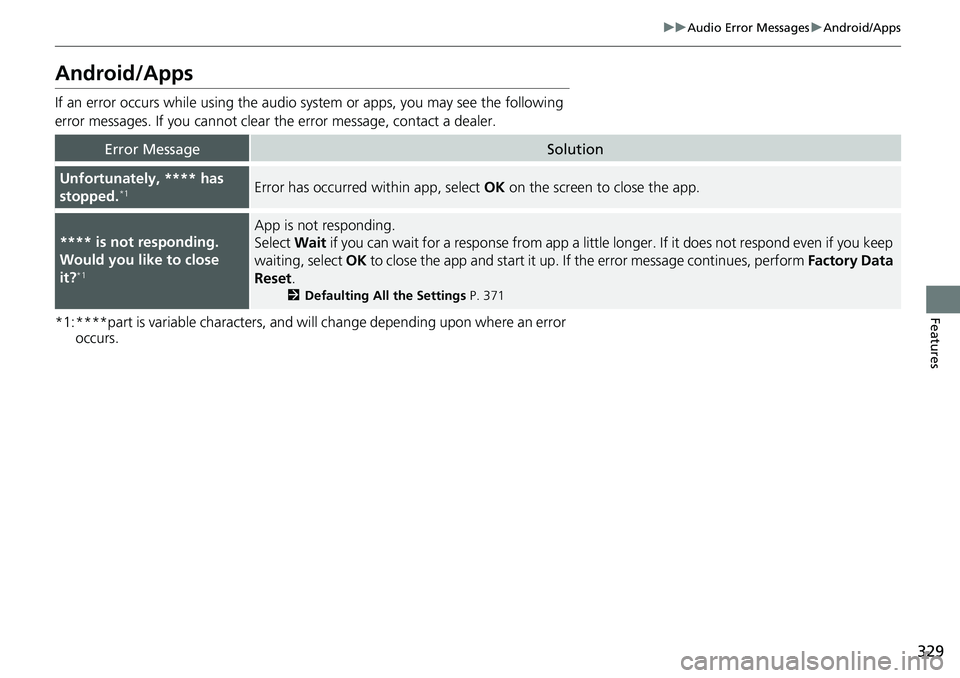
If an error occurs while using the audio system or apps, you may see the following
error messages. If you cannot clear the error message, contact a dealer.
*1:****part is variable characters, and will change depending upon where an error
occurs.
Error MessageSolution
Unfortunately, **** has
stopped.*1Error has occurred within app, select OK on the screen to close the app.
**** is not responding.
Would you like to close
it?
*1
App is not responding.
Select Wait if you can wait for a response from app a little longer. If it does not respond even if you keep
waiting, select OK to close the app and start it up. If the error message continues, perform Factory Data
Reset .
2Defaulting All the Settings P. 371
Page 356 of 659
354
uuCustomized Features u
Features
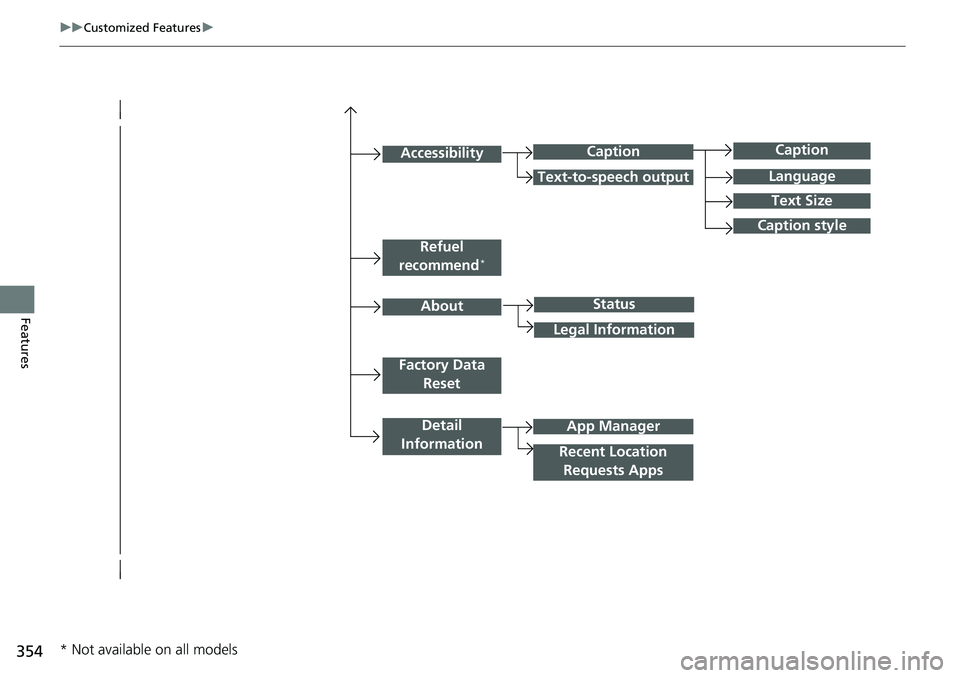
Caption
Language
Caption style
Detail
Information
Factory Data Reset
About
Refuel
recommend*
Accessibility
Status
Legal Information
App Manager
Recent Location Requests Apps
Caption
Text-to-speech output
Text Size
* Not available on all models
Page 358 of 659
356
uuCustomized Features u
Features
Vehicle
Meter Setup
Adjust Outside Temp. Display
“Trip A” Reset Timing
“Trip B” Reset Timing
Reverse Alert Tone*
Config. of Instrument Panel
Adjust Alarm Volume
Turn By Turn Auto Display
Fuel Efficiency Backlight
TPMS Calibration
Driver Assist
System SetupBlind Spot Info*
Head-up Warning*
Traffic Sign Recognition System
Forward Collision Warning Distance
ACC Forward Vehicle Detect Beep
Lane Keeping Assist Suspend Beep
Road Departure Mitigation Setting
Driver Attention Monitor
Speed/Distance Units
Tachometer
Language Selection
Auto Engine Idle Stop Guidance Screens*
Rear Seat Reminder*
* Not available on all models
Page 359 of 659
357
uuCustomized Features u
Continued
Features
Lighting Setup
Interior Light Dimming Time
Headlight Auto OFF Timer
Auto Light Sensitivity*
Door/Window
SetupAuto Door Lock
Auto Door Unlock
Key and Remote Unlock Mode
Keyless Lock Answer Back
Security Relock Timer
Maintenance Info.Select Reset Items
Walk Away Auto Lock*
Driving Position
Setup*Seat Position Movement at Entry/Exit
Memory Position Link
Keyless Access Setup*Door Unlock Mode
Smart Entry Light Flash
Smart Entry Beep
Remote Start System ON/OFF
Auto Headlight On with Wiper On
Auto Interior Illu mination Sensitivity
* Not available on all models
Page 364 of 659
362
uuCustomized Features u
Features
*1:Default SettingSetup
Group Customizable Features Description Selectable Settings
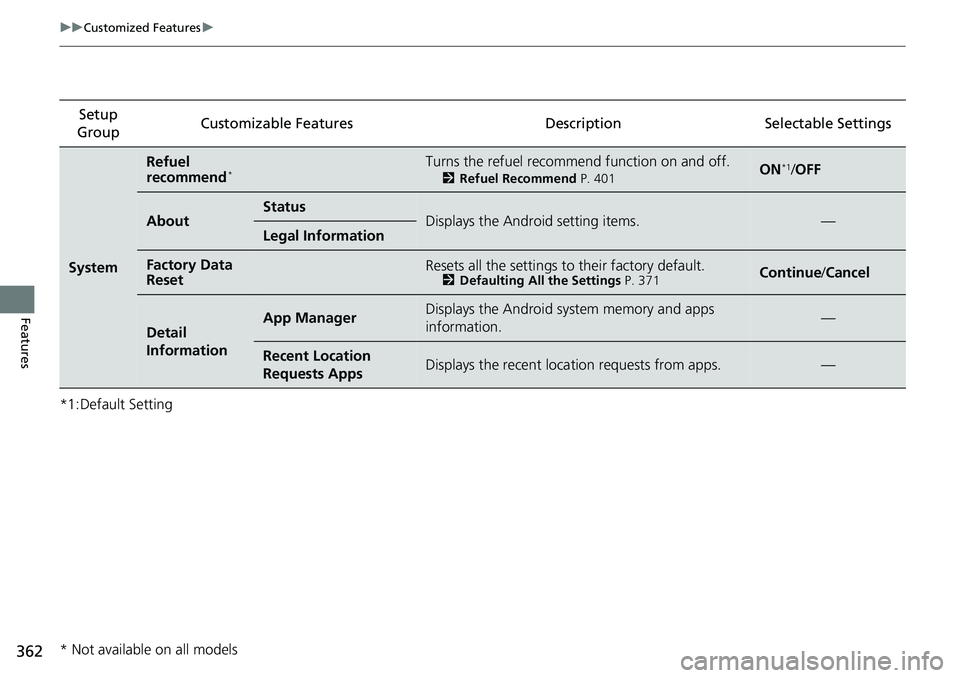
System
Refuel
recommend*Turns the refuel recommend function on and off.
2
Refuel Recommend P. 401ON*1/OFF
AboutStatusDisplays the Android setting items.—Legal Information
Factory Data
ResetResets all the settings to their factory default.2 Defaulting All the Settings P. 371Continue /Cancel
Detail
InformationApp ManagerDisplays the Android sy stem memory and apps
information.—
Recent Location
Requests AppsDisplays the recent loca tion requests from apps.—
* Not available on all models
Page 368 of 659
366
uuCustomized Features u
Features
*1:Default SettingSetup
Group Customizable Features Description Selectable Settings
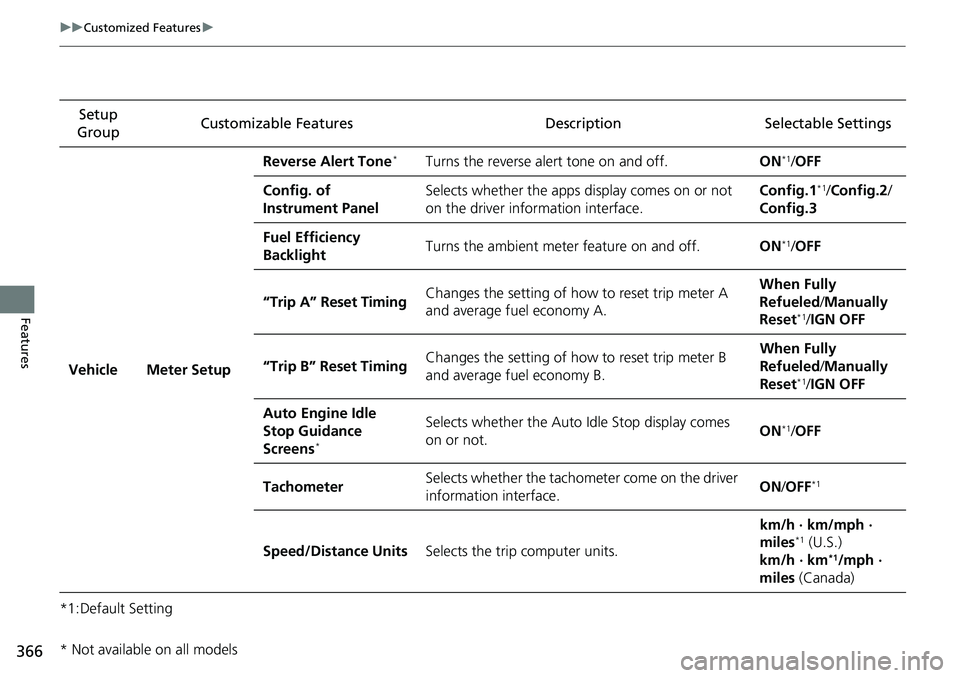
Vehicle Meter Setup Reverse Alert Tone
*Turns the reverse alert tone on and off.
ON*1/OFF
Config. of
Instrument Panel Selects whether the apps display comes on or not
on the driver information interface. Config.1
*1/
Config.2 /
Config.3
Fuel Efficiency
Backlight Turns the ambient meter feature on and off.
ON
*1/OFF
“Trip A” Reset Timing Changes the setting of how to reset trip meter A
and average fuel economy A. When Fully
Refueled
/Manually
Reset
*1/ IGN OFF
“Trip B” Reset Timing Changes the setting of how to reset trip meter B
and average fuel economy B. When Fully
Refueled
/Manually
Reset
*1/ IGN OFF
Auto Engine Idle
Stop Guidance
Screens
*
Selects whether the Auto Idle Stop display comes
on or not. ON*1/
OFF
Tachometer Selects whether the tachometer come on the driver
information interface. ON
/OFF
*1
Speed/Distance Units Selects the trip computer units. km/h · km/mph ·
miles*1 (U.S.)
km/h · km*1/mph ·
miles (Canada)
* Not available on all models
Page 371 of 659

369
uuCustomized Features u
Continued
Features
*1:Default SettingSetup
Group Customizable Features Description Selectable Settings
Vehicle Door/Window
Setup Auto Door Lock
Changes the setting for
the automatic locking
feature. OFF
/With Ve hicle
Speed
*1/ Shift From P
Key and Remote
Unlock Mode Sets up either the driver’s door or all doors to
unlock on the first push
of the remote or built-in
key. Driver Door Only
*1/
All Doors
Keyless Lock Answer
Back LOCK/UNLOCK- The exterior lights flash.
LOCK (2nd push)- The beeper sounds.
ON
*1/
OFF
Security Relock Timer Changes the time it takes for the doors to relock
and the security system to
set after you unlock the
vehicle without opening any door. 30sec
*1/
60sec /90sec
Auto Door Unlock Changes the setting for
when the doors unlock
automatically. OFF
/All Doors When
Driver’s Door
Opens
*1/ All Doors
When Shifted to
Park/ All Doors With
IGN OFF
Walk Away Auto
Lock
*Changes the settings for the auto lock function
when you walk away from the vehicle. ON
/OFF*1
Maintenance
Info. Select Reset Items
Resets the engine oil life display when you have
performed the maintenance service. —
* Not available on all models