Page 89 of 659
87
uuIndicators u
Continued
Instrument Panel
IndicatorNameOn/BlinkingExplanationMessage
Malfunction
Indicator
Lamp
•After you have set the power mode
to ON, the vehicle performs system
checks. However, if the readiness
codes have not been set by that
time, this indicator will blink five
times and then go off.
• Comes on if there is a problem with
the emissions control systems.
• Blinks when a misfire in the
engine’s cylinders is detected.•Readiness codes are part of the on board
diagnostics for the emissions control
systems.
2 Testing of Readiness Codes P. 641
•Comes on while driving - Have your
vehicle checked by a dealer.
• Blinks while driving - Stop in a safe place
where there are no flammable objects. Stop
the engine for 10 minutes or more, and
wait for it to cool down. Then, take your
vehicle to a dealer.
2 If the Malfunction Indicator Lamp
Comes On or Blinks P. 616
Page 100 of 659
98
uuIndicators u
Instrument Panel
*1:Canadian models only: Apply and hold the brake pedal before selecting the ON mode.
*2:Canadian models
IndicatorNameOn/BlinkingExplanationMessage
Immobilizer
System
Indicator
• Blinks if the immobilizer system
cannot recognize the key
information.• Blinks - You cannot start the engine. Set
the power mode to VEHICLE OFF*1, then
select the ON mode again.
• Repeatedly blinks - The system may be
malfunctioning. Have your vehicle checked
by a dealer.
• Do not attempt to alter this system or add
other devices to it. Electrical problems can
occur.
Indicator
*2
*2
Page 104 of 659
102
uuIndicators u
Instrument Panel
IndicatorNameOn/BlinkingExplanationMessage
Auto Idle
Stop Indicator
(Green)
*
●Comes on when Auto Idle Stop is in
operation. The engine automatically
shuts off.
2Auto Idle Stop* P. 437—
Auto Idle
Stop System
Indicator
(Amber)
*
●Comes on when the Auto Idle Stop
system has been turned off by the
Auto Idle Stop OFF button.
2Auto Idle Stop System ON/OFF P. 438
●Blinks if there is a problem with the
Auto Idle Stop system.●Blinks - Have your vehicle checked by a
dealer.
* Not available on all models
Page 111 of 659
109
uuIndicators uDriver Information Interface Wa rning and Information Messages
Continued
Instrument Panel
Driver Information Interface Warning and Information Messages
The following messages appear only on the driver info rmation interface. Press the (home) button, select Warnings, then press the left
selector wheel to see the message agai n with the system message indicator on.
MessageConditionExplanation
●Appears when the vehicle is no longer able to run
due to a malfunction.●Immediately stop in a safe place.
●Appears when there is a ri sk that the vehicle will
move unexpectedly after you have stopped due to a
malfunction with the vehicle.●While the vehicle is stopped, apply the parking brake.
2 Parking Brake P. 510●Have your vehicle checked by a dealer.
●Appears when you set the power mode to ON again
and the vehicle is able to run.
2Starting the Engine P. 414
Automatic transmission models
Page 112 of 659
110
uuIndicators uDriver Information Interface Wa rning and Information Messages
Instrument Panel
MessageConditionExplanation
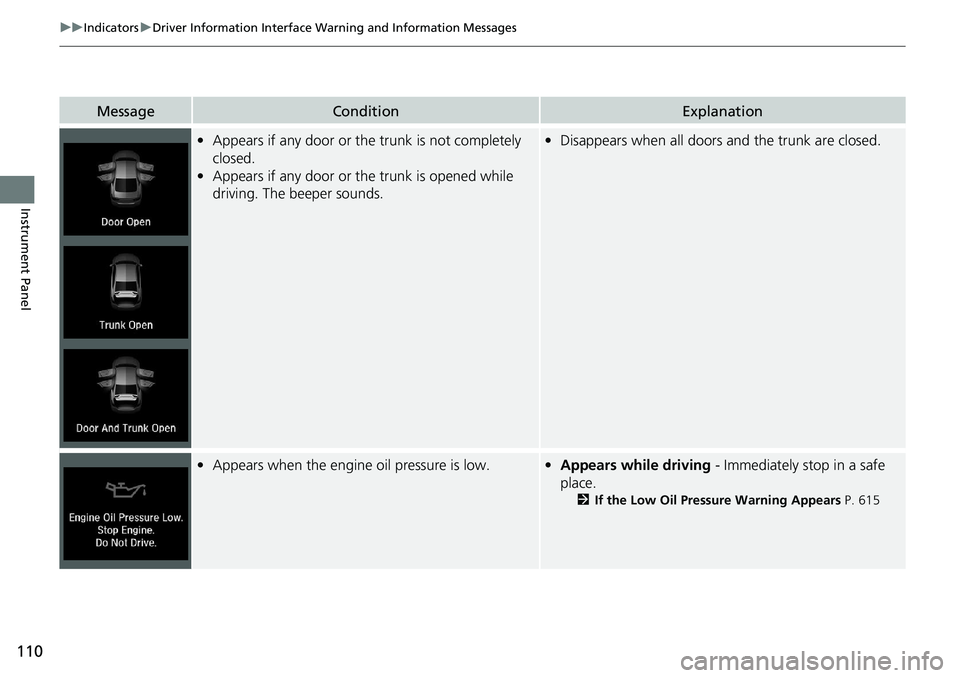
•Appears if any door or the trunk is not completely
closed.
• Appears if any door or the trunk is opened while
driving. The beeper sounds.•Disappears when all doors and the trunk are closed.
•Appears when the engine oil pressure is low.•Appears while driving - Immediately stop in a safe
place.
2 If the Low Oil Pressure Warning Appears P. 615
Page 114 of 659
112
uuIndicators uDriver Information Interface Wa rning and Information Messages
Instrument Panel
MessageConditionExplanation
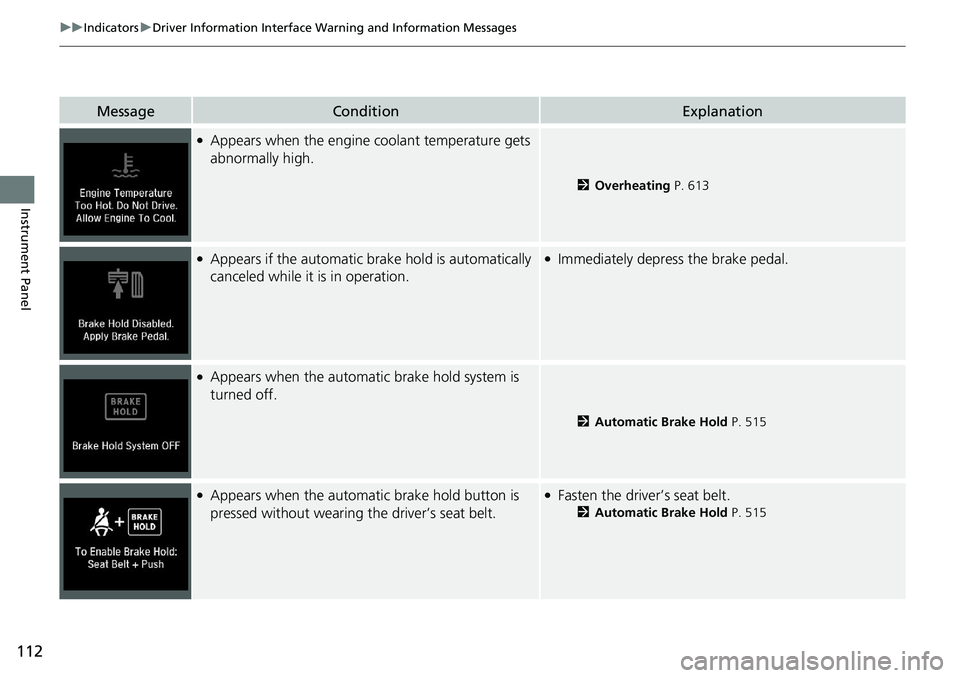
●Appears when the engine coolant temperature gets
abnormally high.
2 Overheating P. 613
●Appears if the automatic brake hold is automatically
canceled while it is in operation.●Immediately depress the brake pedal.
●Appears when the automa tic brake hold system is
turned off.
2 Automatic Brake Hold P. 515
●Appears when the automa tic brake hold button is
pressed without wearing the driver’s seat belt.●Fasten the driver’s seat belt.
2 Automatic Brake Hold P. 515
Page 116 of 659
114
uuIndicators uDriver Information Interface Wa rning and Information Messages
Instrument Panel
MessageConditionExplanation
●Appears after you set the power mode to
ACCESSORY or ON.
●Appears after you unlock and open the driver’s
door.2Starting the Engine P. 414
●Appears when the steering wheel is locked.
●Move the steering wheel left and right while pressing the
ENGINE START/STOP button.
Canadian models
Continuously variable transmission models
for Canadian models
Page 117 of 659
115
uuIndicators uDriver Information Interface Wa rning and Information Messages
Continued
Instrument Panel
MessageConditionExplanation
●Appears when the power mode is in ACCESSORY.
—
●Appears after the driver’s door is opened when the
power mode is in ACCESSORY.●Change the power mode to VEHICLE OFF.
2ENGINE START/STOP Button P. 191
●Appears when you close the door with the power
mode in ON without the remote inside the vehicle.●Disappears when you bring the remote back inside the
vehicle and close the door.
2 Remote Reminder P. 193
●Appears when the remote battery becomes weak.
2Replacing the Button Battery P. 588