Page 249 of 659
247
uuAudio System uUSB Ports
Continued
Features
USB Ports
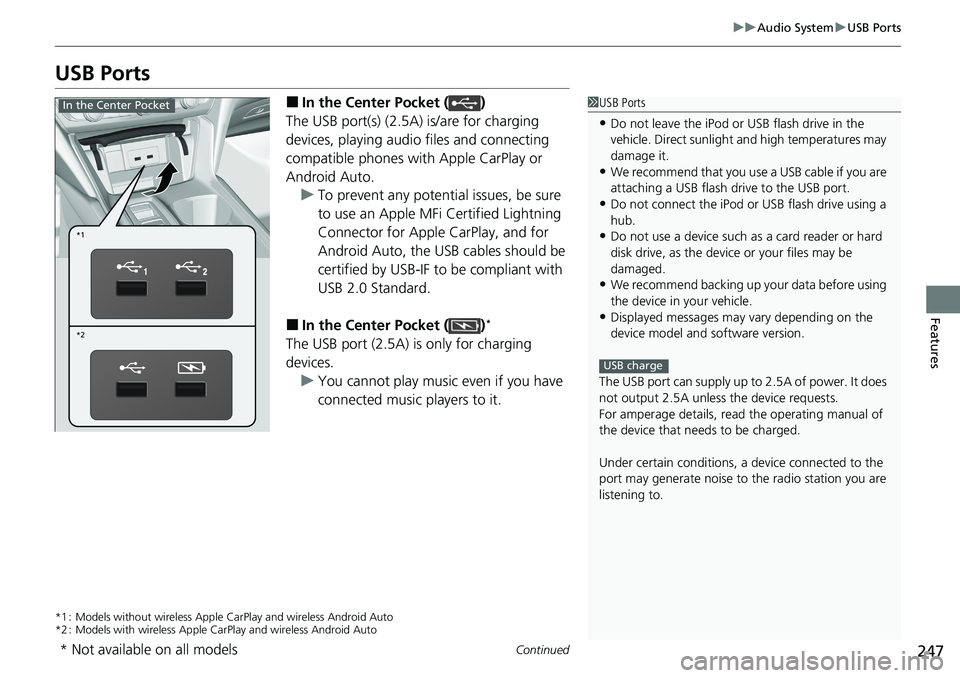
■In the Center Pocket ( )
The USB port(s) (2.5A) is/are for charging
devices, playing audio files and connecting
compatible phones with Apple CarPlay or
Android Auto. u To prevent any potenti al issues, be sure
to use an Apple MFi Certified Lightning
Connector for Apple CarPlay, and for
Android Auto, the USB cables should be
certified by USB-IF to be compliant with
USB 2.0 Standard.
■In the Center Pocket ( )*
The USB port (2.5A) is only for charging
devices. u You cannot play music even if you have
connected music players to it.
*1 : Models without wireless Apple Ca rPlay and wireless Android Auto
*2 : Models with wireless Apple CarPlay and wireless Android Auto
1USB Ports
•Do not leave the iPod or USB flash drive in the
vehicle. Direct sunlight and high temperatures may
damage it.
•We recommend that you us e a USB cable if you are
attaching a USB flash drive to the USB port.
•Do not connect the iPod or USB flash drive using a
hub.
•Do not use a device such as a card reader or hard
disk drive, as the device or your files may be
damaged.
•We recommend backing up yo ur data before using
the device in your vehicle.
•Displayed messages may vary depending on the
device model and software version.
The USB port can supply up to 2.5A of power. It does
not output 2.5A unless the device requests.
For amperage details, read the operating manual of
the device that ne eds to be charged.
Under certain condi tions, a device connected to the
port may generate noise to the radio station you are
listening to.
USB charge
*1
*2
In the Center Pocket
* Not available on all models
Page 253 of 659
251
uuAudio System uAudio Remote Controls
Continued
Features
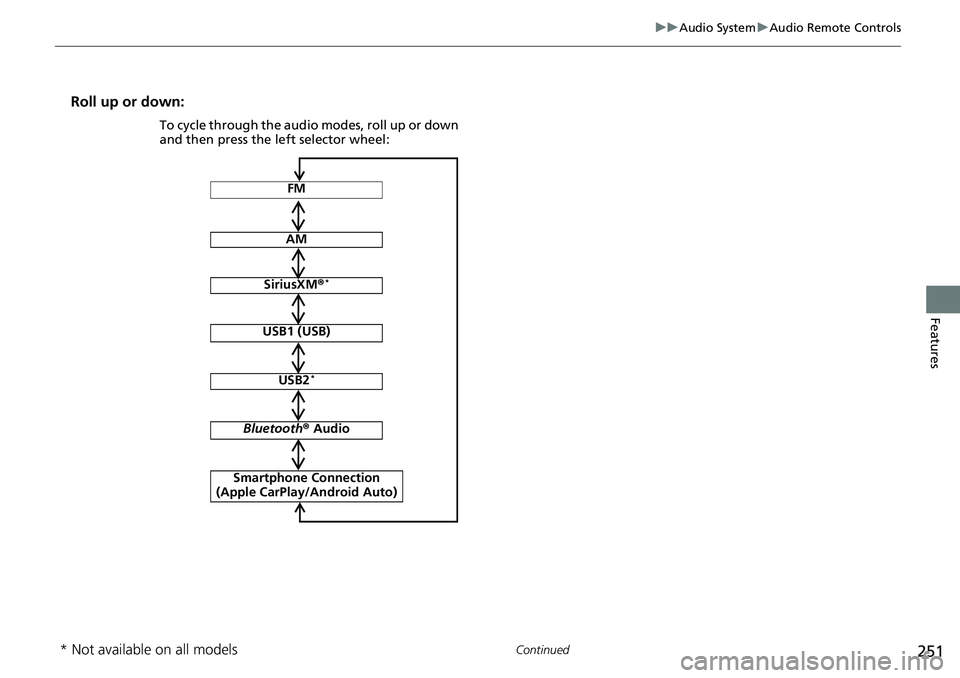
Roll up or down:
FM
AM
SiriusXM ®*
USB1 (USB)
USB2*
Bluetooth ® Audio
Smartphone Connection
(Apple CarPlay/Android Auto)
To cycle through the audio modes, roll up or down
and then press the left selector wheel:
* Not available on all models
Page 254 of 659
252
uuAudio System uAudio Remote Controls
Features
/ (Seek/Skip) Buttons
• When listening to the radio
Press : To select the next preset radio station.
Press : To select the previous preset radio station.
Press and hold : To select the next strong station.
Press and hold : To select the previous strong station.
• When listening to an iPod, USB flash drive, or Bluetooth® Audio, or Smartphone
Connection
Press : To skip to the next song.
Press : To go back to the beginning of the current or previous song.
• When listening to a USB flash drive
Press and hold : To skip to the next folder.
Press and hold : To go back to the previous folder.
Page 255 of 659
253
Features
Audio System Basic Operation
To use the audio system function, the power mode must be in ACCESSORY or ON.
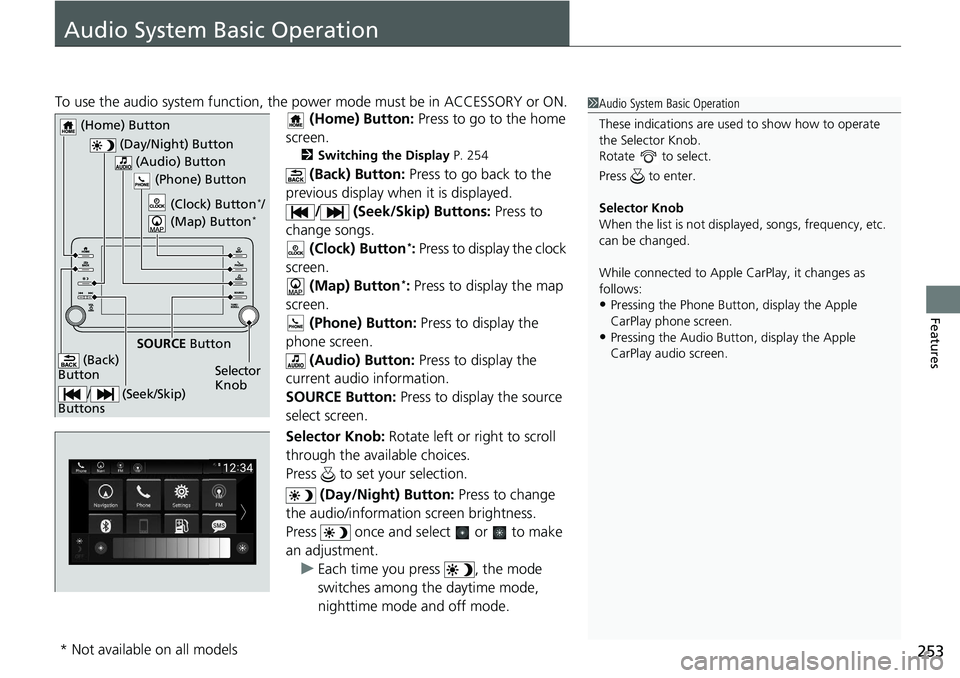
(Home) Button: Press to go to the home
screen.
2 Switching the Display P. 254
(Back) Button: Press to go back to the
previous display when it is displayed. / (Seek/Skip) Buttons: Press to
change songs. (Clock) Button
*: Press to display the clock
screen.
(Map) Button
*: Press to display the map
screen. (Phone) Button: Press to display the
phone screen. (Audio) Button: Press to display the
current audio information.
SOURCE Button: Press to display the source
select screen.
Selector Knob: Rotate left or right to scroll
through the available choices.
Press to set your selection.
(Day/Night) Button: Press to change
the audio/information screen brightness.
Press once and select or to make
an adjustment. u Each time you press , the mode
switches among the daytime mode,
nighttime mode and off mode.
1Audio System Basic Operation
These indications are used to show how to operate
the Selector Knob.
Rotate to select.
Press to enter.
Selector Knob
When the list is not displayed, songs, frequency, etc.
can be changed.
While connected to Apple CarPlay, it changes as
follows:
•Pressing the Phone Butt on, display the Apple
CarPlay phone screen.
•Pressing the Audio Button, display the Apple
CarPlay audio screen.
(Day/Night) Button
(Home) Button
(Back)
Button
(Audio) Button
Selector
Knob
(Phone) Button
SOURCE
Button
/ (Seek/Skip)
Buttons
(Clock) Button*/
(Map) Button*
* Not available on all models
Page 256 of 659
254
uuAudio System Basic Operation uAudio/Information Screen
Features
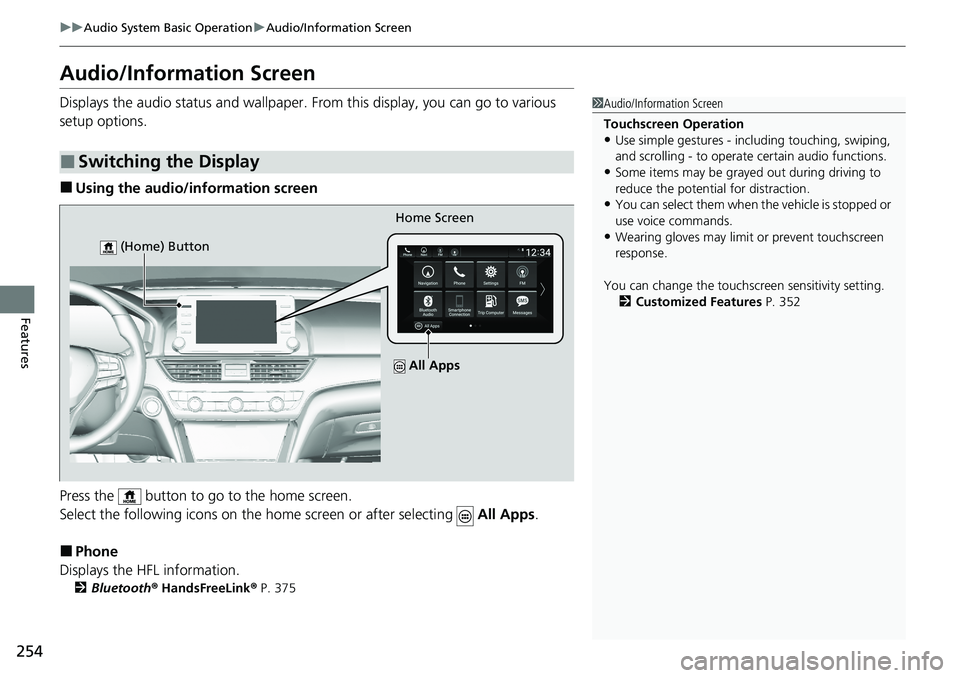
Audio/Information Screen
Displays the audio status and wallpaper. From this display, you can go to various
setup options.
■Using the audio/information screen
Press the button to go to the home screen.
Select the following icons on the hom e screen or after selecting All Apps.
■Phone
Displays the HFL information.
2 Bluetooth ® HandsFreeLink ® P. 375
■Switching the Display
1 Audio/Information Screen
Touchscreen Operation
•Use simple gestures - in cluding touching, swiping,
and scrolling - to operate certain audio functions.
•Some items may be grayed out during driving to
reduce the potential for distraction.
•You can select them when the vehicle is stopped or
use voice commands.
•Wearing gloves may limit or prevent touchscreen
response.
You can change the touchs creen sensitivity setting.
2 Customized Features P. 352
Home Screen
(Home) Button
All Apps
Page 257 of 659
255
uuAudio System Basic Operation uAudio/Information Screen
Continued
Features
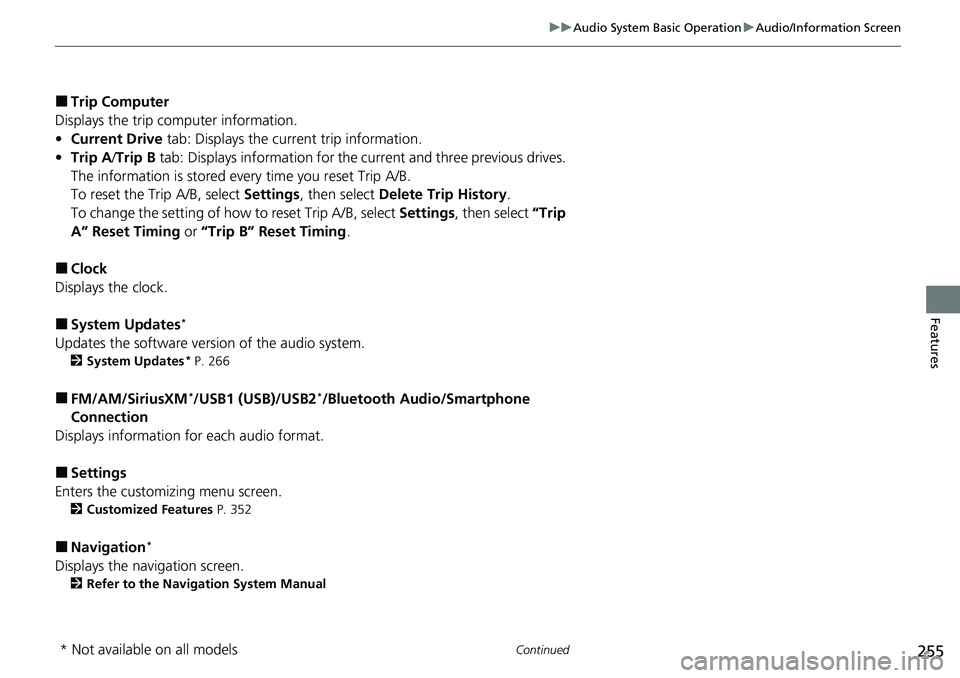
■Trip Computer
Displays the trip computer information.
• Current Drive tab: Displays the current trip information.
• Trip A /Trip B tab: Displays information for the current and three previous drives.
The information is stored ev ery time you reset Trip A/B.
To reset the Trip A/B, select Settings, then select Delete Trip History .
To change the setting of how to reset Trip A/B, select Settings, then select “Trip
A” Reset Timing or “Trip B” Reset Timing .
■Clock
Displays the clock.
■System Updates*
Updates the software version of the audio system.
2 System Updates* P. 266
■FM/AM/SiriusXM*/USB1 (USB)/USB2*/Bluetooth Audio/Smartphone
Connection
Displays information for each audio format.
■Settings
Enters the customizing menu screen.
2 Customized Features P. 352
■Navigation*
Displays the navigation screen.
2Refer to the Navigation System Manual
* Not available on all models
Page 277 of 659

275
uuAudio System Basic Operation uVoice Control Operation
Continued
Features
Voice Control Operation
Your vehicle has a voice control syst em that allows hands-free operation.
The voice control system uses the (tal k) and (back) buttons on the steering
wheel and a microphone near the map lights on the ceiling.
To achieve optimum voice recognition when using the voice control system:
• Make sure the correct screen is displa yed for the voice command that you are
using.
The system recognizes only certain commands.
Available voice commands.
2 Voice Portal Screen P. 276
•Close the windows and moonroof*.
• Adjust the dashboard and side vents so air does not blow onto the microphone
on the ceiling.
• Speak clearly in a clear, natural speaking voice without pausing between words.
• Reduce any background noise if possible. The system may misinterpret your
command if more than one person is speaking at the same time.
■Voice Recognition
1Voice Control Operation
When you press the button, a helpful prompt asks
what you would like to do. Press and release the
button again to bypass this prompt and give a
command.
* Not available on all models
Page 278 of 659
276
uuAudio System Basic Operation uVoice Control Operation
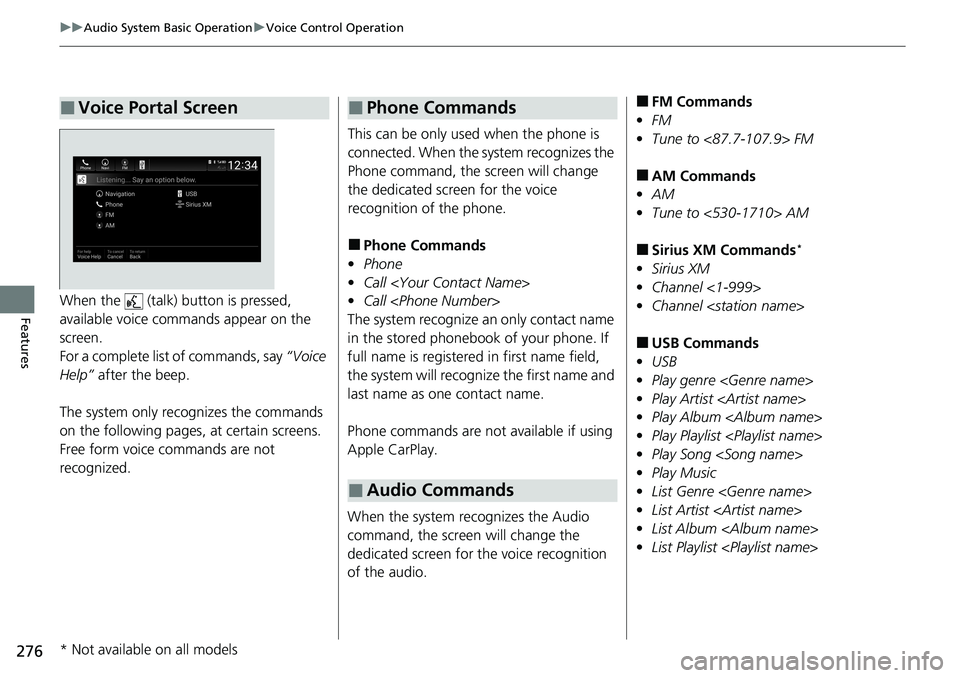
FeaturesWhen the (talk) button is pressed,
available voice commands appear on the
screen.
For a complete list of commands, say “Voice
Help” after the beep.
The system only reco gnizes the commands
on the following pages, at certain screens.
Free form voice commands are not
recognized.
■Voice Portal Screen
This can be only used when the phone is
connected. When the sy stem recognizes the
Phone command, the screen will change
the dedicated screen for the voice
recognition of the phone.
■Phone Commands
• Phone
• Call
• Call
The system recognize an only contact name
in the stored phonebook of your phone. If
full name is registered in first name field,
the system will recognize the first name and
last name as one contact name.
Phone commands are not available if using
Apple CarPlay.
When the system recognizes the Audio
command, the screen will change the
dedicated screen for the voice recognition
of the audio.
■Phone Commands
■Audio Commands
■FM Commands
• FM
• Tune to <87.7-107.9> FM
■AM Commands
• AM
• Tune to <530-1710> AM
■Sirius XM Commands*
•Sirius XM
• Channel <1-999>
• Channel
■USB Commands
• USB
• Play genre
• Play Artist
• Play Album
• Play Playlist
• Play Song
• Play Music
• List Genre
• List Artist
• List Album
• List Playlist
* Not available on all models